https://awesome-panel.github.io/panel-copy-paste/
Extends HoloViz Panel with functionality to copy to and paste from the clipboard
https://awesome-panel.github.io/panel-copy-paste/
data-app holoviz-panel python
Last synced: 12 months ago
JSON representation
Extends HoloViz Panel with functionality to copy to and paste from the clipboard
- Host: GitHub
- URL: https://awesome-panel.github.io/panel-copy-paste/
- Owner: awesome-panel
- License: bsd-3-clause
- Created: 2024-11-23T19:44:39.000Z (over 1 year ago)
- Default Branch: main
- Last Pushed: 2025-06-01T05:11:50.000Z (about 1 year ago)
- Last Synced: 2025-07-01T00:02:07.492Z (about 1 year ago)
- Topics: data-app, holoviz-panel, python
- Language: Python
- Homepage: https://awesome-panel.github.io/panel-copy-paste/
- Size: 3.65 MB
- Stars: 3
- Watchers: 2
- Forks: 0
- Open Issues: 3
-
Metadata Files:
- Readme: README.md
- License: LICENSE.txt
- Codeowners: .github/CODEOWNERS
Awesome Lists containing this project
README
# ✨ panel-copy-paste
[](https://github.com/awesome-panel/panel-copy-paste/actions/workflows/ci.yml)
[](https://prefix.dev/channels/conda-forge/packages/panel-copy-paste)
[](https://pypi.org/project/panel-copy-paste)
[](https://pypi.org/project/panel-copy-paste)
[](https://py.cafe/awesome.panel.org/panel-copy-paste)
Extends HoloViz Panel with copy-paste functionality.
[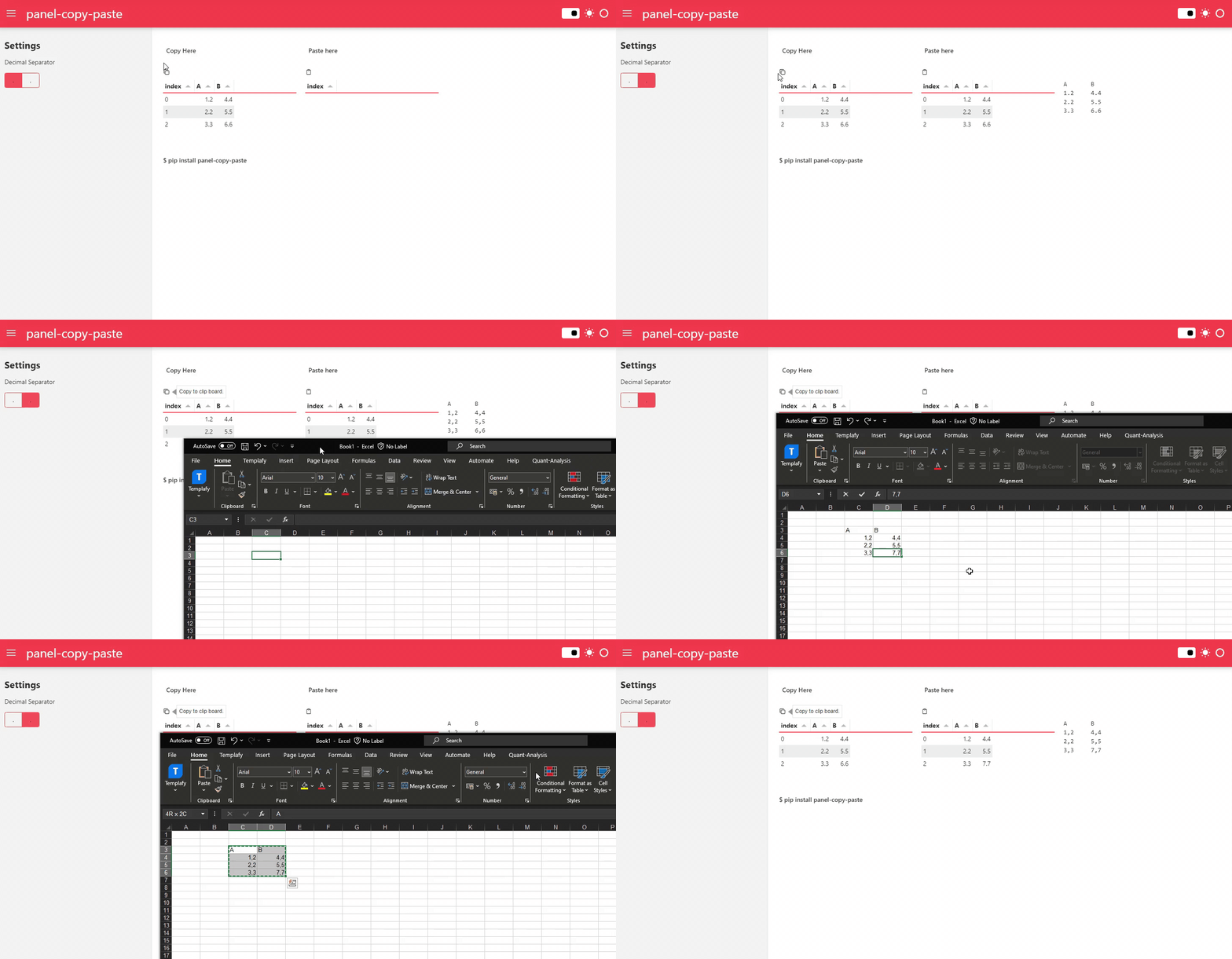](https://py.cafe/awesome.panel.org/panel-copy-paste)
Copy-paste to and from your data apps as well as external applications like Excel.
## Features
- `CopyButton`: Enables you to copy Python objects to the clipboard.
- `PasteButton`: Enables you to paste strings from the clipboard.
- `PasteToDataFrameButton`: Enables you to paste strings from the clipboard into dataframe values.
## Pin your version!
This project is **in its early stages**, so if you find a version that suits your needs, it’s recommended to **pin your version**, as updates may introduce changes.
## Installation
Install it via `pip`:
```bash
pip install panel-copy-paste
```
## Usage
To use the `CopyButton`:
```python
import panel as pn
from panel_copy_paste import CopyButton
pn.extension("codeeditor")
editor = pn.widgets.CodeEditor()
button = CopyButton(value="Hello World")
pn.Column(button, editor).servable()
```
To use the `PasteButton`:
```python
import panel as pn
from panel_copy_paste import PasteButton
pn.extension("codeeditor")
editor = pn.widgets.CodeEditor()
button = PasteButton(target=editor)
pn.Column(button, editor).servable()
```
To use the `PasteToDataFrameButton`:
```python
import panel as pn
from panel_copy_paste import PasteToDataFrameButton
pn.extension("tabulator")
table = pn.widgets.Tabulator()
button = PasteToDataFrameButton(target=table)
pn.Column(button, table).servable()
```
For more examples check out the [documentation](https://awesome-panel.github.io/panel-copy-paste/).
## Development
```bash
git clone https://github.com/awesome-panel/panel-copy-paste
cd panel-copy-paste
```
For a simple setup use [`uv`](https://docs.astral.sh/uv/):
```bash
uv venv
source .venv/bin/activate # on linux. Similar commands for windows and osx
uv pip install -e .[dev]
pre-commit run install
pytest tests
```
For the full setup used by Github Actions use [`pixi`](https://pixi.sh):
```bash
pixi run pre-commit-install
pixi run postinstall
pixi run test
```
This repository is based on [copier-template-panel-extension](https://github.com/panel-extensions/copier-template-panel-extension).
To update to the latest template version run:
```bash
pixi exec --spec copier --spec ruamel.yaml -- copier update --defaults --trust
```
Note: `copier` will show `Conflict` for files with manual changes during an update. This is normal. As long as there are no merge conflict markers, all patches applied cleanly.
## ❤️ Contributing
Contributions are welcome! Please follow these steps to contribute:
1. Fork the repository.
2. Create a new branch: `git checkout -b feature/YourFeature`.
3. Make your changes and commit them: `git commit -m 'Add some feature'`.
4. Push to the branch: `git push origin feature/YourFeature`.
5. Open a pull request.
Please ensure your code adheres to the project's coding standards and passes all tests.