https://github.com/0pandadev/ziit
The Swiss army knife of code time tracking.
https://github.com/0pandadev/ziit
coding-statistics coding-stats dashboard developer-tools productivity self-hosted selfhosted time-management time-tracker time-tracking wakatime
Last synced: 10 months ago
JSON representation
The Swiss army knife of code time tracking.
- Host: GitHub
- URL: https://github.com/0pandadev/ziit
- Owner: 0PandaDEV
- License: agpl-3.0
- Created: 2025-04-03T17:38:27.000Z (over 1 year ago)
- Default Branch: main
- Last Pushed: 2025-09-26T15:23:51.000Z (11 months ago)
- Last Synced: 2025-09-26T15:29:01.002Z (11 months ago)
- Topics: coding-statistics, coding-stats, dashboard, developer-tools, productivity, self-hosted, selfhosted, time-management, time-tracker, time-tracking, wakatime
- Language: TypeScript
- Homepage: https://ziit.app
- Size: 1.71 MB
- Stars: 139
- Watchers: 2
- Forks: 8
- Open Issues: 13
-
Metadata Files:
- Readme: README.md
- Contributing: CONTRIBUTING.md
- Funding: .github/FUNDING.yml
- License: LICENSE
- Code of conduct: CODE_OF_CONDUCT.md
Awesome Lists containing this project
README

The Swiss army knife of code time tracking.
[](https://status.ziit.app)
> [!IMPORTANT]
> Upvote Ziit on [AlternativeTo](https://alternativeto.net/software/ziit/about/), [ProductHunt](https://www.producthunt.com/posts/ziit), [PeerPush](https://peerpush.net/p/ziit) to help me promote it.
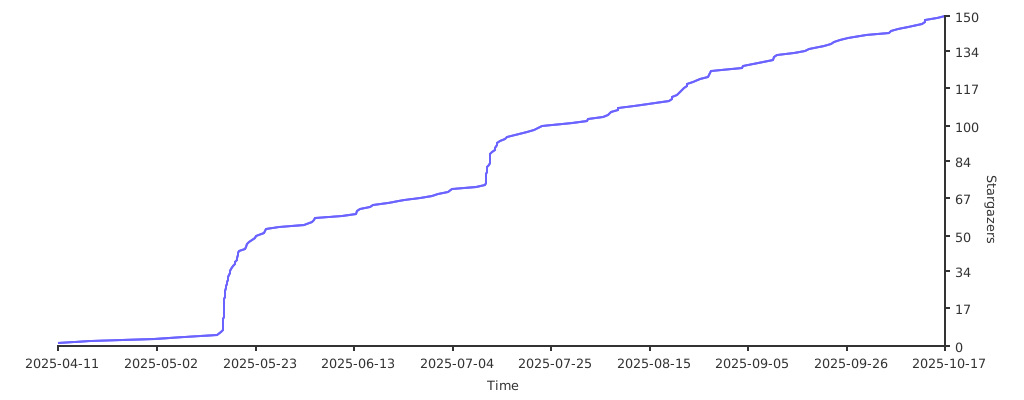
Star History
## What is Ziit?
Ziit (pronounced 'tseet') is an open-source, self-hostable alternative to WakaTime. It provides a clean, minimal, and fast dashboard for displaying coding statistics, while ensuring privacy by keeping all data on your own server. Ziit tracks coding activity such as projects, languages, editors, files, branches, operating systems, and time spent coding all presented in a familiar interface inspired by Plausible Analytics.

## Features
- Time tracking directly from VS Code to your Ziit instance of choice.
- Filtering using different time ranges.
- Clean & Minimal dashboard showing only the information needed.
- Login with GitHub or Email and Password.
- Import Data from Wakatime or a WakAPI Instance.
- Saves data about your current project, OS, editor, file, language and git branch.
- Badges to embed coding time for a project into a README.
- Public stats page to see information from the whole Ziit instance.
- Public leaderboard to see who has the most coding hours.
- More to come...
## How to use Ziit
First [setup an instance](https://docs.ziit.app/deploy) or sign up on the public one then install the extension by searching for "Ziit" in your favorite IDE.
Supported IDE's:
- [VS Code (Including all forks)](https://docs.ziit.app/extensions/vscode)
- [JetBrains](https://plugins.jetbrains.com/plugin/27391-ziit)
For more details on how to setup the IDE extensions checkout the [docs](https://docs.ziit.app/extensions).
## Development
### Prerequisites
- [Bun](https://bun.sh/)
- [TimescaleDB](https://docs.timescale.com/self-hosted/latest/install/installation-docker/)
### Setup
1. **Install dependencies:**
```bash
bun i
```
2. **Database Migrations:**
Apply database schema changes.
```bash
bunx prisma migrate dev
```
3. **Set the environment variables:**
It is imporatnt that you make a `.env` using the [.env.example](https://github.com/0PandaDEV/Ziit/blob/main/.env.example) as a template and set the correct values. All the instructions needed are in the example file.
4. **Run the development server:**
The server will start on `http://localhost:3000`.
```bash
bun dev
```