https://github.com/0snap/visual-pcap-mixer
Visually arrange PCAPs in browser and rewrite IPs / timestamps. Requires config with known groudtruth about attacks / benign traffic
https://github.com/0snap/visual-pcap-mixer
apt dangerous experimental go ids pcap react
Last synced: 5 months ago
JSON representation
Visually arrange PCAPs in browser and rewrite IPs / timestamps. Requires config with known groudtruth about attacks / benign traffic
- Host: GitHub
- URL: https://github.com/0snap/visual-pcap-mixer
- Owner: 0snap
- License: mit
- Created: 2019-06-11T06:48:24.000Z (about 7 years ago)
- Default Branch: master
- Last Pushed: 2020-09-22T08:47:26.000Z (over 5 years ago)
- Last Synced: 2025-02-13T12:24:35.665Z (over 1 year ago)
- Topics: apt, dangerous, experimental, go, ids, pcap, react
- Language: JavaScript
- Homepage:
- Size: 595 KB
- Stars: 2
- Watchers: 0
- Forks: 2
- Open Issues: 5
-
Metadata Files:
- Readme: README.md
- License: LICENSE
Awesome Lists containing this project
README
Visual PCAP Mixer
=================
## What this is
- A highly experimental thing that I need for myself
- Untested code, potentially dangerous
*YOU SHOULD NOT USE THIS UNLESS YOU KNOW WHAT YOU DO*
You alone are responsible for using this tool, I do not take any responsibility for any kind of harm that it may cause.
## Functions
- A go cli wrapper around existing tools that can analyze and modify pcaps. The tools are directly invoked as `cmd`. They write stuff on your harddrive. Thats why you should not use this.
- A react frontend for the browser to visualize what will happen with the pcaps.
## Config
The backend needs a `config.json`. This thing differentiates attack samples and benign traffic. Example below.
Btw, nice dataset for attack & benign traffic here: https://www.unb.ca/cic/datasets/ids-2018.html
```
{
"groundtruth": [
{
"files": [
"/home/you/pcaps/unbca/attacks/28-02-2018/capEC2AMAZ-O4EL3NG-172.31.69.24-part1",
"/home/you/pcaps/unbca/attacks/28-02-2018/capEC2AMAZ-O4EL3NG-172.31.69.24-part2"
],
"attacks": [
{
"attackers": [
"13.58.225.34"
],
"victims": [
"172.31.69.24"
],
"name": "Infiltration",
"start": "2018-02-28T10:50:00-04:00",
"end": "2018-02-28T12:05:00-04:00"
},
{
"attackers": [
"13.58.225.34"
],
"victims": [
"172.31.69.24"
],
"name": "Infiltration",
"start": "2018-02-28T13:42:00-04:00",
"end": "2018-02-28T14:40:00-04:00"
}
]
}
],
"unclassifiedTraffic": [
"/home/you/pcaps/unbca/benign/22-02-2018",
"/home/you/pcaps/unbca/benign/28-02-2018"
],
"outPath": "/home/you/pcap/apt-scenarios"
}
```
## When you really really want to use this
Install dependencies:
$ go get github.com/spf13/cobra
Install packages for your linux distro. The go wrapper calls them.
- `wireshark` (needed: `capinfos`)
- `tcpdump`. in case you are on debian/ubuntu make sure that it can be used by your user. if you have app-armor in place and it blocks you, here is a guide https://gcplinux.com/tcpdump-permission-denied-running-as-root/
- `tcpreplay` (needed `tcprewrite`)
Init app
- add the `backend` folder to your go path
- build your own `config.json` file like above
- check the help menu `go run main.go`
You *must* first run a deep analysis over the configured files. Export the analysis results to a state file:
$ go run main.go export -e your_state.json
Grab a coffee in case you have several hundred gigs of traffic (as I do) ...
Now take the analysed files and host a server
$ go run main.go server -s your_state.json
Navigate to the `frontend` folder and fire it up. you need a moderately new version of `npm` / `yarn`:
$ npm install
$ npm start
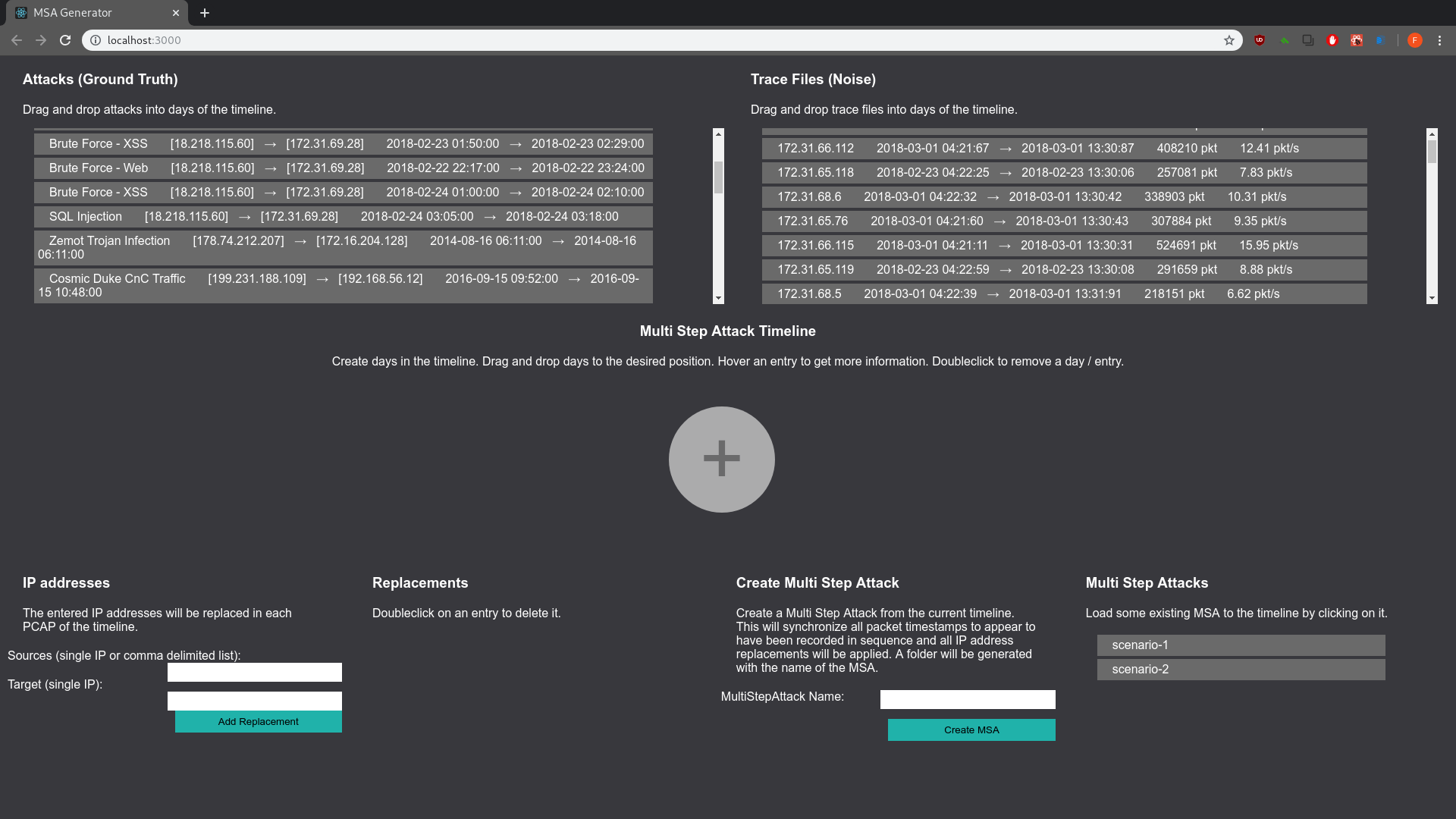
Go to your browser, `localhost:3000`. When you did the config right the browser content looks somewhat like this:
#### In browser use
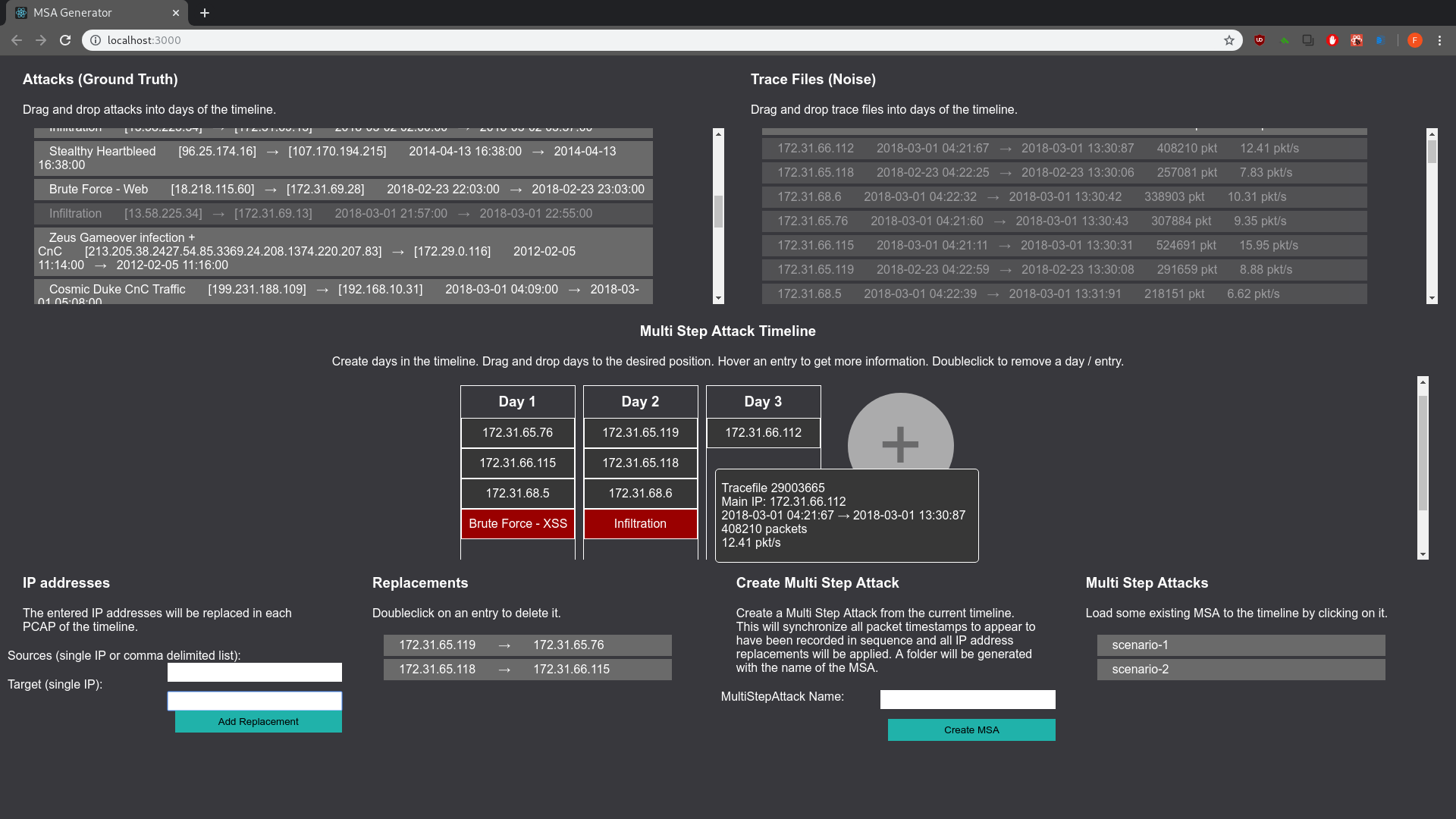
- create new days of an attack scenario by hitting the big `+`
- move all the stuff per drag n drop (attacks, traffic samples, days in the timeline)
- drag benign and attack traffic to your liking
- hover stuff for more info
- double click stuff to delete it
- you can rewrite IP addresses with the form in the bottom left corner
- name the scenario you created (form in lower right corner)
When you create an attack scenario the following will happen *on your computer*:
- first timestamp is taken from first traffic sample in day 1
- all other pcaps get time-adjusted, that they apprear to have been recorded in order
- IP replacements are applied
- stuff is copied to a new folder in the `outPath` that is configured in the `config.json`
Depending on your traffic samples that may fill your harddrive. again, be careful where you run this. better dont. NEVER HOST THIS ON A PUBLIC SERVER. it gives away cmd.
## TODO:
- test this shit
- clean up, take out garbage
- I remember vaguely that I built in a silly assumption about filenames in the benign traffic folders. sigh. remove that.