https://github.com/0x7fffffffffffffff/mysnippetmaker
Visual Studio Code extension to quickly create snippets.
https://github.com/0x7fffffffffffffff/mysnippetmaker
extension extensions snippet snippet-generator snippet-manager snippets snippets-manager snippets-plugin visual-studio-code
Last synced: 3 days ago
JSON representation
Visual Studio Code extension to quickly create snippets.
- Host: GitHub
- URL: https://github.com/0x7fffffffffffffff/mysnippetmaker
- Owner: 0x7FFFFFFFFFFFFFFF
- License: wtfpl
- Created: 2018-08-16T19:19:26.000Z (almost 8 years ago)
- Default Branch: master
- Last Pushed: 2021-09-10T14:37:17.000Z (almost 5 years ago)
- Last Synced: 2025-10-19T08:35:23.436Z (9 months ago)
- Topics: extension, extensions, snippet, snippet-generator, snippet-manager, snippets, snippets-manager, snippets-plugin, visual-studio-code
- Language: TypeScript
- Size: 3.95 MB
- Stars: 3
- Watchers: 2
- Forks: 1
- Open Issues: 0
-
Metadata Files:
- Readme: README.md
- Changelog: CHANGELOG.md
- License: COPYING
Awesome Lists containing this project
README
## Introduction
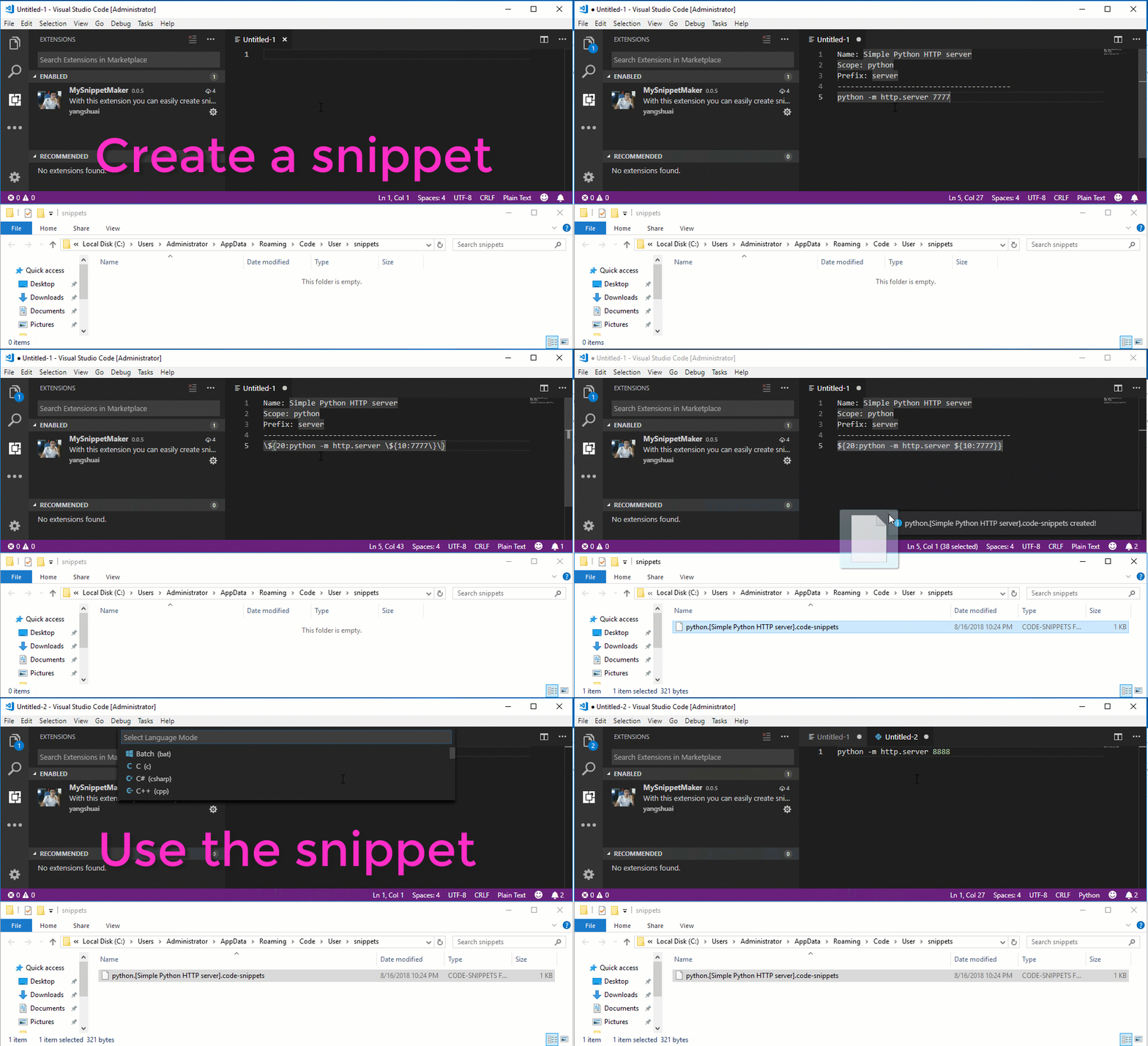
This is a *Visual Studio Code* extension to help you write user snippets quickly. See below demonstration.
## Features
- Escape snippet special characters
- Snippet tab stop helper
- Able to reset tab stop counter
- Provide an intuitive way to create a snippet
- The extension will help to translate the user-friendly snippet syntax to Visual Studio Code native snippet
## How to use
After you installed this extension, you have a snippet to help you to create other snippets. ctrl + n create a new file and type `skel`, press tab, you will have a snippet skeleton. Press tab to fill the *name*, *scope*, *prefix* and *body* of your snippet. Below is an example:
```
Name: keyboard HTML markup - describing shortcuts on web
Prefix: kkk
----------------------------------------
ctrl
```
Here I didn't specify the *scope* for this snippet, so it is a global snippet and will be available for all file types.
Optionally, I can select the text `ctrl` between `` and `` and press ctrl + shift + x. Now the text `ctrl` will be automatically changed to `${10:ctrl}`. Next time when you press ctrl + shift + x again, you will get a tab stop with counter 20 like this `${20:some_text}`. The idea is that you can easily create tab stops with an increment of 10 and this makes it easy for you to modify you snippet later, for example add a new tab stop `${15:}` somewhere between `${10:}` and `${20:}`. This will be very hard if you are using continous tab stop counters.
Another feature this extension provides is escape special snippet characters. Select the text you are going to escape and manually invoke this feature by pressing ctrl + shift + p and type `edde`. Find the command and press enter.
When you finished editing the snippet, press ctrl + shift + z, a snippet file will be created in the snippets folder.
Note that, if the shortcuts do not work, you can always press ctrl + shift + p and type `edde` to call the commands provided by this extension manually. You can also specify your own shortcuts for them.
## Cool features
1. You can use multiple prefixes for the same snippet and this extension will help you to create multiple snippet files. For example, if you have the following template:
```
Name: import a module
Scope: python
Prefix: req, imp
----------------------------------------
require ${10:sys}
```
After you press ctrl + shift + z to create the actual snippets, the following two snippets files will be created.
```
python.[imp - import a module].code-snippets
python.[req - import a module].code-snippets
```
2. This extension will correctly create valid file names for you. Invalid file name characters will be removed and continuous white spaces will be replaced with just a single space character.
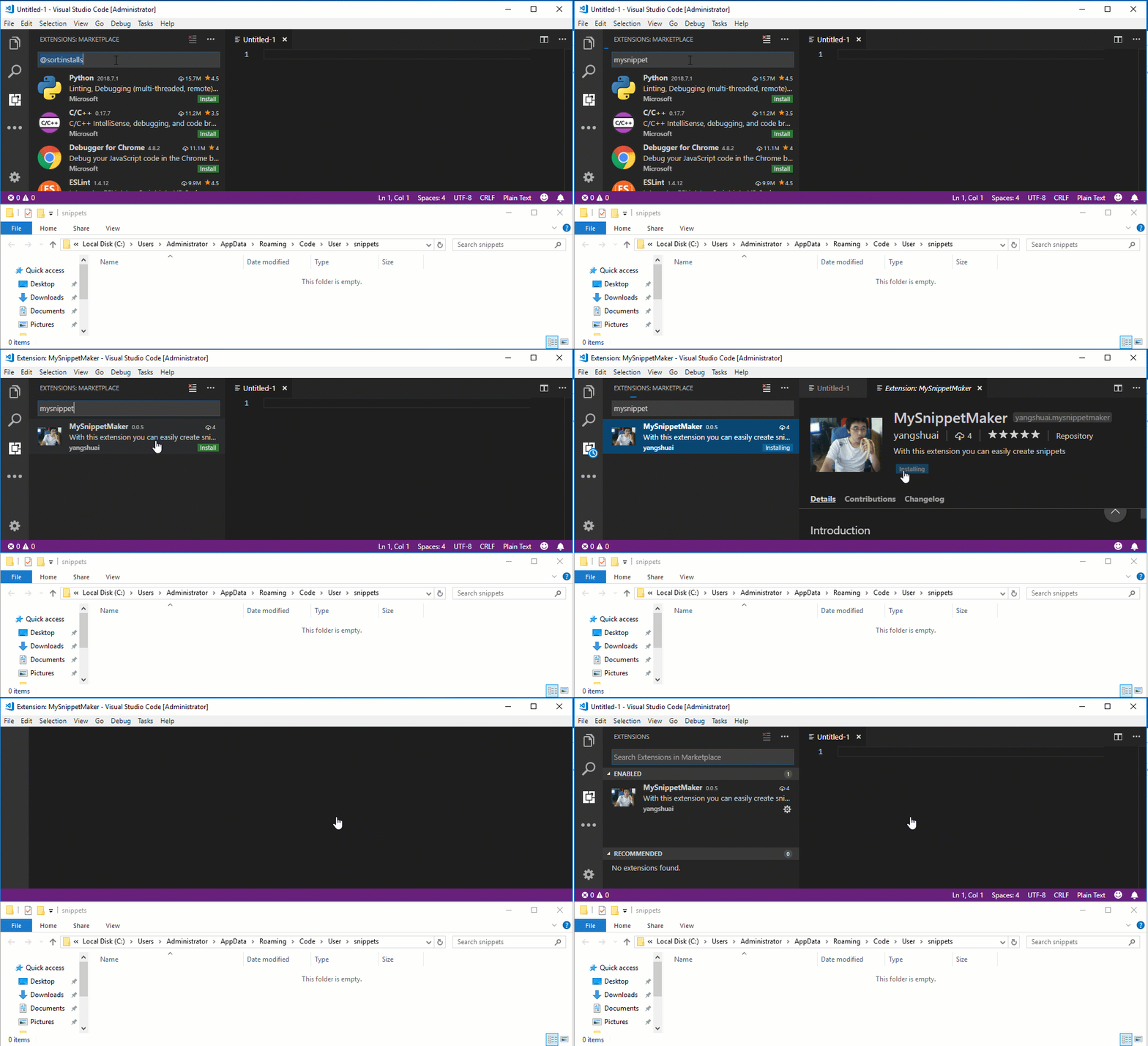
## Installation
## License
Copyright © 2018 Yang Shuai
This work is free. You can redistribute it and/or modify it under the terms of the [wtfpl](http://www.wtfpl.net), Version 2, as published by Sam Hocevar. See the [COPYING](https://github.com/yangshuairocks/MySnippetMaker/blob/master/COPYING) file for more details.