https://github.com/0xbitbuster/python-chess-engine
Python-based (pygame) chess engine
https://github.com/0xbitbuster/python-chess-engine
chess game pygame python
Last synced: 11 days ago
JSON representation
Python-based (pygame) chess engine
- Host: GitHub
- URL: https://github.com/0xbitbuster/python-chess-engine
- Owner: 0xBitBuster
- License: mit
- Created: 2023-04-14T19:29:32.000Z (about 3 years ago)
- Default Branch: main
- Last Pushed: 2023-05-01T21:55:25.000Z (about 3 years ago)
- Last Synced: 2025-11-30T22:12:37.366Z (7 months ago)
- Topics: chess, game, pygame, python
- Language: Python
- Homepage:
- Size: 34.2 KB
- Stars: 2
- Watchers: 1
- Forks: 1
- Open Issues: 0
-
Metadata Files:
- Readme: README.md
- License: LICENSE
Awesome Lists containing this project
README
# Python Chess Engine with AI
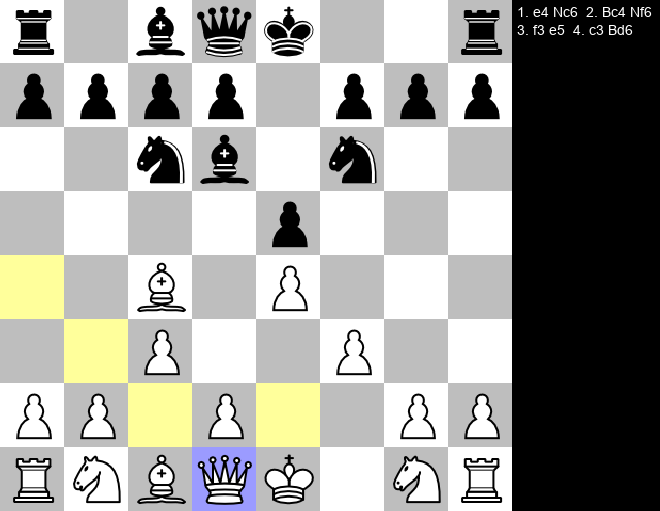
This is a Python-based (pygame) chess engine that allows users to play against a computer opponent or a second player. The engine follows the standard rules of chess and features somewhat efficient move generation using the nega max algorithm. It also includes a beautiful GUI with valid move visualization and a move log.
## Features
- [x] **Chess Rules**: The engine follows the standard rules of chess including enpassant, castling and moving the pieces
- [x] **AI**: Play against your computer using the nega max algorithm which finds the best possible move recursively using alpha beta pruning
- [x] **GUI**: The project makes use of the pygame library to create a beautiful graphical user interface and draw text, rectangles and images onto the screen.
- [x] **Extras**: such as undoing a move, sound effects and a move log
## Getting Started
### Prerequisites
- Python 3
### Installation
1. Clone the repository to your local machine:
```bash
git clone https://github.com/0xBitBuster/python-chess-engine.git
```
2. Install all requirements using pip:
```
pip3 install -r requirements.txt
```
### Usage
To start the game you can either do it in your IDE or manually:
```bash
python3 ChessMain.py
```
## Quick Note / Todo
This code does not use the python best practice for the naming convention (The project uses camelCasing instead of lowercase_underscore). You can also try to optimize the negamax and find valid moves algorithm. Maybe even create a UI to select wether you want to play against the computer or another player.
## Contributing
Contributions are welcome! If you have a feature request or bug report, please open an issue. If you want to contribute code, please fork the repository and submit a pull request.
## License
This project is licensed under the MIT License - see the LICENSE file for details.