https://github.com/0xdea/zed-highlight
A Zed extension that allows to highlight all occurrences of selected words.
https://github.com/0xdea/zed-highlight
code-review lsp-server vulnerability-research zed zed-extension
Last synced: 20 days ago
JSON representation
A Zed extension that allows to highlight all occurrences of selected words.
- Host: GitHub
- URL: https://github.com/0xdea/zed-highlight
- Owner: 0xdea
- License: mit
- Created: 2026-05-03T17:39:17.000Z (about 1 month ago)
- Default Branch: master
- Last Pushed: 2026-05-26T16:06:52.000Z (21 days ago)
- Last Synced: 2026-05-26T16:26:43.736Z (21 days ago)
- Topics: code-review, lsp-server, vulnerability-research, zed, zed-extension
- Language: Rust
- Homepage: https://zed.dev/extensions
- Size: 5.1 MB
- Stars: 3
- Watchers: 0
- Forks: 0
- Open Issues: 0
-
Metadata Files:
- Readme: README.md
- Changelog: CHANGELOG.md
- License: LICENSE
Awesome Lists containing this project
README
# zed-highlight
[](https://github.com/0xdea/zed-highlight)
[](https://crates.io/crates/zed-highlight-lsp)
[](https://crates.io/crates/zed-highlight-lsp)
[](https://zed.dev/extensions/html/highlight)
[](https://twitter.com/0xdea)
[](https://infosec.exchange/@raptor)
[](https://github.com/0xdea/zed-highlight/actions/workflows/build.yml)
[](https://github.com/0xdea/zed-highlight/actions/workflows/release.yml)
> "Free as in use-after."
>
> -- [@catsalad@infosec.exchange](https://infosec.exchange/@catsalad)
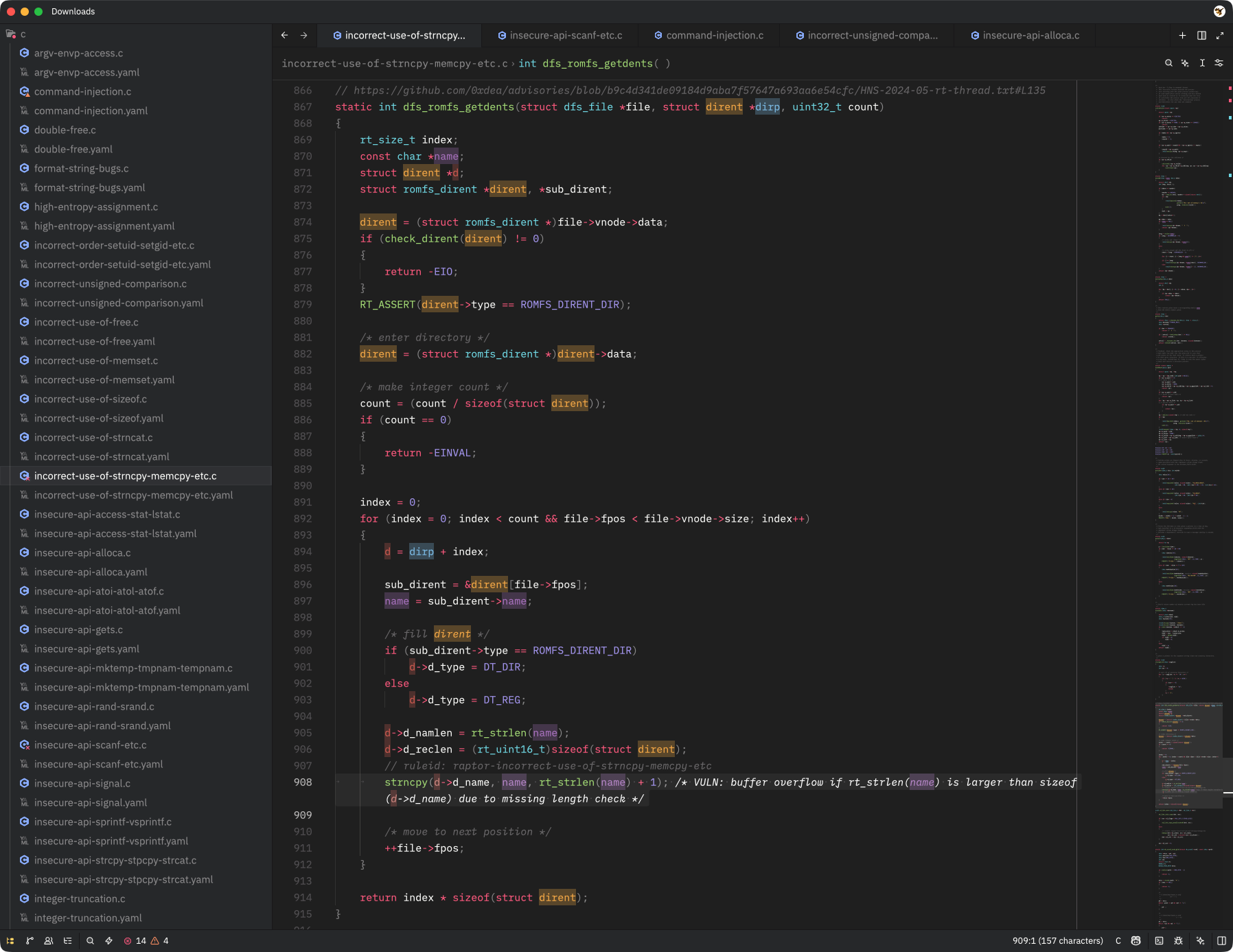
[Highlight](https://zed.dev/extensions/html/highlight) is a language extension for the [Zed editor](https://zed.dev/), designed to provide word highlighting. It's useful for quickly identifying all occurrences of selected words in code, enhancing readability and navigation when tracing the execution flow from input sources to potential vulnerability sinks.
## How it works
The extension runs a small [LSP server](https://github.com/0xdea/zed-highlight/tree/master/lsp) in the background. When you toggle a word, the server scans every supported open document for occurrences and returns them as semantic tokens. Zed colors those tokens using the rules you add to `settings.json`.
Words are matched whole-word and case-sensitively by default. Up to 8 words can be highlighted simultaneously, each getting a distinct color. Adding a 9th word reuses the first color, and so on.
## Features
The following features are currently supported by the extension and the bundled LSP server:
- Easy access to the following code actions via the `editor: toggle code actions` menu (`⌘.`/`ctrl+.` shortcut or lightning bolt icon in the gutter):
- `Toggle highlight` - Toggle highlighting on and off for the current selection or cursor position.
- `Clear all highlights` - Remove all active highlights with a single command.
- Configurable highlight colors (via `settings.json`).
## See also
-
-
-
-
## Installing
The easiest way to install the Highlight extension is via Zed's [extension marketplace](https://zed.dev/extensions/html/highlight). It will take care of installing the latest release of the bundled [LSP server](https://github.com/0xdea/zed-highlight/tree/master/lsp) automatically on first use and will check for updates upon startup.
Alternatively, you can clone the repository and install both the extension and the LSP server manually. First, build the LSP server from source and install it:
```sh
git clone https://github.com/0xdea/zed-highlight
cd zed-highlight
cargo install --path lsp
```
Then, in Zed, run `zed: install dev extension` from the command palette and select the `zed-highlight` directory in which you have previously cloned the repository.
> [!NOTE]
> Highlight LSP is also available on [crates.io](https://crates.io/crates/zed-highlight-lsp).
> You can install it directly via `cargo install zed-highlight-lsp` if you don't want to build from source.
## Configuration
Make sure [syntax highlighting with semantic tokens](https://zed.dev/docs/extensions/languages#syntax-highlighting-with-semantic-tokens) is enabled in `settings.json`, with e.g.:
```json
{
// enable combined semantic tokens (recommended)
"semantic_tokens": "combined"
}
```
or:
```json
{
// enable full semantic tokens
"semantic_tokens": "full"
}
```
Then, configure the foreground and background colors for each of the 8 semantic token types emitted by the extension (i.e., `zed-highlight-0` to `zed-highlight-7`) in `settings.json`. For dark themes, you can use the following color scheme:
```json
{
// zed-highlight extension colors (dark themes)
"global_lsp_settings": {
"semantic_token_rules": [
{
"token_type": "zed-highlight-0",
"foreground_color": "#F5B041",
"background_color": "#F5B04150"
},
{
"token_type": "zed-highlight-1",
"foreground_color": "#85C1E9",
"background_color": "#85C1E950"
},
{
"token_type": "zed-highlight-2",
"foreground_color": "#CD6155",
"background_color": "#CD615550"
},
{
"token_type": "zed-highlight-3",
"foreground_color": "#AF7AC5",
"background_color": "#AF7AC550"
},
{
"token_type": "zed-highlight-4",
"foreground_color": "#48C9B0",
"background_color": "#48C9B050"
},
{
"token_type": "zed-highlight-5",
"foreground_color": "#F4D03F",
"background_color": "#F4D03F50"
},
{
"token_type": "zed-highlight-6",
"foreground_color": "#52BE80",
"background_color": "#52BE8050"
},
{
"token_type": "zed-highlight-7",
"foreground_color": "#FF9933",
"background_color": "#FF993350"
}
]
}
}
```
The `50` suffix on background colors is an alpha value in hex (roughly 31% opacity). You can adjust the colors and opacity to your taste.
An alternative color scheme that should be more suitable for light themes is provided below:
```json
{
// zed-highlight extension colors (light themes)
"global_lsp_settings": {
"semantic_token_rules": [
{
"token_type": "zed-highlight-0",
"foreground_color": "#B3D9FF",
"background_color": "#B3D9FF40"
},
{
"token_type": "zed-highlight-1",
"foreground_color": "#B3B3FF",
"background_color": "#B3B3FF40"
},
{
"token_type": "zed-highlight-2",
"foreground_color": "#DFB9B3",
"background_color": "#DFB9B340"
},
{
"token_type": "zed-highlight-3",
"foreground_color": "#FFB3FF",
"background_color": "#FFB3FF40"
},
{
"token_type": "zed-highlight-4",
"foreground_color": "#93DFB3",
"background_color": "#93DFB340"
},
{
"token_type": "zed-highlight-5",
"foreground_color": "#B1C0E0",
"background_color": "#B1C0E040"
},
{
"token_type": "zed-highlight-6",
"foreground_color": "#DFDF80",
"background_color": "#DFDF8040"
},
{
"token_type": "zed-highlight-7",
"foreground_color": "#C6DFB3",
"background_color": "#C6DFB340"
}
]
}
}
```
See Zed's [documentation](https://zed.dev/docs/semantic-tokens#customizing-token-colors) for further customization options.
## Usage
Place the cursor on a word (or select a range of text) and open the code actions menu via `editor: toggle code actions` in the command palette or by pressing the default shortcut `⌘.`/`ctrl+.` (or the lightning bolt icon in the gutter). The following actions are available depending on context:
- `Toggle highlight` - Toggle highlighting on and off for the current selection or cursor position.
- `Clear all highlights` - Remove all active highlights with a single command.
## Compatibility
The latest release was tested with Zed 1.3.7 (ARM64) on:
- Apple macOS Tahoe 26.4.1
- Ubuntu Linux 24.04.3 LTS
- Microsoft Windows 11 23H2
## Credits
- [@debugpig](https://github.com/debugpig) for their [vscode-extension-highlight](https://github.com/debugpig/vscode-extension-highlight), which served as a major inspiration for this project.
## Changelog
- [CHANGELOG.md](https://github.com/0xdea/zed-highlight/blob/master/CHANGELOG.md)
## TODO
- Add a minimal command-line interface for manual use of the LSP server outside of Zed.
- Add and test customizable settings (e.g., `whole_word` and `ignore_case` flags).
- Add highlighting based on regular expressions.
- Add a sidebar for navigation between currently highlighted words.
- Consider migrating to [tower-lsp-server](https://crates.io/crates/tower-lsp-server) that is maintained upstream.