https://github.com/0xnyk/xint
X Intelligence CLI — search, monitor, analyze, and engage on X/Twitter. TypeScript + Bun. AI agent skill.
https://github.com/0xnyk/xint
ai-agents bun claude cli openclaw openclaw-skill osint skill twitter typescript x
Last synced: 5 months ago
JSON representation
X Intelligence CLI — search, monitor, analyze, and engage on X/Twitter. TypeScript + Bun. AI agent skill.
- Host: GitHub
- URL: https://github.com/0xnyk/xint
- Owner: 0xNyk
- License: mit
- Created: 2026-02-14T20:47:52.000Z (5 months ago)
- Default Branch: main
- Last Pushed: 2026-02-20T08:52:58.000Z (5 months ago)
- Last Synced: 2026-02-20T08:55:56.835Z (5 months ago)
- Topics: ai-agents, bun, claude, cli, openclaw, openclaw-skill, osint, skill, twitter, typescript, x
- Language: TypeScript
- Homepage: https://clawhub.ai/0xNyk/xint
- Size: 2.23 MB
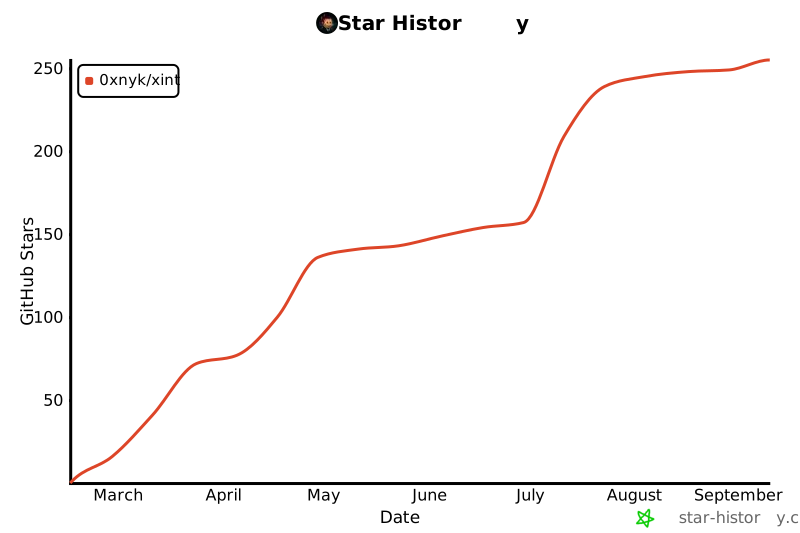
- Stars: 15
- Watchers: 1
- Forks: 1
- Open Issues: 0
-
Metadata Files:
- Readme: README.md
- Changelog: CHANGELOG.md
- Contributing: CONTRIBUTING.md
- License: LICENSE
Awesome Lists containing this project
README

X Intelligence CLI — search, monitor, analyze, and engage on X/Twitter from your terminal.





---
> **Search X like a pro.** Full-text search, real-time monitoring, follower tracking, AI sentiment analysis, and structured export — all from CLI.
## Why xint?
- **For AI Agents** — designed as a [skill](#use-as-an-ai-agent-skill) for Claude Code, OpenClaw, and other coding agents
- **For Researchers** — OSINT, market intelligence, trend tracking without leaving the terminal
- **For Developers** — JSONL/CSV export, Unix pipeline integration, MCP server for AI agent tools
- **Fast** — built on Bun, typed TypeScript, smart caching
Spiritual successor to [twint](https://github.com/twintproject/twint) (archived 2023).
## Install
```bash
curl -fsSL https://raw.githubusercontent.com/0xNyk/xint/main/install.sh | bash
```
Optional pinned version:
```bash
XINT_INSTALL_VERSION= \
curl -fsSL https://raw.githubusercontent.com/0xNyk/xint/main/install.sh | bash
```
Homebrew (lightweight prebuilt binary on Apple Silicon):
```bash
brew tap 0xNyk/xint
brew install xint
```
Rust variant explicitly:
```bash
brew install xint-rs
```
Manual source install:
```bash
git clone https://github.com/0xNyk/xint.git
cd xint
bun install
```
> **Requires:** [Bun](https://bun.sh) · [X API access](https://developer.x.com) (prepaid credits)
## Quick Reference
| Task | Command |
|------|---------|
| Search | `xint search "AI agents"` |
| Monitor | `xint watch "solana" -i 5m` |
| Stream | `xint stream` |
| Profile | `xint profile @elonmusk` |
| Thread | `xint thread 123456789` |
| Followers | `xint diff @username` |
| Bookmarks | `xint bookmarks` |
| Lists | `xint lists` |
| Blocks | `xint blocks` |
| Mutes | `xint mutes` |
| Follow | `xint follow @username` |
| Media | `xint media ` |
| Trends | `xint trends` |
| AI Analyze | `xint analyze "best AI frameworks?"` |
| Report | `xint report "crypto"` |
| Article | `xint article --ai "summarize"` |
| Capabilities | `xint capabilities --json` |
| TUI | `xint tui` |
### Shorthands
```bash
xint s "query" # search
xint w "query" # watch
xint p @user # profile
xint tr # trends
xint bm # bookmarks
```
## Setup
### 1. X API Key
Set a local bearer token in your shell or secret manager (do not commit credentials):
- `X_BEARER_TOKEN`
Get your bearer token from [developer.x.com](https://developer.x.com) → Your Apps → App Settings.
### 2. Optional: xAI for AI Features
For `analyze`, `report --sentiment`, and `article --ai`:
- `XAI_API_KEY`
### 3. Optional: OAuth for Write Access
For bookmarks, likes, lists, blocks/mutes, and follower tracking:
- `X_CLIENT_ID`
Run `xint auth setup` to complete OAuth flow.
## Deployment Modes
### Self-hosted (OSS default)
- Run everything locally from this repo.
- Package API calls are local unless you set cloud endpoints.
- Good for development and private workflows.
### Hosted cloud control plane (`xint-cloud`)
- Point package API features at your hosted control plane:
- `XINT_PACKAGE_API_BASE_URL=http://localhost:8787/v1` (or your deployed URL)
- `XINT_PACKAGE_API_KEY=`
- `XINT_WORKSPACE_ID=`
- Optional billing upgrade link shown on quota/plan errors:
- `XINT_BILLING_UPGRADE_URL=https://your-app/pricing`
Notes:
- If `XINT_PACKAGE_API_BASE_URL` is unset, package API MCP tools return a setup error.
- `xint-cloud` should remain private; `xint` and `xint-rs` stay public OSS clients.
## Agent-Native Capabilities Manifest
`xint` now ships a machine-readable manifest for agent runtime allowlists and tool routing:
```bash
# Pretty JSON
xint capabilities
# Compact JSON for machine ingestion
xint capabilities --compact
```
## Search
```bash
# Quick pulse
xint search "AI agents" --quick
# High-engagement from last hour
xint search "react 19" --since 1h --sort likes --min-likes 50
# Full-archive deep dive
xint search "bitcoin ETF" --full --pages 3
# With sentiment
xint search "solana" --sentiment
# Export
xint search "startups" --csv > data.csv
xint search "AI" --jsonl | jq '.text'
```
### Options
| Flag | Description |
|------|-------------|
| `--sort` | `likes` · `impressions` · `retweets` · `recent` |
| `--since` | `1h` · `3h` · `12h` · `1d` · `7d` |
| `--full` | Search full archive (back to 2006) |
| `--min-likes N` | Filter by engagement |
| `--pages N` | Pages to fetch (1-5) |
| `--sentiment` | Add AI sentiment per tweet |
| `--quick` | Fast mode with caching |
## Watch (Real-Time)
```bash
# Monitor topic every 5 minutes
xint watch "solana" --interval 5m
# Watch user
xint watch "@vitalikbuterin" -i 1m
# Webhook to Slack
xint watch "breaking" -i 30s --webhook https://example.com/webhook
```
Webhook safety:
- Remote webhooks must use `https://`
- `http://` is accepted only for localhost/loopback targets
- Optional host allowlist: `XINT_WEBHOOK_ALLOWED_HOSTS=hooks.example.com,*.internal.example`
Press `Ctrl+C` — shows session stats.
## Stream (Official Filtered Stream)
```bash
# List current stream rules
xint stream-rules
# Add a filtered-stream rule
xint stream-rules add "from:elonmusk -is:retweet" --tag elon
# Connect to stream
xint stream
# JSONL output + stop after 25 events
xint stream --jsonl --max-events 25
```
## Follower Tracking
```bash
# First run: creates snapshot
xint diff @vitalikbuterin
# Second run: shows changes
xint diff @vitalikbuterin
# Track following
xint diff @username --following
```
Requires OAuth (`xint auth setup`).
## Lists (OAuth)
```bash
# List your owned lists
xint lists
# Create a private list
xint lists create "AI Researchers" --description "High-signal accounts" --private
# Add/remove members
xint lists members add @username
xint lists members remove @username
```
## Blocks & Mutes (OAuth)
```bash
# List blocked/muted users
xint blocks
xint mutes
# Add/remove
xint blocks add @username
xint blocks remove @username
xint mutes add @username
xint mutes remove @username
```
## Follow Actions (OAuth)
```bash
xint follow @username
xint unfollow @username
```
## Media Download
```bash
# Download media from a tweet ID
xint media 1900100012345678901
# Download media from a tweet URL
xint media https://x.com/user/status/1900100012345678901
# Custom output directory + JSON summary
xint media 1900100012345678901 --dir ./downloads --json
# Download only first video/gif
xint media 1900100012345678901 --video-only --max-items 1
# Download only photos
xint media 1900100012345678901 --photos-only
# Custom filename template
xint media 1900100012345678901 --name-template "{username}-{created_at}-{index}"
```
## Intelligence Reports
```bash
# Generate report
xint report "AI agents" --save
# With sentiment + specific accounts
xint report "crypto" --sentiment --accounts @aaboronkov,@solana
```
Reports include: summary, sentiment breakdown, top tweets, account activity.
## Article Analysis
```bash
# Fetch article
xint article "https://example.com"
# Fetch + AI summary
xint article "https://example.com" --ai "Key takeaways?"
# From X tweet
xint article "https://x.com/user/status/123" --ai "Summarize"
```
Uses xAI's `grok-4` model.
## Use as AI Agent Skill
Designed for AI coding agents. Add as a skill:
```bash
# Claude Code
mkdir -p .claude/skills && cd .claude/skills
git clone https://github.com/0xNyk/xint.git
# OpenClaw
mkdir -p skills && cd skills
git clone https://github.com/0xNyk/xint.git
```
Then just ask: *"Search X for what people say about React 19"* — the agent reads `SKILL.md` and runs the right command.
### MCP Server
```bash
xint mcp
```
Runs an MCP server AI agents can connect to.
```bash
# HTTP/SSE mode (local-only by default)
xint mcp --sse --port=3000
# Optional: require bearer auth (recommended if binding beyond loopback)
XINT_MCP_AUTH_TOKEN=change-me xint mcp --sse --host=127.0.0.1
```
Security defaults:
- SSE mode binds to `127.0.0.1` unless `--host` / `XINT_MCP_HOST` is set.
- If host is non-loopback, auth is required via `--auth-token` or `XINT_MCP_AUTH_TOKEN`.
## Cost
| Operation | Cost |
|-----------|------|
| Tweet read | $0.005/tweet |
| Full-archive | $0.01/tweet |
| Write action | $0.01/action |
```bash
xint costs # Today's spend
xint costs week # Last 7 days
xint costs budget # Show/set limits
```
## Package API Billing
```bash
# Show workspace plan, limits, and feature gates
xint billing status
# Show usage units by operation over a window
xint billing usage --days=30
```
These commands read from the local/hosted package API (`XINT_PACKAGE_API_BASE_URL`).
For hosted billing sync, package API also supports:
- `POST /v1/billing/webhook` (provider-agnostic event ingest)
- `GET /v1/billing/events?limit=100` (workspace billing event history)
## Configuration Variables (Local Only)
| Variable | Required | Description |
|----------|----------|-------------|
| `X_BEARER_TOKEN` | Yes | X API v2 bearer token |
| `XAI_API_KEY` | No | xAI key for analyze/report |
| `XINT_ARTICLE_TIMEOUT_SEC` | No | Article fetch timeout seconds (default 30, range 5-120) |
| `X_CLIENT_ID` | No | OAuth for bookmarks/likes/lists/blocks/mutes |
| `XINT_PACKAGE_API_BASE_URL` | No | Package API base URL for MCP package tools/billing |
| `XINT_PACKAGE_API_KEY` | No | Legacy single bearer key for package API auth |
| `XINT_PACKAGE_API_KEYS` | No | JSON map of API keys to `workspace_id` + `plan` |
| `XINT_PACKAGE_API_PLAN` | No | Default workspace plan (`free\|pro\|team\|enterprise`) |
| `XINT_WORKSPACE_ID` | No | Workspace id used by local `xint billing *` calls |
| `XINT_BILLING_WEBHOOK_SECRET` | No | HMAC secret for `/v1/billing/webhook` signature validation |
| `XINT_BILLING_UPGRADE_URL` | No | Upgrade URL shown in MCP plan/quota errors |
## File Structure
```
xint/
├── xint.ts # CLI entry
├── lib/ # Core modules
│ ├── api.ts # X API wrapper
│ ├── oauth.ts # OAuth 2.0 PKCE
│ ├── grok.ts # xAI integration
│ ├── sentiment.ts # AI sentiment
│ ├── watch.ts # Real-time monitoring
│ └── format.ts # Output formatters
├── data/
│ ├── cache/ # Search cache (15min TTL)
│ ├── exports/ # Saved results
│ └── snapshots/ # Follower snapshots
├── SKILL.md # AI agent instructions
└── .env.example # Template
```
## Security
- Tokens from env vars — never hardcoded
- OAuth tokens stored with `chmod 600`
- Webhooks: use trusted endpoints only
- Review agent session logs in untrusted environments
See [SECURITY.md](docs/security.md) for full details.
## Contributing
Open source! See [CONTRIBUTING.md](CONTRIBUTING.md).
## Release Automation
`xint` is the source of truth for release automation across `xint` and `xint-rs`.
```bash
# from xint/
./scripts/release.sh --dry-run --allow-dirty
./scripts/release.sh 2026.2.18.4 --allow-dirty
# disable default ClawdHub publish for one run
./scripts/release.sh 2026.2.18.4 --no-clawdhub
# enable skills.sh as well
./scripts/release.sh 2026.2.18.4 --skillsh
# disable GitHub auto-generated notes if you want manual sections only
./scripts/release.sh 2026.2.18.4 --no-auto-notes
# write release report to a custom location
./scripts/release.sh 2026.2.18.4 --report-dir /tmp/xint-release-reports
```
Optional path overrides:
- `REPO_PATH_XINT` (defaults to current repo when running inside `xint`)
- `REPO_PATH_XINT_RS` (defaults to sibling `../xint-rs` when present)
- `RELEASE_REPORT_DIR` (defaults to `xint/reports/releases`)
Notes behavior:
- Default: uses `gh release create --generate-notes`
- Manual override: set any of `CHANGELOG_ADDED`, `CHANGELOG_CHANGED`, `CHANGELOG_FIXED`, `CHANGELOG_SECURITY`
- Default: publishes to ClawdHub when `clawdhub` CLI is available (disable with `--no-clawdhub`)
- Optional: publish to skills.sh with `--skillsh` (or `--ai-skill` for both)
Release report:
- Default: writes `reports/releases/.md`
- Contains per-repo commit list, commit range, file changes, SHAs, compare links, and release URLs
- Uploaded automatically to both GitHub releases as an asset (can disable with `--no-report-asset`)
- Embedded automatically in both GitHub release bodies (can disable with `--no-report-body`)
- Disable with `--no-report`
## License
[MIT](LICENSE) · [0xNyk](https://github.com/0xNyk)
---