https://github.com/0xrelogic/go-shareit
A simple, secure, and self-hosted file sharing application built with Go. Cross-platform and dependency-free.
https://github.com/0xrelogic/go-shareit
cross-platform file-sharing go golang http-server one-time-link-privacy secure-local-network self-hosted zero-dependencies
Last synced: 10 months ago
JSON representation
A simple, secure, and self-hosted file sharing application built with Go. Cross-platform and dependency-free.
- Host: GitHub
- URL: https://github.com/0xrelogic/go-shareit
- Owner: 0xReLogic
- License: mit
- Created: 2025-07-19T15:48:43.000Z (about 1 year ago)
- Default Branch: main
- Last Pushed: 2025-08-21T03:55:58.000Z (12 months ago)
- Last Synced: 2025-08-21T05:50:47.270Z (12 months ago)
- Topics: cross-platform, file-sharing, go, golang, http-server, one-time-link-privacy, secure-local-network, self-hosted, zero-dependencies
- Language: HTML
- Homepage: https://github.com/0xReLogic/Go-ShareIt
- Size: 11.8 MB
- Stars: 2
- Watchers: 0
- Forks: 0
- Open Issues: 0
-
Metadata Files:
- Readme: README.md
- License: LICENSE
Awesome Lists containing this project
README

Go-ShareIt
A simple, secure, and self-hosted file sharing application.






---
Go-ShareIt is a lightweight, local-first file sharing application built entirely with the Go standard library. It is designed for users who need a quick and secure way to transfer a file with a self-destructing link. Run it on one machine and access it from any other device on the same Wi-Fi network or mobile hotspot to transfer files without using internet data. Once a file is downloaded, it is permanently deleted from the server, ensuring privacy and security.
## Screenshots
| 1. Main Upload Page | 2. Upload Successful | 3. Link Expired |
| :---: | :---: | :---: |
|  |
|  |
|  |
|
## Features
- **Secure One-Time Downloads**: Each generated link is valid for only a single download.
- **Self-Destructing Files**: After a successful download, the file is immediately and permanently deleted from the server's storage.
- **End-to-End Encryption**: Client-side encryption ensures the server never sees the unencrypted content of your files.
- **Large File Support**: Efficiently handles large files of any size through streaming, ensuring low memory usage.
- **Stateless & Always Ready**: After each download, the file and token are instantly destroyed. The server is immediately ready for the next share without needing a restart.
- **Customizable Expiration**: Links can be set to expire after 5 minutes, 15 minutes, 1 hour, or 24 hours.
- **Password Protection**: Add an optional password to protect sensitive files.
- **File Type Restrictions**: Limit uploads to specific file types for enhanced security.
- **Admin Dashboard**: Monitor and manage all active file shares through a secure admin interface.
- **Automatic Compression**: Automatically compresses compatible files to reduce transfer size and speed up downloads.
- **Multi-File Upload**: Upload multiple files at once and get individual shareable links for each one.
- **Token Encryption**: Secure download links with encrypted tokens to prevent manipulation.
- **Offline Local Transfers**: Share files across devices on the same Wi-Fi or mobile hotspot network without using internet data.
- **Zero External Dependencies**: Built using only the Go standard library, making it lightweight and fast.
- **Cross-Platform**: Comes with a simple build script to generate binaries for Windows, macOS, and Linux.
- **Self-Contained Executable**: All necessary assets, including the web interface, are embedded directly into the executable file. This means you can run it anywhere without needing extra files.
- **Modern Web Interface**: A clean, responsive interface with progress indicators and detailed file information.
- **API Support**: RESTful API endpoints for integration with other applications.
## Usage
1. **Download** the latest release for your operating system from the [Releases](https://github.com/0xReLogic/Go-ShareIt/releases) page.
2. **Run** the executable file. A terminal window will open, indicating that the server is running.
3. **Allow Firewall Access**: If your operating system's firewall prompts for permission, make sure to **Allow Access**, especially for **Private Networks**. This is crucial for other devices to connect.
4. **Start Sharing**:
- **On the same computer**: Open your web browser and navigate to `http://localhost:8080`.
- **From another device (phone/laptop)**:
1. Connect the device to the **same Wi-Fi network or mobile hotspot**.
2. Find the local IP address of the computer running Go-ShareIt:
- **Windows**: Open Command Prompt (`cmd`) and type `ipconfig`. Look for the `IPv4 Address`.
- **macOS/Linux**: Open a terminal and type `ip addr` or `ifconfig`.
3. On your other device's browser, enter `http://:8080` (e.g., `http://192.168.1.10:8080`).
5. **Upload Files**:
- **Single File Upload**: On the main page
- Select a file to upload
- Choose an expiration time (5 minutes, 15 minutes, 1 hour, or 24 hours)
- Optionally add password protection
- Click "Upload File" and wait for the upload to complete
- **Multi-File Upload**: Go to `http://localhost:8080/multi`
- Select multiple files to upload
- Configure expiration time and password (applies to all files)
- Click "Upload Files" and wait for all uploads to complete
- **End-to-End Encrypted Upload**: Go to `http://localhost:8080/e2e`
- Select a file to encrypt and upload
- The file is encrypted in your browser before being uploaded
- The encryption key never leaves your device
- Share both the link and the decryption key with the recipient
6. **Share the Links**: Copy the generated links and share them with recipients.
7. **Admin Dashboard**: Access the admin dashboard at `http://localhost:8080/admin` (username: admin, password: admin123) to monitor and manage all active file shares.
## How to Build (For Developers)
To build the project from the source code, you will need to have Go installed.
1. Clone the repository:
```sh
git clone https://github.com/0xReLogic/Go-ShareIt.git
cd Go-ShareIt
```
2. Run the build script provided. This will create a `releases` directory and populate it with binaries for multiple platforms.
- On Windows:
```cmd
.\build.bat
```
- On macOS/Linux:
```sh
chmod +x build.sh
./build.sh
```
## For Contributors: Making it Publicly Accessible
The default way to run Share-it is on a local network. If you are developing and want to share a live demo with someone over the internet, you'll need a public URL. For permanent hosting, a service like `fly.io` is recommended. For temporary sharing during development, `ngrok` is an excellent tool.
1. Download and set up [ngrok](https://ngrok.com/).
2. Run Go-ShareIt locally (`go run main.go`).
3. Expose your local server to the internet:
```sh
ngrok http 8080
```
4. `ngrok` will provide you with a public URL (e.g., `https://random-string.ngrok.io`) that you can share.
## License
This project is licensed under the MIT License - see the [LICENSE](LICENSE) file for details.
---
## Star History
[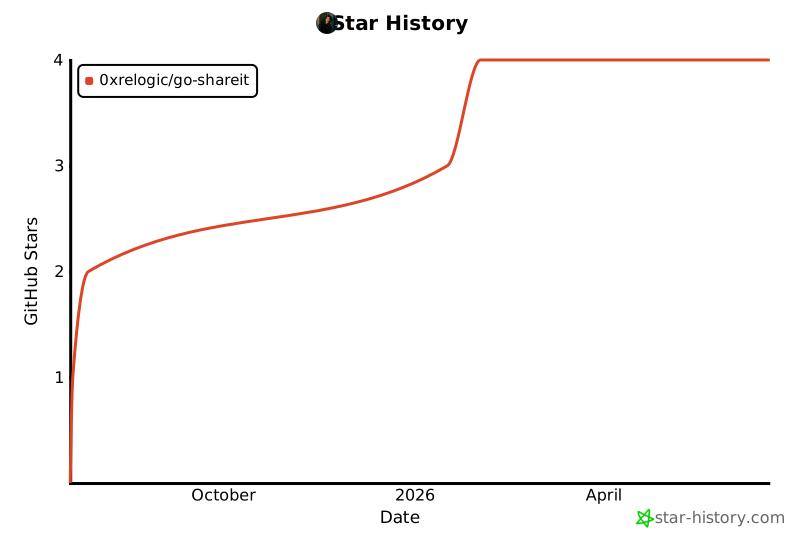](https://www.star-history.com/#0xReLogic/Go-ShareIt&Date)
Made with ❤️ by ReLogic
## Roadmap
Here is the future development plan for Go-ShareIt, based on priority:
### v1.5 - Security Enhancements (Next Priority)
- [x] **End-to-End Encryption**: Implement client-side encryption so the server can never read the file contents.
- [x] **Password Protection**: Add an option to protect downloads with a password.
- [x] **Custom Expiration Settings**: Allow users to set their own expiration time limits.
- [x] **Token Encryption**: Encrypt the token within the URL to prevent manipulation.
### v2.0 - Optimization & Advanced Features
- [x] **Multi-File Upload**: Allow users to upload multiple files or an entire folder in a single session.
- [x] **Automatic Compression**: Automatically compress files before upload to speed up transfers.
- [x] **CLI Version**: Build a command-line interface (CLI) for power users, aligning with the project's original vision.
### v3.0 - Enterprise & Integration Features
- [ ] **User Accounts**: Add optional user accounts for tracking upload history.
- [ ] **Team Sharing**: Allow teams to share files with access controls.
- [ ] **API Keys**: Generate API keys for third-party integrations.
- [ ] **Webhooks**: Send notifications to external services when files are uploaded or downloaded.
- [ ] **Storage Backends**: Support for S3, Google Cloud Storage, and other storage providers.
- [ ] **Analytics Dashboard**: Track usage statistics and file sharing patterns.
---
## API Documentation
Go-ShareIt provides a RESTful API for integration with other applications:
### Upload a File
```
POST /upload
```
Form data:
- `file`: File to upload (required)
- `expiration`: Expiration time in minutes (optional, default: 5)
- `password`: Password protection (optional)
- `compress`: Set to "false" to disable automatic compression (optional, default: true)
- `encrypted`: Set to "true" if the file is already encrypted client-side (optional, default: false)
- `originalName`: Original filename for encrypted files (optional, used with `encrypted=true`)
Response:
```json
{
"success": true,
"url": "http://localhost:8080/files/abcdef1234567890",
"expiresIn": 5,
"isProtected": false,
"originalName": "example.pdf",
"size": 1234567,
"originalSize": 2345678,
"isCompressed": true,
"isEncrypted": false
}
```
### Get Server Statistics
```
GET /api/stats
```
Response:
```json
{
"activeFiles": 5,
"totalSizeBytes": 12345678,
"serverTime": "2023-08-21T12:34:56Z"
}
```
### List All Active Files (Admin Only)
```
GET /api/files
```
Requires Basic Authentication.
Response:
```json
[
{
"token": "abcdef1234567890",
"originalName": "example.pdf",
"createdAt": "2023-08-21T12:34:56Z",
"expiresAt": "2023-08-21T12:39:56Z",
"isProtected": true,
"size": 1234567,
"url": "http://localhost:8080/files/abcdef1234567890"
}
]
```
### Delete a File (Admin Only)
```
DELETE /api/files/{token}
```
Requires Basic Authentication.
Response:
```json
{
"success": true,
"message": "File deleted successfully"
}
```
## How to Contribute
We welcome contributions from everyone to make Go-ShareIt better! If you're interested in helping, here are the areas where we need the most help:
1. **Implement Roadmap Features**: You can pick up any item from the **v1.5 Roadmap** or **v2.0** above. Features like **end-to-end encryption** or **token encryption** would be incredibly valuable additions.
2. **Concurrency Improvements**: We currently use a standard `mutex` for access control. We'd like to implement more sophisticated solutions to handle many concurrent connections:
- **For Uploads**: Use a *Worker Pool Pattern* to limit the number of simultaneous uploads.
- **For Downloads**: Use a *Channel as a Semaphore* to ensure only one download is active per token.
3. **Refactoring & Testing**: Help write unit and integration tests to ensure code stability and reliability as new features are added.
Please open a new issue to discuss your ideas or claim an existing one before you start working. Thank you for helping!