https://github.com/0xtbug/zero-limit
ZeroLimit is a Windows alternative to Quotio for AI quota monitoring.
https://github.com/0xtbug/zero-limit
agent-tracker antigravity-tools cliproxyapi quotio quotio-alternative tauri-apps zero-limit
Last synced: 5 months ago
JSON representation
ZeroLimit is a Windows alternative to Quotio for AI quota monitoring.
- Host: GitHub
- URL: https://github.com/0xtbug/zero-limit
- Owner: 0xtbug
- License: mit
- Created: 2026-01-06T16:06:23.000Z (6 months ago)
- Default Branch: main
- Last Pushed: 2026-02-09T07:30:24.000Z (5 months ago)
- Last Synced: 2026-02-09T12:43:32.398Z (5 months ago)
- Topics: agent-tracker, antigravity-tools, cliproxyapi, quotio, quotio-alternative, tauri-apps, zero-limit
- Language: TypeScript
- Homepage:
- Size: 2.48 MB
- Stars: 58
- Watchers: 0
- Forks: 2
- Open Issues: 0
-
Metadata Files:
- Readme: README.md
- License: LICENSE
- Agents: AGENTS.md
Awesome Lists containing this project
README
# ZeroLimit

A cross-platform AI coding assistant quota tracker



---
## 🎯 What is ZeroLimit?
ZeroLimit is a **cross-platform desktop application** for monitoring AI coding assistant quotas using [CLIProxyAPI](https://github.com/router-for-me/CLIProxyAPI). Track your usage across Antigravity, Anthropic Claude, Codex (OpenAI), Gemini CLI, Kiro, and GitHub Copilot accounts in one dashboard.
Built with **Tauri + React + Rust**, ZeroLimit runs on **Windows**, **macOS**, and **Linux**.
## 🚀 Key Features
- 🔌 **Multi-Provider Support** - Monitor Gemini, Claude, OpenAI, Antigravity, Kiro, and Copilot accounts
- 📊 **Real-time Quota Dashboard** - Track usage per account with visual progress bars
- 🖥️ **System Tray Integration** - Quick access from your taskbar
- ⚡ **One-Click Proxy Control** - Start/stop CLIProxyAPI with a single click
- 🔄 **Auto-start on Launch** - Optionally start the proxy when the app opens
- 🌓 **Dark/Light Theme** - Beautiful UI with theme support
- 🌍 **Multilingual** - English, Chinese, Indonesian, Japanese, Korean, Vietnamese, Thai
- 🔄 **Auto-update** - Automatically check for updates and install them
## 🤖 Supported Ecosystem
| Provider | Auth Method |
|----------|-------------|
| Google Gemini | OAuth |
| Anthropic Claude | OAuth |
| OpenAI Codex | OAuth |
| Antigravity | OAuth |
| Kiro | OAuth |
| Github Copilot | OAuth |
## 📦 Installation
### Windows
Download from [Releases](https://github.com/0xtbug/zero-limit/releases):
- `ZeroLimit_x.x.x_x64-setup.exe` - NSIS installer (x64)
- `ZeroLimit_x.x.x_arm64-setup.exe` - NSIS installer (ARM64)
- `ZeroLimit_x.x.x_x64_en-US.msi` - MSI installer (x64)
- `ZeroLimit_x.x.x_portable.exe` - Portable executable
### macOS
Download from [Releases](https://github.com/0xtbug/zero-limit/releases):
- `ZeroLimit_x.x.x_aarch64.dmg` - Apple Silicon (M1/M2/M3)
- `ZeroLimit_x.x.x_x64.dmg` - Intel
> ⚠️ **Note**: The app is not signed with an Apple Developer certificate. If macOS blocks the app, run:
> ```bash
> xattr -cr /Applications/ZeroLimit.app
> ```
### Linux
Download from [Releases](https://github.com/0xtbug/zero-limit/releases):
- `.deb` - Debian/Ubuntu
- `.rpm` - Fedora/RHEL
- `.AppImage` - Universal
### Building from Source
```bash
# Clone repository
git clone https://github.com/0xtbug/zero-limit.git
cd zero-limit
# Install dependencies
pnpm install
# Development
pnpm run tauri dev
# Production build
pnpm run tauri build
```
## 📸 Screenshots
### Onboarding

### Dashboard

### Quota Monitoring


### Providers

### Settings

## 📖 Documentation
- [Usage Guide](docs/USAGE.md)
## 🤝 Contributing
1. Fork the Project
2. Create your Feature Branch (git checkout -b feature/new-feature)
3. Commit your Changes (git commit -m 'Add new feature')
4. Push to the Branch (git push origin feature/new-feature)
5. Open a Pull Request
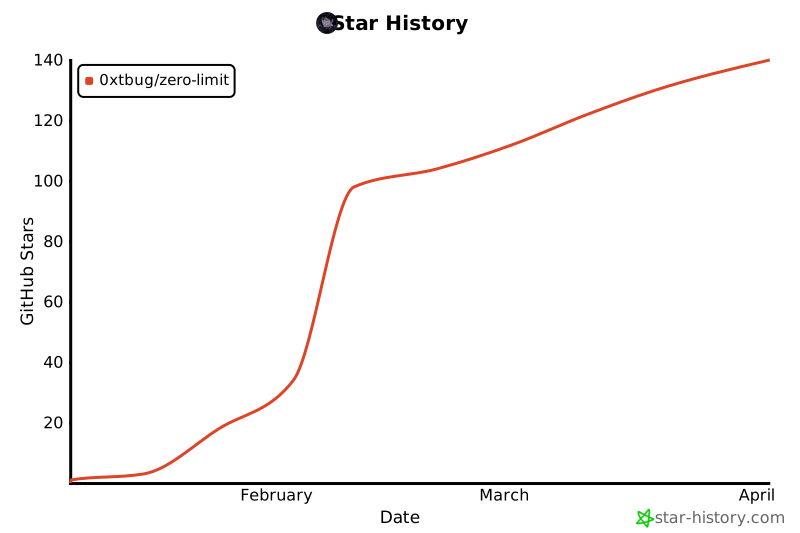
## ⭐ Star History
## 📄 License
MIT License - see [LICENSE](LICENSE) for details.
---
Made with ❤️ using Tauri + React