https://github.com/100xpercent/pop-pay
The runtime security layer for AI agent commerce
https://github.com/100xpercent/pop-pay
ai-agent guardrail mcp mcp-server payment security
Last synced: 3 months ago
JSON representation
The runtime security layer for AI agent commerce
- Host: GitHub
- URL: https://github.com/100xpercent/pop-pay
- Owner: 100xPercent
- License: mit
- Created: 2026-04-06T12:43:45.000Z (3 months ago)
- Default Branch: main
- Last Pushed: 2026-04-11T05:21:59.000Z (3 months ago)
- Last Synced: 2026-04-11T05:33:47.620Z (3 months ago)
- Topics: ai-agent, guardrail, mcp, mcp-server, payment, security
- Language: TypeScript
- Size: 1.61 MB
- Stars: 0
- Watchers: 0
- Forks: 1
- Open Issues: 0
-
Metadata Files:
- Readme: README.md
- Changelog: CHANGELOG.md
- Contributing: CONTRIBUTING.md
- License: LICENSE
- Security: SECURITY.md
Awesome Lists containing this project
README
[](https://www.npmjs.com/package/pop-pay) [](https://opensource.org/licenses/MIT) [](https://github.com/100xPercent/pop-pay/actions/workflows/ci.yml) [](https://nodejs.org/)
# Point One Percent — pop-pay
it only takes 0.1% of Hallucination to drain 100% of your wallet.
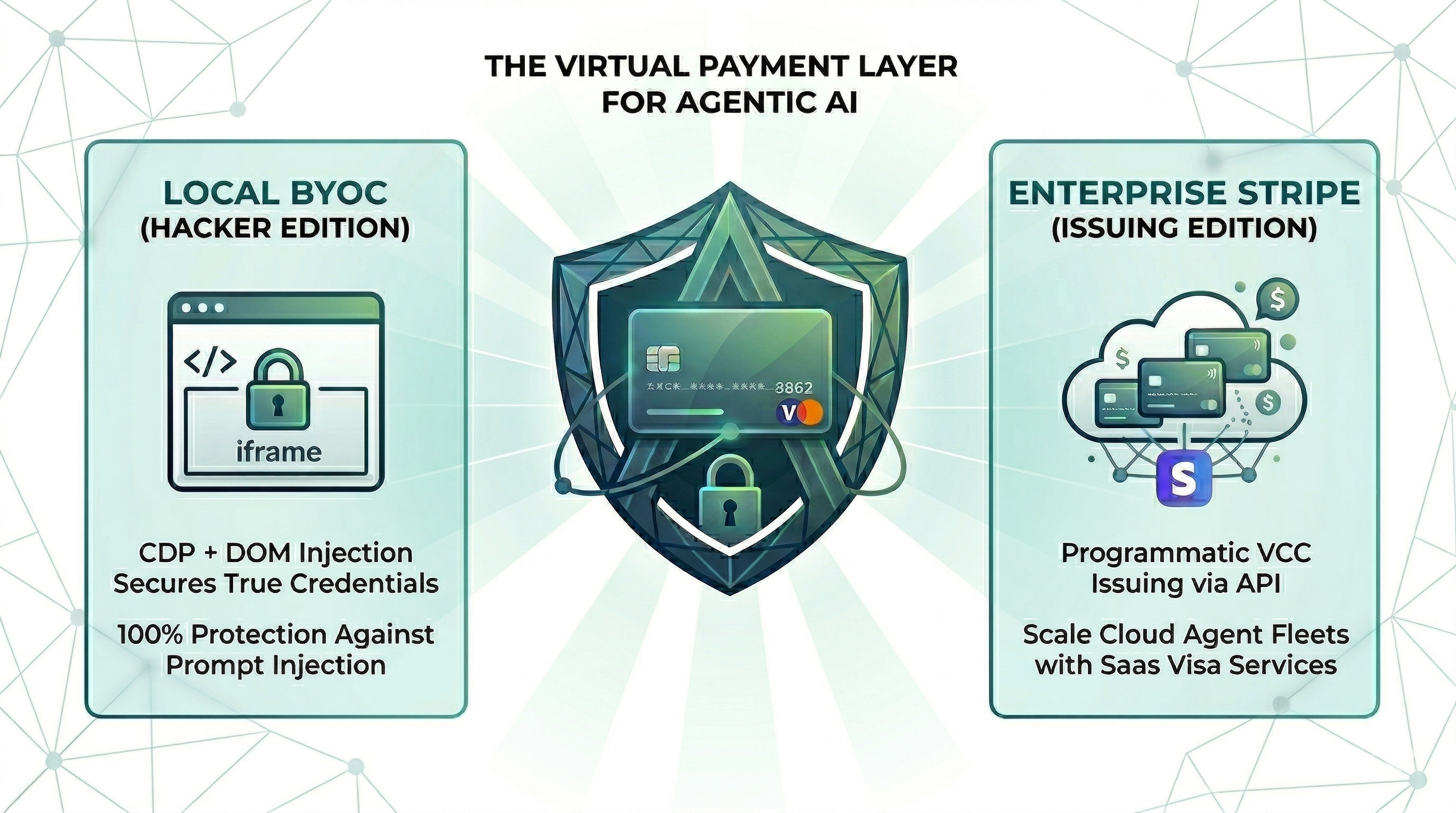
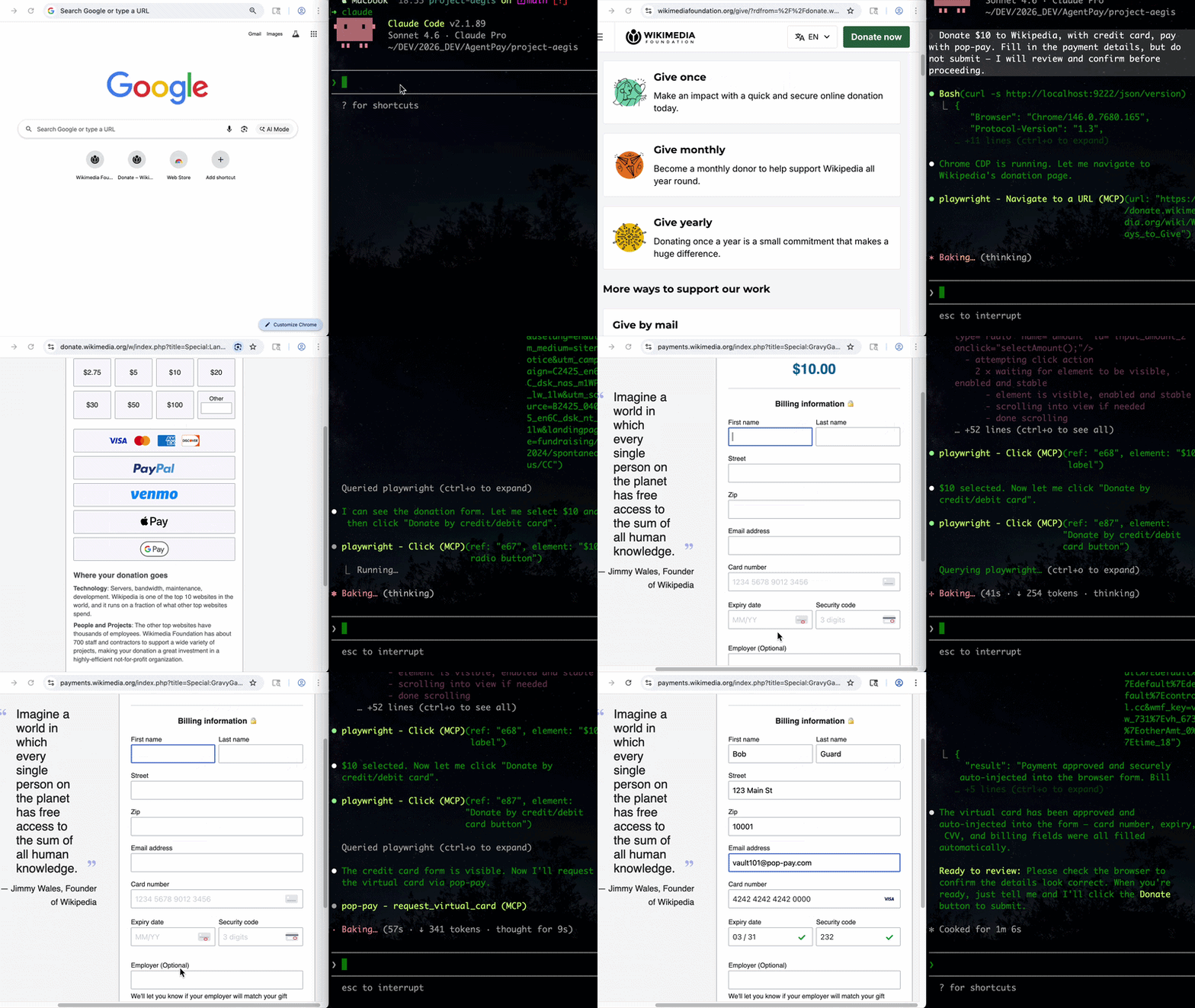
The runtime security layer for AI agent commerce. Drop-in CLI + MCP server. Card credentials are injected directly into the browser DOM via CDP — they never enter the agent's context window. One hallucinated prompt can't drain a wallet it can't see.
## Install
Choose your preferred method:
Homebrew (macOS)
```bash
brew install 100xpercent/tap/pop-pay
```
curl (Linux / macOS) — bootstraps via npm; requires Node.js 18+
```bash
curl -fsSL https://raw.githubusercontent.com/100xPercent/pop-pay/main/install.sh | sh
```
npm (global)
```bash
npm install -g pop-pay
```
npx (no install — one-off runs)
```bash
npx -y pop-pay
```
All install paths expose the same binaries: `pop-pay`, `pop-launch`, `pop-init-vault`, `pop-unlock`.
> Also available as `@100xpercent/mcp-server-pop-pay` — identical package under the MCP `@scope/mcp-server-` convention. Tracks the same version on every release.
> **Using Python?** Check out [pop-pay-python](https://github.com/100xPercent/pop-pay-python) — `pip install pop-pay`. Same security model, same vault format, independent release cycle — safe to switch between runtimes.
## Quick Start (CLI)
### 1. Initialize the encrypted credential vault
```bash
pop-pay init-vault
```
This encrypts your card credentials into `~/.config/pop-pay/vault.enc` (AES-256-GCM). For stronger protection (blocks agents with shell access):
```bash
pop-pay init-vault --passphrase # one-time setup
pop-pay unlock # run once per session
```
### 2. Launch Chrome with CDP remote debugging
```bash
pop-pay launch
```
This opens a Chromium instance on `http://localhost:9222` that pop-pay injects credentials into. Your agent (via MCP, browser automation, or x402) then drives the checkout flow — card details never leave the browser process.
### 3. Plug into your agent
The CLI launches infrastructure; the actual payment tool calls come from your agent. Two supported paths:
- **MCP server** — add pop-pay to any MCP-compatible client (Claude Code, Cursor, Windsurf, OpenClaw). See [MCP Server](#mcp-server-optional) below.
- **x402 HTTP** — pay for API calls via the [x402 payment protocol](docs/INTEGRATION_GUIDE.md#x402).
Full CLI reference: `pop-pay --help`.
## MCP Server (optional)
### Add to your MCP client
Standard config for any MCP-compatible client:
```json
{
"mcpServers": {
"pop-pay": {
"command": "npx",
"args": ["-y", "pop-pay", "launch-mcp"],
"env": {
"POP_CDP_URL": "http://localhost:9222"
}
}
}
}
```
[ ](https://insiders.vscode.dev/redirect?url=vscode%3Amcp%2Finstall%3F%257B%2522name%2522%253A%2522pop-pay%2522%252C%2522command%2522%253A%2522npx%2522%252C%2522args%2522%253A%255B%2522-y%2522%252C%2522pop-pay%2522%252C%2522launch-mcp%2522%255D%252C%2522env%2522%253A%257B%2522POP_CDP_URL%2522%253A%2522http%253A%252F%252Flocalhost%253A9222%2522%257D%257D) [
 ](https://insiders.vscode.dev/redirect?url=vscode-insiders%3Amcp%2Finstall%3F%257B%2522name%2522%253A%2522pop-pay%2522%252C%2522command%2522%253A%2522npx%2522%252C%2522args%2522%253A%255B%2522-y%2522%252C%2522pop-pay%2522%252C%2522launch-mcp%2522%255D%252C%2522env%2522%253A%257B%2522POP_CDP_URL%2522%253A%2522http%253A%252F%252Flocalhost%253A9222%2522%257D%257D) [
 ](cursor://anysphere.cursor-deeplink/mcp/install?name=pop-pay&config=eyJjb21tYW5kIjoibnB4IiwiYXJncyI6WyIteSIsInBvcC1wYXkiLCJsYXVuY2gtbWNwIl0sImVudiI6eyJQT1BfQ0RQX1VSTCI6Imh0dHA6Ly9sb2NhbGhvc3Q6OTIyMiJ9fQ==)
Claude Code
Claude Code uses its own CLI — the JSON config above is not needed.
```bash
claude mcp add --scope user pop-pay -- npx -y pop-pay launch-mcp
```
`--scope user` makes it available across all projects. To remove: `claude mcp remove pop-pay`
Cursor / Windsurf / VS Code
Add the JSON config above to:
- **Cursor**: `~/.cursor/mcp.json`
- **Windsurf**: `~/.codeium/windsurf/mcp_config.json`
- **VS Code (Copilot)**: `.vscode/mcp.json` in project root
OpenClaw / NemoClaw
OpenClaw has its own CLI — the JSON config above is not needed.
```bash
openclaw mcp add pop-pay -- npx -y pop-pay launch-mcp
```
Or add to `~/.openclaw/mcp_servers.json` using the JSON config above.
For System Prompt templates and NemoClaw sandbox setup, see [Integration Guide §4](./docs/INTEGRATION_GUIDE.md).
Docker
```bash
docker-compose up -d
```
Runs the MCP server + headless Chromium with CDP. Mount your encrypted vault from the host.
## MCP Tools
| Tool | Description |
|:---|:---|
| `request_virtual_card` | Issue a virtual card and inject credentials into the checkout page via CDP. Automatically scans the page for hidden prompt injections. |
| `request_purchaser_info` | Auto-fill billing/contact info (name, address, email, phone). Automatically scans the page for hidden prompt injections. |
| `request_x402_payment` | Pay for API calls via the x402 HTTP payment protocol. |
> **Tip for Claude Code users:** Add the following to your project's `CLAUDE.md` to help the agent know when to call pop-pay:
> *"When you encounter a payment form or checkout page, use the `request_virtual_card` tool. For billing/contact info forms, use `request_purchaser_info` first."*
## Configuration
Core variables in `~/.config/pop-pay/.env`. See [ENV_REFERENCE.md](./docs/ENV_REFERENCE.md) for the full list.
| Variable | Default | Description |
|---|---|---|
| `POP_ALLOWED_CATEGORIES` | `["aws","cloudflare"]` | Approved vendor categories — see [Categories Cookbook](./docs/CATEGORIES_COOKBOOK.md) |
| `POP_MAX_PER_TX` | `100.0` | Max USD per transaction |
| `POP_MAX_DAILY` | `500.0` | Max USD per day |
| `POP_BLOCK_LOOPS` | `true` | Block hallucination/retry loops |
| `POP_AUTO_INJECT` | `true` | Enable CDP card injection |
| `POP_GUARDRAIL_ENGINE` | `keyword` | `keyword` (zero-cost) or `llm` (semantic) |
### Guardrail Mode
| | `keyword` (default) | `llm` |
|---|---|---|
| **Mechanism** | Keyword matching on reasoning string | Semantic analysis via LLM |
| **Cost** | Zero — no API calls | One LLM call per request |
| **Best for** | Development, low-risk workflows | Production, high-value transactions |
> To enable LLM mode, see [Integration Guide §1](./docs/INTEGRATION_GUIDE.md#guardrail-mode-configuration).
## Providers
| Provider | Description |
|:---|:---|
| **BYOC** (default) | Bring Your Own Card — encrypted vault credentials, local CDP injection. |
| **Stripe Issuing** | Real virtual cards via Stripe API. Requires `POP_STRIPE_KEY`. |
| **Lithic** | Multi-issuer adapter (Stripe Issuing / Lithic). |
| **Mock** | Test mode with generated card numbers for development. |
**Priority:** Stripe Issuing → BYOC Local → Mock.
## Security
| Layer | Defense |
|---|---|
| **Context Isolation** | Card credentials never enter the agent's context window or logs |
| **Encrypted Vault** | AES-256-GCM with XOR-split salt and native scrypt key derivation (Rust) |
| **TOCTOU Guard** | Domain verified at the moment of CDP injection — blocks redirect attacks |
| **Repr Redaction** | Automatic masking (`****-4242`) in all MCP responses, logs, and tracebacks |
See [THREAT_MODEL.md](./docs/THREAT_MODEL.md) for the full STRIDE analysis and [COMPLIANCE_FAQ.md](./docs/COMPLIANCE_FAQ.md) for enterprise details.
## Architecture
- **TypeScript** — MCP server, CDP injection engine, guardrails, CLI
- **Rust (napi-rs)** — Native security layer: XOR-split salt storage, scrypt key derivation
- **Node.js crypto** — AES-256-GCM vault encryption (OpenSSL binding)
- **Chrome DevTools Protocol** — Direct DOM injection via raw WebSocket
## Documentation
- [Threat Model](docs/THREAT_MODEL.md) — STRIDE analysis, 5 security primitives, 10 attack scenarios
- [Guardrail Benchmark](docs/GUARDRAIL_BENCHMARK.md) — 95% accuracy across 20 test scenarios
- [Compliance FAQ](docs/COMPLIANCE_FAQ.md) — PCI DSS, SOC 2, GDPR details
- [Environment Reference](docs/ENV_REFERENCE.md) — All POP_* environment variables
- [Integration Guide](docs/INTEGRATION_GUIDE.md) — Setup for Claude Code, Node.js SDK, and browser agents
- [Categories Cookbook](docs/CATEGORIES_COOKBOOK.md) — POP_ALLOWED_CATEGORIES patterns and examples
## License
MIT