https://github.com/1038lab/ComfyUI-RMBG
A ComfyUI custom node designed for advanced image background removal utilizing multiple models, including RMBG-2.0, INSPYRENET, and BEN.
https://github.com/1038lab/ComfyUI-RMBG
Last synced: 5 months ago
JSON representation
A ComfyUI custom node designed for advanced image background removal utilizing multiple models, including RMBG-2.0, INSPYRENET, and BEN.
- Host: GitHub
- URL: https://github.com/1038lab/ComfyUI-RMBG
- Owner: 1038lab
- License: gpl-3.0
- Created: 2024-11-14T17:48:27.000Z (about 1 year ago)
- Default Branch: main
- Last Pushed: 2024-12-12T17:41:26.000Z (about 1 year ago)
- Last Synced: 2024-12-12T18:28:20.227Z (about 1 year ago)
- Language: Python
- Homepage: https://github.com/1038lab/ComfyUI-RMBG
- Size: 157 KB
- Stars: 110
- Watchers: 1
- Forks: 4
- Open Issues: 5
-
Metadata Files:
- Readme: README.md
- License: LICENSE
Awesome Lists containing this project
- awesome-comfyui - **ComfyUI-RMBG** - 2.0, INSPYRENET, BEN, BEN2, BiRefNet models, SAM, and GroundingDINO, while also incorporating a new feature for real-time background replacement and enhanced edge detection for improved accuracy. (Workflows (3395) sorted by GitHub Stars)
- awesome-comfyui - **ComfyUI-RMBG** - 2.0, INSPYRENET, BEN, BEN2, BiRefNet models, SAM, and GroundingDINO, while also incorporating a new feature for real-time background replacement and enhanced edge detection for improved accuracy. (All Workflows Sorted by GitHub Stars)
README
# ComfyUI-RMBG
A sophisticated ComfyUI custom node engineered for advanced image background removal and precise segmentation of objects, faces, clothing, and fashion elements. This tool leverages a diverse array of models, including RMBG-2.0, INSPYRENET, BEN, BEN2, BiRefNet, SDMatte models, SAM, SAM2 and GroundingDINO, while also incorporating a new feature for real-time background replacement and enhanced edge detection for improved accuracy.
## News & Updates
- **2025/08/18**: Update ComfyUI-RMBG to **v2.9.0** ( [update.md](https://github.com/1038lab/ComfyUI-RMBG/blob/main/update.md#v290-20250818) )

- Added `SDMatte Matting` node
- **2025/08/11**: Update ComfyUI-RMBG to **v2.8.0** ( [update.md](https://github.com/1038lab/ComfyUI-RMBG/blob/main/update.md#v280-20250811) )

- Added `SAM2Segment` node for text-prompted segmentation with the latest Facebook Research SAM2 technology.
- Enhanced color widget support across all nodes
- **2025/08/06**: Update ComfyUI-RMBG to **v2.7.1** ( [update.md](https://github.com/1038lab/ComfyUI-RMBG/blob/main/update.md#v271-20250806) )

- Enhanced LoadImage into three distinct nodes to meet different needs, all supporting direct image loading from local paths or URLs
- Completely redesigned ImageStitch node compatible with ComfyUI's native functionality
- Fixed background color handling issues reported by users
- **2025/07/15**: Update ComfyUI-RMBG to **v2.6.0** ( [update.md](https://github.com/1038lab/ComfyUI-RMBG/blob/main/update.md#v260-20250715) )

- Added `Kontext Refence latent Mask` node, Which uses a reference latent and mask for precise region conditioning.
- **2025/07/11**: Update ComfyUI-RMBG to **v2.5.2** ( [update.md](https://github.com/1038lab/ComfyUI-RMBG/blob/main/update.md#v252-20250711) )

- **2025/07/07**: Update ComfyUI-RMBG to **v2.5.1** ( [update.md](https://github.com/1038lab/ComfyUI-RMBG/blob/main/update.md#v251-20250707) )
- **2025/07/01**: Update ComfyUI-RMBG to **v2.5.0** ( [update.md](https://github.com/1038lab/ComfyUI-RMBG/blob/main/update.md#v250-20250701) )

- Added `MaskOverlay`, `ObjectRemover`, `ImageMaskResize` new nodes.
- Added 2 BiRefNet models: `BiRefNet_lite-matting` and `BiRefNet_dynamic`
- Added batch image support for `Segment_v1` and `Segment_V2` nodes
- **2025/06/01**: Update ComfyUI-RMBG to **v2.4.0** ( [update.md](https://github.com/1038lab/ComfyUI-RMBG/blob/main/update.md#v240-20250601) )

- Added `CropObject`, `ImageCompare`, `ColorInput` nodes and new Segment V2 (see update.md for details)
- **2025/05/15**: Update ComfyUI-RMBG to **v2.3.2** ( [update.md](https://github.com/1038lab/ComfyUI-RMBG/blob/main/update.md#v232-20250515) )

- **2025/05/02**: Update ComfyUI-RMBG to **v2.3.1** ( [update.md](https://github.com/1038lab/ComfyUI-RMBG/blob/main/update.md#v231-20250502) )
- **2025/05/01**: Update ComfyUI-RMBG to **v2.3.0** ( [update.md](https://github.com/1038lab/ComfyUI-RMBG/blob/main/update.md#v230-20250501) )

- Added new nodes: IC-LoRA Concat, Image Crop
- Added resizing options for Load Image: Longest Side, Shortest Side, Width, and Height, enhancing flexibility.
- **2025/04/05**: Update ComfyUI-RMBG to **v2.2.1** ( [update.md](https://github.com/1038lab/ComfyUI-RMBG/blob/main/update.md#v221-20250405) )
- **2025/04/05**: Update ComfyUI-RMBG to **v2.2.0** ( [update.md](https://github.com/1038lab/ComfyUI-RMBG/blob/main/update.md#v220-20250405) )

- Added new nodes: Image Combiner, Image Stitch, Image/Mask Converter, Mask Enhancer, Mask Combiner, and Mask Extractor
- Fixed compatibility issues with transformers v4.49+
- Fixed i18n translation errors
- Added mask image output to segment nodes
- **2025/03/21**: Update ComfyUI-RMBG to **v2.1.1** ( [update.md](https://github.com/1038lab/ComfyUI-RMBG/blob/main/update.md#v211-20250321) )
- Enhanced compatibility with Transformers
- **2025/03/19**: Update ComfyUI-RMBG to **v2.1.0** ( [update.md](https://github.com/1038lab/ComfyUI-RMBG/blob/main/update.md#v210-20250319) )
- Integrated internationalization (i18n) support for multiple languages.
- Improved user interface for dynamic language switching.
- Enhanced accessibility for non-English speaking users with fully translatable features.
https://github.com/user-attachments/assets/7faa00d3-bbe2-42b8-95ed-2c830a1ff04f
- **2025/03/13**: Update ComfyUI-RMBG to **v2.0.0** ( [update.md](https://github.com/1038lab/ComfyUI-RMBG/blob/main/update.md#v200-20250313) )

- Added Image and Mask Tools improved functionality.
- Enhanced code structure and documentation for better usability.
- Introduced a new category path: `🧪AILab/🛠️UTIL/🖼️IMAGE`.
- **2025/02/24**: Update ComfyUI-RMBG to **v1.9.3** Clean up the code and fix the issue ( [update.md](https://github.com/1038lab/ComfyUI-RMBG/blob/main/update.md#v193-20250224) )
- **2025/02/21**: Update ComfyUI-RMBG to **v1.9.2** with Fast Foreground Color Estimation ( [update.md](https://github.com/1038lab/ComfyUI-RMBG/blob/main/update.md#v192-20250221) )

- Added new foreground refinement feature for better transparency handling
- Improved edge quality and detail preservation
- Enhanced memory optimization
- **2025/02/20**: Update ComfyUI-RMBG to **v1.9.1** ( [update.md](https://github.com/1038lab/ComfyUI-RMBG/blob/main/update.md#v191-20250220) )
- Changed repository for model management to the new repository and Reorganized models files structure for better maintainability.
- **2025/02/19**: Update ComfyUI-RMBG to **v1.9.0** with BiRefNet model improvements ( [update.md](https://github.com/1038lab/ComfyUI-RMBG/blob/main/update.md#v190-20250219) )

- Enhanced BiRefNet model performance and stability
- Improved memory management for large images
- **2025/02/07**: Update ComfyUI-RMBG to **v1.8.0** with new BiRefNet-HR model ( [update.md](https://github.com/1038lab/ComfyUI-RMBG/blob/main/update.md#v180-20250207) )

- Added a new custom node for BiRefNet-HR model.
- Support high resolution image processing (up to 2048x2048)
- **2025/02/04**: Update ComfyUI-RMBG to **v1.7.0** with new BEN2 model ( [update.md](https://github.com/1038lab/ComfyUI-RMBG/blob/main/update.md#v170-20250204) )

- Added a new custom node for BEN2 model.
- **2025/01/22**: Update ComfyUI-RMBG to **v1.6.0** with new Face Segment custom node ( [update.md](https://github.com/1038lab/ComfyUI-RMBG/blob/main/update.md#v160-20250122) )

- Added a new custom node for face parsing and segmentation
- Support for 19 facial feature categories (Skin, Nose, Eyes, Eyebrows, etc.)
- Precise facial feature extraction and segmentation
- Multiple feature selection for combined segmentation
- Same parameter controls as other RMBG nodes
- **2025/01/05**: Update ComfyUI-RMBG to **v1.5.0** with new Fashion and accessories Segment custom node ( [update.md](https://github.com/1038lab/ComfyUI-RMBG/blob/main/update.md#v150-20250105) )

- Added a new custom node for fashion segmentation.
- **2025/01/02**: Update ComfyUI-RMBG to **v1.4.0** with new Clothes Segment node ( [update.md](https://github.com/1038lab/ComfyUI-RMBG/blob/main/update.md#v140-20250102) )

- Added intelligent clothes segmentation with 18 different categories
- Support multiple item selection and combined segmentation
- Same parameter controls as other RMBG nodes
- **2024/12/29**: Update ComfyUI-RMBG to **v1.3.2** with background handling ( [update.md](https://github.com/1038lab/ComfyUI-RMBG/blob/main/update.md#v132-20241229) )
- Enhanced background handling to support RGBA output when "Alpha" is selected.
- Ensured RGB output for all other background color selections.
- **2024/12/25**: Update ComfyUI-RMBG to **v1.3.1** with bug fixes ( [update.md](https://github.com/1038lab/ComfyUI-RMBG/blob/main/update.md#v131-20241225) )
- Fixed an issue with mask processing when the model returns a list of masks.
- Improved handling of image formats to prevent processing errors.
- **2024/12/23**: Update ComfyUI-RMBG to **v1.3.0** with new Segment node ( [update.md](https://github.com/1038lab/ComfyUI-RMBG/blob/main/update.md#v140-20241222) )

- Added text-prompted object segmentation
- Support both tag-style ("cat, dog") and natural language ("a person wearing red jacket") prompts
- Multiple models: SAM (vit_h/l/b) and GroundingDINO (SwinT/B) (as always model file will be downloaded automatically when first time using the specific model)
- This update requires install requirements.txt
- **2024/12/12**: Update Comfyui-RMBG ComfyUI Custom Node to **v1.2.2** ( [update.md](https://github.com/1038lab/ComfyUI-RMBG/blob/main/update.md#v122-20241212) )

- **2024/12/02**: Update Comfyui-RMBG ComfyUI Custom Node to **v1.2.1** ( [update.md](https://github.com/1038lab/ComfyUI-RMBG/blob/main/update.mdv121-20241202) )

- **2024/11/29**: Update Comfyui-RMBG ComfyUI Custom Node to **v1.2.0** ( [update.md](https://github.com/1038lab/ComfyUI-RMBG/blob/main/update.md#v120-20241129) )

- **2024/11/21**: Update Comfyui-RMBG ComfyUI Custom Node to **v1.1.0** ( [update.md](https://github.com/1038lab/ComfyUI-RMBG/blob/main/update.md#v110-20241121) )

## Features
- Background Removal (RMBG Node)
- Multiple models: RMBG-2.0, INSPYRENET, BEN, BEN2
- Various background options
- Batch processing support
- Object Segmentation (Segment Node)
- Text-prompted object detection
- Support both tag-style and natural language inputs
- High-precision segmentation with SAM
- Flexible parameter controls
- SAM2 Segmentation
- Text-prompted segmentation with the latest SAM2 models (Tiny/Small/Base+/Large)
- Automatic model download on first use, with manual download option

## Installation
### Method 1. install on ComfyUI-Manager, search `Comfyui-RMBG` and install
install requirment.txt in the ComfyUI-RMBG folder
```bash
./ComfyUI/python_embeded/python -m pip install -r requirements.txt
```
> [!TIP]
> Note: If your environment cannot install dependencies with the system Python, you can use ComfyUI's embedded Python instead.
> Example (embedded Python): `./ComfyUI/python_embeded/python.exe -m pip install --no-user --no-cache-dir -r requirements.txt`
### Method 2. Clone this repository to your ComfyUI custom_nodes folder:
```bash
cd ComfyUI/custom_nodes
git clone https://github.com/1038lab/ComfyUI-RMBG
```
install requirment.txt in the ComfyUI-RMBG folder
```bash
./ComfyUI/python_embeded/python -m pip install -r requirements.txt
```
### Method 3: Install via Comfy CLI
Ensure `pip install comfy-cli` is installed.
Installing ComfyUI `comfy install` (if you don't have ComfyUI Installed)
install the ComfyUI-RMBG, use the following command:
```bash
comfy node install ComfyUI-RMBG
```
install requirment.txt in the ComfyUI-RMBG folder
```bash
./ComfyUI/python_embeded/python -m pip install -r requirements.txt
```
### 4. Manually download the models:
- The model will be automatically downloaded to `ComfyUI/models/RMBG/` when first time using the custom node.
- Manually download the RMBG-2.0 model by visiting this [link](https://huggingface.co/1038lab/RMBG-2.0), then download the files and place them in the `/ComfyUI/models/RMBG/RMBG-2.0` folder.
- Manually download the INSPYRENET models by visiting the [link](https://huggingface.co/1038lab/inspyrenet), then download the files and place them in the `/ComfyUI/models/RMBG/INSPYRENET` folder.
- Manually download the BEN model by visiting the [link](https://huggingface.co/1038lab/BEN), then download the files and place them in the `/ComfyUI/models/RMBG/BEN` folder.
- Manually download the BEN2 model by visiting the [link](https://huggingface.co/1038lab/BEN2), then download the files and place them in the `/ComfyUI/models/RMBG/BEN2` folder.
- Manually download the BiRefNet-HR by visiting the [link](https://huggingface.co/1038lab/BiRefNet_HR), then download the files and place them in the `/ComfyUI/models/RMBG/BiRefNet-HR` folder.
- Manually download the SAM models by visiting the [link](https://huggingface.co/1038lab/sam), then download the files and place them in the `/ComfyUI/models/SAM` folder.
- Manually download the SAM2 models by visiting the [link](https://huggingface.co/1038lab/sam2), then download the files (e.g., `sam2.1_hiera_tiny.safetensors`, `sam2.1_hiera_small.safetensors`, `sam2.1_hiera_base_plus.safetensors`, `sam2.1_hiera_large.safetensors`) and place them in the `/ComfyUI/models/sam2` folder.
- Manually download the GroundingDINO models by visiting the [link](https://huggingface.co/1038lab/GroundingDINO), then download the files and place them in the `/ComfyUI/models/grounding-dino` folder.
- Manually download the Clothes Segment model by visiting the [link](https://huggingface.co/1038lab/segformer_clothes), then download the files and place them in the `/ComfyUI/models/RMBG/segformer_clothes` folder.
- Manually download the Fashion Segment model by visiting the [link](https://huggingface.co/1038lab/segformer_fashion), then download the files and place them in the `/ComfyUI/models/RMBG/segformer_fashion` folder.
- Manually download BiRefNet models by visiting the [link](https://huggingface.co/1038lab/BiRefNet), then download the files and place them in the `/ComfyUI/models/RMBG/BiRefNet` folder.
- Manually download SDMatte safetensors models by visiting the [link](https://huggingface.co/1038lab/SDMatte), then download the files and place them in the `/ComfyUI/models/RMBG/SDMatte` folder.
## Usage
### RMBG Node

### Optional Settings :bulb: Tips
| Optional Settings | :memo: Description | :bulb: Tips |
|----------------------|-----------------------------------------------------------------------------|---------------------------------------------------------------------------------------------------|
| **Sensitivity** | Adjusts the strength of mask detection. Higher values result in stricter detection. | Default value is 0.5. Adjust based on image complexity; more complex images may require higher sensitivity. |
| **Processing Resolution** | Controls the processing resolution of the input image, affecting detail and memory usage. | Choose a value between 256 and 2048, with a default of 1024. Higher resolutions provide better detail but increase memory consumption. |
| **Mask Blur** | Controls the amount of blur applied to the mask edges, reducing jaggedness. | Default value is 0. Try setting it between 1 and 5 for smoother edge effects. |
| **Mask Offset** | Allows for expanding or shrinking the mask boundary. Positive values expand the boundary, while negative values shrink it. | Default value is 0. Adjust based on the specific image, typically fine-tuning between -10 and 10. |
| **Background** | Choose output background color | Alpha (transparent background) Black, White, Green, Blue, Red |
| **Invert Output** | Flip mask and image output | Invert both image and mask output |
| **Refine Foreground** | Use Fast Foreground Color Estimation to optimize transparent background | Enable for better edge quality and transparency handling |
| **Performance Optimization** | Properly setting options can enhance performance when processing multiple images. | If memory allows, consider increasing `process_res` and `mask_blur` values for better results, but be mindful of memory usage. |
### Basic Usage
1. Load `RMBG (Remove Background)` node from the `🧪AILab/🧽RMBG` category
2. Connect an image to the input
3. Select a model from the dropdown menu
4. select the parameters as needed (optional)
3. Get two outputs:
- IMAGE: Processed image with transparent, black, white, green, blue, or red background
- MASK: Binary mask of the foreground
### Parameters
- `sensitivity`: Controls the background removal sensitivity (0.0-1.0)
- `process_res`: Processing resolution (512-2048, step 128)
- `mask_blur`: Blur amount for the mask (0-64)
- `mask_offset`: Adjust mask edges (-20 to 20)
- `background`: Choose output background color
- `invert_output`: Flip mask and image output
- `optimize`: Toggle model optimization
### Segment Node
1. Load `Segment (RMBG)` node from the `🧪AILab/🧽RMBG` category
2. Connect an image to the input
3. Enter text prompt (tag-style or natural language)
4. Select SAM and GroundingDINO models
5. Adjust parameters as needed:
- Threshold: 0.25-0.35 for broad detection, 0.45-0.55 for precision
- Mask blur and offset for edge refinement
- Background color options
About Models
## RMBG-2.0
RMBG-2.0 is is developed by BRIA AI and uses the BiRefNet architecture which includes:
- High accuracy in complex environments
- Precise edge detection and preservation
- Excellent handling of fine details
- Support for multiple objects in a single image
- Output Comparison
- Output with background
- Batch output for video
The model is trained on a diverse dataset of over 15,000 high-quality images, ensuring:
- Balanced representation across different image types
- High accuracy in various scenarios
- Robust performance with complex backgrounds
## INSPYRENET
INSPYRENET is specialized in human portrait segmentation, offering:
- Fast processing speed
- Good edge detection capability
- Ideal for portrait photos and human subjects
## BEN
BEN is robust on various image types, offering:
- Good balance between speed and accuracy
- Effective on both simple and complex scenes
- Suitable for batch processing
## BEN2
BEN2 is a more advanced version of BEN, offering:
- Improved accuracy and speed
- Better handling of complex scenes
- Support for more image types
- Suitable for batch processing
## BIREFNET MODELS
BIREFNET is a powerful model for image segmentation, offering:
- BiRefNet-general purpose model (balanced performance)
- BiRefNet_512x512 model (optimized for 512x512 resolution)
- BiRefNet-portrait model (optimized for portrait/human matting)
- BiRefNet-matting model (general purpose matting)
- BiRefNet-HR model (high resolution up to 2560x2560)
- BiRefNet-HR-matting model (high resolution matting)
- BiRefNet_lite model (lightweight version for faster processing)
- BiRefNet_lite-2K model (lightweight version for 2K resolution)
## SAM
SAM is a powerful model for object detection and segmentation, offering:
- High accuracy in complex environments
- Precise edge detection and preservation
- Excellent handling of fine details
- Support for multiple objects in a single image
- Output Comparison
- Output with background
- Batch output for video
## SAM2
SAM2 is the latest segmentation model family designed for efficient, high-quality text-prompted segmentation:
- Multiple sizes: Tiny, Small, Base+, Large
- Optimized inference with strong accuracy
- Automatic download on first use; manual placement supported in `ComfyUI/models/sam2`
## GroundingDINO
GroundingDINO is a model for text-prompted object detection and segmentation, offering:
- High accuracy in complex environments
- Precise edge detection and preservation
- Excellent handling of fine details
- Support for multiple objects in a single image
- Output Comparison
- Output with background
- Batch output for video
## BiRefNet Models
- BiRefNet-general purpose model (balanced performance)
- BiRefNet_512x512 model (optimized for 512x512 resolution)
- BiRefNet-portrait model (optimized for portrait/human matting)
- BiRefNet-matting model (general purpose matting)
- BiRefNet-HR model (high resolution up to 2560x2560)
- BiRefNet-HR-matting model (high resolution matting)
- BiRefNet_lite model (lightweight version for faster processing)
- BiRefNet_lite-2K model (lightweight version for 2K resolution)
## Requirements
- ComfyUI
- Python 3.10+
- Required packages (automatically installed):
- huggingface-hub>=0.19.0
- transparent-background>=1.1.2
- segment-anything>=1.0
- groundingdino-py>=0.4.0
- opencv-python>=4.7.0
- onnxruntime>=1.15.0
- onnxruntime-gpu>=1.15.0
- protobuf>=3.20.2,<6.0.0
- hydra-core>=1.3.0
- omegaconf>=2.3.0
- iopath>=0.1.9
### SDMatte models (manual download)
- Auto-download on first run to `models/RMBG/SDMatte/`
- If network restricted, place weights manually:
- `models/RMBG/SDMatte/SDMatte.safetensors` (standard) or `SDMatte_plus.safetensors` (plus)
- Components (config files) are auto-downloaded; if needed, mirror the structure from the Hugging Face repo to `models/RMBG/SDMatte/` (`scheduler/`, `text_encoder/`, `tokenizer/`, `unet/`, `vae/`)
## Troubleshooting (short)
- 401 error when initializing GroundingDINO / missing `models/sam2`:
- Delete `%USERPROFILE%\.cache\huggingface\token` (and `%USERPROFILE%\.huggingface\token` if present)
- Ensure no `HF_TOKEN`/`HUGGINGFACE_TOKEN` env vars are set
- Re-run; public repos download anonymously (no login required)
- Preview shows "Required input is missing: images":
- Ensure image outputs are connected and upstream nodes ran successfully
## Credits
- RMBG-2.0: https://huggingface.co/briaai/RMBG-2.0
- INSPYRENET: https://github.com/plemeri/InSPyReNet
- BEN: https://huggingface.co/PramaLLC/BEN
- BEN2: https://huggingface.co/PramaLLC/BEN2
- BiRefNet: https://huggingface.co/ZhengPeng7
- SAM: https://huggingface.co/facebook/sam-vit-base
- GroundingDINO: https://github.com/IDEA-Research/GroundingDINO
- Clothes Segment: https://huggingface.co/mattmdjaga/segformer_b2_clothes
- SDMatte: https://github.com/vivoCameraResearch/SDMatte
- Created by: [AILab](https://github.com/1038lab)
## Star History
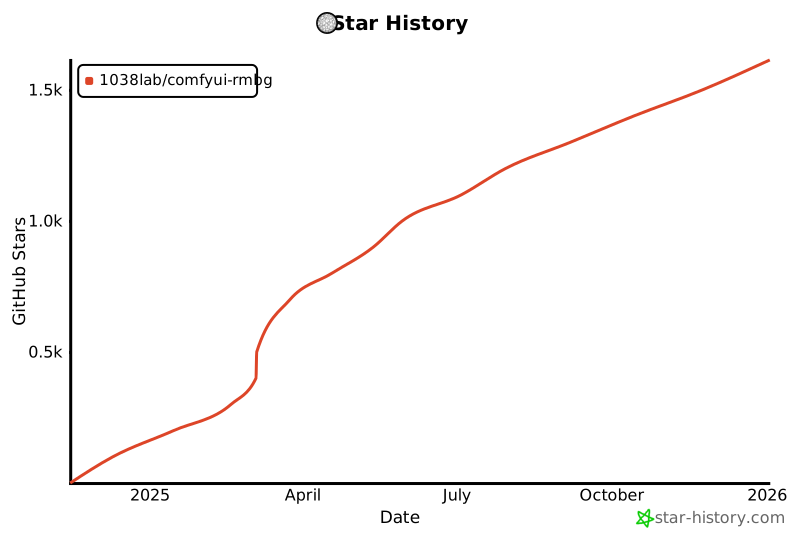
If this custom node helps you or you like my work, please give me ⭐ on this repo! It's a great encouragement for my efforts!
## License
GPL-3.0 License