https://github.com/11273/mooc-work-answer
🎉免费开源🎉,智慧职教(兼容新版) 职教云 mooc 慕课 MOOC学院 资源库 ✅AI答题 ✅考试 ✅测验 ✅刷课💯 mooc.icve.com.cn 自动刷课答题考试,AI匹配答案📜,准确率高,稳定,免费工具,简单上手🎁
https://github.com/11273/mooc-work-answer
ai ai-answer answer deepseek icve mooc python python3
Last synced: 3 months ago
JSON representation
🎉免费开源🎉,智慧职教(兼容新版) 职教云 mooc 慕课 MOOC学院 资源库 ✅AI答题 ✅考试 ✅测验 ✅刷课💯 mooc.icve.com.cn 自动刷课答题考试,AI匹配答案📜,准确率高,稳定,免费工具,简单上手🎁
- Host: GitHub
- URL: https://github.com/11273/mooc-work-answer
- Owner: 11273
- Created: 2022-03-25T01:39:52.000Z (over 4 years ago)
- Default Branch: main
- Last Pushed: 2026-01-27T05:08:46.000Z (6 months ago)
- Last Synced: 2026-03-02T21:54:26.086Z (5 months ago)
- Topics: ai, ai-answer, answer, deepseek, icve, mooc, python, python3
- Language: Python
- Homepage:
- Size: 2.25 MB
- Stars: 340
- Watchers: 4
- Forks: 39
- Open Issues: 3
-
Metadata Files:
- Readme: README.md
Awesome Lists containing this project
README
# MOOC 智慧职教助手
[](https://github.com/11273/mooc-work-answer)
[](https://github.com/11273/mooc-work-answer)
[](https://github.com/11273/mooc-work-answer/issues)
[](https://github.com/11273/mooc-work-answer/releases)
> 🎓 智慧职教平台学习管理工具,通过官方 API 接口实现学习进度跟踪与辅助功能
## ✨ 特色功能
### 🤖 AI 学习辅助`DeepSeek`
- **v3.0 新增功能**:集成 AI 学习辅助系统
- **参考准确率**:60-100%(仅供学习参考)
- **适用场景**:日常学习、练习辅助
- **注意事项**:重要评估建议人工验证
### 📚 多平台支持
| 平台 | 地址 | 说明 | 状态 |
| :--- |:-------------------------------------------------------| :--- | :--- |
| **职教云** | **[前往项目仓库](https://github.com/11273/zjy-work-answer)** | 职教云平台请使用专用版本 | ✅ 运行中 |
| **常规 MOOC** / **AI 优课** | [ai.icve.com.cn](https://ai.icve.com.cn/) | 支持学习管理、AI 辅助等功能 | ✅ 运行中 |
| **资源库** | [zyk.icve.com.cn](https://zyk.icve.com.cn/) | 支持学习管理功能 | ✅ 运行中 |
| ~~智慧职教-课堂版~~ | - | 已停止支持 | ❌ 已下架 |
| ~~智慧职教-旧版~~ | - | 已停止支持 | ❌ 已下架 |
### 🔧 核心功能
| 功能类型 | 智慧职教版 | 职教云版 | 功能描述 | 状态 |
| --------------- | ---------- | -------- | ------------------------------ | ------ |
| 📖 **学习管理** | ✅ | ✅ | 通过 API 接口管理课程学习进度 | 已完成 |
| 💬 **讨论辅助** | ✅ | ❌ | 辅助参与课程讨论,提供回复建议 | 已完成 |
| 📝 **学习辅助** | ✅ | ❌ | AI 驱动的学习内容理解与分析 | 已完成 |
| 📋 **作业辅助** | 🔄 | ✅ | 辅助完成课程作业,提供解题思路 | 开发中 |
| 🎯 **评估辅助** | 🔄 | ❌ | 在线评估辅助功能,提供参考答案 | 规划中 |
**版本说明**:
- **智慧职教版**:支持 MOOC、AI 优课、资源库等平台
- **职教云版**:专门针对职教云平台优化 - [前往项目 >>>](https://github.com/11273/zjy-work-answer)
## 🚀 快速开始
### 💾 下载安装
#### 方式一:直接运行(推荐新手)
1. 前往 [Releases](https://github.com/11273/mooc-work-answer/releases/latest) 下载最新版本
2. 解压后直接运行 `.exe` 文件
3. 按照提示进行配置即可
#### 方式二:源码运行(开发者)
```bash
# 1. 克隆项目
git clone https://github.com/11273/mooc-work-answer.git
cd mooc-work-answer
# 2. 安装依赖
pip install -i https://pypi.tuna.tsinghua.edu.cn/simple -r requirements.txt
# 3. 运行程序
python StartWork.py
```
### 🔧 环境要求
- **Python**: ≥ 3.8
- **操作系统**: Windows / macOS / Linux
- **网络**: 稳定的互联网连接
## ⚙️ 技术说明
### 🔍 技术原理
- 通过调用智慧职教官方 API 接口进行数据交互
- 单线程运行,确保操作时间控制在合理范围
- 已在 38+ 课程中进行兼容性测试
### 🛡️ 安全机制
- 遵循正常用户操作节奏
- 合理的随机时间间隔设置
- 单线程运行,降低系统负载
## 📖 使用指南
### 📋 操作步骤
1. **启动程序**: 运行 `StartWork.py` 或下载的可执行文件
2. **登录账号**: 输入智慧职教账号密码
3. **选择功能**: 根据需要选择学习管理、辅助功能等
4. **程序执行**: 程序通过 API 接口辅助完成相关任务
5. **查看结果**: 实时显示执行进度和结果
### 💡 使用技巧
- 建议在网络稳定的环境下使用
- 可同时开启多个不同平台的任务
- 定期更新到最新版本以获得最佳体验
## ⚠️ 重要声明
### 📢 免责声明
- **学习用途**: 本项目仅供技术学习和研究使用,严禁用于商业盈利
- **AI 参考性**: AI 学习辅助准确率约 60-100%,重要评估请人工验证
- **使用责任**: 用户应自行承担使用本工具的所有责任和风险
- **合规使用**: 请严格遵守相关平台的使用条款和服务协议
- **技术性质**: 本项目为学习管理工具,通过合法 API 接口进行数据交互
### 🚫 禁止行为
- 商业化使用或销售
- 大规模批量操作
- 破坏平台正常秩序
- 侵犯他人权益
## 🆘 问题反馈
### 🐛 Bug 报告
在提交问题前,请确保:
- 提供详细的错误信息
- 说明出错的具体代码行
- 描述重现问题的步骤
**提交方式**:
- [Issues](https://github.com/11273/mooc-work-answer/issues/new) - 提交 Bug 和建议
- [Discussions](https://github.com/11273/mooc-work-answer/discussions) - 讨论交流
### 📚 参考资料
- [API 接口技术详解](https://www.52pojie.cn/thread-1338063-1-1.html)
- [网关认证技术](https://www.52pojie.cn/thread-1713942-1-1.html)
- [新手运行教程](REAEME_RUN.md)
## 🎯 相关项目
- **职教云版本**: [zjy-work-answer](https://github.com/11273/zjy-work-answer) - 专门针对职教云平台
## 📊 项目统计
[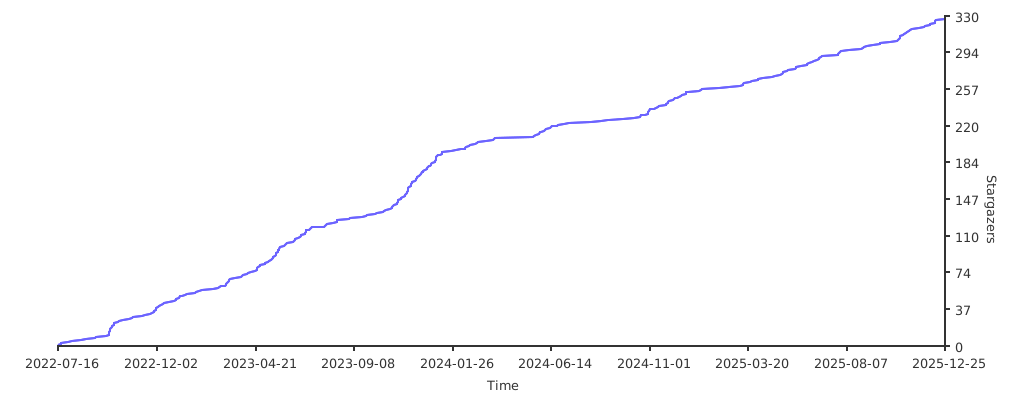](https://github.com/11273/mooc-work-answer)
## 🖼️ 效果展示
> 注:随着版本迭代,实际界面可能与下图有所差异,请以最新版本为准
点击查看截图


---
**⭐ 如果这个项目对你有帮助,请给一个 Star 支持!**
**📢 欢迎 Fork 和提交 Pull Request 来改进项目!**