https://github.com/16131zzzzzzzz/EveryoneNobel
A flexible framework powered by ComfyUI for generating personalized Nobel Prize images.
https://github.com/16131zzzzzzzz/EveryoneNobel
comfyui imagegeneration
Last synced: 8 months ago
JSON representation
A flexible framework powered by ComfyUI for generating personalized Nobel Prize images.
- Host: GitHub
- URL: https://github.com/16131zzzzzzzz/EveryoneNobel
- Owner: 16131zzzzzzzz
- License: apache-2.0
- Created: 2024-10-20T07:57:57.000Z (over 1 year ago)
- Default Branch: main
- Last Pushed: 2024-10-29T17:18:31.000Z (over 1 year ago)
- Last Synced: 2024-10-29T18:43:45.573Z (over 1 year ago)
- Topics: comfyui, imagegeneration
- Language: Python
- Homepage:
- Size: 5.73 MB
- Stars: 718
- Watchers: 2
- Forks: 52
- Open Issues: 3
-
Metadata Files:
- Readme: README.md
Awesome Lists containing this project
- awesome - 16131zzzzzzzz/EveryoneNobel - A flexible framework powered by ComfyUI for generating personalized Nobel Prize images. (Python)
README
🏆 EveryoneNobel

| **[Overview](#overview)** | **[News](#news)** | **[Requirements](#requirements)** | **[Quick Start](#quick-start)** | **[Contributors](#contributors)** |
## 💡 Overview
EveryoneNobel aims to generate **Nobel Prize images for everyone**. We utilizes ComfyUI for image generation and HTML templates to display text on the images. This project serves not only as a process for generating nobel images but also as **a potential universal framework**. This framework transforms the ComfyUI-generated visuals into final products, offering a structured approach for further applications and customization.
We share how we build the entire app and sell the product in 30 hours in this blog [here](https://mp.weixin.qq.com/s/t3v-h1MzpFKuh0RCMRmjEg).
You could generate the picture without text [here](https://civitai.com/models/875184?modelVersionId=979771).

## 🔥 News
- Added new requirements websocket-client==0.58.0
- We upload the models to enable easier usage of ComfyUI. Readme here in [ComfyUI Models](README_model.md)
- Some issues have mentioned the workflow problems. A new file `nobel_workflow_for_install.json` here in `resources/workflow/` used for missing node installation.
- Quick Start step 1 readme has been adapted. The ComfyUI server need to use the python inside ComfyUI.
- Our second QQ group 348210641 is now open! You're welcome to join for discussions on all issues.

## 🎬 Requirements
### 1. Install ComfyUI
Follow the instructions in [ComfyUI repo](https://github.com/comfyanonymous/ComfyUI) to install ComfyUI. Open ComfyUI and install the missing custom nodes and models for workflow in `resources/workflow/nobel_workflow_for_install.json`. Run the workflow to check if the installation is successful. Then save the API format workflow json and replace `resources/workflow/nobel_workflow.json`.
This process is quite complex so we give out more details in [ComfyUI Models](README_model.md).
### 2. Install requirements
``` shell
# cd to EveryoneNobel main folder
npm install
pip install -r requirements.txt
```
### 3. write .env (optional when using main_without_openai.py)
Create a `.env` file in the main folder with the following content:
``` shell
API_KEY=YOUR_OPENAI_API_KEY
```
## 🚀 Quick Start
Make sure that you are familiar with ComfyUI and Python, or it will take a long time. If you are not familiar, try to use liblib or civitai.
### 1. Start ComfyUI server
An example for starting the server.
``` shell
# cd to ComfyUI main folder
{ComfyUI_python} main.py --port 6006 --listen 0.0.0.0
```
(NEW) The {ComfyUI_python} is the path to the python inside your ComfyUI. For me, it is the python.exe under python_embeded folder in ComfyUI.
### 2. Run main.py
An example
```shell
python main.py \
--name "somebody" \
--subject "2024 nobel prize" \
--content "Do nothing" \
--image_path "resources/test/test.jpg" \
--comfy_server_address "127.0.0.1:6006"
```
Parameter Explanations:
- `--name`: The name of the individual.
- `--subject`: The subject of the prize.
- `--content`: Description contribution of the individual. (AI will use this to generate the text at the bottom of the image)
- `--image_path "resources/test/test.jpg"`: The file path of the input image
- `--comfy_server_address "127.0.0.1:6006"`: Sets the address of the ComfyUI server that will handle the image generation.
(NEW) Example for not using openai api to generate text:
```shell
python main_without_openai.py \
--name "somebody" \
--subject "2024 nobel prize" \
--content "Do nothing" \
--image_path "resources/test/test.jpg" \
--comfy_server_address "127.0.0.1:6006"
```
## 🔧 Contributors


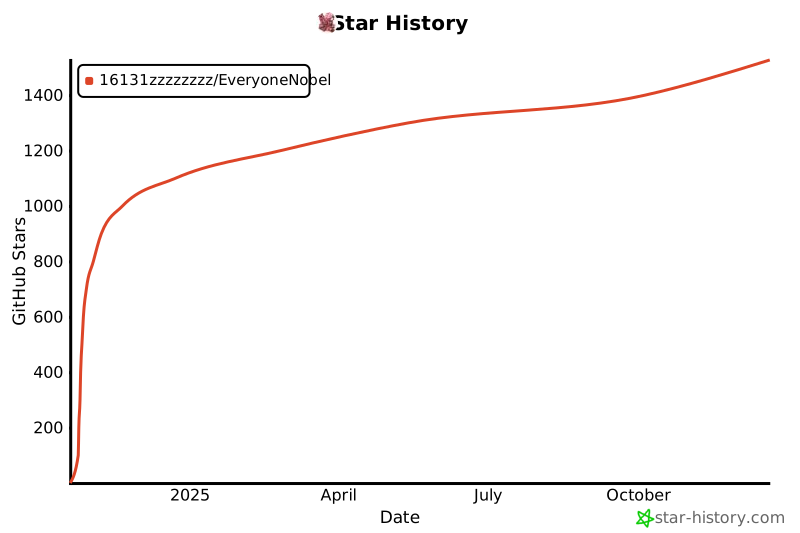
## 🏄 Star History
[](https://star-history.com/#16131zzzzzzzz/EveryoneNobel&Date)