https://github.com/199ocero/radio-deck
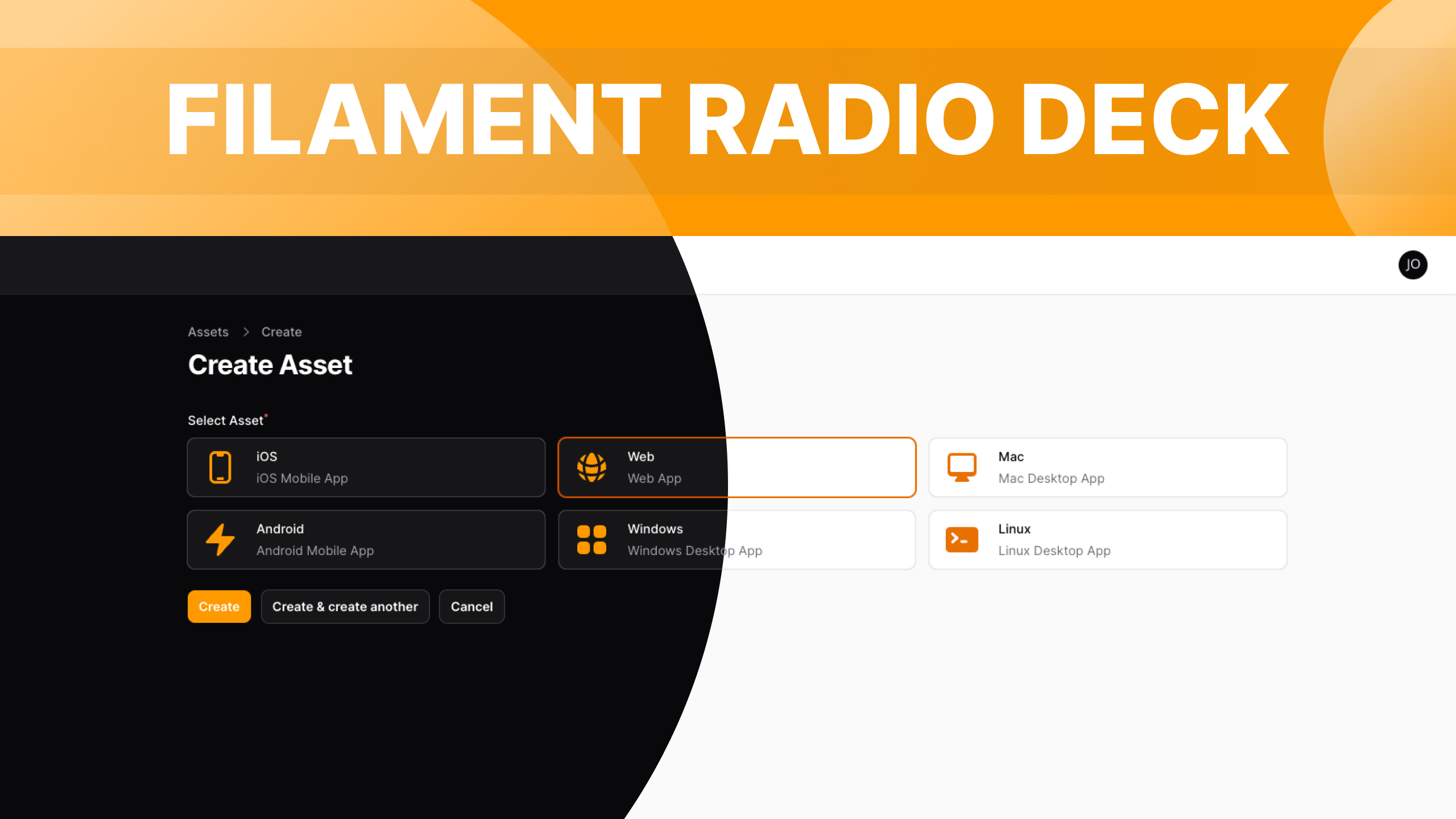
Turn filament default radio button into a selectable card with icons, title and description.
https://github.com/199ocero/radio-deck
filament-form filamentphp filamentphp-plugin
Last synced: 5 months ago
JSON representation
Turn filament default radio button into a selectable card with icons, title and description.
- Host: GitHub
- URL: https://github.com/199ocero/radio-deck
- Owner: 199ocero
- License: mit
- Created: 2023-12-28T03:03:48.000Z (over 2 years ago)
- Default Branch: 4.x
- Last Pushed: 2025-09-15T23:51:42.000Z (9 months ago)
- Last Synced: 2025-11-11T05:51:41.514Z (8 months ago)
- Topics: filament-form, filamentphp, filamentphp-plugin
- Language: PHP
- Homepage: https://filamentphp.com/plugins/jaocero-radio-deck
- Size: 685 KB
- Stars: 80
- Watchers: 1
- Forks: 24
- Open Issues: 0
-
Metadata Files:
- Readme: README.md
- Changelog: CHANGELOG.md
- Contributing: .github/CONTRIBUTING.md
- Funding: .github/FUNDING.yml
- License: LICENSE.md
- Security: .github/SECURITY.md
Awesome Lists containing this project
README
# Radio Deck
[](https://packagist.org/packages/jaocero/radio-deck)
[](https://packagist.org/packages/jaocero/radio-deck)
Turn filament default radio button into a selectable card with icons, title and description.
## Requirements
- FilamentPHP v4.x
- PHP 8.2+
- Laravel v11.28+
- Tailwind CSS v4.0+
## Installation
You can install the package via composer:
```bash
composer require jaocero/radio-deck
```
### For FilamentPHP v4 Users
To adhere to Filament's theming approach, you'll be required to employ a personalized theme in order to utilize this plugin.
> **Custom Theme Installation**
> [Filament v4 Docs - Creating a Custom Theme](https://filamentphp.com/docs/4.x/styling/overview#creating-a-custom-theme)
Instead of adding the plugin's views to your `tailwind.config.js` file, add the following source directive to your custom theme's CSS file (usually `resources/css/filament/admin/theme.css`):
```css
@source '../../../../vendor/jaocero/radio-deck/resources/views';
```
This will include the plugin's styles during the compilation process.
## Migration from v3 to v4
If you're upgrading from Radio Deck v3 to v4, please follow these steps:
### 1. Update Dependencies
```bash
composer require jaocero/radio-deck:^2.0
```
### 2. Create a Custom Theme
Since FilamentPHP v4 requires custom themes for plugins, you need to create one:
```bash
php artisan make:filament-theme
```
### 3. Update Theme Configuration
**Remove** the old configuration from your `tailwind.config.js`:
```js
// Remove this from tailwind.config.js
content: [
...
'./vendor/jaocero/radio-deck/resources/views/**/*.blade.php', // Remove this line
]
```
**Add** the source directive to your theme's CSS file instead:
```css
/* Add this to resources/css/filament/admin/theme.css */
@source '../../../../vendor/jaocero/radio-deck/resources/views';
```
### 4. Update Import Statements
Update your import statements to use the new namespace structure:
```php
// Old (v1.x)
use JaOcero\RadioDeck\Forms\Components\RadioDeck;
// New (v2.x) - Same import, but make sure you're using v2.x
use JaOcero\RadioDeck\Forms\Components\RadioDeck;
```
### 5. Method Changes
Some method names have been updated for better consistency:
```php
// Old method
->gap('gap-4')
// New method (renamed for clarity & to avoid conflicts with Filament’s built-in gap)
->optionsGap('gap-4')
```
## Usage
```php
use JaOcero\RadioDeck\Forms\Components\RadioDeck;
use Filament\Support\Enums\IconSize;
use Filament\Support\Enums\Alignment;
use Filament\Support\Enums\IconPosition;
public static function form(Form $form): Form
{
return $form
->schema([
RadioDeck::make('name')
->options([
'ios' => 'iOS',
'android' => 'Android',
'web' => 'Web',
'windows' => 'Windows',
'mac' => 'Mac',
'linux' => 'Linux',
])
->descriptions([
'ios' => 'iOS Mobile App',
'android' => 'Android Mobile App',
'web' => 'Web App',
'windows' => 'Windows Desktop App',
'mac' => 'Mac Desktop App',
'linux' => 'Linux Desktop App',
])
->icons([
'ios' => 'heroicon-m-device-phone-mobile',
'android' => 'heroicon-m-device-phone-mobile',
'web' => 'heroicon-m-globe-alt',
'windows' => 'heroicon-m-computer-desktop',
'mac' => 'heroicon-m-computer-desktop',
'linux' => 'heroicon-m-computer-desktop',
])
->required()
->iconSizes(IconSize::Medium) // Medium | Small | Large | ExtraLarge | TwoExtraLarge
->iconPosition(IconPosition::Before) // Before | After
->alignment(Alignment::Center) // Start | Center | End
->optionGap('gap-5') // Gap between Options and Descriptions between the Icon
->padding('px-4 py-6') // Padding around the deck
->extraCardsAttributes([ // Extra attributes for card elements
'class' => 'rounded-xl'
])
->extraOptionsAttributes([ // Extra attributes for option elements
'class' => 'text-3xl leading-none w-full flex flex-col items-center justify-center p-4'
])
->extraDescriptionsAttributes([ // Extra attributes for description elements
'class' => 'text-sm font-light text-center'
])
->multiple() // Enable multiple selection (returns array)
->colors('primary')
// or you can use an array of colors per option or you can use one color for all options
// ->colors([
// 'ios' => 'blue',
// 'android' => 'green',
// 'web' => 'purple',
// ])
->columns(3)
// or you can use how many columns every screen size
// ->columns([
// 'sm' => 1,
// 'md' => 2,
// 'lg' => 3,
// ])
->columnSpanFull()
]);
}
```
### Using Enums
You can also utilize an Enum class for `->options()`, `->descriptions()`, and `->icons()`. Here's an example:
```php
'iOS',
self::Android => 'Android',
self::Web => 'Web',
self::Windows => 'Windows',
self::Mac => 'Mac',
self::Linux => 'Linux',
};
}
public function getDescriptions(): ?string
{
return match ($this) {
self::iOs => 'iOS Mobile App',
self::Android => 'Android Mobile App',
self::Web => 'Web App',
self::Windows => 'Windows Desktop App',
self::Mac => 'Mac Desktop App',
self::Linux => 'Linux Desktop App',
};
}
public function getIcons(): ?string
{
return match ($this) {
self::iOs => 'heroicon-m-device-phone-mobile',
self::Android => 'heroicon-m-device-phone-mobile',
self::Web => 'heroicon-m-globe-alt',
self::Windows => 'heroicon-m-computer-desktop',
self::Mac => 'heroicon-m-computer-desktop',
self::Linux => 'heroicon-m-computer-desktop',
};
}
}
```
Usage with Enum:
```php
public static function form(Form $form): Form
{
return $form
->schema([
RadioDeck::make('name')
->options(AssetType::class)
->descriptions(AssetType::class)
->icons(AssetType::class)
->required()
->iconPosition(IconPosition::Before)
->alignment(Alignment::Center)
->colors('primary')
->columns(3),
])
->columns('full');
}
```
## Changelog
Please see [CHANGELOG](CHANGELOG.md) for more information on what has changed recently.
## Contributing
Please see [CONTRIBUTING](.github/CONTRIBUTING.md) for details.
## Security Vulnerabilities
Please review [our security policy](../../security/policy) on how to report security vulnerabilities.
## Credits
- [Jay-Are Ocero](https://github.com/199ocero)
- [All Contributors](../../contributors)
## License
The MIT License (MIT). Please see [License File](LICENSE.md) for more information.