https://github.com/1nvitr0/plugin-vscode-blocksort
Visual Studio Code Plugin for sorting code blocks like switch-statements, json-like or other structured data
https://github.com/1nvitr0/plugin-vscode-blocksort
formatting json-like sorting structured-data switch-case vscode vscode-extension
Last synced: 9 months ago
JSON representation
Visual Studio Code Plugin for sorting code blocks like switch-statements, json-like or other structured data
- Host: GitHub
- URL: https://github.com/1nvitr0/plugin-vscode-blocksort
- Owner: 1nVitr0
- License: mit
- Created: 2021-03-21T16:28:40.000Z (over 5 years ago)
- Default Branch: develop
- Last Pushed: 2025-04-17T07:15:07.000Z (over 1 year ago)
- Last Synced: 2025-10-20T21:47:05.696Z (9 months ago)
- Topics: formatting, json-like, sorting, structured-data, switch-case, vscode, vscode-extension
- Language: TypeScript
- Homepage:
- Size: 1.83 MB
- Stars: 11
- Watchers: 1
- Forks: 1
- Open Issues: 2
-
Metadata Files:
- Readme: README.md
- Changelog: CHANGELOG.md
- License: LICENSE.md
Awesome Lists containing this project
README
# Block Sort
[](https://marketplace.visualstudio.com/items?itemName=1nVitr0.blocksort)
[](https://open-vsx.org/extension/1nVitr0/blocksort)
[](https://marketplace.visualstudio.com/items?itemName=1nVitr0.blocksort)
[](https://marketplace.visualstudio.com/items?itemName=1nVitr0.blocksort)
[](https://github.com/semantic-release/semantic-release)
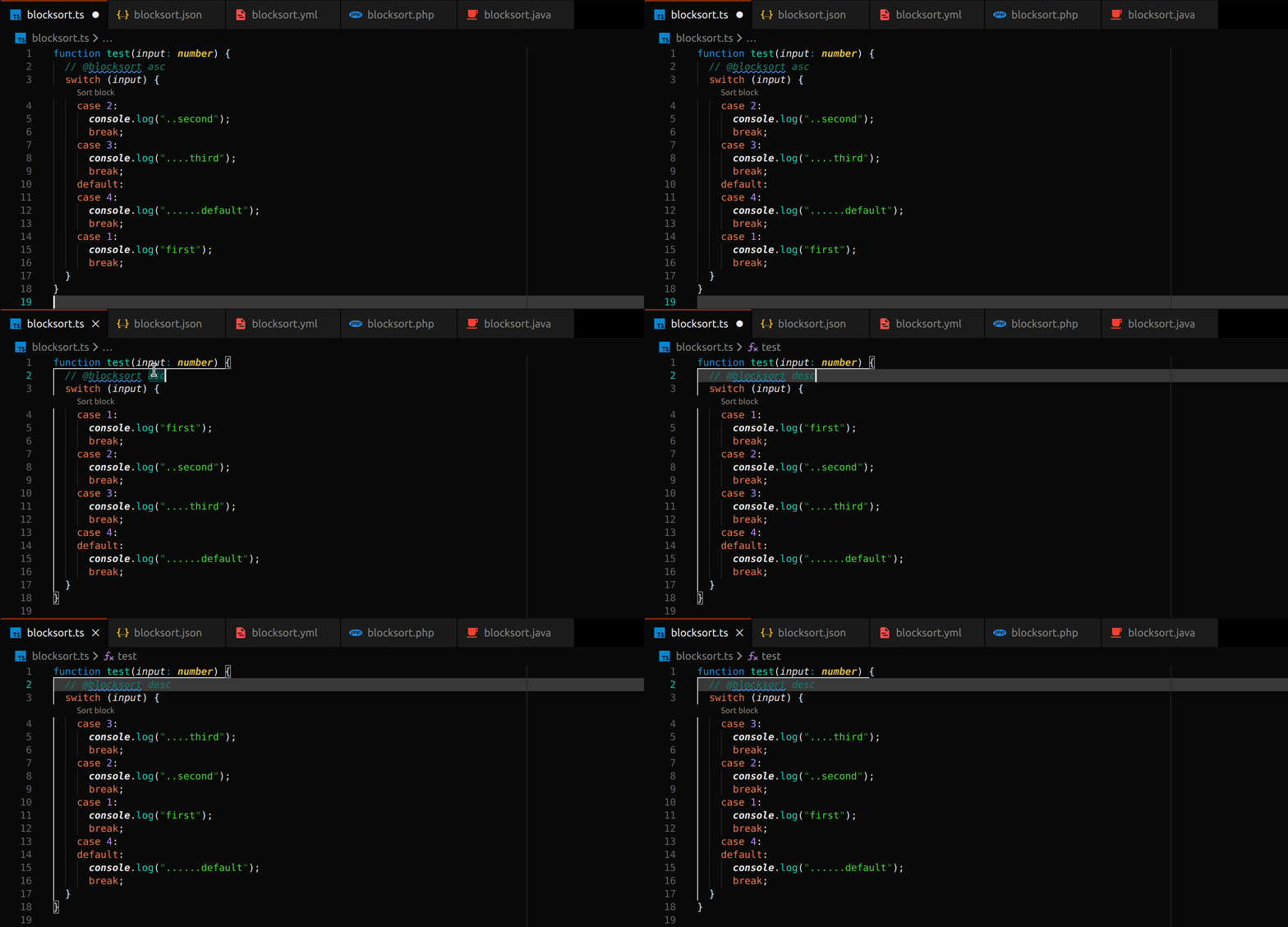
Sort Blocks instead of lines! Works for all major programming languages including JavaScript / TypeScript, Java, JSON, XML, etc.
### Table of Contents
- [Features](#features)
- [Commands](#commands)
- [Code Actions / Auto Sorting](#code-actions--auto-sorting)
- [Extension Settings](#extension-settings)
- [Default Keybindings](#default-keybindings)
- [Known Issues](#known-issues)
- [Contributors](#contributors)
***
## Features
The extension offers commands, similar to the default "Sort Lines Ascending / Descending" command. But instead of sorting lines, it sorts code blocks.
The selection should automatically expand to the surrounding block if nothing is selected.
If something is already selected, the extension tries it's best to validate and clean up your selection.
Additional features include:
- `@blocksort` annotations and `source.fixAll` code actions for auto-sorting on save
- deep (multilevel) sorting for nested blocks
- "*natural*" sorting for lines containing numbers
The blocks are sorted purely by their content, so while decorators are supported, classes or functions with different decorators will be sorted by their decorators first.
***
## Commands
This extension contributes the following commands:
`Sort Blocks Ascending`: Sorts the selected code blocks in ascending order. If no code blocks are selected, a selection for the deepest block the cursor is currently positioned in is generated.
`Sort Blocks Descending`: Sorts the selected code blocks in descending order. If no code blocks are selected, a selection for the deepest block the cursor is currently positioned in is generated.
`Shuffle Blocks`: Sorts the blocks in a random order. If no code blocks are selected, a selection for the deepest block the cursor is currently positioned in is generated.
`Sort Blocks Deep Ascending (Multilevel)`: Sorts the selected code blocks in ascending order, including nested blocks up to a specified depth.
`Sort Blocks Deep Descending (Multilevel)`: Sorts the selected code blocks in descending order, including nested blocks up to a specified depth.
`Shuffle Blocks Deep (Multilevel)`: Sorts the selected code blocks in a random order, including nested blocks up to a specified depth.
`Sort inner Blocks Ascending`: Sorts inner blocks in ascending order, without affecting the surrounding block(s). The depth at which to start, as well as the depth to stop at can ve specified.
`Sort inner Blocks Descending`: Sorts inner blocks in descending order, without affecting the surrounding block(s). The depth at which to start, as well as the depth to stop at can ve specified.
`Shuffle inner Blocks`: Sorts inner blocks in a random order, without affecting the surrounding block(s). The depth at which to start, as well as the depth to stop at can ve specified.
`Expand current Selection to surrounding Block`: Expand curren selection locally to surrounding lines in block.
`Expand current Selection fully (including separating Newlines) to the surrounding Block`: Expand curren selection to complete surrounding block.
`Quick Sort`: Shows a configurable list of sort commands, can be used to bind a keyboard shortcut.
***
## Code Actions / Auto Sorting
The extension provides the following code actions:
`source.fixAll.blocksort`: This can be executed on save to auto-sort all blocks following a `@blocksort` marker.
To enable auto Sorting, you must set the `editor.codeActionsOnSave` in your `settings.json`:
```json
{
"editor.codeActionsOnSave": {
"source.fixAll.blocksort": true
}
}
```
This will enable auto-sorting for blocks following a `@blocksort` marker.
The marker can additionally be followed by the options `asc` or `desc` to control the sorting order,
as well as optional numbers for the depth and skipping parent blocks (`depth:skip`):
```js
// @blocksort asc
switch(value) {
case 1:
return 1;
case 2:
return 2;
default:
return 2;
}
```
```yaml
# @blocksort asc inf
some:
nested:
- code
- (will be
sorted:
- up to
- any level)
```
```jsonc
// @blocksort inf:1
{
"keep1": {
"be": "kept",
"first": "level",
"items": "will",
},
"keep2": [
"inner",
"only",
"sort",
"values",
]
}
```
***
## Extension Settings
This extension contributed the following settings:
- `defaultMultilevelDepth`: Default depth used for deep sorting.
- Default: `-1` (infinite)
- `askForMultilevelDepth`: Skip asking for multilevel depth and always use `defaultSkipParents`.
- Default: `true`
- `defaultSkipParents`: Default depth of parent blocks to skip sorting
- Default: `0`
- `askForSkipParents`: Skip asking for depth of parent blocks to skip and always use `defaultSkipParents`.
- Default: `true`
- `indentIgnoreMarkers`: List of regex markers that when matched will result in ignoring the indentation of the current line. This is for example used for c-style `{` in a new line. The markers are always assumed to be at teh start of the line, but can be preceded by spaces and comments.
- Default:
```json
[
]
```
- *Language Overridable*
- `completeBlockMarkers`: List of markers that complete a block. They are assumed to be at the end of a line, but can be succeeded by comments or end-of-line markers (`,` or `;`).
- Default: `["\\}", "<\\/[a-zA-Z0-9\\-_=\\s]+"]`
- *Language Overridable*
- `foldingMarkers`: Dictionary of folding markers. They are supplied set a key-value style, the key being a human-readable ultra-short description of the folding markers.
- Base Options are always applied unless overridden in the dictionary, if null is specified, the marker is ignored:
```json
{
"()": { "start": "\\(", "end": "\\)" },
"[]": { "start": "\\[", "end": "\\]" },
"{}": { "start": "\\{", "end": "\\}" },
"<>": { "start": "<", "end": ">" },
}
```
- Default:
- global: `{}`
- `[xml]`:
```json
{
"<>": {
"start": "<[a-zA-Z0-9\\-_=\\s]+",
"end": "<\\/[a-zA-Z0-9\\-_=\\s]+|\\/>"
}
}
```
- `[html]`, `[php]`, `[jsx-tags]`:
```json
{
"<>": {
"start": "<(?!(?:\\/|area|base|br|col|command|embed|hr|img|input|keygen|link|meta|param|source|track|wbr)(?:[\\s\\/]|>))[a-zA-Z0-9\\-_=\\s>]+",
"end": "<\\/[a-zA-Z0-9\\-_=\\s]+|\\/>"
}
}
```
- *Language Overridable*
- `enableNaturalSorting`: Enables the natural sorting behavior for lines containing numbers.
- Default: `false`
- **Deprecated**: This option is n longer used, use `collationOptions.numeric` instead
- `collatorOptions`: Collator options for sorting. See https://developer.mozilla.org/en-US/docs/Web/JavaScript/Reference/Global_Objects/Intl/Collator/Collator for more information
- Default:
```json
{
"numeric": true,
"caseFirst": "false",
"sensitivity": "base"
}
```
- In addition to the default JavaScript Collator options, the following properties can be supplied
- `locales`: A BCP 47 language tag, or an comma separated array of such strings.
- `customSortOrder`: Custom Sort order in the form of a list of characters
- `customIgnoreCharacters`: A list of characters that are ignored when sorting, e.g. `"'\"()[]{}<>"`
- `sortConsecutiveBlockHeaders`: sorts consecutive block headers, such as a list of `case` statements.
- Default: `true`
- *Language Overridable*
- `enableCodeLens`: enables / disables code lenses shown over blocks annotated with `@blocksort`
- Default: `true`
- If `true` will copy value from `enableCodeActions`
- `enableCodeActions`: enables / disables code actions used for sorting blocks annotated with `@blocksort`, this will have an effect on `fixAll` code actions
- Default: "*"
- Will be overridden with `enableCodeLens` when set to `false` to avoid non-functioning code lenses
- `enableDocumentFormatting`: Document selector for selecting documents to select formatting for. Only matching documents will have a `Sort with` entry
- Default: `*`
- `enableRangeFormatting`: Document selector for selecting documents to select formatting for. Only matching documents will have a `Sort with` entry
- Default: `true`
- If `true` will copy value from `enableDocumentFormatting`
- `forceBlockHeaderFirstRegex`: Regex to match block headers that should be sorted first. `^` and `$` will be expanded to allow comments
- Default: `^$`
- *Language Overridable*
- `forceBlockHeaderLastRegex`: Regex to match block headers that should be sorted last. `^` and `$` will be expanded to allow comments
- Default: ``^(\\s*(when|case)\\s*('([^']|(?<=\\\\)')*'|\"([^\"]|(?<=\\\\)\")*\"|`([^`]|(?<=\\\\)`)*`|[A-Za-z_+\\-*/%<>d.,s]*)*\\s*(.*:)?\\n?\\r?)*\\s*default|else(?!\\s?if)\\s*:?$``
- *Language Overridable*
- `multiBlockHeaderRegex`: Regex for multi-block-headers such as a list of `case` statements under each other. `^` and `$` will be expanded to allow comments
- Default: ``^(when|case|default|else)\\s*('([^']|(?<=\\\\)')*'|\"([^\"]|(?<=\\\\)\")*\"|`([^`]|(?<=\\\\)`)*`|[A-Za-z_+\\-*/%<>d.,s]*)*\\s*(.*:)?$``
- *Language Overridable*
- `incompleteBlockRegex`: Regex for incomplete blocks. `^` and `$` will be expanded to allow comments
- Default: ``(if|when|else|case|for|foreach|else|elsif|while|def|then|default)\\s*('([^']|(?<=\\\\)')*'|\"([^\"]|(?<=\\\\)\")*\"|`([^`]|(?<=\\\\)`)*`|[A-Za-z_+\\-*/%<>d.,s]*)*\\s*(.*:)?$``
- *Language Overridable*
- `keepAppendedNewlines`: Keep appended Newlines in place when sorting
- Default: `true`
- `expandSelection`: Expand Selection options
- Default:
```json
{
"expandLocally": true,
"expandOverEmptyLines": false,
"foldingComplete": true,
"indentationComplete": true
}
```
- `expandSelection`: Expand Cursor to selection options
- Default:
```json
{
"expandLocally": true,
"expandOverEmptyLines": false,
"foldingComplete": true,
"indentationComplete": true
}
```
- `quickSortCommands`: Commands to show when the quick sort is opened
- Default:
```json
[
{
"command": "blocksort.sortBlocksAsc",
"label": "$(sort-asc) Sort Blocks Ascending",
"description": "Expand Selection and sort blocks in ascending order",
"picked": true
},
{
"command": "blocksort.sortBlocksDesc",
"label": "$(sort-desc) Sort Blocks Descending",
"description": "Expand Selection and sort blocks in descending order"
},
{
"command": "blocksort.sortBlocksShuffle",
"label": "$(arrow-switch) Shuffle Blocks",
"description": "Expand Selection and shuffle blocks"
},
{
"command": "editor.action.sortLinesAscending",
"label": "$(sort-asc) Sort Lines Ascending",
"description": "Sort selected lines in ascending order"
},
{
"command": "editor.action.sortLinesDescending",
"label": "$(sort-desc) Sort Lines Descending",
"description": "Sort selected lines in descending order"
},
{
"command": "blocksort.expandSelectionLocally",
"label": "$(unfold) Expand Selection",
"description": "Expand current Selection to surrounding Block"
}
]
```
Settings marked as *Language Overridable* can be specified on a per-language basis using the notation:
```json
"[typescript]": {
"blocksort.foldingMarkers": {
"<>": {
"start": "<",
"end": "/>"
}
}
}
```
***
## Default Keybindings
This extension has the following default keybindings:
- `Ctrl + Alt + Up` (when editor text has focus): `Sort Blocks Ascending` - Sort the currently blocks at the current selection in ascending order
- `Ctrl + Alt + Down` (when editor text has focus): `Sort Blocks Descending` - Sort the currently blocks at the current selection in descending order
- `Ctrl + Alt + End` (when editor text has focus): `Shuffle Blocks` - Sort the currently blocks at the current selection in a random order
***
## Known Issues
- some spacings between the original blocks may not be preserved
- The extension does NOT check for code errors due to sorting
- The extension assumes valid formatting, invalid formatting will probably result in invalid sorting
***
## Contributors
This theme is maintained by the following person:
[](https://github.com/1nVitr0) |
:---: |
[Aram Becker](https://github.com/1nVitr0) |
The following users have contributed to the project:
| | User | Commits |
| --------------------------------------------------------------------------------------------------: | :------------------------------------ | :------ |
| [](https://github.com/sixskys) | [sixskys](https://github.com/sixskys) | 1 |
The following users have inspired features or noticed important issues:
| | User | Feature |
| ------------------------------------------------------------------------------------------------------------------------------------: | :---------------------------------------------------------------------- | :----------------------------------- |
| [](https://github.com/YAMLcase) | [Yamlcase](https://github.com/YAMLcase) | Support for indent-style syntax |
| [ ](https://github.com/lavermil) | [lavermil](https://github.com/lavermil) | Multilevel sorting |
| [](https://github.com/centigrade-thomas-becker) | [centigrade-thomas-becker](https://github.com/centigrade-thomas-becker) | auto-sort on save |
| [](https://github.com/axefrog) | [axefrog](https://github.com/axefrog) | language specific extension settings |