https://github.com/39software/Panoply
Python program to display various stats and texts on a HUB75 connected RGB matrix display
https://github.com/39software/Panoply
home-assistant matrix-led raspberry-pi rgb rgb-matrix rgbmatrix
Last synced: about 1 year ago
JSON representation
Python program to display various stats and texts on a HUB75 connected RGB matrix display
- Host: GitHub
- URL: https://github.com/39software/Panoply
- Owner: x86-39
- License: gpl-3.0
- Created: 2021-12-29T23:56:30.000Z (over 4 years ago)
- Default Branch: main
- Last Pushed: 2022-04-30T18:55:00.000Z (about 4 years ago)
- Last Synced: 2024-11-08T10:54:54.140Z (over 1 year ago)
- Topics: home-assistant, matrix-led, raspberry-pi, rgb, rgb-matrix, rgbmatrix
- Language: Python
- Homepage:
- Size: 578 KB
- Stars: 5
- Watchers: 2
- Forks: 1
- Open Issues: 0
-
Metadata Files:
- Readme: README.md
- License: LICENSE
Awesome Lists containing this project
README

# Panoply
Panoply is a Python program to drive an RGB Matrix display. This program comes with Home Assistant integration, which makes it a great display to view Home Assistant devices.
## Usage
1. Make sure you the [rgbmatrix](https://github.com/hzeller/rpi-rgb-led-matrix) library installed and your RGB matrix is connected.
2. Configure your display settings in `config.py` (Copy this from `config_sample.py`). The default size is 64x64, with no rotation.
3. If you've got the display connected and configured, go into the `panoply` directory and simply run `python3 main.py`!
4. If all works, you can configure the layout in `config.py` to your liking.
5. (Optional) To have it persist after your terminal closes, I recommend using `tmux` (`tmux new-session`).
## Configuration
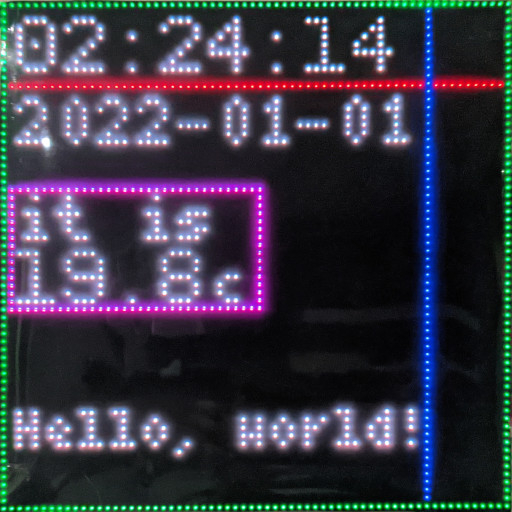
The following is the default configuration for Panoply, with every option commented with usage. Please place the configuration at `panoply/config.py` after configuring.
config_sample.py
## config_sample.py
```python
# How often the display refreshes
DISPLAY_REFRESH_RATE = 0.25
# How often information on the device is polled (Date, time)
LOCAL_REFRESH_INTERVAL = 0.5
# How often information over web requests is polled (Home Assistant)
WEB_REFRESH_INTERVAL = 30
# Put your display resolution here
DISPLAY_WIDTH = 64
DISPLAY_HEIGHT = 64
# If you need any rotation, specify this as a multiple of 90, otherwise leave it at 0
DISPLAY_ROTATION = 0
# Display mapping, read https://github.com/hzeller/rpi-rgb-led-matrix#changing-parameters-via-command-line-flags
DISPLAY_HARDWARE_MAPPING = "adafruit-hat"
# Path to font files, NEEDS TO BE "BDF" bitmap fonts!
TINY_FONT = "../fonts/Tiny-4x6.bdf"
SMALL_FONT = "../fonts/Small-5x7.bdf"
LARGE_FONT = "../fonts/PixeloidMono.bdf"
# Time when to dim the display
# BE SURE TO ZERO-FILL THE TIMES (06:00, NOT 6:00)
DIM_START_TIME = "20:00"
# Time when to stop dimming the display
DIM_STOP_TIME = "06:00"
# How much the display should be dimmer as a multiplier of the usual brightness.
# Set to 1 to disable dimming
DIM_MODIFIER = 1
# This defines placeholders which are retrieved from shell commands
# These are refreshed according to LOCAL_REFRESH_INTERVAL
# '' : ''
COMMAND_PLACEHOLDERS = {
'time' : 'date +"%H:%M:%S"',
'date' : 'date +"%Y-%m-%d"'
}
# URL of your Home Assistant instance
HOME_ASSISTANT_URL = "https://home.example.com"
# Long-lived access token
HOME_ASSISTANT_KEY = "ABCDEF"
# This defines placeholders which are retrieved from a Home Assistant instance
# Leave blank to disable entirely
# These are refreshed according to WEB_REFRESH_INTERVAL
# '' : ''
HOME_ASSISTANT_STATE_PLACEHOLDERS = {
'temp' : 'sensor.room_temperature',
'phonebattery' : 'sensor.phone_battery_level'
}
# Colors that are retrieved from a Home Assistant lightbulb
# These can be used instead of the usual tuple:
# 'text definition' : (, , 'bulbs')
# Leave blank to disable entirely
# These are refreshed according to WEB_REFRESH_INTERVAL
# '' : ''
HOME_ASSISTANT_COLORS = {
'bulbs' : 'light.bulbs'
}
# Layout settings
# Here you can customise the location and content of text elements or place shapes
# AVAILABLE TEXT PLACEHOLDERS:
# %time% - Replaced with the current time
# %date% - Replaced with the current date
# And any entities defined from Home Assistant
# Large text, using the PixeloidMono font
# '' : (, , (, , ))
LARGE_TEXT_ELEMENTS = {
'%time%' : (2, 9, (200, 200, 200)),
'%temp%' : (2, 38, (200, 200, 200))
}
# Small text, using the 5x7 font
# '' : (, , (, , ))
SMALL_TEXT_ELEMENTS = {
'%date%' : (2, 18, (200, 200, 200)),
'it is' : (2, 30, (200, 200, 200))
}
# Tiny text, using the 4x6 font
# '' : (, , (, , ))
TINY_TEXT_ELEMENTS = {
'c' : (27, 38, (200, 200, 200)),
'Hello, world!' : (2, 56, 'bulbs') # Example of using colors retrieved from Home Assistant
}
# Place a line going from x0, y0 to x1, y1
# (, , , , , ))
LINES = [
(0, 10, 64, 10, (200, 0, 0)),
(53, 0, 53, 64, (0, 0, 200))
]
# Place a hollow rectangle
# (, , , , (, , ))
RECTANGLES = [
(0, 0, 63, 63, (0, 200, 0)),
(1, 23, 32, 38, (200, 0, 200))
]
```
For every text field, placeholders can be used. These placeholders can be defined earlier in the config at `HOME_ASSISTANT_STATE_PLACEHOLDERS` and `COMMAND_PLACEHOLDERS`. When you type the placeholder surrounded by percentage signs, these will be replaced with the last value retrieved from the command/entity configured.
There are also color placeholders which are retrieved from Home Assistant entities. These take the entity's `rgb_color` field and use them as the colour. These can be used by defining them in `HOME_ASSISTANT_COLORS` and then using the colors name instead of the colour tuple.
## Example / My Config
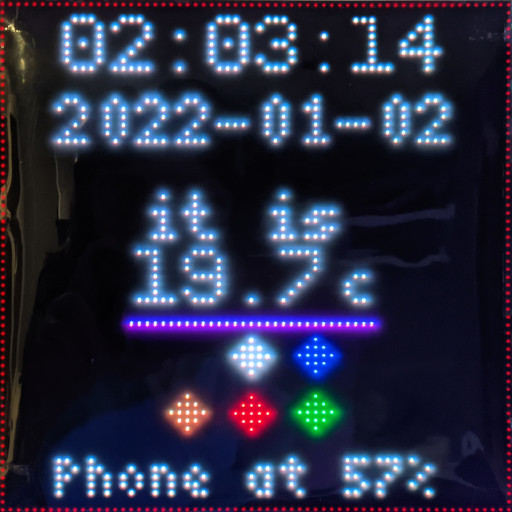
In this image my configuration is shown. I have the time and date displayed at the top. The temperature is shown after being retrieved from Home Assistant.
Beneath that is a horizontal line which takes the colour of my LED strip (Which you can see in the reflection!), and below that are 6 icons representing my ceiling bulbs, these also take the colour they are set to. In the picture there's one turned off, one at cool white, one at warm white and a red, blue and green bulb.
At the bottom there is text which says my phone's current battery level, and the entire panel is wrapped in a red square. Hopefully this gives an idea of the possibilities so far!
The configuration used for it is the following:
config.py
## config.py
```python
# How often the display refreshes
DISPLAY_REFRESH_RATE = 0.25
# How often information on the device is polled (Date, time)
LOCAL_REFRESH_INTERVAL = 0.4
# How often information over web requests is polled (Home Assistant)
WEB_REFRESH_INTERVAL = 10
# Put your display resolution here
DISPLAY_WIDTH = 64
DISPLAY_HEIGHT = 64
# If you need any rotation, specify this as a multiple of 90, otherwise leave it at 0
DISPLAY_ROTATION = 180
# Display mapping, read https://github.com/hzeller/rpi-rgb-led-matrix#changing-parameters-via-command-line-flags
DISPLAY_HARDWARE_MAPPING = "adafruit-hat"
# Path to font files, NEEDS TO BE "BDF" bitmap fonts!
TINY_FONT = "../fonts/Tiny-4x6.bdf"
SMALL_FONT = "../fonts/Small-5x7.bdf"
LARGE_FONT = "../fonts/PixeloidMono.bdf"
# Time when to dim the display
# BE SURE TO ZERO-FILL THE TIMES (06:00, NOT 6:00)
DIM_START_TIME = "22:00"
# Time when to stop dimming the display
DIM_STOP_TIME = "07:00"
# How much the display should be dimmer as a multiplier of the usual brightness
DIM_MODIFIER = 0.15
# This defines placeholders which are retrieved from shell commands
# These are refreshed according to LOCAL_REFRESH_INTERVAL
# '' : ''
COMMAND_PLACEHOLDERS = {
'time' : 'date +"%H:%M:%S"',
'date' : 'date +"%Y-%m-%d"'
}
# URL of your Home Assistant instance
HOME_ASSISTANT_URL = "https://home.example.com"
# Long-lived access token
HOME_ASSISTANT_KEY = "ABCDEF"
# This defines placeholders which are retrieved from a Home Assistant instance
# Leave blank to disable entirely
# These are refreshed according to WEB_REFRESH_INTERVAL
# '' : ''
HOME_ASSISTANT_STATE_PLACEHOLDERS = {
'temp' : 'sensor.room_temperature',
'phonebattery' : 'sensor.phone_battery_level'
}
# Colors that are retrieved from a Home Assistant lightbulb
# These can be used instead of the usual tuple:
# 'text definition' : (, , 'bulbs')
# Leave blank to disable entirely
# These are refreshed according to WEB_REFRESH_INTERVAL
# '' : ''
HOME_ASSISTANT_COLORS = {
'bulb1' : 'light.bulb1',
'bulb2' : 'light.bulb2',
'bulb3' : 'light.bulb3',
'bulb4' : 'light.bulb4',
'bulb5' : 'light.bulb5',
'bulb6' : 'light.bulb6',
'led_01' : 'light.led_01'
}
# Layout settings
# Here you can customise the location and content of text elements or place shapes
# Large text, using the PixeloidMono font
# '' : (, , (, , ))
LARGE_TEXT_ELEMENTS = {
'%time%' : (8, 9, (200, 200, 200)),
'%temp%' : (17, 38, (200, 200, 200)),
'●' : (21, 48, 'bulb1'),
'● ' : (21, 55, 'bulb2'),
'● ' : (29, 48, 'bulb3'),
'● ' : (29, 55, 'bulb4'),
'● ' : (37, 48, 'bulb5'),
'● ' : (37, 55, 'bulb6') # The spaces are required so these show up as unique values in the dict, but they do not get rendered!
}
# Small text, using the 5x7 font
# '' : (, , (, , ))
SMALL_TEXT_ELEMENTS = {
'%date%' : (7, 18, (200, 200, 200)),
'it is' : (18, 30, (200, 200, 200))
}
# Tiny text, using the 4x6 font
# '' : (, , (, , ))
TINY_TEXT_ELEMENTS = {
'c' : (43, 38, (200, 200, 200)),
'Phone at %phonebattery%%' : (7, 62, (200, 200, 200))
}
# Place a line going from x0, y0 to x1, y1
# (, , , , (, , ))
LINES = [
(16, 40, 48, 40, 'led_01')
]
# Place a hollow rectangle
# (, , , , (, , ))
RECTANGLES = [
(0, 0, 63, 63, (64, 0, 0))
]
```
## Notices
This project uses fonts under the public domain and fonts licensed under the SIL Open Font License. For more information, check the [README.md](./fonts/README.md) in the `fonts` directory.
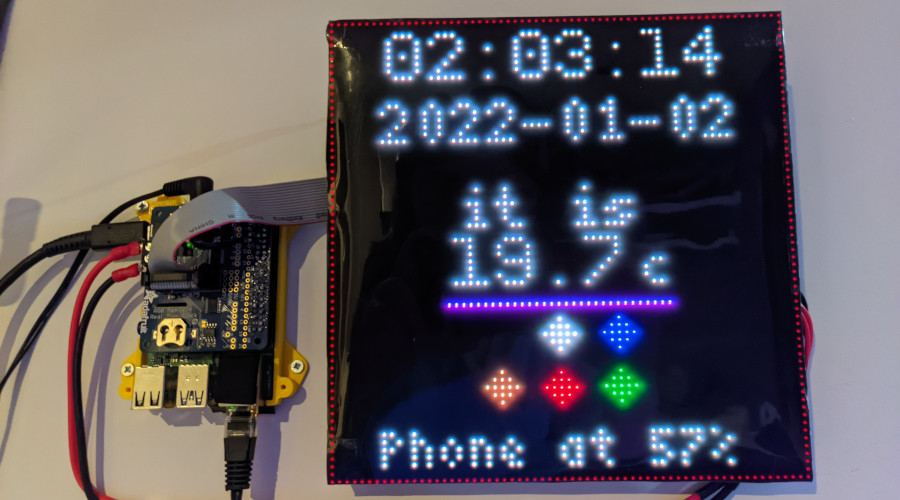
This has been tested with a Raspberry Pi 4b with 4GB of RAM. The display I am using is a [JOY-iT 64x64 RGB-LED Matrix Module](https://www.elektor.com/joy-it-64x64-rgb-led-matrix-module) with an [Adafruit RGB Matrix HAT](https://www.adafruit.com/product/2345). The code is made to work with any display that supports the [rgbmatrix](https://github.com/hzeller/rpi-rgb-led-matrix) library though, although I doubt lower resolutions will be able to display much.
The cause of the reflections in the images are because I covered the display with a plastic film to dim it so it can be kept on at night, not the display itself.
The `rgbmatrix` library requires root unless configured otherwise, this is not a bug with this program!