https://github.com/3pillarlabs/hailstorm-sdk
Distribute Apache JMeter tests with Amazon EC2 instances or data-center machines, optionally collect application infrastructure metrics and generate editable reports.
https://github.com/3pillarlabs/hailstorm-sdk
aws cli jmeter nmon reports
Last synced: 12 months ago
JSON representation
Distribute Apache JMeter tests with Amazon EC2 instances or data-center machines, optionally collect application infrastructure metrics and generate editable reports.
- Host: GitHub
- URL: https://github.com/3pillarlabs/hailstorm-sdk
- Owner: 3pillarlabs
- License: mit
- Created: 2017-08-16T04:48:11.000Z (almost 9 years ago)
- Default Branch: develop
- Last Pushed: 2023-03-09T18:11:33.000Z (over 3 years ago)
- Last Synced: 2024-04-14T13:52:12.139Z (over 2 years ago)
- Topics: aws, cli, jmeter, nmon, reports
- Language: Ruby
- Homepage: https://3pillarlabs.github.io/hailstorm-sdk/
- Size: 6.81 MB
- Stars: 4
- Watchers: 9
- Forks: 2
- Open Issues: 32
-
Metadata Files:
- Readme: README.md
- License: LICENSE.md
- Code of conduct: CODE_OF_CONDUCT.md
Awesome Lists containing this project
README
# Hailstorm SDK
[](https://travis-ci.org/3pillarlabs/hailstorm-sdk)
[](https://codeclimate.com/github/3pillarlabs/hailstorm-sdk/maintainability)
[](https://codeclimate.com/github/3pillarlabs/hailstorm-sdk/test_coverage)
[](https://github.com/3pillarlabs/hailstorm-sdk/blob/develop/CODE_OF_CONDUCT.md)
A cloud-aware library and applications for distributed load testing using JMeter and support for server monitoring.
Hailstorm uses JMeter to generate load on the system under test. You create your JMeter test
plans/scripts using JMeter GUI interface. Hailstorm uses these test plans to generate load. Hailstorm uses Amazon EC2
to create load agents. Each load agent is pre-installed with JMeter. The application executes your test plans in
non-GUI mode using these load agents. Hailstorm can also work with containers or virtual machines or physical machines
in your data center. Hailstorm can monitor server side resources, though at the moment, the server side monitoring is
limited to UNIX hosts with [nmon](http://nmon.sourceforge.net/pmwiki.php).
## Installing Hailstorm
### Software Prerequisites
- [Docker](https://www.docker.com/get-started)
- [Docker Compose](https://docs.docker.com/compose/)
### Setup
#### :tada: Download the [latest Hailstorm release](https://github.com/3pillarlabs/hailstorm-sdk/releases/latest).
Every release consists of three files:
- hailstorm-web/docker-compose.yml
- hailstorm-cli/docker-compose.yml
- hailstorm-cli/Makefile
The release is a tar+gz file. Unpack to any directory on your filesystem.
## Web Interface
This is the recommended approach for most users.
To start the web interface:
```bash
$ cd /path/to/unpacked/release
$ cd hailstorm-web
$ docker-compose up
```
This starts downloading the containers, and starting them one by one. This should complete within a minute. You will get
output similar to this towards the end.
```text
hailstorm-api_1 | The signal INFO is in use by the JVM and will not work correctly on this platform
hailstorm-api_1 | Puma starting in single mode...
hailstorm-api_1 | * Version 4.3.3 (jruby 9.1.17.0 - ruby 2.3.3), codename: Mysterious Traveller
hailstorm-api_1 | * Min threads: 0, max threads: 16
hailstorm-api_1 | * Environment: development
hailstorm-api_1 | * Listening on tcp://0.0.0.0:8080
hailstorm-api_1 | Use Ctrl-C to stop
web_1 | 2020/04/04 17:03:23 Received 200 from http://hailstorm-api:8080
web_1 | 2020-04-04 17:03:23: (server.c.1521) server started (lighttpd/1.4.54)
```
The *Received 200 from http://...* message indicates that the system is available.
**Open browser to [http://localhost:8080](http://localhost:8080)**
You should see a wizard to create a new project.
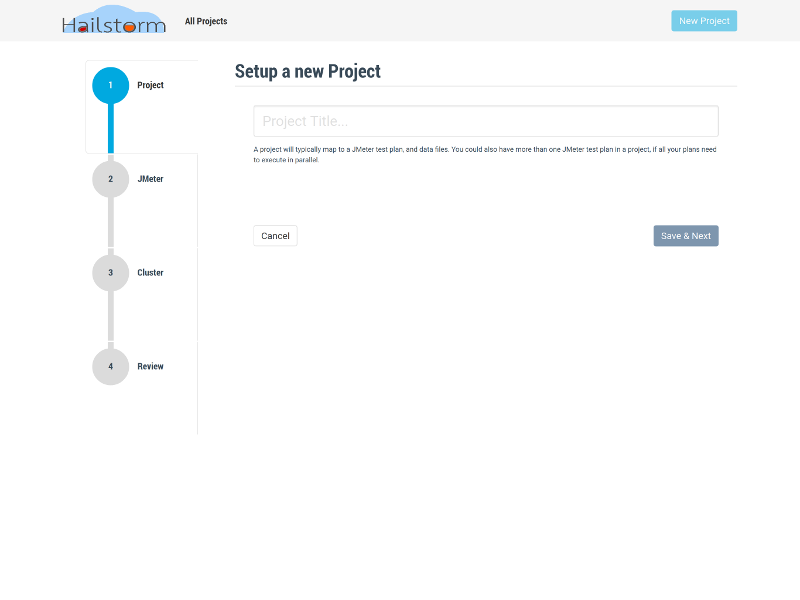
To bring down the container setup, exit with CTRL+C if ``docker-compose`` is running in foreground. If you daemonized it, or
want to clean up completely, execute: ``docker-compose down``.
### Daemonized Mode
To start the web interface as a daemon:
```bash
$ docker-compose up -d
```
It takes up to sixty seconds for the system to initialize completely. If you get a connection reset message in the browser, wait for a few seconds and refresh the browser. While you are waiting, you can see the logs with ``docker-compose logs -f``.
## CLI Interface
The CLI is meant for advanced users who need low level customization and/or server monitoring.
### Additional Prerequisite
- ``make`` - Available on most Linux distributions and MacOSX. For Windows, try installing with
[Chocolatey](https://chocolatey.org/): ``choco install make``.
### Running the CLI
```bash
$ cd /path/to/unpacked/release
$ cd hailstorm-cli
$ docker-compose up -d
$ make
```
The CLI will wait for the docker containers to be available. It should take less than a minute. When the CLI starts, it shows a prompt:
```bash
hailstorm@ab7ecdeac102:/hailstorm$
```
The current directory on the host is mapped to ``/hailstorm`` in the container. Any files saved to this location in the container will persist across container restarts.
#### Create a CLI project
```bash
hailstorm@ab7ecdeac102:/hailstorm$ hailstorm shopping_cart
```
Truncated output...
```text
wrote shopping_cart/config/environment.rb
wrote shopping_cart/config/database.properties
wrote shopping_cart/config/progressive.rb
wrote shopping_cart/config/boot.rb
Done!
```
#### Start the CLI
```bash
hailstorm@ab7ecdeac102:/hailstorm$ cd shopping_cart
hailstorm@ab7ecdeac102:/hailstorm/shopping_cart$ ./script/hailstorm
```
```text
Welcome to the Hailstorm (version 5.0.0) shell.
Type help to get started...
hs > _
```
To bring down the containers, exit the CLI container, and execute on the host: ``docker-compose down``.
## License
The source code is distributed under the [MIT License](https://opensource.org/licenses/MIT).
## Contributing
Bug reports and pull requests are welcome on GitHub at https://github.com/3pillarlabs/hailstorm-sdk/. This project is intended to be a safe, welcoming space for collaboration, and contributors are expected to adhere to the [code of conduct](https://github.com/3pillarlabs/hailstorm-sdk/blob/develop/CODE_OF_CONDUCT.md).
## Code of Conduct
Everyone interacting in the Hailstorm project's codebases, issue trackers, chat rooms and mailing lists is expected to follow the [code of conduct](https://github.com/3pillarlabs/hailstorm-sdk/blob/develop/CODE_OF_CONDUCT.md).
## About this project
Copyright (c) 2012 3Pillar Global
**Hailstorm** is developed, and maintained by open source volunteers at [3Pillar Global](https://www.3pillarglobal.com/). Hailstorm is not an official 3Pillar Global product (experimental or otherwise), but 3Pillar Global owns the code.