https://github.com/3urobeat/cs2-autoaccept-linux
🖱 Automatically accept CS2 matches on Linux (X11 only!) using image scanning [VAC safe]
https://github.com/3urobeat/cs2-autoaccept-linux
auto-accept counter-strike cpp cs2 csgo game image-analysis linux mouse steam
Last synced: 9 months ago
JSON representation
🖱 Automatically accept CS2 matches on Linux (X11 only!) using image scanning [VAC safe]
- Host: GitHub
- URL: https://github.com/3urobeat/cs2-autoaccept-linux
- Owner: 3urobeat
- License: gpl-3.0
- Created: 2021-06-08T15:54:51.000Z (about 5 years ago)
- Default Branch: main
- Last Pushed: 2025-04-18T15:45:30.000Z (about 1 year ago)
- Last Synced: 2025-04-18T23:08:48.231Z (about 1 year ago)
- Topics: auto-accept, counter-strike, cpp, cs2, csgo, game, image-analysis, linux, mouse, steam
- Language: C++
- Homepage:
- Size: 533 KB
- Stars: 17
- Watchers: 1
- Forks: 0
- Open Issues: 1
-
Metadata Files:
- Readme: README.md
- Funding: .github/FUNDING.yml
- License: LICENSE
Awesome Lists containing this project
README
# cs2-autoaccept-linux
This C++ script automatically accepts Counter-Strike 2 matches for you.
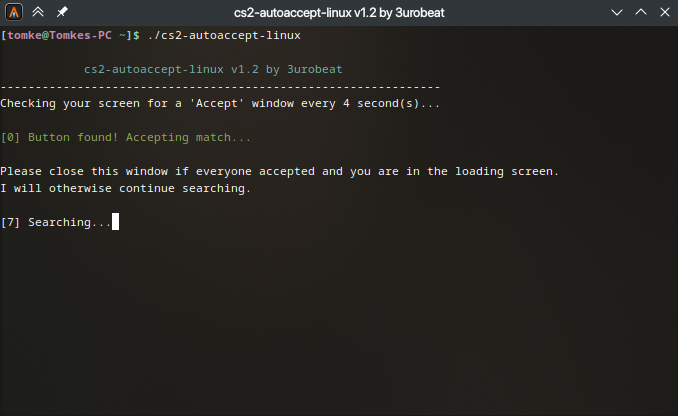
It does this by analyzing your screen every 4 seconds and moving and clicking with your mouse when it detects the 'Accept' button.
Since this script does not interfere with any game files and just takes screenshots of your display it is completely VAC safe.
This script is for Linux only. If you are on Windows, please see [my other repository.](https://github.com/3urobeat/cs2-autoaccept)
> [!NOTE]
> Does **not** support Wayland yet!
## Download & Run
**Easy method:**
Head over to the [release section](https://github.com/3urobeat/cs2-autoaccept-linux/releases/latest) and download the latest executable.
Place it on your system whereever you like.
**Hard way (compiling the project yourself):**
Clone this repository using git or download it as a .zip.
Make sure you have `libxtst-dev`, `cmake`, `make` and `g++` installed. (Package names may vary depending on your distribution)
Open a terminal in the project's folder:
```bash
# Enter the build directory
cd build
# Create Makefile
cmake ..
# Build
make -j8
```
After the build has completed, you may move the `cs2-autoaccept-linux` binary from the `build` directory to anywhere on your system.
## Usage
Open a terminal in the folder you placed the file in.
```bash
# Make sure the very first time that the binary is executable
chmod +x ./cs2-autoaccept-linux
# Run it!
./cs2-autoaccept-linux
```
You can stop the script by either pressing CTRL+C in the terminal or by closing the terminal window entirely.
> [!WARNING]
> It is important that you run the executable from a terminal. Executing it with a double click may cause it to run in the background forever.
The script will start scanning your screen every 4 seconds.
Queue for a match in CS2. The script will automatically accept it for you.
> [!NOTE]
> The game must be on your **primary display** and be focused. If you minimze the game the script won't work.
> The script works in Windowed, as well as in Fullscreen and isn't affected by your brightness settings.
Stop/Close the window when you load into the match.
If not everyone accepted just leave the script open and it will continue scanning.
> [!IMPORTANT]
> Should the script fail to find anything, please make sure that you don't use a color correction profile for your display.
> The scripts relies on matching colors in the screenshot it takes. A color profile changes these color values.
Enjoy a toilet break while queueing!