https://github.com/42coders/document-templates
Laravel package for creating and managing user editable document templates with placeholders and various data sources.
https://github.com/42coders/document-templates
document-generation editable-documents editable-emails hacktoberfest laravel laravel-package
Last synced: 6 months ago
JSON representation
Laravel package for creating and managing user editable document templates with placeholders and various data sources.
- Host: GitHub
- URL: https://github.com/42coders/document-templates
- Owner: 42coders
- License: mit
- Created: 2019-11-05T08:41:09.000Z (over 6 years ago)
- Default Branch: master
- Last Pushed: 2024-08-09T08:21:50.000Z (almost 2 years ago)
- Last Synced: 2025-11-19T17:29:29.342Z (8 months ago)
- Topics: document-generation, editable-documents, editable-emails, hacktoberfest, laravel, laravel-package
- Language: HTML
- Homepage: https://42coders.com/bwf/
- Size: 3.15 MB
- Stars: 201
- Watchers: 6
- Forks: 24
- Open Issues: 8
-
Metadata Files:
- Readme: README.md
- Changelog: CHANGELOG
- License: LICENSE
Awesome Lists containing this project
README
# Document Templates
[](https://github.com/42coders/document-templates/actions/workflows/test.yml)
[](https://packagist.org/packages/42coders/document-templates)
[](https://packagist.org/packages/42coders/document-templates)

## Introduction
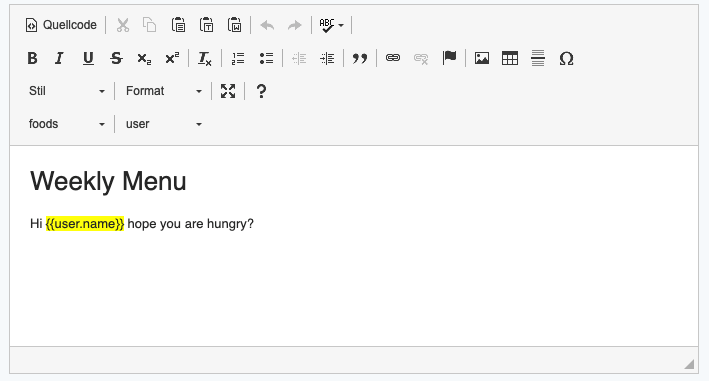
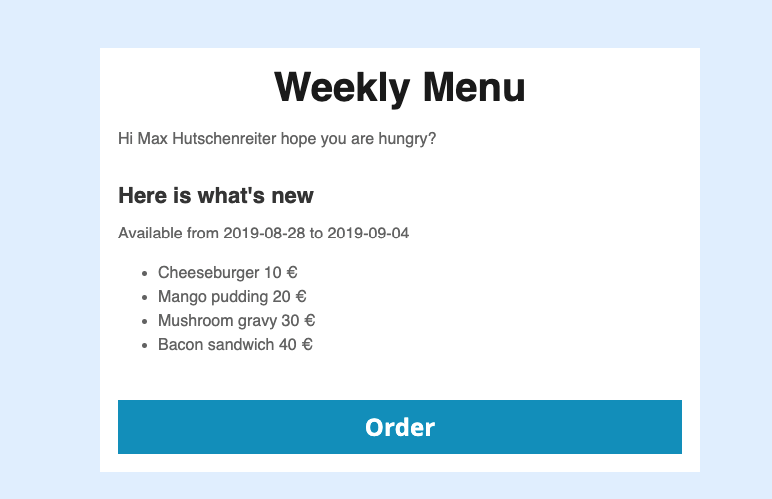
Document templates Laravel package is intended for creating/managing user editable document templates, with ability to add placeholders, and fill them from various data sources (models, collections, arrays, objects).
The package uses [Twig](https://twig.symfony.com/) as a main template engine, but it is possible to extend it with other template engines. Document templates can be used as a base for creating editable pdf documents such as invoices, reports etc., for email templates or any other editable, server generated documents. The user editable parts of the document template are secured using [Twig Sandbox Extension](https://twig.symfony.com/doc/2.x/api.html#sandbox-extension). The sandbox behaviour can be configured in the config file.
This package is part of the Business Workflow Framework. For a quick introduction on how to use the package please see this [blog post](https://42coders.com/how-to-create-invoices-easily-with-document-templates-package/).
## Getting started
### Requirements
#### Document templates version 6
- Laravel 9 or newer
- php 8+
#### Document templates version 5
- Laravel 9 or 10
- php 8+
#### Document templates version 4
- Laravel 5.7 or newer
- php 7.4+
#### Document templates version 3
- Laravel 5.7 or newer
- php 7.3+
### Installation
Install with composer
```sh
composer require 42coders/document-templates
```
Publish the migrations, views, vue components and config:
```sh
php artisan vendor:publish --provider="BWF\DocumentTemplates\DocumentTemplatesServiceProvider"
```
There are separate publish groups if you don't need all the vendor files in your application.
To publish only one group use the following command
```sh
php artisan vendor:publish --provider="BWF\DocumentTemplates\DocumentTemplatesServiceProvider --tag=group_name".
```
The following file groups are available for publishing:
- **migrations** publishes the migration files to the database directory
- **views** publishes the views for the basic administration of the document templates to the `resources/views/vendor/document-templates`
- **components** publishes the views for the basic administration of the document templates to the `resources/js/vendor/document-templates/components`
- **config** publishes the configuration file to the config directory
- **ckeditor** publishes the ckeditor and the placeholders plugin for the ckeditor into the `public/vendor/document-templates/js/lib/ckeditor` and `resources/js/vendor/document-templates/js/ckeditor` respectively
- **js** publishes the javascript for easier initialization of the administration gui
**DANGER ZONE**
If you already published the files and want to overwrite them use the: `--force` argument.
This command overwrites your changes in the published files, use it carefully.
Run the migration
```sh
php artisan migrate
```
Add the routes from the package to your routes file:
```sh
\BWF\DocumentTemplates\DocumentTemplates::routes(YourExtendedDocumentTemplatesController::class);
```
The routes function accepts 1 argument:
1. Controller class name to use with the routes
## Basics
### DocumentTemplate
This trait is responsible for reading the layout files, handling the datasources and rendering the document with data. Can be applied to any class with the convention that the class has only optional parameters in the constructor. These classes represent the document types, create separate classes for Invoices, Letters, Registration Emails etc.
### DocumentTemplateModel
The model responsible to store the document templates, the default table is: `document_templates`.
### EditableTemplate
Editable template is the dynamic part in the layout that the user can modify.
### Layout
The layouts are twig template files created by the developer, they can be used by document templates.
### DocumentTemplatesController
The default controller for administration of the document templates.
### Placeholders
Placeholders are twig template variables or expressions used in the editable templates to be replaced during the rendering, e.g. `{{user.name}}` or `{% for user in users %}`
### Data Sources
Data sources are the objects that provide data to the document template, and replace the placeholders with actual data in the rendering process. Data sources can be created from Models, Objects, arrays, or from any scalar types (strings, integers).
## Basic usage
### Configuration
The configuration can be found in `config/document_templates`.
`layout_path` - path to the layout files, defaults to: `resources/templates`.
The twig sandbox can be configured with the settings below, read more about sandbox configuration [here](https://twig.symfony.com/doc/2.x/api.html#sandbox-extension). The extended sandbox policy class adds support for allowing all object properties by setting wildcard `*` in the first position in the allowed properties array.
```php
'template_sandbox' => [
'allowedTags' => ['for'],
'allowedFilters' => ['escape'],
'allowedMethods' => [],
'allowedProperties' => ['*'],
'allowedFunctions' => []
]
```
Twig environment options can be configured with the settings below, read more about the options [here](https://twig.symfony.com/doc/2.x/api.html#environment-options).
```php
'twig' => [
'environment' => [
'debug' => false,
'charset' => 'utf-8',
'base_template_class' => '\Twig\Template',
'cache' => false,
'auto_reload' => false,
'strict_variables' => false,
'autoescape' => false,
'optimizations' => -1
]
]
```
Twig extensions can be loaded over `twig.extensions` by adding the extension's class to the array (which extends `\Twig\Extension\AbstractExtension` or implements `\Twig\Extension\ExtensionInterface`).
```php
'twig' => [
'extensions' => []
]
```
The model class to be used with route model binding, and in the `DocumentTemplatesController`
```php
'model_class' => \BWF\DocumentTemplates\DocumentTemplates\DocumentTemplateModel::class,
```
Base url to use for generating the routes with `DocumentTemplate::routes()` (e.g /document-templates/, /document-templates/1/edit).
These routes are also named by this base url, and they look like this: `route('document-template.index')`
```php
'base_url' => 'document-templates'
```
Configure if the package should load it's default routes
```php
'load_default_routes' => false
```
### Creating the layout
Create a layout file in the configured layout path, the layout files should have `.twig` extension. The editable parts in the layout should be defined as blocks in the layout:
```twig
{% block title %}
{% endblock %}
{% block content %}
{% endblock %}
```
The name of the block is used as the name of the editable template.
### Creating the document template class
Document Template class can be any class which is uses the `DocumentTemplate` trait and implements the `DocumentTemplateInterface`. When using the trait the `dataSources` method should be implemented, it defines the data used by the document.
The following example show the datasources method:
```php
class DemoDocumentTemplate implements DocumentTemplateInterface
{
use DocumentTemplate;
protected function dataSources()
{
return [
$this->dataSource($userModelInstance, 'user', true, 'users'),
$this->dataSource($orderAssociativeArray, 'order', true, 'orders'),
$this->dataSource($anyObject, 'test'),
$this->dataSource('', 'text'),
$this->dataSource(0, 'number'),
];
}
}
```
The dataSource method accepts 4 arguments:
- `$data` - instance of the data to use, it can be an empty instance, it is used to be able to show the possible placeholders when editing the document template in the admin area.
- `$name` - defines the namespace for the data object e.g. $name = 'user'. The placeholders will be prefixed with the name: `{{user.name}}`. When using scalar data sources, the namespace is mandatory, for arrays and objects it can be omitted.
- `$isIterable` - defines if the datasource can be used in a for loop in the template
- `$iterableName` - defines the name of the iterable variable, which should be used in the template e.g. $iterableName = 'users' the placeholder for iteration would be `{% for user in users %}`
The signature if the dataSource method can be found below:
`protected function dataSource($data, $name = '', $isIterable = false, $iterableName = '')`
### Laravel models as data source
Laravel models can act as a data source for the document templates by using the `ModelProvidesTemplateData` trait and implementing the `TemplateDataSourceInterface`. The developer can define which fields can be used as a template placeholder by overriding the `getTemplateFields` method. Example model used as a data source, allowing the fillable attributes as placeholders:
```php
class User implements TemplateDataSourceInterface
{
use ModelProvidesTemplateData;
/**
* The attributes that are mass assignable.
*
* @var array
*/
protected $fillable = [
'name', 'email'
];
protected function getTemplateFields()
{
return $this->fillable;
}
}
```
### Rendering template with data
The document template class can be instantiated with the `DocumentTemplateFactory`. The `build` method accepts one argument: the DocumentTemplateModel.
```php
$documentTemplateModel = DemoDocumentTemplateModel::findOrFail($id);
$documentTemplate = DocumentTemplateFactory::build($documentTemplateModel);
```
Or the document template can be instantiated manually, in this case the `init()` method should be used to initialize the document template (it creates the document template by retrieving the first row from the database with the given document template class).
Use the `addTemplateData` method to add the data which should replace the placeholders in the document. The arguments for the method are:
- `$data` - the data object or collection of data sources e.g. `User::all()`, assuming the `User` model is implementing the `TemplateDataSourceInterface`
- `$name` - The namespace used in the template, it should be the same as defined in `dataSources` method of the `DocumentTemplate` class.
The render method is used to render the document with the given data, returns the rendered document as string.
```php
$documentTemplate = new DemoDocumentTemplate();
$documentTemplate->init();
$documentTemplate->addTemplateData(User::all(), 'users');
$documentTemplate->addTemplateData($ordersCollection, 'orders');
$documentTemplate->addTemplateData($testObject, 'test');
$documentTemplate->addTemplateData(42, 'number');
$documentTemplate->addTemplateData('coders', 'text');
echo $documentTemplate->render();
```
#### Generating PDF
The need for pdf generation is a quite common thing in web development. The package support pdf generation
with [dompdf](https://github.com/dompdf/dompdf), (using [laravel-dompdf](https://github.com/barryvdh/laravel-dompdf) package)
and [pupeteeer](https://github.com/GoogleChrome/puppeteer) (using [spatie/browsershot](https://github.com/spatie/browsershot) package).
The document template data should be set up the same way like for the simple rendering (see the previous section: Rendering template with data), but instead of the `render` method you should use the `renderPdf` method:
```php
$pdf = $documentTemplate->renderPdf(storage_path( 'app/my_example.pdf'));
```
The only argument of the method is the desired path and file name, and it returns the path of the generated file.
The package supports multiple pdf renderers, the desired pdf renderer can be set up in the `config/document-templates.php`:
**DomPdf:**
```php
'pdf_renderer' => \BWF\DocumentTemplates\Renderers\DomPdfRenderer::class
```
If you would like to configure the dompdf package, publish the dompdf configuration with:
```php
php artisan vendor:publish --provider="Barryvdh\DomPDF\ServiceProvider"
```
When published, the config file can be found in `config/dompdf.php`.
For more details about the dompdf configuration please check the [laravel-dompdf documentation](https://github.com/barryvdh/laravel-dompdf#configuration).
**Browsershot:**
```php
'pdf_renderer' => \BWF\DocumentTemplates\Renderers\BrowsershotPdfRenderer::class
```
The browsershot package requires node 7.6.0 or higher and the Puppeteer Node library.
On MacOS you can install Puppeteer in your project via NPM:
```
npm install puppeteer
```
Or you could opt to just install it globally
```
npm install puppeteer --global
```
On a Forge provisioned Ubuntu 16.04 server you can install the latest stable version of Chrome like this:
```
curl -sL https://deb.nodesource.com/setup_8.x | sudo -E bash -
sudo apt-get install -y nodejs gconf-service libasound2 libatk1.0-0 libc6 libcairo2 libcups2 libdbus-1-3 libexpat1 libfontconfig1 libgcc1 libgconf-2-4 libgdk-pixbuf2.0-0 libglib2.0-0 libgtk-3-0 libnspr4 libpango-1.0-0 libpangocairo-1.0-0 libstdc++6 libx11-6 libx11-xcb1 libxcb1 libxcomposite1 libxcursor1 libxdamage1 libxext6 libxfixes3 libxi6 libxrandr2 libxrender1 libxss1 libxtst6 ca-certificates fonts-liberation libappindicator1 libnss3 lsb-release xdg-utils wget
sudo npm install --global --unsafe-perm puppeteer
sudo chmod -R o+rx /usr/lib/node_modules/puppeteer/.local-chromium
```
For more details please check the [browsershot documentation](https://github.com/spatie/browsershot#requirements).
## Administration
This package includes Vue component and a resource controller as a starting point for the document template admin implementation. In order to use the components you have to use the [Vue](https://vuejs.org/) JavaScript framework. The component is published to `resources/js/components/document-templates`. Register the component in your application (`app.js`):
```javascript
Vue.component('document-template-form', require('./vendor/document-templates/components/DocumentTemplateFormComponent.vue').default);
```
Please note that the pats may vary depending on your application's directory structure.
### Editing the templates
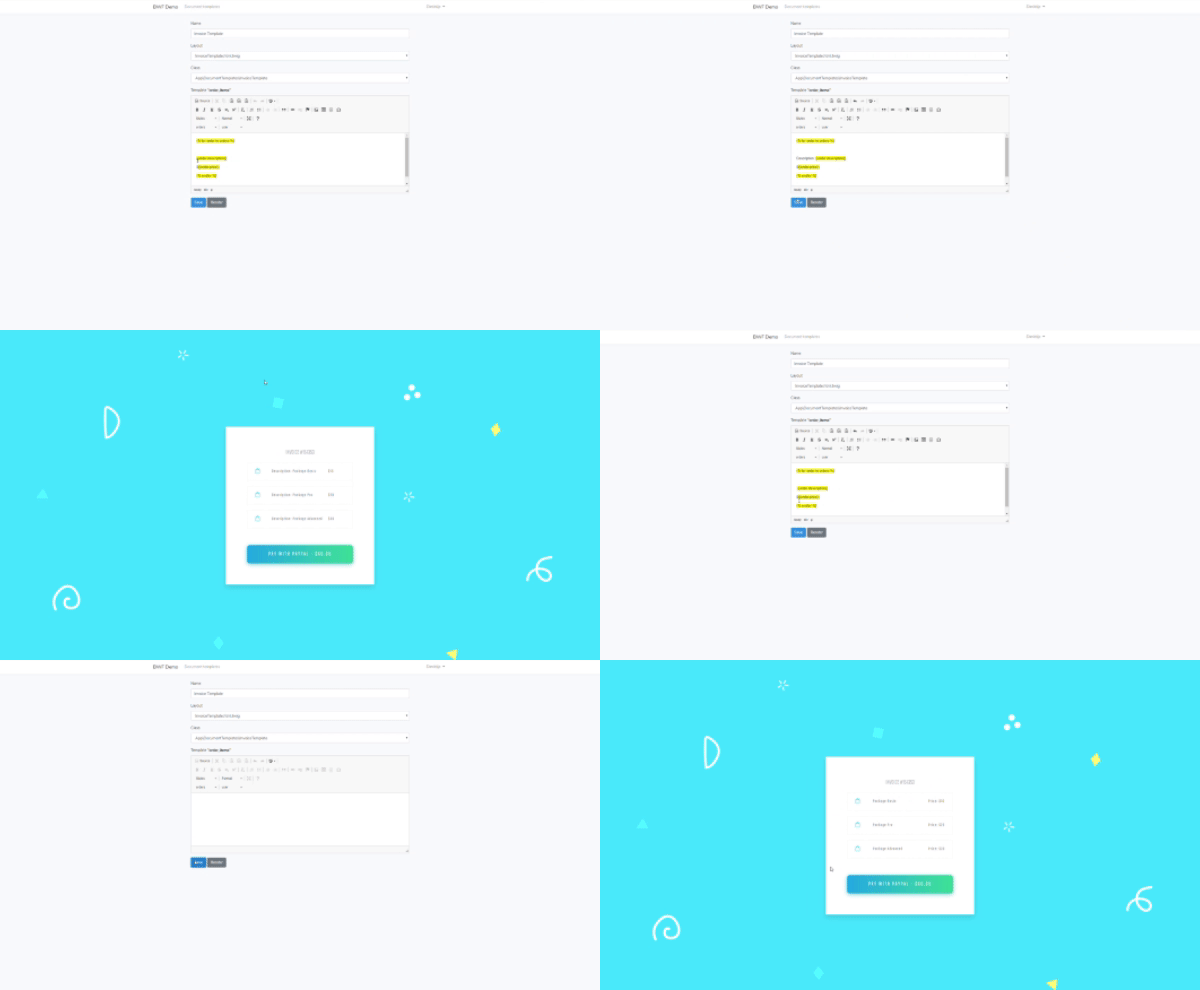
The admin form component uses CKEditor for the user editable templates. The package ships with a custom built placeholders plugin for CKEditor. The placeholders plugin displays the placeholders as select boxes, every dataSource has it's own select box. The selected placeholders are automatically inserted into the editor's content as CKEditor inline widgets. The placeholder widgets can be moved across the text, and can be removed, but theirs content is read only to prevent rendering problems caused by incorrect/modified placeholders.
The CKEditor initialization using the placeholders plugin can be found below:
```javascript
CKEDITOR.replace(editorId, {
customConfig: '',
extraPlugins: 'richcombo,placeholder_select',
toolbarGroups:[
{ name: 'basicstyles' },
'/',
{ name: 'placeholder_select'}
],
placeholder_select: {
placeholders: _this.placeholders,
}
});
```
### Inlcude all the necessary javascript at once
If you'd like to require/initialize all the necessary javascript automatically, you can use the `document-template.js` to do so.
Add the following to the `app.js`:
```javascript
require('./vendor/document-templates/js/document-templates');
```
It includes the ckeditor, the placeholder plugin for ckeditor, sets the ckeditor base path, and registers the Vue component.
### Document Templates Controller
The package ships with a default controller for your convenience, to be able to quickly scaffold an administration interface for the package.
You could extend the `DocumentTemplatesController`, and define the available document template classes, like below:
```php
class DemoDocumentTemplatesController extends DocumentTemplatesController
{
protected $documentClasses = [
DemoDocumentTemplate::class,
DemoDocumentTemplate2::class
];
}
```
These classes appear on the create/edit form for the document, every class should correspond to a document type (e.g. create separate classes for Invoices, Letters, Registration Emails etc.).
If you need to change the default behaviour of the controller feel free to skip the extension and implement the necessary methods yourself.
In this case you can still use the `ManagesDocumentTemplates` trait which contains the methods to get the data for the api endpoints used by the vue components,
those endpoints are: `/placeholders` and `/templates`. If you use the trait you should implement the actions for these endpoints.
## Demo application
Demo application can be found here: https://github.com/42coders/bwf-demo. You can use a symlinked version of the document templates package in the `composer.json`:
```json
"repositories": [
{
"type": "path",
"url": "../document-templates",
"options": {
"symlink": true
}
}
],
```
As you can see from the repository configuration, the package should be cloned in the same directory as the demo app. Also the demo app requires app.js directly from the package 'require('./../../vendor/42coders/document-templates/resources/js/app');', this allows you to develop the package and check the changes in the demo app immediately, without the need for composer install, and vendor:publish.
## Contribution
Every contribution is welcome. We should use the usual [GitFlow](https://www.atlassian.com/git/tutorials/comparing-workflows/gitflow-workflow) like workflow: create branches for features and bug fixes, when the development has been finished create a pull request to the `develop` and it will be reviewed by other developer, and merged/commented/declined accordingly.
It is important to create unit tests for all new features developed, and also for all bug fixes to keep the package stable and easy to use.
For the new features it is recommended to add a demo of the feature to the demo application and extend the documentation as well.
### Test
The php tests are using [PHPUnit](https://phpunit.de/), to run the test you can use either `vendor/bin/phpunit` or `composer test` command.
Test code coverage can be generated with `composer test-coverage` command. In order to generate coverage it is necessary to have [Xdebug](https://xdebug.org/) extension installed and enabled for php cli. The code coverage html report can be found in the `tests/coverage` directory.
Javascript tests are using [Jasmine](https://jasmine.github.io/) test framework. Run the javascript test with the following command `npm run test`
### Documentation
Api documentation can be generated with [phpDox](http://phpdox.de/). To download and install `phpDox` please follow the instructions [here](http://phpdox.de/getting-started.html). Once the `phpDox` is installed generate the api documentation by running `composer build-docs`. When the process is finished the documentation can be found in `docs/html` directory.
## License
The Document Templates is free software licensed under the MIT license.