https://github.com/75lb/command-line-commands
Add a git-like command interface to your app.
https://github.com/75lb/command-line-commands
cli command-line command-line-parser command-line-tool nodejs option-parser
Last synced: 10 months ago
JSON representation
Add a git-like command interface to your app.
- Host: GitHub
- URL: https://github.com/75lb/command-line-commands
- Owner: 75lb
- License: mit
- Created: 2015-11-28T11:04:33.000Z (over 10 years ago)
- Default Branch: master
- Last Pushed: 2024-09-16T23:09:32.000Z (almost 2 years ago)
- Last Synced: 2025-08-26T20:59:24.239Z (11 months ago)
- Topics: cli, command-line, command-line-parser, command-line-tool, nodejs, option-parser
- Language: JavaScript
- Homepage:
- Size: 195 KB
- Stars: 41
- Watchers: 1
- Forks: 8
- Open Issues: 0
-
Metadata Files:
- Readme: README.hbs
- License: LICENSE
Awesome Lists containing this project
README
[](https://www.npmjs.org/package/command-line-commands)
[](https://www.npmjs.org/package/command-line-commands)
[](https://github.com/75lb/command-line-commands/network/dependents?dependent_type=REPOSITORY)
[](https://github.com/75lb/command-line-commands/network/dependents?dependent_type=PACKAGE)
[](https://github.com/75lb/command-line-commands/actions/workflows/node.js.yml)
[](https://github.com/feross/standard)
# command-line-commands
A lightweight module to help build a git-like command interface for your app.
Its job is to extract the command (the first argument, unless it's an option), check it's valid and either return it or throw. From there, you can parse the remaining args using your preferred option parser (e.g. [command-line-args](https://github.com/75lb/command-line-args), [minimist](https://github.com/substack/minimist) etc.).
## Synopsis
Create a list of valid commands (`null` represents "no command"). Supply it to `commandLineCommands()`, receiving back an object with two properties: `command` (the supplied command) and `argv` (the remainder of the command line args):
```js
const commandLineCommands = require('command-line-commands')
const validCommands = [ null, 'clean', 'update', 'install' ]
const { command, argv } = commandLineCommands(validCommands)
/* print the command and remaining command-line args */
console.log('command: %s', command)
console.log('argv: %s', JSON.stringify(argv))
```
We'll assume the above script is installed as `example`. Since the `validCommands` list includes `null`, running it without a command is valid:
```
$ example
command: null
argv: []
```
Running `example` with no command and one option:
```
$ example --verbose
command: null
argv: ["--verbose"]
```
Running `example` with both a command and an option:
```
$ example install --save something
command: install
argv: ["--save","something"]
```
Running `example` without a valid command will cause `commandLineCommands()` to throw.
From here, you can make a decision how to proceed based on the `command` and `argv` received. For example, if no command (`null`) was passed, you could parse the remaining `argv` for general options (in this case using [command-line-args](https://github.com/75lb/command-line-args)):
```js
if (command === null) {
const commandLineArgs = require('command-line-args')
const optionDefinitions = [
{ name: 'version', type: Boolean }
]
// pass in the `argv` returned by `commandLineCommands()`
const options = commandLineArgs(optionDefinitions, { argv })
if (options.version) {
console.log('version 1.0.1')
}
}
```
The same example, using [minimist](https://github.com/substack/minimist):
```js
if (command === null) {
const minimist = require('minimist')
// pass in the `argv` returned by `commandLineCommands()``
const options = minimist(argv)
if (options.version) {
console.log('version 1.0.1')
}
}
```
## More examples
Both examples use [command-line-args](https://github.com/75lb/command-line-args) for option-parsing.
- [Simple](https://github.com/75lb/command-line-commands/blob/master/example/simple.js): A basic app with a couple of commands.
- [Advanced](https://github.com/75lb/command-line-commands/blob/master/example/advanced/git.js): A more complete example, implementing part of the git command interface.
## Usage guides
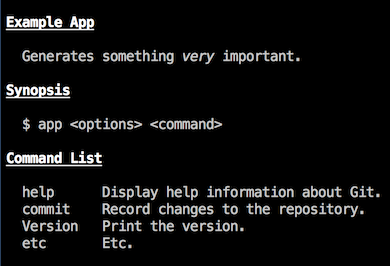
Usage guides can be generated by [command-line-usage](https://github.com/75lb/command-line-usage). Here is a simple example ([code](https://github.com/75lb/command-line-commands/blob/master/example/usage.js)):
# API Reference
{{#module name="command-line-commands"}}
{{>body~}}
{{>member-index~}}
{{>separator~}}
{{>members~}}
{{/module}}
* * *
© 2015-25 Lloyd Brookes \<75pound@gmail.com\>. Documented by [jsdoc-to-markdown](https://github.com/jsdoc2md/jsdoc-to-markdown).