https://github.com/75lb/table-layout
Styleable plain-text table generator. Useful for formatting console output.
https://github.com/75lb/table-layout
javascript layout table text-formatting view
Last synced: 10 months ago
JSON representation
Styleable plain-text table generator. Useful for formatting console output.
- Host: GitHub
- URL: https://github.com/75lb/table-layout
- Owner: 75lb
- License: mit
- Created: 2015-06-28T00:45:38.000Z (about 11 years ago)
- Default Branch: master
- Last Pushed: 2024-11-16T12:44:19.000Z (over 1 year ago)
- Last Synced: 2025-06-20T13:12:57.347Z (about 1 year ago)
- Topics: javascript, layout, table, text-formatting, view
- Language: JavaScript
- Homepage:
- Size: 673 KB
- Stars: 25
- Watchers: 2
- Forks: 6
- Open Issues: 1
-
Metadata Files:
- Readme: README.md
- License: LICENSE
Awesome Lists containing this project
README
[](https://www.npmjs.org/package/table-layout)
[](https://www.npmjs.org/package/table-layout)
[](https://github.com/75lb/table-layout/network/dependents?dependent_type=REPOSITORY)
[](https://github.com/75lb/table-layout/network/dependents?dependent_type=PACKAGE)
[](https://github.com/75lb/table-layout/actions/workflows/node.js.yml)
[](https://github.com/feross/standard)
# table-layout
Styleable plain-text table generator. Useful for formatting console output. Available as both a [command-line tool](https://github.com/75lb/table-layout-cli) and isomorphic Javascript library.
## Install as a library
Add table-layout to your project:
```
$ npm install --save table-layout
```
## Display an array of objects as a table
Trivial example. Read a JSON file from disk and output a table with a maximum width (in characters) of 60.
```js
import Table from 'table-layout'
import { promises as fs } from 'fs'
const issues = await fs.readFile('./issues.json', 'utf8')
const table = new Table(JSON.parse(issues), { maxWidth: 60 })
console.log(table.toString())
```
This is the example input file:
```json
[
{
"number": 15134,
"title": "Coveralls has no source available ",
"login": "ndelangen",
"comments": 0
},
{
"number": 15133,
"title": "Fixing --preserve-symlinks. Enhancing node to exploit.",
"login": "phestermcs",
"comments": 0
},
{
"number": 15131,
"title": "Question - Confused about NPM's local installation philosophy",
"login": "the1mills",
"comments": 0
},
{
"number": 15130,
"title": "Question - global npm cache directory if user is root?",
"login": "ORESoftware",
"comments": 0
}
]
```
This is the output:
```
15134 Coveralls has no source available ndelangen 0
15133 Fixing --preserve-symlinks. phestermcs 0
Enhancing node to exploit.
15131 Question - Confused about NPM's the1mills 0
local installation philosophy
15130 Question - global npm cache ORESoftware 0
directory if user is root?
15127 how to installa gulp fontfacegen aramgreat 0
on Windows 10
15097 Cannot install package from mastertinner 3
tarball out of package.json entry
generated by npm
15067 npm "SELF_SIGNED_CERT_IN_CHAIN" LegendsLyfe 3
error when installing discord.js
with .log
```
## Cherry-picked and computed values
Sometimes, your input data might contain a deeper structure or you want to transform or compute some values. Some example input data with structural depth and large numbers you'd like to reformat:
```json
[
{
"country": { "name": "USA" },
"GDP": 19485394000000,
"population": 325084756
},
{
"country": { "name": "China" },
"GDP": 12237700479375,
"population": 1421021791
},
{
"country": { "name": "Japan" },
"GDP": 4872415104315,
"population": 127502725
}
]
```
Example usage of the column getter function:
```js
import Table from 'table-layout'
import { promises as fs } from 'fs'
const rows = JSON.parse(await fs.readFile('./example/deep-data/gdp.json', 'utf8'))
const germanCurrency = new Intl.NumberFormat('de-DE', { style: 'currency', currency: 'EUR' })
const germanNumber = new Intl.NumberFormat('de-DE', { notation: 'compact', maximumSignificantDigits: 3, maximumFractionDigits: 0 })
const table = new Table(rows, {
maxWidth: 60,
columns: [
{
name: 'country',
get: (cellValue) => cellValue.name
},
{
name: 'GDP',
get: (cellValue) => germanCurrency.format(cellValue)
},
{
name: 'population',
get: (cellValue) => germanNumber.format(cellValue)
},
]
})
console.log(table.toString())
```
Output.
```
$ node example/computed-values.js
USA 19.485.394.000.000,00 € 325 Mio.
China 12.237.700.479.375,00 € 1,42 Mrd.
Japan 4.872.415.104.315,00 € 128 Mio.
```
## Colour-scale conditional formatting
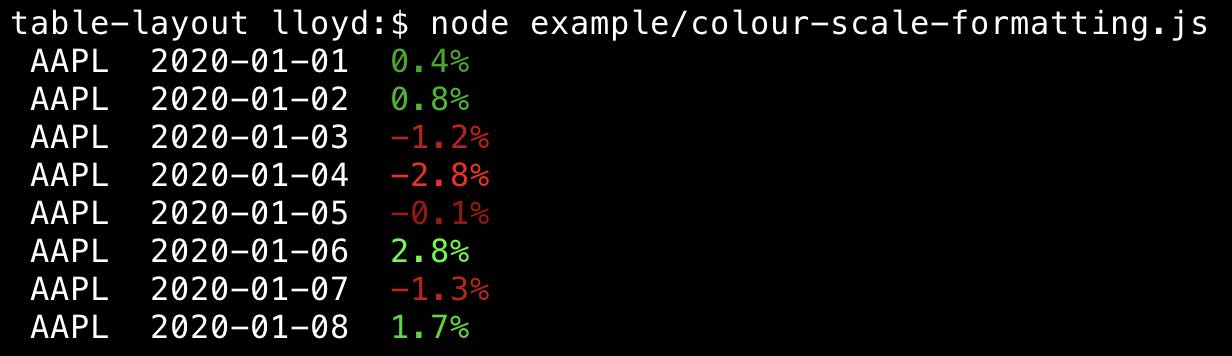
See [this file](https://github.com/75lb/table-layout/blob/master/example/colour-scale-formatting.js) for a example of colour-scale formatting (increasing intensity of red/green for more positive/negative values).
## API Reference
For the full API documentation, see [here](https://github.com/75lb/table-layout/blob/master/docs/API.md).
## Load anywhere
This library is compatible with Node.js, the Web and any style of module loader. It can be loaded anywhere, natively without transpilation.
Within a Node.js CommonJS Module:
```js
const Table = require('table-layout')
```
Within a Node.js ECMAScript Module:
```js
import Table from 'table-layout'
```
Within a modern browser ECMAScript Module:
```js
import Table from './node_modules/table-layout/dist/index.mjs'
```
## See Also
* [gfmt](https://github.com/75lb/gfmt): A github-flavoured-markdown table generator.
* * *
© 2015-24 [Lloyd Brookes](https://github.com/75lb) \.
Isomorphic test suite by [test-runner](https://github.com/test-runner-js/test-runner). Documented by [jsdoc-to-markdown](https://github.com/jsdoc2md/jsdoc-to-markdown).