https://github.com/79e/hexo-theme-quiet
🔥A simple, easy to read flat hexo theme. 扁平化简约Hexo主题
https://github.com/79e/hexo-theme-quiet
blog hexo hexo-theme quiet theme
Last synced: 11 months ago
JSON representation
🔥A simple, easy to read flat hexo theme. 扁平化简约Hexo主题
- Host: GitHub
- URL: https://github.com/79e/hexo-theme-quiet
- Owner: 79E
- License: mit
- Created: 2020-11-03T01:29:35.000Z (over 5 years ago)
- Default Branch: master
- Last Pushed: 2025-07-07T06:14:25.000Z (12 months ago)
- Last Synced: 2025-07-07T07:27:42.603Z (12 months ago)
- Topics: blog, hexo, hexo-theme, quiet, theme
- Language: Less
- Homepage:
- Size: 506 KB
- Stars: 198
- Watchers: 3
- Forks: 26
- Open Issues: 30
-
Metadata Files:
- Readme: README-EN.md
- License: LICENSE
Awesome Lists containing this project
README

A simple and flat hexo theme




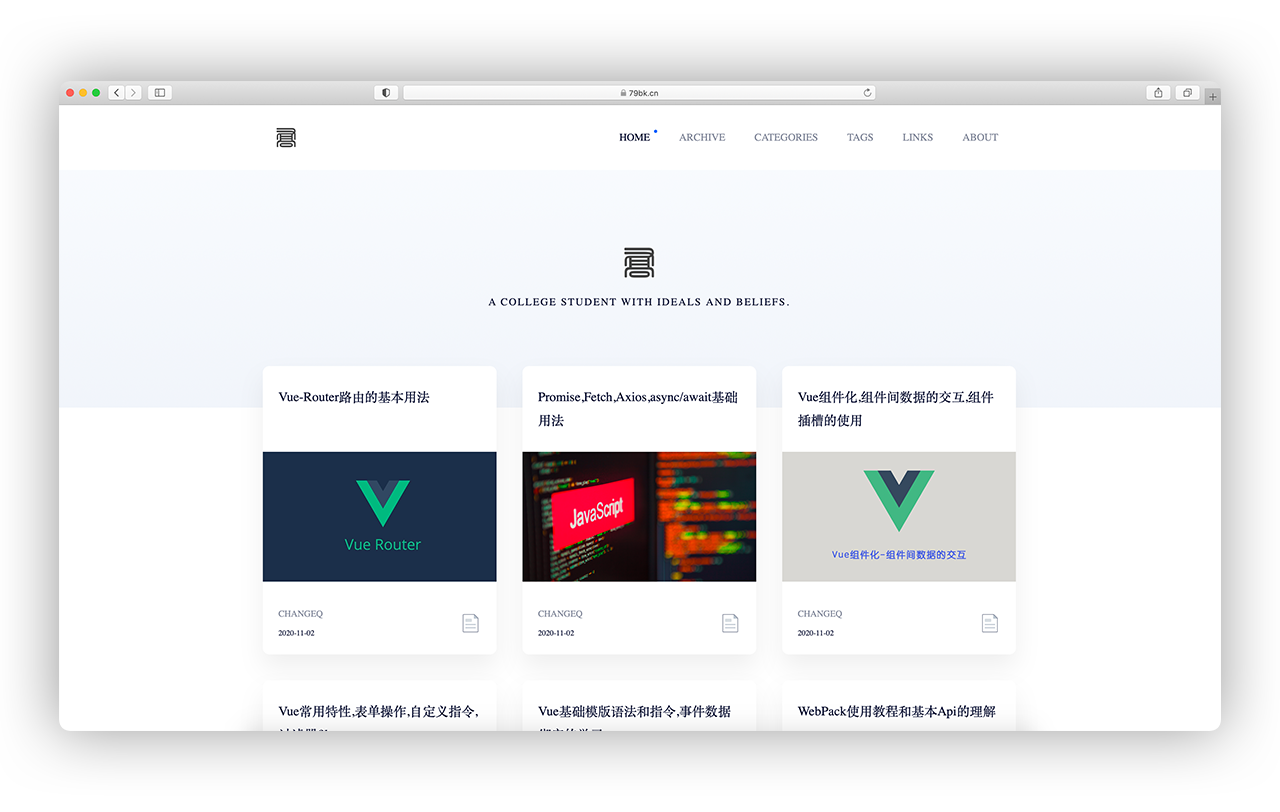
### Samples
- [Joey Blog](https://79e.cc/)
- [Taire's Blog](https://blog.taire.de)
### 🚁Getting started
[中文文档 ](https://github.com/79e/hexo-theme-quiet/blob/master/README.md)
Download the theme:
```
$ git clone https://github.com/79e/hexo-theme-quiet.git
```
Modify `_config.yml` of hexo to enable the quiet theme:
(Probably at the bottom of the file --- you need to put the downloaded theme file in the `themes` folder and change the name to `Quiet`)
```
theme: Quiet
```
For a cleaner display of the 3 columns, set the number of articles displayed on each page to 9 articles per page:
```
index_generator:
path: ''
per_page: 9
order_by: -date
// There's a 10 below. Modify to 9.
per_page: 9
pagination_dir: page
```
Set the following item to be the same as mine to display the code highlighting of the article
```
# Example configuration
highlight:
enable: false
line_number: false
auto_detect: true
tab_replace: ''
wrap: true
hljs: true
prismjs:
enable: false
preprocess: true
line_number: true
tab_replace: ''
```
#### 🏠 Homepage layout
```
# The default layout of the home page article is'card', and'block-card' can be selected
home_layout: card
```
#### 🔧Tags page
Go to the `source` folder in the root directory to create a `tags` folder and create a new `index.md` file
```
---
title: tags
date: 2020-09-19 16:19:22
layout: "tags"
---
```
#### 🏂About page
Go to the `source` folder in the root directory and create the `about` folder and create a new `index.md` file
```
---
title: About
date: 2020-11-03
aubot: Hannah Miller
portrait: 'https://cdn.jsdelivr.net/gh/duogongneng/MyBlogImg/imgIMG_7327.jpeg'
describe: 'Hi, this is me! I am real human and I like breathing very much'
type: "about"
layout: "about"
comments: false
---
```
**Explanation**
`aubot` :The name of the blog or blogger, this will be displayed at the top of the About page
`portrait` : Avatar, link to your profile picture
`describe` :Introduction (briefly describe yourself)
`comments`: Whether to open comments
Other attributes do not need to be modified
**Content**
You can write a lot of things on the profile page, just like an article.
PUt the content in the `index.md` file inside the `about` folder.
#### 🎉Links page
Go to the `source` folder in the root directory and create a `links` folder to create a new `index.md` file
```
---
title: Links
date: 2020-09-19
type: "links"
layout: "links"
comments: false
---
```
**Content**
Put the content you want to describe in the `index.md` file under the `links` folder, it's the same procedure as the about page.
#### 🎪Categories page
Go to the `source` folder in the root directory and create a `categories` folder to create a new `index.md` file.
```
---
title: Categories
date: 2020-11-02
type: categories
layout: categories
author: 79bk.cn
---
```
### 📖Posts
You need to add an header when publishing an article:
```
title: A simple and flat Hexo static theme blog-Quiet
comments: false
categories: Projects
aubot: Cange-Q
aubot_link: 'https://github.com/79E/hexo-theme-quiet'
tags:
- Hexo
- Quiet
- other
- tags
- you
- use
excerpt: A simple and generous flat theme for Hexo - Quiet
toc: false
date: 2020-11-03 20:33:36
cover: 'https://cdn.jsdelivr.net/gh/duogongneng/MyBlogImg/imgQuietView.png'
```
**Explanation**
`title`: Title of your post
`categories`:Category (pro tip: only use one category per post)
`tags`:You can use multiple tags to describe the content
`excerpt`: A short description of the article
`toc`:Whether to display the article directory (the default value is false)
`date`:Creation date
`cover`:Thumbnail (you can leave this empty to use a random default cover)
`comments`: Whether to open comments
`aubot`:The author name is not set and defaults to the name in the configuration file
`aubot_link`: the address to jump to by clicking on the author's name in the article page Default jump to the about me page
### 🏆Theme configuration
Enter the `_config.yml` configuration file of the `Quiet` file inside the `themes` folder in the theme root directory.
You can set the title of the website and change the Logo icons in it
**Add Links**
There is a `linksList` in this configuration file, we can follow the example to add your friendship link
### 💌Comment Configuration
The following is used here `gitalk ` A commenting plugin based on Github Issue and Preact
We just need to configure `gitalk` in the `_config.yml` configuration file inside the `Quiet ` theme file
First, you need to select a public github repository (already exists or create a new github repository) for storing comments.
Then you need to create **GitHub Application**, if not [click here to apply](https://github.com/settings/applications/new), `Authorization callback URL` fill in the domain name of the page currently using the plugin.
**options:**
- **clientID** `String`
**Required**. GitHub Application Client ID.
- **clientSecret** `String`
**Required**. GitHub Application Client Secret.
- **repo** `String`
**Required**. GitHub repository.
- **owner** `String`
**Required**. GitHub repository owner. Can be personal user or organization.
- **admin** `Array`
**Required**. GitHub repository owner and collaborators. (Users who having write access to this repository)
*Tip: Only on the article page and the friend page, the About Me page has a comment function.*
### 📈Baidu Statistics
We need to configure Baidu statistics to generate the key that can
### 🔎 Question
- **css styles are not loaded**
This theme uses `less ` for `css` processing so it relies on `hexo-renderer-less` to recompile after installation
```
npm i hexo-renderer-less
```
- **ejs as a template language**
```
npm i hexo-renderer-ejs
```
### License

Open source according to [MIT](https://github.com/79e/hexo-theme-quiet/blob/master/LICENSE) protocol