https://github.com/7rikazhexde/dlplotlydataset
This is a web application that retrieves datasets (CSV) managed in the Plotly repository, displays them in tables, and downloads them via Dash.
https://github.com/7rikazhexde/dlplotlydataset
csv dash dash-plotly python
Last synced: 10 months ago
JSON representation
This is a web application that retrieves datasets (CSV) managed in the Plotly repository, displays them in tables, and downloads them via Dash.
- Host: GitHub
- URL: https://github.com/7rikazhexde/dlplotlydataset
- Owner: 7rikazhexde
- License: mit
- Created: 2023-01-14T10:06:57.000Z (over 3 years ago)
- Default Branch: main
- Last Pushed: 2024-11-12T14:48:41.000Z (over 1 year ago)
- Last Synced: 2025-03-14T22:45:06.200Z (over 1 year ago)
- Topics: csv, dash, dash-plotly, python
- Language: Python
- Homepage:
- Size: 64.5 KB
- Stars: 0
- Watchers: 1
- Forks: 0
- Open Issues: 0
-
Metadata Files:
- Readme: README.md
- License: LICENSE
Awesome Lists containing this project
README
# dlPlotlyDataset
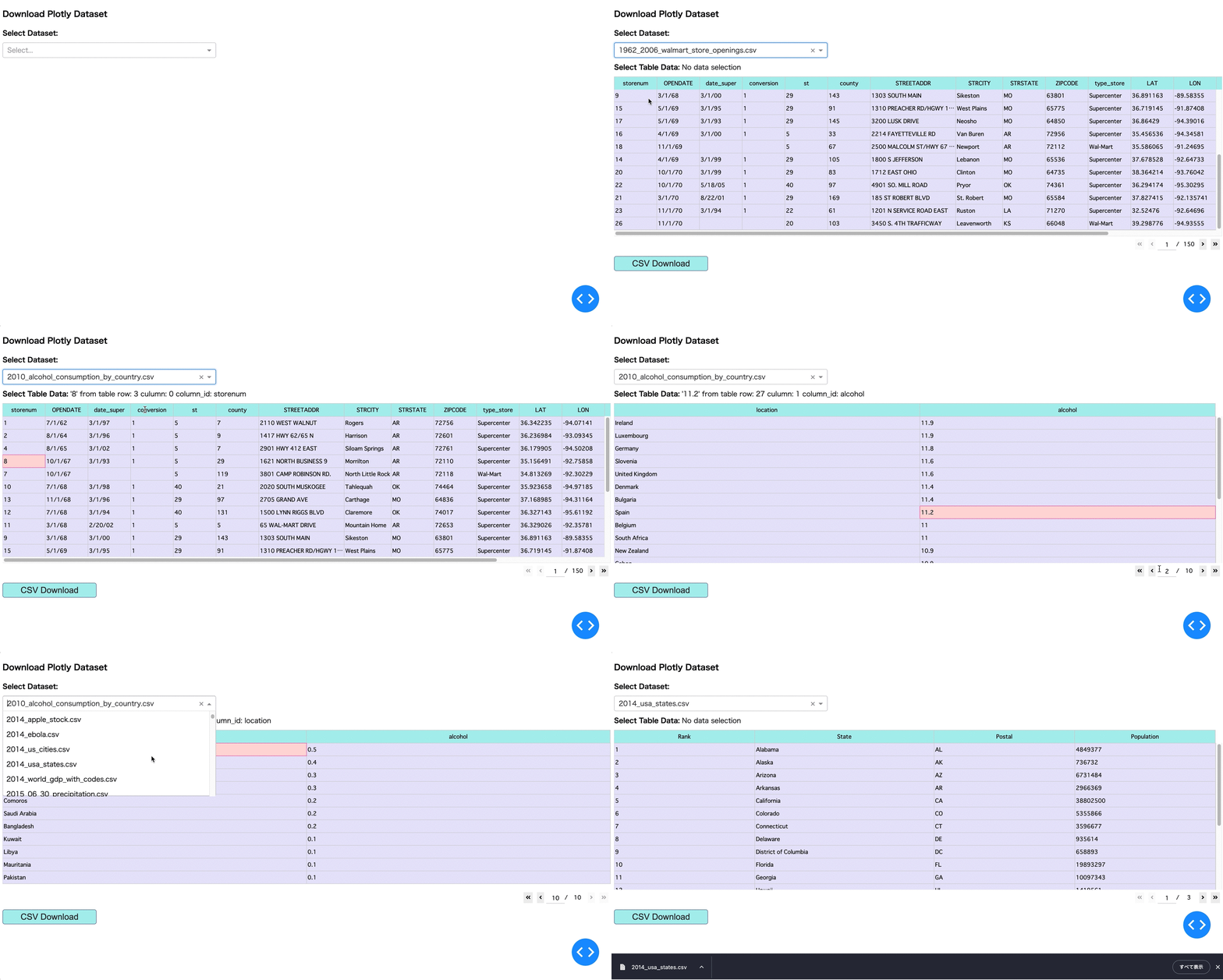
This application selects [plotly / datasets](https://github.com/plotly/datasets) from the Dropdown component and displays it in the DataTable component.The displayed Dataset (DataFrame object) is saved as a csv file by executing the Button component.
## Demo
## Usage
1. Get project
```bash
% git clone https://github.com/7rikazhexde/dlPlotlyDataset.git
```
1. Setup of virtual environment
Run the poetry command.
```bash
% poetry install
```
* If the package DL fails after installation, there may be a problem with the development environment.
* See [Switching between environments](https://python-poetry.org/docs/managing-environments/#switching-between-environments).
* Please run ```poetry env info``` to check your development environment.
* If your python version is not 3.10 or higher, please run ```poetry env use python3.10``` to recreate your development environment.
Or create a virtual environment with venv, pyenv, etc. and run the following command.
```bash
% pip install -r requirements.txt
```
1. Execute the program in a virtual environment
```bash
% cd app
% poetry shell
% python dl_plotly_datasets.py
```
1. Application Launch
Please access the URL displayed.
```bash
Dash is running on http://127.0.0.1:8050/
* Serving Flask app 'dl_plotly_datasets'
* Debug mode: on
```
1. CSV Download
* If you want to download the CSV file, you can do so by executing the "CSV Download" button.
* However, the file name is fixed to ```Data.csv``` due to the specification of ```dash_table.DataTable```.
* This program uses the ```pyperclip``` module to copy the file name selected by ```Dropdown``` to the clipboard.
* If you are using a Macintosh, a file save dialog will appear and you can paste the file to save it with the name of the data set.
* If you are using Windows, the file save dialog will not appear, so please change the file name after saving the file.
## Note
* datasets are for csv files created directly under the repository.
* Please understand that files stored in folders are not supported.
* If you get an interpreter error using vscode, open and start dlPlotlyDataset with the folder designation.
* Dataset information may differ from the latest information.
If the expected dataset does not exist, please add it. See the comments in ```plotly_datasets_info.py``` for details.
* If an error occurs after launching the application and you cannot operate it, check the network settings and reload the browser.