https://github.com/880831ian/nginx-upstream-set-host-header
想使用 Nginx Upstream Proxy 到外部服務,並帶入對應的 header 該怎麼做?
https://github.com/880831ian/nginx-upstream-set-host-header
nginx upstream
Last synced: 18 days ago
JSON representation
想使用 Nginx Upstream Proxy 到外部服務,並帶入對應的 header 該怎麼做?
- Host: GitHub
- URL: https://github.com/880831ian/nginx-upstream-set-host-header
- Owner: 880831ian
- Created: 2023-10-16T03:11:49.000Z (over 2 years ago)
- Default Branch: master
- Last Pushed: 2023-10-16T04:11:07.000Z (over 2 years ago)
- Last Synced: 2025-10-09T05:06:54.142Z (8 months ago)
- Topics: nginx, upstream
- Language: HTML
- Homepage: https://blog.pin-yi.me/nginx-upstream-set-host-header/
- Size: 321 KB
- Stars: 0
- Watchers: 1
- Forks: 0
- Open Issues: 0
-
Metadata Files:
- Readme: README.md
Awesome Lists containing this project
README
# 想使用 Nginx Upstream Proxy 到外部服務,並帶入對應的 header 該怎麼做?
此文章要來記錄一下最近在公司服務入口遇到的一些小問題,以及解決的方法。簡單說明一下,我們的服務入口是用 Nginx 來當作 proxy server,將不同路徑或是 servername 導到對應的後端程式,或是外部的服務上(例如 AWS cloudfront.net),本篇要測試的是如果使用要同時使用 upstream 到外部服務,且需要帶 host header 該怎麼做。
- Nginx 的 upstream 是什麼?
通常我們 proxy_pass 的寫法會是這樣:
```nginx
location /aaa {
proxy_pass http://aaa.example.com;
}
```
當 Nginx 收到的 request 是 `/aaa` 時,就會將 request 轉發到 `http://aaa.example.com`。
但假如後端有多台機器或是服務,可以處理同一種 request,這時候就可以使用 upstream 來處理:
```nginx
upstream backend_hosts {
server aaa.example.com;
server bbb.example.com;
server ccc.example.com;
}
location /aaa {
proxy_pass http://backend_hosts;
}
```
這樣子的好處是可以有多個機器或是後端服務可以分散請求,做到負載平衡的效果。
## 問題
那如果我們使用 Nginx upstream 時,還想要同時帶 host 的 header 到後端該怎麼做呢?我們先來看一下目前的寫法:
( 測試範例是使用 docker 來模擬,可以參考程式碼 > [點我前往 github](https://github.com/880831ian/nginx-upstream-set-host-header),會有三個 nginx,其中一個是負責 proxy 的 nginx 名為 proxy,另外兩台是 upstream 後的服務,名為 upstream_server1、upstream_server2 )
```nginx
upstream upstream_server {
server upstream_server1;
server upstream_server2;
}
server {
listen 80;
server_name localhost;
location /upstream_server/ {
proxy_pass http://upstream_server;
proxy_set_header Host "upstream_server1";
proxy_set_header Host "upstream_server2";
access_log /var/log/nginx/access.log upstream_log;
}
}
}
```
可以看到我們希望 Nginx 收到 request 是 `/upstream_server` 時,將 request 轉發到 `http://upstream_server`,而 `upstream_server` 後面有兩個 server,並且在 proxy 時,帶入兩個不同的 host header。但如果真的這樣寫,可以達到我們想要得效果嗎?我們實際跑看看程式 (範例可以使用 nginx-old.conf):
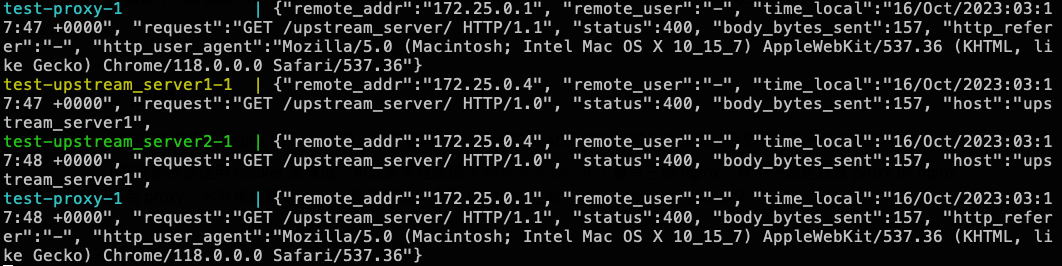
從上面的 LOG 可以發現,我們 call `/upstream_server` 時,後端的 upstream_server1、upstream_server2 收到的 host 只會收到第一個設定的 Host,且服務會出現 400 Bad Request,查了一下網路文章,發現出現 400 Bad Request,可能跟 header 送太多資訊過去,詳細可以參考 [解決網站出現 400 Bad Request 狀態的方法](https://tools.wingzero.tw/article/sn/534)。
這邊推測應該是後端如果也是用 nginx 直接接收才會遇到 400 的問題,還好目前公司服務還是正常的 xDD,檢查一下後發現,其實後端根本沒有要求對應 header 才能接收(應該是對方忘記加上此限制)。
## 解決
好,不管是否需要對應 header,我們還是找看看有沒有辦法同時使用 upstream,並帶入對應 host 的方法呢?
最後參考網路上的文章,似乎只能使用兩層的 proxy,才能完成這兩個需求,我們來看看要怎麼寫吧 (範例可以使用 nginx.conf):
```nginx
server {
listen 777;
server_name localhost;
location / {
proxy_pass http://upstream_server1;
proxy_set_header Host "upstream_server1";
access_log /var/log/nginx/access.log upstream_log;
}
}
server {
listen 888;
server_name localhost;
location / {
proxy_pass http://upstream_server2;
proxy_set_header Host "upstream_server2";
access_log /var/log/nginx/access.log upstream_log;
}
}
upstream upstream_server {
server 127.0.0.1:777;
server 127.0.0.1:888;
}
server {
listen 80;
server_name localhost;
location /upstream_server/ {
proxy_pass http://upstream_server;
access_log /var/log/nginx/access.log upstream_log;
}
}
```
可以看到上面的程式碼,我們透過兩層的 proxy,來達到我們想要的效果,這樣子就可以同時使用 upstream,並且帶入對應的 host header。
首先在 28 ~ 36 行,我們一樣如果 Nginx 收到 request 是 `/upstream_server` 時,會 proxy 到 upstream_server 這個 upstream 中,而 upstream_server 有兩個 server,分別是 `127.0.0.1:777`、`127.0.0.1:888`,但實際上沒有這兩個 port,所以我們需要再寫一層一般的 proxy 設定,分別是 1 ~ 10 行、12 ~ 21 行,這樣子就可以達到我們想要的效果。
但這個方法比較適用於 upstream 後端沒有太多個服務或是機器的情況,如果有很多個服務或是機器,就需要寫很多的 proxy,這樣子會變得很麻煩,所以如果有更好的方法,也歡迎留言跟我分享 🤣。
最後我們來看一下實際執行的結果:

## 參考
[Make nginx to pass hostname of the upstream when reverseproxying](https://serverfault.com/questions/598202/make-nginx-to-pass-hostname-of-the-upstream-when-reverseproxying)