https://github.com/AIDotNet/OpenDeepWiki
开源版本的deepwiki
https://github.com/AIDotNet/OpenDeepWiki
chatgpt deepwiki docs
Last synced: about 1 year ago
JSON representation
开源版本的deepwiki
- Host: GitHub
- URL: https://github.com/AIDotNet/OpenDeepWiki
- Owner: AIDotNet
- License: mit
- Created: 2025-04-27T11:40:00.000Z (about 1 year ago)
- Default Branch: main
- Last Pushed: 2025-05-05T06:46:51.000Z (about 1 year ago)
- Last Synced: 2025-05-05T07:40:06.164Z (about 1 year ago)
- Topics: chatgpt, deepwiki, docs
- Language: C#
- Homepage: https://koala.token-ai.cn/
- Size: 323 KB
- Stars: 230
- Watchers: 3
- Forks: 47
- Open Issues: 2
-
Metadata Files:
- Readme: README.md
- License: LICENSE
Awesome Lists containing this project
- awesome-github-wiki - OpenDeepWiki
- my-awesome - AIDotNet/OpenDeepWiki - tuning pushed_at:2026-05 star:3.3k fork:0.4k OpenDeepWiki is the open-source version of the DeepWiki project, aiming to provide a powerful knowledge management and collaboration platform. The project is mainly developed using C# and TypeScript, supporting modular design, and is easy to expand and customize. (C#)
README
# OpenDeepWiki
[中文](README.zh-CN.md) | [English](README.md)

AI-Driven Code Knowledge Base
# Project Introduction
OpenDeepWiki is an open-source project inspired by [DeepWiki](https://deepwiki.com/), developed using .NET 9 and Semantic Kernel. It aims to help developers better understand and utilize codebases by providing features such as code analysis, documentation generation, and knowledge graph creation.
- Analyze code structure
- Understand core concepts of repositories
- Generate code documentation
- Automatically create README.md for code
MCP Support
OpenDeepWiki supports MCP (Model Context Protocol)
- Supports providing an MCPServer for a single repository and conducting analysis on a single repository.
Usage: The following is the usage of cursor:
```json
{
"mcpServers": {
"OpenDeepWiki":{
"url": "http://Your OpenDeepWiki service IP:port/sse?owner=AIDotNet&name=OpenDeepWiki"
}
}
}
```
- owner: It is the name of the organization or owner of the repository.
- name: It is the name of the repository.
After adding the repository, test by asking a question (please note that before doing this, the repository must be processed first): What is OpenDeepWiki? The effect is as shown in the picture: ! [](img/mcp.png)
In this way, you can use OpenDeepWiki as an MCPServer, making it available for other AI models to call upon, facilitating the analysis and understanding of an open-source project.
## Features
- **Quick Generation:** Convert all code repositories from Github, Gitlab, Gitee, Gitea, etc., into a knowledge base in just a few minutes.
- **Multi-language Support:** Supports code analysis and documentation generation for all programming languages.
- **Code Structure:** Automatically generate Mermaid charts to understand code structure.
- **Custom Models:** Supports custom models and custom APIs for extension as needed.
- **AI Intelligent Analysis:** AI-based code analysis and understanding of code relationships.
- **Easy SEO:** Generate SEO-friendly documents and knowledge bases using Next.js for better search engine indexing.
- **Conversational Interaction:** Support for conversational interaction with AI to obtain detailed information and usage methods for code, enabling deeper understanding.
## 🚀 Quick Start
1. Clone the repository
```bash
git clone https://github.com/AIDotNet/OpenDeepWiki.git
cd OpenDeepWiki
```
2. Open the `docker-compose.yml` file and modify the following environment variables:
```yaml
services:
koalawiki:
environment:
- KOALAWIKI_REPOSITORIES=/repositories
- TASK_MAX_SIZE_PER_USER=5 # Maximum parallel tasks for AI document generation per user
- REPAIR_MERMAID=1 # Whether to repair Mermaid, 1 for repair, others for no repair
- CHAT_MODEL=DeepSeek-V3 # Model must support functions
- ANALYSIS_MODEL= # Analysis model for generating repository directory structure
- CHAT_API_KEY= # Your API key
- LANGUAGE= # Default language for generation set to "Chinese"
- ENDPOINT=https://api.token-ai.cn/v1
- DB_TYPE=sqlite
- DB_CONNECTION_STRING=Data Source=/data/KoalaWiki.db
```
> 💡 **How to get an API Key:**
> - Get Google API key [Google AI Studio](https://makersuite.google.com/app/apikey)
> - Get OpenAI API key [OpenAI Platform](https://platform.openai.com/api-keys)
> - Get CoresHub [CoresHub](https://console.coreshub.cn/xb3/maas/global-keys) [Click here for 50 million free tokens](https://account.coreshub.cn/signup?invite=ZmpMQlZxYVU=)
> - Get TokenAI [TokenAI](https://api.token-ai.cn/)
3. Start the service
You can use the provided Makefile commands to easily manage the application:
```bash
# Build all Docker images
make build
# Start all services in background mode
make up
# Or start in development mode (with logs visible)
make dev
```
Then visit http://localhost:80 to access the knowledge base.
For more commands:
```bash
make help
```
### For Windows Users (without make)
If you're using Windows and don't have `make` available, you can use these Docker Compose commands directly:
```bash
# Build all Docker images
docker-compose build
# Start all services in background mode
docker-compose up -d
# Start in development mode (with logs visible)
docker-compose up
# Stop all services
docker-compose down
# View logs
docker-compose logs -f
```
For building specific architectures or services, use:
```bash
# Build only backend
docker-compose build koalawiki
# Build only frontend
docker-compose build koalawiki-web
# Build with architecture parameters
docker-compose build --build-arg ARCH=arm64
docker-compose build --build-arg ARCH=amd64
```
## 🔍 How It Works
OpenDeepWiki uses AI to:
- Clone code repository locally
- Analyze based on repository README.md
- Analyze code structure and read code files as needed, then generate directory json data
- Process tasks according to directory, each task is a document
- Read code files, analyze code files, generate code documentation, and create Mermaid charts representing code structure dependencies
- Generate the final knowledge base document
- Analyze repository through conversational interaction and respond to user inquiries
```mermaid
graph TD
A[Clone code repository] --> B[Analyze README.md]
B --> C[Analyze code structure]
C --> D[Generate directory json data]
D --> E[Process multiple tasks]
E --> F[Read code files]
F --> G[Analyze code files]
G --> H[Generate code documentation]
H --> I[Create Mermaid charts]
I --> J[Generate knowledge base document]
J --> K[Conversational interaction]
```
## Advanced Configuration
### Environment Variables
- KOALAWIKI_REPOSITORIES # Path for storing repositories
- TASK_MAX_SIZE_PER_USER # Maximum parallel tasks for AI document generation per user
- REPAIR_MERMAID # Whether to repair Mermaid, 1 for repair, others for no repair
- CHAT_MODEL # Model must support functions
- ENDPOINT # API Endpoint
- ANALYSIS_MODEL # Analysis model for generating repository directory structure
- CHAT_API_KEY # Your API key
- LANGUAGE # Change the language of the generated documents
- DB_TYPE # Database type, default is sqlite
- DB_CONNECTION_STRING # Database connection string
### Build for Different Architectures
The Makefile provides commands to build for different CPU architectures:
```bash
# Build for ARM architecture
make build-arm
# Build for AMD architecture
make build-amd
# Build only backend for ARM
make build-backend-arm
# Build only frontend for AMD
make build-frontend-amd
```
## WeChat

## 📄 License
This project is licensed under the MIT License - see the [LICENSE](./LICENSE) file for details.
## Star History
[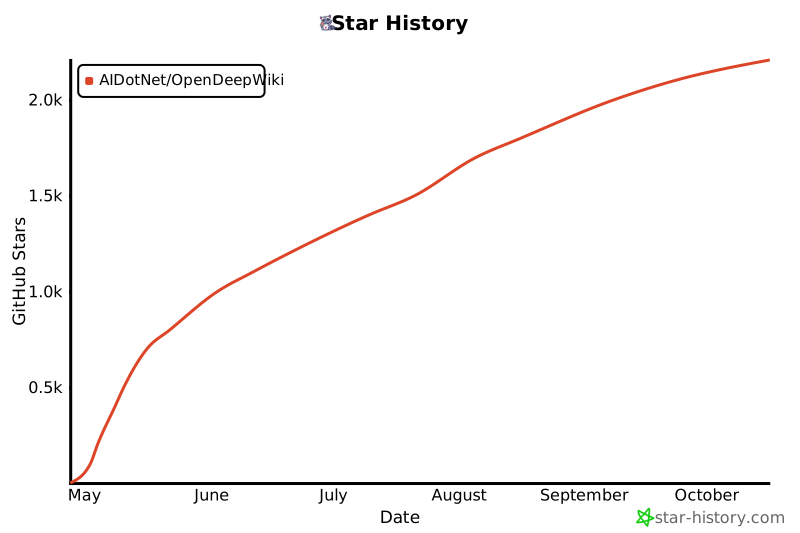](https://www.star-history.com/#AIDotNet/OpenDeepWiki&Date)