https://github.com/AdamRussak/k8f
Effortlessly check your Cloud Kubernetes cluster's version and conveniently connect with all your clusters in just one click by utilizing this GO tool.
https://github.com/AdamRussak/k8f
aks aws devops eks gcp gke go golang kubernetes
Last synced: 5 months ago
JSON representation
Effortlessly check your Cloud Kubernetes cluster's version and conveniently connect with all your clusters in just one click by utilizing this GO tool.
- Host: GitHub
- URL: https://github.com/AdamRussak/k8f
- Owner: AdamRussak
- License: agpl-3.0
- Created: 2022-07-23T12:42:24.000Z (almost 4 years ago)
- Default Branch: main
- Last Pushed: 2025-11-20T01:33:43.000Z (8 months ago)
- Last Synced: 2026-02-05T23:58:17.014Z (5 months ago)
- Topics: aks, aws, devops, eks, gcp, gke, go, golang, kubernetes
- Language: Go
- Homepage:
- Size: 4.14 MB
- Stars: 41
- Watchers: 3
- Forks: 7
- Open Issues: 5
-
Metadata Files:
- Readme: README.md
- License: LICENSE
- Code of conduct: CODE_OF_CONDUCT.md
Awesome Lists containing this project
README
# :sun_behind_large_cloud: k8f :sun_behind_large_cloud:
**k8f** is a command-line tool designed to simplify and streamline Kubernetes cluster operations.
It provides a collection of useful commands and features that assist in managing and interacting with Kubernetes clusters efficiently.
The tool was designed to scan all you're Azure and/or AWS Accounts for Kubernetes with a single command.
**What can it do??**
you can **Add** or **Update** EKS/AKS to your kubeconfig file.
you can get you're EKS/AKS output with **k8s name**, **account**, **region**, **version**, and **upgrade status**.
## Table of Contents
- [:sun\_behind\_large\_cloud: k8f :sun\_behind\_large\_cloud:](#sun_behind_large_cloud-k8f-sun_behind_large_cloud)
- [Table of Contents](#table-of-contents)
- [prerequisite](#prerequisite)
- [Supported Platform](#supported-platform)
- [Known issues](#known-issues)
- [Commands](#commands)
- [list](#list)
- [connect](#connect)
- [find](#find)
- [How to install](#how-to-install)
- [Windows](#windows)
- [Linux](#linux)
- [MacOS](#macos)
- [Arm Processor](#arm-processor)
- [Intel Processor](#intel-processor)
- [Container](#container)

> image created Using MidJorny
>
[](https://github.com/AdamRussak/k8f/actions/workflows/codeql-analysis.yml) [](https://github.com/AdamRussak/k8f/actions/workflows/release-new-version.yaml)    [](https://sonarcloud.io/summary/new_code?id=AdamRussak_k8f) [](https://sonarcloud.io/summary/new_code?id=AdamRussak_k8f)
[](https://hub.docker.com/r/unsoop/k8f)



[badge-info]: https://raw.githubusercontent.com/AdamRussak/public-images/main/badges/info.svg 'Info'
> ![badge-info][badge-info]
> Tested with:
> AWS CLI: 2.9.17
> AZ CLI: 2.44.1
> Kubectl: v1.26.1
## prerequisite
- for Azure: installed and logged in azure cli
- for AWS: install AWS cli and Profiles for each Account at `~/.aws/credentials` and `~/.aws/config`
- for GCP: Installed gcloud cli and logged in
## Supported Platform
| Provider | CLI | Docker |
|----------|----------|----------|
| AWS | ☑ | ☑ |
| Azure | ☑ | |
| GCP | ☑ | |
### Known issues
* GCP currently only supports the List command
* Azure accounts with MFA enabled can cause failure
## Commands
### list
```sh
List all K8S in Azure/AWS or Both
Usage:
k8f list [flags]
Examples:
k8f list {aws/azure/all}
Flags:
-h, --help help for list
-o, --output string Set output type(json or yaml) (default "json")
-p, --path string Set output path (default "./output")
--profile-select Get UI to select single profile to connect
-s, --save Get UI to select single profile to connect
Global Flags:
--aws-region string Set Default AWS Region (default "eu-west-1")
--validate Fail on validation of the AWS credentals before running
-v, --verbose verbose logging
```
List Command Sample Output:
[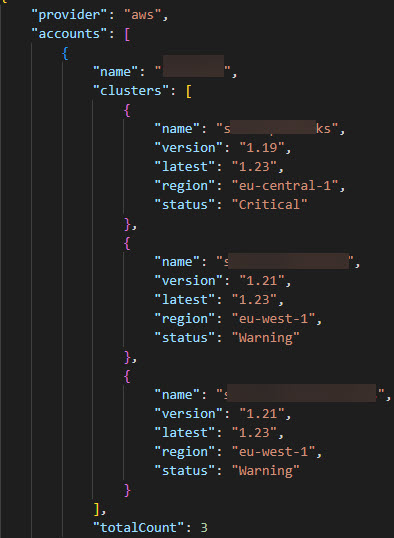](https://raw.githubusercontent.com/AdamRussak/public-images/main/k8f/k8f-list.jpg "Sample of List command output")
### connect
```sh
Connect to all the clusters of a provider or all Supported Providers
Usage:
k8f connect [flags]
Examples:
k8f connect aws -p ./testfiles/config --backup -v
k8f connect aws --isEnv -p ./testfiles/config --overwrite --backup --role-name "test role" -v
Flags:
--auth change from AWS CLI Auth to AWS IAM Authenticator, Default set to AWS CLI
--backup If true, backup config file to $HOME/.kube/config.bk
--dry-run If true, only run a dry-run with cli output
--force-merge If set, all duplication will be merged without prompt, default is interactive
-h, --help help for connect
--isEnv Add AWS Profile as Env to the Kubeconfig
--merge If true, add new K8s to the existing kubeconfig path
-o, --output string kubeconfig output type format(json or yaml) (default "yaml")
--overwrite If true, force overwrite kubeconfig
-p, --path string Set output path (default "/home//.kube/config")
--profile-select provides a UI to select a single profile to scan
--role-name string Set Role Name (Example: 'myRoleName')
-s, --short-name shorten EKS name from :: to :
Global Flags:
--aws-region string Set Default AWS Region (default "eu-west-1")
--validate Fail on validation of the AWS credentals before running
-v, --verbose verbose logging
```
### find
```sh
Find if a specific K8S exist in Azure or AWS
Usage:
k8f find [flags]
Examples:
k8f find {aws/azure/all} my-k8s-cluster
Flags:
-h, --help help for find
Global Flags:
--aws-region string Set Default AWS Region (default "eu-west-1")
--validate Fail on validation of the AWS credentals before running
-v, --verbose verbose logging
```
## How to install
### Windows
Latest:
```ps
$downloads = "$env:USERPROFILE\Downloads"
$source = "$downloads\k8f.exe"
$destination = "C:\tool"
Invoke-WebRequest -Uri "https://github.com/AdamRussak/k8f/releases/latest/download/k8f.exe" -OutFile $source
New-Item -ItemType Directory -Path $destination
Copy-Item -Path $source -Destination $destination
[Environment]::SetEnvironmentVariable("Path", "$env:Path;$destination\k8f.exe", "Machine")
```
Version:
```ps
$downloads = "$env:USERPROFILE\Downloads"
$source = "$downloads\k8f.exe"
$destination = "C:\tool"
$version = "0.3.1"
Invoke-WebRequest -Uri "https://github.com/AdamRussak/k8f/releases/download/$version/k8f.exe" -OutFile "$downloads\k8f.exe"
New-Item -ItemType Directory -Path $destination
Copy-Item -Path $source -Destination $destination
[Environment]::SetEnvironmentVariable("Path", "$env:Path;$destination\k8f.exe", "Machine")
```
### Linux
Latest:
```sh
cd ~ && wget https://github.com/AdamRussak/k8f/releases/latest/download/k8f
sudo cp ~/k8f /usr/local/bin/k8f
sudo chmod 755 /usr/local/bin/k8f
```
Version:
```sh
cd ~ && wget https://github.com/AdamRussak/k8f/releases/download//k8f
sudo cp ~/k8f /usr/local/bin/k8f
sudo chmod 755 /usr/local/bin/k8f
```
### MacOS
#### Arm processor
Latest:
```sh
cd ~ && wget https://github.com/AdamRussak/k8f/releases/latest/download/k8f_darwin-arm64
mv k8f_darwin-arm64 ./k8f
sudo cp ~/k8f /usr/local/bin/k8f
sudo chmod 755 /usr/local/bin/k8f
```
Version:
```sh
cd ~ && wget https://github.com/AdamRussak/k8f/releases/download//k8f_darwin-arm64
mv k8f_darwin-arm64 ./k8f
sudo cp ~/k8f /usr/local/bin/k8f
sudo chmod 755 /usr/local/bin/k8f
```
#### Intel processor
Latest:
```sh
cd ~ && wget https://github.com/AdamRussak/k8f/releases/latest/download/k8f_darwin-amd64
mv k8f_darwin-amd64 ./k8f
sudo cp ~/k8f /usr/local/bin/k8f
sudo chmod 755 /usr/local/bin/k8f
```
Version:
```sh
cd ~ && wget https://github.com/AdamRussak/k8f/releases/download//k8f_darwin-amd64
mv k8f_darwin-amd64 ./k8f
sudo cp ~/k8f /usr/local/bin/k8f
sudo chmod 755 /usr/local/bin/k8f
```
### Container
```sh
# Basic
docker run -v {path to .aws directory}:/home/nonroot/.aws/:ro unsoop/k8f:
# Automation Queryable output
OUTPUT=$(docker run -v {path to .aws directory}:/home/nonroot/.aws/:ro unsoop/k8f: 2> /dev/null | grep -o '{.*}')
```