https://github.com/AnderGoig/InstagramLogin
Simple way to authenticate Instagram accounts on iOS.
https://github.com/AnderGoig/InstagramLogin
authentication carthage cocoapods instagram instagram-api instagram-authentication ios social-login swift xcode
Last synced: over 1 year ago
JSON representation
Simple way to authenticate Instagram accounts on iOS.
- Host: GitHub
- URL: https://github.com/AnderGoig/InstagramLogin
- Owner: AnderGoig
- License: mit
- Archived: true
- Created: 2017-09-08T23:26:37.000Z (almost 9 years ago)
- Default Branch: master
- Last Pushed: 2018-04-03T15:22:27.000Z (over 8 years ago)
- Last Synced: 2024-09-20T10:02:13.179Z (almost 2 years ago)
- Topics: authentication, carthage, cocoapods, instagram, instagram-api, instagram-authentication, ios, social-login, swift, xcode
- Language: Swift
- Homepage:
- Size: 32.2 MB
- Stars: 71
- Watchers: 7
- Forks: 19
- Open Issues: 2
-
Metadata Files:
- Readme: README.md
- Changelog: CHANGELOG.md
- License: LICENSE
Awesome Lists containing this project
- awesome-swift - InstagramLogin - Simple way to authenticate Instagram accounts. (Libs / Authentication)
- awesome-swift - InstagramLogin - Simple way to authenticate Instagram accounts on iOS. ` 📝 3 years ago ` (Authentication [🔝](#readme))
README
# InstagramLogin
[](https://travis-ci.org/AnderGoig/InstagramLogin)
[](http://cocoapods.org/pods/InstagramLogin)
[](http://cocoapods.org/pods/InstagramLogin)
[](http://cocoapods.org/pods/InstagramLogin)
[](https://github.com/Carthage/Carthage)
[](https://codebeat.co/projects/github-com-andergoig-instagramlogin-master)
> InstagramLogin allows iOS developers to authenticate users by their Instagram accounts.
`InstagramLogin` handles all the **Instagram authentication** process by showing a custom `UIViewController` with the login page and returning an access token that can be used to [request data from Instagram](https://www.instagram.com/developer/endpoints/).
Inspired by projects like [InstagramAuthViewController](https://github.com/Isuru-Nanayakkara/InstagramAuthViewController) and [InstagramSimpleOAuth](https://github.com/rbaumbach/InstagramSimpleOAuth), because of the need for a **simple** and **easy** way to authenticate Instagram users.
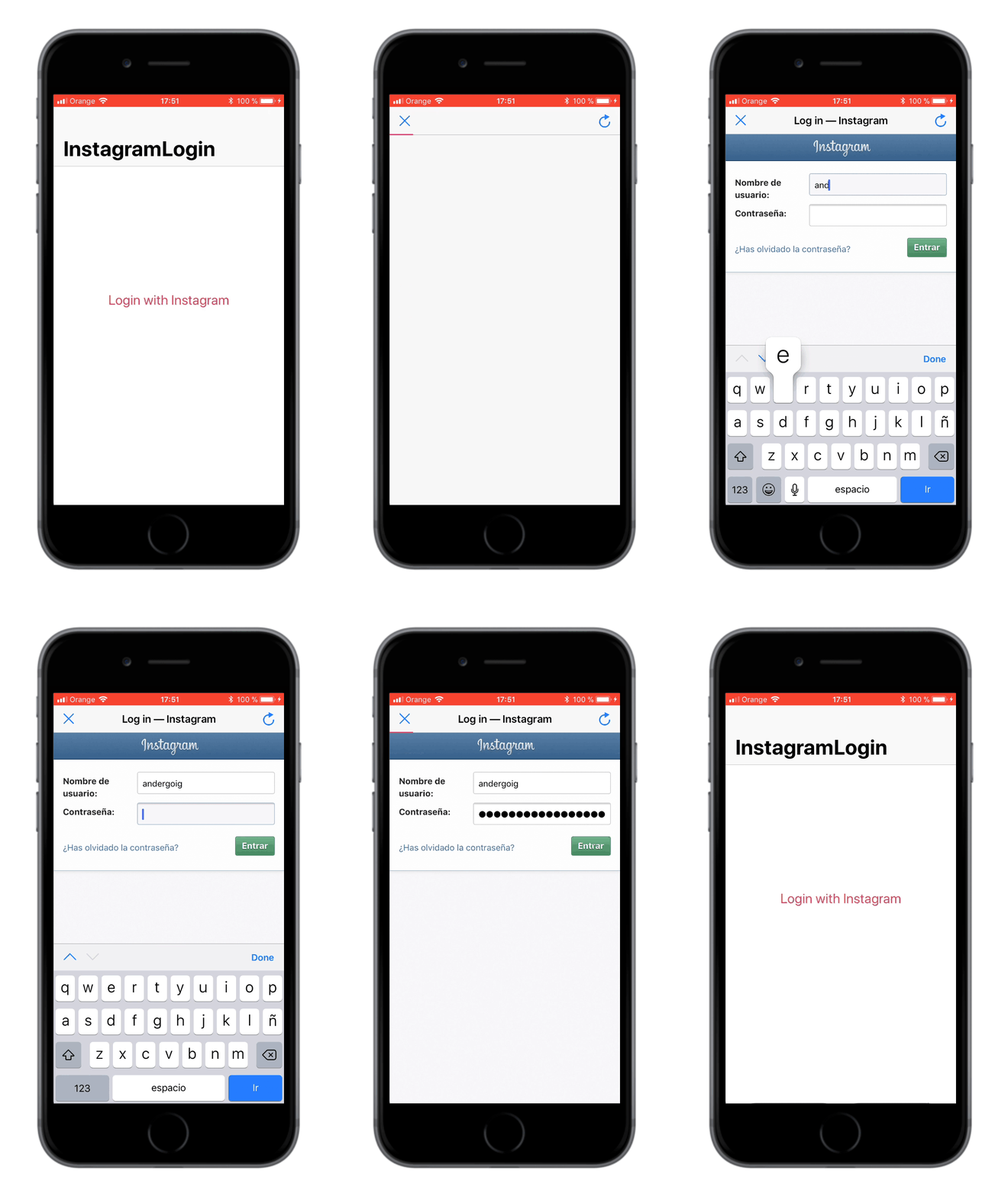
## Example
To run the example project, clone the repo, and run `pod install` from the Example directory first.
Second, go to your Instagram's [developer portal](https://www.instagram.com/developer/clients/manage/), click on _Manage_ your client, and **uncheck** the option "**Disable implicit OAuth**" from the _Security_ tab.
Third, edit the `Constants.swift` file with your client info from Instagram's [developer portal](https://www.instagram.com/developer/clients/manage/):
```swift
static let clientId = ""
static let redirectUri = ""
```
Fourth, go ahead and test it! :rocket:
## Requirements
* iOS 9.0+
* Xcode 9.0+
* Swift 4.0+
## Installation
### CocoaPods
`InstagramLogin` is available through [CocoaPods](http://cocoapods.org). To install
it, simply add the following line to your `Podfile`:
```ruby
pod 'InstagramLogin'
```
### Carthage
[Carthage](https://github.com/Carthage/Carthage) is a decentralized dependency manager that builds your dependencies and provides you with binary frameworks.
To integrate `InstagramLogin` into your Xcode project using Carthage, specify it in your `Cartfile`:
```ogdl
github "AnderGoig/InstagramLogin"
```
Follow the detailed guidelines [here](https://github.com/Carthage/Carthage#if-youre-building-for-ios-tvos-or-watchos).
### Manual installation
Simply copy all the Swift files from the [InstagramLogin/Classes](InstagramLogin/Classes) folder into your Xcode project.
## Usage
First of all, go to your Instagram's [developer portal](https://www.instagram.com/developer/clients/manage/), click on _Manage_ your client, and **uncheck** the option "**Disable implicit OAuth**" from the _Security_ tab.
```swift
import InstagramLogin // <-- VERY IMPORTANT! ;)
class YourViewController: UIViewController {
var instagramLogin: InstagramLoginViewController!
// 1. Set your client info from Instagram's developer portal (https://www.instagram.com/developer/clients/manage)
let clientId = ""
let redirectUri = ""
func loginWithInstagram() {
// 2. Initialize your 'InstagramLoginViewController' and set your 'ViewController' to delegate it
instagramLogin = InstagramLoginViewController(clientId: clientId, redirectUri: redirectUri)
instagramLogin.delegate = self
// 3. Customize it
instagramLogin.scopes = [.basic, .publicContent] // [.basic] by default; [.all] to set all permissions
instagramLogin.title = "Instagram" // If you don't specify it, the website title will be showed
instagramLogin.progressViewTintColor = .blue // #E1306C by default
// If you want a .stop (or other) UIBarButtonItem on the left of the view controller
instagramLogin.navigationItem.leftBarButtonItem = UIBarButtonItem(barButtonSystemItem: .stop, target: self, action: #selector(dismissLoginViewController))
// You could also add a refresh UIBarButtonItem on the right
instagramLogin.navigationItem.rightBarButtonItem = UIBarButtonItem(barButtonSystemItem: .refresh, target: self, action: #selector(refreshPage))
// 4. Present it inside a UINavigationController (for example)
present(UINavigationController(rootViewController: instagramLogin), animated: true)
}
@objc func dismissLoginViewController() {
instagramLogin.dismiss(animated: true)
}
@objc func refreshPage() {
instagramLogin.reloadPage()
}
// ...
}
// MARK: - InstagramLoginViewControllerDelegate
extension YourViewController: InstagramLoginViewControllerDelegate {
func instagramLoginDidFinish(accessToken: String?, error: InstagramError?) {
// Whatever you want to do ...
// And don't forget to dismiss the 'InstagramLoginViewController'
instagramLogin.dismiss(animated: true)
}
}
```
## Contributing to this project
If you have feature requests or bug reports, feel free to help out by sending pull requests or by [creating new issues](https://github.com/AnderGoig/InstagramLogin/issues/new). Please take a moment to
review the guidelines written by [Nicolas Gallagher](https://github.com/necolas):
* [Bug reports](https://github.com/necolas/issue-guidelines/blob/master/CONTRIBUTING.md#bugs)
* [Feature requests](https://github.com/necolas/issue-guidelines/blob/master/CONTRIBUTING.md#features)
* [Pull requests](https://github.com/necolas/issue-guidelines/blob/master/CONTRIBUTING.md#pull-requests)
## License
`InstagramLogin` is available under the MIT license. See the [LICENSE](LICENSE) file for more info.
## Credits
`InstagramLogin` is brought to you by [Ander Goig](https://github.com/AnderGoig) and [contributors to the project](https://github.com/AnderGoig/InstagramLogin/contributors). If you're using `InstagramLogin` in your project, attribution would be very appreciated.
## Author
Ander Goig, [goig.ander@gmail.com](mailto:goig.ander@gmail.com)
[https://github.com/AnderGoig/InstagramLogin](https://github.com/AnderGoig/InstagramLogin)