https://github.com/Baroshem/cache
🔋 Browser and Server Cache module for Nuxt 3
https://github.com/Baroshem/cache
cache nuxt performance
Last synced: 5 months ago
JSON representation
🔋 Browser and Server Cache module for Nuxt 3
- Host: GitHub
- URL: https://github.com/Baroshem/cache
- Owner: Baroshem
- License: mit
- Archived: true
- Created: 2022-01-13T08:03:31.000Z (almost 4 years ago)
- Default Branch: main
- Last Pushed: 2022-10-28T10:19:15.000Z (about 3 years ago)
- Last Synced: 2024-05-02T03:03:37.755Z (over 1 year ago)
- Topics: cache, nuxt, performance
- Language: TypeScript
- Homepage: https://cache-nm.netlify.app
- Size: 503 KB
- Stars: 35
- Watchers: 1
- Forks: 1
- Open Issues: 1
-
Metadata Files:
- Readme: README.md
- Changelog: CHANGELOG.md
- License: LICENSE
- Code of conduct: CODE_OF_CONDUCT.md
Awesome Lists containing this project
README
[](https://cache-nm.netlify.app)
# [DEPRECATED] @nuxt-modules/cache
As of Nuxt 3.rc-12 you can use routeRoules so this module is now deprecated. Please use official Nuxt approach
[![npm version][npm-version-src]][npm-version-href]
[![npm downloads][npm-downloads-src]][npm-downloads-href]
[![Github Actions CI][github-actions-ci-src]][github-actions-ci-href]
[![Codecov][codecov-src]][codecov-href]
[![License][license-src]][license-href]
> Browser and Server Cache module for [Nuxt 3](https://v3.nuxtjs.org)
- [✨ Release Notes](https://github.com/nuxt-modules/cache/releases)
- [📖 Read the documentation](https://cache-nm.netlify.app)
## Features
- Nuxt 3 ready
- Easy Browser Cache Control middleware
- Powerful Server Cache with Redis, memcached, etc [Coming soon]
- TypeScript support
[📖 Read the documentation](https://cache-nm.netlify.app)
## Setup
```sh
yarn add @nuxt-modules/cache # yarn
npm i @nuxt-modules/cache # npm
```
## Basic usage
Firstly, you need to add `@nuxt-modules/cache` to your Nuxt config.
```javascript
// nuxt.config.js
{
buildModules: [
[
'@nuxt-modules/cache',
{
browser: {
pages: [
['/', { 'max-age': 3600, 'stale-when-revalidate': 10 }],
['/product', { 'max-age': 3600, 'stale-when-revalidate': 10 }],
['/category', { 'max-age': 3600, 'stale-when-revalidate': 10 }]
]
}
}
]
]
}
```
And that's it! The module is registered and now your pages will have cache-control headers applied.
[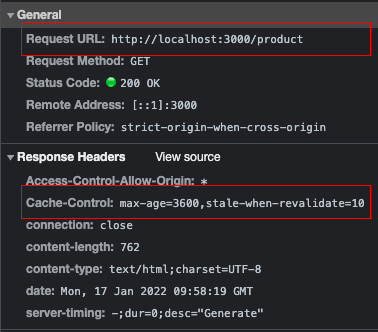](https://cache-nm.netlify.app)
For more configuration options, please visit the [docs](https://cache-nm.netlify.app)
Configuration of server cache will be added in the next versions.
## Development
1. Clone this repository
2. Install dependencies using `yarn install` or `npm install`
3. Start development server using `yarn dev` or `npm run dev`
## License
[MIT License](./LICENSE)
[npm-version-src]: https://img.shields.io/npm/v/@nuxt-modules/cache/latest.svg
[npm-version-href]: https://npmjs.com/package/@nuxt-modules/cache
[npm-downloads-src]: https://img.shields.io/npm/dt/@nuxt-modules/cache.svg
[npm-downloads-href]: https://npmjs.com/package/@nuxt-modules/cache
[github-actions-ci-src]: https://github.com/nuxt-modules/cache/workflows/ci/badge.svg
[github-actions-ci-href]: https://github.com/nuxt-modules/cache/actions?query=workflow%3Aci
[codecov-src]: https://img.shields.io/codecov/c/github/nuxt-modules/cache.svg
[codecov-href]: https://codecov.io/gh/nuxt-modules/cache
[license-src]: https://img.shields.io/npm/l/@nuxt-modules/cache.svg
[license-href]: https://npmjs.com/package/@nuxt-modules/cache