https://github.com/BranBushes/veld-fm
A modern, tileable, terminal-based file manager built with Python and Textual.
https://github.com/BranBushes/veld-fm
Last synced: 3 months ago
JSON representation
A modern, tileable, terminal-based file manager built with Python and Textual.
- Host: GitHub
- URL: https://github.com/BranBushes/veld-fm
- Owner: BranBushes
- License: mit
- Created: 2025-06-06T09:50:11.000Z (about 1 year ago)
- Default Branch: master
- Last Pushed: 2025-10-27T14:57:15.000Z (8 months ago)
- Last Synced: 2025-10-27T16:35:55.147Z (8 months ago)
- Language: Python
- Homepage:
- Size: 550 KB
- Stars: 26
- Watchers: 2
- Forks: 2
- Open Issues: 3
-
Metadata Files:
- Readme: README.md
- License: LICENSE.md
Awesome Lists containing this project
- awesome-cli-apps-in-a-csv - veld - A modern, tileable, terminal-based file manager built with Python and Textual. (<a name="file-manager"></a>File manager)
- awesome-cli-apps - veld - A modern, tileable, terminal-based file manager built with Python and Textual. (<a name="file-manager"></a>File manager)
README
# veld
A modern, tileable, terminal-based file manager built with Python and Textual.
[](https://opensource.org/licenses/MIT)
[](https://www.python.org/downloads/)
[](https://github.com/BranBushes/veld-fm)
---
## About
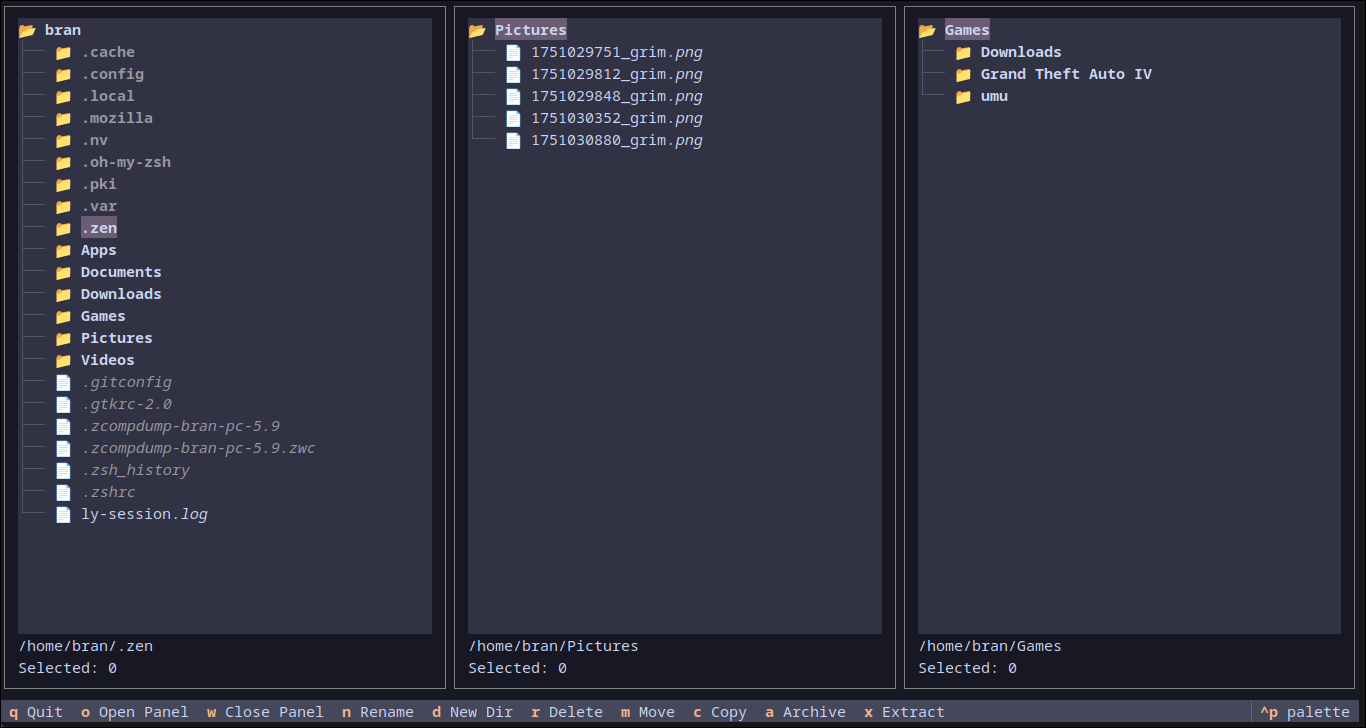
`veld` is a powerful, modern file manager that runs directly in your terminal. Inspired by classic TUIs like Ranger and Midnight Commander, `veld` offers a fresh take with an emphasis on simplicity, ease of use, and multi-panel navigation.
## ✨ Features
* 🗂️ **Tileable Panels:** Open multiple directory views side-by-side to streamline your workflow.
* 📂 **Toggle-able File Previews:** Automatically see a preview of the highlighted file—text, code, and even images. Press a key to hide it when you need more space.
* 🔍 **Recursive File Search:** Instantly find files and directories within the current panel.
* ⌨️ **Intuitive Navigation:** Navigate your filesystem and switch between panels with familiar, ergonomic keybindings.
* ⚙️ **Powerful File Operations:** Perform common operations like copy, move, delete, and rename in the active panel.
* **ዚ Archive Management:** Create and extract zip/tar archives directly within the file manager.
* 🎨 **Customizable Keybindings:** Don't like the defaults? Change every keybinding by editing a simple configuration file.
* 🐧 **Cross-Platform:** Built with Python and Textual, `veld` runs on Linux, macOS, and Windows.
* **Vim Mode:** Queue up file operations and execute them in a batch, Vim-style.
## 🚀 Installation
You need Python 3.9+ and `pip` installed.
Install the latest development version directly from GitHub:
```bash
pip install git+https://github.com/BranBushes/veld-fm.git
```
Or using `uv`:
```bash
uv pip install git+https://github.com/BranBushes/veld-fm.git
```
This will install `veld` and make the `veld` command available in your terminal.
## 💻 Usage
Once installed, you can run `veld` from anywhere in your terminal. You can also provide an optional starting directory for the first panel.
```bash
# Start in the default home directory
veld
# Start in the ~/Documents directory
veld ~/Documents
```
### Navigating Panels
Use `Tab` and `Shift+Tab` to cycle focus between open panels. The active panel is highlighted with a colored border.
### Vim Mode
Veld includes an optional Vim-style command mode for batching file operations.
* **Enter Command Mode:** Press `:` to open the command input.
* `:vim` - Toggles Vim Mode on or off.
* `:w` - Executes (writes) all queued actions.
* `:c` - Clears all queued actions.
When Vim Mode is active, a list of queued actions will appear in the bottom-right corner.
## ⌨️ Keybindings
Keybindings are organized by function and can be fully customized (see Configuration section).
### Application & Panel Management
| Key | Action |
|---------------|------------------------|
| **q** | Quit the application |
| **o** | Open a new panel (prompts for path) |
| **O** (Shift+o)| Open panel at selected directory |
| **w** | Close the active panel |
| **p** | Toggle the preview panel|
| **backspace** | Close the search panel |
| **:** | Enter Command Mode |
### File & Directory Operations
| Key | Action |
|-------------|-----------------------|
| **enter** | Open file or directory (default app) |
| **e** | Open file with... (prompts for command) |
| **space** | Toggle file selection |
| **f** | Find files/directories|
| **n** | Rename a file |
| **d** | Create a directory |
| **r** | Delete selected files (queues in Vim Mode) |
| **m** | Move selected files |
| **c** | Copy selected files (queues in Vim Mode) |
| **a** | Archive selected items|
| **x** | Extract highlighted archive |
## 🔧 Configuration
On the first run, a config file is created at `~/.config/veld-fm/config.toml`. You can edit this file to change keybindings.
## 🧑💻 For Developers
To set up a development environment:
```bash
git clone https://github.com/BranBushes/veld-fm.git
cd veld-fm
./setup.sh # This creates a venv and installs in editable mode
source .venv/bin/activate
```
---
Made with ❤️ from Bangladesh!