https://github.com/Brandawg93/PeaNUT
A tiny dashboard for Network UPS Tools
https://github.com/Brandawg93/PeaNUT
Last synced: 10 months ago
JSON representation
A tiny dashboard for Network UPS Tools
- Host: GitHub
- URL: https://github.com/Brandawg93/PeaNUT
- Owner: Brandawg93
- License: apache-2.0
- Created: 2023-08-31T01:36:37.000Z (almost 3 years ago)
- Default Branch: main
- Last Pushed: 2024-12-21T12:41:07.000Z (over 1 year ago)
- Last Synced: 2024-12-21T13:36:50.386Z (over 1 year ago)
- Language: TypeScript
- Size: 2.44 MB
- Stars: 492
- Watchers: 6
- Forks: 12
- Open Issues: 6
-
Metadata Files:
- Readme: README.md
- Funding: .github/FUNDING.yml
- License: LICENSE
Awesome Lists containing this project
- definitive-opensource - PeaNUT
README

# PeaNUT
A Tiny Dashboard for Network UPS Tools
[](https://www.paypal.com/cgi-bin/webscr?cmd=_donations&business=CEYYGVB7ZZ764&item_name=peanut¤cy_code=USD&source=url)
[](https://github.com/Brandawg93)

[](https://sonarcloud.io/summary/new_code?id=Brandawg93_PeaNUT)
## Features
- Monitor UPS devices connected to your network via [NUT](https://networkupstools.org)
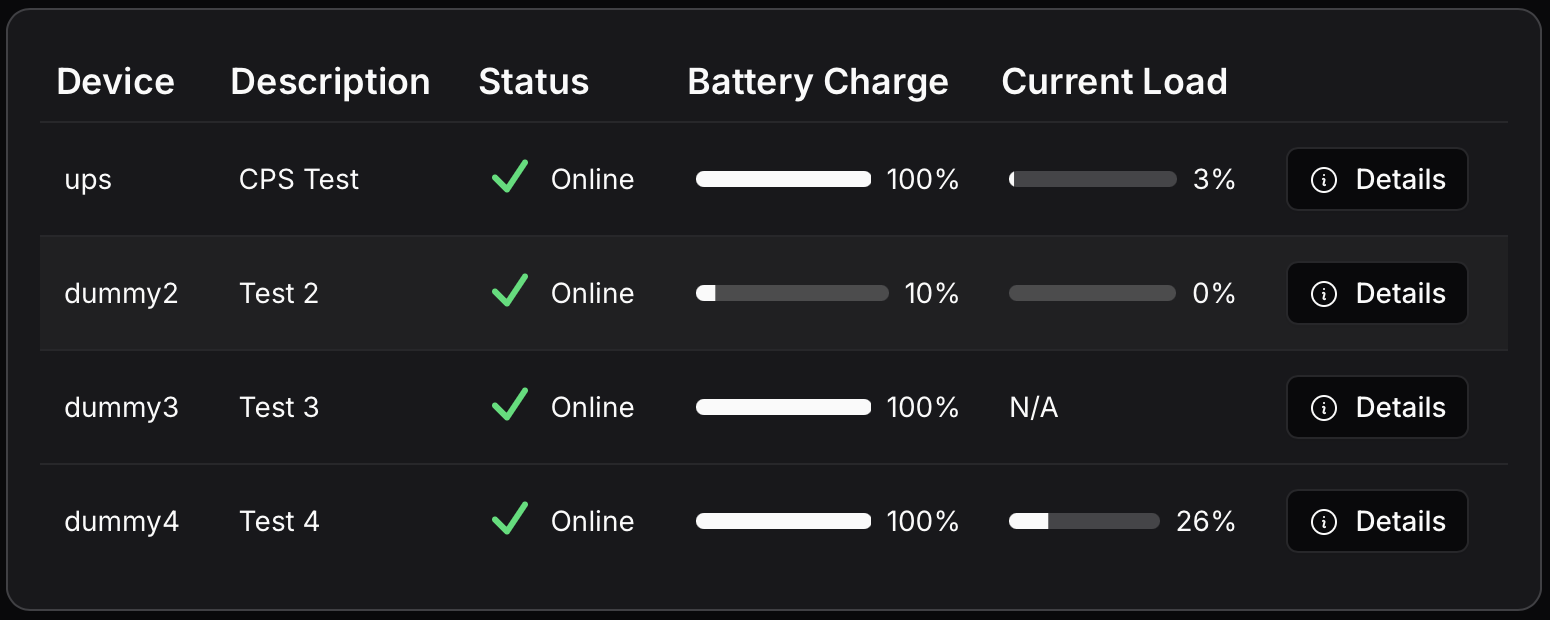
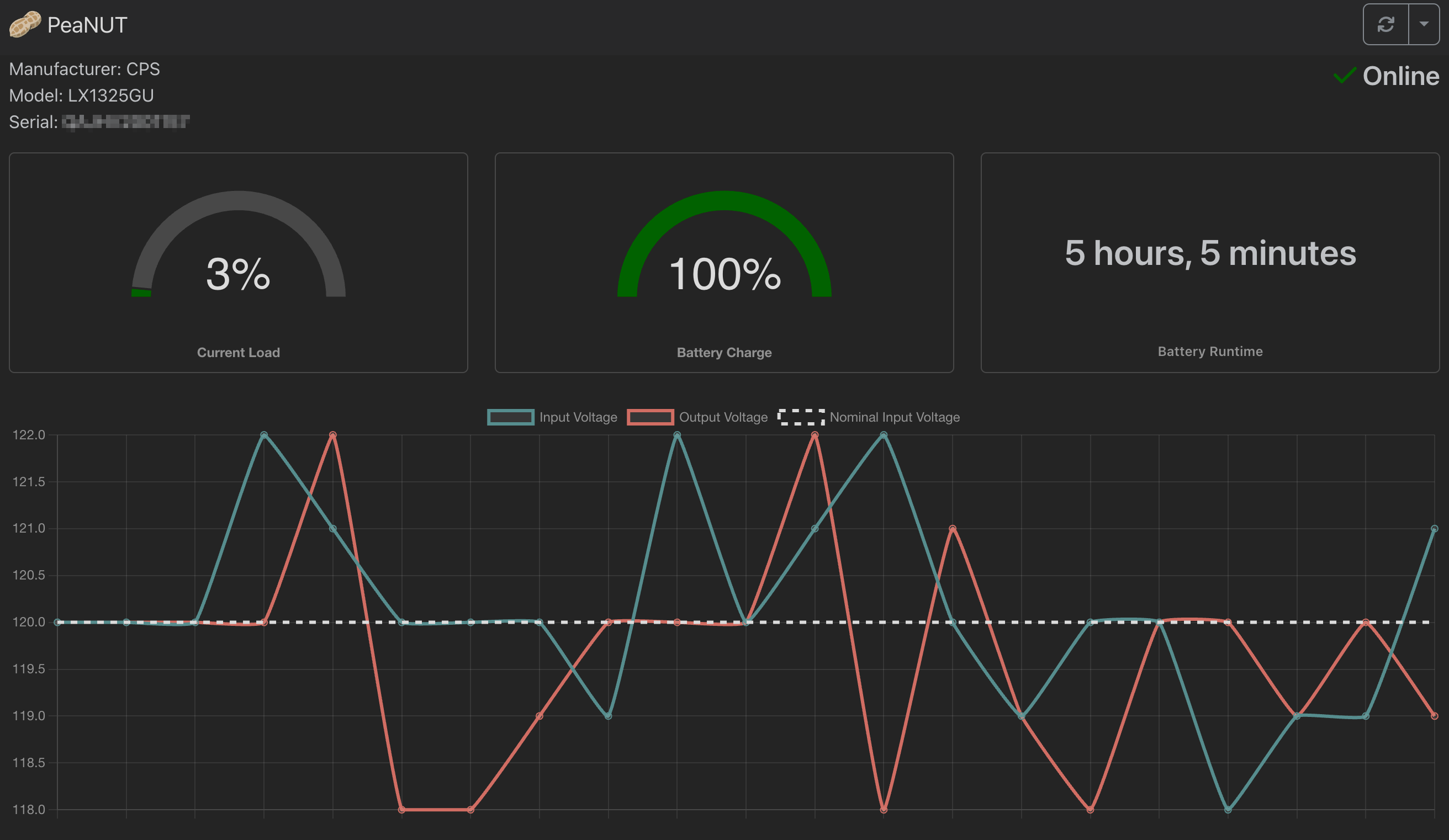
- View real-time statistics and status of UPS devices
- Customizable dashboard layout
- Supports multiple UPS devices
- Execute commands on UPS devices
- Configure settings through a user-friendly UI
- Manual configuration via YAML file
- Access NUT server directly via terminal
- API access for integration with other tools
- [InfluxDB](https://www.influxdata.com) v2 integration for monitoring via [Grafana](https://grafana.com)
- [Prometheus](https://prometheus.io) support for monitoring and alerting
- Customizable widgets for [Homepage](https://gethomepage.dev) integration
- Detailed [documentation](https://github.com/Brandawg93/PeaNUT/wiki) and examples available
## Installation
Install using Docker
### docker run
```bash
docker run -v ${PWD}/config:/config -p 8080:8080 --restart unless-stopped \
--env WEB_PORT=8080 brandawg93/peanut
```
### docker-compose.yml
```yaml
services:
peanut:
image: brandawg93/peanut:latest
container_name: PeaNUT
restart: unless-stopped
volumes:
- /path/to/config:/config
ports:
- 8080:8080
environment:
- WEB_PORT=8080
```
### compile from source
```bash
git clone https://github.com/Brandawg93/PeaNUT.git
cd PeaNUT
npm i -g pnpm # only if you don't have pnpm installed
pnpm i
pnpm run build:local
pnpm run start:local
```
More examples can be found in the [examples](https://github.com/Brandawg93/PeaNUT/tree/main/examples) folder.
## Environment Variables
| Variable | Default | Description |
| ------------------- | --------- | ------------------------------------------------- |
| WEB_HOST | localhost | Hostname of web server |
| WEB_PORT | 8080 | Port of web server |
| WEB_USERNAME | undefined | Username of web app |
| WEB_PASSWORD | undefined | Password of web app |
| BASE_PATH | undefined | Base path for reverse proxy |
| DISABLE_CONFIG_FILE | undefined | If set to 'true', disables all config file saving |
## Reverse Proxies
For detailed reverse proxy configuration instructions, see the [Reverse Proxy Setup Wiki](https://github.com/Brandawg93/PeaNUT/wiki/Reverse-Proxy-Setup-for-PeaNUT).
**Note**: If you encounter issues with missing favicon or font loading errors, please check the troubleshooting section in the wiki for additional `sub_filter` rules.
## Configuration
Configuration is primarily done via the UI, but manual configuration can be done via the `/config/settings.yml` file within the container. More information can be found on the [wiki](https://github.com/Brandawg93/PeaNUT/wiki/YAML-Configuration).
## Authentication
Authentication can be enabled by setting both `WEB_USERNAME` and `WEB_PASSWORD` environment variables. When these are set:
- Web UI access will require login using these credentials
- API calls will require Basic Authentication
For API calls, you'll need to include an Authorization header with the Base64 encoded credentials in the format `username:password`. The header should be formatted as: `Authorization: Basic `
## API
| API Call | Description |
| --------------------------------------------------------- | ------------------------------------------------------------------------- |
| `GET /api/ping` | Health check endpoint that returns "pong" |
| `GET /api/v1/info` | Retrieves information about the PeaNUT application |
| `GET /api/v1/version` | Retrieves the version of the NUT server currently in use |
| `GET /api/v1/netversion` | Retrieves the version of the network protocol currently in use |
| `GET /api/v1/devices` | Retrieves information about all UPS devices |
| `GET /api/v1/devices/[ups]` | Retrieves information about the specified UPS device |
| `GET /api/v1/devices/[ups]/vars` | Retrieves all variables for the specified UPS device |
| `GET /api/v1/devices/[ups]/var/[param]` | Retrieves value for a single parameter of the specified UPS device |
| `POST /api/v1/devices/[ups]/var/[param]` | Saves value for a single parameter of the specified UPS device |
| `GET /api/v1/devices/[ups]/var/[param]/description` | Retrieves description for a single parameter of the specified UPS device |
| `GET /api/v1/devices/[ups]/var/[param]/type` | Retrieves type for a single parameter of the specified UPS device |
| `GET /api/v1/devices/[ups]/var/[param]/enum` | Retrieves enum values for a single parameter of the specified UPS device |
| `GET /api/v1/devices/[ups]/var/[param]/range` | Retrieves range values for a single parameter of the specified UPS device |
| `GET /api/v1/devices/[ups]/commands` | Retrieves available commands for the specified UPS device |
| `POST /api/v1/devices/[ups]/command/[command]` | Executes a given command for the specified UPS device |
| `GET /api/v1/devices/[ups]/command/[command]/description` | Retrieves description for a single command of the specified UPS device |
| `GET /api/v1/devices/[ups]/description` | Retrieves the description for the specified UPS device |
| `GET /api/v1/devices/[ups]/clients` | Retrieves the connected clients for the specified UPS device |
| `GET /api/v1/devices/[ups]/rwvars` | Retrieves writable variables for the specified UPS device |
| `GET /api/v1/metrics` | Metrics endpoint for prometheus |
| `GET /api/ws` | WebSocket endpoint for direct NUT server communication |
## Homepage Support
For information about how to set up Homepage, check the [Homepage docs](https://gethomepage.dev/widgets/services/peanut/).
Ex:
```yaml
widget:
type: peanut
url: http://peanut.host.or.ip:port
key: nameofyourups
```
Or use the `customapi` widget for complete customization!
Ex:
```yaml
widget:
type: customapi
url: http://{HOSTNAME}:{PORT}/api/v1/devices/ups
mappings:
- field: battery.charge
label: Battery Charge
format: percent
- field: battery.runtime
label: Battery Runtime
format: duration
- field: ups.load
label: UPS Load
format: percent
- field: ups.status
label: UPS Status
format: text
remap:
- value: OL
to: Online
- value: OB
to: On Battery
- value: LB
to: Low Battery
- any: true
to: Unknown
```
## FAQ
**Question:** Chokidar is using lots of resources on my machine.
**Answer:** If you are using a Networked File Share, please see [#142](https://github.com/Brandawg93/PeaNUT/issues/142).
**Question:** Why can't I see multiple NUT devices on the display?
**Answer:** In order for PeaNUT to display multiple NUT devices, each UPS must have a unique identifier in the corresponding NUT configuration file. Make sure each UPS device has a distinct name/identifier in your NUT configuration to avoid conflicts and ensure proper display of all devices.
## Tested Devices
[A wiki](https://github.com/Brandawg93/PeaNUT/wiki/Tested-UPS-Devices) has been compiled of tested UPS devices. Feel free to look there for your device or add your device to the list by submitting an issue with the `tested device` label.
## Donate to Support PeaNUT
This project was made with you in mind. If you would like to show your appreciation for its continued development, please consider [sponsoring me on Github](https://github.com/sponsors/Brandawg93).
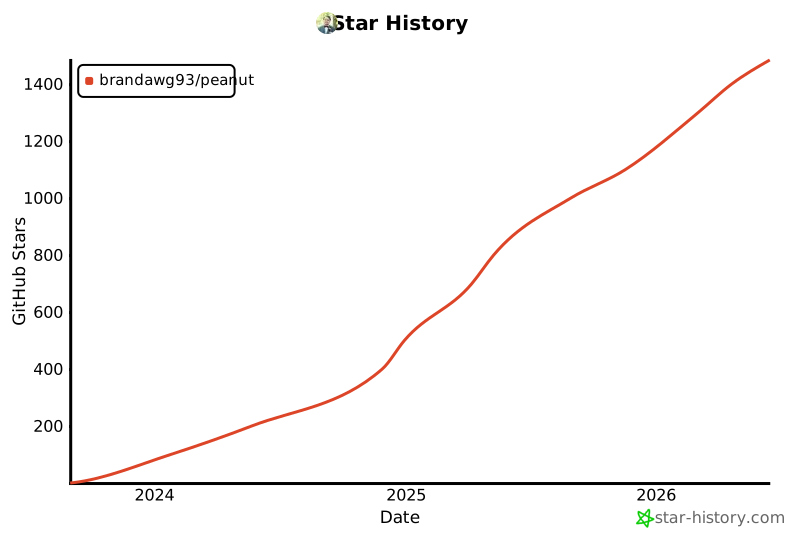
Star History
[](https://star-history.com/#brandawg93/peanut&Date)