https://github.com/DevLink-Tech-Academy/waterwall-api-gateway
https://github.com/DevLink-Tech-Academy/waterwall-api-gateway
Last synced: 2 months ago
JSON representation
- Host: GitHub
- URL: https://github.com/DevLink-Tech-Academy/waterwall-api-gateway
- Owner: DevLink-Tech-Academy
- License: apache-2.0
- Created: 2026-03-29T19:07:33.000Z (3 months ago)
- Default Branch: main
- Last Pushed: 2026-04-09T23:21:22.000Z (3 months ago)
- Last Synced: 2026-04-10T01:24:25.679Z (3 months ago)
- Language: Java
- Size: 1.45 MB
- Stars: 46
- Watchers: 1
- Forks: 0
- Open Issues: 1
-
Metadata Files:
- Readme: README.md
- Contributing: CONTRIBUTING.md
- Funding: .github/FUNDING.yml
- License: LICENSE
Awesome Lists containing this project
- awesome-java - Waterwall
README
# Waterwall
> **The open-source API gateway platform that publishes, secures, monitors, and monetizes APIs — built on Java 21 virtual threads, deployable in 60 seconds.**
[](LICENSE)
[](https://openjdk.org/projects/jdk/21/)
[](https://spring.io/projects/spring-boot)
[](https://nextjs.org/)
[](CONTRIBUTING.md)
[](CODE_OF_CONDUCT.md)
Waterwall is a **full API lifecycle management platform** — not just a proxy. It ships with an admin portal, a developer portal, real-time analytics, pricing plans, billing, and a high-performance request runtime. Think WSO2 API Manager or Kong Enterprise, but open source, Java 21-native, and deployable on a single machine.
## ⚡ Performance
Single-machine benchmark — all 7 services, PostgreSQL, and RabbitMQ on one box (Windows 11, AMD Ryzen 9 7945HX, 32 GB RAM), measured with [Vegeta](https://github.com/tsenart/vegeta):
| Rate | Success | p50 | p95 | p99 |
|---:|:---:|---:|---:|---:|
| **1,000 rps** | 100% | 1.5 ms | 8.0 ms | 20.8 ms |
| **2,000 rps** | 100% | 1.3 ms | 8.0 ms | 20.1 ms |
| **3,000 rps** | 100% | 3.5 ms | 22.0 ms | 34.6 ms |
| **4,000 rps** | 100% | 8.5 ms | 30.5 ms | 65.3 ms |
100% success rate up to 4,000 rps with sub-10ms median latency — on a laptop. See the full table and optimization notes in the [Performance section](#performance).
## Why Waterwall?
| | Waterwall | Kong OSS | WSO2 APIM | Gravitee CE | Tyk OSS |
|---|:---:|:---:|:---:|:---:|:---:|
| Admin portal UI | ✅ | Enterprise only | ✅ | ✅ | Dashboard is paid |
| Developer portal UI | ✅ | Enterprise only | ✅ | ✅ | Paid |
| Built-in monetization & billing | ✅ | ❌ | ✅ | Enterprise only | ❌ |
| Real-time analytics + SLA monitoring | ✅ | Enterprise only | ✅ | ✅ | Enterprise only |
| Java 21 + virtual threads (blocking code, no reactive) | ✅ | N/A (Lua/Go) | ❌ | ❌ | N/A (Go) |
| One-command install on a blank machine | ✅ | ✅ | ❌ | ❌ | ✅ |
| Fully open source (Apache 2.0) | ✅ | Partial | Partial | Partial | Partial |
> **Data plane:** Waterwall's `gateway-runtime` is a custom reverse proxy built on Spring Boot + Tomcat with Java 21 virtual threads and Apache HttpClient 5 connection pooling — no Spring Cloud Gateway, no Netty WebFlux. Owning the hot path is what makes optimizations like the lock-free circuit breaker, async access logging, and the virtual-thread pinning fix possible. A separate Netty port on 9090 handles gRPC.
## Quickstart (60 seconds)
```bash
curl -fsSL https://raw.githubusercontent.com/DevLink-Tech-Academy/waterwall-api-gateway/main/setup.sh -o setup.sh
sudo bash setup.sh
```
Then open **http://localhost:3001** (admin) or **http://localhost:3000** (developer portal). Default login: `admin@gateway.local` / `changeme`. Full install options in [Getting Started](#getting-started).
---
## Features
### API Lifecycle Management
- Create, version, publish, deprecate, and retire APIs
- API governance with linting and OpenAPI spec validation
- SDK generation for multiple languages
- Try-It console for interactive API testing
### Security
- Multiple authentication types: JWT, API Key, Basic Auth, mTLS, OAuth2
- WAF rules, IP filtering, and geo-blocking
- Role-based access control (RBAC)
### Traffic Control
- Rate limiting with token bucket, sliding window, and strict DB-backed strategies
- Circuit breaker for upstream fault tolerance
- Request proxying with distributed tracing
### Analytics and Monitoring
- Real-time dashboards with SSE streaming
- SLA monitoring with automated breach detection
- Custom report builder with CSV export
- Alerting via email, webhook, and Slack
### Monetization
- Pricing plans (Free, Flat Rate, Pay-per-Use, Tiered, Freemium) and subscription management
- Multi-provider payments: Paystack, Stripe, Flutterwave (admin-configurable)
- Wallet system with pay-as-you-go billing and auto top-up
- Double-entry accounting ledger with automated invoicing and dunning
### Notifications
- Asynchronous event processing via RabbitMQ
- Email, webhook, and Slack delivery channels
---
## Architecture
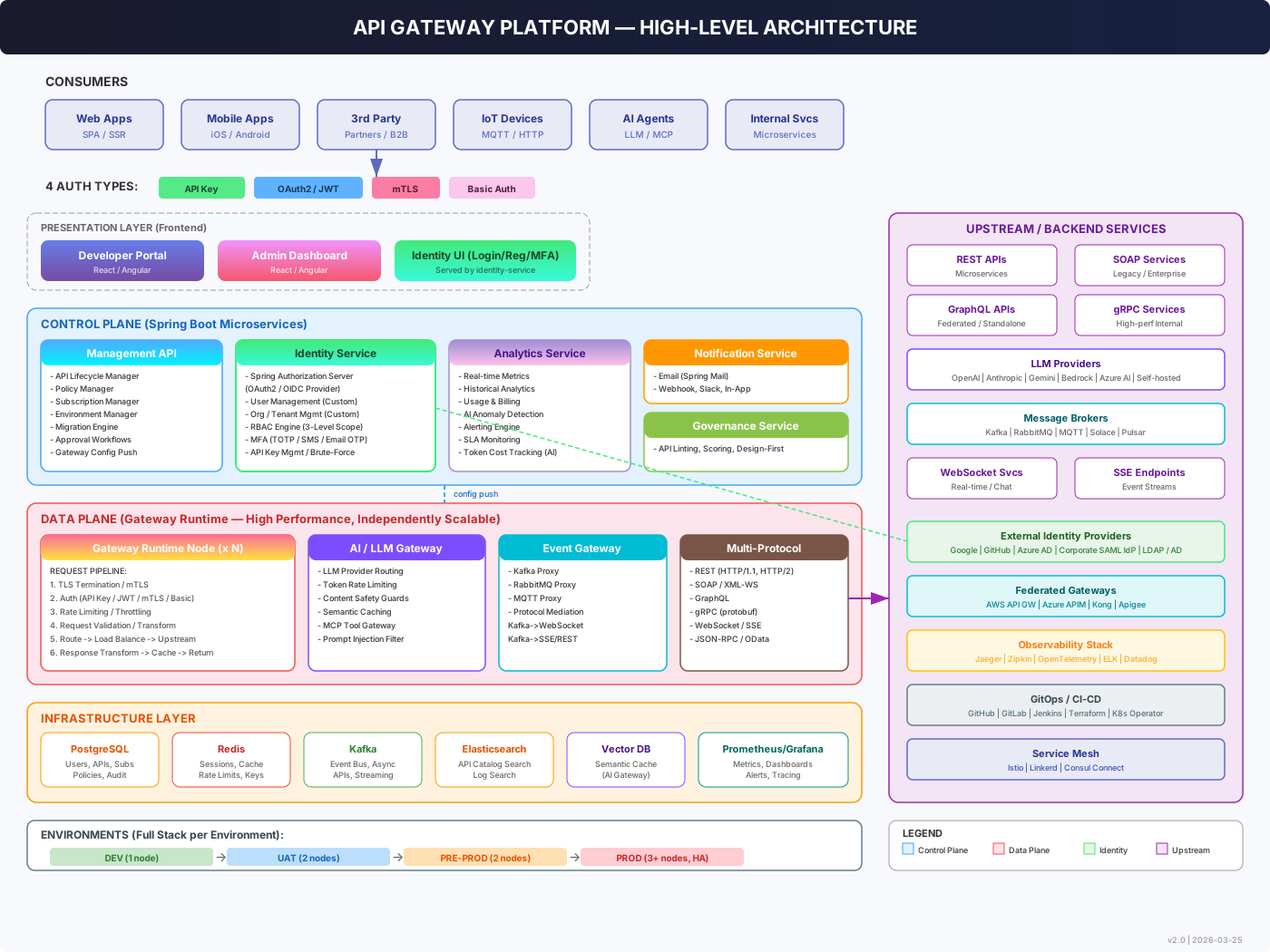
### Platform Overview
### Identity Service
### API Protection & Auth Flows
### Versioning & Environment Flow
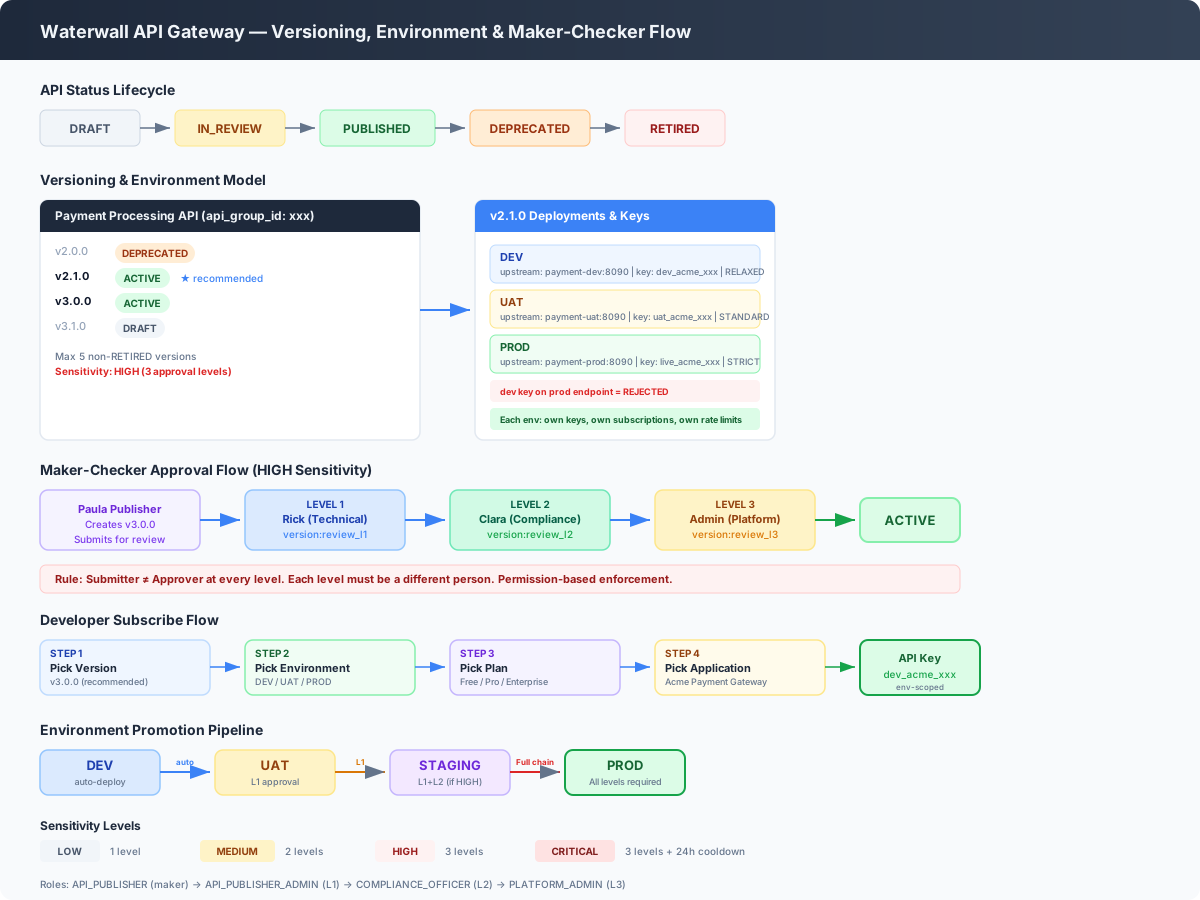
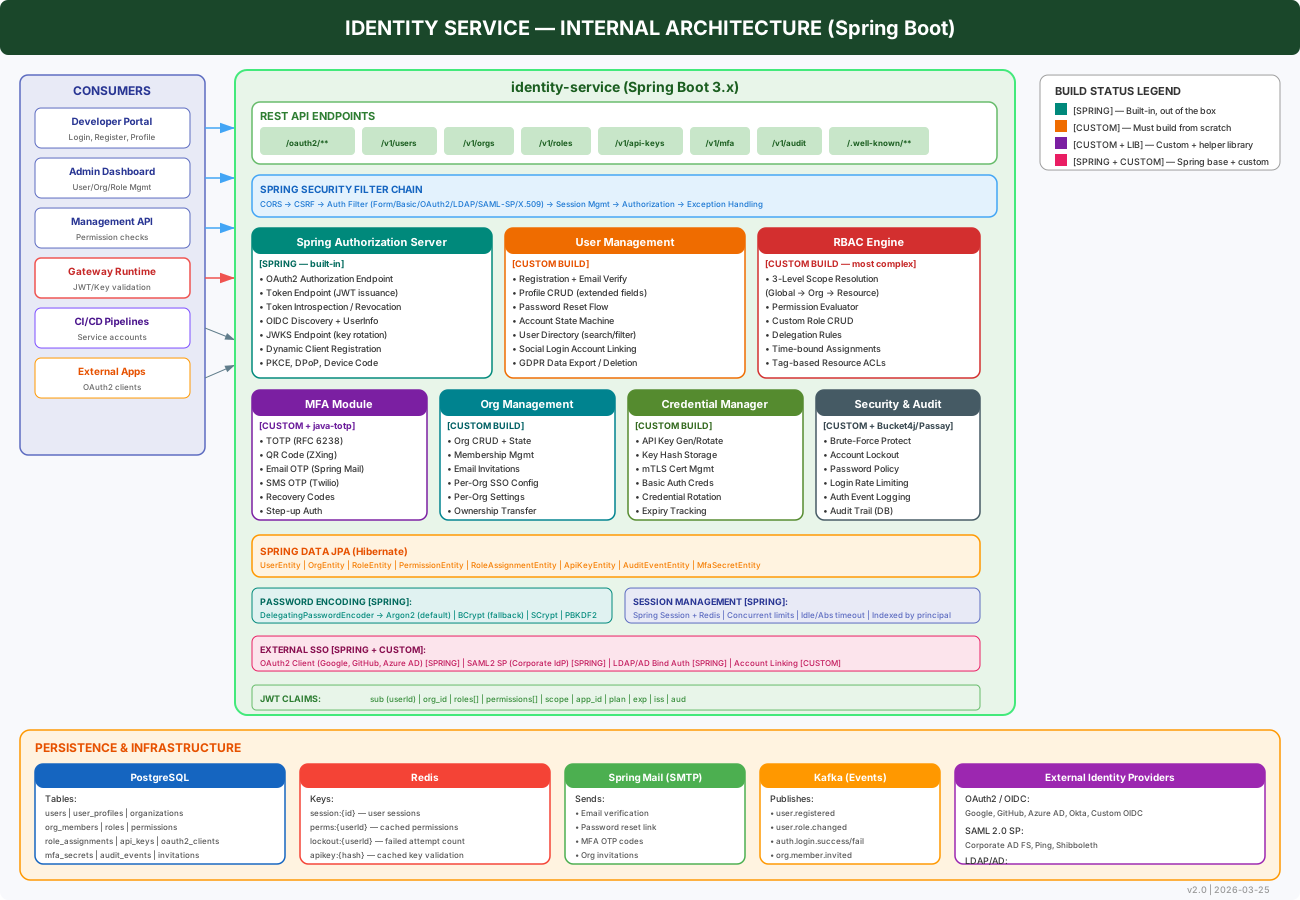
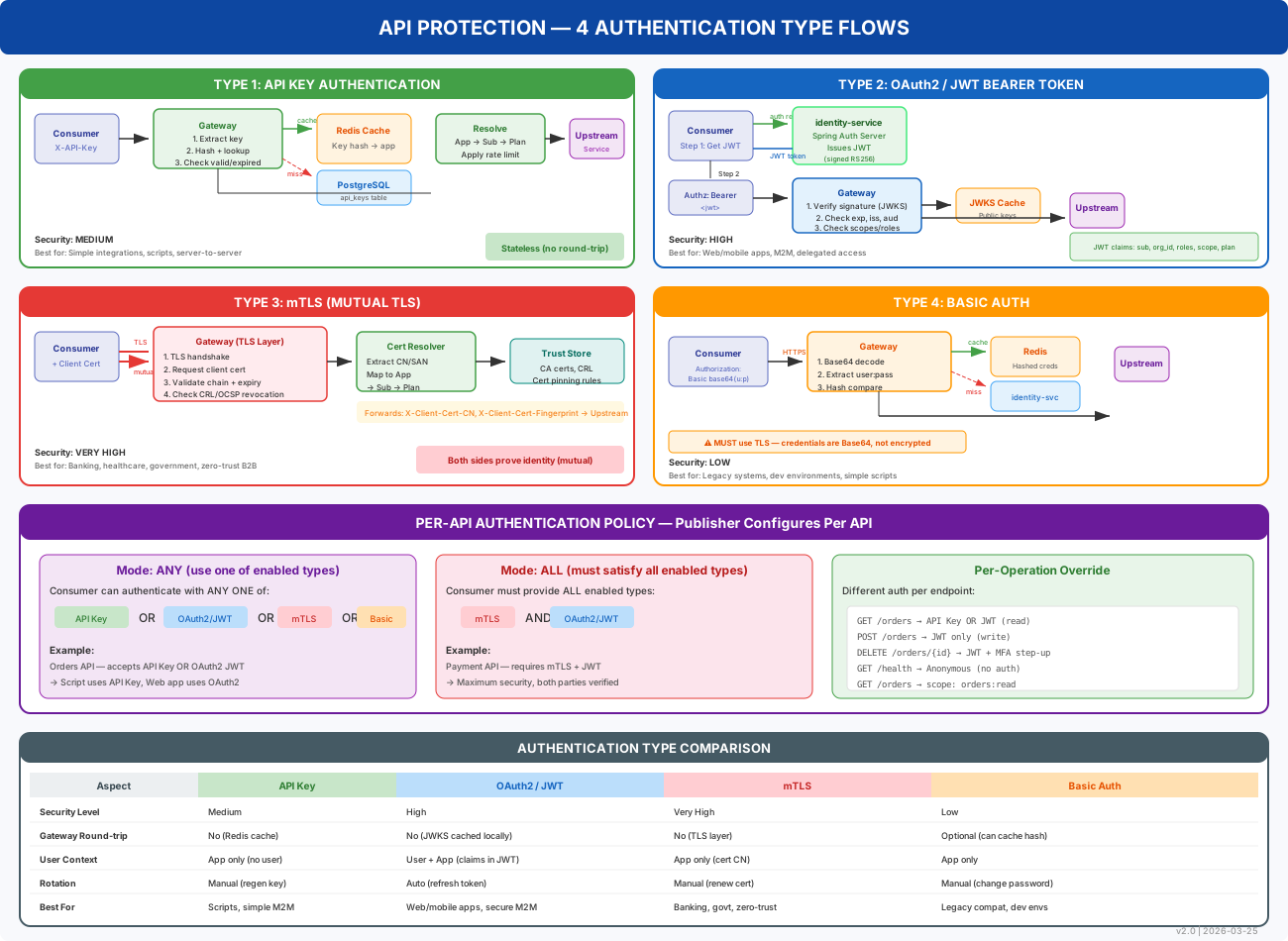
> Open [`architecture/architecture-diagrams.html`](architecture/architecture-diagrams.html) locally in a browser for an interactive view with navigation.
### Services
| Service | Port | Description |
|---|---|---|
| **gateway-runtime** | 8080 | Request proxy, auth enforcement, rate limiting, WAF, circuit breaker, distributed tracing |
| **identity-service** | 8081 | User registration/login, JWT/OAuth2 tokens, RBAC, API key management |
| **management-api** | 8082 | API lifecycle (CRUD, versioning, publish), subscriptions, pricing plans, SDK generation, governance |
| **analytics-service** | 8083 | Real-time dashboards, SLA monitoring, custom report builder, SSE streaming, alerting |
| **notification-service** | 8084 | Email, webhook, Slack notifications via RabbitMQ event processing |
| **gateway-portal** | 3000 | Developer portal — API catalog, Try-It console, subscriptions, billing, docs |
| **gateway-admin** | 3001 | Admin portal — API management, analytics, monetization, SLA, user management |
### Shared Libraries
| Module | Purpose |
|---|---|
| `common-dto` | Shared DTOs, global exception handler, API error responses |
| `common-logging` | Centralized logging, trace ID propagation |
| `common-events` | RabbitMQ event definitions and config |
| `common-cache` | Two-tier caching (Caffeine L1 + RabbitMQ invalidation) |
| `common-auth` | JWT authentication filter, shared security utilities |
### API Versioning and Governance
Waterwall supports full API version lifecycle with maker-checker approval:
```
DRAFT ──> IN_REVIEW ──> PUBLISHED ──> DEPRECATED ──> RETIRED
```
- **Multi-level approval** based on API sensitivity (LOW → 1 level, CRITICAL → 3 levels + cooldown)
- **Environment-scoped deployments** (DEV, UAT, STAGING, PROD) with per-environment auth enforcement
- **Environment-scoped API keys and subscriptions** — cross-environment usage is rejected
See [`architecture/04-versioning-environment-flow.md`](architecture/04-versioning-environment-flow.md) for the full data model and flow diagrams.
### Authentication Flows
The gateway supports four authentication types, enforced at the runtime proxy layer:
| Auth Type | Header | Use Case |
|---|---|---|
| **JWT Bearer** | `Authorization: Bearer ` | Web/mobile apps, SSO |
| **API Key** | `X-API-Key: ` | Server-to-server, IoT |
| **Basic Auth** | `Authorization: Basic ` | Legacy integrations |
| **mTLS** | Client certificate | High-security B2B |
### Database Schema
PostgreSQL with four schemas, managed by Liquibase migrations:
| Schema | Tables | Purpose |
|---|---|---|
| `identity` | users, roles, permissions, sessions, api_keys | Authentication and authorization |
| `gateway` | apis, routes, plans, subscriptions, applications, rate_limits | API lifecycle and traffic management |
| `analytics` | request_logs, metrics_1m/1h/1d, alert_rules, sla_configs | Observability and reporting |
| `notification` | templates, channels, delivery_log | Notification management |
---
## Getting Started
There are four ways to run Waterwall, from simplest to most flexible.
### Option 1: Pre-built Release (recommended)
Downloads a pre-built release from GitHub — no compilation needed. All services are managed by [PM2](https://pm2.keymetrics.io/) for auto-restart and boot persistence.
```bash
curl -fsSL https://raw.githubusercontent.com/DevLink-Tech-Academy/waterwall-api-gateway/main/setup.sh -o setup.sh
chmod +x setup.sh
sudo bash setup.sh
```
The script will prompt for your server's IP or domain name so browsers can reach the APIs.
To skip the prompt:
```bash
sudo bash setup.sh --host 203.0.113.10
sudo bash setup.sh --host api.example.com
sudo bash setup.sh --version v1.0.0 --host api.example.com
```
The script will:
1. Detect your OS and install missing prerequisites (Java 21, Node.js, Docker)
2. Download and extract the latest release from GitHub Releases
3. Start PostgreSQL and RabbitMQ via Docker Compose
4. Start all 7 services with PM2 and print access URLs
**Prerequisites installed automatically:** Java 21, Node.js 20, Docker, PM2. No Maven or build tools needed.
After the initial setup, use these PM2 commands:
```bash
sudo pm2 status # view all services
sudo pm2 logs # tail logs
sudo pm2 restart all # restart everything
sudo pm2 stop all # stop everything
sudo pm2 monit # real-time monitoring dashboard
```
To clean up and start fresh:
```bash
curl -fsSL https://raw.githubusercontent.com/DevLink-Tech-Academy/waterwall-api-gateway/main/cleanup.sh -o cleanup.sh
sudo bash cleanup.sh --all # stop services, remove containers, wipe data
sudo bash setup.sh # fresh install
```
### Option 2: Build from Source
For contributors or custom builds. Clones the repo and compiles everything locally.
```bash
curl -fsSL https://raw.githubusercontent.com/DevLink-Tech-Academy/waterwall-api-gateway/main/setup.sh -o setup.sh
chmod +x setup.sh
sudo bash setup.sh --build-from-source
```
Or from an existing clone:
```bash
sudo bash setup.sh --no-clone
```
**Additional prerequisites:** Git, Maven 3.9+
> On Linux/macOS, all prerequisites are installed automatically. On Windows, the script prints download links for any missing tools.
### Option 3: Docker Compose (all-in-Docker)
Runs everything in containers. Only requires Docker.
```bash
git clone https://github.com/DevLink-Tech-Academy/waterwall-api-gateway.git
cd waterwall-api-gateway/deploy/docker
docker compose up -d
```
This builds and starts **9 containers**: PostgreSQL, RabbitMQ, 5 backend services, and 2 frontend portals. The first build takes a few minutes (Maven + npm dependencies are cached for subsequent builds).
To stop:
```bash
docker compose down # Stop containers (keep data)
docker compose down -v # Stop containers and delete all data
```
### Option 4: Manual Setup (services run locally)
For contributors who want to run services individually with hot reload.
**Prerequisites:** Java 21, Maven 3.9+, Node.js 20+, npm 10+, PostgreSQL 16, RabbitMQ 3.13+
#### Step 1: Start infrastructure
Use Docker for just PostgreSQL and RabbitMQ:
```bash
cd deploy/docker
docker compose up -d postgres rabbitmq
```
Or if running them natively, create the database and schemas:
```sql
CREATE DATABASE gateway;
\c gateway
CREATE SCHEMA IF NOT EXISTS identity;
CREATE SCHEMA IF NOT EXISTS gateway;
CREATE SCHEMA IF NOT EXISTS analytics;
CREATE SCHEMA IF NOT EXISTS audit;
CREATE SCHEMA IF NOT EXISTS notification;
```
And create the RabbitMQ virtual host:
```bash
rabbitmqctl add_vhost /cem
rabbitmqctl set_permissions -p /cem guest ".*" ".*" ".*"
```
#### Step 2: Build the backend
```bash
mvn clean install -DskipTests
```
#### Step 3: Start backend services
Services must start in order — identity-service first.
**Start all at once (Windows):**
```cmd
start-all.bat
```
**Start individually** (open a separate terminal for each):
```bash
# 1. Identity Service (start first, wait for it to be ready)
java -jar identity-service/target/identity-service-1.0.0-SNAPSHOT.jar
# 2. Management API
java -jar management-api/target/management-api-1.0.0-SNAPSHOT.jar
# 3. Gateway Runtime
java -jar gateway-runtime/target/gateway-runtime-1.0.0-SNAPSHOT.jar
# 4. Analytics Service
java -jar analytics-service/target/analytics-service-1.0.0-SNAPSHOT.jar
# 5. Notification Service
java -jar notification-service/target/notification-service-1.0.0-SNAPSHOT.jar
```
Verify all services are healthy:
```bash
curl http://localhost:8081/actuator/health/liveness # identity-service
curl http://localhost:8082/actuator/health/liveness # management-api
curl http://localhost:8080/actuator/health/liveness # gateway-runtime
curl http://localhost:8083/actuator/health/liveness # analytics-service
curl http://localhost:8084/actuator/health/liveness # notification-service
```
#### Step 4: Start the frontends
```bash
npm install
```
**Development mode** (hot reload):
```bash
npm run dev:portal # Developer portal on http://localhost:3000
npm run dev:admin # Admin portal on http://localhost:3001
```
**Production mode:**
```bash
npm run build:all
cd gateway-portal && npx next start -p 3000 &
cd gateway-admin && npx next start -p 3001 &
```
---
## Access the Platform
| Service | URL | Description |
|---|---|---|
| Developer Portal | http://localhost:3000 | API catalog, subscriptions, billing, docs |
| Admin Portal | http://localhost:3001 | API management, analytics, monetization |
| Gateway Runtime | http://localhost:8080 | API proxy endpoint |
| Identity Service | http://localhost:8081 | Auth, users, API keys |
| Management API | http://localhost:8082 | API lifecycle, subscriptions, plans |
| Analytics Service | http://localhost:8083 | Dashboards, reports, alerting |
| Notification Service | http://localhost:8084 | Email, webhook, Slack notifications |
| RabbitMQ Management | http://localhost:15672 | Message broker UI (guest/guest) |
### Login Credentials
**Admin:**
| Role | Email | Password |
|---|---|---|
| Super Admin | `admin@gateway.local` | `changeme` |
**Sample users** (seeded in dev/uat only — all share the password `password123`):
| Email | Role | What to explore |
|---|---|---|
| `alice@acme-corp.com` | `API_PUBLISHER_ADMIN` | Publishing APIs, managing team subscriptions |
| `carol@globex.io` | `PLATFORM_ADMIN` | Admin portal, analytics, user management |
| `dave@globex.io` | `DEVELOPER` | Developer portal, Try-It console, subscriptions |
Additional seeded users for every role (`API_PUBLISHER`, `VIEWER`, `AUDITOR`, etc.) are defined in `db-changelog/` seed files. These accounts exist **only in dev and UAT profiles** and are never created in production.
---
## Configuration
All services are configured through environment variables. A pre-configured `.env` file is included for Docker — no changes needed for local development.
Copy `.env.example` to `.env` for production deployments and fill in your values.
| Variable | Docker Default | Local Default | Description |
|---|---|---|---|
| `GATEWAY_ENV` | `dev` | `dev` | Environment profile (`dev`, `staging`, `prod`) |
| `DB_HOST` | `postgres` | `localhost` | PostgreSQL host |
| `DB_PORT` | `5432` | `5432` | PostgreSQL port |
| `DB_NAME` | `gateway` | `gateway` | PostgreSQL database name |
| `DB_USERNAME` | `postgres` | `postgres` | PostgreSQL username |
| `DB_PASSWORD` | `postgres` | `postgres` | PostgreSQL password |
| `RABBITMQ_HOST` | `rabbitmq` | `localhost` | RabbitMQ host |
| `RABBITMQ_PORT` | `5672` | `5672` | RabbitMQ AMQP port |
| `RABBITMQ_USERNAME` | `guest` | `guest` | RabbitMQ username |
| `RABBITMQ_PASSWORD` | `guest` | `guest` | RabbitMQ password |
| `RABBITMQ_VHOST` | `/cem` | `/cem` | RabbitMQ virtual host |
| `JWT_ISSUER_URI` | `http://identity-service:8081` | `http://localhost:8081` | JWT token issuer URI |
| `IDENTITY_SERVICE_URL` | `http://identity-service:8081` | `http://localhost:8081` | Internal identity service URL |
| `MAIL_HOST` | `localhost` | `localhost` | SMTP server host |
| `MAIL_PORT` | `1025` | `1025` | SMTP server port |
| `NEXT_PUBLIC_API_URL` | `http://localhost:8082` | `http://localhost:8082` | Management API URL (browser) |
| `NEXT_PUBLIC_IDENTITY_URL` | `http://localhost:8081` | `http://localhost:8081` | Identity service URL (browser) |
| `NEXT_PUBLIC_GATEWAY_URL` | `http://localhost:8080` | `http://localhost:8080` | Gateway runtime URL (browser) |
| `NEXT_PUBLIC_ANALYTICS_URL` | `http://localhost:8083` | `http://localhost:8083` | Analytics service URL (browser) |
> **Note:** `NEXT_PUBLIC_*` variables are accessed from the browser, so they use `localhost` even in Docker. Internal service-to-service URLs use Docker container names. Database schemas are created automatically and managed with Liquibase migrations.
---
## Deployment Modes
### Standard Mode (PostgreSQL only)
The default mode — suitable for most deployments. All data (including analytics) is stored in PostgreSQL.
```bash
cd deploy/docker
docker compose up -d
```
### High-Throughput Mode (PostgreSQL + ClickHouse)
For deployments with very high analytics ingestion volume (billions of request logs, long retention windows, or heavy ad-hoc reporting), enable [ClickHouse](https://clickhouse.com/) as the analytics backend while keeping everything else in PostgreSQL.
#### Why ClickHouse?
| Challenge | PostgreSQL | ClickHouse |
|---|---|---|
| **Write throughput** | ~5K-10K inserts/sec | 500K+ inserts/sec |
| **Storage efficiency** | Row-based, large on disk | Columnar, 10-20x compression |
| **Aggregation queries** | Slows down on 100M+ rows | Sub-second on billions of rows |
| **Data retention** | Expensive DELETE operations | Built-in TTL auto-expiry |
| **Resource contention** | Analytics writes compete with API management reads | Dedicated engine, no contention |
#### What moves to ClickHouse
Only high-volume analytics data moves. Everything else stays in PostgreSQL:
| Data | Store | Reason |
|---|---|---|
| `request_logs` (every API request) | **ClickHouse** | High-volume writes, time-series queries |
| `metrics_1m`, `metrics_1h`, `metrics_1d` | **ClickHouse** | Aggregated rollups, large scans |
| Real-time dashboards, SSE streaming | **ClickHouse** | Fast aggregation over recent data |
| Custom report builder queries | **ClickHouse** | Ad-hoc analytics on large datasets |
| APIs, routes, plans, subscriptions | PostgreSQL | Relational, low volume |
| Users, roles, sessions, API keys | PostgreSQL | Transactional, relational |
| Notification templates, delivery logs | PostgreSQL | Low volume, relational |
#### Enabling ClickHouse
1. Edit `deploy/docker/.env`:
```properties
SPRING_PROFILES_ACTIVE=dev,clickhouse
CLICKHOUSE_HOST=clickhouse
CLICKHOUSE_PORT=8123
CLICKHOUSE_DB=gateway_analytics
```
2. Start with the ClickHouse profile:
```bash
docker compose --profile clickhouse up -d
```
#### How the switch works
The analytics-service uses a strategy pattern with Spring profiles — the concrete implementation is selected at startup based on which profile is active:

All other services are completely unaffected — they always use PostgreSQL.
#### Migrating existing data to ClickHouse
```bash
./scripts/migrate-to-clickhouse.sh
```
---
## Performance
Waterwall's `gateway-runtime` is a custom reverse proxy built on Spring Boot + Tomcat with Java 21 virtual threads and Apache HttpClient 5 connection pooling. Owning the hot path end-to-end enabled the optimizations below.
### Benchmark setup
Load-tested with [Vegeta](https://github.com/tsenart/vegeta) running all 7 services, PostgreSQL, and RabbitMQ **on a single machine** (Windows 11, AMD Ryzen 9 7945HX, 32 GB RAM).
### Full results
| Rate | Success | p50 | p95 | p99 | Total Requests |
|---:|:---:|---:|---:|---:|---:|
| 100 rps | 100% | 1.2 ms | 3.3 ms | 12.5 ms | 1,500 |
| 500 rps | 100% | 1.1 ms | 4.2 ms | 9.9 ms | 7,500 |
| 1,000 rps | 100% | 1.5 ms | 8.0 ms | 20.8 ms | 15,000 |
| 2,000 rps | 100% | 1.3 ms | 8.0 ms | 20.1 ms | 119,998 |
| 3,000 rps | 100% | 3.5 ms | 22.0 ms | 34.6 ms | 45,000 |
| 4,000 rps | 100% | 8.5 ms | 30.5 ms | 65.3 ms | 60,000 |
100% success rate from 100 up to 4,000 rps, with sub-millisecond-to-single-digit-millisecond medians across the range — on a single laptop running **every component** of the stack.
### Key optimizations
- **Virtual-thread pinning fix** — moved RabbitMQ publishing to dedicated platform thread pools, eliminating carrier-thread starvation on synchronized AMQP blocks
- **Lock-free route configuration** — volatile references to immutable collections, no read contention on the hot path
- **Async access logging** — fully decoupled from the request lifecycle
- **Backpressure filter** — returns `503 Retry-After` under overload instead of dropping connections
- **Early route rejection** — unmatched routes fail at filter order 5, before any heavy work
Benchmarks were run on Windows. Contributions of Linux benchmark data are welcome — see [CONTRIBUTING.md](CONTRIBUTING.md).
---
## Documentation
### User Guide
For comprehensive setup instructions, configuration guides, and usage documentation, see the **[Waterwall User Guide](https://waterwall.dev/docs/index.html)**.
### API Documentation
Each backend service exposes health and info endpoints via Spring Boot Actuator:
```
GET /actuator/health/liveness
GET /actuator/health/readiness
```
Full OpenAPI documentation is available at each service's `/v3/api-docs` endpoint when running in development mode.
---
## Contributing
Contributions are welcome. Please read [CONTRIBUTING.md](CONTRIBUTING.md) for guidelines on how to submit issues, feature requests, and pull requests.
---
## License
This project is licensed under the **Apache License 2.0**. See the [LICENSE](LICENSE) file for details.