https://github.com/Erriez/ErriezTM1638
TM1638 LED driver with key-scan library for Arduino
https://github.com/Erriez/ErriezTM1638
arduino c-plus-plus documentation esp32 esp8266 examples getting key-scan led library started tm1638 uno
Last synced: about 1 year ago
JSON representation
TM1638 LED driver with key-scan library for Arduino
- Host: GitHub
- URL: https://github.com/Erriez/ErriezTM1638
- Owner: Erriez
- License: mit
- Created: 2018-01-25T20:16:04.000Z (over 8 years ago)
- Default Branch: master
- Last Pushed: 2020-08-28T17:55:33.000Z (almost 6 years ago)
- Last Synced: 2024-11-19T04:44:04.878Z (over 1 year ago)
- Topics: arduino, c-plus-plus, documentation, esp32, esp8266, examples, getting, key-scan, led, library, started, tm1638, uno
- Language: C++
- Homepage: https://github.com/Erriez/ErriezArduinoLibrariesAndSketches
- Size: 5.82 MB
- Stars: 14
- Watchers: 3
- Forks: 7
- Open Issues: 0
-
Metadata Files:
- Readme: README.md
- License: LICENSE
Awesome Lists containing this project
README
# Optimized TM1638 library for Arduino
[](https://travis-ci.org/Erriez/ErriezTM1638)
This is a 3-pin serial TM1638 chip library for Arduino, optimized for size and speed. It supports a combined LED driver controller and key-scan interface to detect multiple key presses at the same time.
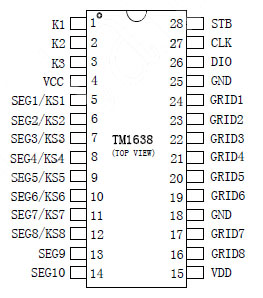
Displaying numbers, characters and reading keys depends on the hardware wiring and is not part of this library. A fully operational example for a board with 8 7-segment displays, 8 dual color LED's and 8 buttons which uses this library is available here: [JY-LKM1638](https://github.com/Erriez/ErriezLKM1638).
## Hardware
Connect power and 3 data pins to an Arduino board DIGITAL pins:
* VDD (Power 3.3V - 5V)
* GND (Ground)
* DIO (Bi-directional data input/output)
* STB (Chip select)
* CLK (Clock)
The following TM1638 pins should be connected to LED's and buttons in a matrix:
* K1~K3 (Key-scan data input to read multiple key presses at the same time)
* SEG/GRID (Output for LED matrix)
## Pins
| Pin | TM1638 | Arduino UNO / Nano / Micro / Pro Micro / Leonardo / Mega2560 | WeMos D1 & R2 / Node MCU | WeMos LOLIN32 |
| :--: | :----: | :----------------------------------------------------------: | :----------------------: | :-----------: |
| 1 | VCC | 5V (or 3.3V) | 3V3 | 3V3 |
| 2 | GND | GND | GND | GND |
| 3 | CLK | 2 (DIGITAL pin) | D2 | 0 |
| 4 | DIO | 3 (DIGITAL pin) | D3 | 4 |
| 5 | STB0 | 4 (DIGITAL pin) | D4 | 5 |
* Check maximum regulator / diode current to prevent a burnout when using lots of LED's. Some boards can provide only 100mA, others 800mA max.
## Example
Arduino IDE | Examples | Erriez TM1638 button and LED driver:
* [ErriezTM1638](https://github.com/Erriez/ErriezTM1638/blob/master/examples/ErriezTM1638/ErriezTM1638.ino)
## Documentation
- [Doxygen online HTML](https://Erriez.github.io/ErriezTM1638)
- [Doxygen PDF](https://github.com/Erriez/ErriezTM1638/raw/master/ErriezTM1638.pdf)
- [TM1638 Datasheet](https://github.com/Erriez/ErriezTM1638/blob/master/extras/TM1638_datasheet.pdf)
## Usage
**Initialization**
```c++
// Include TM1638 library
#include
// Connect display pins to the Arduino DIGITAL pins
#define TM1638_CLK_PIN 2
#define TM1638_DIO_PIN 3
#define TM1638_STB_PIN 4
// Create tm1638 object
TM1638 tm1638(TM1638_CLK_PIN, TM1638_DIO_PIN, TM1638_STB_PIN);
void setup()
{
// Initialize TM1638
tm1638.begin();
}
```
**Display on/off**
```c++
// Turn display off
tm1638.displayOff();
// Turn display on
tm1638.displayOn();
```
**Turn all LED's off**
```c++
// Turn all LED's off
tm1638.clear();
```
**Get keys**
```c++
// Get 32-bit key-scan
uint32_t keys = tm1638.getKeys();
```
**Write Byte to display register**
```c++
// Write segment LED's to the first display registers 0x00..0x0F with value 0x00..0xff to
// display numbers and characters. Just an example which depends on the hardware:
tm1638.writeData(0x01, 0x01);
```
**Write buffer to display registers**
```c++
// Creat buffer with LED's
uint8_t buf[] = { 0b10000110, 0b00111111, 0b00111111, 0b00111111, 0b00111111, 0b00111111};
// Write buffer to TM1638
tm1638.writeData(0x00, buf, sizeof(buf));
```
## Small footprint
Measured with Arduino IDE v1.8.5 without any other peripherals, calling all library functions once:
| Board | MCU flash size | MCU RAM size | TM1638 library flash | TM1638 library RAM |
| ----------- | :------------: | :----------: | :------------------: | :----------------: |
| Arduino UNO | 32kB | 2048kB | 1840 Bytes | 40 Bytes |
## Optimized timing
The library uses optimized pin control for AVR targets. Other targets uses the default digitalRead() and digitalWrite() pin control functions.
Output [Benchmark](https://github.com/Erriez/ErriezTM1638/blob/master/examples/Benchmark/Benchmark.ino) example:
| Board | CLK | Read keys | Write Byte | Write 16 Bytes buffer | Clear display |
| -------------------- | :----: | :-------: | :--------: | :-------------------: | :-----------: |
| Pro Mini 8MHz | 65kHz | 736us | 312us | 2448us | 2224us |
| UNO 16MHz | 125kHz | 340us | 152us | 1192us | 1176us |
| WeMos D1 & R2 80MHz | 200kHz | 284us | 116us | 683us | 682us |
| WeMos D1 & R2 160MHz | 300kHz | 223us | 66us | 474us | 469us |
#### Arduino UNO 16MHz

#### WeMos D1 & R2 80MHz

#### WeMos D1 & R2 160MHz

## Library dependencies
- The [ErriezTM1638Benchmark](https://github.com/Erriez/ErriezTM1638/blob/master/examples/ErriezTM1638Benchmark/ErriezTM1638Benchmark.ino) example uses [Erriez Timestamp](https://github.com/Erriez/ErriezTimestamp) library.
## Library installation
Please refer to the [Wiki](https://github.com/Erriez/ErriezArduinoLibrariesAndSketches/wiki) page.
## Other Arduino Libraries and Sketches from Erriez
* [Erriez Libraries and Sketches](https://github.com/Erriez/ErriezArduinoLibrariesAndSketches)