https://github.com/F4GOJ/AD9850
AD9850 serial library for arduino
https://github.com/F4GOJ/AD9850
arduino
Last synced: 4 months ago
JSON representation
AD9850 serial library for arduino
- Host: GitHub
- URL: https://github.com/F4GOJ/AD9850
- Owner: F4GOJ
- License: unlicense
- Created: 2014-09-14T03:02:57.000Z (over 11 years ago)
- Default Branch: master
- Last Pushed: 2018-07-21T17:26:53.000Z (over 7 years ago)
- Last Synced: 2024-12-12T23:02:55.536Z (about 1 year ago)
- Topics: arduino
- Language: C++
- Homepage:
- Size: 323 KB
- Stars: 43
- Watchers: 10
- Forks: 27
- Open Issues: 1
-
Metadata Files:
- Readme: README.md
- License: LICENSE
Awesome Lists containing this project
README
# Arduino serial library for AD9850 #
F4GOJ Christophe f4goj@free.fr
August 2014
AD9850 datasheet at http://www.analog.com/static/imported-files/data_sheets/AD9850.pdf
Use this library freely.
## Installation ##
To use the **AD9850** library:
- Go to https://github.com/F4GOJ/AD9850, click the [Download ZIP](https://github.com/F4GOJ/AD9850/archive/master.zip) button and save the ZIP file to a convenient location on your PC.
- Uncompress the downloaded file. This will result in a folder containing all the files for the library, that has a name that includes the branch name, usually **AD9850-master**.
- Rename the folder to **AD9850**.
- Copy the renamed folder to the Arduino sketchbook\libraries folder.
## Usage notes ##
The **AD9850** library instantiates a **DDS** object, the user does not need to do this.
```c++
#include //http://github.com/F4GOJ/AD9850
```
## Hardware connections : ##
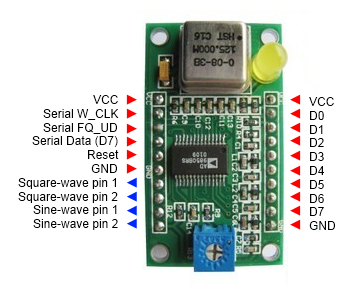
- W_CLK -> any pin
- FQ_UD -> any pin
- DATA/D7 -> any pin
- RESET -> any pin
## Functions : ##
### begin(int w_clk_pin, int fq_ud_pin, int data_pin, int reset_pin)
##### Description
Initialize the output pins and master reset the AD9850
##### Syntax
`DDS.begin(w_clk, fq_ud, data, reset);`
##### Parameters
**w_clk :** Working clock output pin, any pin *(int)*
**fq_ud :** Frequency update pin, any pin. *(int)*
**data :** Serial data output pin, any pin *(int)*
**reset :** Reset output pin, any pin. *(int)*
##### Returns
None.
##### Example
```c++
void setup(){
DDS.begin(6, 7, 8, 9);
}
```
### calibrate(double trim_frequency)
##### Description
Compensation of crystal oscillator frequency.
Can be used at any time after initialization.
##### Syntax
`DDS.calibrate(trim_freq);`
##### Parameters
**trim_freq :** Adjust around 125000000 to match the real crystal oscillator frequency. *(double)*
##### Returns
None.
##### Example
```c++
void setup(){
DDS.begin(6, 7, 8, 9);
}
void loop(){
DDS.calibrate(124999000);
}
```
### setfreq(double frequency, int phase)
##### Description
Sets the output frequency of the AD9850 and the phase of the signal.
##### Syntax
`DDS.setfreq(frequency, phase);`
##### Parameters
**frequency :** Output frequency in Hz. *(double)*
**phase :** Sets the phase of the output signal, coded on 5 bits allows 32 phase steps of 11,25° each. *(int)*
##### Returns
None.
##### Example
```c++
double frequency = 10000000;
int phase = 0;
DDS.setfreq(frequency, phase);
```
### down()
##### Description
Power down mode reducing the dissipated power from 380mW to 30mW at 5V
##### Syntax
`DDS.down();`
##### Parameters
None.
##### Returns
None.
##### Example
```c++
DDS.down();
```
### up()
##### Description
Wakes-up the AD9850 from power down mode.
##### Syntax
`DDS.up();`
##### Parameters
None.
##### Returns
None.
##### Example
```c++
DDS.down(); // Entering power down mode
// some code doing something
...
DDS.up(); // WAKE-UP !!! :)
```