https://github.com/George-Miao/clashctl
CLI for interacting with clash
https://github.com/George-Miao/clashctl
Last synced: 3 months ago
JSON representation
CLI for interacting with clash
- Host: GitHub
- URL: https://github.com/George-Miao/clashctl
- Owner: George-Miao
- License: mit
- Created: 2021-10-22T16:28:13.000Z (over 4 years ago)
- Default Branch: master
- Last Pushed: 2024-04-02T14:48:55.000Z (almost 2 years ago)
- Last Synced: 2025-10-16T17:08:17.132Z (5 months ago)
- Language: Rust
- Homepage: https://crates.io/crates/clashctl
- Size: 725 KB
- Stars: 225
- Watchers: 2
- Forks: 20
- Open Issues: 14
-
Metadata Files:
- Readme: README.md
- License: LICENSE
Awesome Lists containing this project
- awesome - George-Miao/clashctl - CLI for interacting with clash (Rust)
README
# Clashctl
Easy-to-use TUI & CLI to interact with [Clash](https://github.com/Dreamacro/clash) RESTful API.
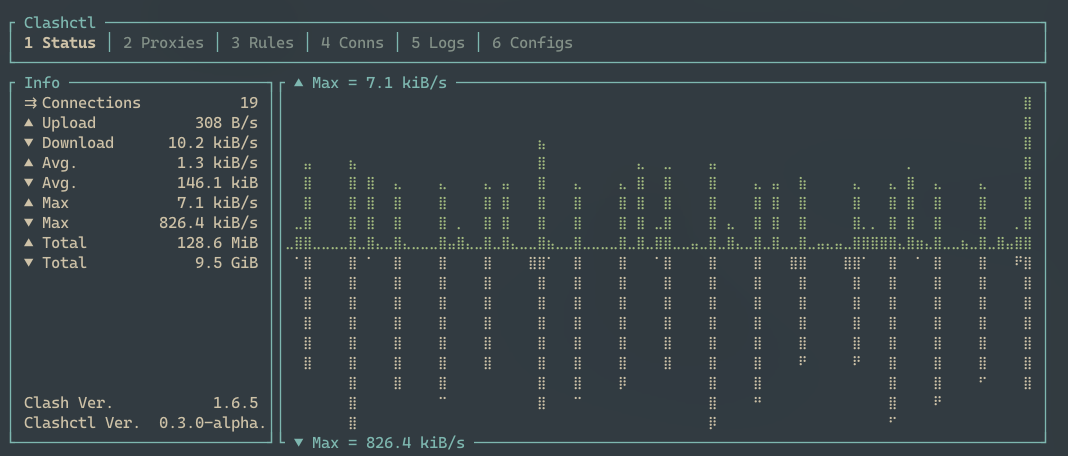
### Status panel
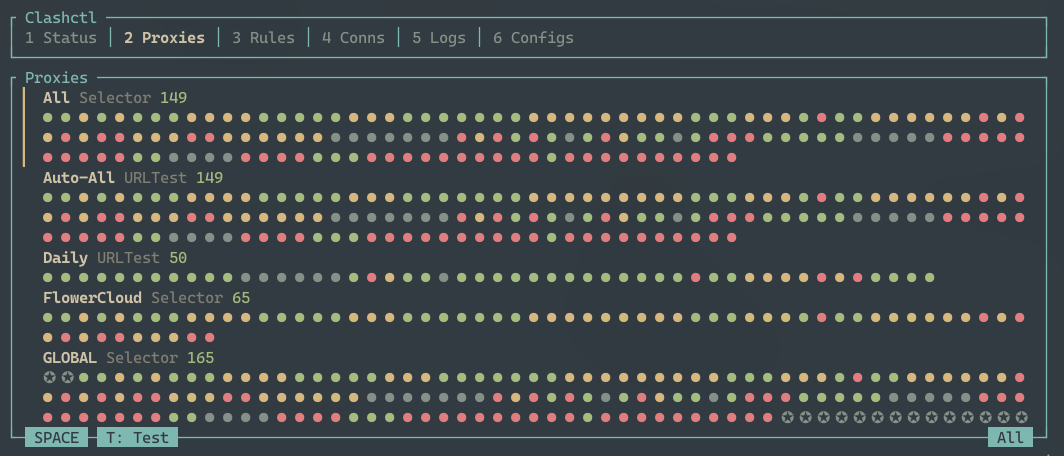
### Proxies panel
### Download release binaries
For mac and Linux x86 users, find compiled binary under [release page](https://github.com/George-Miao/clashctl/releases).
### Compile from source
```bash
$ git clone https://github.com/George-Miao/clashctl.git
$ cd clashctl
$ cargo install --path ./clashctl # Note that the path here is *NOT* a mistake - It's a submodule with exact same name that contains the bin
```
First, add an API server:
```bash
$ clashctl server add
# Follow the prompts
```
Use the command without subcommands defaults to open TUI:
```bash
$ clashctl
# Equals
$ clashctl tui
```
Or use a subcommand to use the CLI:
```bash
$ clashctl proxy list
---------------------------------------------------------
TYPE DELAY NAME
---------------------------------------------------------
selector - All
URLTest - Auto-All
ShadowsocksR 19 SomeProxy-1
Vmess 177 SomeProxy-2
Vmess 137 SomeProxy-3
Shadowsocks 143 SomeProxy-4
---------------------------------------------------------
```
- Pretty terminal UI
- Change proxies
- Display proxies, with filter and sorting supported, in both plain and grouped mode
- Store and use multiple servers
- Generate completion script (by [clap_generate](https://crates.io/crates/clap_generate))
- Manage multiple servers
- [ ] CLI
- [x] Manage servers
- [x] Sort proxies
- [ ] More features
- [ ] TUI
- [x] Status Panel
- [x] Proxies Panel
- [x] Update proxy
- [x] Test latency
- [x] Sort by {Original, LatencyAsc, LatencyDsc, NameAsc, NameDsc}
- [x] Rules Panel
- [x] Connections Panel
- [ ] Sort
- [x] Log Panel
- [x] Debug Panel
- [ ] Config Panel
- [ ] Update clash configs
- [ ] Update clashctl configs
- [ ] Search
- [ ] (Maybe?) mouse support
You will need nightly rust environment (Cargo & rustc) to compile and install
### Use the TUI
- Use the cli to config servers (for now)
- Use number to navigate between tabs
- Space to hold the list (and therefor move the list)
- Arrow key to move the list under Hold mode
- [^d] open debug panel
### Use the CLI
```
$ clashctl -h
clashctl
George Miao
Cli & Tui used to interact with Clash RESTful API
USAGE:
clashctl [OPTIONS] [SUBCOMMAND]
OPTIONS:
-c, --config-path Path of config file. Default to ~/.config/clashctl/config.ron
--config-dir Path of config directory. Default to ~/.config/clashctl
-h, --help Print help information
-t, --timeout Timeout of requests, in ms [default: 2000]
--test-url Url for testing proxy endpointes [default: http://
www.gstatic.com/generate_204]
-v, --verbose Verbosity. Default: INFO, -v DEBUG, -vv TRACE
-V, --version Print version information
SUBCOMMANDS:
completion Generate auto-completion scripts
help Print this message or the help of the given subcommand(s)
proxy Interacting with proxies
server Interacting with servers
tui Open TUI
```
### Use as a crate
```toml
# cargo.toml
[dependencies]
clashctl-core = "*" # Don't add `clashctl`, that will be the binary crate. `clashctl-core` contains API stuff.
```
Then in your project:
```rust
use clashctl_core::Clash;
fn main() {
let clash = Clash::builder("http://example.com:9090").unwrap().build();
println!("Clash version is {:?}", clash.get_version().unwrap())
}
```
`clashctl` comes with a [`justfile`](https://github.com/casey/just) to speed up your development.
Especially the command `just dev`, managed to reproduce the hot reload function in front-end development, with [`cargo-watch`](https://github.com/watchexec/cargo-watch).
### [`Just`](https://github.com/casey/just) commands
#### `just dev` [ alias: `d` ]
Hot reload development, auto reload on `cargo-check` approved changes, with all features enabled
#### `just run {{ Args }}` [ alias: `r` ]
Run with feature cli & ui
#### `just ui`
Run UI only
#### `just cli`
Run CLI only
#### `just build` [ alias: `b` ]
Build in release mode with feature cli & ui
#### `just add`
### Project structure
```bash
$ tree src -L 2
├── clashctl # Submodule for binary - Both CLI & TUI
├── clashctl-core # Submodule for API interaction
├── clashctl-interactive # Submodule for common dependency of CLI & TUI
├── clashctl-tui # TUI only binary
├── clashctl-workspace-hack # Workspace hack generated by cargo-hakari
└── ...
```