https://github.com/HKUDS/DeepTutor
"DeepTutor: AI-Powered Personalized Learning Assistant"
https://github.com/HKUDS/DeepTutor
ai-agents ai-tutor deepresearch idea-generation interactive-learning knowledge-graph large-language-models multi-agent-systems rag
Last synced: 8 months ago
JSON representation
"DeepTutor: AI-Powered Personalized Learning Assistant"
- Host: GitHub
- URL: https://github.com/HKUDS/DeepTutor
- Owner: HKUDS
- License: agpl-3.0
- Created: 2025-12-28T15:35:54.000Z (9 months ago)
- Default Branch: main
- Last Pushed: 2026-01-13T16:33:34.000Z (9 months ago)
- Last Synced: 2026-01-13T19:59:03.302Z (9 months ago)
- Topics: ai-agents, ai-tutor, deepresearch, idea-generation, interactive-learning, knowledge-graph, large-language-models, multi-agent-systems, rag
- Language: Python
- Homepage: https://hkuds.github.io/DeepTutor
- Size: 57.5 MB
- Stars: 8,301
- Watchers: 73
- Forks: 1,076
- Open Issues: 24
-
Metadata Files:
- Readme: README.md
- Contributing: CONTRIBUTING.md
- License: LICENSE
- Roadmap: docs/roadmap.md
Awesome Lists containing this project
- StarryDivineSky - HKUDS/DeepTutor - r requirements.txt` 安装依赖项,然后使用 `python src/main.py` 执行主脚本(可选参数为数据目录或模型检查点)。README 文件还提供了从头开始训练的说明:设置配置,指定批大小、学习率、训练轮数和 GPU 设备;训练日志会写入 `./logs/` 目录。最后,DeepTutor 提供了一个 API,可以与 Web 或移动前端集成,提供知识图谱查询、答案评估和推荐生成的接口。 (A01_文本生成_文本对话 / 大语言对话模型及数据)
- awesome-opensource-ai - DeepTutor - Multi-agent system for lifelong personalized tutoring with interactive and adaptive learning workflows.  (4. Agentic AI & Multi-Agent Systems)
- awesome-ai-agent - HKUDS-DeepTutor
- awesome-github-projects - DeepTutor - DeepTutor: Lifelong Personalized Tutoring. https://deeptutor.info/. ⭐40,146 `Python` 🔥 (🤖 AI & Machine Learning)
- awesome-ai - DeepTutor
- awesome-data-analysis - DeepTutor - AI-powered personalized learning assistant with document Q&A, exercise generation, and deep research capabilities. (🧠 AI Applications & Platforms / Tools)
- awesome-ai-pulse-georgia - DeepTutor - ის Python-ის AI სასწავლო ასისტენტი, სპეციალურად სტუდენტებისა და მკვლევარებისთვის. Chat, Deep Solve, Quiz Generation, Deep Research და Math Animator — 5 სარეჟიმო ერთ პლატფორმაზე. RAG (საკუთარი სასწავლო მასალების ჩართვა), ვებ ძიება, სამეცნიერო ნაშრომების ძიება, კოდის ექსეკუცია ჩაშენებულია. TutorBot-ების შექმნა მდგრადი მეხსიერებითა და „პიროვნებით" — ყოველ სტუდენტზე მორგებული სასწავლო გამოცდილება. HKUDS ეკოსისტემის (nanobot, OpenSpace) ნაწილია. | (💼 AI ასისტენტები და ბიზნეს-აგენტები)
- awesome-local-llms - DeepTutor - native Personalized Tutoring. https://deeptutor.info/. | 24,862 | 3,360 | 30 | 0 | 48 | Apache License 2.0 | 0 days, 4 hrs, 26 mins | (Open-Source LLM & Agent Projects)
- AiTreasureBox - HKUDS/DeepTutor - 04-22_20988_275](https://img.shields.io/github/stars/HKUDS/DeepTutor.svg)|"DeepTutor: Agent-Native Personalized Learning Assistant"| (Repos)
- awesome-agentic-knowledge-base - HKUDS/DeepTutor - app | Agent-Native Personalized Tutoring; versioned KB indexes + scheduled TutorBot subsystem ([survey](surveys/HKUDS__DeepTutor.md)) | (Open-source repos)
- awesome-ai-agents - HKUDS/DeepTutor - DeepTutor is an AI-powered personalized learning assistant that offers interactive knowledge Q&A, visualization, practice generation, and deep research capabilities to enhance education through a comprehensive and adaptive platform. (Autonomous Research & Content Generation / AI Assistants)
- awesome-ai-200 - HKUDS/DeepTutor
- awesome-skill - DeepTutor - ⭐ 35,445 - DeepTutor: Lifelong Personalized Tutoring. https://deeptutor.info/. (Skills (144 total) / Research)
README

# DeepTutor: AI-Powered Personalized Learning Assistant
[](https://www.python.org/downloads/)
[](https://fastapi.tiangolo.com/)
[](https://react.dev/)
[](https://nextjs.org/)
[](https://tailwindcss.com/)
[](LICENSE)



[**Quick Start**](#quick-start) · [**Core Modules**](#core-modules) · [**FAQ**](#faq)
[🇨🇳 中文](assets/README/README_CN.md) · [🇯🇵 日本語](assets/README/README_JA.md) · [🇪🇸 Español](assets/README/README_ES.md) · [🇫🇷 Français](assets/README/README_FR.md) · [🇸🇦 العربية](assets/README/README_AR.md) · [🇷🇺 Русский](assets/README/README_RU.md) · [🇮🇳 हिन्दी](assets/README/README_HI.md) · [🇵🇹 Português](assets/README/README_PT.md)
📚 **Massive Document Knowledge Q&A** • 🎨 **Interactive Learning Visualization**
🎯 **Knowledge Reinforcement** • 🔍 **Deep Research & Idea Generation**
---
### 📰 News
> **[2026.1.1]** Join our [Discord Community](https://discord.gg/zpP9cssj) and [GitHub Discussions](https://github.com/HKUDS/DeepTutor/discussions) - shape the future of DeepTutor! 💬
> **[2025.12.30]** Visit our [Official Website](https://hkuds.github.io/DeepTutor/) for more details!
> **[2025.12.29]** DeepTutor is now live! ✨
### 📦 Releases
> **[2026.1.9]** Release [v0.4.1](https://github.com/HKUDS/DeepTutor/releases/tag/v0.4.1) with LLM Provider system overhaul, Question Generation robustness improvements, and codebase cleanup - Thanks to all the contributors!
History releases
> **[2026.1.9]** Release [v0.4.0](https://github.com/HKUDS/DeepTutor/releases/tag/v0.4.0) with new code structure, multiple llm & embeddings support - Thanks to all the contributors!
> **[2026.1.5]** [v0.3.0](https://github.com/HKUDS/DeepTutor/releases/tag/v0.3.0) - Unified PromptManager architecture, CI/CD automation & pre-built Docker images on GHCR
> **[2026.1.2]** [v0.2.0](https://github.com/HKUDS/DeepTutor/releases/tag/v0.2.0) - Docker deployment, Next.js 16 & React 19 upgrade, WebSocket security & critical vulnerability fixes
---
## Key Features of DeepTutor
### 📚 Massive Document Knowledge Q&A
• **Smart Knowledge Base**: Upload textbooks, research papers, technical manuals, and domain-specific documents. Build a comprehensive AI-powered knowledge repository for instant access.
• **Multi-Agent Problem Solving**: Dual-loop reasoning architecture with RAG, web search, and code execution -- delivering step-by-step solutions with precise citations.
### 🎨 Interactive Learning Visualization
• **Knowledge Simplification & Explanations**: Transform complex concepts, knowledge, and algorithms into easy-to-understand visual aids, detailed step-by-step breakdowns, and engaging interactive demonstrations.
• **Personalized Q&A**: Context-aware conversations that adapt to your learning progress, with interactive pages and session-based knowledge tracking.
### 🎯 Knowledge Reinforcement with Practice Exercise Generator
• **Intelligent Exercise Creation**: Generate targeted quizzes, practice problems, and customized assessments tailored to your current knowledge level and specific learning objectives.
• **Authentic Exam Simulation**: Upload reference exams to generate practice questions that perfectly match the original style, format, and difficulty—giving you realistic preparation for the actual test.
### 🔍 Deep Research & Idea Generation
• **Comprehensive Research & Literature Review**: Conduct in-depth topic exploration with systematic analysis. Identify patterns, connect related concepts across disciplines, and synthesize existing research findings.
• **Novel Insight Discovery**: Generate structured learning materials and uncover knowledge gaps. Identify promising new research directions through intelligent cross-domain knowledge synthesis.
---

📚 Massive Document Knowledge Q&A

Multi-agent Problem Solving with Exact Citations
🎨 Interactive Learning Visualization

Step-by-step Visual Explanations with Personal QAs.
🎯 Knowledge Reinforcement

**Custom Questions**
Auto-Validated Practice Questions Generation

**Mimic Questions**
Clone Exam Style for Authentic Practice
🔍 Deep Research & Idea Generation

**Deep Research**
Knowledge Extention from Textbook with RAG, Web and Paper-search

**Automated IdeaGen**
Brainstorming and Concept Synthesis with Dual-filter Workflow

**Interactive IdeaGen**
RAG and Web-search Powered Co-writer with Podcast Generation
🏗️ All-in-One Knowledge System

**Personal Knowledge Base**
Build and Organize Your Own Knowledge Repository

**Personal Notebook**
Your Contextual Memory for Learning Sessions
🌙 Use DeepTutor in Dark Mode!
---
## 🏛️ DeepTutor's Framework

### 💬 User Interface Layer
• **Intuitive Interaction**: Simple bidirectional query-response flow for intuitive interaction.
• **Structured Output**: Structured response generation that organizes complex information into actionable outputs.
### 🤖 Intelligent Agent Modules
• **Problem Solving & Assessment**: Step-by-step problem solving and custom assessment generation.
• **Research & Learning**: Deep Research for topic exploration and Guided Learning with visualization.
• **Idea Generation**: Automated and interactive concept development with multi-source insights.
### 🔧 Tool Integration Layer
• **Information Retrieval**: RAG hybrid retrieval, real-time web search, and academic paper databases.
• **Processing & Analysis**: Python code execution, query item lookup, and PDF parsing for document analysis.
### 🧠 Knowledge & Memory Foundation
• **Knowledge Graph**: Entity-relation mapping for semantic connections and knowledge discovery.
• **Vector Store**: Embedding-based semantic search for intelligent content retrieval.
• **Memory System**: Session state management and citation tracking for contextual continuity.
## 📋 Todo
> 🌟 Star to follow our future updates!
- [ x ] Support More RAG Pipelines
- [ x ] DataBase Robostness and Visualization
- [ ] Personalized Interaction with Notebook
## 🚀 Getting Started
### Step 1: Pre-Configuration
**① Clone Repository**
```bash
git clone https://github.com/HKUDS/DeepTutor.git
cd DeepTutor
```
**② Set Up Environment Variables**
```bash
cp .env.example .env
# Edit .env file with your API keys
```
📋 Environment Variables Reference
| Variable | Required | Description |
|:---|:---:|:---|
| `LLM_MODEL` | **Yes** | Model name (e.g., `gpt-4o`) |
| `LLM_API_KEY` | **Yes** | Your LLM API key |
| `LLM_HOST` | **Yes** | API endpoint URL |
| `EMBEDDING_MODEL` | **Yes** | Embedding model name |
| `EMBEDDING_API_KEY` | **Yes** | Embedding API key |
| `EMBEDDING_HOST` | **Yes** | Embedding API endpoint |
| `BACKEND_PORT` | No | Backend port (default: `8001`) |
| `FRONTEND_PORT` | No | Frontend port (default: `3782`) |
| `NEXT_PUBLIC_API_BASE` | No | **Frontend API URL** - Set this for remote/LAN access (e.g., `http://192.168.1.100:8001`) |
| `TTS_*` | No | Text-to-Speech settings |
| `SEARCH_PROVIDER` | No | Search provider (options: `perplexity`, `baidu`, default: `perplexity`) |
| `PERPLEXITY_API_KEY` | No | For Perplexity web search |
| `BAIDU_API_KEY` | No | For Baidu AI search |
> 💡 **Remote Access**: If accessing from another device (e.g., `192.168.31.66:3782`), add to `.env`:
> ```bash
> NEXT_PUBLIC_API_BASE=http://192.168.31.66:8001
> ```
**③ Configure Ports & LLM** *(Optional)*
- **Ports**: Set in `.env` file → `BACKEND_PORT` / `FRONTEND_PORT` (defaults: 8001/3782)
- **LLM**: Edit `config/agents.yaml` → `temperature` / `max_tokens` per module
- See [Configuration Docs](config/README.md) for details
**④ Try Demo Knowledge Bases** *(Optional)*
📚 Available Demos
- **Research Papers** — 5 papers from our lab ([AI-Researcher](https://github.com/HKUDS/AI-Researcher), [LightRAG](https://github.com/HKUDS/LightRAG), etc.)
- **Data Science Textbook** — 8 chapters, 296 pages ([Book Link](https://ma-lab-berkeley.github.io/deep-representation-learning-book/))
1. Download from [Google Drive](https://drive.google.com/drive/folders/1iWwfZXiTuQKQqUYb5fGDZjLCeTUP6DA6?usp=sharing)
2. Extract into `data/` directory
> Demo KBs use `text-embedding-3-large` with `dimensions = 3072`
**⑤ Create Your Own Knowledge Base** *(After Launch)*
1. Go to http://localhost:3782/knowledge
2. Click "New Knowledge Base" → Enter name → Upload PDF/TXT/MD files
3. Monitor progress in terminal
---
### Step 2: Choose Your Installation Method
#### 🐳 Option A: Docker Deployment
> No Python/Node.js setup required
**Prerequisites**: [Docker](https://docs.docker.com/get-docker/) & [Docker Compose](https://docs.docker.com/compose/install/)
**Quick Start** — Build from source:
```bash
docker compose up --build -d # Build and start (~5-10 min first run)
docker compose logs -f # View logs
```
**Or use pre-built image** (faster):
```bash
# Linux/macOS (AMD64)
docker run -d --name deeptutor \
-p 8001:8001 -p 3782:3782 \
--env-file .env \
-v $(pwd)/data:/app/data \
-v $(pwd)/config:/app/config:ro \
ghcr.io/hkuds/deeptutor:latest
# Apple Silicon (ARM64): use ghcr.io/hkuds/deeptutor:latest-arm64
# Windows PowerShell: use ${PWD} instead of $(pwd)
```
**Common Commands**:
```bash
docker compose up -d # Start
docker compose down # Stop
docker compose logs -f # View logs
docker compose up --build # Rebuild after changes
```
📋 More Docker Options (Pre-built images, Cloud deployment, Custom ports)
**Pre-built Image Architecture Reference:**
| Architecture | Image Tag | Use Case |
|:-------------|:----------|:---------|
| **AMD64** | `ghcr.io/hkuds/deeptutor:latest` | Intel/AMD (most servers, Windows/Linux PCs) |
| **ARM64** | `ghcr.io/hkuds/deeptutor:latest-arm64` | Apple Silicon, AWS Graviton, Raspberry Pi |
> 💡 Run `uname -m` to check: `x86_64` = AMD64, `arm64`/`aarch64` = ARM64
**Cloud Deployment** — Must set external API URL:
```bash
docker run -d --name deeptutor \
-p 8001:8001 -p 3782:3782 \
-e NEXT_PUBLIC_API_BASE_EXTERNAL=https://your-server.com:8001 \
--env-file .env \
-v $(pwd)/data:/app/data \
ghcr.io/hkuds/deeptutor:latest
```
**Custom Ports Example:**
```bash
docker run -d --name deeptutor \
-p 9001:9001 -p 3000:3000 \
-e BACKEND_PORT=9001 \
-e FRONTEND_PORT=3000 \
-e NEXT_PUBLIC_API_BASE_EXTERNAL=https://your-server.com:9001 \
--env-file .env \
-v $(pwd)/data:/app/data \
ghcr.io/hkuds/deeptutor:latest
```
---
#### 💻 Option B: Manual Installation
> For development or non-Docker environments
**Prerequisites**: Python 3.10+, Node.js 18+
**1. Set Up Environment**:
```bash
# Using conda (Recommended)
conda create -n deeptutor python=3.10 && conda activate deeptutor
# Or using venv
python -m venv venv && source venv/bin/activate # Windows: venv\Scripts\activate
```
**2. Install Dependencies**:
```bash
pip install -r requirements.txt
npm install --prefix web
```
**3. Launch**:
```bash
python scripts/start_web.py # Start frontend + backend
# Or: python scripts/start.py # CLI only
# Stop: Ctrl+C
```
🔧 Start Frontend & Backend Separately
**Backend** (FastAPI):
```bash
python src/api/run_server.py
# Or: uvicorn src.api.main:app --host 0.0.0.0 --port 8001 --reload
```
**Frontend** (Next.js):
```bash
cd web && npm install && npm run dev -- -p 3782
```
**Note**: Create `web/.env.local`:
```
NEXT_PUBLIC_API_BASE=http://localhost:8001
```
| Service | Default Port |
|:---:|:---:|
| Backend | `8001` |
| Frontend | `3782` |
### Access URLs
| Service | URL | Description |
|:---:|:---|:---|
| **Frontend** | http://localhost:3782 | Main web interface |
| **API Docs** | http://localhost:8001/docs | Interactive API documentation |
---
## 📂 Data Storage
All user content and system data are stored in the `data/` directory:
```
data/
├── knowledge_bases/ # Knowledge base storage
└── user/ # User activity data
├── solve/ # Problem solving results and artifacts
├── question/ # Generated questions
├── research/ # Research reports and cache
├── co-writer/ # Interactive IdeaGen documents and audio files
├── notebook/ # Notebook records and metadata
├── guide/ # Guided learning sessions
├── logs/ # System logs
└── run_code_workspace/ # Code execution workspace
```
Results are automatically saved during all activities. Directories are created automatically as needed.
## 📦 Core Modules
🧠 Smart Solver
Architecture Diagram

> **Intelligent problem-solving system** based on **Analysis Loop + Solve Loop** dual-loop architecture, supporting multi-mode reasoning and dynamic knowledge retrieval.
**Core Features**
| Feature | Description |
|:---:|:---|
| Dual-Loop Architecture | **Analysis Loop**: InvestigateAgent → NoteAgent
**Solve Loop**: PlanAgent → ManagerAgent → SolveAgent → CheckAgent → Format |
| Multi-Agent Collaboration | Specialized agents: InvestigateAgent, NoteAgent, PlanAgent, ManagerAgent, SolveAgent, CheckAgent |
| Real-time Streaming | WebSocket transmission with live reasoning process display |
| Tool Integration | RAG (naive/hybrid), Web Search, Query Item, Code Execution |
| Persistent Memory | JSON-based memory files for context preservation |
| Citation Management | Structured citations with reference tracking |
**Usage**
1. Visit http://localhost:{frontend_port}/solver
2. Select a knowledge base
3. Enter your question, click "Solve"
4. Watch the real-time reasoning process and final answer
Python API
```python
import asyncio
from src.agents.solve import MainSolver
async def main():
solver = MainSolver(kb_name="ai_textbook")
result = await solver.solve(
question="Calculate the linear convolution of x=[1,2,3] and h=[4,5]",
mode="auto"
)
print(result['formatted_solution'])
asyncio.run(main())
```
Output Location
```
data/user/solve/solve_YYYYMMDD_HHMMSS/
├── investigate_memory.json # Analysis Loop memory
├── solve_chain.json # Solve Loop steps & tool records
├── citation_memory.json # Citation management
├── final_answer.md # Final solution (Markdown)
├── performance_report.json # Performance monitoring
└── artifacts/ # Code execution outputs
```
---
📝 Question Generator
Architecture Diagram

> **Dual-mode question generation system** supporting **custom knowledge-based generation** and **reference exam paper mimicking** with automatic validation.
**Core Features**
| Feature | Description |
|:---:|:---|
| Custom Mode | **Background Knowledge** → **Question Planning** → **Generation** → **Single-Pass Validation**
Analyzes question relevance without rejection logic |
| Mimic Mode | **PDF Upload** → **MinerU Parsing** → **Question Extraction** → **Style Mimicking**
Generates questions based on reference exam structure |
| ReAct Engine | QuestionGenerationAgent with autonomous decision-making (think → act → observe) |
| Validation Analysis | Single-pass relevance analysis with `kb_coverage` and `extension_points` |
| Question Types | Multiple choice, fill-in-the-blank, calculation, written response, etc. |
| Batch Generation | Parallel processing with progress tracking |
| Complete Persistence | All intermediate files saved (background knowledge, plan, individual results) |
| Timestamped Output | Mimic mode creates batch folders: `mimic_YYYYMMDD_HHMMSS_{pdf_name}/` |
**Usage**
**Custom Mode:**
1. Visit http://localhost:{frontend_port}/question
2. Fill in requirements (topic, difficulty, question type, count)
3. Click "Generate Questions"
4. View generated questions with validation reports
**Mimic Mode:**
1. Visit http://localhost:{frontend_port}/question
2. Switch to "Mimic Exam" tab
3. Upload PDF or provide parsed exam directory
4. Wait for parsing → extraction → generation
5. View generated questions alongside original references
Python API
**Custom Mode - Full Pipeline:**
```python
import asyncio
from src.agents.question import AgentCoordinator
async def main():
coordinator = AgentCoordinator(
kb_name="ai_textbook",
output_dir="data/user/question"
)
# Generate multiple questions from text requirement
result = await coordinator.generate_questions_custom(
requirement_text="Generate 3 medium-difficulty questions about deep learning basics",
difficulty="medium",
question_type="choice",
count=3
)
print(f"✅ Generated {result['completed']}/{result['requested']} questions")
for q in result['results']:
print(f"- Relevance: {q['validation']['relevance']}")
asyncio.run(main())
```
**Mimic Mode - PDF Upload:**
```python
from src.agents.question.tools.exam_mimic import mimic_exam_questions
result = await mimic_exam_questions(
pdf_path="exams/midterm.pdf",
kb_name="calculus",
output_dir="data/user/question/mimic_papers",
max_questions=5
)
print(f"✅ Generated {result['successful_generations']} questions")
print(f"Output: {result['output_file']}")
```
Output Location
**Custom Mode:**
```
data/user/question/custom_YYYYMMDD_HHMMSS/
├── background_knowledge.json # RAG retrieval results
├── question_plan.json # Question planning
├── question_1_result.json # Individual question results
├── question_2_result.json
└── ...
```
**Mimic Mode:**
```
data/user/question/mimic_papers/
└── mimic_YYYYMMDD_HHMMSS_{pdf_name}/
├── {pdf_name}.pdf # Original PDF
├── auto/{pdf_name}.md # MinerU parsed markdown
├── {pdf_name}_YYYYMMDD_HHMMSS_questions.json # Extracted questions
└── {pdf_name}_YYYYMMDD_HHMMSS_generated_questions.json # Generated questions
```
---
🎓 Guided Learning
Architecture Diagram

> **Personalized learning system** based on notebook content, automatically generating progressive learning paths through interactive pages and smart Q&A.
**Core Features**
| Feature | Description |
|:---:|:---|
| Multi-Agent Architecture | **LocateAgent**: Identifies 3-5 progressive knowledge points
**InteractiveAgent**: Converts to visual HTML pages
**ChatAgent**: Provides contextual Q&A
**SummaryAgent**: Generates learning summaries |
| Smart Knowledge Location | Automatic analysis of notebook content |
| Interactive Pages | HTML page generation with bug fixing |
| Smart Q&A | Context-aware answers with explanations |
| Progress Tracking | Real-time status with session persistence |
| Cross-Notebook Support | Select records from multiple notebooks |
**Usage Flow**
1. **Select Notebook(s)** — Choose one or multiple notebooks (cross-notebook selection supported)
2. **Generate Learning Plan** — LocateAgent identifies 3-5 core knowledge points
3. **Start Learning** — InteractiveAgent generates HTML visualization
4. **Learning Interaction** — Ask questions, click "Next" to proceed
5. **Complete Learning** — SummaryAgent generates learning summary
Output Location
```
data/user/guide/
└── session_{session_id}.json # Complete session state, knowledge points, chat history
```
---
✏️ Interactive IdeaGen (Co-Writer)
Architecture Diagram

> **Intelligent Markdown editor** supporting AI-assisted writing, auto-annotation, and TTS narration.
**Core Features**
| Feature | Description |
|:---:|:---|
| Rich Text Editing | Full Markdown syntax support with live preview |
| EditAgent | **Rewrite**: Custom instructions with optional RAG/web context
**Shorten**: Compress while preserving key information
**Expand**: Add details and context |
| Auto-Annotation | Automatic key content identification and marking |
| NarratorAgent | Script generation, TTS audio, multiple voices (Cherry, Stella, Annie, Cally, Eva, Bella) |
| Context Enhancement | Optional RAG or web search for additional context |
| Multi-Format Export | Markdown, PDF, etc. |
**Usage**
1. Visit http://localhost:{frontend_port}/co_writer
2. Enter or paste text in the editor
3. Use AI features: Rewrite, Shorten, Expand, Auto Mark, Narrate
4. Export to Markdown or PDF
Output Location
```
data/user/co-writer/
├── audio/ # TTS audio files
│ └── {operation_id}.mp3
├── tool_calls/ # Tool call history
│ └── {operation_id}_{tool_type}.json
└── history.json # Edit history
```
---
🔬 Deep Research
Architecture Diagram

> **DR-in-KG** (Deep Research in Knowledge Graph) — A systematic deep research system based on **Dynamic Topic Queue** architecture, enabling multi-agent collaboration across three phases: **Planning → Researching → Reporting**.
**Core Features**
| Feature | Description |
|:---:|:---|
| Three-Phase Architecture | **Phase 1 (Planning)**: RephraseAgent (topic optimization) + DecomposeAgent (subtopic decomposition)
**Phase 2 (Researching)**: ManagerAgent (queue scheduling) + ResearchAgent (research decisions) + NoteAgent (info compression)
**Phase 3 (Reporting)**: Deduplication → Three-level outline generation → Report writing with citations |
| Dynamic Topic Queue | Core scheduling system with TopicBlock state management: `PENDING → RESEARCHING → COMPLETED/FAILED`. Supports dynamic topic discovery during research |
| Execution Modes | **Series Mode**: Sequential topic processing
**Parallel Mode**: Concurrent multi-topic processing with `AsyncCitationManagerWrapper` for thread-safe operations |
| Multi-Tool Integration | **RAG** (hybrid/naive), **Query Item** (entity lookup), **Paper Search**, **Web Search**, **Code Execution** — dynamically selected by ResearchAgent |
| Unified Citation System | Centralized CitationManager as single source of truth for citation ID generation, ref_number mapping, and deduplication |
| Preset Configurations | **quick**: Fast research (1-2 subtopics, 1-2 iterations)
**medium/standard**: Balanced depth (5 subtopics, 4 iterations)
**deep**: Thorough research (8 subtopics, 7 iterations)
**auto**: Agent autonomously decides depth |
**Citation System Architecture**
The citation system follows a centralized design with CitationManager as the single source of truth:
```
┌─────────────────────────────────────────────────────────────────┐
│ CitationManager │
│ ┌─────────────────┐ ┌─────────────────┐ ┌─────────────────┐ │
│ │ ID Generation │ │ ref_number Map │ │ Deduplication │ │
│ │ PLAN-XX │ │ citation_id → │ │ (papers only) │ │
│ │ CIT-X-XX │ │ ref_number │ │ │ │
│ └────────┬────────┘ └────────┬────────┘ └────────┬────────┘ │
└───────────┼────────────────────┼────────────────────┼───────────┘
│ │ │
┌──────┴──────┐ ┌──────┴──────┐ ┌──────┴──────┐
│DecomposeAgent│ │ReportingAgent│ │ References │
│ ResearchAgent│ │ (inline [N]) │ │ Section │
│ NoteAgent │ └─────────────┘ └────────────┘
└─────────────┘
```
| Component | Description |
|:---:|:---|
| ID Format | **PLAN-XX** (planning stage RAG queries) + **CIT-X-XX** (research stage, X=block number) |
| ref_number Mapping | Sequential 1-based numbers built from sorted citation IDs, with paper deduplication |
| Inline Citations | Simple `[N]` format in LLM output, post-processed to clickable `[[N]](#ref-N)` links |
| Citation Table | Clear reference table provided to LLM: `Cite as [1] → (RAG) query preview...` |
| Post-processing | Automatic format conversion + validation to remove invalid citation references |
| Parallel Safety | Thread-safe async methods (`get_next_citation_id_async`, `add_citation_async`) for concurrent execution |
**Parallel Execution Architecture**
When `execution_mode: "parallel"` is enabled, multiple topic blocks are researched concurrently:
```
┌─────────────────────────────────────────────────────────────────────────┐
│ Parallel Research Execution │
├─────────────────────────────────────────────────────────────────────────┤
│ │
│ DynamicTopicQueue AsyncCitationManagerWrapper │
│ ┌─────────────────┐ ┌─────────────────────────┐ │
│ │ Topic 1 (PENDING)│ ──┐ │ Thread-safe wrapper │ │
│ │ Topic 2 (PENDING)│ ──┼──→ asyncio │ for CitationManager │ │
│ │ Topic 3 (PENDING)│ ──┤ Semaphore │ │ │
│ │ Topic 4 (PENDING)│ ──┤ (max=5) │ • get_next_citation_ │ │
│ │ Topic 5 (PENDING)│ ──┘ │ id_async() │ │
│ └─────────────────┘ │ • add_citation_async() │ │
│ │ └───────────┬─────────────┘ │
│ ▼ │ │
│ ┌─────────────────────────────────────────────────────────────┐ │
│ │ Concurrent ResearchAgent Tasks │ │
│ │ ┌─────────┐ ┌─────────┐ ┌─────────┐ ┌─────────┐ │ │
│ │ │ Task 1 │ │ Task 2 │ │ Task 3 │ │ Task 4 │ ... │ │
│ │ │(Topic 1)│ │(Topic 2)│ │(Topic 3)│ │(Topic 4)│ │ │
│ │ └────┬────┘ └────┬────┘ └────┬────┘ └────┬────┘ │ │
│ │ │ │ │ │ │ │
│ │ └────────────┴────────────┴────────────┘ │ │
│ │ │ │ │
│ │ ▼ │ │
│ │ AsyncManagerAgentWrapper │ │
│ │ (Thread-safe queue updates) │ │
│ └─────────────────────────────────────────────────────────────┘ │
│ │
└─────────────────────────────────────────────────────────────────────────┘
```
| Component | Description |
|:---:|:---|
| `asyncio.Semaphore` | Limits concurrent tasks to `max_parallel_topics` (default: 5) |
| `AsyncCitationManagerWrapper` | Wraps CitationManager with `asyncio.Lock()` for thread-safe ID generation |
| `AsyncManagerAgentWrapper` | Ensures queue state updates are atomic across parallel tasks |
| Real-time Progress | Live display of all active research tasks with status indicators |
**Agent Responsibilities**
| Agent | Phase | Responsibility |
|:---:|:---:|:---|
| RephraseAgent | Planning | Optimizes user input topic, supports multi-turn user interaction for refinement |
| DecomposeAgent | Planning | Decomposes topic into subtopics with RAG context, obtains citation IDs from CitationManager |
| ManagerAgent | Researching | Queue state management, task scheduling, dynamic topic addition |
| ResearchAgent | Researching | Knowledge sufficiency check, query planning, tool selection, requests citation IDs before each tool call |
| NoteAgent | Researching | Compresses raw tool outputs into summaries, creates ToolTraces with pre-assigned citation IDs |
| ReportingAgent | Reporting | Builds citation map, generates three-level outline, writes report sections with citation tables, post-processes citations |
**Report Generation Pipeline**
```
1. Build Citation Map → CitationManager.build_ref_number_map()
2. Generate Outline → Three-level headings (H1 → H2 → H3)
3. Write Sections → LLM uses [N] citations with provided citation table
4. Post-process → Convert [N] → [[N]](#ref-N), validate references
5. Generate References → Academic-style entries with collapsible source details
```
**Usage**
1. Visit http://localhost:{frontend_port}/research
2. Enter research topic
3. Select research mode (quick/medium/deep/auto)
4. Watch real-time progress with parallel/series execution
5. View structured report with clickable inline citations
6. Export as Markdown or PDF (with proper page splitting and Mermaid diagram support)
CLI
```bash
# Quick mode (fast research)
python src/agents/research/main.py --topic "Deep Learning Basics" --preset quick
# Medium mode (balanced)
python src/agents/research/main.py --topic "Transformer Architecture" --preset medium
# Deep mode (thorough research)
python src/agents/research/main.py --topic "Graph Neural Networks" --preset deep
# Auto mode (agent decides depth)
python src/agents/research/main.py --topic "Reinforcement Learning" --preset auto
```
Python API
```python
import asyncio
from src.agents.research import ResearchPipeline
from src.core.core import get_llm_config, load_config_with_main
async def main():
# Load configuration (main.yaml merged with any module-specific overrides)
config = load_config_with_main("research_config.yaml")
llm_config = get_llm_config()
# Create pipeline (agent parameters loaded from agents.yaml automatically)
pipeline = ResearchPipeline(
config=config,
api_key=llm_config["api_key"],
base_url=llm_config["base_url"],
kb_name="ai_textbook" # Optional: override knowledge base
)
# Run research
result = await pipeline.run(topic="Attention Mechanisms in Deep Learning")
print(f"Report saved to: {result['final_report_path']}")
asyncio.run(main())
```
Output Location
```
data/user/research/
├── reports/ # Final research reports
│ ├── research_YYYYMMDD_HHMMSS.md # Markdown report with clickable citations [[N]](#ref-N)
│ └── research_*_metadata.json # Research metadata and statistics
└── cache/ # Research process cache
└── research_YYYYMMDD_HHMMSS/
├── queue.json # DynamicTopicQueue state (TopicBlocks + ToolTraces)
├── citations.json # Citation registry with ID counters and ref_number mapping
│ # - citations: {citation_id: citation_info}
│ # - counters: {plan_counter, block_counters}
├── step1_planning.json # Planning phase results (subtopics + PLAN-XX citations)
├── planning_progress.json # Planning progress events
├── researching_progress.json # Researching progress events
├── reporting_progress.json # Reporting progress events
├── outline.json # Three-level report outline structure
└── token_cost_summary.json # Token usage statistics
```
**Citation File Structure** (`citations.json`):
```json
{
"research_id": "research_20241209_120000",
"citations": {
"PLAN-01": {"citation_id": "PLAN-01", "tool_type": "rag_hybrid", "query": "...", "summary": "..."},
"CIT-1-01": {"citation_id": "CIT-1-01", "tool_type": "paper_search", "papers": [...], ...}
},
"counters": {
"plan_counter": 2,
"block_counters": {"1": 3, "2": 2}
}
}
```
Configuration Options
Key configuration in `config/main.yaml` (research section) and `config/agents.yaml`:
```yaml
# config/agents.yaml - Agent LLM parameters
research:
temperature: 0.5
max_tokens: 12000
# config/main.yaml - Research settings
research:
# Execution Mode
researching:
execution_mode: "parallel" # "series" or "parallel"
max_parallel_topics: 5 # Max concurrent topics
max_iterations: 5 # Max iterations per topic
# Tool Switches
enable_rag_hybrid: true # Hybrid RAG retrieval
enable_rag_naive: true # Basic RAG retrieval
enable_paper_search: true # Academic paper search
enable_web_search: true # Web search (also controlled by tools.web_search.enabled)
enable_run_code: true # Code execution
# Queue Limits
queue:
max_length: 5 # Maximum topics in queue
# Reporting
reporting:
enable_inline_citations: true # Enable clickable [N] citations in report
# Presets: quick, medium, deep, auto
# Global tool switches in tools section
tools:
web_search:
enabled: true # Global web search switch (higher priority)
```
---
💡 Automated IdeaGen
Architecture Diagram

> **Research idea generation system** that extracts knowledge points from notebook records and generates research ideas through multi-stage filtering.
**Core Features**
| Feature | Description |
|:---:|:---|
| MaterialOrganizerAgent | Extracts knowledge points from notebook records |
| Multi-Stage Filtering | **Loose Filter** → **Explore Ideas** (5+ per point) → **Strict Filter** → **Generate Markdown** |
| Idea Exploration | Innovative thinking from multiple dimensions |
| Structured Output | Organized markdown with knowledge points and ideas |
| Progress Callbacks | Real-time updates for each stage |
**Usage**
1. Visit http://localhost:{frontend_port}/ideagen
2. Select a notebook with records
3. Optionally provide user thoughts/preferences
4. Click "Generate Ideas"
5. View generated research ideas organized by knowledge points
Python API
```python
import asyncio
from src.agents.ideagen import IdeaGenerationWorkflow, MaterialOrganizerAgent
from src.core.core import get_llm_config
async def main():
llm_config = get_llm_config()
# Step 1: Extract knowledge points from materials
organizer = MaterialOrganizerAgent(
api_key=llm_config["api_key"],
base_url=llm_config["base_url"]
)
knowledge_points = await organizer.extract_knowledge_points(
"Your learning materials or notebook content here"
)
# Step 2: Generate research ideas
workflow = IdeaGenerationWorkflow(
api_key=llm_config["api_key"],
base_url=llm_config["base_url"]
)
result = await workflow.process(knowledge_points)
print(result) # Markdown formatted research ideas
asyncio.run(main())
```
---
📊 Dashboard + Knowledge Base Management
> **Unified system entry** providing activity tracking, knowledge base management, and system status monitoring.
**Key Features**
| Feature | Description |
|:---:|:---|
| Activity Statistics | Recent solving/generation/research records |
| Knowledge Base Overview | KB list, statistics, incremental updates |
| Notebook Statistics | Notebook counts, record distribution |
| Quick Actions | One-click access to all modules |
**Usage**
- **Web Interface**: Visit http://localhost:{frontend_port} to view system overview
- **Create KB**: Click "New Knowledge Base", upload PDF/Markdown documents
- **View Activity**: Check recent learning activities on Dashboard
---
📓 Notebook
> **Unified learning record management**, connecting outputs from all modules to create a personalized learning knowledge base.
**Core Features**
| Feature | Description |
|:---:|:---|
| Multi-Notebook Management | Create, edit, delete notebooks |
| Unified Record Storage | Integrate solving/generation/research/Interactive IdeaGen records |
| Categorization Tags | Auto-categorize by type, knowledge base |
| Custom Appearance | Color, icon personalization |
**Usage**
1. Visit http://localhost:{frontend_port}/notebook
2. Create new notebook (set name, description, color, icon)
3. After completing tasks in other modules, click "Add to Notebook"
4. View and manage all records on the notebook page
---
### 📖 Module Documentation
Configuration
Data Directory
API Backend
Core Utilities
Knowledge Base
Tools
Web Frontend
Solve Module
Question Module
Research Module
Interactive IdeaGen Module
Guide Module
## ❓ FAQ
Backend fails to start?
**Checklist**
- Confirm Python version >= 3.10
- Confirm all dependencies installed: `pip install -r requirements.txt`
- Check if port 8001 is in use
- Check `.env` file configuration
**Solutions**
- **Change port**: Set `BACKEND_PORT=9001` in `.env` file
- **Check logs**: Review terminal error messages
Port occupied after Ctrl+C?
**Problem**
After pressing Ctrl+C during a running task (e.g., deep research), restarting shows "port already in use" error.
**Cause**
Ctrl+C sometimes only terminates the frontend process while the backend continues running in the background.
**Solution**
```bash
# macOS/Linux: Find and kill the process
lsof -i :8001
kill -9
# Windows: Find and kill the process
netstat -ano | findstr :8001
taskkill /PID /F
```
Then restart the service with `python scripts/start_web.py`.
npm: command not found error?
**Problem**
Running `scripts/start_web.py` shows `npm: command not found` or exit status 127.
**Checklist**
- Check if npm is installed: `npm --version`
- Check if Node.js is installed: `node --version`
- Confirm conda environment is activated (if using conda)
**Solutions**
```bash
# Option A: Using Conda (Recommended)
conda install -c conda-forge nodejs
# Option B: Using Official Installer
# Download from https://nodejs.org/
# Option C: Using nvm
nvm install 18
nvm use 18
```
**Verify Installation**
```bash
node --version # Should show v18.x.x or higher
npm --version # Should show version number
```
Frontend cannot connect to backend?
**Checklist**
- Confirm backend is running (visit http://localhost:8001/docs)
- Check browser console for error messages
**Solution**
Create `.env.local` in `web` directory:
```bash
NEXT_PUBLIC_API_BASE=http://localhost:8001
```
Docker: Frontend cannot connect in cloud deployment?
**Problem**
When deploying to a cloud server, the frontend shows connection errors like "Failed to fetch" or "NEXT_PUBLIC_API_BASE is not configured".
**Cause**
The default API URL is `localhost:8001`, which points to the user's local machine in the browser, not your server.
**Solution**
Set the `NEXT_PUBLIC_API_BASE_EXTERNAL` environment variable to your server's public URL:
```bash
# Using docker run
docker run -d --name deeptutor \
-e NEXT_PUBLIC_API_BASE_EXTERNAL=https://your-server.com:8001 \
... other options ...
ghcr.io/hkuds/deeptutor:latest
# Or in .env file
NEXT_PUBLIC_API_BASE_EXTERNAL=https://your-server.com:8001
```
**Custom Port Example:**
```bash
# If using backend port 9001
-e BACKEND_PORT=9001 \
-e NEXT_PUBLIC_API_BASE_EXTERNAL=https://your-server.com:9001
```
Docker: How to use custom ports?
**Solution**
Set both the port environment variables AND the port mappings:
```bash
docker run -d --name deeptutor \
-p 9001:9001 -p 4000:4000 \
-e BACKEND_PORT=9001 \
-e FRONTEND_PORT=4000 \
-e NEXT_PUBLIC_API_BASE_EXTERNAL=http://localhost:9001 \
... other env vars ...
ghcr.io/hkuds/deeptutor:latest
```
**Important**: The `-p` port mapping must match the `BACKEND_PORT`/`FRONTEND_PORT` values.
WebSocket connection fails?
**Checklist**
- Confirm backend is running
- Check firewall settings
- Confirm WebSocket URL is correct
**Solution**
- **Check backend logs**
- **Confirm URL format**: `ws://localhost:8001/api/v1/...`
Where are module outputs stored?
| Module | Output Path |
|:---:|:---|
| Solve | `data/user/solve/solve_YYYYMMDD_HHMMSS/` |
| Question | `data/user/question/question_YYYYMMDD_HHMMSS/` |
| Research | `data/user/research/reports/` |
| Interactive IdeaGen | `data/user/co-writer/` |
| Notebook | `data/user/notebook/` |
| Guide | `data/user/guide/session_{session_id}.json` |
| Logs | `data/user/logs/` |
How to add a new knowledge base?
**Web Interface**
1. Visit http://localhost:{frontend_port}/knowledge
2. Click "New Knowledge Base"
3. Enter knowledge base name
4. Upload PDF/TXT/MD documents
5. System will process documents in background
**CLI**
```bash
python -m src.knowledge.start_kb init --docs
```
How to incrementally add documents to existing KB?
**CLI (Recommended)**
```bash
python -m src.knowledge.add_documents --docs
```
**Benefits**
- Only processes new documents, saves time and API costs
- Automatically merges with existing knowledge graph
- Preserves all existing data
Numbered items extraction failed with uvloop.Loop error?
**Problem**
When initializing a knowledge base, you may encounter this error:
```
ValueError: Can't patch loop of type
```
This occurs because Uvicorn uses `uvloop` event loop by default, which is incompatible with `nest_asyncio`.
**Solution**
Use one of the following methods to extract numbered items:
```bash
# Option 1: Using the shell script (recommended)
./scripts/extract_numbered_items.sh
# Option 2: Direct Python command
python src/knowledge/extract_numbered_items.py --kb --base-dir ./data/knowledge_bases
```
This will extract numbered items (Definitions, Theorems, Equations, etc.) from your knowledge base without reinitializing it.
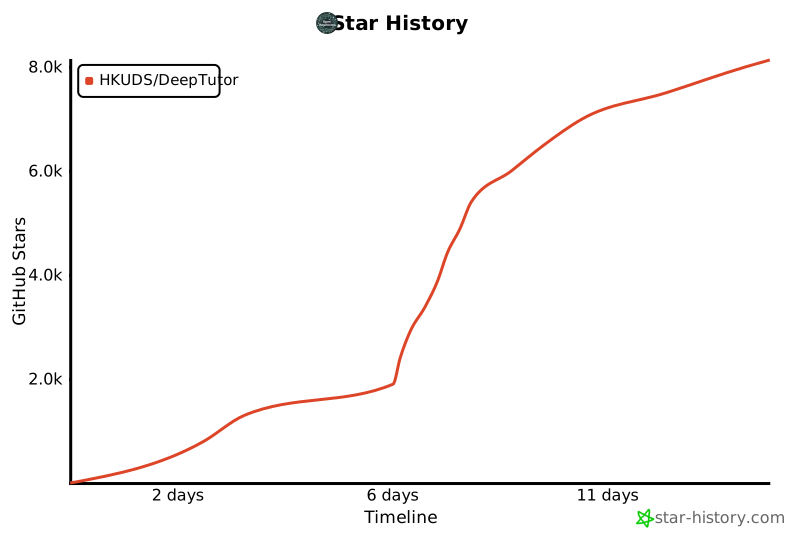
## ⭐ Star History


## 🤝 Contribution
We hope DeepTutor could become a gift for the community. 🎁
## 🔗 Related Projects
| [⚡ LightRAG](https://github.com/HKUDS/LightRAG) | [🎨 RAG-Anything](https://github.com/HKUDS/RAG-Anything) | [💻 DeepCode](https://github.com/HKUDS/DeepCode) | [🔬 AI-Researcher](https://github.com/HKUDS/AI-Researcher) |
|:---:|:---:|:---:|:---:|
| Simple and Fast RAG | Multimodal RAG | AI Code Assistant | Research Automation |
**[Data Intelligence Lab @ HKU](https://github.com/HKUDS)**
[⭐ Star us](https://github.com/HKUDS/DeepTutor/stargazers) · [🐛 Report a bug](https://github.com/HKUDS/DeepTutor/issues) · [💬 Discussions](https://github.com/HKUDS/DeepTutor/discussions)
---
This project is licensed under the ***[AGPL-3.0 License](LICENSE)***.
*✨ Thanks for visiting **DeepTutor**!*
