https://github.com/Jaennaet/pISSStream
macOS menu bar app that shows how full the International Space Station's urine tank is in real time
https://github.com/Jaennaet/pISSStream
Last synced: 11 months ago
JSON representation
macOS menu bar app that shows how full the International Space Station's urine tank is in real time
- Host: GitHub
- URL: https://github.com/Jaennaet/pISSStream
- Owner: Jaennaet
- License: bsd-3-clause
- Created: 2024-12-18T16:20:56.000Z (over 1 year ago)
- Default Branch: main
- Last Pushed: 2024-12-25T20:53:18.000Z (over 1 year ago)
- Last Synced: 2024-12-25T21:23:42.536Z (over 1 year ago)
- Language: Swift
- Homepage:
- Size: 13.7 KB
- Stars: 652
- Watchers: 8
- Forks: 14
- Open Issues: 3
-
Metadata Files:
- Readme: README.md
- License: LICENSE
Awesome Lists containing this project
- fucking-open-source-ios-apps - pISSStream
- open-source-ios-apps - pISSStream
- starred - Jaennaet/pISSStream - App that shows how full the International Space Station's urine tank is in real time, available for macOS (menu bar), iOS, watchOS and visionOS (Swift)
- awesome-github-repos - Jaennaet/pISSStream - App that shows how full the International Space Station's urine tank is in real time, available for macOS (menu bar), iOS, watchOS and visionOS (Swift)
README
# pISSStream
pISSStream is a menu bar app that shows the International Space Station's urine tank's capacity in real-time. It is available for macOS, watchOS, iOS, and visionOS.
## Official Icon

## Features
- Real-time ISS urine tank level monitoring
- macOS menu bar integration
- iOS and watchOS app with live updates
- visionOS immersive 3D visualization
- **Spatial audio with deep-space soundscape in immersive view**
- Enhanced UI and custom app icon for Vision Pro
- Uses NASA's official public ISS telemetry stream via [Lightstreamer](https://lightstreamer.com/)
## Installation
### macOS
[Download](https://github.com/Jaennaet/pISSStream/releases/download/v0.2/pISSStream.0.2.dmg) the latest release DMG.
### iOS, watchOS & visionOS
Due to Apple's security model, you'll need to build from source and sign with your own developer account:
1. Prerequisites:
- Xcode 15.2 or later
- Apple Developer account
- iOS 17.0+ device for iOS app
- Apple Vision Pro or visionOS simulator for spatial computing
2. Build steps:
```sh
# Clone the repository
git clone https://github.com/Jaennaet/pISSStream.git
cd pISSStream
# Open in Xcode
open pISSStream.xcodeproj
```
3. In Xcode:
- Select your development team in the Signing & Capabilities tab
- Choose your target device (iPhone/macOS or Vision Pro)
- Build and run (⌘R)
Note: If you don't have an Apple Developer account, you can still run the app in the simulator or on your device for up to 7 days using a free provisioning profile.
For **visionOS** development, you'll need the visionOS SDK installed in Xcode. The app uses the ImmersiveSpace API for the 3D visualization experience and features spatial audio for enhanced immersion.
## Requirements
- Mac with Apple silicon
- Xcode 15.2+
- Apple Developer Account
- Vision Pro with developer mode enabled
- Mac and Vision Pro on same Wi-Fi network
#### Wireless Development
1. On Vision Pro:
- Settings > General > Developer > Enable Developer Mode
- Settings > Privacy & Security > Allow Remote Development
2. Connect Vision Pro:
- Open Xcode
- Window > Devices and Simulators
- Click '+' to add Vision Pro
- Follow pairing instructions
3. Build & Deploy:
- Select Vision Pro as build target
- Product > Run (⌘R)
#### Common Issues
- "Device not found": Check Wi-Fi connection
- "Unauthorized device": Re-pair Vision Pro
- "Build failed": Update provisioning profile
- Error "No paired Vision Pro found": Ensure Vision Pro is connected and paired
- "Invalid signing": Verify developer account and provisioning profile
## Usage
#### macOS
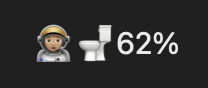
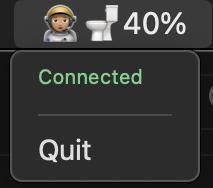
When pISSStream can connect to Lightstreamer and the ISS telemetry signal is being received by the ground station, the menu bar item shows 🧑🏽🚀🚽 alongside the fill percentage, and the app icon reflects the latest UI enhancements.
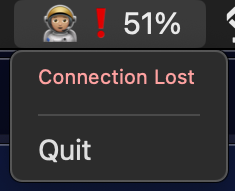
If either the connection to Lightstreamer or the ISS telemetry signal itself is lost, the menu bar item shows 🧑🏽🚀❗and the last received value if any, and the menu reads either "Connecting" or "No Signal".
#### iOS
Launch the app to view the current tank level in a simple interface.

#### visionOS
Experience the ISS waste tank in immersive 3D with real-time fill-level visualization.
https://github.com/user-attachments/assets/b24c6752-0fb8-4a2e-bf3c-6dab13f2c5e2
#### watchOS
Track the ISS waste tank fill level in real time — right from your wrist.
https://github.com/user-attachments/assets/f342fc59-0f2e-47db-88f9-d11746a863a2
## But why?
For some inexplicable reason people keep asking me why I ([@Jaennaet](https://github.com/Jaennaet)) did this.
My motivation was entirely that I thought this was both a hilariously stupid use of a space station's telemetry stream, but also kind of amazing at the same time. It's remarkable that we live in a world where it takes an afternoon to bang out a joke application that reads actual realtime telemetry data from a space station's toilets.
Also a great excuse to learn Swift, but the sheer ridiculousness was what drove me.
## Known Issues
Not the epitome of good coding practices since this was my first Swift & Apple platforms app ever, may break in exciting ways at the slightest excuse.
At the very least:
- shrugs at stale data
- Not overly bothered with error handling
## Contributing
Pull requests are welcome for bug fixes.
## Errata
[@Jaennaet](https://github.com/Jaennaet) found out about the data stream from https://iss-mimic.github.io/Mimic/, which has considerably more and more interesting stats than just how full the piss tank is.
We will not be adding any of them.
## Contributors
- [@Jaennaet](https://github.com/Jaennaet): initial idea and first version
- [@durul](https://github.com/durul): code quality, LOS handling, iOS, watchOS & visionOS versions