https://github.com/JairFC/openclaw-telegram-approval-buttons
OpenClaw plugin: Inline keyboard buttons for exec approval messages in Telegram
https://github.com/JairFC/openclaw-telegram-approval-buttons
approval exec inline-keyboard openclaw openclaw-extension plugin telegram typescript
Last synced: 4 months ago
JSON representation
OpenClaw plugin: Inline keyboard buttons for exec approval messages in Telegram
- Host: GitHub
- URL: https://github.com/JairFC/openclaw-telegram-approval-buttons
- Owner: JairFC
- License: mit
- Created: 2026-02-14T18:19:33.000Z (7 months ago)
- Default Branch: main
- Last Pushed: 2026-03-01T14:49:36.000Z (7 months ago)
- Last Synced: 2026-03-01T17:54:48.682Z (7 months ago)
- Topics: approval, exec, inline-keyboard, openclaw, openclaw-extension, plugin, telegram, typescript
- Language: TypeScript
- Homepage:
- Size: 1.93 MB
- Stars: 7
- Watchers: 1
- Forks: 1
- Open Issues: 0
-
Metadata Files:
- Readme: README.md
- Changelog: CHANGELOG.md
- License: LICENSE
- Security: SECURITY.md
Awesome Lists containing this project
README
--Closed #30695.
# 🔐 Approval Buttons for OpenClaw
> One-tap `exec` approvals in **Telegram** and **Slack** — no more typing `/approve allow-once`.
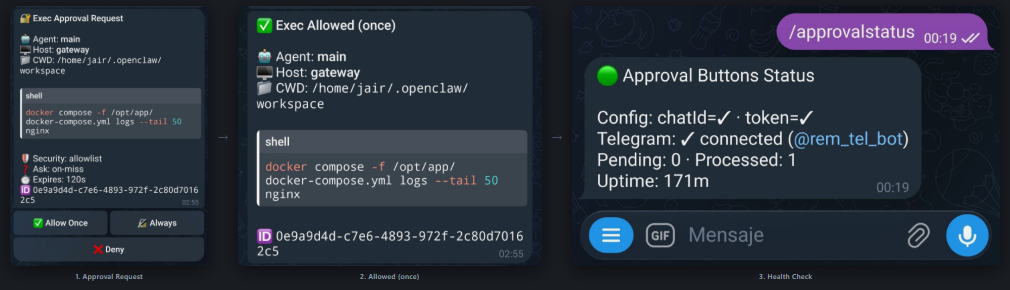
## What does this look like?
## What does this do?
OpenClaw's Discord has built-in approval buttons. **Telegram and Slack don't** — you're stuck typing long `/approve` commands. This plugin fixes that for both.
**Features:**
- ✅ **One-tap approvals** — Allow Once · 🔏 Always · ❌ Deny
- 💬 **Multi-channel** — works on Telegram (inline keyboard) and Slack (Block Kit buttons)
- 🔄 **Auto-resolve** — edits the message after decision (removes buttons, shows result)
- ⏰ **Expiry handling** — stale approvals auto-cleaned and marked as expired
- 🩺 **Self-diagnostics** — `/approvalstatus` checks health and stats for both channels
- 🛡️ **Graceful fallback** — if buttons fail, the original text goes through
- 📦 **Zero dependencies** — uses only Node.js built-in `fetch`
## Quick Start
### Step 1: Install the plugin
```bash
openclaw plugins install telegram-approval-buttons
```
That's it — OpenClaw downloads it from npm and enables it automatically.
Alternative: install from source (for development)
```bash
git clone https://github.com/JairFC/openclaw-telegram-approval-buttons.git
```
Then add the path manually to your `openclaw.json`:
```jsonc
{
"plugins": {
"load": {
"paths": ["/path/to/openclaw-telegram-approval-buttons"]
}
}
}
```
### Step 2: Configure approvals and plugin
Open your `~/.openclaw/openclaw.json` and add two things:
1. **Exec approvals targeting Telegram** — without this, approvals stay as plain text
2. **Plugin config with your bot token and chat ID** — the plugin needs these to send buttons
```jsonc
{
"approvals": {
"exec": {
"enabled": true,
"mode": "targets",
"targets": [
{
"channel": "telegram",
"to": ""
}
]
}
},
"plugins": {
"entries": {
"telegram-approval-buttons": {
"enabled": true,
"config": {
"botToken": "",
"chatId": ""
}
}
}
}
}
```
> 💡 **Where to find these values:**
> - **Bot token** — the token you got from [@BotFather](https://t.me/BotFather) when creating your bot. It's the same token OpenClaw uses for Telegram.
> - **Chat ID** — your Telegram user ID. Send a message to [@userinfobot](https://t.me/userinfobot) to get it, or check `openclaw logs --follow` after sending a message to your bot.
### Step 3: Restart and verify
```bash
openclaw gateway restart
```
Then send `/approvalstatus` in your Telegram chat. You should see:
```
🟢 Approval Buttons Status
Telegram: chatId=✓ · token=✓
✓ connected (@your_bot)
Slack: not configured
Pending: 0 · Processed: 0
Uptime: 1m
```
> ⚠️ **If you see `DISABLED — missing config`**, the plugin can't find your bot token or chat ID. Double-check that `botToken` and `chatId` are set in `plugins.entries.telegram-approval-buttons.config` in your `~/.openclaw/openclaw.json`.
**That's it!** Next time the AI triggers an `exec` approval, you'll get inline buttons instead of text.
## Prerequisites
- **OpenClaw ≥ 2026.2.9** installed and running
- **Node.js ≥ 20** (uses built-in `fetch`)
- **Telegram configured** in your `openclaw.json` (bot token + `allowFrom`)
- **Exec approvals targeting Telegram** — see Step 2 above
## How it works
```
┌─────────────┐ message_sending ┌──────────────────┐
│ OpenClaw │ ── approval text ──→ │ Plugin │
│ Gateway │ │ │
│ │ cancel original │ 1. Parse text │
│ │ ←──────────────────── │ 2. Send buttons │
└─────────────┘ │ 3. Track pending │
└────────┬─────────┘
│
Telegram Bot API
│
┌────────▼─────────┐
│ Telegram Chat │
│ │
│ 🔐 Exec Approval │
│ [✅ Allow] [🔏] │
│ [❌ Deny] │
└──────────────────┘
```
When you tap a button, OpenClaw converts the `callback_data` into a synthetic text message — **no webhook needed**.
## Configuration
The plugin **auto-detects** `botToken` and `chatId` from your Telegram channel config. Most setups need zero extra configuration.
### Config resolution order
| Setting | Priority 1 (explicit) | Priority 2 (shared config) | Priority 3 (env) |
|------------|-----------------------------|------------------------------------|---------------------------|
| `botToken` | `pluginConfig.botToken` | `channels.telegram.token` | `TELEGRAM_BOT_TOKEN` |
| `chatId` | `pluginConfig.chatId` | `channels.telegram.allowFrom[0]` | `TELEGRAM_CHAT_ID` |
### Advanced options
```jsonc
{
"plugins": {
"entries": {
"telegram-approval-buttons": {
"enabled": true,
"config": {
"chatId": "123456789", // Telegram chat ID
"botToken": "123:ABC...", // Telegram bot token
"slackBotToken": "xoxb-...", // Slack bot OAuth token (optional)
"slackChannelId": "C0123456", // Slack channel/DM ID (optional)
"staleMins": 10, // Minutes before stale cleanup (default: 10)
"verbose": false // Diagnostic logging (default: false)
}
}
}
}
}
```
## FAQ
**Q: I installed the plugin but I still get old text approvals.**
A: Most likely your `approvals.exec` section is missing or doesn't target Telegram. Make sure you have `"mode": "targets"` with a target pointing to `"channel": "telegram"` — see Step 2 above. Restart the gateway after changing the config.
**Q: I installed the plugin but no buttons appear at all.**
A: Make sure `tools.exec.ask` is NOT set to `"off"` in your config. If it's `"off"`, there are no approvals to buttonize. Set it to `"on-miss"` or `"always"`.
**Q: How do I find my Telegram Chat ID?**
A: Send `/start` to [@userinfobot](https://t.me/userinfobot) on Telegram — it replies with your ID. Alternatively, check `https://api.telegram.org/bot/getUpdates` after sending a message to your bot.
**Q: Do I need to set up a webhook?**
A: No! OpenClaw's Telegram integration automatically converts button taps into synthetic text messages. No extra setup needed.
**Q: What happens if the plugin fails to send buttons?**
A: The original plain-text approval message goes through normally. The plugin never blocks approvals.
**Q: Does this work in group chats?**
A: Yes, but the bot needs to be an admin or it needs permission to edit its own messages.
## Troubleshooting
| Problem | Fix |
|---------|-----|
| `DISABLED — missing config` in logs | Add `botToken` and `chatId` to `plugins.entries.telegram-approval-buttons.config` in your `~/.openclaw/openclaw.json`. See Step 2. |
| Still getting old text approvals | Your `approvals.exec` config must target Telegram. See Step 2. |
| `/approvalstatus` says "unknown command" | Plugin didn't load. Run `openclaw plugins install telegram-approval-buttons` and restart the gateway. |
| No buttons appear | Check `tools.exec.ask` is not `"off"`. Run `/approvalstatus` to check config. |
| Buttons show but nothing happens | Bot needs message editing permission. Use a private chat or make bot admin. |
| Buttons say "expired" | Approval timed out before you tapped. Adjust `staleMins` if needed. |
## Architecture
```
telegram-approval-buttons/
├── index.ts # Entry point — orchestration only
├── types.ts # Shared TypeScript interfaces
├── lib/
│ ├── telegram-api.ts # Telegram Bot API client
│ ├── slack-api.ts # Slack Web API client
│ ├── approval-parser.ts # Parse OpenClaw approval text format
│ ├── message-formatter.ts # HTML formatting for Telegram messages
│ ├── slack-formatter.ts # Block Kit formatting for Slack messages
│ ├── approval-store.ts # In-memory pending approval tracker
│ └── diagnostics.ts # Config resolution, health checks
├── openclaw.plugin.json # Plugin manifest
└── package.json
```
## Contributing
Issues and PRs welcome. Each file in `lib/` is self-contained with a single responsibility.
## Contributors
- [@JairFC](https://github.com/JairFC) — creator and maintainer
- [@sjkey](https://github.com/sjkey) — Slack support and message simplification (v5.0.0)
## License
[MIT](LICENSE)