https://github.com/JasonKessler/scattertext
Beautiful visualizations of how language differs among document types.
https://github.com/JasonKessler/scattertext
computational-social-science d3 eda exploratory-data-analysis japanese-language machine-learning natural-language-processing nlp scatter-plot semiotic-squares sentiment stylometric stylometry text-as-data text-mining text-visualization topic-modeling visualization word-embeddings word2vec
Last synced: over 1 year ago
JSON representation
Beautiful visualizations of how language differs among document types.
- Host: GitHub
- URL: https://github.com/JasonKessler/scattertext
- Owner: JasonKessler
- License: apache-2.0
- Created: 2016-07-21T01:47:12.000Z (almost 10 years ago)
- Default Branch: master
- Last Pushed: 2024-09-23T05:24:52.000Z (almost 2 years ago)
- Last Synced: 2025-03-25T22:06:40.189Z (over 1 year ago)
- Topics: computational-social-science, d3, eda, exploratory-data-analysis, japanese-language, machine-learning, natural-language-processing, nlp, scatter-plot, semiotic-squares, sentiment, stylometric, stylometry, text-as-data, text-mining, text-visualization, topic-modeling, visualization, word-embeddings, word2vec
- Language: Python
- Homepage:
- Size: 40.7 MB
- Stars: 2,288
- Watchers: 54
- Forks: 292
- Open Issues: 22
-
Metadata Files:
- Readme: README.md
- License: LICENSE
Awesome Lists containing this project
- awesome-nlp-note - scattertext - Python library to produce d3 visualizations of how language differs between corpora (Libraries / Videos and Online Courses)
- awesome-list - Scattertext - A tool for finding distinguishing terms in corpora and displaying them in an interactive HTML scatter plot. (Data Visualization / Data Management)
- awesome-python-data-science - scatterText - Visualizations of how language differs among document types. (Visualization)
- awesome-data-analysis - Scattertext - Beautiful visualizations of language differences among document types. (🐍 Python / Useful Python Tools for Data Analysis)
- awesome-python-machine-learning-resources - GitHub - 17% open · ⏱️ 26.03.2022): (文本数据和NLP)
- text_mining_resources - Scattertext
- awesome-starred - JasonKessler/scattertext - Beautiful visualizations of how language differs among document types. (nlp)
- awesome-nlp - scattertext - 用於生成語料庫之間語言差異的 d3 可視化的 Python 函式庫。 (函式庫 / 書籍)
- awesome-text-ml - Scattertext - Beautiful visualizations of how language differs among document types. (Frameworks and libraries / :snake: Python)
- https-github.com-keon-awesome-nlp - scattertext - Python library to produce d3 visualizations of how language differs between corpora. (Packages / Libraries)
- awesome-nlp - scattertext - 用於生成語料庫之間語言差異的 d3 可視化的 Python 函式庫。 (函式庫 / 書籍)
README
[](https://travis-ci.org/JasonKessler/scattertext)
[]()
[](https://gitter.im/scattertext/Lobby)
[](https://twitter.com/jasonkessler)
# Scattertext 0.2.2
A tool for finding distinguishing terms in corpora and displaying them in an
interactive HTML scatter plot. Points corresponding to terms are selectively labeled
so that they don't overlap with other labels or points.
Cite as: Jason S. Kessler. Scattertext: a Browser-Based Tool for Visualizing how Corpora Differ. ACL System
Demonstrations. 2017.
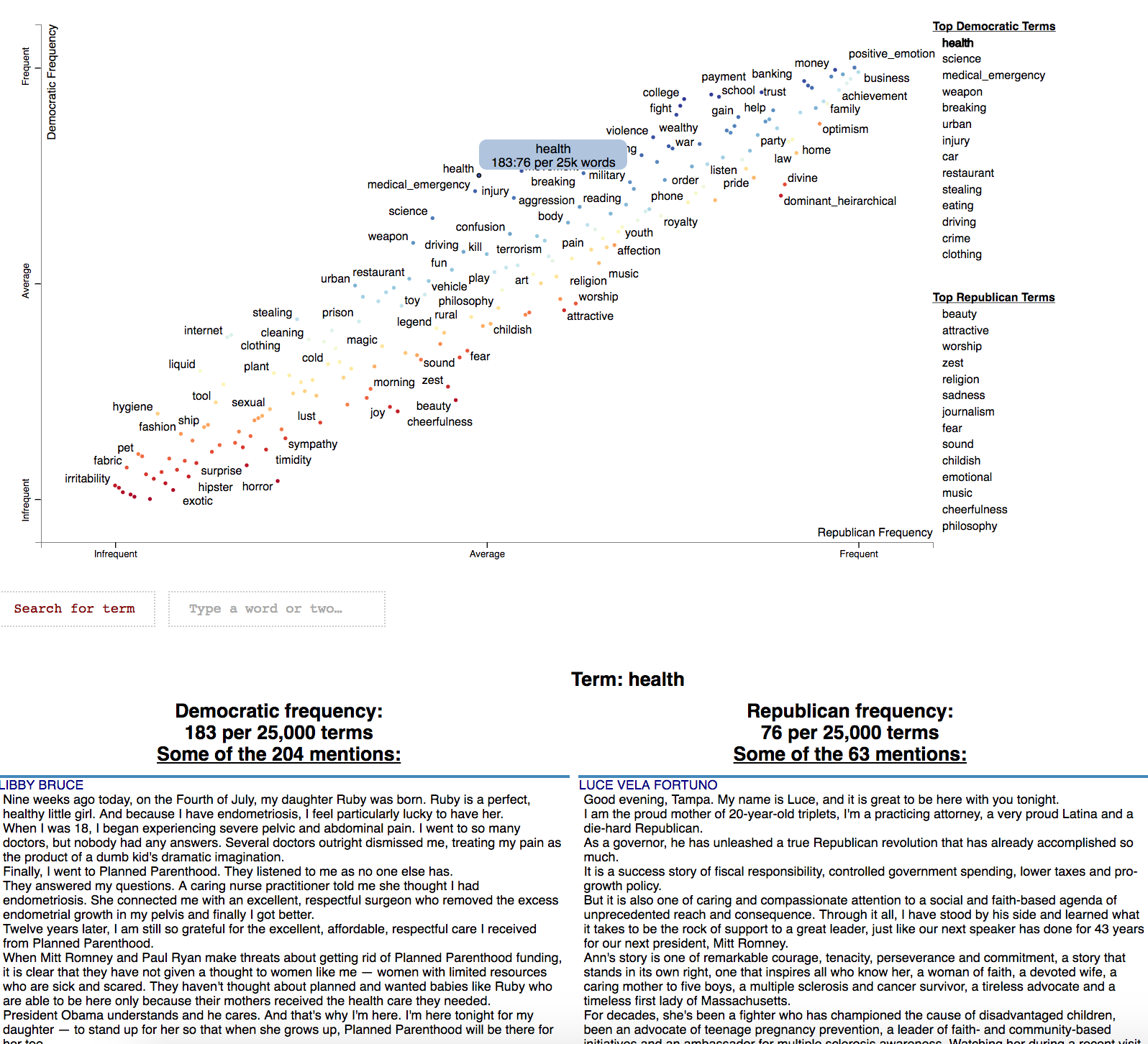
Below is an example of using Scattertext to create visualize terms used in 2012 American
political conventions. The 2,000 most party-associated uni grams are displayed as
points in the scatter plot. Their x- and y- axes are the dense ranks of their usage by
Republican and Democratic speakers respectively.
```pydocstring
import scattertext as st
df = st.SampleCorpora.ConventionData2012.get_data().assign(
parse=lambda df: df.text.apply(st.whitespace_nlp_with_sentences)
)
corpus = st.CorpusFromParsedDocuments(
df, category_col='party', parsed_col='parse'
).build().get_unigram_corpus().compact(st.AssociationCompactor(2000))
html = st.produce_scattertext_explorer(
corpus,
category='democrat',
category_name='Democratic',
not_category_name='Republican',
minimum_term_frequency=0,
pmi_threshold_coefficient=0,
width_in_pixels=1000,
metadata=corpus.get_df()['speaker'],
transform=st.Scalers.dense_rank,
include_gradient=True,
left_gradient_term='More Republican',
middle_gradient_term='Metric: Dense Rank Difference',
right_gradient_term='More Democratic',
)
open('./demo_compact.html', 'w').write(html)
```
The HTML file written would look like the image below. Click on it for the actual interactive visualization.
[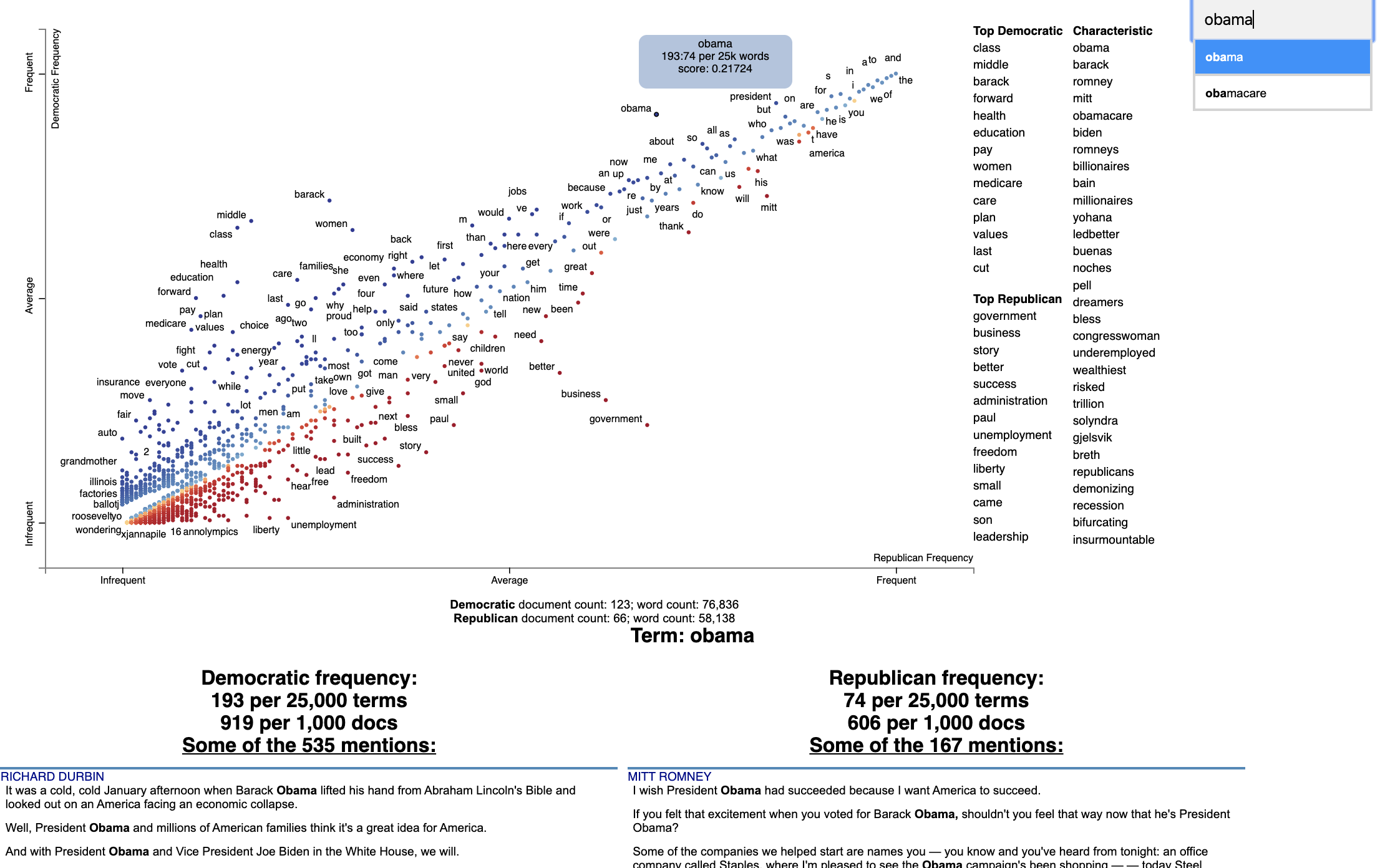](https://jasonkessler.github.io/demo_compact.html)
## Citation
Jason S. Kessler. Scattertext: a Browser-Based Tool for Visualizing how Corpora Differ. ACL System Demonstrations. 2017.
Link to paper: [arxiv.org/abs/1703.00565](https://arxiv.org/abs/1703.00565)
```
@article{kessler2017scattertext,
author = {Kessler, Jason S.},
title = {Scattertext: a Browser-Based Tool for Visualizing how Corpora Differ},
booktitle = {Proceedings of ACL-2017 System Demonstrations},
year = {2017},
address = {Vancouver, Canada},
publisher = {Association for Computational Linguistics},
}
```
**Table of Contents**
- [Installation](#installation)
- [Overview](#overview)
- [Customizing the Visualization and Plotting Dispersion](#customizing-the-visualization-and-plotting-dispersion)
- [Tutorial](#tutorial)
- [Help! I don't know Python but I still want to use Scattertext](#help-i-dont-know-python-but-i-still-want-to-use-scattertext)
- [Using Scattertext as a text analysis library: finding characteristic terms and their associations](#using-scattertext-as-a-text-analysis-library-finding-characteristic-terms-and-their-associations)
- [Visualizing term associations](#visualizing-term-associations)
- [Visualizing phrase associations](#visualizing-phrase-associations)
- [Adding color gradients to explain scores](#adding-color-gradients-to-explain-scores)
- [Visualizing Empath topics and categories](#visualizing-empath-topics-and-categories)
- [Visualizing the Moral Foundations 2.0 Dictionary](#visualizing-the-moral-foundations-2.0-dictionary)
- [Ordering Terms by Corpus Characteristicness](#ordering-terms-by-corpus-characteristicness)
- [Document-Based Scatterplots](#document-based-scatterplots)
- [Using Cohen's d or Hedge's g to visualize effect size](#using-cohens-d-or-hedges-g-to-visualize-effect-size)
- [Using Cliff's Delta to visualize effect size](#using-cliffs-delta-to-visualize-effect-size)
- [Using Bi-Normal Separation (BNS) to score terms](#using-bi-normal-separation-bns-to-score-terms)
- [Using correlations to explain classifiers](#using-correlations-to-explain-classifiers)
- [Using Custom Background Word Frequencies](#using-custom-background-word-frequencies)
- [Plotting word productivity](#plotting-word-productivity)
- [Understanding Scaled F-Score](#understanding-scaled-f-score)
- [Alternative term scoring methods](#alternative-term-scoring-methods)
- [The position-select-plot process](#the-position-select-plot-process)
- [Advanced Uses](#advanced-uses)
- [Visualizing differences based on only term frequencies](#visualizing-differences-based-on-only-term-frequencies)
- [Visualizing query-based categorical differences](#visualizing-query-based-categorical-differences)
- [Visualizing any kind of term score](#visualizing-any-kind-of-term-score)
- [Custom term positions](#custom-term-positions)
- [Emoji analysis](#emoji-analysis)
- [Visualizing SentencePiece tokens](#visualizing-sentencepiece-tokens)
- [Visualizing scikit-learn text classification weights](#visualizing-scikit-learn-text-classification-weights)
- [Creating lexicalized semiotic squares](#creating-lexicalized-semiotic-squares)
- [Visualizing topic models](#visualizing-topic-models)
- [Creating T-SNE-style word embedding projection plots](#creating-T-SNE-style-word-embedding-projection-plots)
- [Using SVD to visualize any kind of word embeddings](#using-svd-to-visualize-any-kind-of-word-embeddings)
- [Exporting plot to matplotlib](#exporting-plot-to-matplotlib)
- [Using the same scale for both axes](#using-the-same-scale-for-both-axes)
- [Examples](#examples)
- [A note on chart layout](#a-note-on-chart-layout)
- [What's new](#whats-new)
- [Sources](#sources)
## Installation
Install Python 3.11 or higher and run:
`$ pip install scattertext`
If you cannot (or don't want to) install spaCy, substitute `nlp = spacy.load('en')` lines with
`nlp = scattertext.WhitespaceNLP.whitespace_nlp`. Note, this is not compatible
with `word_similarity_explorer`, and the tokenization and sentence boundary detection
capabilities will be low-performance regular expressions. See `demo_without_spacy.py`
for an example.
It is recommended you install `jieba`, `spacy`, `empath`, `astropy`, `flashtext`, `gensim` and `umap-learn` in order to
take full advantage of Scattertext.
Scattertext should mostly work with Python 2.7, but it may not.
The HTML outputs look best in Chrome and Safari.
## Style Guide
The name of this project is Scattertext. "Scattertext" is written as a single word
and should be capitalized. When used in Python, the package `scattertext` should be defined
to the name `st`, i.e., `import scattertext as st`.
## Overview
This is a tool that's intended for visualizing what words and phrases
are more characteristic of a category than others.
Consider the example at the top of the page.
Looking at this seem overwhelming. In fact, it's a relatively simple visualization of word use
during the 2012 political convention. Each dot corresponds to a word or phrase mentioned by Republicans or Democrats
during their conventions. The closer a dot is to the top of the plot, the more frequently it was used by
Democrats. The further right a dot, the more that word or phrase was used by Republicans. Words frequently
used by both parties, like "of" and "the" and even "Mitt" tend to occur in the upper-right-hand corner. Although very
low
frequency words have been hidden to preserve computing resources, a word that neither party used, like "giraffe"
would be in the bottom-left-hand corner.
The interesting things happen close to the upper-left and lower-right corners. In the upper-left corner,
words like "auto" (as in auto bailout) and "millionaires" are frequently used by Democrats but infrequently or never
used
by Republicans. Likewise, terms frequently used by Republicans and infrequently by Democrats occupy the
bottom-right corner. These include "big government" and "olympics", referring to the Salt Lake City Olympics in which
Gov. Romney was involved.
Terms are colored by their association. Those that are more associated with Democrats are blue, and those
more associated with Republicans red.
Terms that are most characteristic of the both sets of documents are displayed
on the far-right of the visualization.
The inspiration for this visualization came from Dataclysm (Rudder, 2014).
Scattertext is designed to help you build these graphs and efficiently label points on them.
The documentation (including this readme) is a work in
progress. Please see the tutorial below as well as
the [PyData 2017 Tutorial](https://github.com/JasonKessler/Scattertext-PyData).
Poking around the code and tests should give you a good idea of how things work.
The library covers some novel and effective term-importance formulas, including **Scaled F-Score**.
## Customizing the Visualization and Plotting Dispersion
New in Scattertext 0.1.0, one can use a dataframe for term/metadata positions and other term-specific data. We
can also use it to determine term-specific information which is shown after a term is clicked.
Note that it is possible to disable the use of document categories in Scattertext, as we shall see in this example.
This example covers plotting term dispersion against word frequency and identifying the terms which are most and least
dispersed given their frequencies. Using the Rosengren's S dispersion measure (Gries 2021), terms tend to increase in
their
dispersion scores as they get more frequent. We'll see how we can both plot this effect and factor out the effect
of frequency.
This, along with a number of other dispersion metrics presented in Gries (2021), are available and documented
in the `Dispersion` class, which we'll use later in the section.
Let's start by creating a Convention corpus, but we'll use the `CorpusWithoutCategoriesFromParsedDocuments` factory
to ensure that no categories are included in the corpus. If we try to find document categories, we'll see that
all documents have the category '_'.
```python
import scattertext as st
df = st.SampleCorpora.ConventionData2012.get_data().assign(
parse=lambda df: df.text.apply(st.whitespace_nlp_with_sentences))
corpus = st.CorpusWithoutCategoriesFromParsedDocuments(
df, parsed_col='parse'
).build().get_unigram_corpus().remove_infrequent_words(minimum_term_count=6)
corpus.get_categories()
# Returns ['_']
```
Next, we'll create a dataframe for all terms we'll plot. We'll just start by creating a dataframe where we capture
the frequency of each term and various dispersion metrics. These will be shown after a term is activated in the plot.
```python
dispersion = st.Dispersion(corpus)
dispersion_df = dispersion.get_df()
dispersion_df.head(3)
```
Which returns
```
Frequency Range SD VC Juilland's D Rosengren's S DP DP norm KL-divergence Dissemination
thank 363 134 3.108113 1.618274 0.707416 0.694898 0.391548 0.391560 0.748808 0.972954
you 1630 177 12.383708 1.435902 0.888596 0.898805 0.233627 0.233635 0.263337 0.963905
so 549 155 3.523380 1.212967 0.774299 0.822244 0.283151 0.283160 0.411750 0.986423```
These are discussed in detail in [Gries 2021](http://www.stgries.info/research/ToApp_STG_Dispersion_PHCL.pdf).
Dissementation is presented in Altmann et al. (2011).
We'll use Rosengren's S to find the dispersion of each term. It's which a metric designed for corpus parts
(convention speeches in our case) of varying length. Where n is the number of documents in the corpus, s_i is the
percentage of tokens in the corpus found in document i, v_i is term count in document i, and f is the total number
of tokens in the corpus of type term type.
Rosengren's
S: [^2}{f})](https://render.githubusercontent.com/render/math?math=\frac{\Sum_{i=1}^{n}\sqrt{s_i%20\cdot%20\v_i})
^2}{f})
In order to start plotting, we'll need to add coordinates for each term to the data frame.
To use the `dataframe_scattertext` function, you need, at a minimum a dataframe with 'X' and 'Y' columns.
The `Xpos` and `Ypos` columns indicate the positions of the original `X` and `Y` values on the scatterplot, and
need to be between 0 and 1. Functions in `st.Scalers` perform this scaling. Absent `Xpos` or `Ypos`,
`st.Scalers.scale` would be used.
Here is a sample of values:
* `st.Scalers.scale(vec)` Rescales the vector to where the minimum value is 0 and the maximum is 1.
* `st.Scalers.log_scale(vec)` Rescales the lgo of the vector
* `st.Scalers.dense_ranke(vec)` Rescales the dense rank of the vector
* `st.Scalers.scale_center_zero_abs(vec)` Rescales a vector with both positive and negative values such that the 0 value
in the original vector is plotted at 0.5, negative values are projected from [-argmax(abs(vec)), 0] to [0, 0.5] and
positive values projected from [0, argmax(abs(vec))] to [0.5, 1].
```python
dispersion_df = dispersion_df.assign(
X=lambda df: df.Frequency,
Xpos=lambda df: st.Scalers.log_scale(df.X),
Y=lambda df: df["Rosengren's S"],
Ypos=lambda df: st.Scalers.scale(df.Y),
)
```
Note that the `Ypos` column here is not necessary since `Y` would automatically be scaled.
Finally, since we are not distinguishing between categories, we can set `ignore_categories=True`.
We can now plot this graph using the `dataframe_scattertext` function:
```python
html = st.dataframe_scattertext(
corpus,
plot_df=dispersion_df,
metadata=corpus.get_df()['speaker'] + ' (' + corpus.get_df()['party'].str.upper() + ')',
ignore_categories=True,
x_label='Log Frequency',
y_label="Rosengren's S",
y_axis_labels=['Less Dispersion', 'Medium', 'More Dispersion'],
)
```
Which yields (click for an interactive version):
[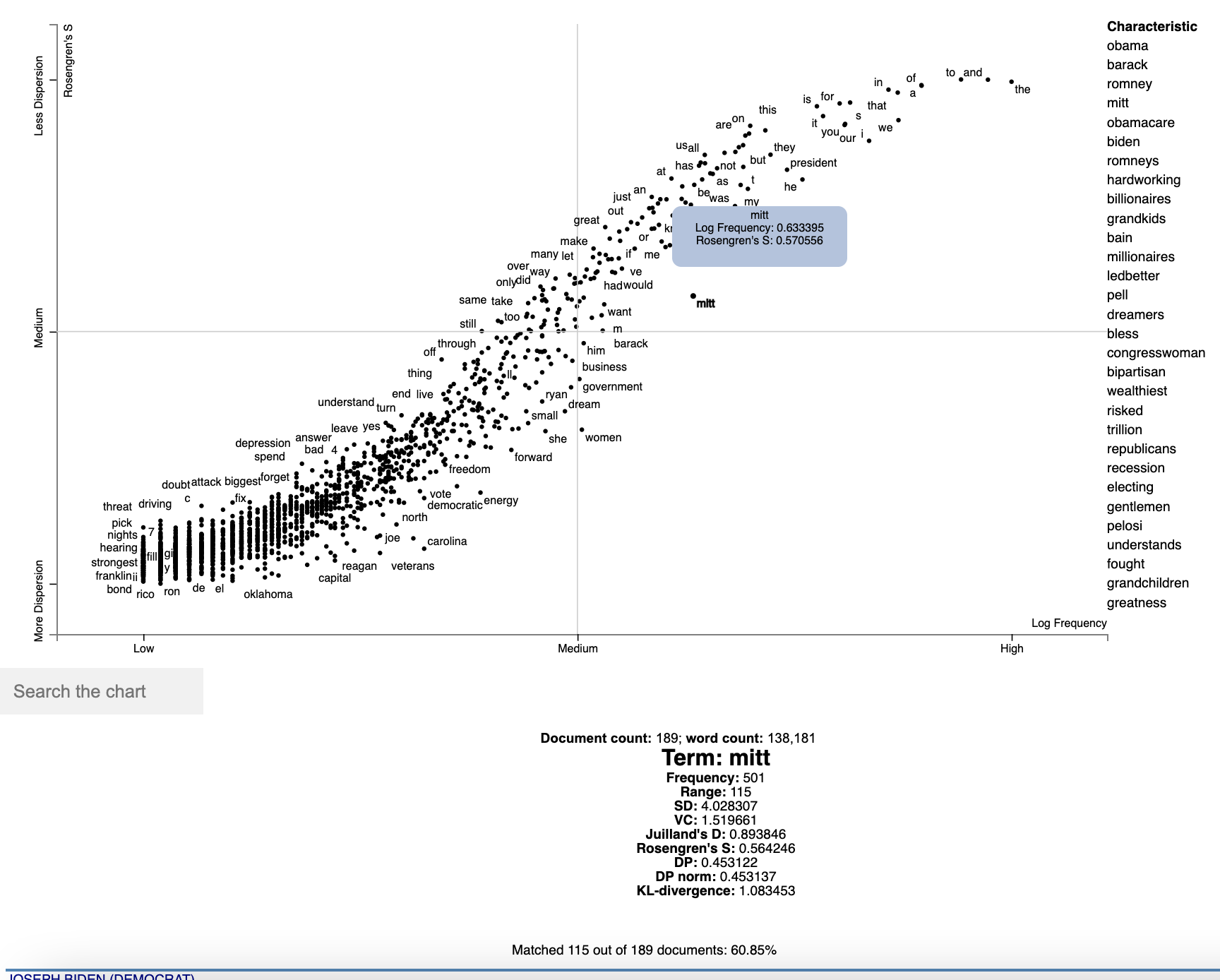](https://jasonkessler.github.io/dispersion-basic.html)
Note that we can see various dispersion statistics under a term's name, in addition to the standard usage statistics. To
customize the statistics which are displayed, set the `term_description_column=[...]` parameter with a list of column
names to be displayed.
One issue in this dispersion chart, which tends to be common to dispersion metrics in general, is that dispersion
and frequency tend to have a high correlation, but with a complex, non-linear curve. Depending on the metric,
this correlation curve could be power, linear, sigmoidal, or typically, something else.
In order to factor out this correlation, we can predict the dispersion from frequency using a non-parametric regressor,
and see which terms have the highest and lowest residuals with respect to their expected dispersions based on their
frequencies.
In this case, we'll use a KNN regressor with 10 neighbors to predict Rosengren'S from term frequencies
(`dispersion_df.X` and `.Y` respectively), and compute the residual.
We'll the residual to color points, with a neutral color for residuals around 0 and other colors for positive and
negative values. We'll add a column in the data frame for point colors, and call it ColorScore. It is populated
with values between 0 and 1, with 0.5 as a netural color on the `d3 interpolateWarm` color scale. We use
`st.Scalers.scale_center_zero_abs`, discussed above, to make this transformation.
```python
from sklearn.neighbors import KNeighborsRegressor
dispersion_df = dispersion_df.assign(
Expected=lambda df: KNeighborsRegressor(n_neighbors=10).fit(
df.X.values.reshape(-1, 1), df.Y
).predict(df.X.values.reshape(-1, 1)),
Residual=lambda df: df.Y - df.Expected,
ColorScore=lambda df: st.Scalers.scale_center_zero_abs(df.Residual)
)
```
Now we are ready to plot our colored dispersion chart. We assign the ColorScore column name to the `color_score_column`
parameter in `dataframe_scattertext`.
Additionally, We'd like to populate the two term lists on the
left with terms that have high and low residual values, indicating terms which have the most dispersion relative to
their frequency-expected level and the lowest. We can do this by the `left_list_column` parameter. We can specify
the upper and lower term list names using the `header_names` parameter. Finally, we can spiff-up the plot by
adding an appealing background color.
```python
html = st.dataframe_scattertext(
corpus,
plot_df=dispersion_df,
metadata=corpus.get_df()['speaker'] + ' (' + corpus.get_df()['party'].str.upper() + ')',
ignore_categories=True,
x_label='Log Frequency',
y_label="Rosengren's S",
y_axis_labels=['Less Dispersion', 'Medium', 'More Dispersion'],
color_score_column='ColorScore',
header_names={'upper': 'Lower than Expected', 'lower': 'More than Expected'},
left_list_column='Residual',
background_color='#e5e5e3'
)
```
Which yields (click for an interactive version):
[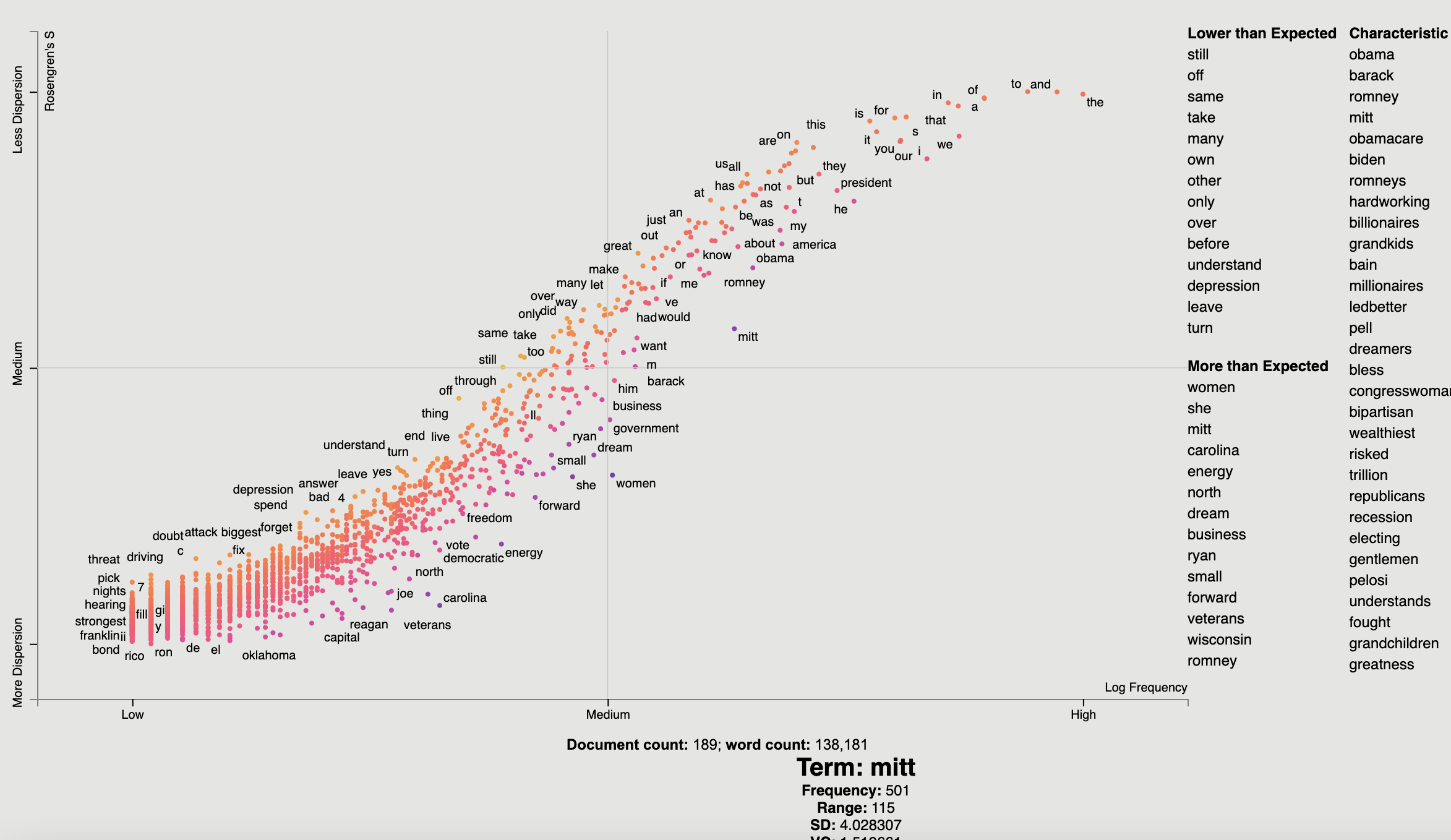](https://jasonkessler.github.io/dispersion-residual.html)
## Tutorial
### Help! I don't know Python but I still want to use Scattertext.
While you should learn Python fully use Scattertext, I've put some of the basic
functionality in a commandline tool. The tool is installed when you follow the procedure laid out
above.
Run `$ scattertext --help` from the commandline to see the full usage information. Here's a quick example of
how to use vanilla Scattertext on a CSV file. The file needs to have at least two columns,
one containing the text to be analyzed, and another containing the category. In the example CSV below,
the columns are text and party, respectively.
The example below processes the CSV file, and the resulting HTML visualization into cli_demo.html.
Note, the parameter `--minimum_term_frequency=8` omit terms that occur less than 8
times, and `--regex_parser` indicates a simple regular expression parser should
be used in place of spaCy. The flag `--one_use_per_doc` indicates that term frequency
should be calculated by only counting no more than one occurrence of a term in a document.
If you'd like to parse non-English text, you can use the `--spacy_language_model` argument to configure which
spaCy language model the tool will use. The default is 'en' and you can see the others available at
[https://spacy.io/docs/api/language-models](https://spacy.io/docs/api/language-models).
```bash
$ curl -s https://cdn.rawgit.com/JasonKessler/scattertext/master/scattertext/data/political_data.csv | head -2
party,speaker,text
democrat,BARACK OBAMA,"Thank you. Thank you. Thank you. Thank you so much.Thank you.Thank you so much. Thank you. Thank you very much, everybody. Thank you.
$
$ scattertext --datafile=https://cdn.rawgit.com/JasonKessler/scattertext/master/scattertext/data/political_data.csv \
> --text_column=text --category_column=party --metadata_column=speaker --positive_category=democrat \
> --category_display_name=Democratic --not_category_display_name=Republican --minimum_term_frequency=8 \
> --one_use_per_doc --regex_parser --outputfile=cli_demo.html
```
### Using Scattertext as a text analysis library: finding characteristic terms and their associations
The following code creates a stand-alone HTML file that analyzes words
used by Democrats and Republicans in the 2012 party conventions, and outputs some notable
term associations.
First, import Scattertext and spaCy.
```pydocstring
>>> import scattertext as st
>>> import spacy
>>> from pprint import pprint
```
Next, assemble the data you want to analyze into a Pandas data frame. It should have
at least two columns, the text you'd like to analyze, and the category you'd like to
study. Here, the `text` column contains convention speeches while the `party` column
contains the party of the speaker. We'll eventually use the `speaker` column
to label snippets in the visualization.
```pydocstring
>>> convention_df = st.SampleCorpora.ConventionData2012.get_data()
>>> convention_df.iloc[0]
party democrat
speaker BARACK OBAMA
text Thank you. Thank you. Thank you. Thank you so ...
Name: 0, dtype: object
```
Turn the data frame into a Scattertext Corpus to begin analyzing it. To look for differences
in parties, set the `category_col` parameter to `'party'`, and use the speeches,
present in the `text` column, as the texts to analyze by setting the `text` col
parameter. Finally, pass a spaCy model in to the `nlp` argument and call `build()` to construct the corpus.
```pydocstring
# Turn it into a Scattertext Corpus
>>> nlp = spacy.load('en')
>>> corpus = st.CorpusFromPandas(convention_df,
... category_col='party',
... text_col='text',
... nlp=nlp).build()
```
Let's see characteristic terms in the corpus, and terms that are most associated Democrats and
Republicans. See slides
[52](http://www.slideshare.net/JasonKessler/turning-unstructured-content-into-kernels-of-ideas/52)
to [59](http://www.slideshare.net/JasonKessler/turning-unstructured-content-into-kernels-of-ideas/59) of
the [Turning Unstructured Content ot Kernels of Ideas](http://www.slideshare.net/JasonKessler/turning-unstructured-content-into-kernels-of-ideas/)
talk for more details on these approaches.
Here are the terms that differentiate the corpus from a general English corpus.
```pydocstring
>>> print(list(corpus.get_scaled_f_scores_vs_background().index[:10]))
['obama',
'romney',
'barack',
'mitt',
'obamacare',
'biden',
'romneys',
'hardworking',
'bailouts',
'autoworkers']
```
Here are the terms that are most associated with Democrats:
```pydocstring
>>> term_freq_df = corpus.get_term_freq_df()
>>> term_freq_df['Democratic Score'] = corpus.get_scaled_f_scores('democrat')
>>> pprint(list(term_freq_df.sort_values(by='Democratic Score', ascending=False).index[:10]))
['auto',
'america forward',
'auto industry',
'insurance companies',
'pell',
'last week',
'pell grants',
"women 's",
'platform',
'millionaires']
```
And Republicans:
```pydocstring
>>> term_freq_df['Republican Score'] = corpus.get_scaled_f_scores('republican')
>>> pprint(list(term_freq_df.sort_values(by='Republican Score', ascending=False).index[:10]))
['big government',
"n't build",
'mitt was',
'the constitution',
'he wanted',
'hands that',
'of mitt',
'16 trillion',
'turned around',
'in florida']
```
### Visualizing term associations
Now, let's write the scatter plot a stand-alone HTML file. We'll make the y-axis category "democrat", and name
the category "Democrat" with a capital "D" for presentation
purposes. We'll name the other category "Republican" with a capital "R". All documents in the corpus without
the category "democrat" will be considered Republican. We set the width of the visualization in pixels, and label
each excerpt with the speaker using the `metadata` parameter. Finally, we write the visualization to an HTML file.
```pydocstring
>>> html = st.produce_scattertext_explorer(corpus,
... category='democrat',
... category_name='Democratic',
... not_category_name='Republican',
... width_in_pixels=1000,
... metadata=convention_df['speaker'])
>>> open("Convention-Visualization.html", 'wb').write(html.encode('utf-8'))
```
Below is what the webpage looks like. Click it and wait a few minutes for the interactive version.
[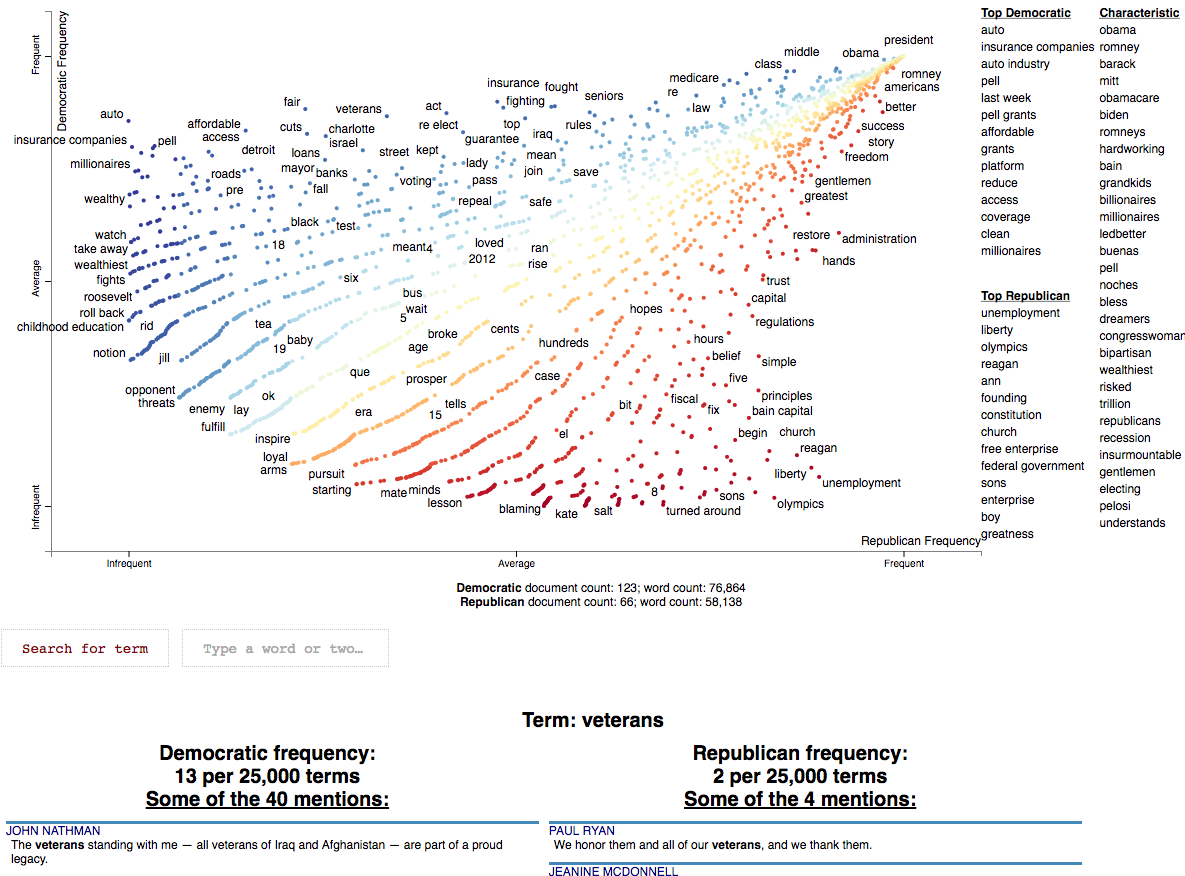](https://jasonkessler.github.io/Conventions-Visualization.html)
### Visualizing Phrase associations
Scattertext can also be used to visualize the category association of a variety of different phrase types. The word
"phrase" denotes any single or multi-word collocation.
#### Using PyTextRank
[PyTextRank](https://github.com/DerwenAI/pytextrank), created by Paco Nathan, is an implementation of
a modified version of the TextRank algorithm (Mihalcea and Tarau 2004). It involves graph centrality
algorithm to extract a scored list of the most prominent phrases in a document. Here,
named entities recognized by spaCy. As of spaCy version 2.2, these are from an NER system trained on
[Ontonotes 5](https://catalog.ldc.upenn.edu/LDC2013T19).
Please install pytextrank `$ pip3 install pytextrank` before continuing with this tutorial.
To use, build a corpus as normal, but make sure you use spaCy to parse each document as opposed a built-in
`whitespace_nlp`-type tokenizer. Note that adding PyTextRank to the spaCy pipeline is not needed, as it
will be run separately by the `PyTextRankPhrases` object. We'll reduce the number of phrases displayed in the
chart to 2000 using the `AssociationCompactor`. The phrases generated will be treated like non-textual features
since their document scores will not correspond to word counts.
```pydocstring
import pytextrank, spacy
import scattertext as st
nlp = spacy.load('en')
nlp.add_pipe("textrank", last=True)
convention_df = st.SampleCorpora.ConventionData2012.get_data().assign(
parse=lambda df: df.text.apply(nlp),
party=lambda df: df.party.apply({'democrat': 'Democratic', 'republican': 'Republican'}.get)
)
corpus = st.CorpusFromParsedDocuments(
convention_df,
category_col='party',
parsed_col='parse',
feats_from_spacy_doc=st.PyTextRankPhrases()
).build(
).compact(
AssociationCompactor(2000, use_non_text_features=True)
)
```
Note that the terms present in the corpus are named entities, and, as opposed to frequency counts, their scores
are the eigencentrality scores assigned to them by the TextRank algorithm. Running `corpus.get_metadata_freq_df('')`
will return, for each category, the sums of terms' TextRank scores. The dense ranks of these scores will be used to
construct the scatter plot.
```pydocstring
term_category_scores = corpus.get_metadata_freq_df('')
print(term_category_scores)
'''
Democratic Republican
term
our future 1.113434 0.699103
your country 0.314057 0.000000
their home 0.385925 0.000000
our government 0.185483 0.462122
our workers 0.199704 0.210989
her family 0.540887 0.405552
our time 0.510930 0.410058
...
'''
```
Before we construct the plot, let's some helper variables Since the aggregate TextRank scores aren't particularly
interpretable, we'll display the per-category rank of each score in the `metadata_description` field. These will be
displayed after a term is clicked.
```pydocstring
term_ranks = pd.DataFrame(
np.argsort(np.argsort(-term_category_scores, axis=0), axis=0) + 1,
columns=term_category_scores.columns,
index=term_category_scores.index)
metadata_descriptions = {
term: '
' + '
'.join(
'%s TextRank score rank: %s/%s' % (cat, term_ranks.loc[term, cat], corpus.get_num_metadata())
for cat in corpus.get_categories())
for term in corpus.get_metadata()
}
```
We can construct term scores in a couple ways. One is a standard dense-rank difference, a score which is used in most
of the two-category contrastive plots here, which will give us the most category-associated phrases. Another is to use
the maximum category-specific score, this will give us the most prominent phrases in each category, regardless of the
prominence in the other category. We'll take both approaches in this tutorial, let's compute the second kind of score,
the category-specific prominence below.
```pydocstring
category_specific_prominence = term_category_scores.apply(
lambda r: r.Democratic if r.Democratic > r.Republican else -r.Republican,
axis=1
)
```
Now we're ready output this chart. Note that we use a `dense_rank` transform, which places identically scalled phrases
atop each other. We use `category_specific_prominence` as scores, and set `sort_by_dist` as `False` to ensure the
phrases displayed on the right-hand side of the chart are ranked by the scores and not distance to the upper-left or
lower-right corners. Since matching phrases are treated as non-text features, we encode them as single-phrase topic
models and set the `topic_model_preview_size` to `0` to indicate the topic model list shouldn't be shown. Finally,
we set ensure the full documents are displayed. Note the documents will be displayed in order of phrase-specific score.
```pydocstring
html = produce_scattertext_explorer(
corpus,
category='Democratic',
not_category_name='Republican',
minimum_term_frequency=0,
pmi_threshold_coefficient=0,
width_in_pixels=1000,
transform=dense_rank,
metadata=corpus.get_df()['speaker'],
scores=category_specific_prominence,
sort_by_dist=False,
use_non_text_features=True,
topic_model_term_lists={term: [term] for term in corpus.get_metadata()},
topic_model_preview_size=0,
metadata_descriptions=metadata_descriptions,
use_full_doc=True
)
```
[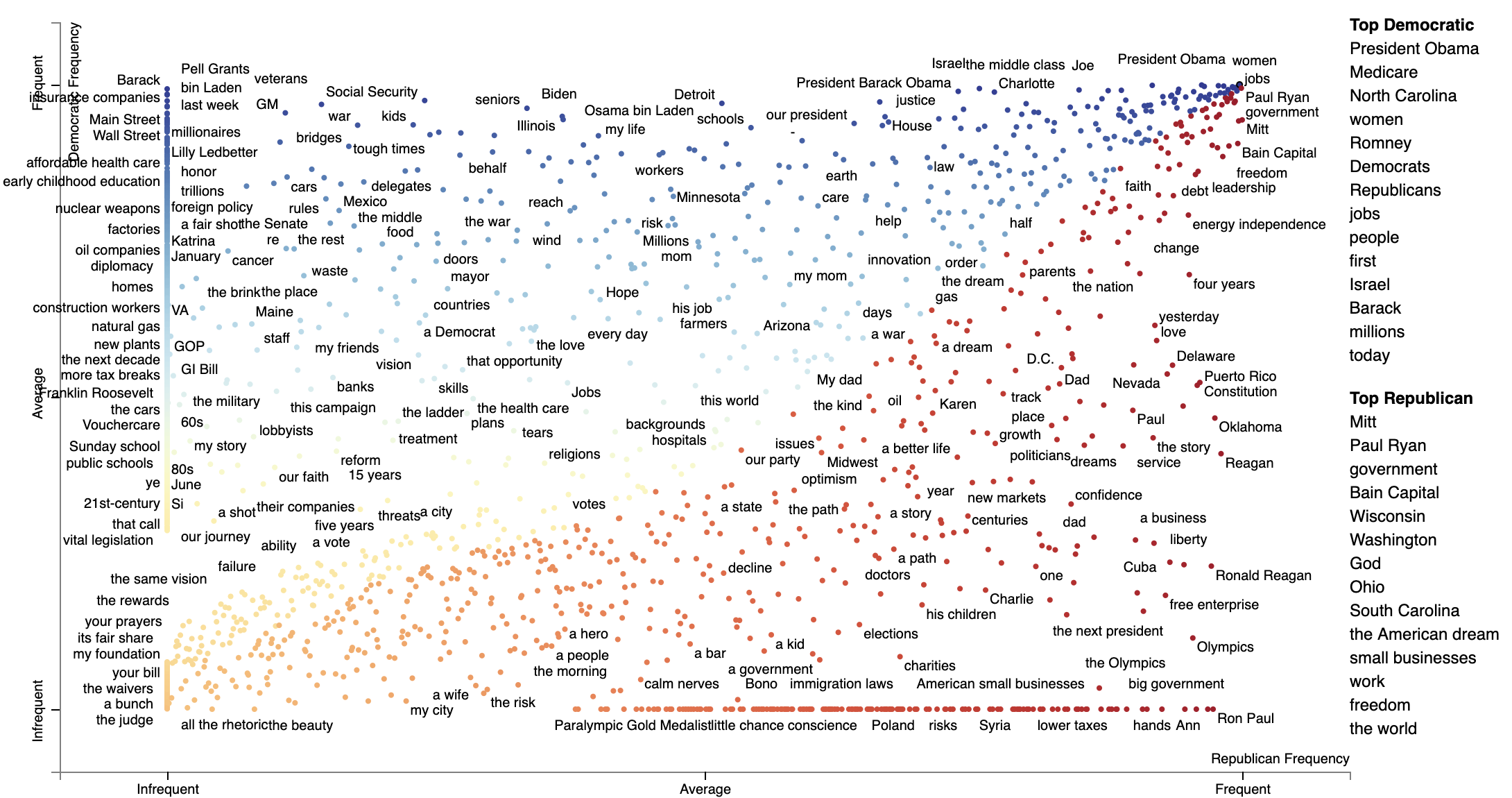](https://jasonkessler.github.io/PyTextRankProminenceScore.html)
The most associated terms in each category make some sense, at least on a post hoc analysis. When referring to (then)
Governor Romney, Democrats used his surname "Romney" in their most central mentions of him, while Republicans used the
more familiar and humanizing "Mitt". In terms of the President Obama, the phrase "Obama" didn't show up as a top term i
n either, the but the first name "Barack" was one of the the most central phrases in Democratic speeches,
mirroring "Mitt."
Alternatively, we can Dense Rank Difference in scores to color phrase-points and determine the top phrases to be
displayed on the right-hand side of the chart. Instead of setting `scores` as category-specific prominence scores,
we set `term_scorer=RankDifference()` to inject a way determining term scores into the scatter plot creation process.
```pydocstring
html = produce_scattertext_explorer(
corpus,
category='Democratic',
not_category_name='Republican',
minimum_term_frequency=0,
pmi_threshold_coefficient=0,
width_in_pixels=1000,
transform=dense_rank,
use_non_text_features=True,
metadata=corpus.get_df()['speaker'],
term_scorer=RankDifference(),
sort_by_dist=False,
topic_model_term_lists={term: [term] for term in corpus.get_metadata()},
topic_model_preview_size=0,
metadata_descriptions=metadata_descriptions,
use_full_doc=True
)
```
[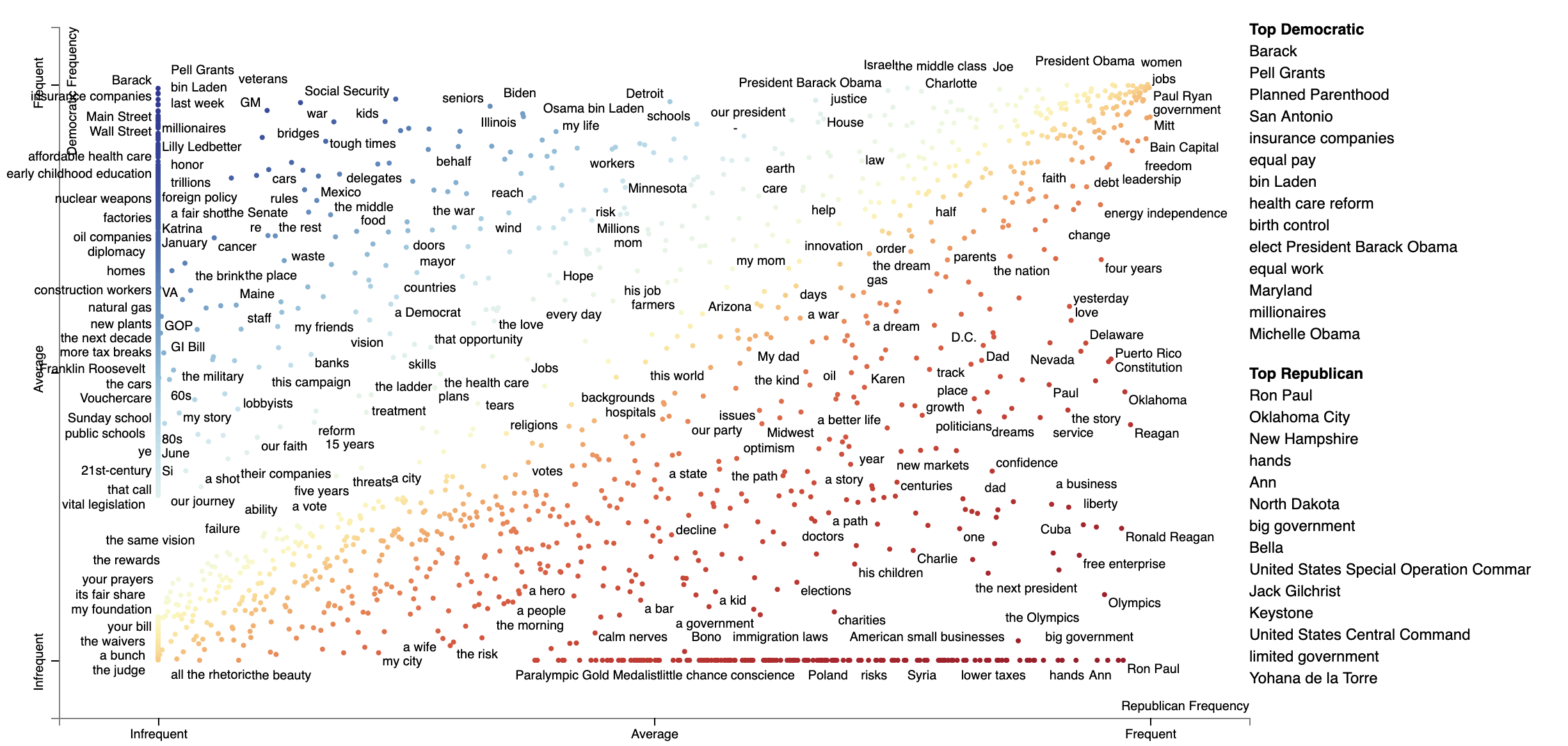](https://jasonkessler.github.io/PyTextRankRankDiff.html)
#### Using Phrasemachine to find phrases.
Phrasemachine from [AbeHandler](https://github.com/AbeHandler) (Handler et al. 2016) uses regular expressions over
sequences of part-of-speech tags to identify noun phrases. This has the advantage over using spaCy's NP-chunking
in that it tends to isolote meaningful, large noun phases which are free of appositives.
A opposed to PyTextRank, we'll just use counts of these phrases, treating them like any other term.
```pydocstring
import spacy
from scattertext import SampleCorpora, PhraseMachinePhrases, dense_rank, RankDifference, AssociationCompactor, produce_scattertext_explorer
from scattertext.CorpusFromPandas import CorpusFromPandas
corpus = (CorpusFromPandas(SampleCorpora.ConventionData2012.get_data(),
category_col='party',
text_col='text',
feats_from_spacy_doc=PhraseMachinePhrases(),
nlp=spacy.load('en', parser=False))
.build().compact(AssociationCompactor(4000)))
html = produce_scattertext_explorer(corpus,
category='democrat',
category_name='Democratic',
not_category_name='Republican',
minimum_term_frequency=0,
pmi_threshold_coefficient=0,
transform=dense_rank,
metadata=corpus.get_df()['speaker'],
term_scorer=RankDifference(),
width_in_pixels=1000)
```
[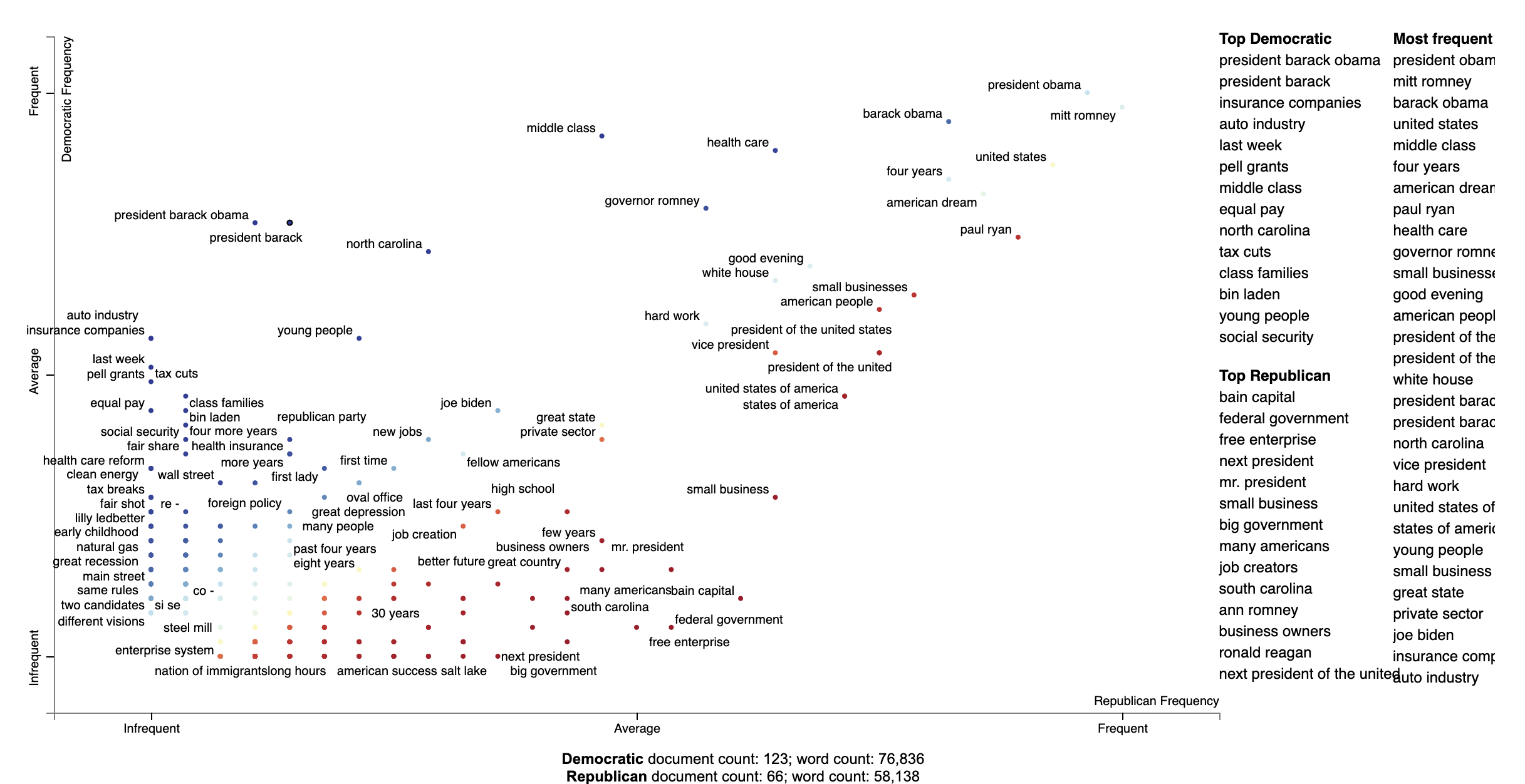](https://jasonkessler.github.io/Phrasemachine.html)
### Adding color gradients to explain scores
In Scattertext, various metrics, including term associations, are often shown through two ways. The first
and most important, is the position in the chart. The second is the color of a point or text. In Scattertext 0.2.21, a
way of visualizing the semantics of these scores is introduced: the gradient as key.
The gradient, by default, follows the `d3_color_scale` parameter of `produce_scattertext_explorer` which is
`d3.interpolateRdYlBu` by default.
The following additional parameters to `produce_scattertext_explorer` (and similar functions) allow for the manipulation
gradients.
- `include_gradient: bool` (`False` by default) is a flag that triggers the appearance of a gradient.
- `left_gradient_term: Optional[str]` indicates the text written on the far-left side of the gradient. It is written in `gradient_text_color` and is `category_name` by default.
- `right_gradient_term: Optional[str]` indicates the text written on the far-left side of the gradient. It is written in `gradient_text_color` and is `not_category_name` by default.
- `middle_gradient_term: Optional[str]` indicates the text written in the middle of the gradient. It is the opposite color of the center gradient color and is empty by default.
- `gradient_text_color: Optional[str]` indicates the fixed color of the text written on the gradient. If None, it defaults to opposite color of the gradient.
- `left_text_color: Optional[str]` overrides `gradient_text_color` for the left gradient term
- `middle_text_color: Optional[str]` overrides `gradient_text_color` for the middle gradient term
- `right_text_color: Optional[str]` overrides `gradient_text_color` for the right gradient term
- `gradient_colors: Optional[List[str]]` list of hex colors, including '#', (e.g., `['#0000ff', '#980067', '#cc3300', '#32cd00']`) which describe the gradient. If given, these override `d3_color_scale`.
A straightforward example is as follows. Term colors are defined as a mapping between a term name and a `#RRGGBB` color
as part of the `term_color` parameter, and the color gradient is defined in `gradient_colors`. THe
```python
import matplotlib.pyplot as plt
import matplotlib as mpl
df = st.SampleCorpora.ConventionData2012.get_data().assign(
parse=lambda df: df.text.apply(st.whitespace_nlp_with_sentences)
)
corpus = st.CorpusFromParsedDocuments(
df, category_col='party', parsed_col='parse'
).build().get_unigram_corpus().compact(st.AssociationCompactor(2000))
html = st.produce_scattertext_explorer(
corpus,
category='democrat',
category_name='Democratic',
not_category_name='Republican',
minimum_term_frequency=0,
pmi_threshold_coefficient=0,
width_in_pixels=1000,
metadata=corpus.get_df()['speaker'],
transform=st.Scalers.dense_rank,
include_gradient=True,
left_gradient_term="More Democratic",
right_gradient_term="More Republican",
middle_gradient_term='Metric: Dense Rank Difference',
gradient_text_color="white",
term_colors=dict(zip(
corpus.get_terms(),
[
mpl.colors.to_hex(x) for x in plt.get_cmap('brg')(
st.Scalers.scale_center_zero_abs(
st.RankDifferenceScorer(corpus).set_categories('democrat').get_scores()).values
)
]
)),
gradient_colors=[mpl.colors.to_hex(x) for x in plt.get_cmap('brg')(np.arange(1., 0., -0.01))],
)
```
[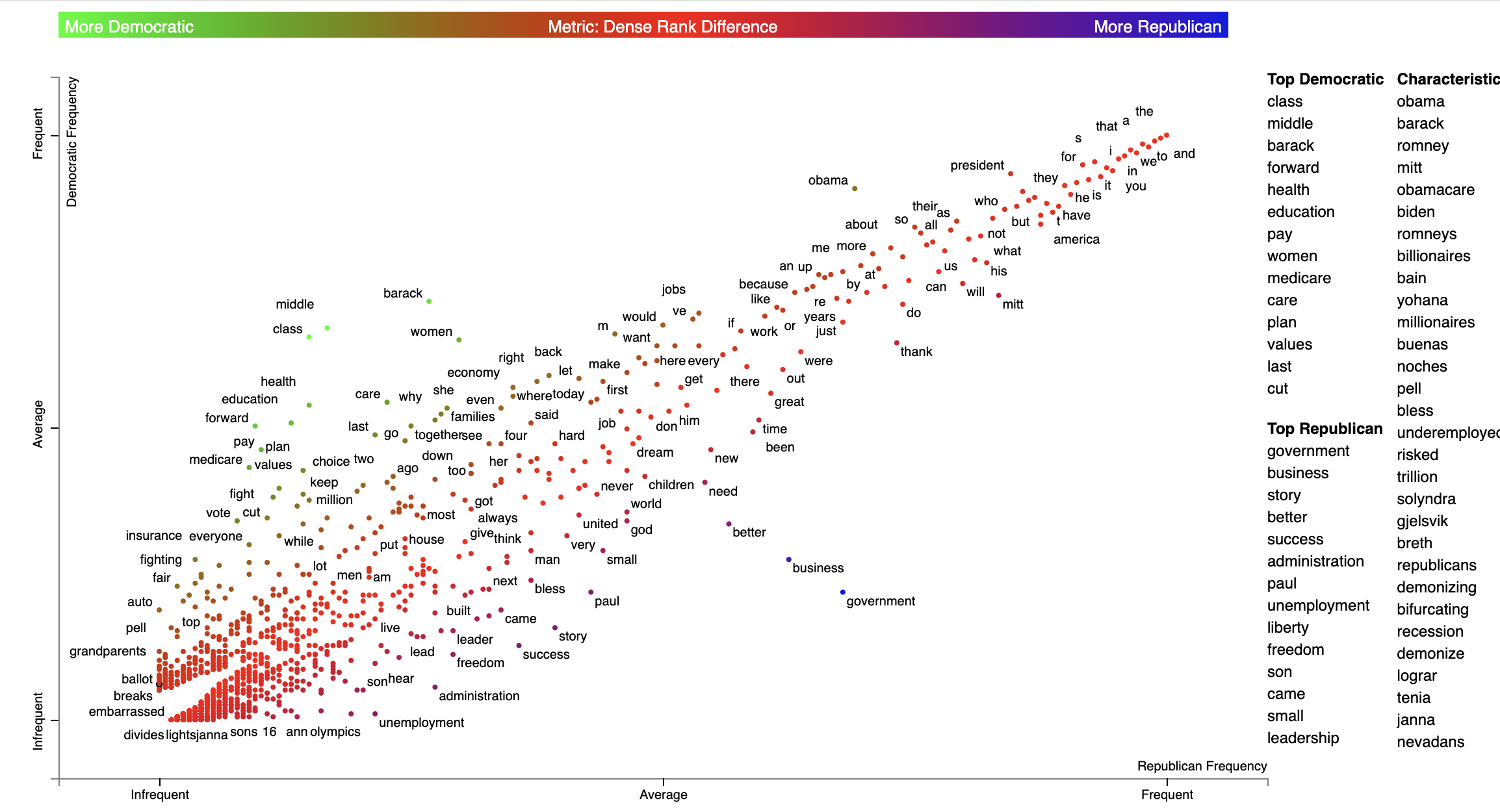](https://jasonkessler.github.io/demo_gradient.html)
### Visualizing Empath topics and categories
In order to visualize Empath (Fast et al., 2016) topics and categories instead of terms, we'll need to
create a `Corpus` of extracted topics and categories rather than unigrams and
bigrams. To do so, use the `FeatsOnlyFromEmpath` feature extractor. See the source code for
examples of how to make your own.
When creating the visualization, pass the `use_non_text_features=True` argument into
`produce_scattertext_explorer`. This will instruct it to use the labeled Empath
topics and categories instead of looking for terms. Since the documents returned
when a topic or category label is clicked will be in order of the document-level
category-association strength, setting `use_full_doc=True` makes sense, unless you have
enormous documents. Otherwise, the first 300 characters will be shown.
(New in 0.0.26). Ensure you include `topic_model_term_lists=feat_builder.get_top_model_term_lists()`
in `produce_scattertext_explorer` to ensure it bolds passages of snippets that match the
topic model.
```pydocstring
>>> feat_builder = st.FeatsFromOnlyEmpath()
>>> empath_corpus = st.CorpusFromParsedDocuments(convention_df,
... category_col='party',
... feats_from_spacy_doc=feat_builder,
... parsed_col='text').build()
>>> html = st.produce_scattertext_explorer(empath_corpus,
... category='democrat',
... category_name='Democratic',
... not_category_name='Republican',
... width_in_pixels=1000,
... metadata=convention_df['speaker'],
... use_non_text_features=True,
... use_full_doc=True,
... topic_model_term_lists=feat_builder.get_top_model_term_lists())
>>> open("Convention-Visualization-Empath.html", 'wb').write(html.encode('utf-8'))
```
[](https://jasonkessler.github.io/Convention-Visualization-Empath.html)
c
Scattertext also includes a feature builder to explore the relationship between General Inquirer Tag Categoires
and Document Categories. We'll use a slightly different approach, looking at relationship of GI Tag Categories to
political parties by using the
Z-Scores of the Log-Odds-Ratio with Uninformative Dirichlet Priors (Monroe 2008). We'll use
the `produce_frequency_explorer` plot
variation to visualize this relationship, setting the x-axis as the number of times a word in the tag category occurs,
and the y-axis as the z-score.
For more information on the General Inquirer, please see
the [General Inquirer Home Page](http://www.wjh.harvard.edu/~inquirer/).
We'll use the same data set as before, except we'll use the `FeatsFromGeneralInquirer` feature builder.
```pydocstring
>>> general_inquirer_feature_builder = st.FeatsFromGeneralInquirer()
>>> corpus = st.CorpusFromPandas(convention_df,
... category_col='party',
... text_col='text',
... nlp=st.whitespace_nlp_with_sentences,
... feats_from_spacy_doc=general_inquirer_feature_builder).build()
```
Next, we'll call `produce_frequency_explorer` in a similar way we called `produce_scattertext_explorer` in the previous
section.
There are a few differences, however. First, we specify the `LogOddsRatioUninformativeDirichletPrior` term scorer, which
scores the relationships between the categories. The `grey_threshold` indicates the points scoring between [-1.96, 1.96]
(i.e., p > 0.05) should be colored gray. The
argument `metadata_descriptions=general_inquirer_feature_builder.get_definitions()`
indicates that a dictionary mapping the tag name to a string definition is passed. When a tag is clicked, the definition
in the dictionary will be shown below the plot, as shown in the image following the snippet.
```pydocstring
>>> html = st.produce_frequency_explorer(corpus,
... category='democrat',
... category_name='Democratic',
... not_category_name='Republican',
... metadata=convention_df['speaker'],
... use_non_text_features=True,
... use_full_doc=True,
... term_scorer=st.LogOddsRatioUninformativeDirichletPrior(),
... grey_threshold=1.96,
... width_in_pixels=1000,
... topic_model_term_lists=general_inquirer_feature_builder.get_top_model_term_lists(),
... metadata_descriptions=general_inquirer_feature_builder.get_definitions())
```
Here's the resulting chart.
[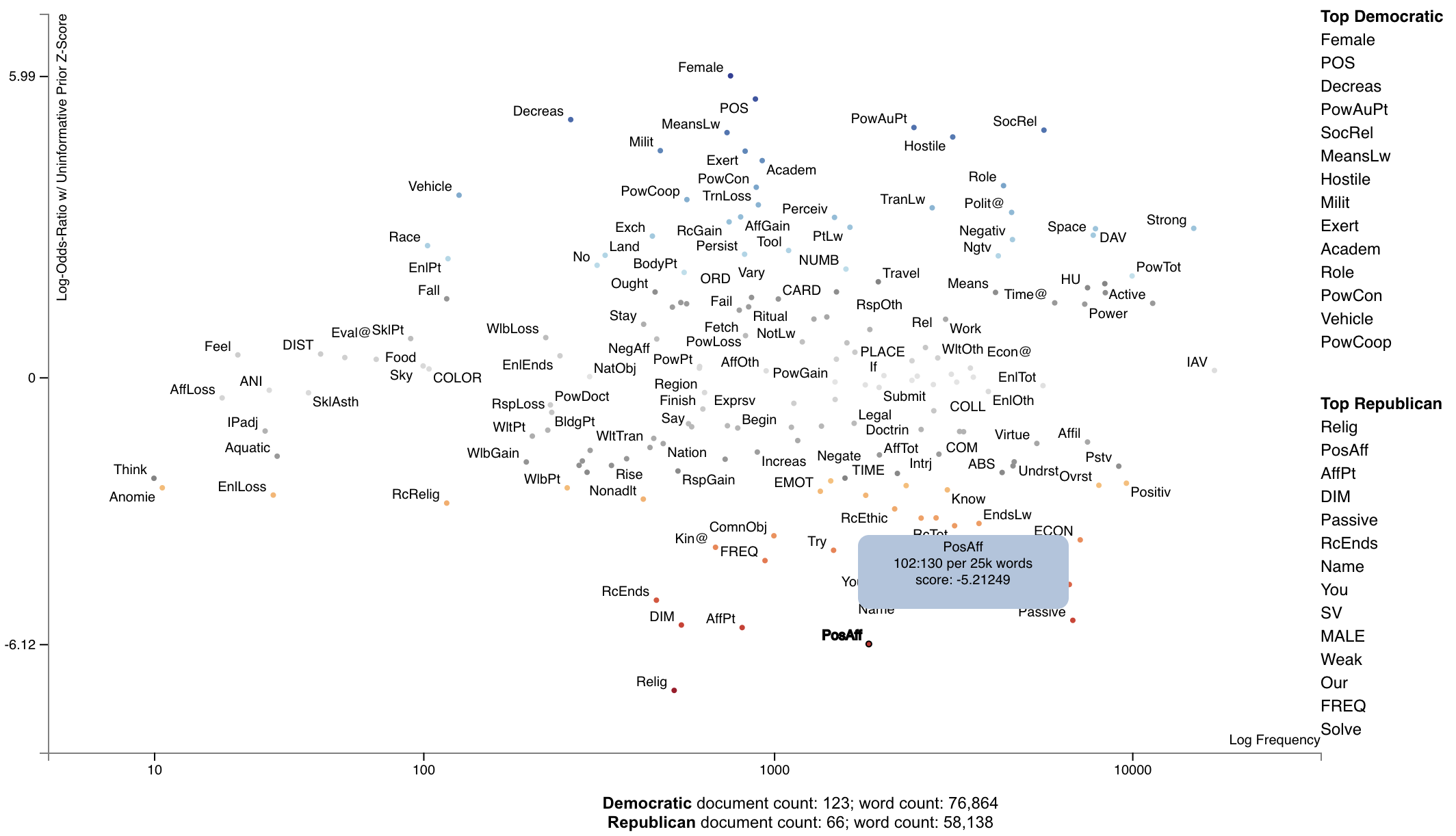](https://jasonkessler.github.io/demo_general_inquirer_frequency_plot.html)
[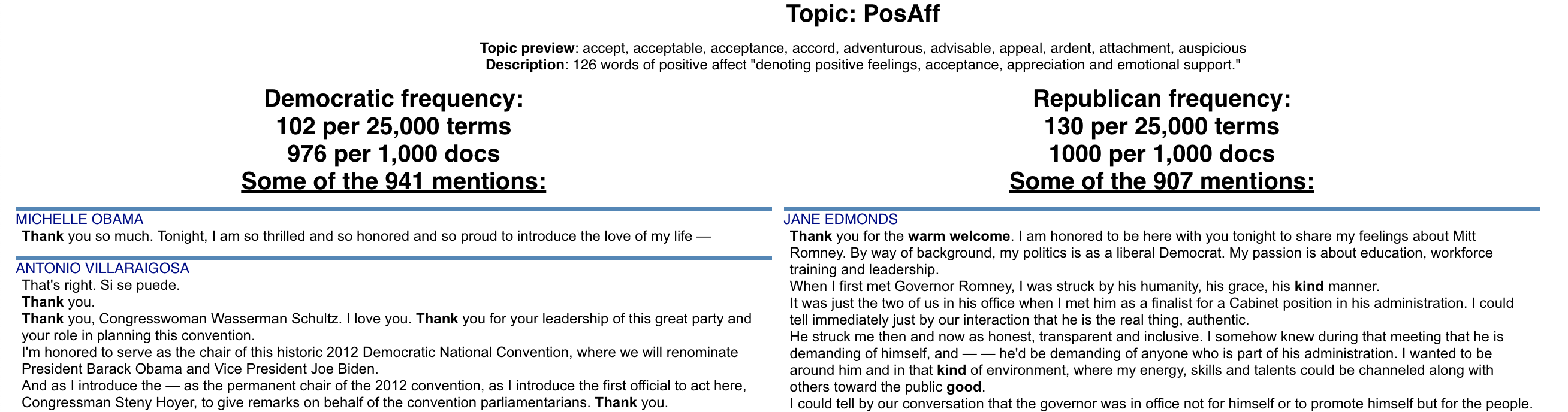](https://jasonkessler.github.io/demo_general_inquirer_frequency_plot.html)
### Visualizing the Moral Foundations 2.0 Dictionary
The [[Moral Foundations Theory]](https://moralfoundations.org/) proposes six psychological constructs
as building blocks of moral thinking, as described in Graham et al. (2013). These foundations are,
as described on [[moralfoundations.org]](https://moralfoundations.org/): care/harm, fairness/cheating, loyalty/betrayal,
authority/subversion, sanctity/degradation, and liberty/oppression. Please see the site for a more in-depth discussion
of these foundations.
Frimer et al. (2019) created the Moral Foundations Dictionary 2.0, or a lexicon of terms which invoke a moral foundation
as a virtue (favorable toward the foundation) or a vice (in opposition to the foundation).
This dictionary can be used in the same way as the General Inquirer. In this example, we can plot the Cohen's d scores
of
foundation-word counts relative to the frequencies words involving those foundations were invoked.
We can first load the corpus as normal, and use `st.FeatsFromMoralFoundationsDictionary()` to extract features.
```python
import scattertext as st
convention_df = st.SampleCorpora.ConventionData2012.get_data()
moral_foundations_feats = st.FeatsFromMoralFoundationsDictionary()
corpus = st.CorpusFromPandas(convention_df,
category_col='party',
text_col='text',
nlp=st.whitespace_nlp_with_sentences,
feats_from_spacy_doc=moral_foundations_feats).build()
```
Next, let's use Cohen's d term scorer to analyze the corpus, and describe a set of Cohen's d association scores.
```python
cohens_d_scorer = st.CohensD(corpus).use_metadata()
term_scorer = cohens_d_scorer.set_categories('democrat', ['republican']).term_scorer.get_score_df()
```
Which yields the following data frame:
| | cohens_d | cohens_d_se | cohens_d_z | cohens_d_p | hedges_g | hedges_g_se | hedges_g_z | hedges_g_p | m1 | m2 | count1 | count2 | docs1 | docs2 |
|:-----------------|-----------:|--------------:|-------------:|-------------:|-----------:|------------:|-----------:|------------:|-----------:|-----------:|---------:|---------:|--------:|--------:|
| care.virtue | 0.662891 | 0.149425 | 4.43629 | 4.57621e-06 | 0.660257 | 0.159049 | 4.15129 | 1.65302e-05 | 0.195049 | 0.12164 | 760 | 379 | 115 | 54 |
| care.vice | 0.24435 | 0.146025 | 1.67335 | 0.0471292 | 0.243379 | 0.152654 | 1.59432 | 0.0554325 | 0.0580005 | 0.0428358 | 244 | 121 | 80 | 41 |
| fairness.virtue | 0.176794 | 0.145767 | 1.21286 | 0.112592 | 0.176092 | 0.152164 | 1.15725 | 0.123586 | 0.0502469 | 0.0403369 | 225 | 107 | 71 | 39 |
| fairness.vice | 0.0707162 | 0.145528 | 0.485928 | 0.313509 | 0.0704352 | 0.151711 | 0.464273 | 0.321226 | 0.00718627 | 0.00573227 | 32 | 14 | 21 | 10 |
| authority.virtue | -0.0187793 | 0.145486 | -0.12908 | 0.551353 | -0.0187047 | 0.15163 | -0.123357 | 0.549088 | 0.358192 | 0.361191 | 1281 | 788 | 122 | 66 |
| authority.vice | -0.0354164 | 0.145494 | -0.243422 | 0.596161 | -0.0352757 | 0.151646 | -0.232619 | 0.591971 | 0.00353465 | 0.00390602 | 20 | 14 | 14 | 10 |
| sanctity.virtue | -0.512145 | 0.147848 | -3.46399 | 0.999734 | -0.51011 | 0.156098 | -3.26788 | 0.999458 | 0.0587987 | 0.101677 | 265 | 309 | 74 | 48 |
| sanctity.vice | -0.108011 | 0.145589 | -0.74189 | 0.770923 | -0.107582 | 0.151826 | -0.708585 | 0.760709 | 0.00845048 | 0.0109339 | 35 | 28 | 23 | 20 |
| loyalty.virtue | -0.413696 | 0.147031 | -2.81367 | 0.997551 | -0.412052 | 0.154558 | -2.666 | 0.996162 | 0.259296 | 0.309776 | 1056 | 717 | 119 | 66 |
| loyalty.vice | -0.0854683 | 0.145549 | -0.587213 | 0.72147 | -0.0851287 | 0.151751 | -0.560978 | 0.712594 | 0.00124518 | 0.00197022 | 5 | 5 | 5 | 4 |
This data frame gives us Cohen's d scores (and their standard errors and z-scores), Hedge's $g$ scores (ditto),
the mean document-length normalized topic usage per category (where the in-focus category is m1 [in this case Democrats]
and the out-of-focus is m2), the raw number of words used in for each topic (count1 and count2), and the number of
documents
in each category with the topic (docs1 and docs2).
Note that Cohen's d is the difference of m1 and m2 divided by their pooled standard deviation.
Now, let's plot the d-scores of foundations vs. their frequencies.
```python
html = st.produce_frequency_explorer(
corpus,
category='democrat',
category_name='Democratic',
not_category_name='Republican',
metadata=convention_df['speaker'],
use_non_text_features=True,
use_full_doc=True,
term_scorer=st.CohensD(corpus).use_metadata(),
grey_threshold=0,
width_in_pixels=1000,
topic_model_term_lists=moral_foundations_feats.get_top_model_term_lists(),
metadata_descriptions=moral_foundations_feats.get_definitions()
)
```
[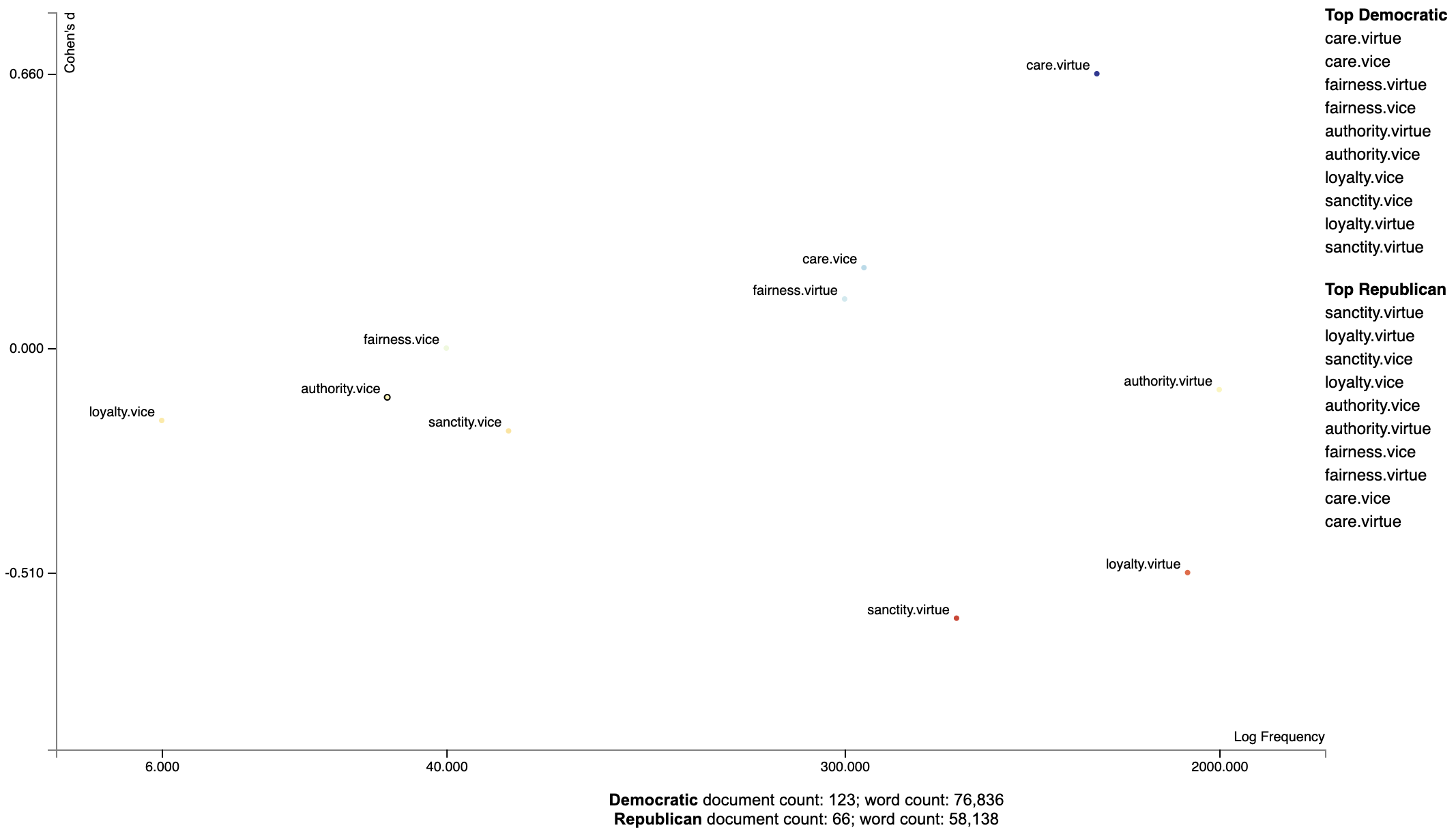](https://jasonkessler.github.io/demo_moral_foundations.html)
### Ordering Terms by Corpus Characteristicness
Often the terms of most interest are ones that are characteristic to the corpus as a whole. These are terms which occur
frequently in all sets of documents being studied, but relatively infrequent compared to general term frequencies.
We can produce a plot with a characteristic score on the x-axis and class-association scores on the y-axis using the
function `produce_characteristic_explorer`.
Corpus characteristicness is the difference in dense term ranks between the words in all of the documents in the study
and a general English-language frequency list. See
this [Talk on Term-Class Association Scores](http://nbviewer.jupyter.org/github/JasonKessler/PuPPyTalk/blob/master/notebooks/Class-Association-Scores.ipynb)
for a more thorough explanation.
```python
import scattertext as st
corpus = (st.CorpusFromPandas(st.SampleCorpora.ConventionData2012.get_data(),
category_col='party',
text_col='text',
nlp=st.whitespace_nlp_with_sentences)
.build()
.get_unigram_corpus()
.compact(st.ClassPercentageCompactor(term_count=2,
term_ranker=st.OncePerDocFrequencyRanker)))
html = st.produce_characteristic_explorer(
corpus,
category='democrat',
category_name='Democratic',
not_category_name='Republican',
metadata=corpus.get_df()['speaker']
)
open('demo_characteristic_chart.html', 'wb').write(html.encode('utf-8'))
```
[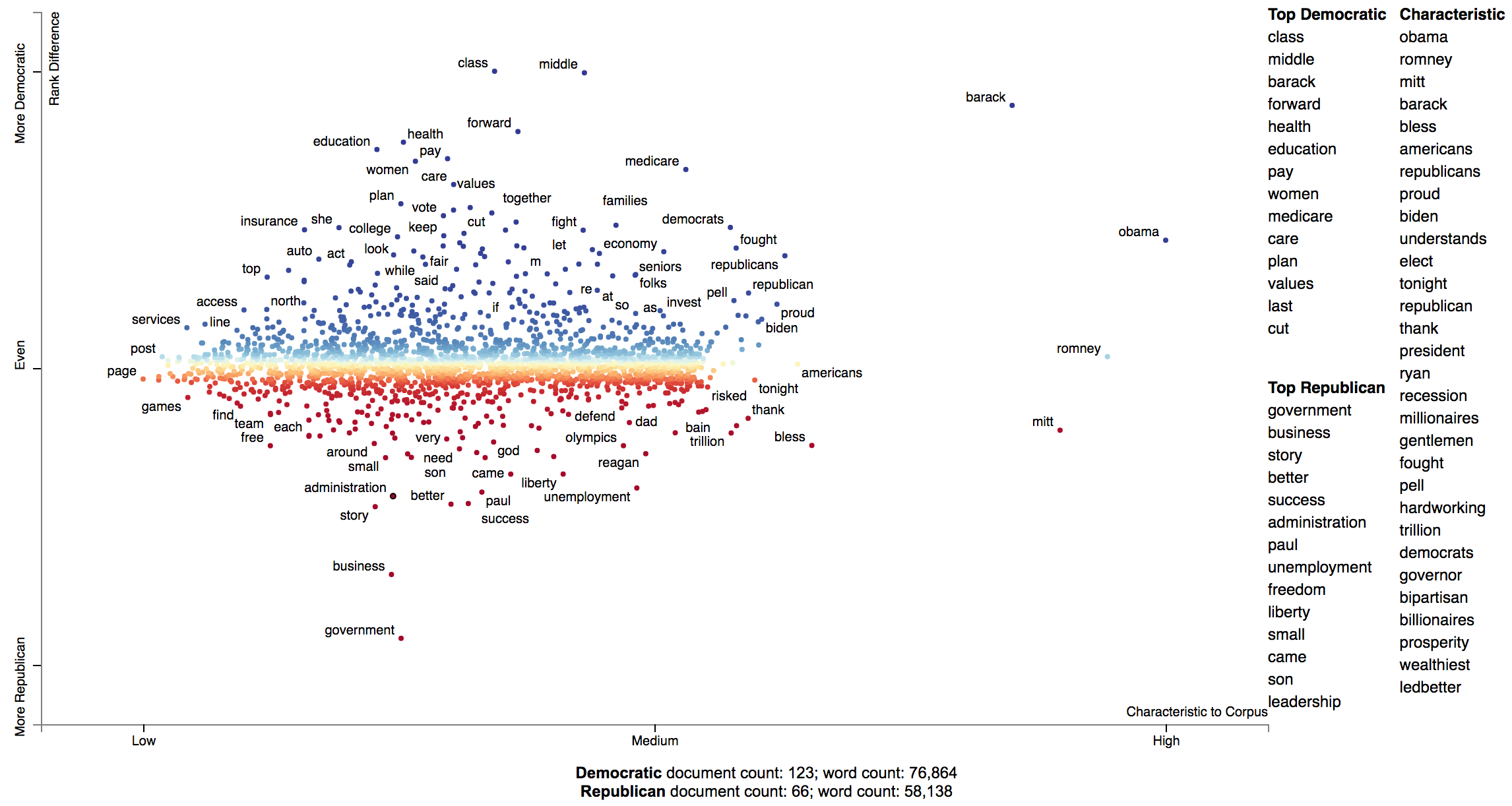](https://jasonkessler.github.io/demo_characteristic_chart.html)
### Document-Based Scatterplots
In addition to words, phases and topics, we can make each point correspond to a document. Let's first create
a corpus object for the 2012 Conventions data set. This explanation follows `demo_pca_documents.py`
```python
import pandas as pd
from sklearn.feature_extraction.text import TfidfTransformer
import scattertext as st
from scipy.sparse.linalg import svds
convention_df = st.SampleCorpora.ConventionData2012.get_data()
convention_df['parse'] = convention_df['text'].apply(st.whitespace_nlp_with_sentences)
corpus = (st.CorpusFromParsedDocuments(convention_df,
category_col='party',
parsed_col='parse')
.build()
.get_stoplisted_unigram_corpus())
```
Next, let's add the document names as meta data in the corpus object. The `add_doc_names_as_metadata` function
takes an array of document names, and populates a new corpus' meta data with those names. If two documents have the
same name, it appends a number (starting with 1) to the name.
```python
corpus = corpus.add_doc_names_as_metadata(corpus.get_df()['speaker'])
```
Next, we find tf.idf scores for the corpus' term-document matrix, run sparse SVD, and add them to a projection
data frame, making the x and y-axes the first two singular values, and indexing it on the corpus' meta data, which
corresponds to the document names.
```python
embeddings = TfidfTransformer().fit_transform(corpus.get_term_doc_mat())
u, s, vt = svds(embeddings, k=3, maxiter=20000, which='LM')
projection = pd.DataFrame({'term': corpus.get_metadata(), 'x': u.T[0], 'y': u.T[1]}).set_index('term')
```
Finally, set scores as 1 for Democrats and 0 for Republicans, rendering Republican documents as red points and
Democratic documents as blue. For more on the `produce_pca_explorer` function,
see [Using SVD to visualize any kind of word embeddings](#using-svd-to-visualize-any-kind-of-word-embeddings).
```python
category = 'democrat'
scores = (corpus.get_category_ids() == corpus.get_categories().index(category)).astype(int)
html = st.produce_pca_explorer(corpus,
category=category,
category_name='Democratic',
not_category_name='Republican',
metadata=convention_df['speaker'],
width_in_pixels=1000,
show_axes=False,
use_non_text_features=True,
use_full_doc=True,
projection=projection,
scores=scores,
show_top_terms=False)
```
Click for an interactive version
[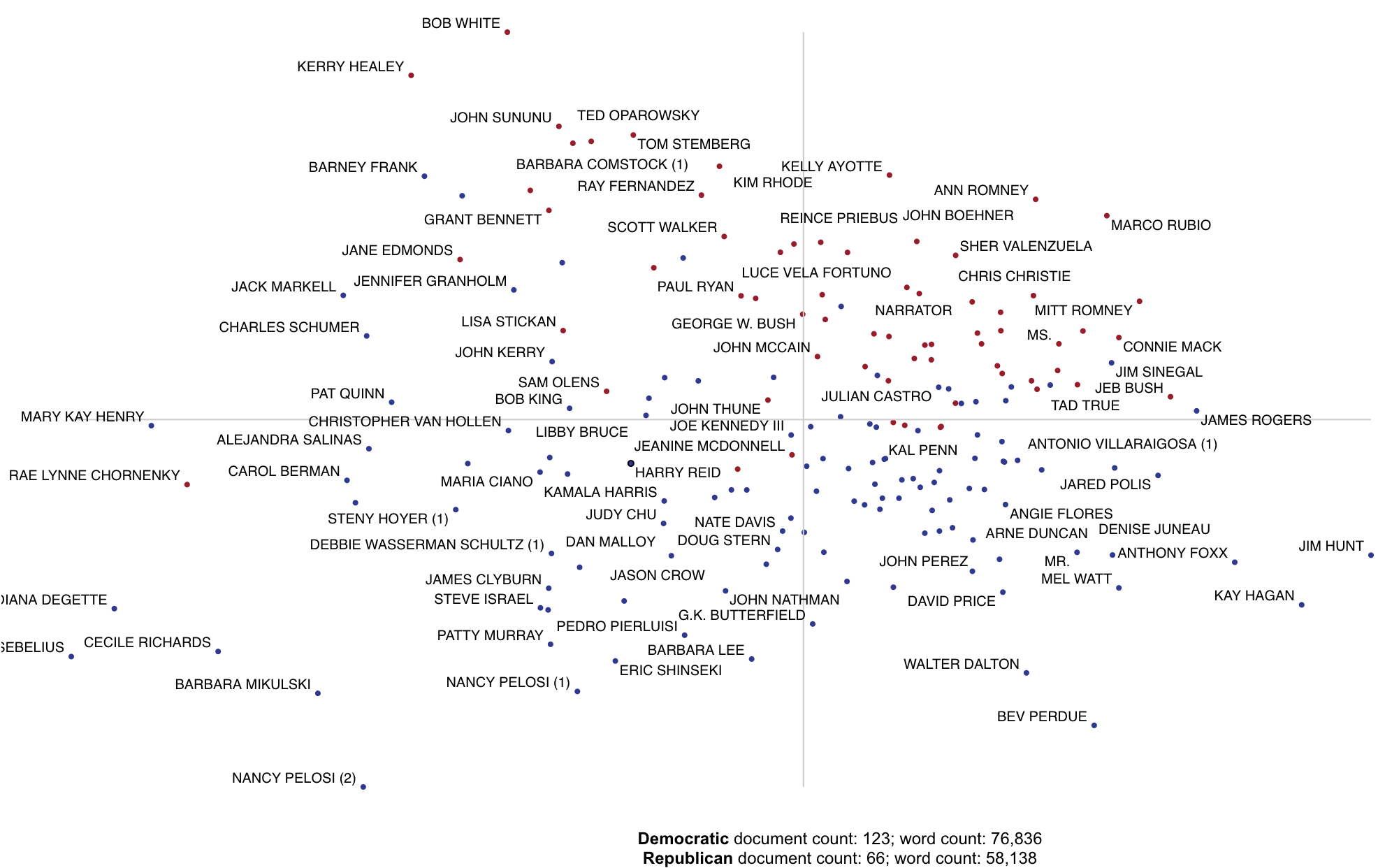](https://jasonkessler.github.io/demo_pca_documents.html)
### Using Cohen's d or Hedge's g to visualize effect size.
Cohen's d is a popular metric used to measure effect size. The definitions of Cohen's d and Hedge's $g$
from (Shinichi and Cuthill 2017) are implemented in Scattertext.
```python
>>> convention_df = st.SampleCorpora.ConventionData2012.get_data()
>>> corpus = (st.CorpusFromPandas(convention_df,
... category_col='party',
...text_col='text',
...nlp=st.whitespace_nlp_with_sentences)
....build()
....get_unigram_corpus())
```
We can create a term scorer object to examine the effect sizes and other metrics.
```python
>> > term_scorer = st.CohensD(corpus).set_categories('democrat', ['republican'])
>> > term_scorer.get_score_df().sort_values(by='cohens_d', ascending=False).head()
cohens_d
cohens_d_se
cohens_d_z
cohens_d_p
hedges_g
hedges_g_se
hedges_g_z
hedges_g_p
m1
m2
obama
1.187378
0.024588
48.290444
0.000000e+00
1.187322
0.018419
64.461363
0.0
0.007778
0.002795
class 0.855859 0.020848 41.052045 0.000000e+00 0.855818 0.017227 49.677688 0.0 0.002222 0.000375
middle
0.826895
0.020553
40.232746
0.000000e+00
0.826857
0.017138
48.245626
0.0
0.002316
0.000400
president
0.820825
0.020492
40.056541
0.000000e+00
0.820786
0.017120
47.942661
0.0
0.010231
0.005369
barack
0.730624
0.019616
37.245725
6.213052e-304
0.730589
0.016862
43.327800
0.0
0.002547
0.000725
```
Our calculation of Cohen's d is not directly based on term counts. Rather, we divide each document's term counts by the
total number
of terms in the document before calculating the statistics. `m1` and `m2` are, respectively the mean portions of words
in speeches made by Democrats and Republicans that were the term in question. The effect size (`cohens_d`) is the
difference between these means divided by the pooled standard deviation. `cohens_d_se` is the standard error
of the statistic, while `cohens_d_z` and `cohens_d_p` are the Z-scores and p-values indicating the statistical
significance of the effect. Corresponding columns are present for Hedge's $g$ a version of Cohen's d adjusted for data set size.
```python
>>> st.produce_frequency_explorer(
corpus,
category='democrat',
category_name='Democratic',
not_category_name='Republican',
term_scorer=st.CohensD(corpus),
metadata=convention_df['speaker'],
grey_threshold=0
)
```
Click for an interactive version.
[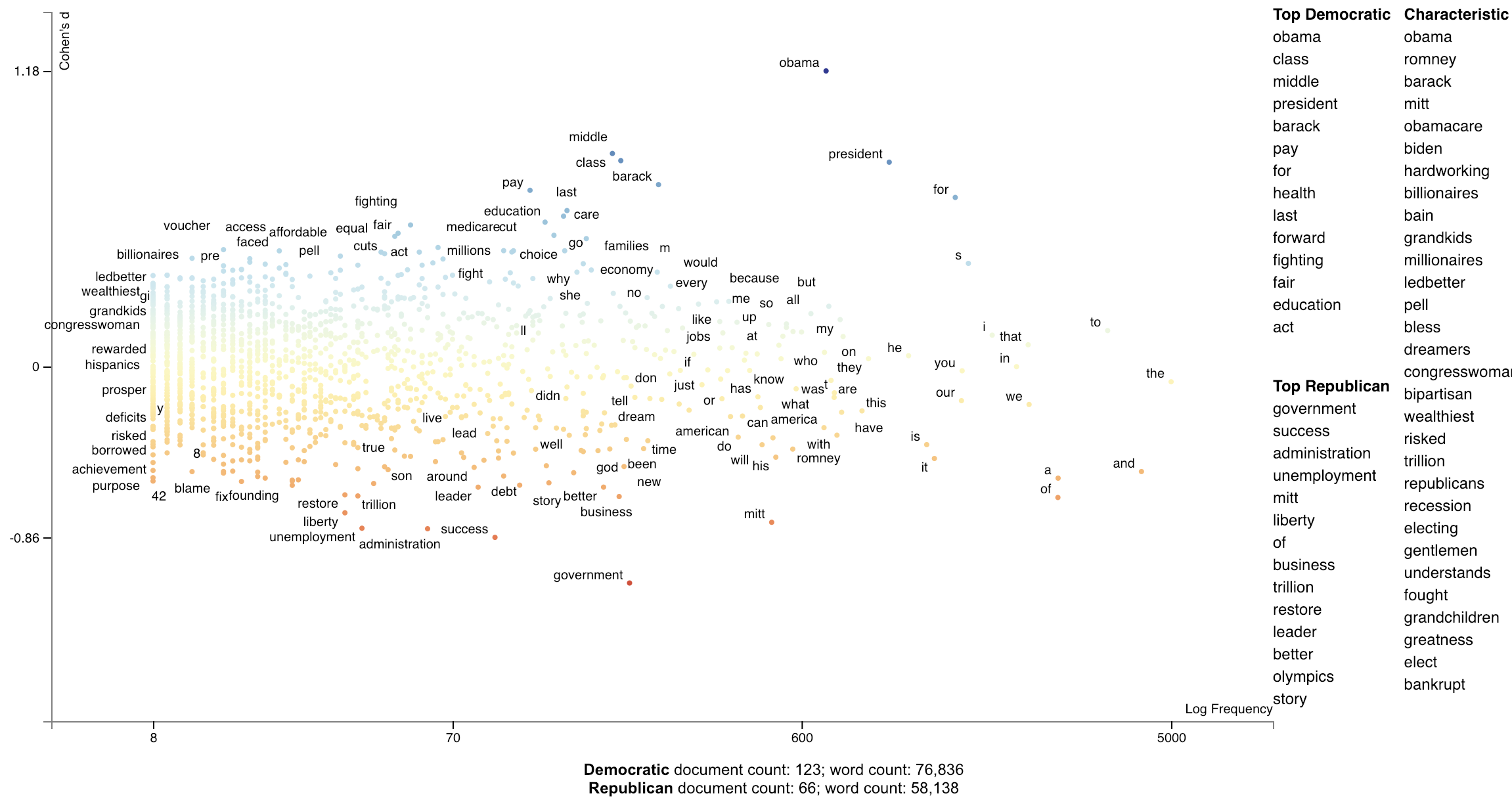](https://jasonkessler.github.io/demo_cohens_d.html)
### Using Cliff's Delta to visualize effect size
Cliff's Delta (Cliff 1993) uses a non-parametric approach to computing effect size. In our setting, the term's frequency
percentage of each document in the focus set is compared with that of the background set. For each pair of documents,
a score of 1 is given if the focus document's frequency percentage is larger than the background, 0 if identical, and -1
if different. Note that this assumes document lengths are similarly distributed across the focus and background corpora.
See [https://real-statistics.com/non-parametric-tests/mann-whitney-test/cliffs-delta/] for the formulas used in `CliffsDelta`.
Below is an example of how to use `CliffsDelta` to find and plot term scores:
```python
nlp = spacy.blank('en')
nlp.add_pipe('sentencizer')
convention_df = st.SampleCorpora.ConventionData2012.get_data().assign(
party = lambda df: df.party.apply(
lambda x: {'democrat': 'Dem', 'republican': 'Rep'}[x]),
SpacyParse=lambda df: df.text.progress_apply(nlp)
)
corpus = st.CorpusFromParsedDocuments(convention_df, category_col='party', parsed_col='SpacyParse').build(
).remove_terms_used_in_less_than_num_docs(10)
st.CliffsDelta(corpus).set_categories('Dem').get_score_df().sort_values(by='Dem', ascending=False).iloc[:10]
```
| term | Metric | Stddev | Low-5.0% CI | High-5.0% CI | TermCount1 | TermCount2 | DocCount1 | DocCount2 |
|:----------------|---------:|----------:|--------------:|---------------:|-------------:|-------------:|------------:|------------:|
| obama | 0.597191 | 0.0266606 | -1.35507 | -1.03477 | 537 | 165 | 113 | 40 |
| president obama | 0.565903 | 0.0314348 | -2.37978 | -1.74131 | 351 | 78 | 100 | 30 |
| president | 0.426337 | 0.0293418 | 1.22784 | 0.909226 | 740 | 301 | 113 | 53 |
| middle | 0.417591 | 0.0267365 | 1.10791 | 0.840932 | 164 | 27 | 68 | 12 |
| class | 0.415373 | 0.0280622 | 1.09032 | 0.815649 | 161 | 25 | 69 | 14 |
| barack | 0.406997 | 0.0281692 | 1.00765 | 0.750963 | 202 | 46 | 76 | 16 |
| barack obama | 0.402562 | 0.027512 | 0.965359 | 0.723403 | 164 | 45 | 76 | 16 |
| that 's | 0.384085 | 0.0227344 | 0.809747 | 0.634705 | 236 | 91 | 89 | 31 |
| obama . | 0.356245 | 0.0237453 | 0.664688 | 0.509631 | 70 | 5 | 49 | 4 |
| for | 0.35526 | 0.0364138 | 0.70142 | 0.46487 | 1020 | 542 | 119 | 62 |
We can elegantly display the Cliff's delta scores using `dataframe_scattertext`, and describe the point coloring scheme
using the `include_gradient=True` parameter. We set the `left_gradient_term`, `middle_gradient_term`, and `right_gradient_term`
parameters to strings which will appear in their corresonding values.
```python
plot_df = st.CliffsDelta(
corpus
).set_categories(
category_name='Dem'
).get_score_df().rename(columns={'Metric': 'CliffsDelta'}).assign(
Frequency=lambda df: df.TermCount1 + df.TermCount1,
X=lambda df: df.Frequency,
Y=lambda df: df.CliffsDelta,
Xpos=lambda df: st.Scalers.dense_rank(df.X),
Ypos=lambda df: st.Scalers.scale_center_zero_abs(df.Y),
ColorScore=lambda df: df.Ypos,
)
html = st.dataframe_scattertext(
corpus,
plot_df=plot_df,
category='Dem',
category_name='Dem',
not_category_name='Rep',
width_in_pixels=1000,
ignore_categories=False,
metadata=lambda corpus: corpus.get_df()['speaker'],
color_score_column='ColorScore',
left_list_column='ColorScore',
show_characteristic=False,
y_label="Cliff's Delta",
x_label='Frequency Ranks',
y_axis_labels=[f'More Rep: delta={plot_df.CliffsDelta.max():.3f}',
'',
f'More Dem: delta={-plot_df.CliffsDelta.max():.3f}'],
tooltip_columns=['Frequency', 'CliffsDelta'],
term_description_columns=['CliffsDelta', 'Stddev', 'Low-95.0% CI', 'High-95.0% CI'],
header_names={'upper': 'Top Dem', 'lower': 'Top Reps'},
horizontal_line_y_position=0,
include_gradient=True,
left_gradient_term='More Republican',
right_gradient_term='More Democratic',
middle_gradient_term="Metric: Cliff's Delta",
)
```
[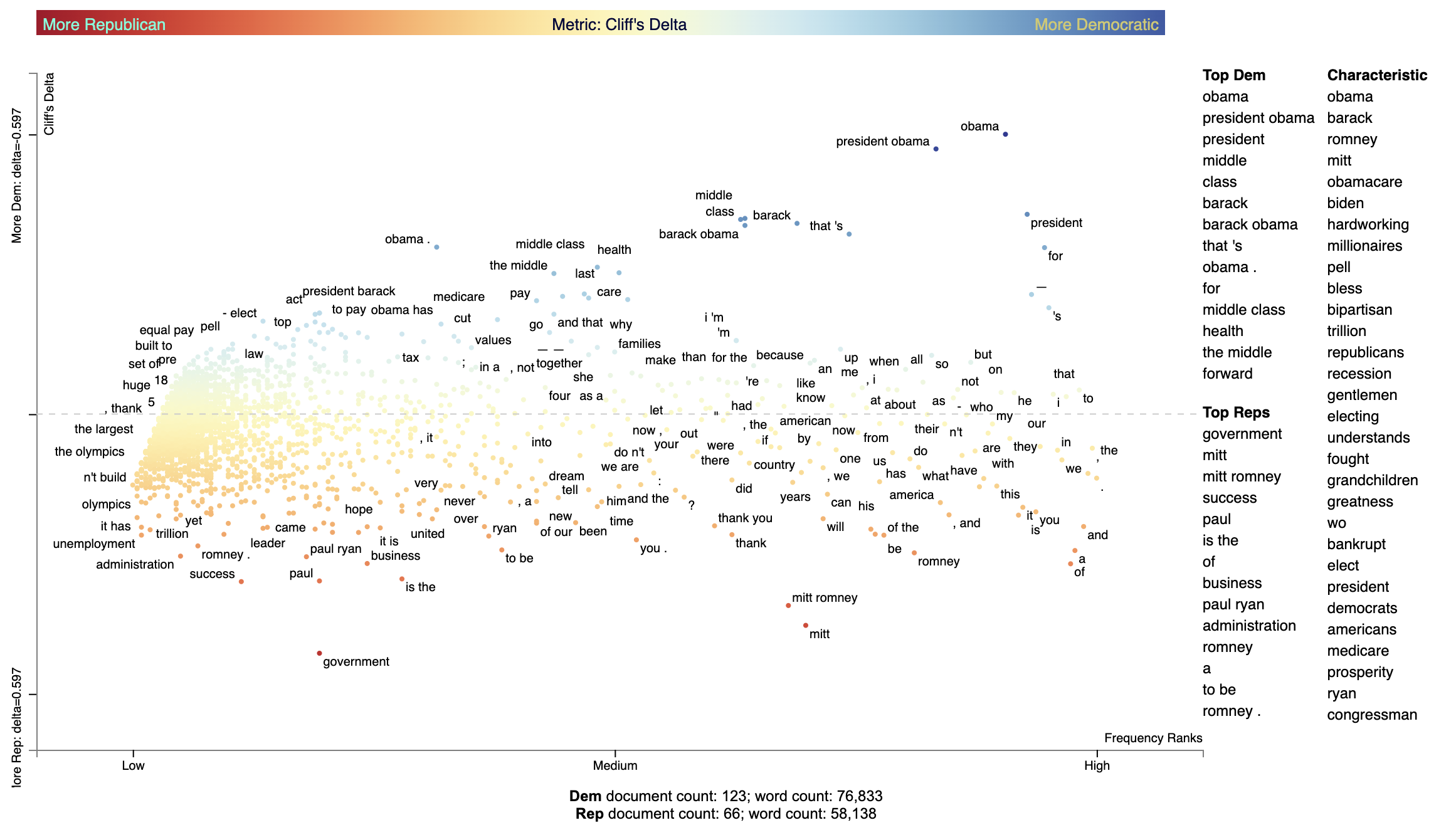](https://jasonkessler.github.io/demo_cliffs_delta.html)
### Using Bi-Normal Separation (BNS) to score terms
Bi-Normal Separation (BNS) (Forman, 2008) was added in version 0.1.8. A variation of (BNS) is used
where $F^{-1}(tpr) - F^{-1}(fpr)$ is not used as an absolute value, but kept as a difference. This allows for
terms strongly indicative of true positives and false positives to have a high or low score.
Note that tpr and fpr are scaled to between $[\alpha, 1-\alpha]$ where
alpha is $\in [0, 1]$. In Forman (2008) and earlier literature $\alpha=0.0005$. In personal correspondence with Forman,
he kindly suggested using $\frac{1.}{\mbox{minimum(positives, negatives)}}$. I have implemented this as
$\alpha=\frac{1.}{\mbox{minimum documents in the least frequent category}}$
```python
corpus = (st.CorpusFromPandas(convention_df,
category_col='party',
text_col='text',
nlp=st.whitespace_nlp_with_sentences)
.build()
.get_unigram_corpus()
.remove_infrequent_words(3, term_ranker=st.OncePerDocFrequencyRanker))
term_scorer = (st.BNSScorer(corpus).set_categories('democrat'))
print(term_scorer.get_score_df().sort_values(by='democrat BNS'))
html = st.produce_frequency_explorer(
corpus,
category='democrat',
category_name='Democratic',
not_category_name='Republican',
scores=term_scorer.get_score_df()['democrat BNS'].reindex(corpus.get_terms()).values,
metadata=lambda c: c.get_df()['speaker'],
minimum_term_frequency=0,
grey_threshold=0,
y_label=f'Bi-normal Separation (alpha={term_scorer.prior_counts})'
)
```
BNS Scored terms using an algorithmically found alpha.
[](https://raw.githubusercontent.com/JasonKessler/jasonkessler.github.io/master/demo_bi_normal_separation.html)
### Using correlations to explain classifiers
We can train a classifier to produce a prediction score for each document. Often classifiers or regressors
use features which take into account features beyond the ones represented by Scatterext, be they n-gram, topic,
extra-linguistic, neural, etc.
We can use Scattertext to visualize the correlations between unigrams (or really any feature representation) and
the document scores produced by a model.
In the following example, we train a linear SVM using unigram and bi-gram features on the entire convention data set,
and use the model to make a prediction on each document, and finally using Pearson's $r$ to correlate unigram features
to the distance from the SVM decision boundary.
```python
from sklearn.svm import LinearSVC
import scattertext as st
df = st.SampleCorpora.ConventionData2012.get_data().assign(
parse=lambda df: df.text.apply(st.whitespace_nlp_with_sentences)
)
corpus = st.CorpusFromParsedDocuments(
df, category_col='party', parsed_col='parse'
).build()
X = corpus.get_term_doc_mat()
y = corpus.get_category_ids()
clf = LinearSVC()
clf.fit(X=X, y=y == corpus.get_categories().index('democrat'))
doc_scores = clf.decision_function(X=X)
compactcorpus = corpus.get_unigram_corpus().compact(st.AssociationCompactor(2000))
plot_df = st.Correlations().set_correlation_type(
'pearsonr'
).get_correlation_df(
corpus=compactcorpus,
document_scores=doc_scores
).reindex(compactcorpus.get_terms()).assign(
X=lambda df: df.Frequency,
Y=lambda df: df['r'],
Xpos=lambda df: st.Scalers.dense_rank(df.X),
Ypos=lambda df: st.Scalers.scale_center_zero_abs(df.Y),
SuppressDisplay=False,
ColorScore=lambda df: df.Ypos,
)
html = st.dataframe_scattertext(
compactcorpus,
plot_df=plot_df,
category='democrat',
category_name='Democratic',
not_category_name='Republican',
width_in_pixels=1000,
metadata=lambda c: c.get_df()['speaker'],
unified_context=False,
ignore_categories=False,
color_score_column='ColorScore',
left_list_column='ColorScore',
y_label="Pearson r (correlation to SVM document score)",
x_label='Frequency Ranks',
header_names={'upper': 'Top Democratic',
'lower': 'Top Republican'},
)
```
[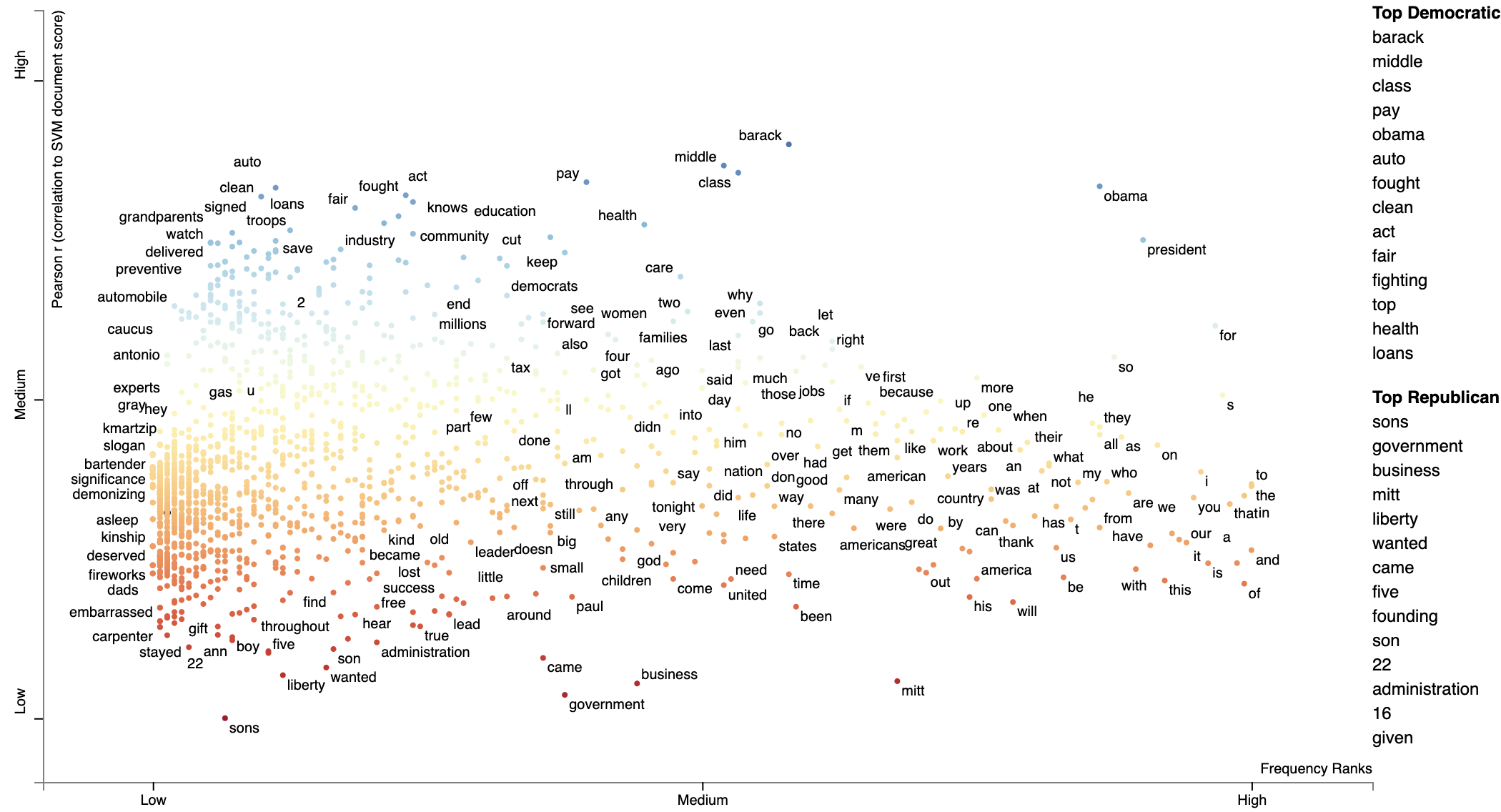](https://raw.githubusercontent.com/JasonKessler/jasonkessler.github.io/master/pearsons.html)
### Using Custom Background Word Frequencies
Scattertext relies on a set of general-domain English word frequencies when computing unigram characteristic
scores. When using running Scattertext on non-English data or in a specific domain, the quality of the scores
will degrade.
Ensure that you are on Scattertext 0.1.6 or higher.
To remedy this, one can add a custom set of background scores to a Corpus-like object,
using the `Corpus.set_background_corpus` function. The function takes a `pd.Series` object, indexed on
terms with numeric count values.
By default, [!understanding-scaled-f-score](Scaled F-Score) is used to rank how characteristic
terms are.
The example below illustrates using Polish background word frequencies.
First, we produce a Series object mapping Polish words to their frequencies using a list from
the [https://github.com/oprogramador/most-common-words-by-language](most-common-words-by-language) repo.
```python
polish_word_frequencies = pd.read_csv(
'https://raw.githubusercontent.com/hermitdave/FrequencyWords/master/content/2016/pl/pl_50k.txt',
sep=' ',
names=['Word', 'Frequency']
).set_index('Word')['Frequency']
```
Note the composition of the Series
```python
>> > polish_word_frequencies
Word
nie
5875385
to
4388099
się
3507076
w
2723767
na
2309765
Name: Frequency, dtype: int64
```
Next, we build a DataFrame, `reviews_df`, consisting of document which appear (to a non-Polish speaker) to be
positive and negative hotel reviews from the [https://klejbenchmark.com/tasks/](PolEmo2.0) corpus
(Kocoń, et al. 2019). Note this data is under a CC BY-NC-SA 4.0 license. These are labeled as
"__label__meta_plus_m" and "__label__meta_minus_m". We will use Scattertext to compare those
reviews and determine
```python
nlp = spacy.blank('pl')
nlp.add_pipe('sentencizer')
with ZipFile(io.BytesIO(urlopen(
'https://klejbenchmark.com/static/data/klej_polemo2.0-in.zip'
).read())) as zf:
review_df = pd.read_csv(zf.open('train.tsv'), sep='\t')[
lambda df: df.target.isin(['__label__meta_plus_m', '__label__meta_minus_m'])
].assign(
Parse=lambda df: df.sentence.apply(nlp)
)
```
Next, we wish to create a `ParsedCorpus` object from `review_df`. In preparation, we first assemble a
list of Polish stopwords from the [stopwords](https://github.com/bieli/stopwords/) repository. We also
create the `not_a_word` regular expression to filter out terms which do not contain a letter.
```python
polish_stopwords = {
stopword for stopword in
urlopen(
'https://raw.githubusercontent.com/bieli/stopwords/master/polish.stopwords.txt'
).read().decode('utf-8').split('\n')
if stopword.strip()
}
not_a_word = re.compile(r'^\W+$')
```
With these present, we can build a corpus from `review_df` with the category being the binary
"target" column. We reduce the term space to unigrams and then run the `filter_out` which
takes a function to determine if a term should be removed from the corpus. The function identifies
terms which are in the Polish stoplist or do not contain a letter. Finally, terms occurring
less than 20 times in the corpus are removed.
We set the background frequency Series we created early as the background corpus.
```python
corpus = st.CorpusFromParsedDocuments(
review_df,
category_col='target',
parsed_col='Parse'
).build(
).get_unigram_corpus(
).filter_out(
lambda term: term in polish_stopwords or not_a_word.match(term) is not None
).remove_infrequent_words(
minimum_term_count=20
).set_background_corpus(
polish_word_frequencies
)
```
Note that a minimum word count of 20 was chosen to ensure that only around 2,000 terms would be displayed
```python
>> > corpus.get_num_terms()
2023
```
Running `get_term_and_background_counts` shows us total term counts in the corpus compare to background
frequency counts. We limit this to terms which only occur in the corpus.
```python
>> > corpus.get_term_and_background_counts()[
...
lambda df: df.corpus > 0
...].sort_values(by='corpus', ascending=False)
background
corpus
m
341583838.0
4819.0
hotelu
33108.0
1812.0
hotel
297974790.0
1651.0
doktor
154840.0
1534.0
polecam
0.0
1438.0
.........
szoku
0.0
21.0
badaniem
0.0
21.0
balkonu
0.0
21.0
stopnia
0.0
21.0
wobec
0.0
21.0
```
Interesting, the term "polecam" appears very frequently in the corpus, but does not appear at all
in the background corpus, making it highly characteristic. Judging from Google Translate, it appears to
mean something related to "recommend".
We are now ready to display the plot.
```python
html = st.produce_scattertext_explorer(
corpus,
category='__label__meta_plus_m',
category_name='Plus-M',
not_category_name='Minus-M',
minimum_term_frequency=1,
width_in_pixels=1000,
transform=st.Scalers.dense_rank
)
```
[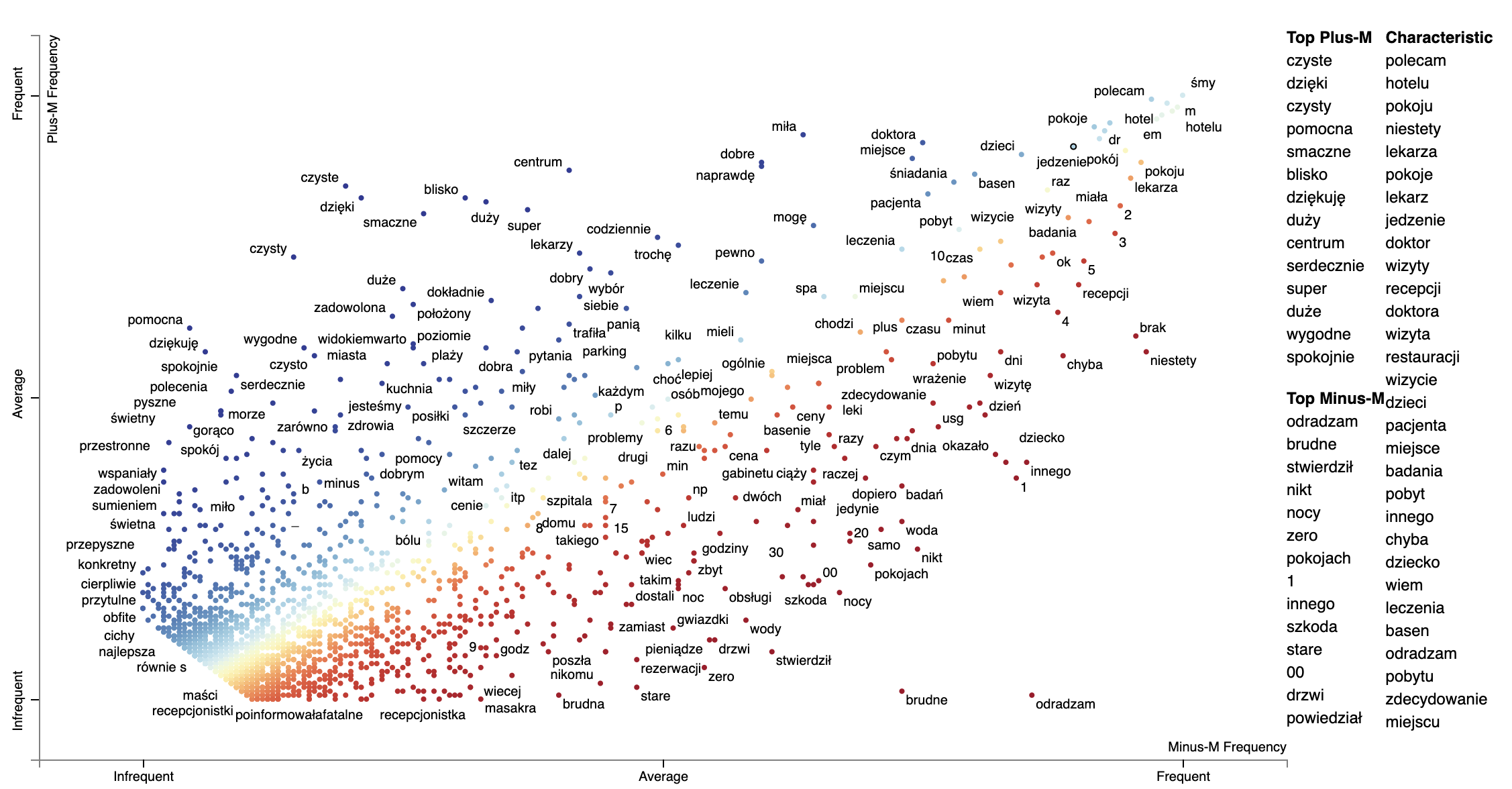](https://raw.githubusercontent.com/JasonKessler/jasonkessler.github.io/master/polish_pos_neg_scattertext.html)
We can change the formula which is used to produce the Characteristic scores
using the `characteristic_scorer` parameter to `produce_scattertext_explorer`.
It takes a instance of a descendant of the `CharacteristicScorer` class. See
[DenseRankCharacteristicness.py](https://github.com/JasonKessler/scattertext/blob/8ddff82f670aa2ed40312b2cdd077e7f0a98a873/scattertext/characteristic/DenseRankCharacteristicness.py#L36)
for an example of how to make your own.
Example of plotting with a modified characteristic scorer,
```python
html = st.produce_scattertext_explorer(
corpus,
category='__label__meta_plus_m',
category_name='Plus-M',
not_category_name='Minus-M',
minimum_term_frequency=1,
transform=st.Scalers.dense_rank,
characteristic_scorer=st.DenseRankCharacteristicness(),
term_ranker=st.termranking.AbsoluteFrequencyRanker,
term_scorer=st.ScaledFScorePresets(beta=1, one_to_neg_one=True)
).encode('utf-8'))
print('open ' + fn)
```
[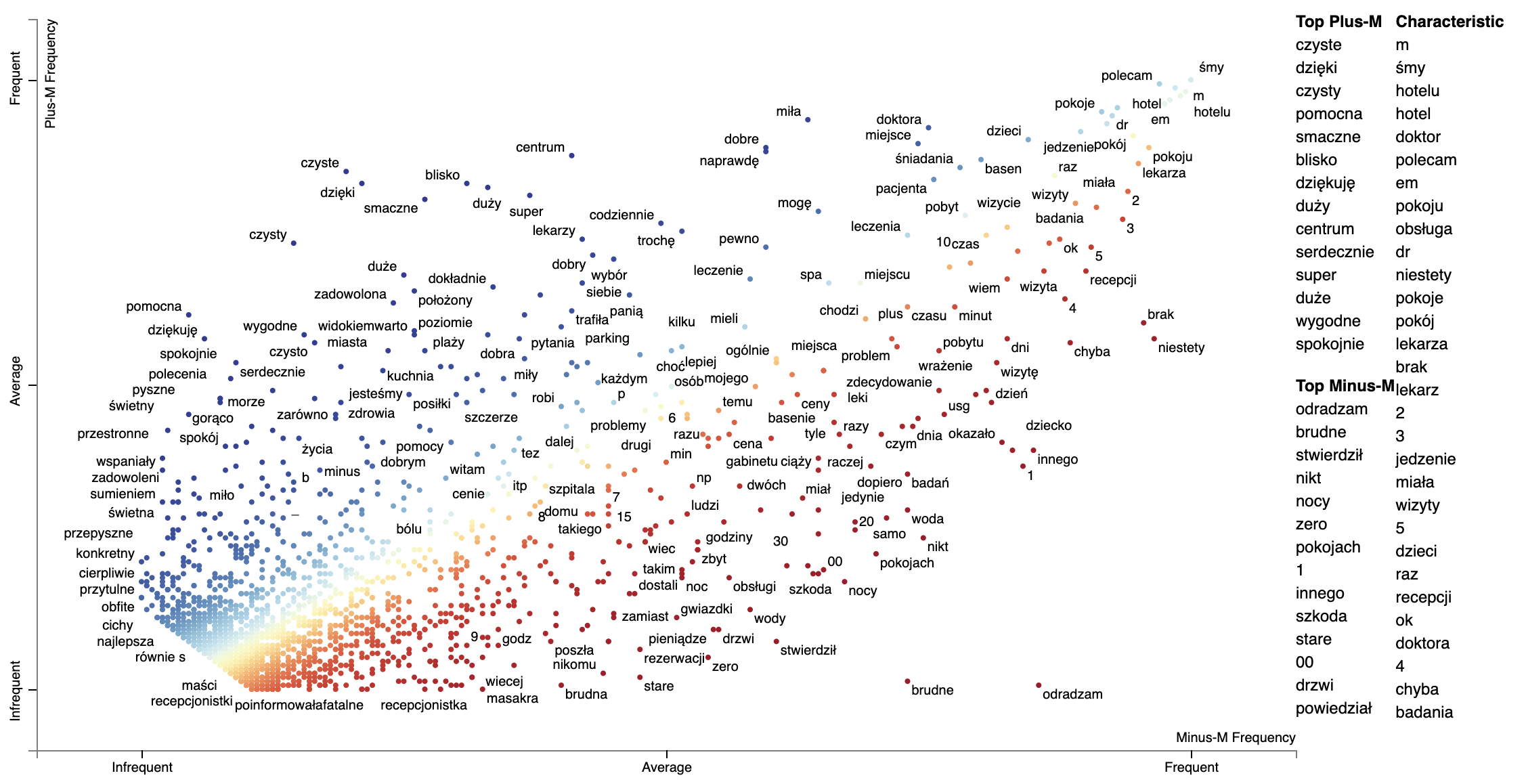](https://raw.githubusercontent.com/JasonKessler/jasonkessler.github.io/master/polish_dense_rank_characteristic.png)
Note that numbers show up as more characteristic using the Dense Rank Difference. It may be they occur
unusually frequently in this corpus, or perhaps the background word frequencies under counted mumbers.
### Plotting word productivity
Word productivity is one strategy for plotting word-based charts describing an uncategorized corpus.
Productivity is defined in Schumann (2016) (Jason: check this) as the entropy of ngrams
which contain a term. For the entropy computation, the probability of an n-gram wrt the term whose productivity is
being calculated is the frequency of the n-gram divided by the term's frequency.
Since productivity highly correlates with frequency, the recommended metric to plot is the dense rank difference between
frequency and productivity.
The snippet below plots words in the convention corpus based on their log frequency and their productivity.
The function `st.whole_corpus_productivity_scores` returns a DataFrame giving each word's productivity. For example,
in the convention corpus,
Productivity scores should be calculated on a `Corpus`-like object which contains a complete set of unigrams and at
least bigrams. This corpus should not be compacted before the productivity score calculation.
The terms with lower productivity have more limited usage (e.g., "thank" for "thank you", "united"
for "united steates") while the terms with higher productivity occurr in a wider varity of contexts ("getting",
"actually", "political", etc.).
```python
import spacy
import scattertext as st
corpus_no_cat = st.CorpusWithoutCategoriesFromParsedDocuments(
st.SampleCorpora.ConventionData2012.get_data().assign(
Parse=lambda df: [x for x in spacy.load('en_core_web_sm').pipe(df.text)]),
parsed_col='Parse'
).build()
compact_corpus_no_cat = corpus_no_cat.get_stoplisted_unigram_corpus().remove_infrequent_words(9)
plot_df = st.whole_corpus_productivity_scores(corpus_no_cat).assign(
RankDelta=lambda df: st.RankDifference().get_scores(
a=df.Productivity,
b=df.Frequency
)
).reindex(
compact_corpus_no_cat.get_terms()
).dropna().assign(
X=lambda df: df.Frequency,
Xpos=lambda df: st.Scalers.log_scale(df.Frequency),
Y=lambda df: df.RankDelta,
Ypos=lambda df: st.Scalers.scale(df.RankDelta),
)
html = st.dataframe_scattertext(
compact_corpus_no_cat.whitelist_terms(plot_df.index),
plot_df=plot_df,
metadata=lambda df: df.get_df()['speaker'],
ignore_categories=True,
x_label='Rank Frequency',
y_label="Productivity",
left_list_column='Ypos',
color_score_column='Ypos',
y_axis_labels=['Least Productive', 'Average Productivity', 'Most Productive'],
header_names={'upper': 'Most Productive', 'lower': 'Least Productive', 'right': 'Characteristic'},
horizontal_line_y_position=0
)
```
[](https://raw.githubusercontent.com/JasonKessler/jasonkessler.github.io/master/convention_single_category_productivity.png)
### Understanding Scaled F-Score
Let's now turn our attention to a novel term scoring metric, Scaled F-Score. We'll examine this on a unigram
version of the Rotten Tomatoes corpus (Pang et al. 2002). It contains excerpts of
positive and negative movie reviews.
Please
see [Scaled F Score Explanation](http://nbviewer.jupyter.org/github/JasonKessler/GlobalAI2018/blob/master/notebook/Scaled-F-Score-Explanation.ipynb)
for a notebook version of this analysis.
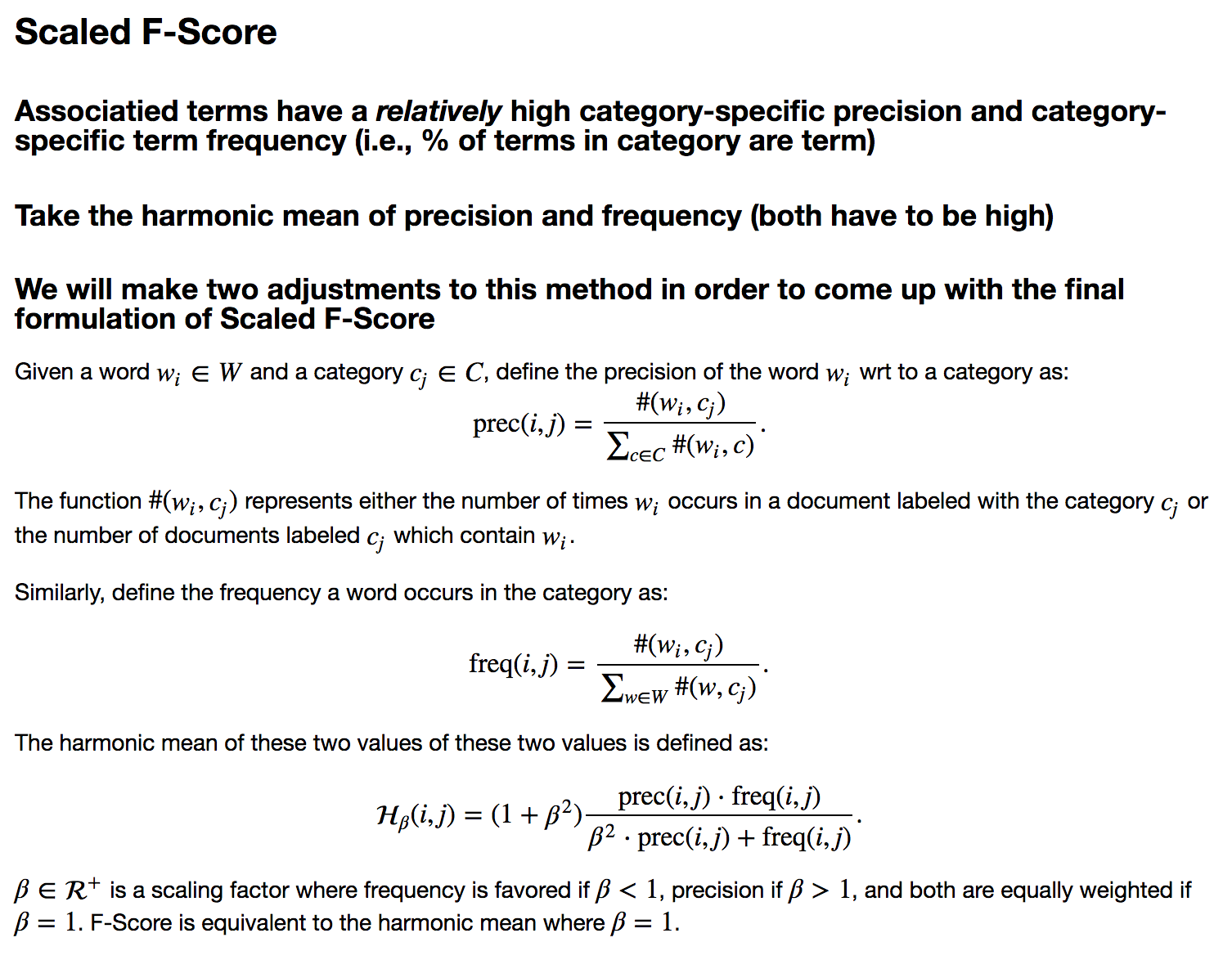
```python
from scipy.stats import hmean
term_freq_df = corpus.get_unigram_corpus().get_term_freq_df()[['Positive freq', 'Negative freq']]
term_freq_df = term_freq_df[term_freq_df.sum(axis=1) > 0]
term_freq_df['pos_precision'] = (term_freq_df['Positive freq'] * 1. /
(term_freq_df['Positive freq'] + term_freq_df['Negative freq']))
term_freq_df['pos_freq_pct'] = (term_freq_df['Positive freq'] * 1.
/ term_freq_df['Positive freq'].sum())
term_freq_df['pos_hmean'] = (term_freq_df
.apply(lambda x: (hmean([x['pos_precision'], x['pos_freq_pct']])
if x['pos_precision'] > 0 and x['pos_freq_pct'] > 0
else 0), axis=1))
term_freq_df.sort_values(by='pos_hmean', ascending=False).iloc[:10]
```
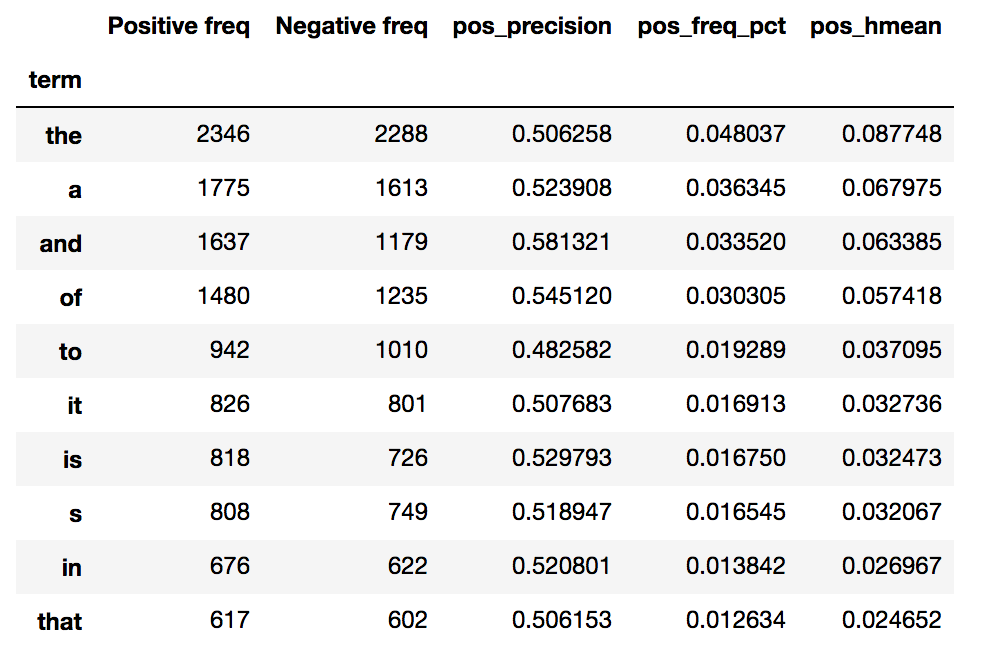
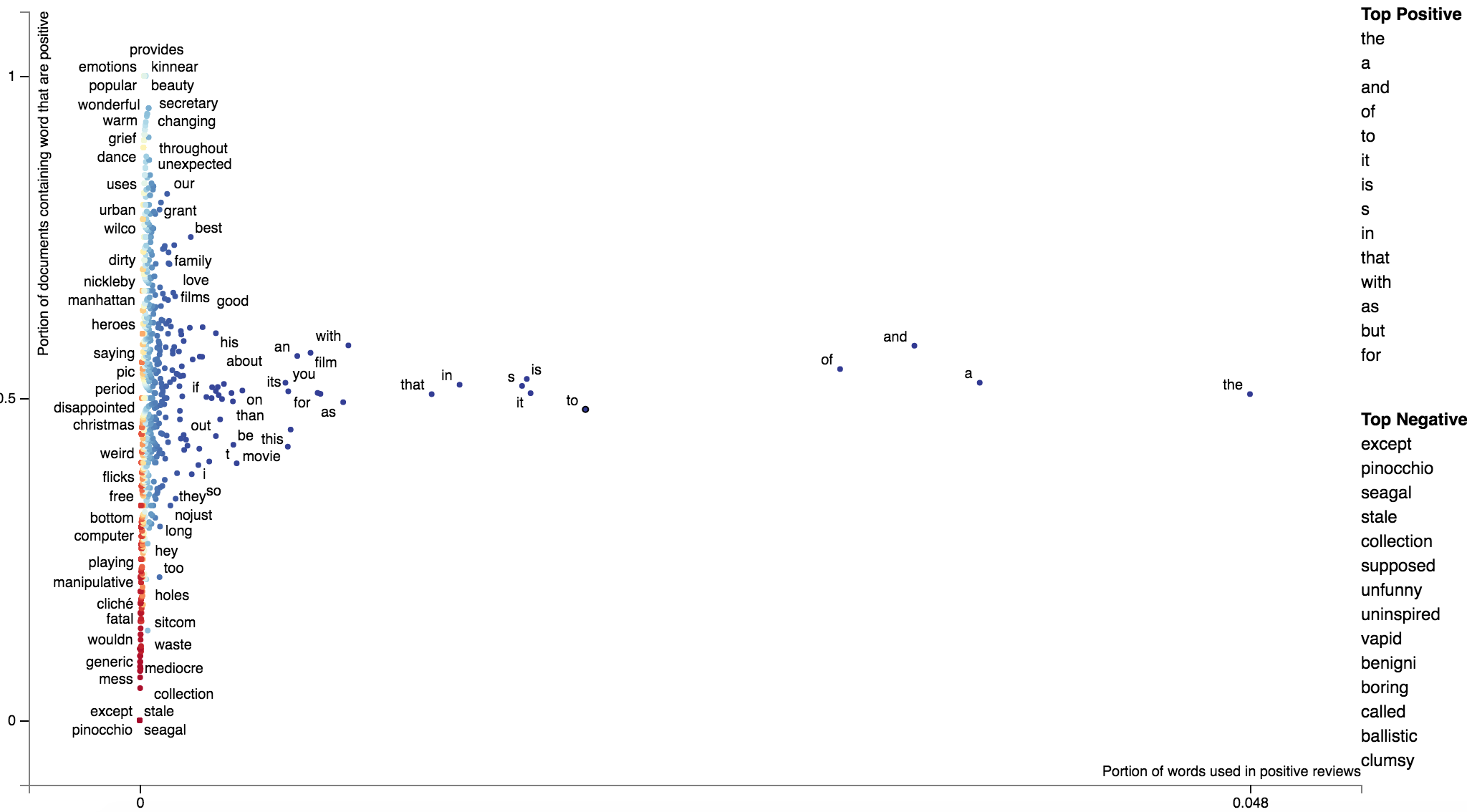
If we plot term frequency on the x-axis and the percentage of a term's occurrences
which are in positive documents (i.e., its precision) on the y-axis, we can see
that low-frequency terms have a much higher variation in the precision. Given these terms have
low frequencies, the harmonic means are low. Thus, the only terms which have a high harmonic mean
are extremely frequent words which tend to all have near average precisions.
```python
freq = term_freq_df.pos_freq_pct.values
prec = term_freq_df.pos_precision.values
html = st.produce_scattertext_explorer(
corpus.remove_terms(set(corpus.get_terms()) - set(term_freq_df.index)),
category='Positive',
not_category_name='Negative',
not_categories=['Negative'],
x_label='Portion of words used in positive reviews',
original_x=freq,
x_coords=(freq - freq.min()) / freq.max(),
x_axis_values=[int(freq.min() * 1000) / 1000.,
int(freq.max() * 1000) / 1000.],
y_label='Portion of documents containing word that are positive',
original_y=prec,
y_coords=(prec - prec.min()) / prec.max(),
y_axis_values=[int(prec.min() * 1000) / 1000.,
int((prec.max() / 2.) * 1000) / 1000.,
int(prec.max() * 1000) / 1000.],
scores=term_freq_df.pos_hmean.values,
sort_by_dist=False,
show_characteristic=False
)
file_name = 'not_normed_freq_prec.html'
open(file_name, 'wb').write(html.encode('utf-8'))
IFrame(src=file_name, width=1300, height=700)
```
```python
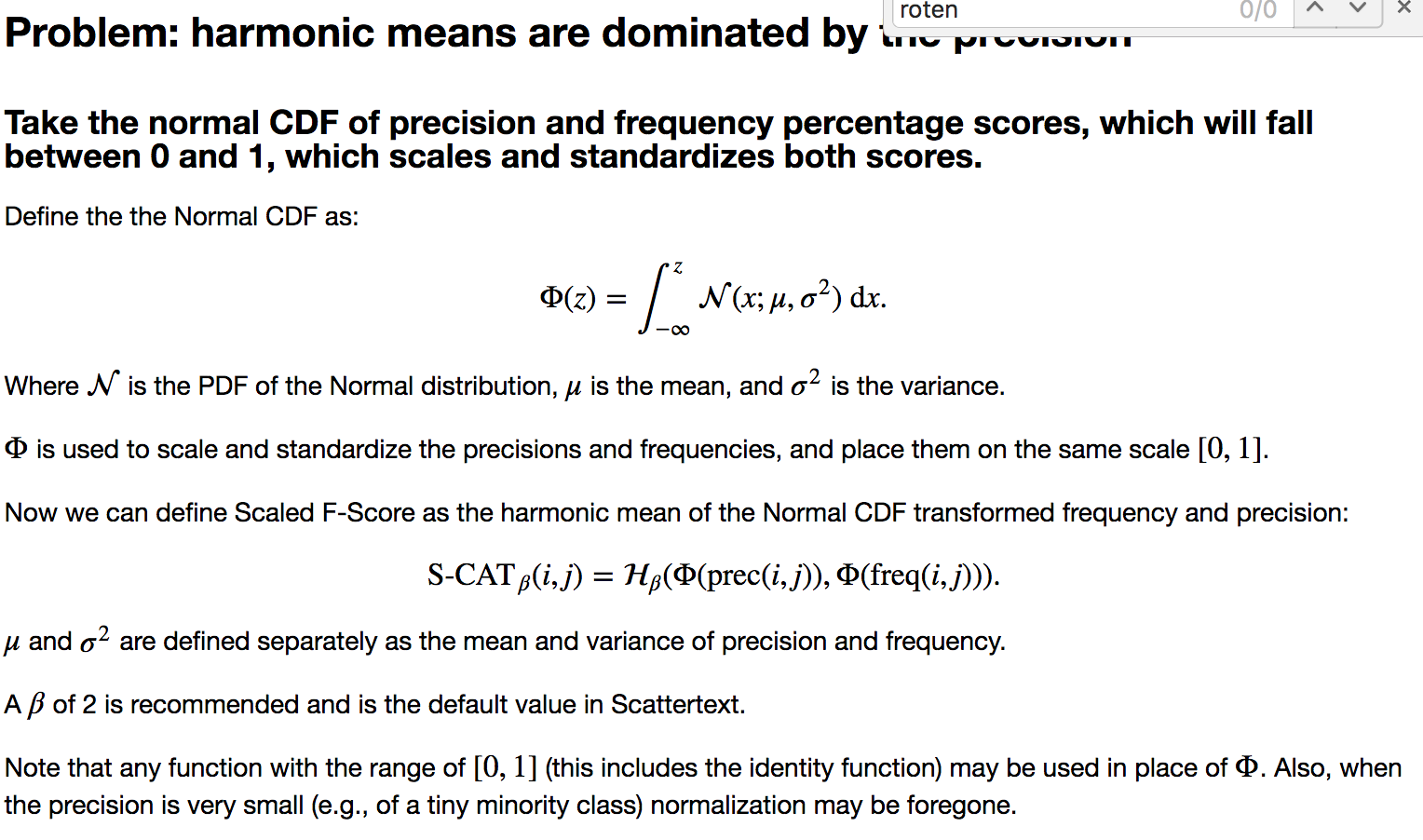
from scipy.stats import norm
def normcdf(x):
return norm.cdf(x, x.mean(), x.std())
term_freq_df['pos_precision_normcdf'] = normcdf(term_freq_df.pos_precision)
term_freq_df['pos_freq_pct_normcdf'] = normcdf(term_freq_df.pos_freq_pct.values)
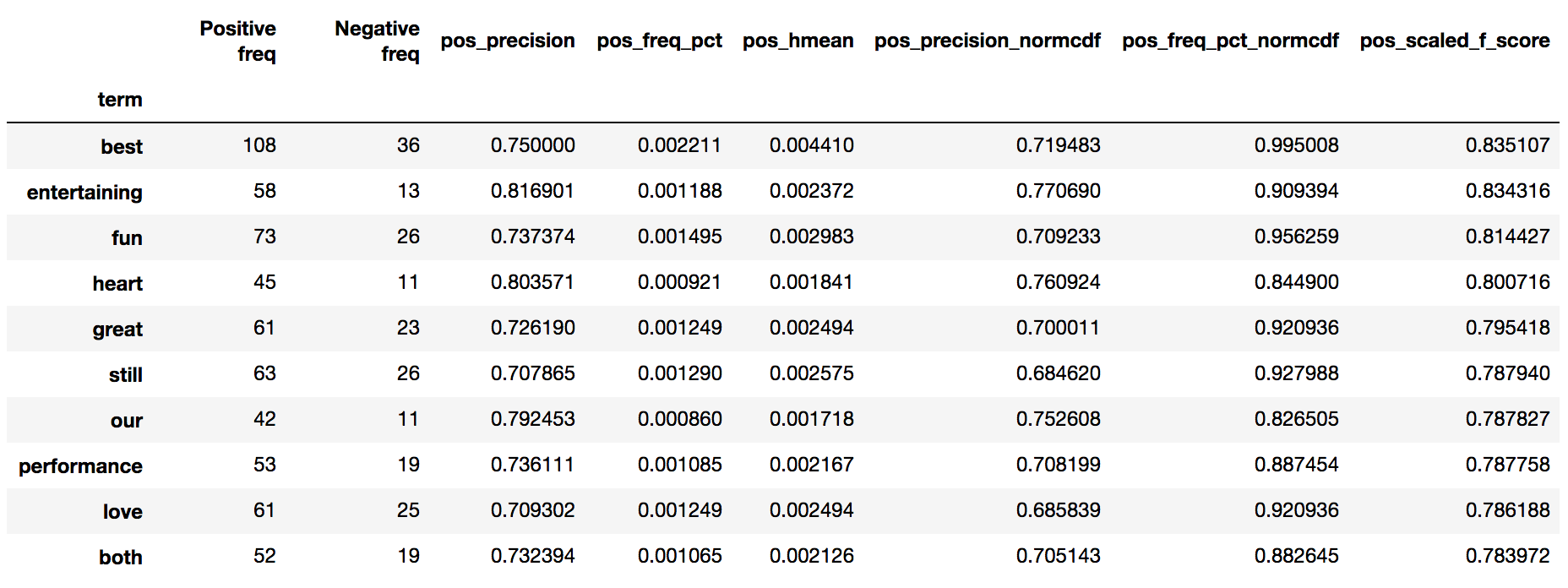
term_freq_df['pos_scaled_f_score'] = hmean(
[term_freq_df['pos_precision_normcdf'], term_freq_df['pos_freq_pct_normcdf']])
term_freq_df.sort_values(by='pos_scaled_f_score', ascending=False).iloc[:10]
```
```python
freq = term_freq_df.pos_freq_pct_normcdf.values
prec = term_freq_df.pos_precision_normcdf.values
html = st.produce_scattertext_explorer(
corpus.remove_terms(set(corpus.get_terms()) - set(term_freq_df.index)),
category='Positive',
not_category_name='Negative',
not_categories=['Negative'],
x_label='Portion of words used in positive reviews (norm-cdf)',
original_x=freq,
x_coords=(freq - freq.min()) / freq.max(),
x_axis_values=[int(freq.min() * 1000) / 1000.,
int(freq.max() * 1000) / 1000.],
y_label='documents containing word that are positive (norm-cdf)',
original_y=prec,
y_coords=(prec - prec.min()) / prec.max(),
y_axis_values=[int(prec.min() * 1000) / 1000.,
int((prec.max() / 2.) * 1000) / 1000.,
int(prec.max() * 1000) / 1000.],
scores=term_freq_df.pos_scaled_f_score.values,
sort_by_dist=False,
show_characteristic=False
)
```
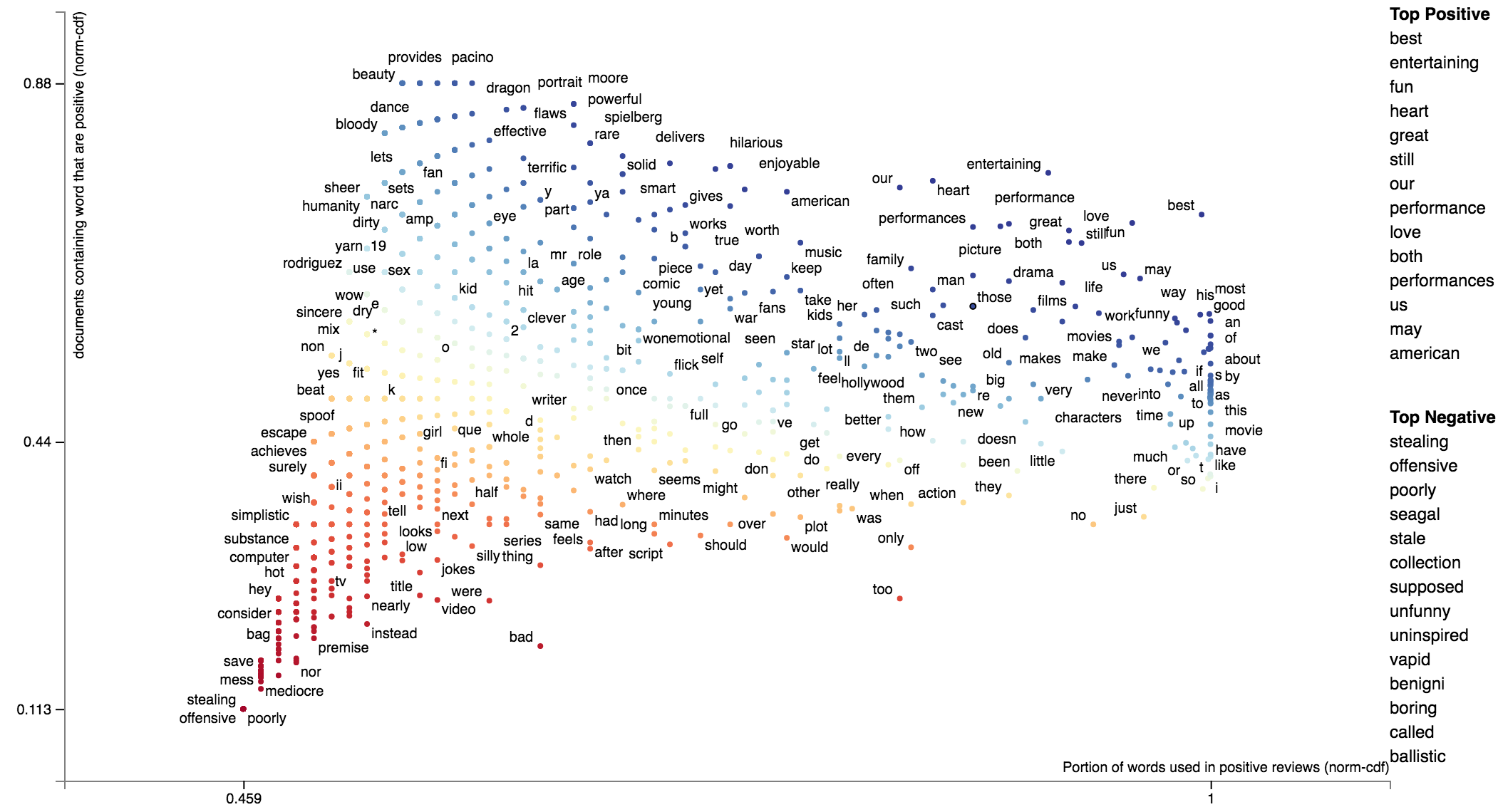
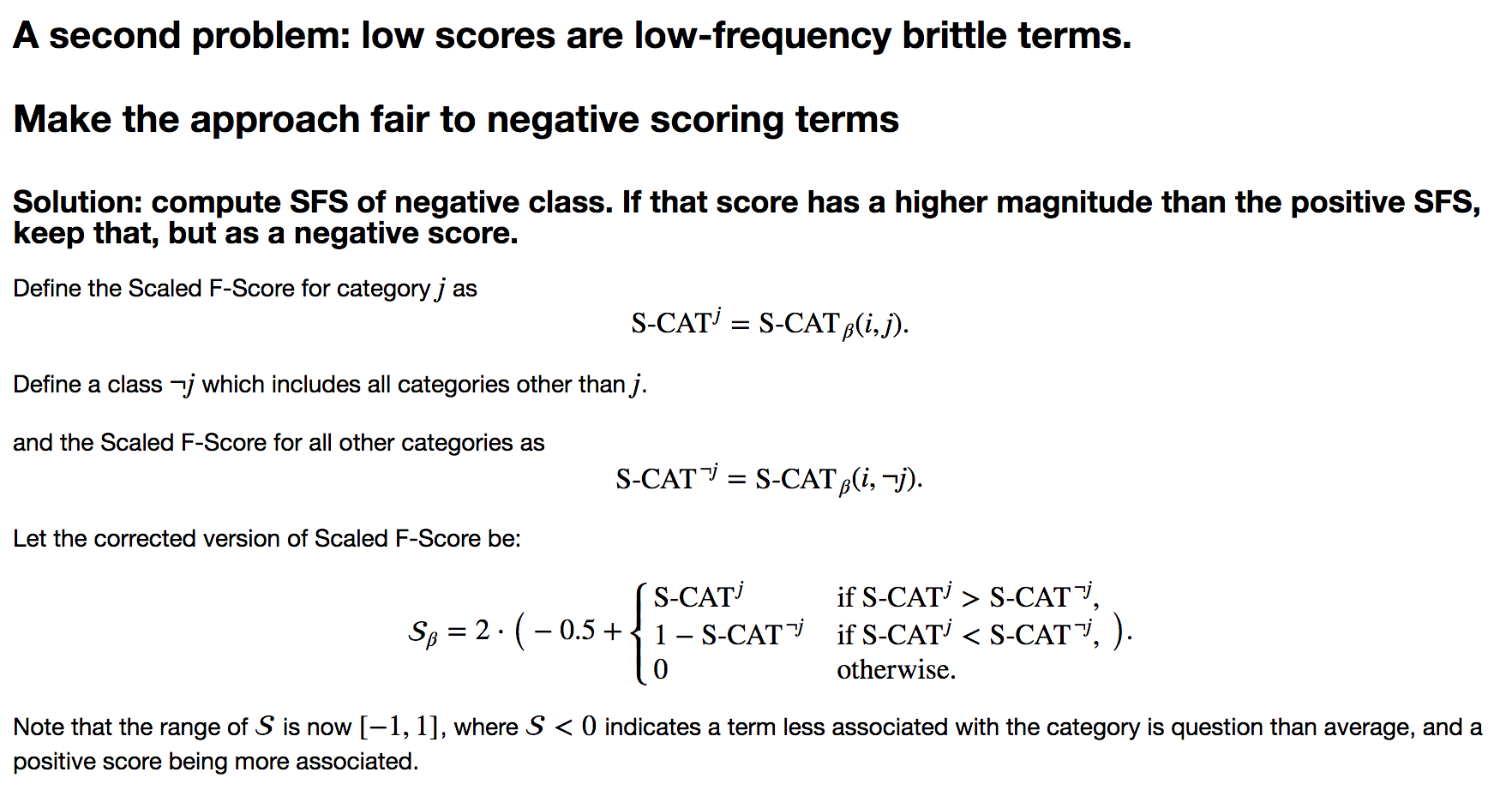
```python
term_freq_df['neg_precision_normcdf'] = normcdf((term_freq_df['Negative freq'] * 1. /
(term_freq_df['Negative freq'] + term_freq_df['Positive freq'])))
term_freq_df['neg_freq_pct_normcdf'] = normcdf((term_freq_df['Negative freq'] * 1.
/ term_freq_df['Negative freq'].sum()))
term_freq_df['neg_scaled_f_score'] = hmean(
[term_freq_df['neg_precision_normcdf'], term_freq_df['neg_freq_pct_normcdf']])
term_freq_df['scaled_f_score'] = 0
term_freq_df.loc[term_freq_df['pos_scaled_f_score'] > term_freq_df['neg_scaled_f_score'],
'scaled_f_score'] = term_freq_df['pos_scaled_f_score']
term_freq_df.loc[term_freq_df['pos_scaled_f_score'] < term_freq_df['neg_scaled_f_score'],
'scaled_f_score'] = 1 - term_freq_df['neg_scaled_f_score']
term_freq_df['scaled_f_score'] = 2 * (term_freq_df['scaled_f_score'] - 0.5)
term_freq_df.sort_values(by='scaled_f_score', ascending=True).iloc[:10]
```
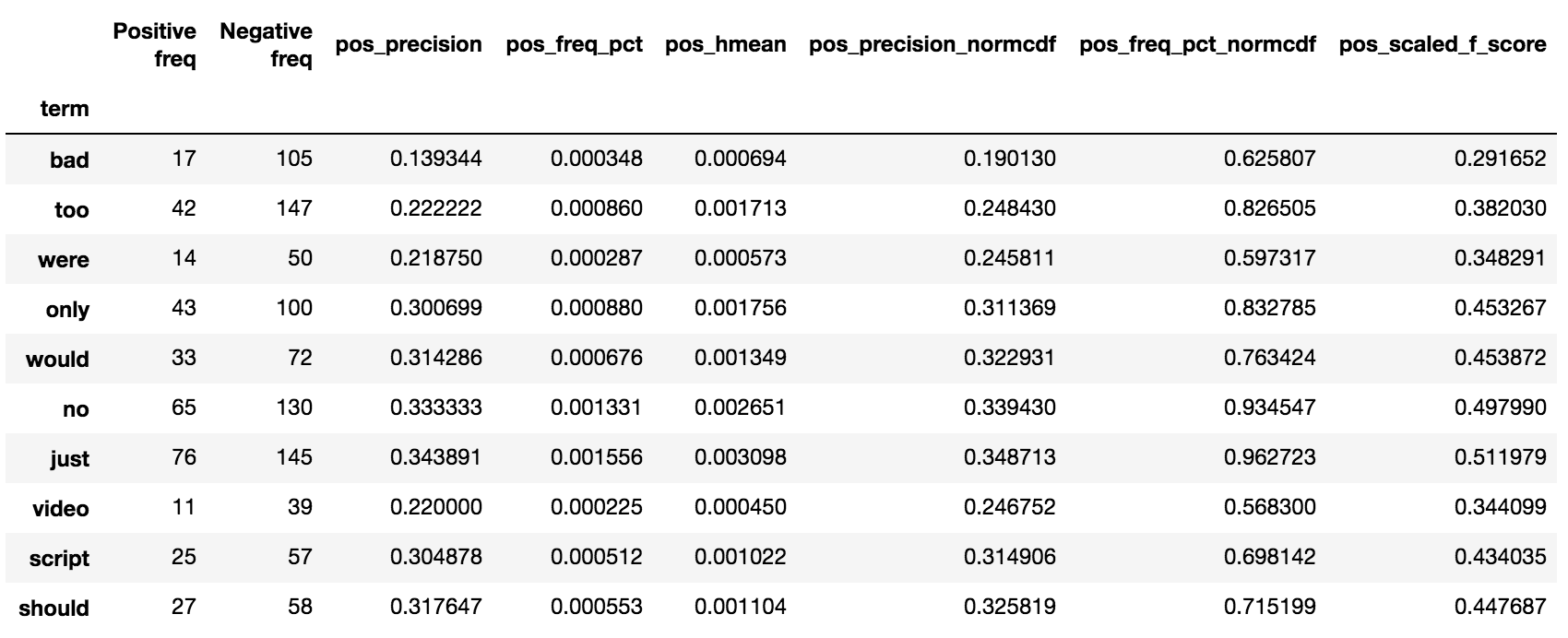
```python
is_pos = term_freq_df.pos_scaled_f_score > term_freq_df.neg_scaled_f_score
freq = term_freq_df.pos_freq_pct_normcdf * is_pos - term_freq_df.neg_freq_pct_normcdf * ~is_pos
prec = term_freq_df.pos_precision_normcdf * is_pos - term_freq_df.neg_precision_normcdf * ~is_pos
def scale(ar):
return (ar - ar.min()) / (ar.max() - ar.min())
def close_gap(ar):
ar[ar > 0] -= ar[ar > 0].min()
ar[ar < 0] -= ar[ar < 0].max()
return ar
html = st.produce_scattertext_explorer(
corpus.remove_terms(set(corpus.get_terms()) - set(term_freq_df.index)),
category='Positive',
not_category_name='Negative',
not_categories=['Negative'],
x_label='Frequency',
original_x=freq,
x_coords=scale(close_gap(freq)),
x_axis_labels=['Frequent in Neg',
'Not Frequent',
'Frequent in Pos'],
y_label='Precision',
original_y=prec,
y_coords=scale(close_gap(prec)),
y_axis_labels=['Neg Precise',
'Imprecise',
'Pos Precise'],
scores=(term_freq_df.scaled_f_score.values + 1) / 2,
sort_by_dist=False,
show_characteristic=False
)
```
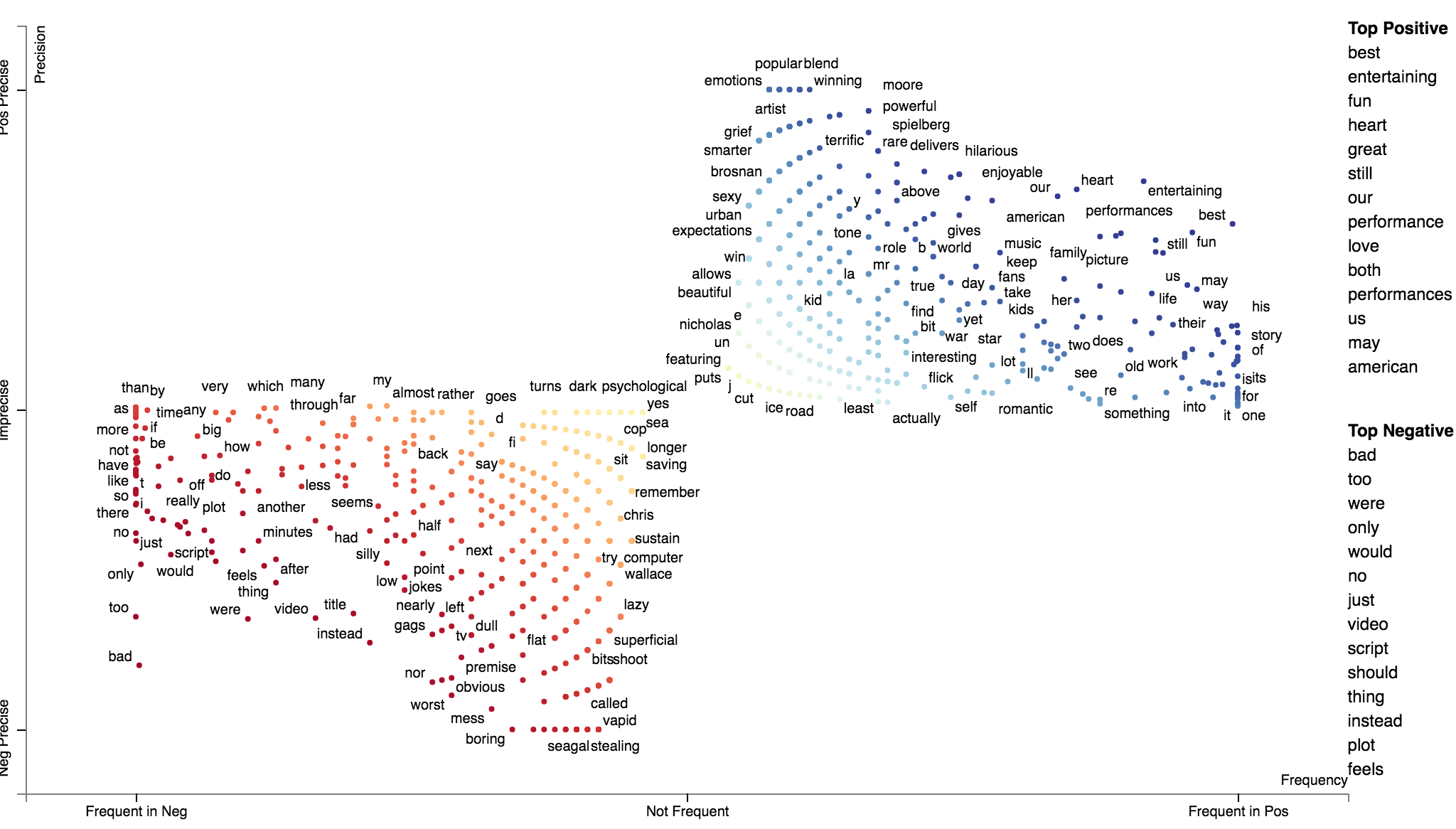
We can use `st.ScaledFScorePresets` as a term scorer to display terms' Scaled F-Score on the y-axis and
term frequencies on the x-axis.
```python
html = st.produce_frequency_explorer(
corpus.remove_terms(set(corpus.get_terms()) - set(term_freq_df.index)),
category='Positive',
not_category_name='Negative',
not_categories=['Negative'],
term_scorer=st.ScaledFScorePresets(beta=1, one_to_neg_one=True),
metadata=rdf['movie_name'],
grey_threshold=0
)
```
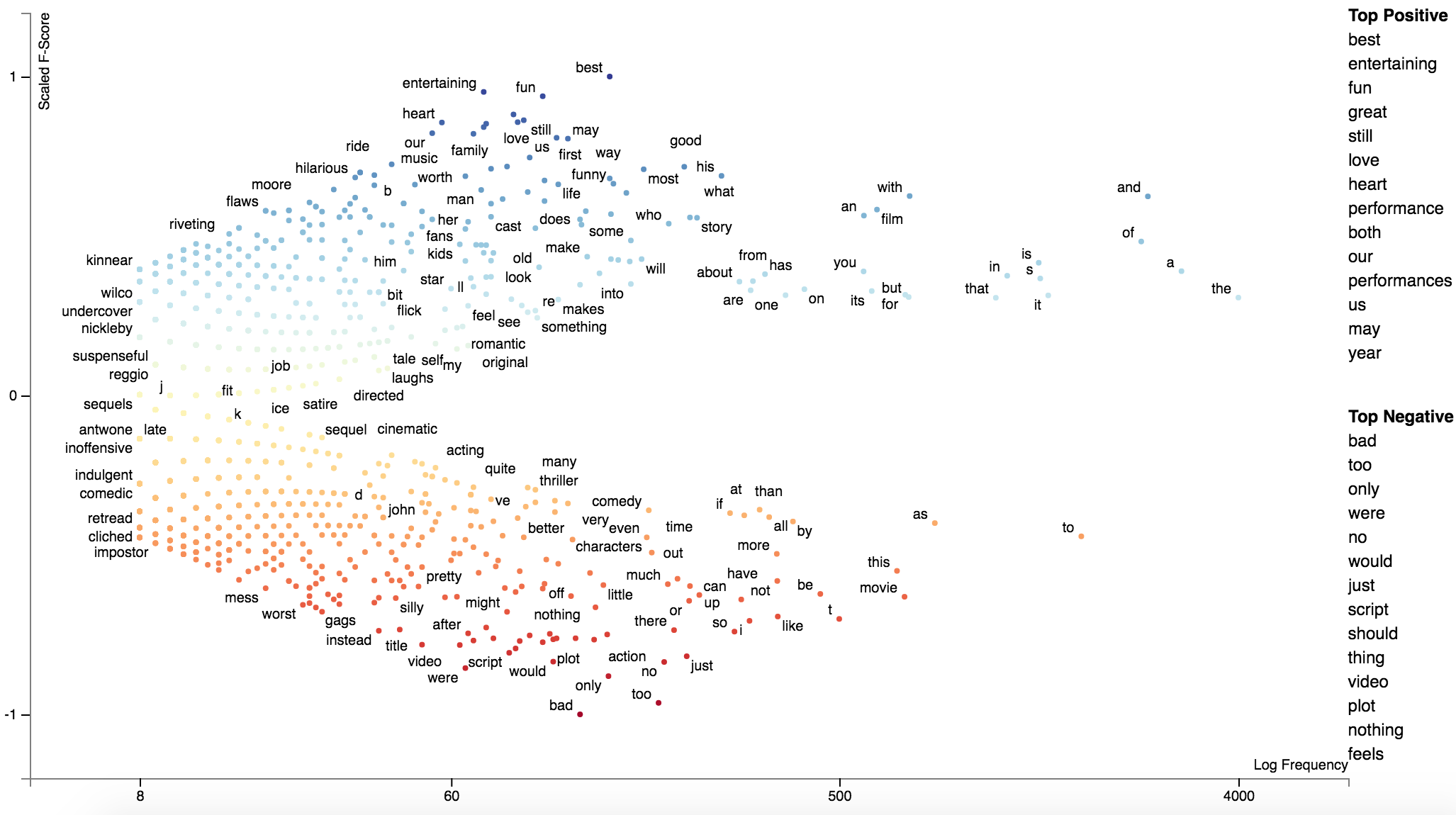
### Alternative term scoring methods
Scaled F-Score is not the only scoring method included in Scattertext. Please click on one of the links below to
view a notebook which describes how other class association scores work and can be visualized through Scattertext.
* [Google Colab Notebook](https://colab.research.google.com/drive/1snxAP8X6EIDi42FugJ_h5U-fBGDCqtyS) (recommend).
* [Jupyter Notebook via NBViewer](https://colab.research.google.com/drive/1snxAP8X6EIDi42FugJ_h5U-fBGDCqtyS).
New in 0.0.2.73 is the delta JS-Divergence scorer `DeltaJSDivergence` scorer (Gallagher et al. 2020), and its
corresponding compactor (JSDCompactor.) See `demo_deltajsd.py` for an example usage.
### The position-select-plot process
New in 0.0.2.72
Scattertext was originally set up to visualize corpora objects, which are connected sets of documents and
terms to visualize. The "compaction" process allows users to eliminate terms which may not be associated with a
category using a variety of feature selection methods. The issue with this is that the terms eliminated during
the selection process are not taken into account when scaling term positions.
This issue can be mitigated by using the position-select-plot process, where term positions are pre-determined
before the selection process is made.
Let's first use the 2012 conventions corpus, update the category names, and create a unigram corpus.
```python
import scattertext as st
import numpy as np
df = st.SampleCorpora.ConventionData2012.get_data().assign(
parse=lambda df: df.text.apply(st.whitespace_nlp_with_sentences)
).assign(party=lambda df: df['party'].apply({'democrat': 'Democratic', 'republican': 'Republican'}.get))
corpus = st.CorpusFromParsedDocuments(
df, category_col='party', parsed_col='parse'
).build().get_unigram_corpus()
category_name = 'Democratic'
not_category_name = 'Republican'
```
Next, let's create a dataframe consisting of the original counts and their log-scale positions.
```python
def get_log_scale_df(corpus, y_category, x_category):
term_coord_df = corpus.get_term_freq_df('')
# Log scale term counts (with a smoothing constant) as the initial coordinates
coord_columns = []
for category in [y_category, x_category]:
col_name = category + '_coord'
term_coord_df[col_name] = np.log(term_coord_df[category] + 1e-6) / np.log(2)
coord_columns.append(col_name)
# Scale these coordinates to between 0 and 1
min_offset = term_coord_df[coord_columns].min(axis=0).min()
for coord_column in coord_columns:
term_coord_df[coord_column] -= min_offset
max_offset = term_coord_df[coord_columns].max(axis=0).max()
for coord_column in coord_columns:
term_coord_df[coord_column] /= max_offset
return term_coord_df
# Get term coordinates from original corpus
term_coordinates = get_log_scale_df(corpus, category_name, not_category_name)
print(term_coordinates)
```
Here is a preview of the `term_coordinates` dataframe. The `Democrat` and
`Republican` columns contain the term counts, while the `_coord` columns
contain their logged coordinates. Visualizing 7,973 terms is difficult (but
possible) for people running Scattertext on most computers.
```
Democratic Republican Democratic_coord Republican_coord
term
thank 158 205 0.860166 0.872032
you 836 794 0.936078 0.933729
so 337 212 0.894681 0.873562
much 84 76 0.831380 0.826820
very 62 75 0.817543 0.826216
... ... ... ... ...
precinct 0 2 0.000000 0.661076
godspeed 0 1 0.000000 0.629493
beauty 0 1 0.000000 0.629493
bumper 0 1 0.000000 0.629493
sticker 0 1 0.000000 0.629493
[7973 rows x 4 columns]
```
We can visualize this full data set by running the following code block. We'll create a custom
Javascript function to populate the tooltip with the original term counts, and create a
Scattertext Explorer where the x and y coordinates and original values are specified from the data
frame. Additionally, we can use `show_diagonal=True` to draw a dashed diagonal line across the plot area.
You can click the chart below to see the interactive version. Note that it will take a while to load.
```
# The tooltip JS function. Note that d is is the term data object, and ox and oy are the original x- and y-
# axis counts.
get_tooltip_content = ('(function(d) {return d.term + "
' + not_category_name + ' Count: " ' +
'+ d.ox +"
' + category_name + ' Count: " + d.oy})')
html_orig = st.produce_scattertext_explorer(
corpus,
category=category_name,
not_category_name=not_category_name,
minimum_term_frequency=0,
pmi_threshold_coefficient=0,
width_in_pixels=1000,
metadata=corpus.get_df()['speaker'],
show_diagonal=True,
original_y=term_coordinates[category_name],
original_x=term_coordinates[not_category_name],
x_coords=term_coordinates[category_name + '_coord'],
y_coords=term_coordinates[not_category_name + '_coord'],
max_overlapping=3,
use_global_scale=True,
get_tooltip_content=get_tooltip_content,
)
```
[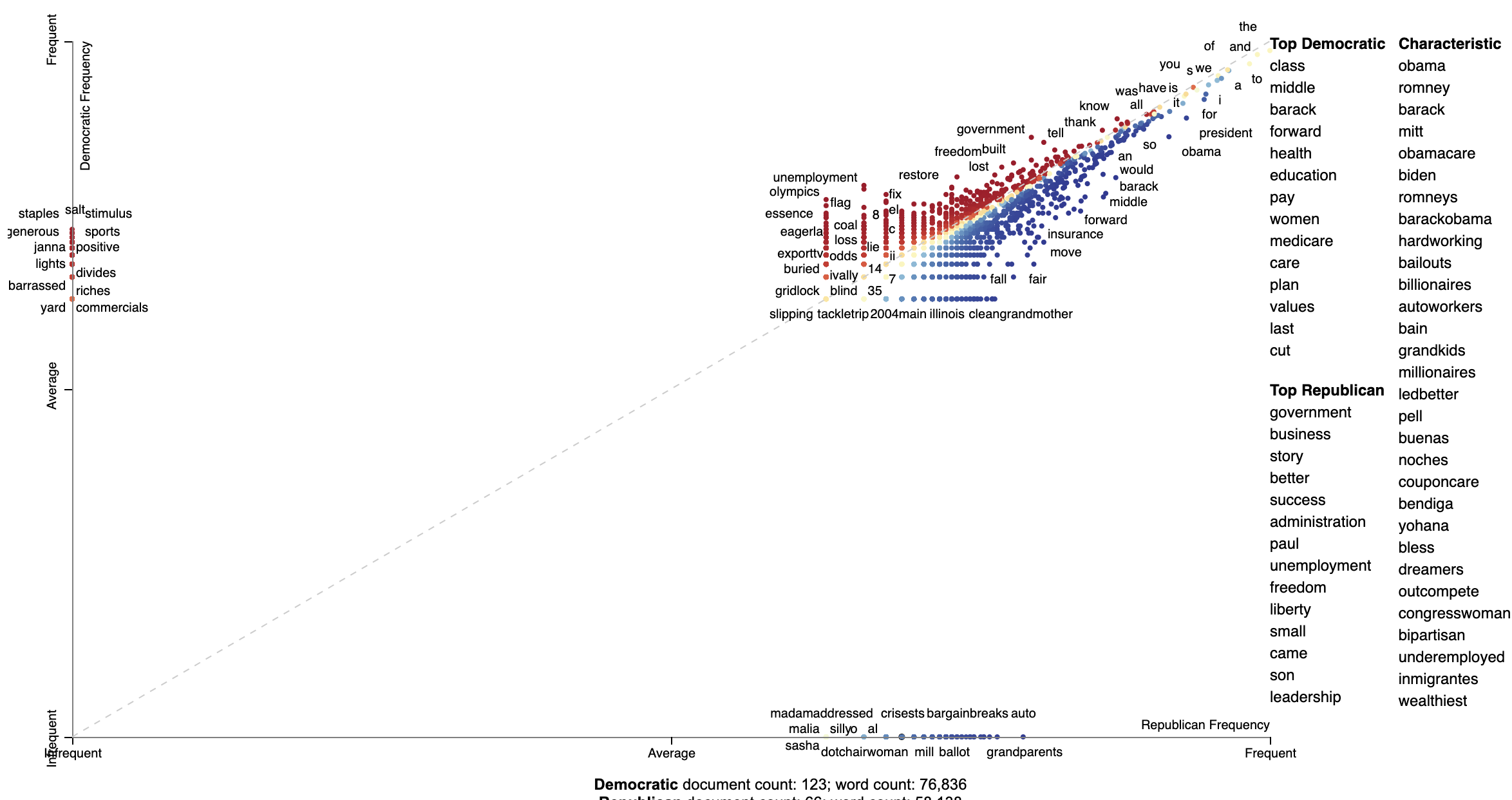](https://jasonkessler.github.io/demo_global_scale_log_orig.html)
Next, we can visualize the compacted version of the corpus. The compaction, using `ClassPercentageCompactor`,
selects terms which frequently in each category. The `term_count` parameter, set to 2, is used to determine
the percentage threshold for terms to keep in a particular category. This is done using by calculating the
percentile of terms (types) in each category which appear more than two times. We find the smallest percentile,
and only include terms which occur above that percentile in a given category.
Note that this compaction leaves only 2,828 terms. This number is much easier for Scattertext to display
in a browser.
```python
# Select terms which appear a minimum threshold in both corpora
compact_corpus = corpus.compact(st.ClassPercentageCompactor(term_count=2))
# Only take term coordinates of terms remaining in corpus
term_coordinates = term_coordinates.loc[compact_corpus.get_terms()]
html_compact = st.produce_scattertext_explorer(
compact_corpus,
category=category_name,
not_category_name=not_category_name,
minimum_term_frequency=0,
pmi_threshold_coefficient=0,
width_in_pixels=1000,
metadata=corpus.get_df()['speaker'],
show_diagonal=True,
original_y=term_coordinates[category_name],
original_x=term_coordinates[not_category_name],
x_coords=term_coordinates[category_name + '_coord'],
y_coords=term_coordinates[not_category_name + '_coord'],
max_overlapping=3,
use_global_scale=True,
get_tooltip_content=get_tooltip_content,
)
```
[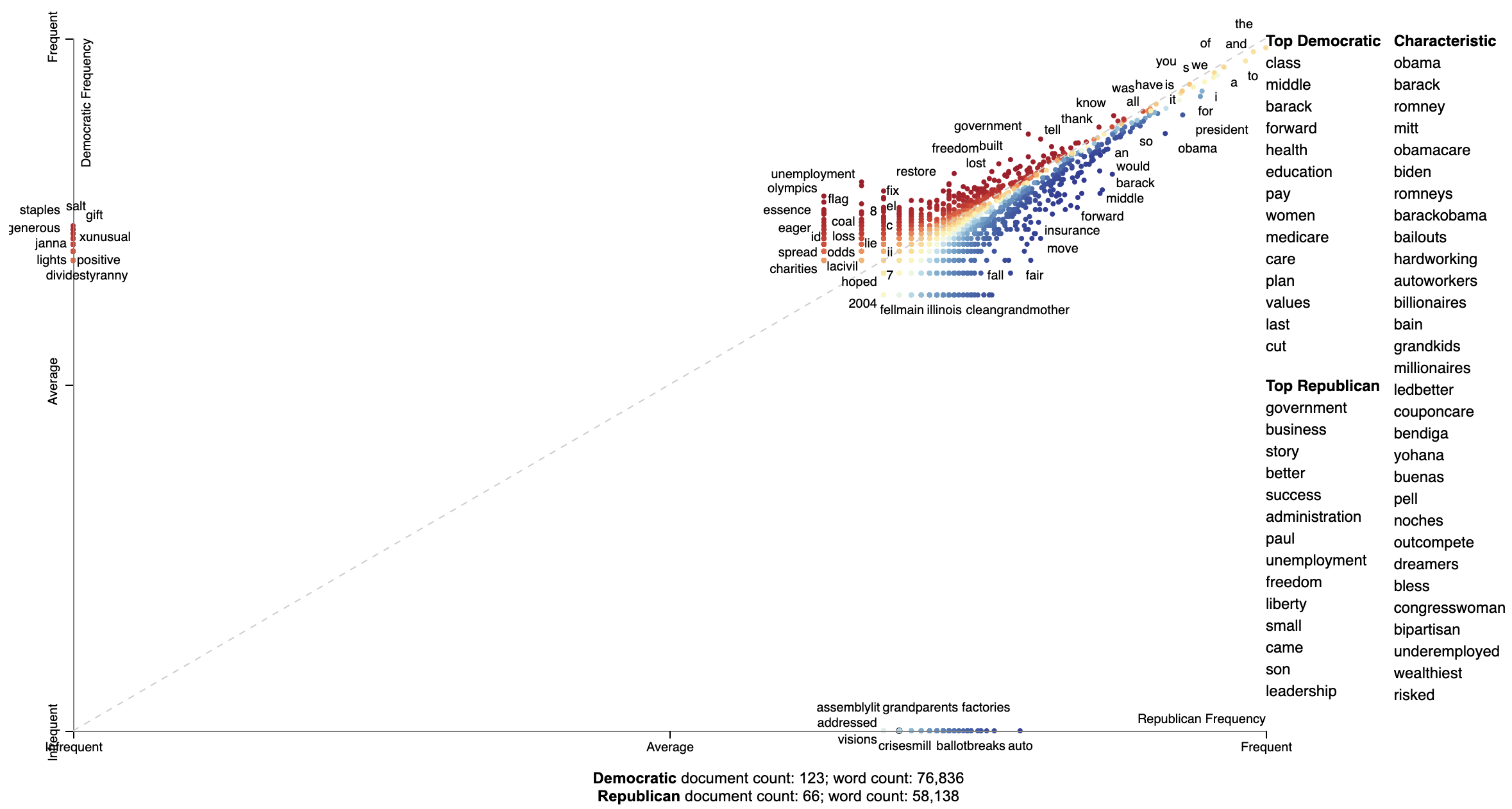](https://jasonkessler.github.io/demo_global_scale_log.html)
## Advanced uses
### Visualizing differences based on only term frequencies
Occasionally, only term frequency statistics are available. This may happen in the case of very large,
lost, or proprietary data sets. `TermCategoryFrequencies` is a corpus representation,that can accept this
sort of data, along with any categorized documents that happen to be available.
Let use the [Corpus of Contemporary American English](https://corpus.byu.edu/coca/) as an example.
We'll construct a visualization
to analyze the difference between spoken American English and English that occurs in fiction.
```python
df = (pd.read_excel('https://www.wordfrequency.info/files/genres_sample.xls')
.dropna()
.set_index('lemma')[['SPOKEN', 'FICTION']]
.iloc[:1000])
df.head()
'''
SPOKEN FICTION
lemma
the 3859682.0 4092394.0
I 1346545.0 1382716.0
they 609735.0 352405.0
she 212920.0 798208.0
would 233766.0 229865.0
'''
```
Transforming this into a visualization is extremely easy. Just pass a dataframe indexed on
terms with columns indicating category-counts into the the `TermCategoryFrequencies` constructor.
```python
term_cat_freq = st.TermCategoryFrequencies(df)
```
And call `produce_scattertext_explorer` normally:
```python
html = st.produce_scattertext_explorer(
term_cat_freq,
category='SPOKEN',
category_name='Spoken',
not_category_name='Fiction',
)
```
[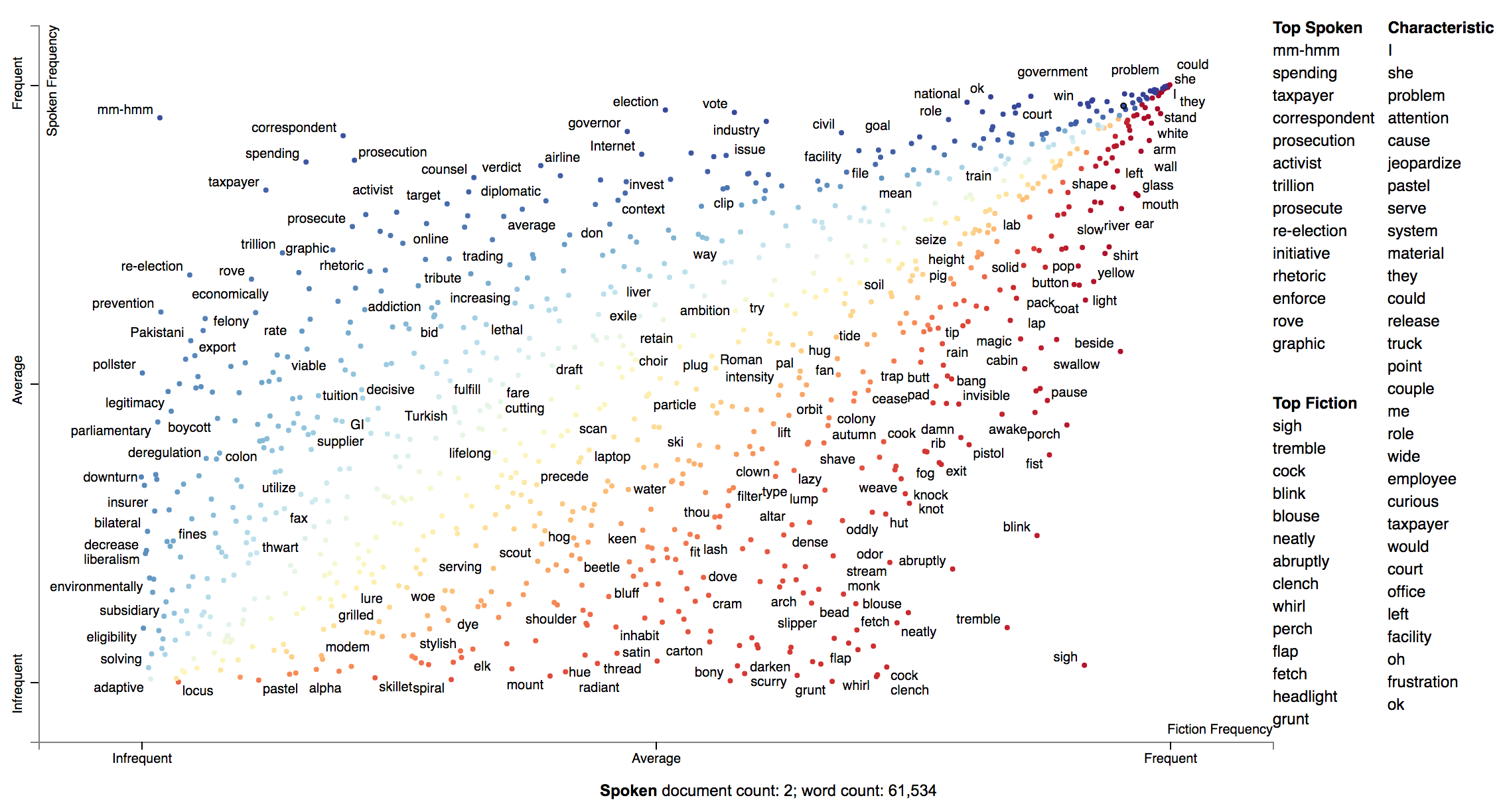](https://jasonkessler.github.io/demo_category_frequencies.html)
If you'd like to incorporate some documents into the visualization, you can add them into to the
`TermCategoyFrequencies` object.
First, let's extract some example Fiction and Spoken documents from the sample COCA corpus.
```python
import requests, zipfile, io
coca_sample_url = 'http://corpus.byu.edu/cocatext/samples/text.zip'
zip_file = zipfile.ZipFile(io.BytesIO(requests.get(coca_sample_url).content))
document_df = pd.DataFrame(
[{'text': zip_file.open(fn).read().decode('utf-8'),
'category': 'SPOKEN'}
for fn in zip_file.filelist if fn.filename.startswith('w_spok')][:2]
+ [{'text': zip_file.open(fn).read().decode('utf-8'),
'category': 'FICTION'}
for fn in zip_file.filelist if fn.filename.startswith('w_fic')][:2])
```
And we'll pass the `documents_df` dataframe into `TermCategoryFrequencies` via the `document_category_df`
parameter. Ensure the dataframe has two columns, 'text' and 'category'. Afterward, we can
call `produce_scattertext_explorer` (or your visualization function of choice) normally.
```python
doc_term_cat_freq = st.TermCategoryFrequencies(df, document_category_df=document_df)
html = st.produce_scattertext_explorer(
doc_term_cat_freq,
category='SPOKEN',
category_name='Spoken',
not_category_name='Fiction',
)
```
### Visualizing query-based categorical differences
Word representations have recently become a hot topic in NLP. While lots of work has been done visualizing
how terms relate to one another given their scores
(e.g., [http://projector.tensorflow.org/](http://projector.tensorflow.org/)),
none to my knowledge has been done visualizing how we can use these to examine how
document categories differ.
In this example given a query term, "jobs", we can see how Republicans and
Democrats talk about it differently.
In this configuration of Scattertext, words are colored by their similarity to a query phrase.
This is done using [spaCy](https://spacy.io/)-provided GloVe word vectors (trained on
the Common Crawl corpus). The cosine distance between vectors is used,
with mean vectors used for phrases.
The calculation of the most similar terms associated with each category is a simple heuristic. First,
sets of terms closely associated with a category are found. Second, these terms are ranked
based on their similarity to the query, and the top rank terms are displayed to the right of the
scatterplot.
A term is considered associated if its p-value is less than 0.05. P-values are
determined using Monroe et al. (2008)'s difference in the weighted log-odds-ratios with an
uninformative Dirichlet prior. This is the only model-based method discussed in Monroe et al.
that does not rely on a large, in-domain background corpus. Since we are scoring
bigrams in addition to the unigrams scored by Monroe, the size of the corpus would have to be larger
to have high enough bigram counts for proper penalization. This function
relies the Dirichlet distribution's parameter alpha, a vector, which is uniformly set to 0.01.
Here is the code to produce such a visualization.
```pydocstring
>>> from scattertext import word_similarity_explorer
>>> html = word_similarity_explorer(corpus,
... category='democrat',
... category_name='Democratic',
... not_category_name='Republican',
... target_term='jobs',
... minimum_term_frequency=5,
... pmi_threshold_coefficient=4,
... width_in_pixels=1000,
... metadata=convention_df['speaker'],
... alpha=0.01,
... max_p_val=0.05,
... save_svg_button=True)
>>> open("Convention-Visualization-Jobs.html", 'wb').write(html.encode('utf-8'))
```
[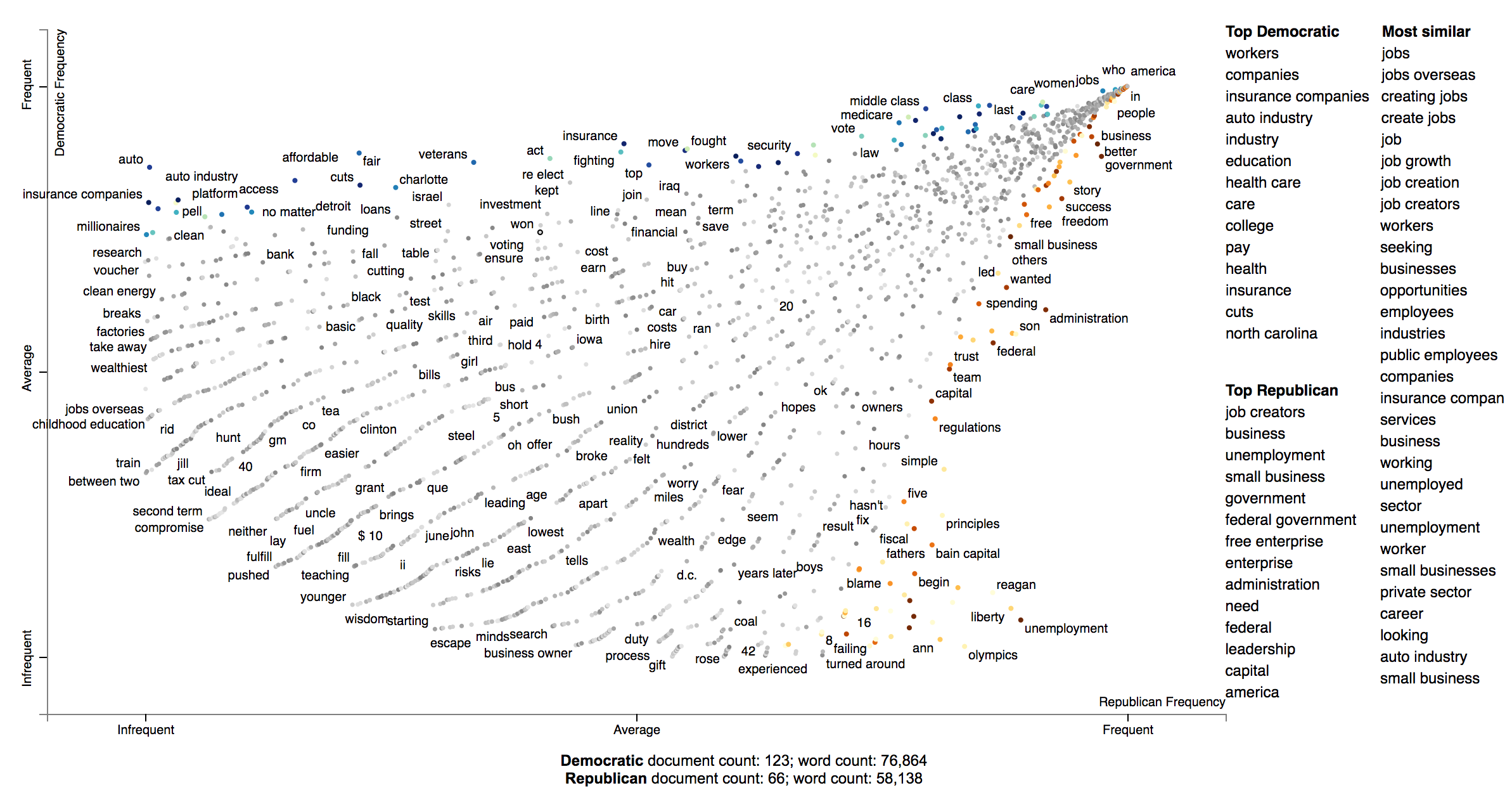](https://jasonkessler.github.io/Convention-Visualization-Jobs.html)
#### Developing and using bespoke word representations
Scattertext can interface with Gensim Word2Vec models. For example, here's a snippet from `demo_gensim_similarity.py`
which illustrates how to train and use a word2vec model on a corpus. Note the similarities produced
reflect quirks of the corpus, e.g., "8" tends to refer to the 8% unemployment rate at the time of the
convention.
```python
import spacy
from gensim.models import word2vec
from scattertext import SampleCorpora, word_similarity_explorer_gensim, Word2VecFromParsedCorpus
from scattertext.CorpusFromParsedDocuments import CorpusFromParsedDocuments
nlp = spacy.en.English()
convention_df = SampleCorpora.ConventionData2012.get_data()
convention_df['parsed'] = convention_df.text.apply(nlp)
corpus = CorpusFromParsedDocuments(convention_df, category_col='party', parsed_col='parsed').build()
model = word2vec.Word2Vec(size=300,
alpha=0.025,
window=5,
min_count=5,
max_vocab_size=None,
sample=0,
seed=1,
workers=1,
min_alpha=0.0001,
sg=1,
hs=1,
negative=0,
cbow_mean=0,
iter=1,
null_word=0,
trim_rule=None,
sorted_vocab=1)
html = word_similarity_explorer_gensim(corpus,
category='democrat',
category_name='Democratic',
not_category_name='Republican',
target_term='jobs',
minimum_term_frequency=5,
pmi_threshold_coefficient=4,
width_in_pixels=1000,
metadata=convention_df['speaker'],
word2vec=Word2VecFromParsedCorpus(corpus, model).train(),
max_p_val=0.05,
save_svg_button=True)
open('./demo_gensim_similarity.html', 'wb').write(html.encode('utf-8'))
```
How Democrats and Republicans talked differently about "jobs" in their 2012 convention speeches.
[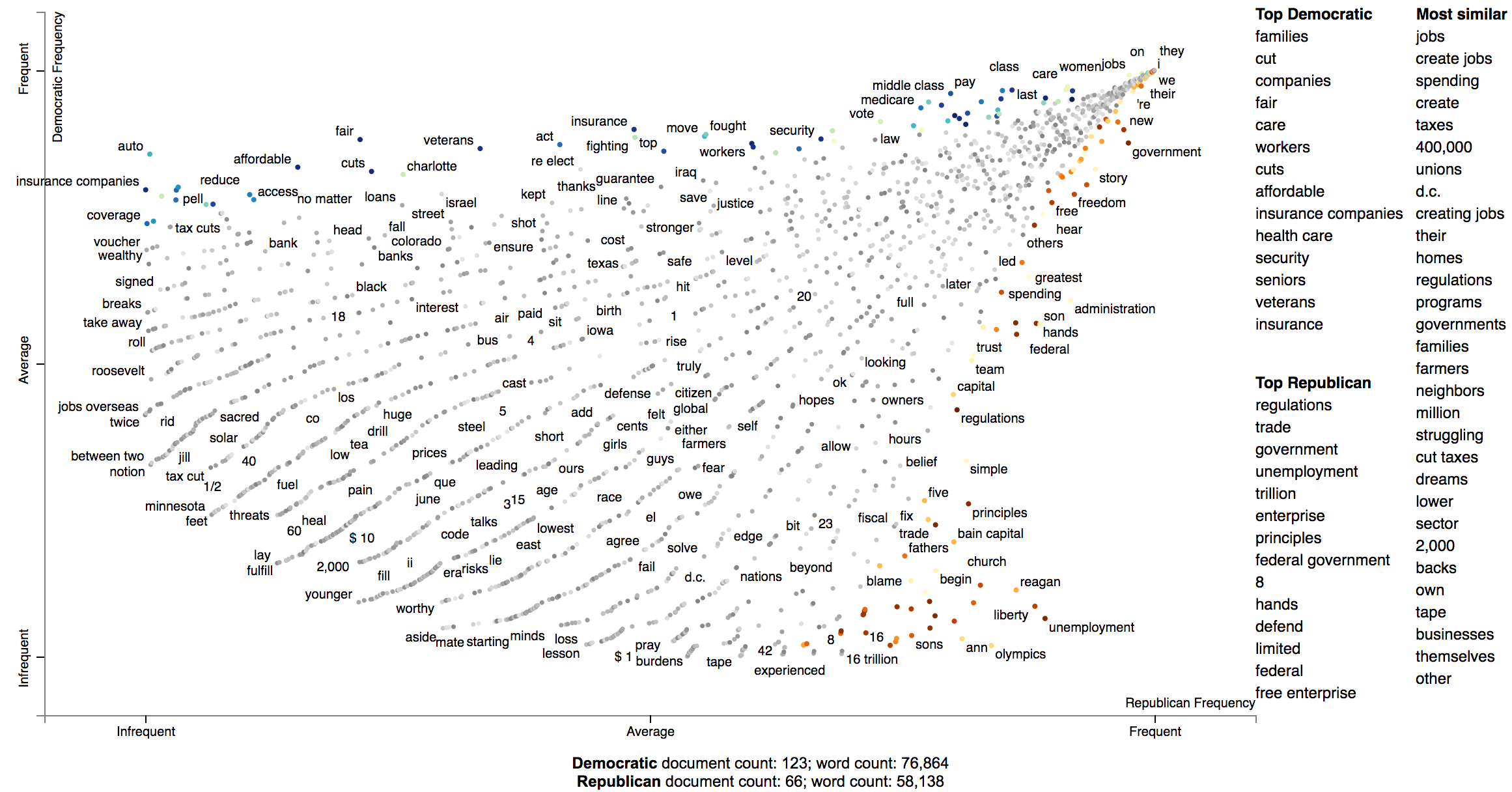](https://jasonkessler.github.io/demo_gensim_similarity.html)
### Visualizing any kind of term score
We can use Scattertext to visualize alternative types of word scores, and ensure that 0 scores are greyed out. Use
the `sparse_explroer` function to acomplish this, and see its source code for more details.
```pydocstring
>>> from sklearn.linear_model import Lasso
>>> from scattertext import sparse_explorer
>>> html = sparse_explorer(corpus,
... category='democrat',
... category_name='Democratic',
... not_category_name='Republican',
... scores = corpus.get_regression_coefs('democrat', Lasso(max_iter=10000)),
... minimum_term_frequency=5,
... pmi_threshold_coefficient=4,
... width_in_pixels=1000,
... metadata=convention_df['speaker'])
>>> open('./Convention-Visualization-Sparse.html', 'wb').write(html.encode('utf-8'))
```
[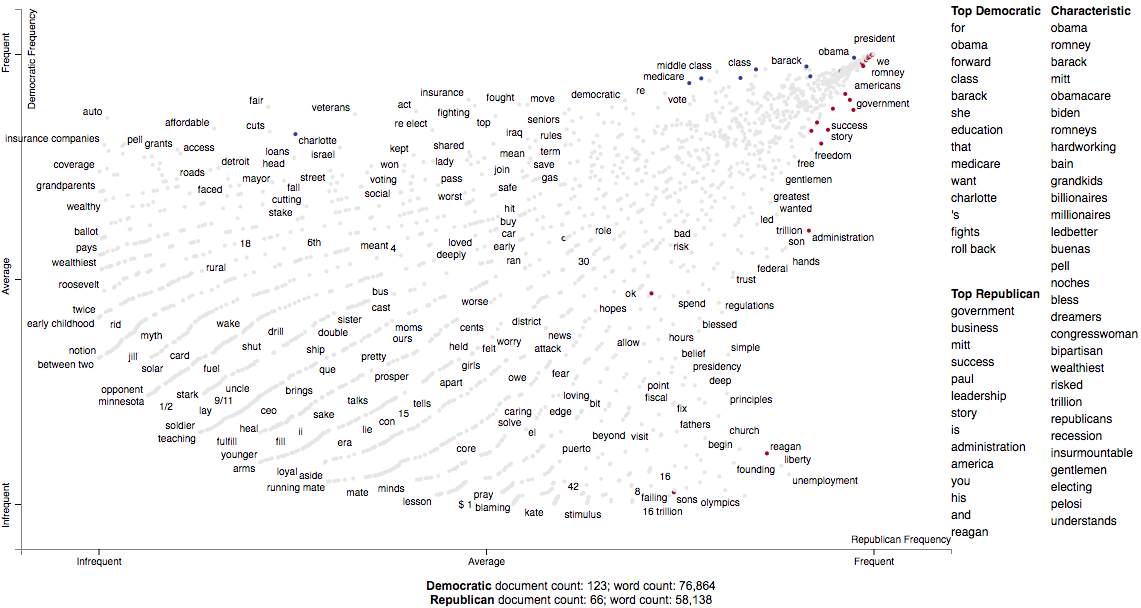](https://jasonkessler.github.io/Convention-Visualization-Sparse.html)
### Custom term positions
You can also use custom term positions and axis labels. For example, you can base terms' y-axis
positions on a regression coefficient and their x-axis on term frequency and label the axes
accordingly. The one catch is that axis positions must be scaled between 0 and 1.
First, let's define two scaling functions: `scale` to project positive values to \[0,1\], and
`zero_centered_scale` project real values to \[0,1\], with negative values always \<0.5, and
positive values always \>0.5.
```pydocstring
>>> def scale(ar):
... return (ar - ar.min()) / (ar.max() - ar.min())
...
>>> def zero_centered_scale(ar):
... ar[ar > 0] = scale(ar[ar > 0])
... ar[ar < 0] = -scale(-ar[ar < 0])
... return (ar + 1) / 2.
```
Next, let's compute and scale term frequencies and L2-penalized regression coefficients. We'll
hang on to the original coefficients and allow users to view them by mousing over terms.
```pydocstring
>>> from sklearn.linear_model import LogisticRegression
>>> import numpy as np
>>>
>>> frequencies_scaled = scale(np.log(term_freq_df.sum(axis=1).values))
>>> scores = corpus.get_logreg_coefs('democrat',
... LogisticRegression(penalty='l2', C=10, max_iter=10000, n_jobs=-1))
>>> scores_scaled = zero_centered_scale(scores)
```
Finally, we can write the visualization. Note the use of the `x_coords` and `y_coords`
parameters to store the respective coordinates, the `scores` and `sort_by_dist` arguments
to register the original coefficients and use them to rank the terms in the r