https://github.com/JulesGuesnon/Ppx-Figma
🎨 A ppx that generates styles based on Bs-Css from a Figma document
https://github.com/JulesGuesnon/Ppx-Figma
Last synced: 10 months ago
JSON representation
🎨 A ppx that generates styles based on Bs-Css from a Figma document
- Host: GitHub
- URL: https://github.com/JulesGuesnon/Ppx-Figma
- Owner: JulesGuesnon
- License: mit
- Archived: true
- Created: 2020-05-19T15:05:37.000Z (almost 6 years ago)
- Default Branch: master
- Last Pushed: 2020-11-16T15:36:12.000Z (over 5 years ago)
- Last Synced: 2024-11-14T17:47:17.098Z (over 1 year ago)
- Language: Reason
- Homepage:
- Size: 393 KB
- Stars: 12
- Watchers: 2
- Forks: 0
- Open Issues: 0
-
Metadata Files:
- Readme: readme.md
- License: LICENSE
Awesome Lists containing this project
- awesome-list - Ppx-Figma - Css from a Figma document | JulesGuesnon | 9 | (Reason)
README
# :art: Ppx-Figma
Ppx-Figma will autogenerate styles based on [Bs-Css](https://github.com/reasonml-labs/bs-css) from a figma document for you.
## :books: Table of contents
- [:thinking: Why ?](#thinking-why-)
- [:warning: Important informations](#warning-important-informations)
- [:building_construction: Figma architecture](##building_construction-figma-architecture)
- [Styleguide](#styleguide)
- [Fonts](#fonts)
- [Colors](#colors)
- [:wrench: Setup](#wrench-setup)
- [Bs-Css setup](#bs-css-setup)
- [Installation](#installation)
- [Get a Figma token](#get-a-figma-token)
- [Get a document id](#get-a-document-id)
- [:fire: How to use it ? ](#fire-how-to-use-it-)
- [Generated code](#generated-code)
- [Fonts](#fonts-1)
- [Colors](#colors-1)
- [Apply the style](#apply-the-style)
- [What if I need to override a style ?](#what-if-i-need-to-override-a-style-)
- [:raising_hand: Some suggestions ?](#raising_hand-some-suggestions-)
- [:heart: Acknowledgements](#heart-acknowledgements)
## :thinking: Why ?
The process between developers and designers can be painful. Even if you work carefully and define your styles as variables, you still need to make sure you have the last version of the colors or fonts.
To simplify this process, I made a ppx that automatically import colors and fonts from Figma and create styles based on [Bs-Css](https://github.com/reasonml-labs/bs-css) for you.
## :warning: Important informations
Before you dive in you need to be aware of some points:
- Ppx-Figma is based on Figma api:
- It will require an api key to make request (refer to the [Setup](#get-a-figma-token) part to know how to generate a key)
- A request is made at each build, so the bigger your Figma document is, the longer the request will be and the longer the build will be. it sounds pretty scary but don't worry there's a cache system and you have control on it
- By using Ppx-Figma your designer will have to respect an architecture for his fonts and colors. This architecture has been thought with a designer but everyone has his habits. But if you see something to improve feel free to open an issue
- For now it's a mac and linux only ppx. I'm working on making a build for windows, but it's still wip
## :building_construction: Figma architecture
### Styleguide
All the colors and fonts will have to be in a `Styleguide` page.
So create a new document in Figma, and create a new page called `Styleguide` on the top left:

> All the pages

> Pages while creating the `Styleguide`
### Fonts
All the fonts will need to be in a frame call `Fonts`. So create the frame with the tool on the top left and call the frame `Fonts` :

> The frame tool in the toolbar
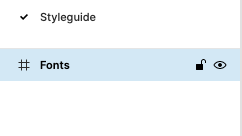
> The frame named `Fonts`
Then to define your font styles, create a text, apply your style to it and there you go:

> Example of font namings
:warning: **Important informations**
- You don't have to "namespace" your styles, but it's a good way to classify them and it will have an impact on generated code
- The text you write has an importance. For example: `body/regular` will have generate a variable called `regular` in the code. So if you write something like `.../whatever`, a variable called `whatever` will be generated. Note that there's **forbidden name**, the one that Bs-Css use (e.g: style, width, fontWeight, bold, ...)
- **Only write text for your styles** and don't put annotation next to the styles (I'm planning to allow this in a next version)
### Colors
All the colors will need to be in a frame call `Colors`. So create the frame with the tool on the top left and call the frame `Colors` :
> The frame tool in the toolbar

> The frame named `Colors`
Then you can create a rectangle or an ellipse with the desired color:

> The color frame with the colors
Finally name you rectangles or ellipses (here it's the name of the color, but it can be whatever you want of course):

> Naming of the colors
:warning: **Important informations**
- There's no "namespace" like the text, but it might be the case in the future
- Just like the fonts, **only put rectangles or ellipses** and don't put annotation next to them (I'm planning to allow this in a next version)
- Note that there's **forbidden name**, the one that Bs-Css use (e.g: style, width, fontWeight, bold, ...)
:tada: That's all for the Figma part :tada:
## :wrench: Setup
### Bs-Css setup
Make sure you have [Bs-Css](https://github.com/reasonml-labs/bs-css) installed. **If you don't**, refer to [their documentation](https://github.com/reasonml-labs/bs-css).
### Installation
In a terminal run:
```bash
npm i ppx-figma
OR
yarn add ppx-figma
```
Then add the dependency to the `bs-config.json`
```json
...
"ppx-flags": ["ppx-figma/ppx"]
...
```
### Get a Figma token
You'll need to generate a token to allow the request on the document. Here are the steps to generate one:
- Go on [Figma](https://www.figma.com/)
- Click on your profile on the top left

> Profile navigation
- Then go in the settings

> Profile navigation with settings
- Finally generate a token

> Section with the generation of the token
### Get a document id
The last thing to do is to get the document id. It's pretty simple, you'll find it in the url of the document:

> The red part is the id
## :fire: How to use it ?
Now we're ready to go !
Here is the syntax of the ppx:
```reason
open Css;
%figma
["", "", ""]
include Styleguide;
```
- \: The token you generated in Figma
- \: The id that you get in the url
- \: The cache time is composed of 2 things: the time and the unit:
- Time is an `int`
- The unit if one of the following:
- `ms` (milliseconds)
- `s` (seconds)
- `m` (minutes)
- `h` (hours)
- `d` (day)
- `mon` (month)
- `y` (year)
- Here is an example of a cache time: `"23h"`
- **By default** the cache time is `"30m"`
- It define the time between the updates of the styles
- If you change the time, it will delete the current cache and create a new one. So if you need to **force update**, this is the way to do it
Example of the ppx:
```reason
open Css;
%figma
["mytoken", "documentid", "1h"]
include Styleguide;
```
### Generated code
Here is an example of the generated code of a Styleguide in Figma
#### Fonts
For the following fonts:
> Example of the fonts in Figma
The following code is generated:
```reason
module Styleguide = {
module Fonts = {
let light = style([...])
module Body = {
let small = style([...])
let regular = style([...])
module Card = {
let title = style([...])
let medium_legend = style([...])
}
/* Casing will depend on the figma but will respect the variable/module casing */
let cTA = style([...])
}
module Title = {
let normal = style([...])
let large = style([...])
}
}
...
}
```
#### Colors
For the following colors:
> Example of colors
> Example of colors naming
The following code is generated:
```reason
module Styleguide = {
...
module Colors = {
let red = style([...])
let green = style([...])
let blue = style([...])
let yellow = style([...])
}
}
```
### Apply the style
Last step is to apply the style. Here is a brief example, but you better refer to [Bs-Css](https://github.com/reasonml-labs/bs-css) documentation for this part.
```reason
[@react.component]
let make = () => {
/*
Where Theme would be the name of the file where you called the ppx
but it can be what you want
*/
...
}
```
### What if I need to override a style ?
Rather than including the `Styleguide` module, you can let it wrap the `Fonts` and `Colors` modules and create you own modules and merge the existing styles
```reason
open Css;
%figma
["mytoken", "documentid", "1h"]
/* This example is based on the generated code above */
module Fonts = {
let light = Styleguide.Fonts.light;
module Body = {
include Styleguide.Fonts.Body;
let small = merge([
small,
style([fontSize(50->px)])
])
};
module Title = Styleguide.Fonts.Title;
};
/* Here I rename the Colors module */
module AnotherName = Styleguide.Colors;
```
## :raising_hand: Some suggestions ?
Feel free to open an issue if you have suggestions or you're facing an issue
## :heart: Acknowledgements
Thanks to Nemo Fazakerley, the designer that helped me to define the conventions for the Figma part. Go check his [Behance](https://www.behance.net/nemofazakerley)