https://github.com/Jumpat/SegmentAnythingin3D
Segment Anything in 3D with NeRFs (NeurIPS 2023)
https://github.com/Jumpat/SegmentAnythingin3D
3d 3d-segmentation computer-vision deep-learning nerf segment-anything segmentation
Last synced: over 1 year ago
JSON representation
Segment Anything in 3D with NeRFs (NeurIPS 2023)
- Host: GitHub
- URL: https://github.com/Jumpat/SegmentAnythingin3D
- Owner: Jumpat
- License: apache-2.0
- Created: 2023-04-24T08:24:39.000Z (about 3 years ago)
- Default Branch: main
- Last Pushed: 2024-03-04T06:56:24.000Z (over 2 years ago)
- Last Synced: 2024-03-12T22:32:03.011Z (over 2 years ago)
- Topics: 3d, 3d-segmentation, computer-vision, deep-learning, nerf, segment-anything, segmentation
- Language: Python
- Homepage:
- Size: 114 MB
- Stars: 760
- Watchers: 19
- Forks: 43
- Open Issues: 24
-
Metadata Files:
- Readme: README.md
- License: LICENSE
Awesome Lists containing this project
- Awesome-Segment-Anything - [code
README
# Segment Anything🤖️ in 3D with NeRFs (SA3D)
### [Project Page](https://jumpat.github.io/SA3D/) | [Arxiv Paper](https://arxiv.org/abs/2304.12308)
[Segment Anything in 3D with NeRFs](https://arxiv.org/abs/2304.12308)
[Jiazhong Cen](https://github.com/Jumpat)1\*, [Zanwei Zhou](https://github.com/Zanue)1\*, [Jiemin Fang](https://jaminfong.cn/)2,3†, [Chen Yang](https://github.com/chensjtu)1, [Wei Shen](https://shenwei1231.github.io/)1✉, [Lingxi Xie](http://lingxixie.com/)2, [Dongsheng Jiang](https://sites.google.com/site/dongshengjiangbme/)2, [Xiaopeng Zhang](https://sites.google.com/site/zxphistory/)2, [Qi Tian](https://scholar.google.com/citations?hl=en&user=61b6eYkAAAAJ)2
1AI Institute, SJTU 2Huawei Inc 3School of EIC, HUST .
\*denotes equal contribution
†denotes project lead.
*Given a NeRF, just input prompts from **one single view** and then get your 3D model.*

We propose a novel framework to Segment Anything in 3D, named SA3D. Given a neural radiance field (NeRF) model, SA3D allows users to obtain the 3D segmentation result of any target object via only one-shot manual prompting in a single rendered view. The entire process for obtaining the target 3D model can be completed in approximately 2 minutes, yet without any engineering optimization. Our experiments demonstrate the effectiveness of SA3D in different scenes, highlighting the potential of SAM in 3D scene perception.
## Update
* **2024/04/16**: We release the [3D-GS](https://github.com/graphdeco-inria/gaussian-splatting) version of SA3D ([here](https://github.com/Jumpat/SegmentAnythingin3D/tree/nerfstudio-version)). Now 3D segmentation can be achieved within seconds!
* **2023/11/11**: We release the [nerfstudio](https://docs.nerf.studio) version of SA3D ([here](https://github.com/Jumpat/SegmentAnythingin3D/tree/nerfstudio-version))! Currently it only supports the text prompt as input.
* **2023/06/29**: We now support [MobileSAM](https://github.com/ChaoningZhang/MobileSAM) as the segmentation network. Follow the installation instruction in [MobileSAM](https://github.com/ChaoningZhang/MobileSAM), and then download *mobile_sam.pt* into folder ``./dependencies/sam_ckpt``. You can use `--mobile_sam` to switch to MobileSAM.
## Overall Pipeline
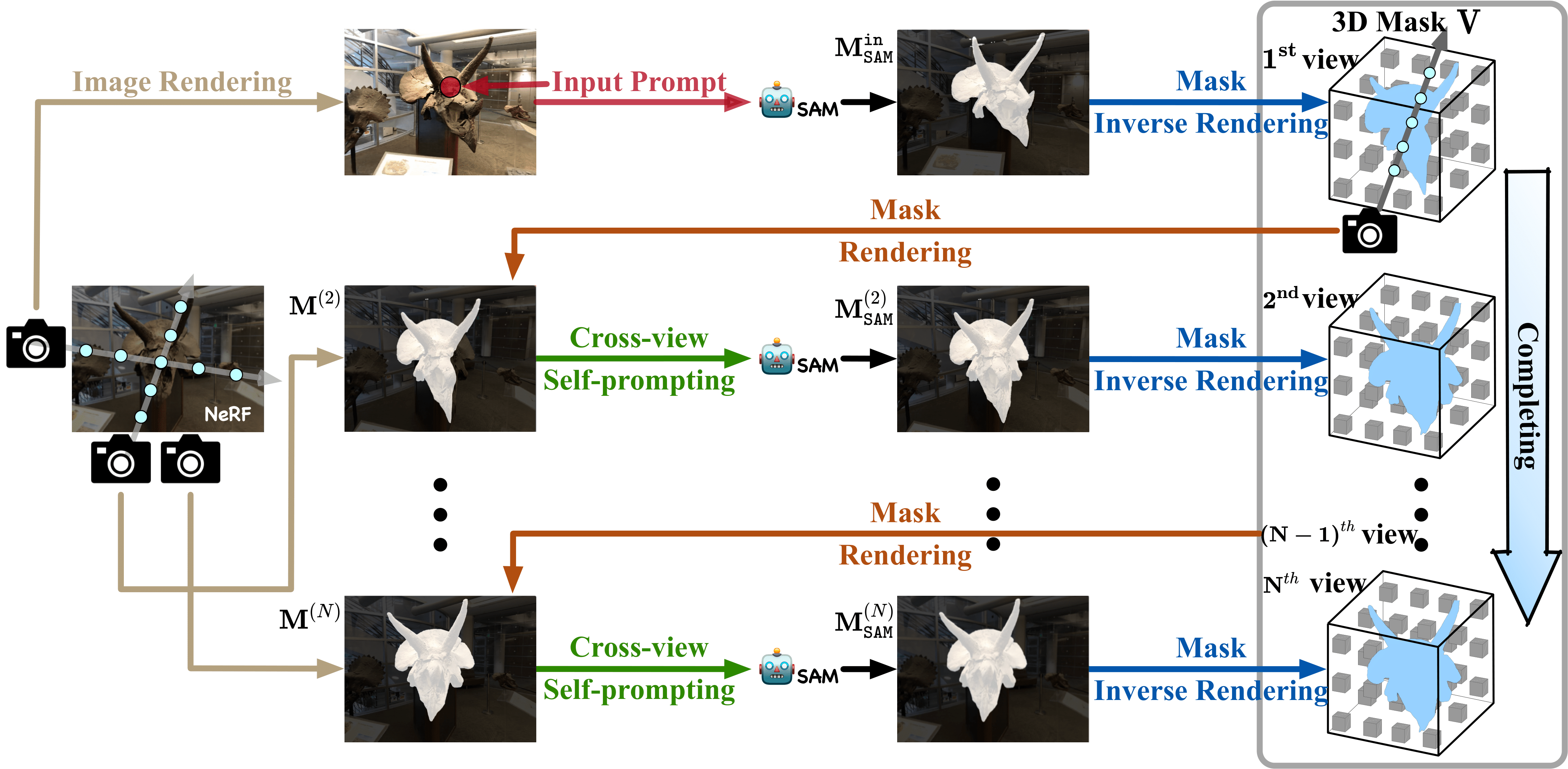
With input prompts, SAM cuts out the target object from the according view. The obtained 2D segmentation mask is projected onto 3D mask grids via density-guided inverse rendering. 2D masks from other views are then rendered, which are mostly uncompleted but used as cross-view self-prompts to be fed into SAM again. Complete masks can be obtained and projected onto mask grids. This procedure is executed via an iterative manner while accurate 3D masks can be finally learned. SA3D can adapt to various radiance fields effectively without any additional redesigning.
## Installation
```
git clone https://github.com/Jumpat/SegmentAnythingin3D.git
cd SegmentAnythingin3D
conda create -n sa3d python=3.10
conda activate sa3d
pip install -r requirements.txt
```
### SAM and Grounding-DINO:
```
# Installing SAM
mkdir dependencies; cd dependencies
mkdir sam_ckpt; cd sam_ckpt
wget https://dl.fbaipublicfiles.com/segment_anything/sam_vit_h_4b8939.pth
git clone git@github.com:facebookresearch/segment-anything.git
cd segment-anything; pip install -e .
# Installing Grounding-DINO
git clone https://github.com/IDEA-Research/GroundingDINO.git
cd GroundingDINO/; pip install -e .
mkdir weights; cd weights
wget https://github.com/IDEA-Research/GroundingDINO/releases/download/v0.1.0-alpha/groundingdino_swint_ogc.pth
```
## Download Data
We now release the configs on these datasets:
* *Foward-facing:* [LLFF](https://drive.google.com/drive/folders/14boI-o5hGO9srnWaaogTU5_ji7wkX2S7)
* *Inward-facing:* [mip-NeRF360](https://jonbarron.info/mipnerf360/), [LERF](https://www.lerf.io/)
### Data structure:
(click to expand)
data
├── 360_v2 # Link: https://jonbarron.info/mipnerf360/
│ └── [bicycle|bonsai|counter|garden|kitchen|room|stump]
│ ├── poses_bounds.npy
│ └── [images|images_2|images_4|images_8]
│
├── nerf_llff_data # Link: https://drive.google.com/drive/folders/14boI-o5hGO9srnWaaogTU5_ji7wkX2S7
│ └── [fern|flower|fortress|horns|leaves|orchids|room|trex]
│ ├── poses_bounds.npy
│ └── [images|images_2|images_4|images_8]
│
└── lerf_data # Link: https://drive.google.com/drive/folders/1vh0mSl7v29yaGsxleadcj-LCZOE_WEWB
└── [book_store|bouquet|donuts|...]
├── transforms.json
└── [images|images_2|images_4|images_8]
## Usage
- Train NeRF
```bash
python run.py --config=configs/llff/fern.py --stop_at=20000 --render_video --i_weights=10000
```
- Run SA3D in GUI
```bash
python run_seg_gui.py --config=configs/llff/seg/seg_fern.py --segment \
--sp_name=_gui --num_prompts=20 \
--render_opt=train --save_ckpt
```
- Render and Save Fly-through Videos
```bash
python run_seg_gui.py --config=configs/llff/seg/seg_fern.py --segment \
--sp_name=_gui --num_prompts=20 \
--render_only --render_opt=video --dump_images \
--seg_type seg_img seg_density
```
Some tips when run SA3D:
- Increase `--num_prompts` when the target object is extremely irregular like LLFF scenes *Fern* and *Trex*;
- Use `--seg_poses` to specify the camera pose sequence used for training 3D mask, `default='train', choices=['train', 'video']`.
Using our [Dash](https://github.com/plotly/dash.git) based GUI:
- Select which type of prompt to be used, currently support: *Point Prompt* and *Text Prompt*;
- *Point Prompt:* select `Points` in the drop down; click the original image to add a point prompt, then SAM will produce candidate masks; click `Clear Points` to clear out the previous inputs;
https://github.com/Jumpat/SegmentAnythingin3D/assets/58475180/9ae39cb2-6a1f-40a7-b7df-6b149e75358f
- *Text Prompt:* select `Text` in the drop down;input your text prompt and click `Generate` to get candidate masks; note that unreasonable text input may cause error.
https://github.com/Jumpat/SegmentAnythingin3D/assets/58475180/ba934e0c-dc8a-472a-958c-2b6c4d6ee644
- Select your target mask;
- Press `Start Training` to run SA3D; we visualize rendered masks and SAM predictions produced by our cross-view self-prompting stategy;
https://github.com/Jumpat/SegmentAnythingin3D/assets/58475180/c5cc947e-8966-4ec5-9531-434a7b27eed5
- Wait a few minutes to see the final rendering results.
https://github.com/Jumpat/SegmentAnythingin3D/assets/58475180/9578ea7a-0947-4105-a65c-1f8de12d0bb5
# TODO List
- [ ] Refine the GUI, *e.g.*, start from any train view, add more training hyper-parameter options, etc.;
- [ ] Support the two-pass stage in GUI; currently it may have some bugs.
## Some Visualization Samples
SA3D can handle various scenes for 3D segmentation. Find more demos in our [project page](https://jumpat.github.io/SA3D/).
| Forward facing | 360° | Multi-objects |
| :---: | :---:| :---:|
| |
|  |
| 
## Acknowledgements
Thanks for the following project for their valuable contributions:
- [Segment Anything](https://github.com/facebookresearch/segment-anything)
- [DVGO](https://github.com/sunset1995/DirectVoxGO)
- [Grounding DINO](https://github.com/IDEA-Research/GroundingDINO.git)
## Citation
If you find this project helpful for your research, please consider citing the report and giving a ⭐.
```BibTex
@inproceedings{cen2023segment,
title={Segment Anything in 3D with NeRFs},
author={Jiazhong Cen and Zanwei Zhou and Jiemin Fang and Chen Yang and Wei Shen and Lingxi Xie and Dongsheng Jiang and Xiaopeng Zhang and Qi Tian},
booktitle = {NeurIPS},
year = {2023},
}
```