https://github.com/Kamalnrf/claude-plugins
Lightweight registry to discover, install, and manage all public Claude plugins and agent skills for your favourite AI coding agent.
https://github.com/Kamalnrf/claude-plugins
claude claude-code plugins
Last synced: 5 months ago
JSON representation
Lightweight registry to discover, install, and manage all public Claude plugins and agent skills for your favourite AI coding agent.
- Host: GitHub
- URL: https://github.com/Kamalnrf/claude-plugins
- Owner: Kamalnrf
- Created: 2025-10-12T20:18:22.000Z (9 months ago)
- Default Branch: main
- Last Pushed: 2026-01-16T11:39:30.000Z (6 months ago)
- Last Synced: 2026-01-17T01:30:09.477Z (6 months ago)
- Topics: claude, claude-code, plugins
- Language: TypeScript
- Homepage: https://claude-plugins.dev
- Size: 423 KB
- Stars: 350
- Watchers: 4
- Forks: 19
- Open Issues: 4
-
Metadata Files:
- Readme: README.md
Awesome Lists containing this project
README
# Claude Plugins
A plugin manager and skills installer for AI coding agents.
[](https://claude-plugins.dev)
[](https://claude-plugins.dev/skills)
[](https://www.npmjs.com/package/claude-plugins)
[](https://www.npmjs.com/package/skills-installer)
[](https://opensource.org/licenses/MIT)
[](https://discord.gg/Pt9uN4FXR4)
## Quick Start
**Install a Claude plugin:**
```bash
npx claude-plugins install @EveryInc/every-marketplace/compounding-engineering
```
> [!IMPORTANT]
> Requires [Claude Code v2.0.12](https://x.com/claudeai/status/1976332881409737124) or later for plugin support.
**Install an agent skill (works with [agentskills](https://agentskills.io)-compatible clients):**
```bash
npx skills-installer install @anthropics/claude-code/frontend-design
```
> [!IMPORTANT]
> Check [agentskills](https://agentskills.io) to see if your client supports skills.
## Why Use This?
Discovering, installing, and managing plugins and skills across AI coding agents can be fragmented. This project provides:
- **One registry** for discovering 11,989 Claude Code plugins and 63,065 agent skills at [claude-plugins.dev](https://claude-plugins.dev)
- **Two focused CLIs** — `claude-plugins` for Claude Code plugins, `skills-installer` for agent skills
- **Multi-client support** — Install skills for Claude, Cursor, Windsurf, OpenCode, Codex, VS Code, Amp Code, Goose, Letta, Gemini CLI, Antigravity, Trae, Qoder, CodeBuddy.
- **Autonomous discovery** — Install the [skills-discovery](#autonomous-skill-discovery) meta skill and let your agent find and install skills for you
## Discover
Explore available Claude Code plugins and agent skills at **[claude-plugins.dev](https://claude-plugins.dev)** or use `skills-installer search` from your terminal.
Our [registry](https://www.val.town/x/kamalnrf/claude-plugins-registry) automatically discovers and indexes all public Claude Code plugins and agent skills on GitHub.
## Two CLI Tools
This project provides two command-line tools:
### claude-plugins
Manage Claude Code plugins — install, enable, disable, and list.
```bash
npm install -g claude-plugins
```
| Command | Description |
|---------|-------------|
| `install ` | Install a plugin from the registry |
| `list` | View installed plugins |
| `enable ` | Enable a disabled plugin |
| `disable ` | Disable a plugin |
Plugins are installed to `~/.claude/plugins/marketplaces/`
### skills-installer
Install [Agent Skills](https://agentskills.io) across multiple AI coding clients.
```bash
npm install -g skills-installer
```
| Command | Description |
|---------|-------------|
| `search [query]` | Search for skills in the registry |
| `install ` | Install or update a skill |
| `list` | List installed skills |
**Options:**
- `--client ` — Target client (default: claude-code)
- `--local` or `-l` — Install to current directory only
Skills are installed to `~/.claude/skills/` (global) or `./.claude/skills/` (local)
#### Interactive Search

The `search` command provides an interactive terminal experience for discovering skills — search, browse, sort by relevance/stars/installs, and install without leaving your terminal.
```bash
npx skills-installer search
```
### Supported Clients
| Client | Flag |
|--------|------|
| Claude Code | `--client claude-code` (default) |
| Cursor | `--client cursor` |
| Windsurf | `--client windsurf` |
| VS Code | `--client vscode` |
| Codex | `--client codex` |
| Amp Code | `--client amp` |
| OpenCode | `--client opencode` |
| Goose | `--client goose` |
| Letta | `--client letta` |
| GitHub | `--client github` |
| Gemini CLI | `--client gemini` |
| Antigravity | `--client antigravity` |
| Trae | `--client trae` |
| Qoder | `--client qoder` |
| CodeBuddy | `--client codebuddy` |
### How It Works
Both tools resolve identifiers via our [registry](https://www.val.town/x/kamalnrf/claude-plugins-registry):
1. Run install command with identifier (e.g., `@owner/repo/name`)
2. Registry returns the Git repository URL
3. CLI clones and installs the plugin or skill
## Autonomous Skill Discovery
Want your agent to help you discover and install skills? Try the **skills-discovery** meta skill:
```bash
npx skills-installer install @Kamalnrf/claude-plugins/skills-discovery
```
Once installed, your agent will:
- Proactively search for relevant skills before starting tasks
- Help you compare and understand the differences between skills
- Install skills on your behalf with your confirmation
## Support the Project
If you find this project useful, here are two ways to help:
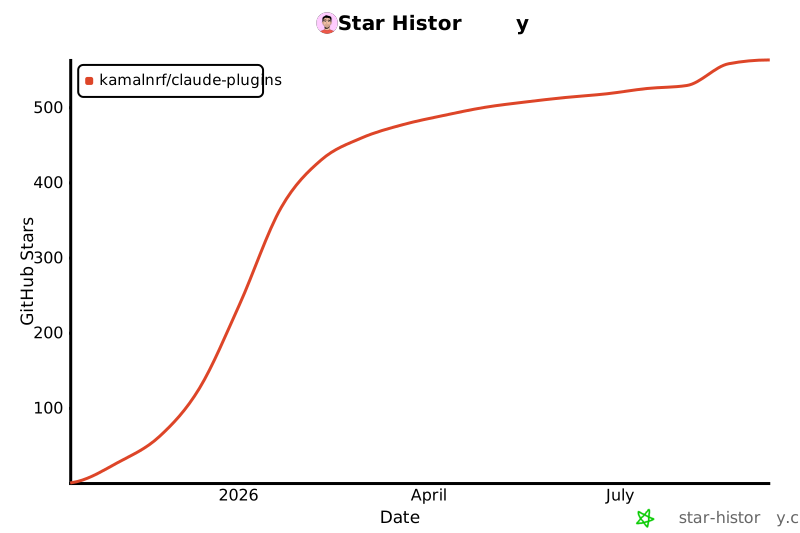
### Star the Repository
A star helps others discover this project!
### Join our GitHub Token Pool
As the registry grows, we're approaching GitHub API rate limits (5,000 requests/hour). You can help by sharing a token:
1. Authorize our [OAuth Application](https://kamalnrf--2a4f92a4e90511f0934e42dde27851f2.web.val.run/)
2. This grants **read-only access to public data only** — no access to private repos or actions on your behalf
3. Your token joins a pool we rotate through to distribute API load
You can revoke access anytime at [github.com/settings/applications](https://github.com/settings/applications).
## Development
See [CLI README](packages/cli/README.md) for development instructions.
**Tech stack:**
- [Bun](https://bun.sh) for CLI
- [Val Town](https://val.town) for registry API
- [Astro](https://astro.build) for web app
## Contributing
Contributions welcome! Open an issue or submit a PR.
## License
MIT