https://github.com/Karmenzind/fp-server
Free proxy server, continuously crawling and providing proxies, based on Tornado and Scrapy. 免费代理服务器,基于Tornado和Scrapy,在本地搭建属于自己的代理池
https://github.com/Karmenzind/fp-server
proxy proxypool python scrapy spider tornado
Last synced: over 1 year ago
JSON representation
Free proxy server, continuously crawling and providing proxies, based on Tornado and Scrapy. 免费代理服务器,基于Tornado和Scrapy,在本地搭建属于自己的代理池
- Host: GitHub
- URL: https://github.com/Karmenzind/fp-server
- Owner: Karmenzind
- License: mit
- Created: 2018-05-29T06:42:59.000Z (about 8 years ago)
- Default Branch: master
- Last Pushed: 2023-05-25T17:17:45.000Z (about 3 years ago)
- Last Synced: 2024-08-01T18:38:24.915Z (almost 2 years ago)
- Topics: proxy, proxypool, python, scrapy, spider, tornado
- Language: Python
- Homepage:
- Size: 768 KB
- Stars: 160
- Watchers: 5
- Forks: 36
- Open Issues: 11
-
Metadata Files:
- Readme: README.md
- License: LICENSE
Awesome Lists containing this project
README
# fp-server
:exclamation: **This code really sucks. I'll rewrite it when I have free time. 这项目写的很烂,仅供参考,后续有时间会重构……**
------
[](https://github.com/Karmenzind/fp-server) [](https://www.python.org/) [](https://github.com/Karmenzind/fp-server)
A free proxy server based on [Tornado](http://www.tornadoweb.org/en/stable/#) and [Scrapy](https://scrapy.org/).
Build your own proxy pool!
Features:
- continuously crawling and providing free proxies
- asynchronous and high-perfermance
- automatically check proxies in cycle and ditch unavailable ones
- easy-to-use HTTP api
免费代理服务器,基于[Tornado](http://www.tornadoweb.org/en/stable/#)和[Scrapy](https://scrapy.org/),在本地搭建自己的代理池
- 持续爬取新的免费代理,检测可用后存入本地数据库
- 完全异步,支持高并发
- 易用的HTTP API
- 周期性检测代理可用性,自动更新
[**查看中文文档\_(:ι」∠)\_**](./README_CN.md)
This project has been tested on:
- Archlinux; Python-3.6.5
- Debian(WSL, Raspbian); Python-3.5.3
And it **cannot directly run on Windows**. Windows users may try [using Docker](#using-docker) or WSL to run this project.
## Contents ##
* [Get started](#get-started)
* [Using Docker](#using-docker)
* [Manually install](#manually-install)
* [web APIs](#web-apis)
* [get proxies](#get-proxies)
* [create new proxy manually](#create-new-proxy-manually)
* [check status](#check-status)
* [Config](#config)
* [Introduction](#introduction)
* [Customization](#customization)
* [Source webs](#source-webs)
* [FAQ](#faq)
* [Examples](#examples)
* [Use fp-server with Python requests module](#use-fp-server-with-python-requests-module)
* [Use fp-server in Scrapy Project](#use-fp-server-in-scrapy-project)
* [Bugs and feature requests](#bugs-and-feature-requests)
* [TODOs and ideas](#todos-and-ideas)
## Get started ##
Choose either one option as follows.
After successful deployment, use the [APIs](#web-apis) to get proxies.
### Using Docker ###
The easiest way to run this repo is using [Docker](https://www.docker.com/). Install Docker and then run:
```bash
# download the image
docker pull karmenzind/fp-server:stable
# run the container
# don't forget to modify `-p` if you prefer another port
docker run -itd --name fpserver -p 12345:12345 karmenzind/fp-server:stable
# check the output inside the container
docker logs -f fpserver
```
For custom configuratiuon, see [this section](#config).
### Manually install ###
1. Install [Redis](https://redis.io/) and `python>=3.5`(I use Python-3.6.5).
2. Clone this repo.
3. Install python packages by:
```bash
pip install -r requirements.txt
```
4. Read the [config](#config) and modify it according to your need.
5. Start the server:
```bash
python ./src/main.py
```
## web APIs ##
typical response:
```json
{
"code": 0,
"msg": "ok",
"data": {}
}
```
- code: result of event (not http code), 0 for sucess
- msg: message for event
- data: detail for sucessful event
### get proxies ###
```
GET /api/proxy/
```
params | Must/
Optional | detail | default
------------------------|-------------------|----------------------------------------------------------------------|---------|
count | O | the number of proxies you need | 1
scheme | O | choices:`HTTP` `HTTPS` | both*
anonymity | O | choices:`transparent` `anonymous` | both
(TODO)
sort_by_speed | O | choices:
1: desending order
0: no order
-1: ascending order | 0
- both: include all type, not grouped
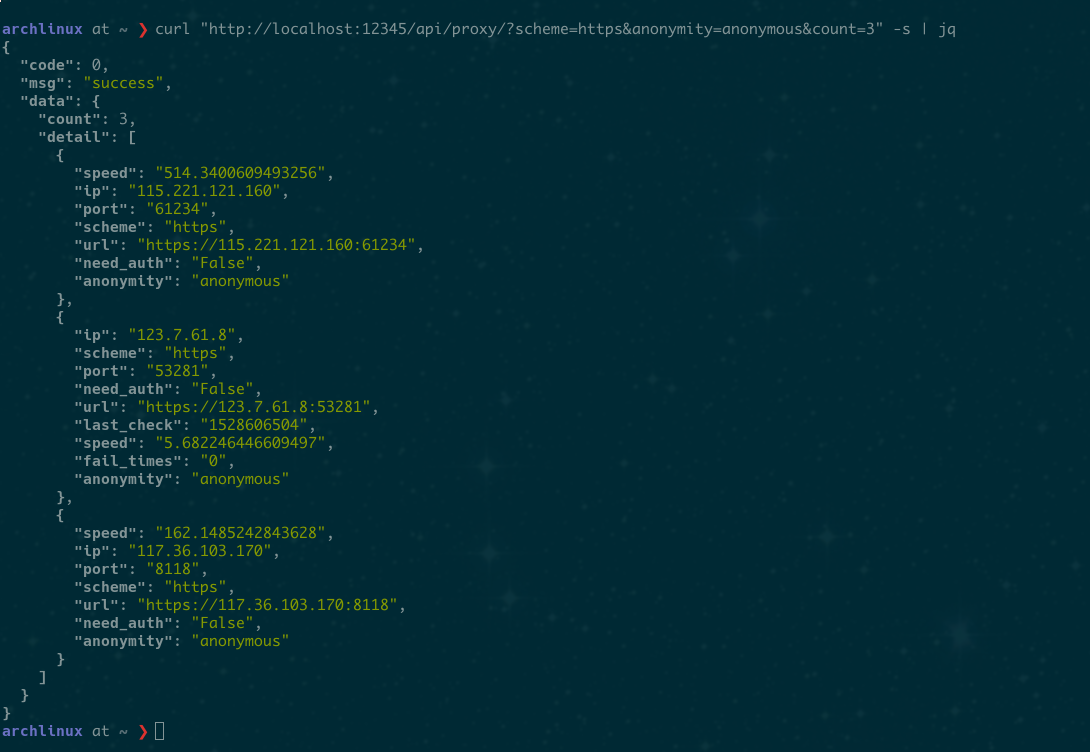
**example**
- To acquire 10 proxies in HTTP scheme with anonymity:
```
GET /api/proxy/?count=10&scheme=HTTP&anonymity=anonymous
```
The response:
```json
{
"code": 0,
"msg": "ok",
"data": {
"count": 9,
"items": [
{
"port": 2000,
"ip": "xxx.xxx.xx.xxx",
"scheme": "HTTP",
"url": "http://xxx.xxx.xxx.xx:xxxx",
"anonymity": "transparent"
}
]
}
}
```
**screenshot**
### create new proxy manually ###
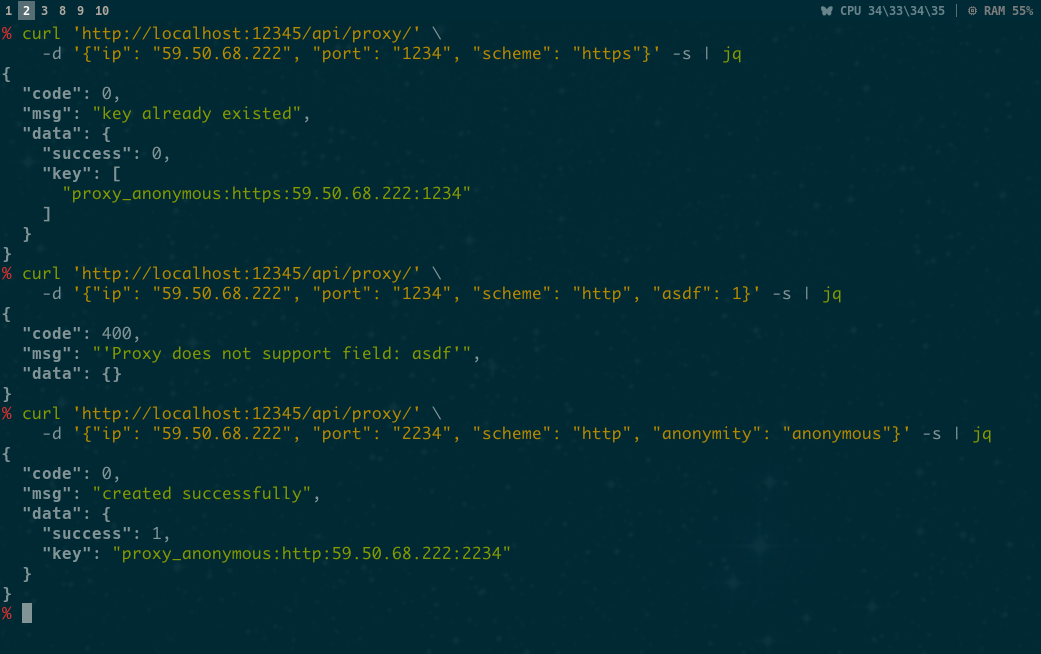
```
POST /api/proxy/
```
params | Must/
Optional | detail | default
----------|-------------------|-----------------------------------|--------------------------------------|
ip | M | e.g. 111.111.111.111 |
port | M | e.g. 12345 |
scheme | M | choices:`HTTP` `HTTPS` |
anonymity | O | choices:`transparent` `anonymous` | `transparent`
need_auth | O | choices: 0 1 |
user | O | |
password | O | |
url | O | | generated by given
scheme+ip+port
**screenshot**
### check status ###
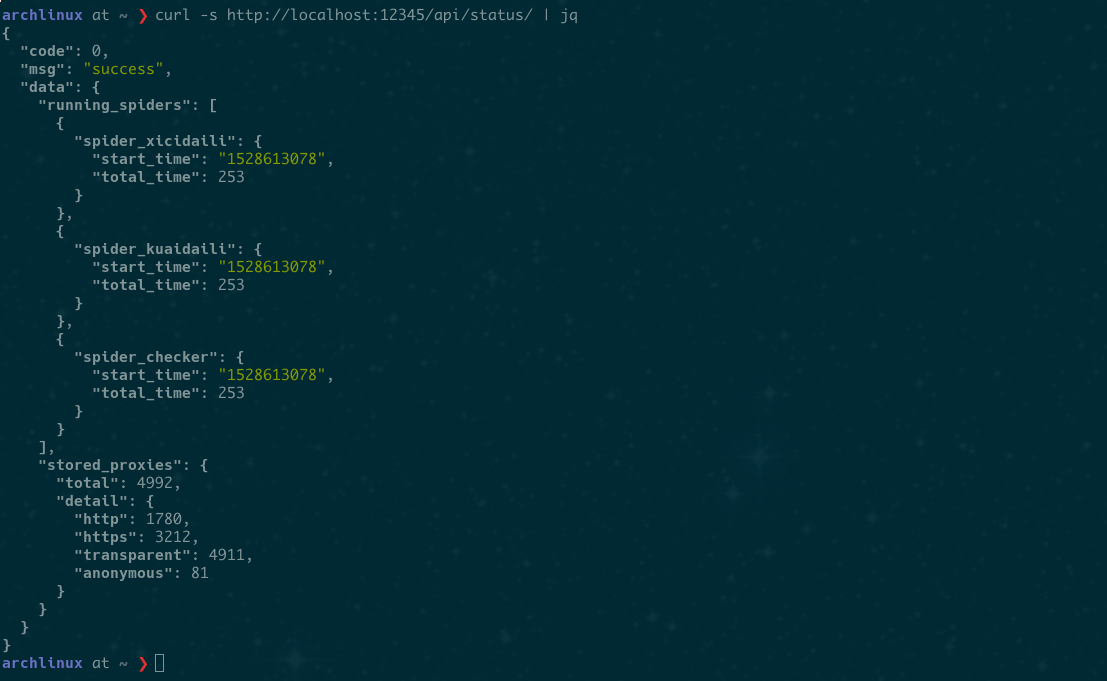
Check server status. Include:
- Running spiders
- Stored proxies
```
GET /api/status/
```
No params.
**screenshot**
## Config ##
### Introduction ###
I choose YAML language for configuration file. The defination and default value for supported items are:
```yaml
# server's http port
HTTP_PORT: 12345
# redirect output to console other than log file
CONSOLE_OUTPUT: 1
# Log
# dir and filename requires `CONSOLE_OUTPUT: 0`
LOG:
level: 'debug'
dir: './logs'
filename: 'fp-server.log'
# redis database
REDIS:
host: '127.0.0.1'
port: 6379
db: 0
password:
# stop crawling new proxies
# after stored this many proxies
PROXY_STORE_NUM: 500
# Check availability in cycle
# It's for each single proxy, not the checker
PROXY_STORE_CHECK_SEC: 3600
```
### Customization ###
- If you use Docker:
- Create a directory such as `/x/config_dir` and put your `config.yml` in it. Then modify the docker-run command like this:
```
docker run -itd --name fpserver -p 12345:12345 -v "/x/config_dir":"/fps-config" karmenzind/fp-server:stable
```
- External `config.yml` doesn't need to contain all config items. For example, it can be:
```
PROXY_STORE_NUM: 100
LOG:
level: 'info'
PROXY_STORE_CHECK_SEC: 7200
```
And other items will be default values.
- If you need to set a log file, **don't** modify `LOG-dir` in `config.yml`. Instead create a directory for log file such as `/x/log_dir` and change the docker-run command like:
```
docker run -itd --name fpserver -p 12345:12345 -v "/x/config_dir":"/fps_config" -v "/x/log_dir":"/fp_server/logs" karmenzind/fp-server:stable
```
- There's no need to modify the exposed port of the container. If you prefer publishing it to another port(say, 9999) on the host, change the `-p` parameter in docker-run command to `-p 9999:12345`
- If you need to access the Redis from host, add a new publishing parameter like `-p 6379:6379` to docker-run command.
- If you manually deploy the project:
- Modify the internal config file: `src/config/common.py`
## Source webs ##
Growing……
If you knew good free-proxy websites, please tell me and I will add them to this project.
Supporting:
- [x] [西刺代理](http://www.xicidaili.com)
- [x] [快代理](http://www.kuaidaili.com)
- [x] [云代理](http://www.ip3366.net)
- [x] [66免费代理](http://www.66ip.cn/)
- [x] [无忧代理](http://www.data5u.com/free/index.shtml)
- [x] [3464](http://www.3464.com/data/Proxy/http/)
- [x] [coderbusy](https://proxy.coderbusy.com/)
- [x] [ip181](http://www.ip181.com/)
- [x] [iphai](http://www.iphai.com/free/ng)
- [x] [a2u](https://raw.githubusercontent.com/a2u/free-proxy-list/master/free-proxy-list.txt)
- [x] [coolproxy](https://www.cool-proxy.net/proxies/http_proxy_list/country_code:/port:/anonymous:)
- [ ] [万能代理](http://wndaili.cn)
- [ ] [小幻代理](https://ip.ihuan.me) (figuring)
- [ ] [89免费代理](http://www.89ip.cn/)(figuring)
- [ ] [baizhongsou](http://ip.baizhongsou.com/) (stop providing free proxies)
Thanks to: [Golmic](https://github.com/lujqme) [Eric_Chan](https://github.com/CL545740896/)
## FAQ ##
- **_How about the availability and quality of the proxies?_**
Before storing new proxy, fp-server will check its availability, anonymity and speed based on your local network. So, feel free to use the crawled proxies.
- **_How many `PROXY_STORE_NUM` should I set? Is there any limitation?_**
You should set it depends on your real requirement. If your project is a normal spider, then 300-500 will be fair enough. I haven't set any limitation for now. After stored 10000 available proxies, I stopped testing. The upper limit is relevant to source websites. I will add more websites if more people use this project.
- **_How to use it in my project?_**
See the next section.
## Examples
These code can be directly copied to your project. **Remember** to modify the configuration and settings at first.
I will write more snippets at leisure. Or you can tell me what example you want.
### Use fp-server with Python requests module
[Here.](./examples/use_with_requests.md)
### Use fp-server in Scrapy Project
Here is [a middleware for Scrapy](./examples/middleware_for_scrapy.md) to fetch and apply proxy for each request. Copy it to your `middlewares.py` and add the name to `DOWNLOADER_MIDDLEWARES` in your `settings.py`.
If you want to keep a cookie pool for your proxies(an independent cookiejar for each IP), [this middleware](https://github.com/Karmenzind/IcrisCrawler/blob/master/IcrisCrawler/middlewares.py#L126) may help you.
## Bugs and feature requests ##
I need your feedback to make it better.
Please [create an issue](https://github.com/Karmenzind/fp-server/issues/new) for any problems or advice.
Known bugs:
* Block while using Tornado-4.5.3
* Afer check, the redis key might change
## TODOs and ideas ##
* Use ZSET
* Add supervisor
* Divide log module
* More detailed api
* Web frontend via bootstrap
* Add user-agent pool
* the checker's scheduler:
- Periodically calculating the average speed of checking request, then reassign the checker based on this average and the quantity of stored proxies.
* Provide region information.
* use redis's HSET for calculation