https://github.com/Kiriyashiki/msx-stats
Website that displays Minesweeper X's stats file
https://github.com/Kiriyashiki/msx-stats
minesweeper minesweeper-stats statistics stats stats-reader website
Last synced: 1 day ago
JSON representation
Website that displays Minesweeper X's stats file
- Host: GitHub
- URL: https://github.com/Kiriyashiki/msx-stats
- Owner: MeijiRestored
- License: mit
- Created: 2022-03-21T10:18:39.000Z (over 4 years ago)
- Default Branch: main
- Last Pushed: 2024-01-31T10:06:25.000Z (over 2 years ago)
- Last Synced: 2025-01-05T09:15:08.152Z (over 1 year ago)
- Topics: minesweeper, minesweeper-stats, statistics, stats, stats-reader, website
- Language: JavaScript
- Homepage: https://meijirestored.github.io/msx-stats
- Size: 153 KB
- Stars: 0
- Watchers: 1
- Forks: 0
- Open Issues: 0
-
Metadata Files:
- Readme: README.md
- License: LICENSE
Awesome Lists containing this project
README
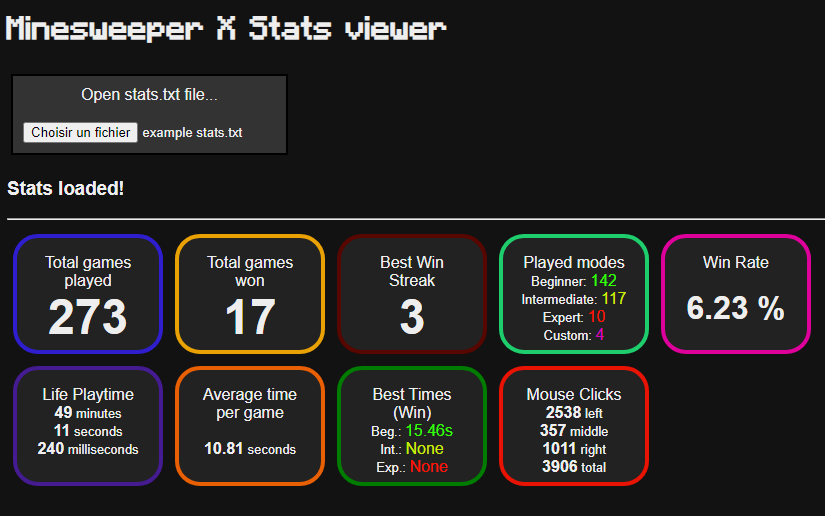
# Minesweeper X Stats viewer
   
A website to visualize [Minesweeper X](http://www.curtisbright.com/msx/)'s ``stats.txt`` file.
## Usage
Open the website with [this link](https://meijirestored.github.io/msx-stats/) and load in your ``stats.txt`` file.
The website will then parse various stats from the file and display them.
### How to get the stats.txt file
By default, Minesweeper X does not save the ``stats.txt`` file, you have to enable it manually.
Open Minesweeper X, go in the Extras tab, open Auto Options
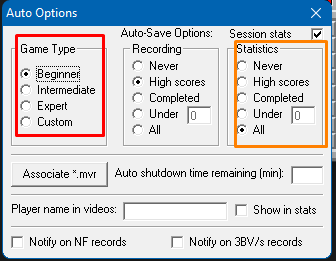
From this menu, check 'All' under Statistics (in orange). Do the same for every game mode (in red), as the statistics setting applies per game mode.
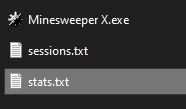
As you play minesweeper, Minesweeper X will fill in the ``stats.txt`` file, located in the same folder as the game executabe, with various stats, that you can read here!