https://github.com/LiaScript/docs
LiaScript documentation course
https://github.com/LiaScript/docs
documentation education liascript liascript-course markdown oer
Last synced: about 1 year ago
JSON representation
LiaScript documentation course
- Host: GitHub
- URL: https://github.com/LiaScript/docs
- Owner: LiaScript
- Created: 2018-03-05T08:55:52.000Z (over 8 years ago)
- Default Branch: master
- Last Pushed: 2025-03-24T14:27:49.000Z (over 1 year ago)
- Last Synced: 2025-04-11T03:38:28.039Z (over 1 year ago)
- Topics: documentation, education, liascript, liascript-course, markdown, oer
- Language: Java
- Homepage: https://liascript.github.io/course/?https://raw.githubusercontent.com/liaScript/docs/master/README.md
- Size: 26.1 MB
- Stars: 19
- Watchers: 2
- Forks: 16
- Open Issues: 0
-
Metadata Files:
- Readme: README.md
- Citation: citation.md
Awesome Lists containing this project
README
https://github.com/user-attachments/assets/7cab2d61-5858-4b62-87bf-0598e44af2e7
# LiaScript
> To see this document as an interactive LiaScript rendered version, click on the
> following link/badge:
>
> [](https://liascript.github.io/course/?https://raw.githubusercontent.com/liaScript/docs/master/README.md)
>
> If you need help, feel free to ask us any questions in the chat:
>
> [](https://gitter.im/LiaScript/community?utm_source=badge&utm_medium=badge&utm_campaign=pr-badge)
--{{0}}--
With LiaScript, we tried to implement an extended
[Markdown](https://en.wikipedia.org/wiki/Markdown) format that should enable
everyone to create, share, adapt, translate or correct online courses without
the need of being a web-developer. We believe that a language-based approach,
instead of a tooling-centered one, provides more flexibility, freedom of
creativity, and sustainability. Therefore we tried to develop a simplistic syntax
that extends the static Markdown with quizzes, animations, spoken text,
automated visualization [ASCII-art](https://en.wikipedia.org/wiki/ASCII_art) and
much more. Everything has been woven around Markdown, so that the content can
still be read and interpreted with any kind of editor or Markdown-interpreter.
**What is LiaScript?**
* a Markdown dialect for interactive courses and data-driven publishing,
* everything is implemented in Elm/JavaScript and runs directly within the
browser (online),
* the interpreter itself is also a reader, which allows for storing documents as
well as the progress,
* courses can also be taken offline, since the interpreter is also a progressive
web app (PWA), that allows to store documents and progress directly within
the browser (locally),
* everything is private, we do not store any data about the courses nor the
users and their progress
--{{1}}--
There are a couple of problems that we currently see in the creation of
[Open educational resources (OER)](https://en.wikipedia.org/wiki/Open_educational_resources).
One of them is isolation, that means people, who want to create content, are
seldom connected via the applied technologies, instead, they are separated by
platforms, authoring tools and used core technologies (programming languages).
Furthermore, it is not possible to simply grab an educational website/project
and to adapt its content for another audience. Additionally, it seems to be
nearly impossible for people without a technical background to simply set up a
small course. Thus, they stuck with Word, PowerPoint, and PDF, since they
provide a simple continuation of the static formats people have used before the
computer-era.
"_If I want to publish content for the computer, I want my audience to dive in, experiment, simulate, play with the content... but not only read._"
{{1}}
********************************************************************************
**Goals**
* Simplicity: with a human-centered markup-language, anyone should be enabled to
create and modify content.
* Interactive: the browser is the next operating systems and although content
with LiaScript is developed within a "static" markup-language it should not be
presented that way.
* Extendability: everything that is not part of LiaScript shall be embeddable
and importable.
* Durability: platforms go down, the development of proprietary software/formats
is discontinued, but LiaScript is not hosted on one platform (it can be
hosted everywhere) and even without the LiaScript interpreter the content is
still readable and interpretable with every editor; you could even print or
engrave it on stone or clay. Furthermore, if you use some kind of versioning
system (e.g. [git](https://en.wikipedia.org/wiki/Git)) you can refer to any
previous version of your course.
********************************************************************************
--{{2}}--
Imagine a world where everyone would have the same access to high quality
educational content for free. Imagine all kind of schoolbooks, technical or
scientific literature could become open-courSe projects and more interactive,
with collaborating teachers and students. Everything that is required is a
simple text-editor and a web-browser.
{{2}}

## Tools
--{{0}}--
As already mentioned all you need to work with LiaScript is an text-editor, but
it can be useful to apply one of the following tools. At least we apply them to
see the result of a change within the course document immediately. You will see,
that the development of online-courses will speed up, especially if there is no
need for memorizing complex point and click sequences.
> "_Let the editor be your canvas and the keyboard your brush._"
### Editing
--{{0}}--
There are currently 2 plugins for the [Atom Editor](https://atom.io) and
[Visual-Studio-Code](https://code.visualstudio.com/Download) available, which
are intended to ease and simplify the development of online courses with
LiaScript. Additionally you can use the LiveEditor, an entirely browser based application.
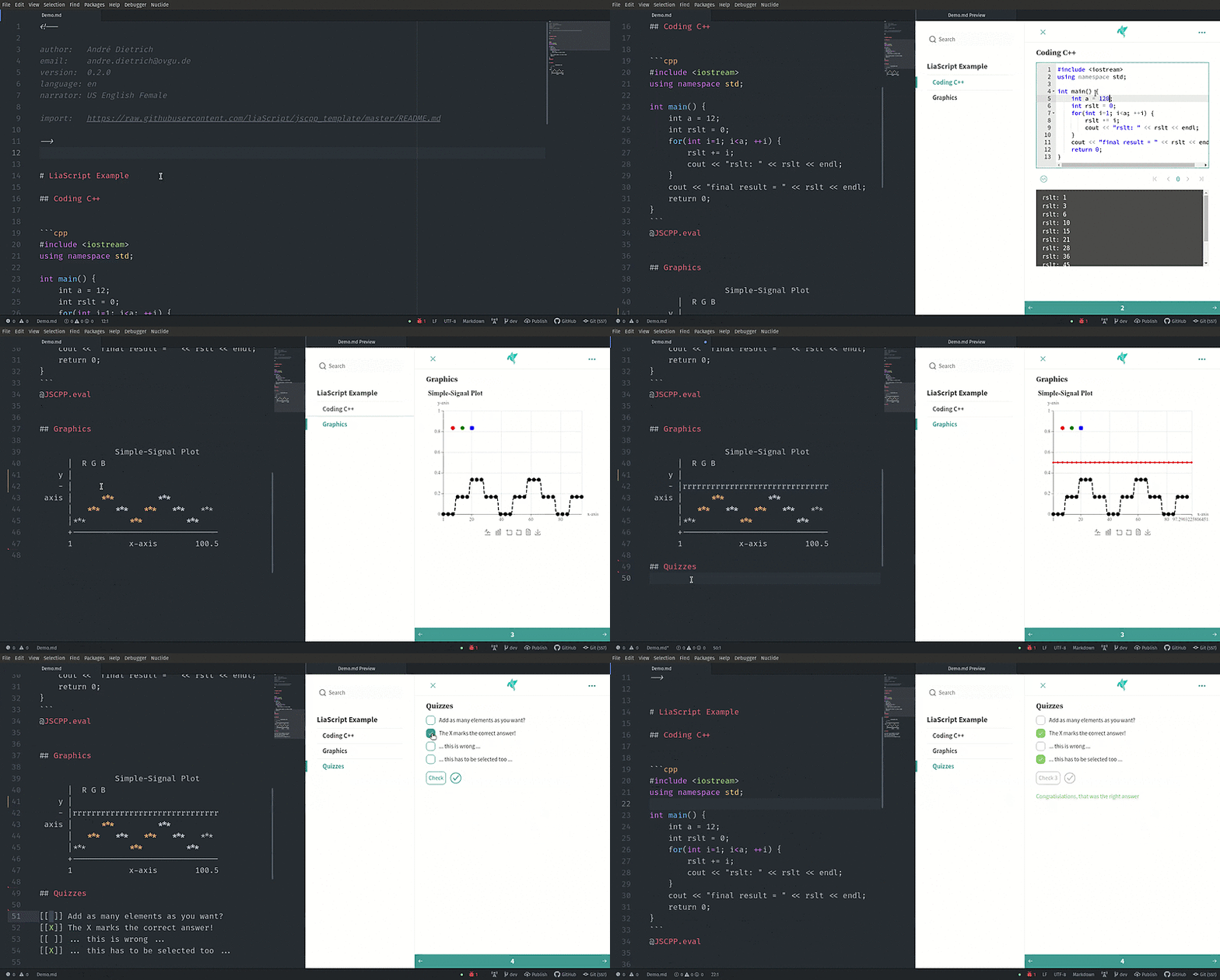
0. [LiveEditor](https://liascript.github.io/LiveEditor): Fully functional online editor, that looks like CodiMD, but is entirely browser based. With support for uploading images and videos and collaborative editing.
1. [Atom](https://atom.io): This is the free and open and official
[GitHub](https://github.com) editor, with lots of plugins for various use
cases.
1. [liascript-preview](https://github.com/andre-dietrich/liascript-preview):
Is a tiny previewer that, if it was toggled ( `Alt+L` ), updates the view
on your course each time you save your document.
2. [liascript-snippets](https://github.com/andre-dietrich/liascript-snippets):
If you start typing `lia` in your Markdown document you switch on a fuzzy
search, that contains a lot of LiaScript help, examples, and snippets.
Detailed installation instructions can be found [here](https://liascript.github.io/blog/install-atom-with-liascript/).
2. [Visual-Studio-Code](https://code.visualstudio.com/Download): This is
Microsoft's free popular editor with various plugins and extensions.
1. [liascript-preview](https://marketplace.visualstudio.com/items?itemName=LiaScript.liascript-preview):
Is a tiny previewer that, if it was toggled ( `Alt+L` ), updates the view
on your course each time you save your document.
2. [liascript-snippets](https://marketplace.visualstudio.com/items?itemName=LiaScript.liascript-snippets):
If you start typing `lia` in your Markdown document you switch on a fuzzy
search, that contains a lot of LiaScript help, examples, and snippets.
Detailed installation instructions can be found [here](https://liascript.github.io/blog/install-visual-studio-code-with-liascript/).
3. [Visual-Studio-Web](https://github.dev):
!?[GitHub web-based Editor](https://www.youtube.com/watch?v=-VBolTxLSeU)
Using the GitHub builtin Web editor, you can install the following extension to preview your course while editing:
[liascript-preview-web](https://marketplace.visualstudio.com/items?itemName=LiaScript.liascript-preview-web)
{{1}}
********************************************************************************
**LiaScript-DevServer:**
--{{1}}--
If you are used to another editor, you can also start a LiaScript development
server locally. It works like the plugin for Atom and updates your course within
your browser on every save, but this can also be used to monitor multiple
projects. And you can also use it for testing purposes, as if you would deploy
your projects.
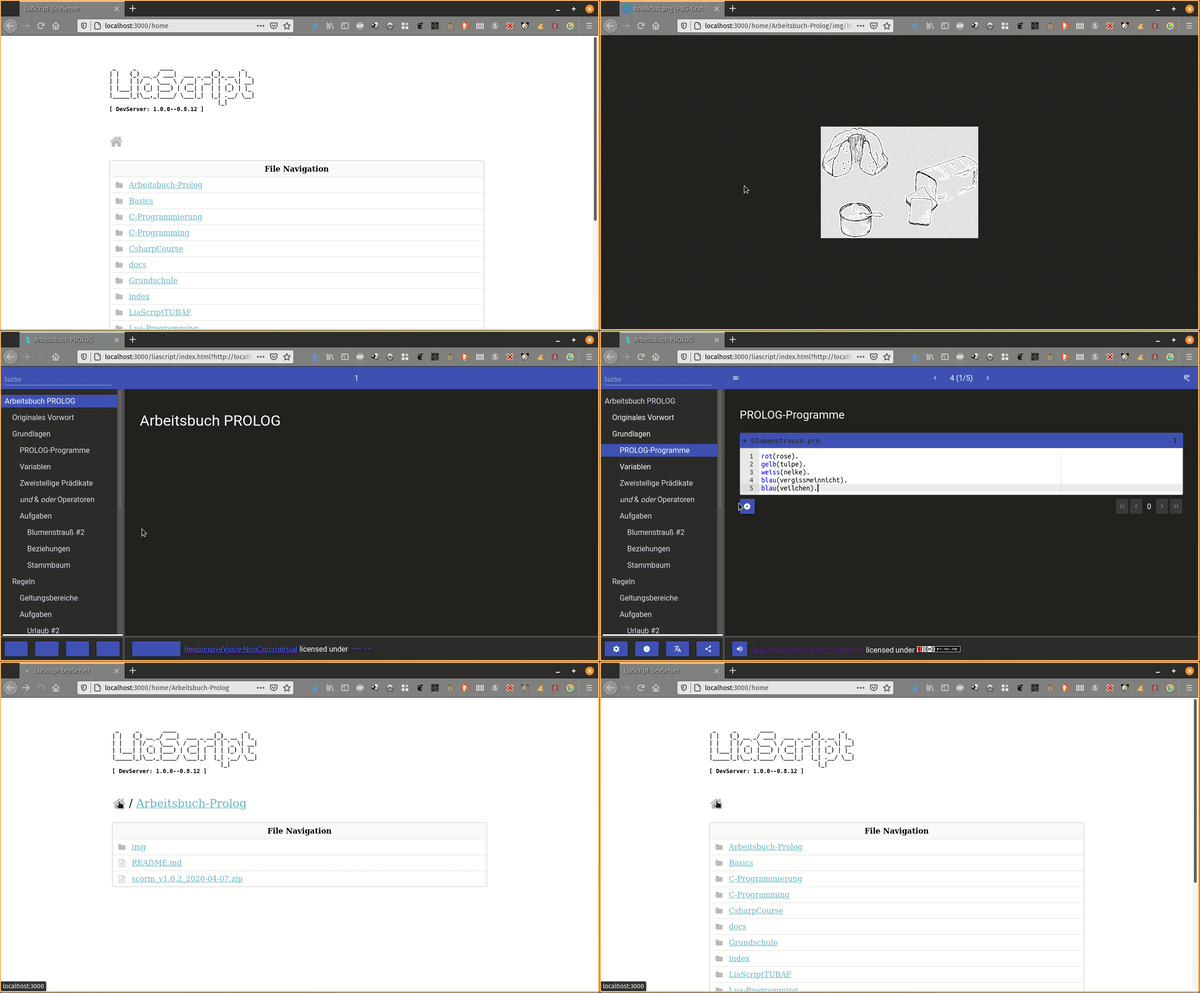
Get the project from:
* npmjs: https://www.npmjs.com/package/@liascript/devserver
* GitHub: https://github.com/LiaScript/LiaScript-DevServer
********************************************************************************
{{2}}
********************************************************************************
**CodiLIA:**
--{{2}}--
If you prefer to work with multiple authors simultaneously, then you should give
[CodiLIA](https://github.com/liascript/codilia) a try. It is a fork of the
collaborative editor
[CodiMD/HedgeDoc](https://github.com/hedgedoc/hedgedoc/tree/master), but instead
of a Markdown preview, you will have a LiaScript preview, and you can
immediately publish your courses.
Project: https://github.com/liascript/codilia
!?[CodiLIA deploy to Heroku](https://www.youtube.com/watch?v=AERiykLvcoQ "**Movie:** A HowTo deploy CodiLIA server to Heroku for free.")
********************************************************************************
### Projects
--{{0}}--
The easiest way of importing a LiaScript into another website or
[Learning Management System (LMS)](https://en.wikipedia.org/wiki/Learning_management_system)
such as
[Moodle](https://en.wikipedia.org/wiki/Moodle),
[ILIAS](https://en.wikipedia.org/wiki/ILIAS), or
[OPAL](https://de.wikipedia.org/wiki/OPAL_%28Lernplattform%29), is via importing
an external website or if possible via an
[`iframe`](https://en.wikipedia.org/wiki/HTML_element#Frames).
!?[LiaScript embed into OPAL](https://www.youtube.com/watch?v=c97m2guiAeA "Movie: Screencast of a LiaScript course that is hosted via CodiLIA and imported as an external resource into OPAL.")
{{1}}
********************************************************************************
**LiaScript-Exporter:**
--{{1}}--
However, there might be cases where you want to store the progress within the
LMS. We therefore have developed an experimental exporter, which allows to bundle
your entire project as an
[SCORM](https://en.wikipedia.org/wiki/Sharable_Content_Object_Reference_Model)
compliant zip-file that can be imported into most common LMS. Other formats than
SCORM can be added too, simply write us a mail or create an issue, if you
require another one.
* npmjs: https://www.npmjs.com/package/@liascript/exporter
* GitHub: https://github.com/liascript/liascript-exporter
********************************************************************************
{{2}}
********************************************************************************
**Preview-Lia:**
--{{2}}--
If you want to refer to your own courses or to foreign ones on your personal
website or blog, you can make use of our "preview web component". This creates
preview cards, which are updated at client-side, so that there is no need to
manually update all information whenever there is a change in the course. Simply
add the `script` tag as depicted in the code-snippet and link to your courses
via the tag `preview-lia`.
``` html
...
...
```
> For more information visit the blog entry:
> [Markdown just got a new preview tag](https://liascript.github.io/blog/markdown-just-got-a-new-preview-tag)
>
> _However, you can also use this to refer to your personal GitHub projects._
********************************************************************************
--{{3}}--
LiaScript was originally developed for supporting programming courses for
embedded systems. You can see an example of the previous eLab remote laboratory
installation.
{{3}}
!?[eLab demonstrator](https://www.youtube.com/watch?v=bICfKRyKTwE "**Movie:** A review on the historical eLab system, the predecessor to LiaScript.")
--{{4}}--
Now it is the opposite, our main focus lays in the development of the Markup
language, but parts of the old systems can still be used. Especially if you want
to teach programming in (_Java_, _C_, _C++_, _C#_, _Mono_, _Go_ and _Python_).
The CodeRunner is an open-source project that enables remote compiling and
execution of code. We apply it to teach procedural and object-oriented
programming. You can either host your own server or use our free herokuapp:
{{4}}
> **CodeRunner:**
>
> * GitHub: https://github.com/liascript/CodeRunner
>
> * Try the interactive LiaScript version at:
>
> https://liascript.github.io/course/?https://github.com/liascript/CodeRunner
>
> * Or if you want to import this functionality into your course, then add the
> following statement into the main header of your LiaScript course:
>
> `import: https://raw.githubusercontent.com/LiaScript/CodeRunner/master/README.md`
### Publishing
--{{0}}--
By now you should have a basic idea of what you can do with LiaScript, but
probably not how you can publish your courses. The best way is actually to use
[GitHub](https://github.com), this way no prior versions of your course get
lost, and you give others (you can even invite them) the opportunity to
contribute to your project.
--{{1}}--
No further hosting is required, no further compilation step, the JavaScript
interpreter of LiaScript does everything else directly within the browser at
client-side.
--{{2}}--
As you can see from the _example_, it is also possible to refer to a specific
slide. You only have to add a `#` with the number of the slide, or you can add
the name of the specific slide as well.
--{{3}}--
You can also add additional tags to your project to make it discoverable. We
currently use three distinct categories: `liascript` to mark it to be related to
the projects, while the others `liascript-course` and `liascript-template` are
used to distinguish the projects into courses or extension, which can be added
to courses.
--{{4}}--
The same way you can also refer to courses that you have put into your
[DropBox](https://en.wikipedia.org/wiki/Dropbox_%28service%29),
[ownCloud](https://en.wikipedia.org/wiki/OwnCloud),
[NextCloud](https://en.wikipedia.org/wiki/Nextcloud), or if you have access to
some old-fashioned web-space then you can also store all of your files there. You
only have to make them publicly available and to refer to the raw or in other
words, the text document. All other sources are loaded relative to this URL.
0. Create a free account at https://github.com
1. Refer to your projects as via a URL parameter:
`https://LiaScript.github.io/course/?YOUR_RAW_COURSE_URL.md`
2. Example with reference to a specific slide:
https://liascript.github.io/course/?https://raw.githubusercontent.com/liaScript/docs/master/README.md#5
3. Make your document discoverable by adding the tags `liascript` and or
`liascript-course`, `liascript-template` to make it appear in one of the
following GitHub topics:
- general: https://github.com/topics/liascript
- free courses: https://github.com/topics/liascript-course
- extensions: https://github.com/topics/liascript-template
_More information on tagging projects can be found [here](https://docs.github.com/en/repositories/managing-your-repositorys-settings-and-features/customizing-your-repository/classifying-your-repository-with-topics)._
4. Use other ways of hosting repositories as well (e.g.
[DropBox](https://en.wikipedia.org/wiki/Dropbox_%28service%29),
[ownCloud](https://en.wikipedia.org/wiki/OwnCloud),
[NextCloud](https://en.wikipedia.org/wiki/Nextcloud)).
#### LiaBooks
--{{0}}--
However, we have no idea who is using LiaScript elsewhere, so it might be hard
to find some resources online. From time to time we translate open-books into
LiaScript and make them more interactive. You can see some of our the
experiments at the following URL and use them as a source of inspiration:
https://github.com/LiaBooks

> __Full overview on courses via the topic `liascript-course`:__
>
> https://github.com/topics/liascript-course
#### LiaTemplates
--{{0}}--
If you tried out CodeRunner, you will have probably noticed that you can reuse
functionality from different courses, simply by using the keyword `import:`
within the main definition of your LiaScript document. Such a functionality is
defined with the help of macros. We will dive deeper into this feature at the
end of this document, but if you are interested you can inspect some of our
templates, which shall provide self-explaining courses of how to embed and use
the implemented macros.
https://github.com/LiaTemplates

> __Full overview on extensions via the topic `liascript-template`:__
>
> https://github.com/topics/liascript-template
## Markdown-Syntax
--{{0}}--
This section is intended to give a brief overview on the basic Markdown syntax
elements. The only difference to common Markdown at this point is, that you can
define meta-information such as author, language, voice, etc. within a
HTML-comment at the beginning of every document. We will describe all of these
elements in more detail in [section: Macros](#macros). All of these `macros`
start with a single word, which is followed by a colon. If you require more
space, like for `comment:` or `link:` you can use multiple lines, but every
following line has to start with an indentation.
Initial LIA-comment-tag for basic definitions:
``` XML
```
--{{1}}--
The meta-information from your document is later shown within the
information-section as well as within the home-section.
{{1}}

--{{2}}--
If you already know Markdown, then you can skip most of the content in this
section. However, there are some slight differences that will be marked with a
trailing star at the section title.
{{2}}
> Something might be different 💫
### Structuring
--{{0}}--
A course is structured as any other Markdown document with starting hash-tags,
whereby the number of hash-tags is used to define the hierarchy of your
document.
```markdown
# Main Title
...
## Section Title 1
...
### Subsection Title
...
## Section Title 2
```
--{{1}}--
Every section is presented separately. In contrast to most Markdown-parsers,
LiaScript applies a two step-approach. Sections are parsed at first, which means
that the parsers searches for patterns as depicted below. Parsing the content of
a section is quite time-consuming, that is why the section-content gets only
analyzed, if this specific section should be displayed to the user. However,
this happens only at the first appearance, afterwards the resulting view is
restored from a local cache.
{{1}}
**Preprocessing pattern:** `## foo bar`
#### Semantic Correct HTML
--{{0}}--
As mentioned earlier, the preprocessor searches for patterns `## header` at the beginning of a line to identify sections.
However, there might be cases where you want to have multiple different sections on one slide, with different headers.
[Semantic HTML](https://en.wikipedia.org/wiki/Semantic_HTML) can help us to deal with this, especially the two [HTML5](https://en.wikipedia.org/wiki/HTML_5) tags [`section`](https://developer.mozilla.org/en-US/docs/Web/HTML/Element/section) and [`article`](https://developer.mozilla.org/en-US/docs/Web/HTML/Element/article).
``` markdown
# Slide-Title
## Section-Title
...
## Article-Title
...
```
--{{1}}--
LiaScript will identify these HTML-tags and the content, such that the content within cannot be used as a separator.
If you use these two semantic tags, your content is grouped in semantic correct way, which improves the readability if screen-readers are used or keyboard navigation is used.
--{{2}}--
When to use which tag might be philosophical question.
We can say, if you just want to structure your content with different sub-headers, then use ``.
If your content represents a self-contained document, then use ``.
However, the visually presented result will be the same, such that you could also
use a `
` to structure your content.
##### Section-Title
> The `` HTML element represents a generic standalone section of a document, which doesn't have a more specific semantic element to represent it.
> Sections should always have a heading, with very few exceptions.
>
> Source: https://developer.mozilla.org/en-US/docs/Web/HTML/Element/section
##### Article-Title
> The `` HTML element represents a self-contained composition in a document, page, application, or site, which is intended to be independently distributable or reusable (e.g., in syndication).
> Examples include: a forum post, a magazine or newspaper article, or a blog entry, a product card, a user-submitted comment, an interactive widget or gadget, or any other independent item of content.
>
> Source: https://developer.mozilla.org/en-US/docs/Web/HTML/Element/article
#### Sub-Titles 💫
--{{0}}--
There might be some cases, where you want to add further headings quickly. We therefore
apply the following syntax with underlining "equal signs" or "dashes". In
common Markdown, this alternative syntax is applied to define level-1 and
level-2 headings. We use it to create headings that are one level `=` or two
levels `-` below the main heading. However, these subsections will not be part
of the table of contents, and since their interpretation is slightly different
to common Markdown, you should use the method presented in the previous section.
```markdown
...
## Section Title
Local Subsection
================
Local Sub-SubSection
--------------------
```
### Content blocks
--{{0}}--
How would you separate paragraphs or other content elements from each other, if
you only have a type-writer? The easiest way is a spatial separation, and in
Markdown this is done via an empty line. Thus, whenever you have blocks such as
paragraphs, enumerations, or tables, it is common practice to separate them via
a newline. This makes it easier for you to edit and structure your course, and
it prevents the interpreter from too much work.
``` markdown
This is a paragraph that consist only of one line.
Here comes another paragraph
with multiple lines.
And multiple sentences.
```
### Text-Formatting 💫
--{{0}}--
How does text-highlighting work in a text file and thus within a paragraph?
Well, Markdown defines some basic characters that can be used to surround a word
or a collection of words. We tried to use the GitHub flavored Markdown style for
simple formatting, thus simply use multiple asterisks or underscores to mark
certain parts of a text.
* `*italic*` -> *italic*
* `**bold**` -> **bold**
* `***bold and italic ***` -> ***bold and italic ***
* `_also italic_` -> _also italic_
* `__also bold__` -> __also bold__
* `___also bold and italic___` -> ___also bold and italic___
* `~strike~` -> ~strike~
--{{1}}--
We define some additions to common Markdown, such as underline and superscript,
which can be defined with the following syntax:
{{1}}
* `~~underline~~` -> ~~underline~~
* `~~~strike and underline~~~` -> ~~~strike and underline~~~
* `^superscript^` -> ^superscript^
#### Combinations
--{{0}}--
As you can see from the examples, you can combine and nest all elements freely.
* `**bold _bold italic_**` -> **bold _bold italic_**
* `**~bold strike~ ~~bold underline~~**` -> **~bold strike~ ~~bold underline~~**
* `*~italic strike~ ~~italic underline~~*` -> *~italic strike~ ~~italic underline~~*
#### Typography
--{{0}}--
It is now possible within a LiaScript Markdown to apply sequences of dashes for typography. A sequence of dashes is now translated into:
1. single dash `-` --> Hyphen or minus sign -
2. double dash `--` --> En dash --
3. triple dash `---` --> Em dash ---
--{{1}}--
An Ellipsis is indicated by a sequence of three dots:
{{1}}
`...` will be translated to the Unicode symbol ...
##### Quotes
--{{0}}--
Additionally single and double quotes are translated into their typographical counterparts, based on the defined [`language`](#language) in the header of the course.
German, French, English or Welsh will be translated into different Unicode symbols.
`"That's a 'magic' shoe."` --> “That’s a ‘magic’ shoe.”
Applied quote translation as defined here: https://en.wikipedia.org/wiki/Quotation_mark
--{{1}}--
If you want o use the original characters, you will have to escape them, as shown also in the [next section](#escape-characters):
{{1}}
`\"` --> \"\
`\'` --> \'
{{2}}
--{{2}}--
As an alternative you can still use the quote tag `` for double quotations.
This will still use the language definition for that document, but you can also overwrite this per markdown block or quote:
``` markdown
That's a 'magic' shoe.\
Das ist ein magischer Schuh.
---
Et voici un autre example: C'est une chaussure magique.
```
That's a 'magic' shoe.\
Das ist ein magischer Schuh.
---
Et voici un autre example: C'est une chaussure magique.
#### Escape Characters
--{{0}}--
If you want to use asterisks, hash-tags, or other syntax elements within your
document without applying their functionality, then you can escape or in other
words indicate them with a starting backslash. If you want to escape a
backslash, you will have to write two subsequent backslashes. But you do not
have to use it, if there is only one asterisk within a line, this will be
interpreted as a single character. So you will have to apply this kind of
escaping only to prevent misunderstandings between you and the interpreter.
``` markdown
\*, \~, \_, \#, \{, \}, \[, \], \|, \`, \$, \@, \\, \<, \>, \", \'
```
**Result:** \*, \~, \_, \#, \{, \}, \[, \], \|, \`, \$, \@, \\, \<, \>, \", \'
### Symbols & Unicode 💫
--{{0}}--
One thing that we missed in standard Markdown, was an implementation for arrows.
The verbatim text shows, how arrows are defined in our Markdown implementation with
their result on the right.
`->` ->, `->>` ->>, `>->` >->, `<-` <-, `<-<` <-<,
`<<-` <<-, `<->` <->, `=>` =>, `<=` <=, `<=>` <=>
`-->` -->, `<--` <--, `<-->` <-->, `==>` ==>, `<==` <==, `<==>` <==>
`~>` ~>, `<~` <~
--{{1}}--
But you can also use some basic smileys. We will try to extend this partial
support in the future.
{{1}}
`:-)` :-), `;-)` ;-), `:-D` :-D, `:-O` :-O, `:-(` :-(, `:-|` :-|,
`:-/` :-/, `:-P` :-P, `:-*` :-*, `:')` :'), `:'(` :'(
--{{2}}--
However, since LiaScript accepts
[Unicode](https://en.wikipedia.org/wiki/Unicode), you can also copy and paste
any kind of character including [emojis](https://emojipedia.org).
### References
> The next section shows how external resources can be referenced and integrated.
#### Simple Links
--{{0}}--
There are two ways of adding links to a Markdown document, either by inlining
the URL directly or you can name it (as shown in listing 2), by applying the
typical brackets and parenthesis notation, the optional information is put in
double quotes at the end of the URL. This optional information is used as a
title attribute, and it is shown, when the user hovers the link with the mouse.
1. Example of an URL-link -> http://goo.gl/fGXNvu
text-formatting can be applied also `*** http://goo.gl/fGXNvu ***` ->
*** http://goo.gl/fGXNvu ***
2. Naming the link (`[title](http://goo.gl/fGXNvu "optional info")`) ->
[title](http://goo.gl/fGXNvu "optional info")
3. For internal navigation you can refer to the slide number or to title with
a starting `#`
* `[next slide](#18)` -> [next slide](#18)
* `[next slide](#preview-lia-💫)` -> [next slide](#preview-lia-💫)
* If your internal link includes parentheses or other characters, you can
also use percent-encoding. An opening parentheses would then be written as
`%28` and a closing one as `%29`.
For more information visit:
https://developer.mozilla.org/en-US/docs/Glossary/percent-encoding
##### Preview-Lia 💫
--{{0}}--
LiaScript has an advanced preview link, that will load the remote course and
parse the meta-information such as title, version, comment, logo, email, tags,
form your main HTML-comment at the top of your document. To do this, you will
have to use `[preview-lia]` as the title of your link, which is followed by the
raw URL of your course document.
`[preview-lia](https://raw.githubusercontent.com/LiaScript/docs/master/README.md)`
[preview-lia](https://raw.githubusercontent.com/LiaScript/docs/master/README.md)
--{{1}}--
You can use this technique also to create previews for other courses on your
personal website or for other GitHub projects, as it was described in section
[Projects](#projects). For more information follow the link:
{{1}} https://liascript.github.io/blog/markdown-just-got-a-new-preview-tag/
##### QR-Codes 💫
--{{0}}--
Sometimes it might be required to have both, a link and a visual representation
of it as an __QR-Codes__. Similar to previews, you simply name your link
`qr-code`:
* Syntax: `[qr-code](https://LiaScript.github.io)`
* Example:
[qr-code](https://LiaScript.github.io)
--{{1}}--
You can add further information to your link by adding a title. Markdown is also
allowed within the link title. In case of an image or media link, the title will
be used as a subtitle and displayed accordingly.
{{1}}
* Syntax: `[qr-code](https://LiaScript.github.io "Checkout the LiaScript website or the __[blog](https://liascript.github.io/blog/)__")`
* Example:
[qr-code](https://LiaScript.github.io "Checkout the LiaScript website or the __[blog](https://liascript.github.io/blog/)__")
##### eMail & Telephone 💫
--{{0}}--
These are two additional link types that you can also use within the `` tag, but LiaScript supports them natively.
{{1}}
* __mailto:__
`[Write me a Mail](mailto:LiaScript@web.de)` --> [Write me a Mail](mailto:LiaScript@web.de)
`[LiaScript\@web.de](mailto:LiaScript@web.de)` --> [LiaScript\@web.de](mailto:LiaScript@web.de)
--{{1}}--
The `mailto` link type does not need to be explained.
On most modern systems, clicking on such a link will open your email client and insert the email address after the colon directly into the recipient address field.
Since the __\@__ symbol is used for [macro](#macro) calls, this has to be escaped at the moment.
{{2}}
* __tel:__
`[Call me](tel:+49-12345-67890)` --> [Call me](tel:+49-12345-67890)
`[+49-12345-67890](tel:+49-12345-67890)` --> [+49-12345-67890](tel:+49-12345-67890)
--{{2}}--
The `tel` link type is lesser known and has been introduced for mobile phones.
Clicking on such a link will trigger the dial dialog, allowing you to call the pre-set number without any need for copy and paste.
#### Images 💫
--{{0}}--
Images are defined similar to links, but they are indicated with a starting
exclamation mark.
--{{1}}--
The name of the link or the alt-text is not wasted, since it is not displayed
anymore. Instead, it is displayed, if the image cannot be loaded for some
reasons, and it is used by screen readers to give visually impaired people a
hint, of what will be visible on the image. So please, don't leave it empty.
--{{2}}--
The URL can be either relative to your Markdown document or it can be absolute,
which means it is pointing to an external resource.
--{{3}}--
The optional title in LiaScript is not only used as a title attribute, instead
it is used as a real sub-title for all media links.
**Image-notation: !\[{1}{`alt-text`}\]({2}{url} {3}{"optional sub-title"})**
{{2}}
* relative URL: ``

* absolute URL: ``

--{{4}}--
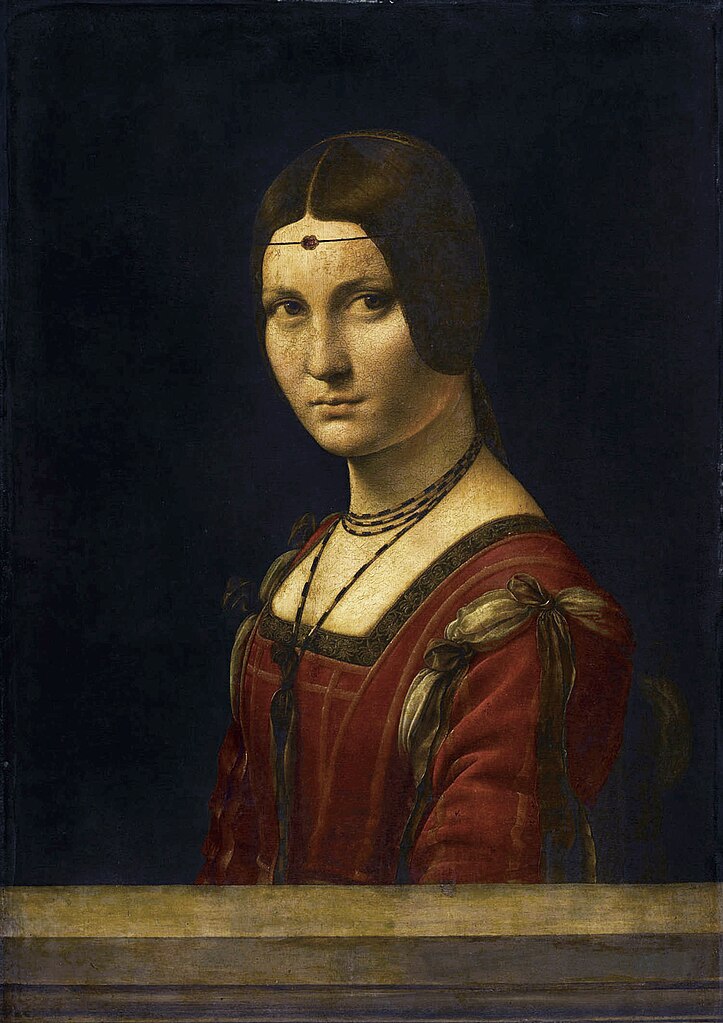
Note, that LiaScript is smart enough to scale your images to the optimal size.
If your image is smaller than the current maximal applicable width, it is shown
in full size. If it is larger, than it is scaled to fit in width and also in
height. You can further click on all images to open them as modal and if the
image is quite large, such as Leonardo's painting, then you can also zoom and
inspect it, by hovering with the mouse or thumb.
--{{5}}--
Additionally, if you start a paragraph with an image, LiaScript expects it to be
a floating object, which is depicted with a maximal size of 50% of your
view-port, if it is not smaller than that.
{{5}}
********************************************************************************
``` markdown

Lorem ipsum dolor sit amet, consectetur adipisicing elit, ...
```
---
 Lorem ipsum dolor
sit amet, consectetur adipisicing elit, sed do eiusmod tempor incididunt ut
labore et dolore magna aliqua. Ut enim ad minim veniam, quis nostrud
exercitation ullamco laboris nisi ut aliquip ex ea commodo consequat. Duis aute
irure dolor in reprehenderit in voluptate velit esse cillum dolore eu fugiat
nulla pariatur. Excepteur sint occaecat cupidatat non proident, sunt in culpa
qui officia deserunt mollit anim id est laborum. Lorem ipsum dolor sit amet,
consectetur adipisicing elit, sed do eiusmod tempor incididunt ut labore et
dolore magna aliqua. Ut enim ad minim veniam, quis nostrud exercitation ullamco
laboris nisi ut aliquip ex ea commodo consequat.
********************************************************************************
##### Galleries 💫
--{{0}}--
How would you interpret a paragraph full of images? We thought that the only
reasonable depiction of this could be a gallery.
``` markdown


```
--{{1}}--
And we like this idea... You can click on every image and inspect it also with
the zooming feature.
{{1}}




#### Audio 💫
--{{0}}--
If an exclamation mark indicates visual content, why not using a question mark
to indicate auditive content. (From our perspective it resembles an ear.)
Everything is similar to images and the URLs can be either relative or absolute.
* Syntax: `?[a horse](https://www.w3schools.com/html/horse.mp3 "hear a horse")`
* Example:
?[a horse](https://www.w3schools.com/html/horse.mp3 "hear a horse")
--{{1}}--
Additionally, you can also directly reference music from the
[SoundCloud](https://Soundcloud.com) website or from
[Music.YouTube](https://music.youtube.com). The associated song will be
automatically embedded for you.
{{1}}
* Syntax: `?[soundcloud](https://soundcloud.com/glennmorrison/beethoven-moonlight-sonata)`
* Example:
?[soundcloud](https://soundcloud.com/glennmorrison/beethoven-moonlight-sonata)
#### Movies 💫
--{{0}}--
Images are marked with a starting exclamation mark before the link, audio by a
starting question mark and movies are made of images and sound, that is why you
combine both marks `!?`. Defining resources this way shows at least the links
correctly in other Markdown parsers or on GitHub. There is baked-in support for
[YouTube](https://YouTube.com), [Vimeo](https://Vimeo.com),
[PeerTube](https://peertube.tv), [DailyMotion](https://www.dailymotion.com) and
[TeacherTube](https://TeacherTube.com), which means that you only have to
include the link and the resource will be embedded appropriately.
**Movie-notation: `!?[alt-text](movie-url)`**
- YouTube: `!?[The Future of Programming](https://www.youtube.com/watch?v=8pTEmbeENF4)`
!?[The Future of Programming](https://www.youtube.com/watch?v=8pTEmbeENF4)
- relative path: `!?[Something about math](vid/math.mp4)`
!?[Something about math](vid/math.mp4)
- > # List of supported Video Platforms
>
> * [DailyMotion](https://www.dailymotion.com)
> * [PeerTube](https://peertube.tv)
> * [TeacherTube](https://TeacherTube.com)
> * [Video TU-Freiberg](https://video.tu-freiberg.de)
> * [Vimeo](https://Vimeo.com)
> * [YouTube](https://YouTube.com)
--{{1}}--
If you required more control over your video, such as autoplay, muted,
start-time, and probably also size and colors, the you can also apply custom
styling rules, then you should take a look at the following section:
{{1}}
[Customizing-Multimedia](#Customizing-Multimedia)
#### So what is left?? 💫
--{{0}}--
If it is something else that you want to embed something else from another
website, then you should try out the link syntax with two starting question
marks. This means, LiaScript will try to use the [oEmbed](https://oembed.com)
service, which is offered by a couple of websites. If this succeeds, this will
embed only a specific part. If it fails, then LiaScript will at least try to
embed the website via an `iframe`.
Examples:
* [SketchFab](https://sketchfab.com): `??[ear model](https://sketchfab.com/3d-models/ear-anatomy-468e2039bde34a3fabb9e90bff9cd56b)`
??[ear model](https://sketchfab.com/3d-models/ear-anatomy-468e2039bde34a3fabb9e90bff9cd56b)
* [StoryMaps](https://storymaps.arcgis.com): `??[presentation](https://storymaps.arcgis.com/stories/583f8b48a857442cb8d27411c93a9664)`
??[presentation](https://storymaps.arcgis.com/stories/583f8b48a857442cb8d27411c93a9664)
* [CircuitJS](https://www.falstad.com/circuit): ` ??[Simulation: Non-inverting Amplifier](https://www.falstad.com/circuit/circuitjs.html?startCircuit=amp-noninvert.txt)`
??[Simulation: Non-inverting Amplifier](https://www.falstad.com/circuit/circuitjs.html?startCircuit=amp-noninvert.txt)
##### Galleries \#2 💫
--{{0}}--
What you have seen previously with images is also possible with any kind of
multimedia link. Simply put everything into one paragraph and LiaScript will
automatically generate a gallery for you:
``` markdown
 ?[audio](url) !?[movie](url)
??[something else](url)
??[something else](url)
```

?[a horse](https://www.w3schools.com/html/horse.mp3 "hear a horse")
!?[Fun with Tables](https://www.youtube.com/watch?v=Y_7q9T5jYHo)
??[VTK VolumeContour](https://kitware.github.io/vtk-js/examples/VolumeContour/index.html)
??[Circuit simulation](https://www.falstad.com/circuit/circuitjs.html?startCircuit=majority.txt)
??[Bust of Nefertiti](https://sketchfab.com/3d-models/bust-of-nefertiti-foia-results-8c60faca6152405e9d35784efa8b9aa1)
## Markdown-Blocks
--{{0}}--
So far we had introduced Markdown only on a tiny level, which means, by now you
should know how to emphasize words and phrases within a paragraph, how to add
images and how you can use references to point to internal or external
resources. But, all we did so far is to work with **paragraphs**. But as pointed
out in the quote below, Markdown can do even more.
> ... Markdown’s syntax is comprised entirely of punctuation characters, which
> punctuation characters have been carefully chosen so as to look like what
> they mean. E.g., asterisks around a word actually look like \*emphasis\*.
> Markdown lists look like, well, lists. Even blockquotes look like quoted
> passages of text, assuming you’ve ever used email.
>
> -- Markdown philosophy by
> [John Gruber](https://daringfireball.net/projects/markdown/syntax#philosophy)
--{{1}}--
Within the following part we will learn how to deal with Markdown blocks and
how to format your content to define the following elements:
{{1}}
1. Lists
2. Blockquotes
3. Tables
4. HTML
5. Code-Snippets
6. Horizontal rules
### Lists
--{{0}}--
The GitHub-flavored Markdown supports two types of lists, ordered and unordered
ones, and so does LiaScript. If you every used a typewriter then the following
syntax for lists would look natural to you. The only thing that matters here is
the correct indentation.
> **Use spaces for correct indentation!** Tabs are allowed too, but might be
> confusing, since editors tend to use varying lengths from 2 to 4 spaces to
> display them...
#### Unordered Lists
--{{0}}--
To define an unordered list, starting asterisks `*`, pluses `+`, and dashes `-`
can be used and mixed. If one point has more than one line, you can also use
multiple lines to define paragraphs. All other Markdown elements, you will get
to know, can be included in the same way.
**Markdown-Syntax:**
``` markdown
* alpha
+ **beta**
- gamma
and delta
new Paragraph
- and another
- important list
- epsilon
```
--{{1}}--
As you can see from the result, you can apply all Markdown styling elements
freely. The starting characters will be interpreted equally, thus it makes no
difference, if you use asterisks, pluses and dashes. To improve the readability
of your document, we would recommend to stick with one format for every level.
Starting with asterisks on the first level and dashes within the second level,
etc.
{{1}}
********************************************************************************
**Result:**
* alpha
+ **beta**
- gamma
and delta
new Paragraph
- and another
- important list
- epsilon
********************************************************************************
{{2}}
> __Note:__
> At the moment it is required to separate blocks by at least one empty line.
> The following example will be interpreted as a single paragraph:
>
> ``` markdown
> * this is one single
> - paragraph with a dash.
> ```
>
> Whereby the following will result in a bullet point with another one nested
>
> ``` markdown
> * separate paragraph
>
> - and this is a separate sub listing
> ```
#### Ordered Lists 💫
--{{0}}--
Ordered lists start with a number and a dot. As you can see from the example,
the numbering is important. In contrast to the GitHub flavored Markdown or the
original Markdown, where the list below would result in **two** separate lists,
and the numbering for every list would start at 1, ignoring your numbering
order. With the LiaScript interpretation you can separate your lists, add more
explanations in between, or use animations to make certain parts appear or
disappear.
**Markdown-Syntax:**
``` markdown
0. alpha
1. **beta**
Something else ...
3. * gamma
* delta
* and epsilon
2. probably zeta
```
**Result:**
0. alpha
1. **beta**
Something else ...
3. * gamma
* delta
* and epsilon
2. probably zeta
### Blockquotes
--{{0}}--
If you, from time to time, reply to emails, than the following notation will
look quite familiar to you. To make use of quoted text, simply start a line with
a `>` greater than character.
**Markdown-Syntax:**
``` md
> This was said some time ago ...
>
>> This was said even longer ago,
> > I guess ...
>
> * aleph
> * beth
```
--{{1}}--
As you can see from the example, all Markdown elements can be used within a
blockquote and vice versa. Everything you have learned so far can be easily
combined, it could also be a gallery or an embedded object...
{{1}}
********************************************************************************
**Result:**
> This was said some time ago ...
>
>> This was said even longer ago,
> > I guess ...
>
> * aleph
> * beth
********************************************************************************
#### Citations 💫
--{{0}}--
Blockquotes are often used for citations, and so do we. You can use the
following pattern to mark a blockquote as a citation. Simply use two paragraphs
within a blockquote and start the second one with two dashes `--`.
**LiaScript-Syntax:**
```
> “Live as if you were to die tomorrow.
> Learn as if you were to live forever.”
>
> -- Mahatma Gandhi
```
--{{1}}--
The resulting blockquote looks slightly different. Furthermore, the paragraph
followed by dashes is put into and HTML `cite`-tag.
{{1}}
> “Live as if you were to die tomorrow.
> Learn as if you were to live forever.”
>
> -- Mahatma Gandhi
--{{2}}--
You can use this syntax, with starting dashes, everywhere within a LiaScript
document and your corresponding paragraph it will be rendered within a
`cite`-tag. But, at this time it will only affect the representation of
blockquotes. We are not sure yet, how this can also be applied to images,
tables, lists, etc.
{{2}}
``` md
lorem ipsum ....
-- Some more citations
```
### Tables
--{{0}}--
Tables, _as we hope_, are easy to interpret and to create. Simply use horizontal
rules to separate cells. The header is always defined by the first line, while
the second line is used to separate the table header from the body visually and
to define the column alignment.
**Markdown-format:**
``` markdown
| Tables | Are | Cool |
| -------------------- |:-------------:| -----:|
| *** columns 3 is *** | right-aligned | $1600 |
| ** column 2 is ** | centered | $12 |
| * zebra stripes * | are neat | $1 |
```
--{{1}}--
As you can see in the result, you can sort tables, by clicking onto the icon
that appears on the right of every header cell. A table will then be either
sorted ascending, descending, or not sorted, which means your initial row order
will be restored.
{{1}}
********************************************************************************
**Result:**
| Tables | Are | Cool |
| -------------------- |:-------------:| -----:|
| *** columns 3 is *** | right-aligned | $1600 |
| ** column 2 is ** | centered | $12 |
| * zebra stripes * | are neat | $1 |
********************************************************************************
--{{2}}--
The position of the colon defines whether a column should be centered, aligned
to the left or to the right. By default, if you do not use colons, all columns
are aligned to the left.
{{2}}
* centered --> `:---:`
* right --> `---:`
* left --> `:---` or `---` (default)
#### Tables <--> Data (Demo) 💫
--{{0}}--
But why stopping here? A table, in many cases, is just a representation of a
dataset. If so, why not simply visualizing it accordingly and plot a graph,
display a chart or a map, or whatever fits the most for your data. At the moment
we apply simple rules to identify the nature of your dataset and thus choose a
visual representation.
> For more details have a look at section [Fun With Tables](#fun-with-tables),
> which provides and extensive overview onto all supported representation
> schemes.
--{{1}}--
The easiest and probably most obvious representation of a simple plot, would be
the following. A header with some names and columns that contain numbers. The
first column is interpreted as the main column and thus defines the x
values, the rest is up to you. A cell is then only associated with a number, if
the first "word", _sequence of characters separated by a space_, can be parsed
as a number. The `0km` within this example gets ignored. So if you want certain
values to be ignored, simply attach something directly to the number, or add a
character in front of it.
{{1}}
``` md
| x's | some y's | dist |
| --- |:----------:| ---------------------:|
| 1 | 1 \$ | 16 km |
| 2.2 | 2 \$ | 12 km |
| 3.3 | 5 \$ | 1 km |
| 4 | -12.333 \$ | 0km _will be ignored_ |
```
--{{2}}--
LiaScript identifies this pattern and automatically adds a button above the
table, which allows to switch between the table and the "line chart"
representation. You can modify the chart interactively and even download the
resulting image.
{{2}}
| x's | some y's | dist |
| --- |:----------:| ---------------------:|
| 1 | 1 \$ | 16 km |
| 2.2 | 2 \$ | 12 km |
| 3.3 | 5 \$ | 1 km |
| 4 | -12.333 \$ | 0km _will be ignored_ |
--{{3}}--
A function cannot possess different y-values for one
x-value, thus, if you have two or more equal x-values, the
resulting plot will be a scatter plot.
{{3}}
``` markdown
| x's | some y's | dist |
| --- |:----------:| -----:|
| 1 | 1 \$ | 16 km |
| 2.2 | 2 \$ | 12 km |
| 3.3 | 5 \$ | 1 km |
| 4 | -12.333 \$ | -5 km |
| 4 | | 1 |
```
{{3}}
| x's | some y's | dist |
| --- |:----------:| -----:|
| 1 | 1 \$ | 16 km |
| 2.2 | 2 \$ | 12 km |
| 3.3 | 5 \$ | 1 km |
| 4 | -12.333 \$ | -5 km |
| 4 | | 1 |
--{{4}}--
Last but not least _bar-charts_. If the first column contains at least one cell,
that cannot be parsed as a number while the others do have, then this table gets
interpreted as a bar-chart. The first column thus defines your set of groups. It
is now also possible to sort your table according to different columns, and to
see this ordering also within the bar-chart representation.
{{4}}
```markdown
| Animal | weight in kg | Lifespan years | Mitogen |
| --------------- | ------------:| --------------:| -------:|
| Mouse | 0.028 | 02 | 95 |
| Flying squirrel | 0.085 | 15 | 50 |
| Brown bat | 0.020 | 30 | 10 |
| Sheep | 90 | 12 | 95 |
| Human | 68 | 70 | 10 |
```
{{4}}
| Animal | weight in kg | Lifespan years | Mitogen |
| --------------- | ------------:| --------------:| -------:|
| Mouse | 0.028 | 02 | 95 |
| Flying squirrel | 0.085 | 15 | 50 |
| Brown bat | 0.020 | 30 | 10 |
| Sheep | 90 | 12 | 95 |
| Human | 68 | 70 | 10 |
--{{5}}--
As mentioned earlier, this is only a brief introduction into this topic. So
check out section [Fun With Tables](#fun-with-tables) for a complete overview.
#### Editing
--{{0}}--
Editing tables might seem tedious, but actually it is not. There is a huge
number of plugins for different editors that you can use, which do the
formatting for you. You can use them to quickly navigate through your cells, and
some even allow sorting.

**Editors: Plugins**
* Atom: [markdown-table-editor](https://atom.io/packages/markdown-table-editor)
* VS-Code: [Markdown Table](https://marketplace.visualstudio.com/items?itemName=TakumiI.markdowntable)
* Obsidian: [Advanced Tables](https://github.com/tgrosinger/advanced-tables-obsidian)
### HTML
--{{0}}--
You can also use plain HTML in your Markdown, if you miss something. It will
mostly work pretty good, but it should be used with caution, since some
interpreters apply different rules. Some interpret everything within an HTML tag
as HTML, while others allow mixing. Thus, HTML can contain Markdown, which
contains HTML, which contains... By the way, LiaScript allows mixing. Thus, keep
in mind that newlines and indentation are still relevant.
**Markdown-Syntax:**
``` html
Test **bold** and HTML bold works also inline

```
--{{1}}--
The result shows how the inline-CSS is applied to all nested Markdown elements.
However, if you want to apply some styling to your document, LiaScript supports
another minimal invasive way of doing that. We will describe this in detail in
section [Styling](#styling).
{{1}}
********************************************************************************
**Result:**
Test **bold** and HTML bold works also inline

> See the following list for an complete overview onto all HTML elements:
>
> [HTML Element Reference](https://www.w3schools.com/tags/default.asp)
********************************************************************************
--{{2}}--
If you use custom HTML instead of Markdown, then no styling will be applied. You
can of course create more complex content or tables, this way you can apply your
own styling to all elements.
{{2}}
[CSS-Reference](https://www.w3schools.com/CSSref/default.asp)
--{{3}}--
If you want to, you can also copy the generated LiaScript structure and use our
classes. Most Browsers include an inspector, which can be used to interactively
inspect the entire DOM-tree.
{{3}}
Open Inspector: Ctrl+Shift+i or Ctrl+Shift+k
{{3}}
!?[Inspecting the DOM](https://www.youtube.com/watch?v=Gk6BljF60RI)
--{{4}}--
But, you can also import your own styles within the main document comment by
using the `link` definition. We will explain this in more details within the
macro section [link](#link).
{{4}}
``` md
# Main Title
```
#### Details & Summary
--{{0}}--
The `details` and `summary` tags are standard HTML tags and GitHub also supports
their usage with Markdown. These tags offer a neat way to define something what
is nowadays called accordion. Thus, your user can click on the summary text to
make the body of the `details`-tag appear.
**Syntax:**
``` md
**Honest Textbook ads (click to enlarge)**
!?[If High School and College Textbooks Were Honest - Honest Ads](https://www.youtube.com/watch?v=lhSjYT7pWkw)
```
**Result:**
**Honest Textbook ads (click to enlarge)**
!?[If High School and College Textbooks Were Honest - Honest Ads](https://www.youtube.com/watch?v=lhSjYT7pWkw)
#### `` 💫
--{{0}}--
If you want to embed more complex HTML, and only HTML, without taking care about
indentation and formatting, then should use the `lia-keep` tag to surround your
code.
``` html
table, th, td {
border: 1px solid black;
width: 250px; height: 40px;
text-align: center;
}
**Header 1**
**Header 2**
Cell 1
Cell 2
Cell 3
```
--{{1}}--
As it is demonstrated in the result, everything within this tag will be treated
as HTML only, no Markdown parsing will be applied and indentation will be
checked.
{{1}}
********************************************************************************
**Result:**
table, th, td {
border: 1px solid black;
width: 250px;
height: 40px;
text-align: center;
}
**Header 1**
**Header 2**
Cell 1
Cell 2
Cell 3
********************************************************************************
--{{2}}--
This way, you could for example also import even more complex HTML-tables,
pictures with multiple sources for different screen-sizes, and more.
_With great power comes great responsibility._ Thus, you will also be
responsible for your styling.
### Code
--{{0}}--
In Markdown, you can use a sequence of at least three subsequent backticks `\``
to indicate a code-block that should not be treated as Markdown, but instead
contains some kind of code for which syntax-highlighting should be used, if
possible. The first word after the backticks is used as an indicator, for which
kind of syntax-highlighting should be applied.
```` md
``` python
import time
# Quick, count to ten!
for i in range(10):
# (but not *too* quick)
time.sleep(0.5)
print(i)
```
````
--{{1}}--
In case you are wondering, how to embed a code-block into a code-block with
backticks? Three backticks are the minimum, thus you can surround your Markdown
code-block example with a sequence of 4 or more backticks. If you start with
four backticks, LiaScript will parse everything as code until it reaches a
matching number of backticks.
{{1}}
``` python
import time
# Quick, count to ten!
for i in range(10):
# (but not *too* quick)
time.sleep(0.5)
print(i)
```
--{{2}}--
However, we are still in the Markdown world with static code visualization.
LiaScript has also support for interactive programming, thus all of your
code-snippet can be made executable and editable. This will be described in more
detail in section [Interactive Coding](#interactive-coding).
#### Differences to Markdown 💫
--{{0}}--
Markdown also supports adding code by using tilde `~` characters instead of
backticks. This is at the moment not supported by LiaScript, but might be added
in the future.
``` md
~~~ javascript
var a = "b"
~~~
```
--{{1}}--
Additionally, it is also possible in standard Markdown to use indentation with
at least 4 spaces to mark a block or a line as code. In LiaScript this is
treated differently. You can use indentation to keep your document readable. The
two indicators for text-to-speech in the example are treated equally by
LiaScript, but another Markdown interpreter will interpret the second example as
a single paragraph, while the indicator in the first example will be treated as
code, and thus be easier to read with any other Markdown interpreter (including
the representation on GitHub).
{{1}}
``` md
This is not code ...
Any kind of text with a 4 space
indentation will be treated as code
in Markdown ...
--{{1}}--
This text will be spoken out loud in LiaScript.
--{{2}}--
This text will be spoken out loud too.
```
#### Projects 💫
--{{0}}--
If you want to bundle a couple of code-blocks into something that mirrors a
project, you can achieve this with the following syntax. All code-blocks are
simply attached to each other, in order to indicate a grouping. If you separate
them at least by one newline, they will be treated separately. This will be
pretty neat, if we introduce the concept of interactive code-blocks.
```` md
``` js -EvalScript.js
let who = data.first_name + " " + data.last_name;
if(data.online) {
who + " is online"; }
else {
who + " is NOT online"; }
```
``` json +Data.json
{
"first_name" : "Sammy",
"last_name" : "Shark",
"online" : true
}
```
````
--{{1}}--
You can define optional names within the head of your code-block. The starting
plus `+` and minus `-` symbols are used to indicate, if the resulting
code-blocks should be visible or hidden. However, you can change this, by
clicking onto the resulting title-bar to either maximize or minimize the
code-block.
{{1}}
``` js -EvalScript.js
let who = data.first_name + " " + data.last_name;
if(data.online) {
who + " is online"; }
else {
who + " is NOT online"; }
```
``` json +Data.json
{
"first_name" : "Sammy",
"last_name" : "Shark",
"online" : true
}
```
--{{2}}--
If you do not add a plus or a minus as a prefix to your file, the plus is used
as default.
#### Supported Languages 💫
--{{0}}--
In most cases you can simply add the name of the language or the common filename
ending into the head of a code snippet. Most Markdown interpreters will use
[highlight.js](https://highlightjs.org) for language rendering, since we require
also an editor with syntax highlighting capabilities, we use
[ace](https://ace.c9.io). Thus, the language support might differ to other
systems. We therefore apply a mapping, so that you can still use all
[highlight.js](https://highlightjs.org) short-codes but also those of
[ace](https://ace.c9.io).
Overview: https://github.com/LiaScript/docs/blob/master/Code.md
### JavaScript 💫
--{{0}}--
In contrast to common Markdown parsers or viewers, LiaScript allows you to include and execute JavaScript code.
When combined with HTML elements, you are free to integrate whatever functionality you desire.
--{{1}}--
The last statement of your script also defines the result that will be shown, but only if it is not `undefined`.
You can also use `console.log` to log the script activities.
As the examples below show, you can combine your scripts with LiaScript animations, so they will only be executed in the right fragment/context.
However, you can do much more with scripts.
{{1}}
> Checkout Section [JavaScript](#JavaScript-or-JS-Components) for more information!
``` html
Do some internal calculation 99 * 88 , the next script
contains an error 99 * a .
{{2}}
// Initialize a Line chart in the container with the ID chart
new Chartist.Line('#chart', {
labels: [1, 2, 3, 4],
series: [[100, 120, 180, 200]]
});
console.debug("loaded #chart") // or undefined
```
Do some internal calculation 99 * 88 , the next script
contains an error: 99 * a .
{{2-3}}
// Initialize a Line chart in the container with the ID chart1
new Chartist.Line('#chart1', {
labels: [1, 2, 3, 4],
series: [[100, 120, 180, 200]]
});
console.debug("loaded #chart1")
{{3}}
// Initialize a Line chart in the container with the ID chart2
new Chartist.Line('#chart2', {
labels: [1, 2, 3, 4],
series: [[-100, 120, 180, 20]]
});
console.debug("loaded #chart2")
--{{4}}--
When discussing events, whether past, present, or future, your course may quickly become outdated.
This is where scripts, as an initial building block, can shine. Using basic datetime calculations ensures precise determination of when events have occurred or will occur.
Rather than relying solely on your calculations, users have the opportunity to inspect and validate your code by double-clicking on the highlighted script result.
Even more, it is possible to modify the code, enabling them to double-check your findings and experiment with the results.
{{4}}
``` markdown
Russia started its invasion of Ukraine
// Define the start date of the invasion
const invasionStartDate = new Date('2022-02-24');
// Get the current date
const currentDate = new Date();
// Calculate the difference in milliseconds
const differenceInMs = currentDate - invasionStartDate;
// Convert milliseconds to days
const differenceInDays = differenceInMs / (1000 * 60 * 60 * 24);
// Calculate the number of full days
const daysSinceInvasion = Math.floor(differenceInDays);
-daysSinceInvasion
.
```
{{4}}
Russia started its invasion of Ukraine
// Define the start date of the invasion
const invasionStartDate = new Date('2022-02-24');
// Get the current date
const currentDate = new Date();
// Calculate the difference in milliseconds
const differenceInMs = currentDate - invasionStartDate;
// Convert milliseconds to days
const differenceInDays = differenceInMs / (1000 * 60 * 60 * 24);
// Calculate the number of full days
const daysSinceInvasion = Math.floor(differenceInDays);
-daysSinceInvasion
.
--{{5}}--
We combined scripts with the [Internationalization API](#Internationalization-API), which enables appropriate formatting of outputs.
The days output is not hardcoded in our code.
If we change the locale to another language, such as in the following example, the result will be optimized for the Russian language.
Furthermore, by using the embedded Google Translator functions, the locale will be automatically set according to the selected language.
{{5}}
```` markdown
Россия начала вторжение в Украину
// Define the start date of the invasion
const invasionStartDate = new Date('2022-02-24');
...
````
Россия начала вторжение в Украину
<script format="relativetime" unit="day" locale="ru">
// Define the start date of the invasion
const invasionStartDate = new Date('2022-02-24');
// Get the current date
const currentDate = new Date();
// Calculate the difference in milliseconds
const differenceInMs = currentDate - invasionStartDate;
// Convert milliseconds to days
const differenceInDays = differenceInMs / (1000 * 60 * 60 * 24);
// Calculate the number of full days
const daysSinceInvasion = Math.floor(differenceInDays);
-daysSinceInvasion
.
--{{6}}--
Now, imagine that instead of performing simple calculations, a script could access any kind of real-world data and output it as either HTML or LiaScript.
What's more, picture scripts being directly combined with input fields, and a change in one script triggering the execution of another.
All of this is possible in LiaScript.
We have re-imagined the usage of scripts as interactive powerhouses, and we will delve into the details in chapter [JavaScript or JS-Components](#JavaScript-or-JS-Components).
{{6}}
``` markdown
longitude: @input
latitude: @input
fetch("https://api.open-meteo.com/v1/forecast?latitude=@input(`latitude`)&longitude=@input(`longitude`)&hourly=temperature_2m")
.then(response => response.json())
.then(data => {
let table = "<!-- data-show data-type='line' data-title='Open-Meteo Weather API' -->\n"
table += "| Time | Temperature |\n"
table += "| ---- | ----------- |\n"
for (let i=0; i < data.hourly.time.length; i++) {
table += "| " + data.hourly.time[i] + " | " + data.hourly.temperature_2m[i] + " |\n"
}
send.lia("LIASCRIPT: "+table) }
)
.catch(e => {
send.lia("ups, something went wrong")
})
"waiting for the weather"
```
---
longitude: @input
latitude: @input
fetch("https://api.open-meteo.com/v1/forecast?latitude=@input(`latitude`)&longitude=@input(`longitude`)&hourly=temperature_2m")
.then(response => response.json())
.then(data => {
let table = "<!-- data-show data-type='line' data-title='Open-Meteo weather API' -->\n"
table += "| Time | Temperature |\n"
table += "| ---- | ----------- |\n"
for (let i=0; i < data.hourly.time.length; i++) {
table += "| " + data.hourly.time[i] + " | " + data.hourly.temperature_2m[i] + " |\n"
}
send.lia("LIASCRIPT: "+table) }
)
.catch(e => {
send.lia("ups, something went wrong")
})
"LIA: wait"
### Horizontal rules 💫
--{{0}}--
At the moment it is possible to insert horizontal rules by adding lines with at
least 3 dashes, longer sequences of dashes are allowed too. Common Markdown also
allows to define such rules with asterisks `*`, but this is used in LiaScript to
group blocks, as we will described later...
**Markdown-Syntax:**
``` markdown
some paragraph
---
something else
----------------
```
**Result:**
some paragraph
---
something else
----------------
## Custom Styling
--{{0}}--
In order to support a nearly equal experience for all Markdown interpreters you
should stick with the basic Markdown notation or use simple HTML-tags as much as
possible, for example if you want to change the color of a sentence or a word.
--{{1}}--
However, LiaScript allows you also to inject attributes into all Markdown blocks
and inline elements by attaching an HTML-comment to that specific object. If the
content of this HTML-comment can be parsed as HTML-attributes, then these
settings will be applied to the element attached.
{{1-2}}
``` markdown
```
{{2}}
********************************************************************************
**Further resources:**
--{{2}}--
The following resources will give you a full overview onto the most common HTML
attributes and onto styling elements. It might be pretty overwhelming at first
glance, what is possible, but you will see, that with some basic elements you
can already achieve a lot. And when it comes to HTML and styling, you can find
examples for pretty much everything on your preferred search-engine, e.g.
[ecosia](https://www.ecosia.org).
* **HTML attributes:**
> Checkout the following link to get a full overview onto all HTML attributes,
> which you can also apply in LiaScript:
> [w3schools: HTML Attribute Reference](https://www.w3schools.com/tags/ref_attributes.asp)
* **Styling with CSS:**
> In most cases inline-styling will be applied, the following website covers
> all CSS-Syntax elements, which then can be used simply by attaching comments
> in the following way:
>
> ``
>
> [w3schools CSS-Tutorial](https://www.w3schools.com/Css/css_syntax.asp)
>
> !?[Basic Inline Styling - CSS](https://www.youtube.com/watch?v=jH_WY-sQ8Lg)
********************************************************************************
### Block-Styling
--{{0}}--
So what is actually a block in LiaScript or Markdown? Basically it is everything
that is separated by a newline, such as a paragraph, a table, a code-block or a
list. But it can also be a block of multiple blocks, such as a list, which may
consist of different bullet points, where every bullet point can be a list of
multiple blocks by itself.
* **Blocks:**
* [tables](#Tables)
* [paragraphs](#content-blocks)
* [lists (ordered/unordered)](#lists)
* [blockquotes](#blockquotes)
* [horizontal rules](#horizontal-rules-💫)
* [HTML-blocks](#HTML) (if standing alone)
* **LiaScript-Extensions:**
* [comments](#narrator)
* [citations](#citations-💫)
* [effects](#effects)
* [quizzes](#quizzes)
* [surveys](#surveys)
* [tables](#fun-with-tables)
* [ASCII-Art](#ascii-art) & [Charts](#charts)
* [executable code-blocks and projects](#Syntax-highlighting)
--{{1}}--
Settings for entire blocks can be set with a **starting** comment that includes
all required HTML-attributes and can even contain animation settings. This can
also be used to highlight specific elements of your slides.
{{1}}
********************************************************************************
**LiaScript-Syntax:**
``` markdown
The whole text-block should appear in purple color and with a wobbling effect.
Which is a **bad** example, please use it with caution ...
```
**Result: (be patient)**
The whole text-block should appear in purple color and with a wobbling effect.
Which is a **bad** example, please use it with caution ...
********************************************************************************
--{{2}}--
Additionally, this method can be used to overwrite some aspects of all Markdown
element. The example shows how you can change the background color for a certain
element. This comes quite handy, if you want to emphasize further some parts of
your document.
{{2}}
********************************************************************************
``` markdown
> **Warning**
>
> You have to be aware, that this does not affect the
> font-color (dark/light mode). Try to use pastel
> colors, or overwrite the color manually with:
>
> `color: white;`
```
> **Warning**
>
> You have to be aware, that this does not affect the
> font-color (dark/light mode). Try to use pastel
> colors, or overwrite the color manually with:
>
> `color: white;`
********************************************************************************
--{{3}}--
The following example depicts the interconnection of nested block-elements. For
the entire table and also for all other blocks, it is possible to set the
properties for width, font-color and font size, which will be applied onto every
cell. And every cell can overwrite these values simply by adding a style-comment
as the first element. These settings are even preserved, if you reorder the
table.
{{3}}
********************************************************************************
``` markdown
| Header 1 | Header 2 |
|:------------------------------------------ |:------------------------------------------------- |
| Item 1 | Item 2 |
| Item 3 | Item 4 |
```
**Result**
| Header 1 | Header 2 |
|:------------------------------------------ |:------------------------------------------------- |
| Item 1 | Item 2 |
| Item 3 | Item 4 |
********************************************************************************
--{{4}}--
There are some special (internal) formats for changing the appearance of
code-blocks and how to deal with tables. These topics will be handled
separately.
### Inline-Styling
--{{0}}--
So what are inline elements? These are basically all the tiny parts, such as
single words, bold-text, links, inline-code, but also images and videos. In
contrast to blocks where you attach the comment to front, inline elements can be
modified by attaching a comment to the end. That's it ...
**LiaScript-Syntax:**
``` markdown
This **is an important** part
of the text.

Some blurry and black-and-white video:
!?[movie](https://www.youtube.com/watch?v=8pTEmbeENF4)
```
--{{1}}--
As you can see from the results, the entire bold text is treated as one block,
whereby in the second case only the single word "text" gets modified.
{{1}}
********************************************************************************
**Result:**
This **is an important** part
of the text.

Some blurry and black-and-white video:
!?[movie](https://www.youtube.com/watch?v=8pTEmbeENF4)
********************************************************************************
--{{2}}--
CSS is a pretty powerful tool and by using HTML-comments to tweak your Markdown,
you can still read the document with any ordinary Markdown interpreter that
simply ignores these comments.
### Images and Styling
--{{0}}--
Styling images might happen quite often. However, you have to be aware of the
fact, that the modal view functionality is only possible if LiaScript is in
total control of the image. Thus, it will handle the optimal scaling for you and
adds a click-event to switch to the modal view.
```markdown


```
--{{1}}--
Thus, if you click onto the first image, you will be able to inspect it in more
detail. If you click onto the second image, then a map associated with this
image is in charge of it, which handles click-events differently.
{{1}}
********************************************************************************
**Result**


> -- The example for the map was taken from
> [w3schools](https://www.w3schools.com/tags/tag_map.asp).
********************************************************************************
### What else can you do
--{{0}}--
The following examples present some useful application of combining attribute
injection into LiaScript components.
#### Hiding Content
--{{0}}--
There might be use cases where you either want to show some parts only on GitHub
and provide and alternative view at LiaScript. As it was shortly introduced in
the sections before, you can add comments to the start of every block to add
additional attributes. These attributes can also be used as a trigger to hide or
show content.
``` markdown
Visible only in LiaScript, but not on GitHub.
-----------------------------------------------
Not visible in LiaScript, but on GitHub!
```
--{{1}}--
The attributes within the comment will overwrite the attributes within the
block. Thus, if there would be more stuff within style, this will be overwritten
too, but other attributes like `id` that are not contained within the comment
won't be affected...
#### Customizing Multimedia
--{{0}}--
As you have seen previously sizing videos and applying CSS filters is easy.
However, there might also be the case that you want to start a video from some
special point or to play it automatically, when it appears.
--{{1}}--
If the video is yours, then you can use the following attributes `autoplay` and
`muted` to control the behavior and the additional fragment `#t=4,12` attached
to the URL of the video, will tell the browser where to start and where to stop
the video. The stop-parameter should be optional.
{{1}}
``` markdown
!?[Something about math](vid/math.mp4#t=4,12)
```
--{{2}}--
The resulting video starts immediately at second 4 and stops at second 10, and
of course it will be muted.
{{2}}
!?[Something about math](vid/math.mp4#t=4,10)
##### Platform Diversity
--{{0}}--
However, if you are referencing other resource on platforms such as
[YouTube](https://youtube.com), [Vimeo](https://vimeo.com),
[DailyMotion](https://dailymotion.com), [PeerTube](https://peertube.tv) or
[TeacherTube](https://teachertube.com) you can achieve something similar, but in
a slightly different way. These settings have to be added to the URL of your
resource and different platforms might have different capabilities.
--{{1}}--
In most cases, you can use something like `&autoplay=1`, `&muted=true` or
`&mute=false` as it is depicted below:
{{1}}
`!?[Multimedia](url/...?autoplay=1&mute=1&start=1895&end=1905)`
--{{2}}--
But, different platforms support different functionalities. Here is a link list
of the different possible settings. For [PeerTube](https://peertube.tv) and
[TeacherTube](https://teachertube.com) we could not find any settings so far.
{{2}}
********************************************************************************
**URL Parameters:**
* [DailyMotion](http://embedcodedailymotion.blogspot.com/2016/05/dailymotion-embed-generator-tdborder.html)
* [Vimeo](https://vimeo.zendesk.com/hc/en-us/articles/360001494447-Using-Player-Parameters)
* [YouTube](https://developers.google.com/youtube/player_parameters)
* PeerTube
* TeacherTube
********************************************************************************
## Ignoreable Comments
--{{0}}--
As you have seen in the previous examples, you can use HTML comments to define certain settings within your course or to change the styling of elements.
--{{1}}--
However, since it is pretty difficult to separate ordinary comments from comments with HTML-parameters within, we have now added a special comment type, which is defined by at least three dashes.
{{1}}
``` markdown
```
--{{2}}--
At least means, that you can use more than three dashes...
{{2}}
``` markdown
```
--{{3}}--
And of course this can be used to comment out content or settings.
{{3}}
``` markdown
Lorem ipsum dolor sit amet, consectetur adipiscing elit.
```
## Math & Formulas
--{{0}}--
The following will not work on [GitHub](https://github.com), but most
Markdown-interpreters do support formulas with a
[LaTeX](https://en.wikipedia.org/wiki/LaTeX)-like syntax. As it is common in
many Markdown dialects, such as in
[Pandoc-Markdown](https://pandoc.org/MANUAL.html#math), you can apply dollar
signs to surround a "math"-environment. Everything within the dollar signs
belongs to the formula only, there is currently no nesting of other HTML or
LiaScript/Markdown allowed.
--{{1}}--
Use single dollar signs to define an inline formula, which will be treated as an
ordinary text element.
{{1}}
Inline math-mode `$ \frac{a}{\sum{b+i}} $` -> $ \frac{a}{\sum{b+i}} $
--{{2}}--
Use double dollar signs to indicate a formula-block. This way you can also use
multiple lines to define a formula or a set of formulas that will furthermore
be displayed larger.
{{2}}
Multi-line math-mode can be applied by double dollars `$$ formula $$`
$$
\frac{a}{\sum{b+i}}
$$
--{{3}}--
Currently, we apply the [KaTeX](http://katex.org) library for typesetting. If you
are already familiar with [LaTeX](https://en.wikipedia.org/wiki/LaTeX) or
[MathJAX](https://www.mathjax.org), as another alternative library, then you can
start immediately to define formulas. If not, then check out some of the
following resources.
{{3}}
* via KaTeX: http://katex.org
* Supported functions:
https://katex.org/docs/supported.html
* Alphabetically sorted features:
https://katex.org/docs/support_table.html
* Detexify: get the appropriate command by drawing symbols
http://detexify.kirelabs.org/classify.html
--{{4}}--
Sometimes it might be tedious to find the right, command for the intended
symbol, if you can draw it, then you should give
[detexify](http://detexify.kirelabs.org/classify.html) a try.
### Formula Playground
--{{0}}--
Alignment is a typical use case for formulas. The code below, shows how this can
be achieved by using ampersands, which are used as an anchor for the center of a
formula.
```latex
\begin{split}
a &=b+c \\
&=e+f \\
&=g+h+i+j\\
a+b+&c+d=12\\
\end{split}
```
@runFormula
--{{1}}--
If you want to number your formulas, we recommend using the `\tag` command to
add or overwrite the reference number. Automatic numbering does not work well at
the moment, since the formulas are rendered within a
[web component](https://en.wikipedia.org/wiki/Web_Components), and it does
conflict with the LiaScript idea of animation, which we describe in a later part
of this series.
{{1}}
```latex
\tag{33}
\begin{equation}
a =b+c
\end{equation}
```
@runFormula
--{{2}}--
And finally it is possible to add some styling, but with
[KaTeX](https://katex.org/docs/supported.html#html)-functionalities, this
includes some basic styling, with the same inline CSS, as we had described it in
section [Custom Styling](#custom-styling). (Can you spot the strange looking
german character [_Eszett_](https://en.wikipedia.org/wiki/%C3%9F).) And you can
mark elements as links with `\href` and add images with the command
`\includegraphics`.
{{2}}
```latex
\begin{Bmatrix}
a & b & c & d & e & f \\
g & h & i & j & k & l \\
m & n & o & p & q & r \\
s & t & u & v & w & x \\
y & z & ä & ö & ü &
\htmlStyle{color: red; font-size: 26px}{ß}
\end{Bmatrix}
\\
\href{https://katex.org/docs/supported.html#html}{\KaTeX HTML support}
\\
\includegraphics[height=0.8em, totalheight=0.9em, width=0.9em, alt=KA logo]{https://katex.org/img/khan-academy.png}
```
@runFormula
### Formula-Macros
--{{0}}--
Additionally, you can define custom macros, as it is supported by [KaTeX](https://katex.org).
However, there are currently two options to define macros, which can be either local or global.
{{1}}
#### Local
--{{1}}--
Local macros can be defined directly within the formula environment.
Even if you use something like `\gdef`, which stands for global define, these macros will only affect the local formula.
The reason for this is, that in contrast to other Markdown renderers, LiaScript will only parse and display the current slide/section.
A global definition on slide 100 will not affect the formulas on slide 12.
Documentation: [KaTeX-Macros](https://katex.org/docs/supported.html#macros)
`$ \def\foo{x^2} \foo + \foo $` --> $ \def\foo{x^2} \foo + \foo $
`$ \gdef\bar#1{#1^2} \bar{y} + \bar{y} $` --> $ \gdef\bar#1{#1^2} \bar{y} + \bar{y} $
{{2}}
#### Global
--{{2}}--
However, if you want to define a custom set of macros and reuse them within all of your formulas, you will have to define them within the main comment of your document.
Use the `formula` macro, whereby the first word defines the macro name (the starting backslash is optional) and the remainder is used as the body.
All of these macros are then passed to every formula while rendering, see therefore the comments at:
[KaTeX rendering options](https://katex.org/docs/options.html)
``` markdown
# Main
$ \foo + \foo $
$ \bar{y} + \bar{y} $
```
`$ \foo + \foo $` --> $ \foo + \foo $
`$ \bar{y} + \bar{y} $` --> $ \bar{y} + \bar{y} $
{{3}}
#### Changing
--{{3}}--
Additionally, it is possible to overwrite global formulas or define new ones per slide.
In the example below, the new formula definition for `foo` will be used, while `bar` remains as it is.
However, if you switch to another slide, the previously global definition of `foo` is used again.
``` markdown
...
## Subsection
$ \bar{\foo} + \bar{\foo} $
```
{{4}}
#### Mixing global and local
--{{4}}--
Unfortunately, it is currently not possible to use both types of macros within one formula.
If there are local macro definitions, then no global macros are passed.
Thus, the following formula will result in an error, since the global `\bar` is not defined.
Passing macros as rendering options and defining local ones currently result in KaTeX errors.
`$ \def\foo{x^2} \bar{\foo} + \bar{\foo} $` $ --> \def\foo{x^2} \bar{\foo} + \bar{\foo} $
### Chemical Formulas
--{{0}}--
LiaScript now supports rendering chemical formulas using KaTeX!
With this update, you can include chemical equations in your slides using the `mhchem` macros.
--{{1}}--
To display chemical equations, simply wrap your formula using the `\ce{...}` command. For example:
{{1}}
``` latex
$\ce{CO2 + C -> 2 CO}$
```
--{{2}}--
This will render as:
{{2}}
$\ce{CO2 + C -> 2 CO}$
{{3}}
> For further details on the syntax and additional features provided by `mhchem`, please refer to the [official mhchem documentation](https://mhchem.github.io/MathJax-mhchem/).
## Footnotes
--{{0}}--
Before moving on to the LiaScript specific features, such as quizzes, surveys,
animations, ASCII-art, etc., we would like present a last feature that is common
to many Markdown dialects and these are footnotes. So, what are footnotes in
general and when to use them.
{{0-1}}
> {{|> UK English Male}}
> Footnotes are notes at the foot of the page while endnotes are collected under
> a separate heading at the end of a chapter, volume, or entire work. Unlike
> footnotes, endnotes have the advantage of not affecting the layout of the main
> text, but may cause inconvenience to readers who have to move back and forth
> between the main text and the endnotes.
>
> -- [Wikipedia](https://en.wikipedia.org/wiki/Note_%28typography%29)
--{{1}}--
In LiaScript a "section", which is defined by a header and a body, resembles a
page. Thus, the body might contain a couple of footnote-marks, while the actual
footnotes have to be defined a