https://github.com/LichAmnesia/openseek
OpenSeek - 广度求索: open-source TUI coding agent with multi-provider routing, MCP, LSP, and Plan/Agent/YOLO modes.
https://github.com/LichAmnesia/openseek
ai-agent bun cli coding-agent lsp mcp tui typescript
Last synced: about 1 month ago
JSON representation
OpenSeek - 广度求索: open-source TUI coding agent with multi-provider routing, MCP, LSP, and Plan/Agent/YOLO modes.
- Host: GitHub
- URL: https://github.com/LichAmnesia/openseek
- Owner: LichAmnesia
- License: mit
- Created: 2026-05-10T01:47:22.000Z (2 months ago)
- Default Branch: main
- Last Pushed: 2026-05-26T03:35:39.000Z (about 1 month ago)
- Last Synced: 2026-05-26T17:34:50.601Z (about 1 month ago)
- Topics: ai-agent, bun, cli, coding-agent, lsp, mcp, tui, typescript
- Language: TypeScript
- Homepage: https://openseek.dev/
- Size: 554 KB
- Stars: 159
- Watchers: 0
- Forks: 5
- Open Issues: 2
-
Metadata Files:
- Readme: README-zh.md
- Funding: .github/FUNDING.yml
- License: LICENSE
Awesome Lists containing this project
- awesome - LichAmnesia/openseek - OpenSeek - 广度求索: open-source TUI coding agent with multi-provider routing, MCP, LSP, and Plan/Agent/YOLO modes. (TypeScript)
README
# OpenSeek · 广度求索
### 开源 TUI 编码代理 — 多 provider、MCP、LSP、Plan/Agent/YOLO 三种模式
[](https://github.com/LichAmnesia/openseek/releases)
[](./LICENSE)
[](#环境要求)
[](https://bun.sh)
[](https://github.com/LichAmnesia/openseek)
### 🌐 官网: **[openseek.dev](https://openseek.dev/)**
[English](./README.md) | 中文
## ❤️ 赞助商
> 想出现在这里?提 issue 联系。
RelayRouter
感谢 RelayRouter 对本项目的赞助!RelayRouter 是一个多协议 AI API 中转 —— 一个 key, 调所有模型。同时兼容 OpenAI /v1/chat/completions 和 Anthropic /v1/messages 两种协议, 按 API key 的 group 自动派发: Claude · GPT-5.x · Codex · Gemini · DeepSeek · Kimi · MiniMax —— 倍率 0.5×–5.5× (取决于所选 group)。OpenSeek 内置了两个 provider (relayrouter + relayrouter-anthropic), 默认置顶。点这里注册。
## 为什么用 OpenSeek?
现代 AI 编程工具 —— Claude Code、Codex、Cursor —— 都很好用, 但都是闭源, 还把你锁死在特定 provider 上。**OpenSeek** 给你同样的终端 agentic 体验, 开源, **28 个内置 provider** 任你 BYOK, 还有透明的成本表。
- **28 个内置 provider** —— OpenAI-compat (Mikan、DeepSeek、OpenRouter、Groq、Fireworks、NVIDIA NIM、Together、Cerebras、DeepInfra、Perplexity、Mistral、xAI、Cohere、Vercel Gateway、Novita、SGLang、vLLM、MiniMax、**RelayRouter**)、Anthropic 协议 (Anthropic、Bedrock、Vertex、Azure Foundry、**RelayRouter-Anthropic**)、Google (Gemini、Vertex)、本地 (Ollama、custom)
- **50+ 工具, 100+ slash 命令** —— 文件操作、shell、网搜、MCP 并行、Plan 树、sub-agent、RLM
- **Plan / Agent / YOLO 三种模式** —— 只读规划 → 受确认执行 → 完全自动
- **MCP client** —— stdio / SSE / websocket 三种传输, 一键装 skills / server
- **LSP 反馈** —— `tsserver` / `rust-analyzer` / `pyright` / `gopls` 等, 编辑时实时打诊断
- **无头 HTTP/SSE Runtime API** —— `openseek serve --http`, 给 IDE bridge / CI 用
- **成本表** —— 每模型 `$/Mtok` 价格, 实时花费、cache hit 统计
## 环境要求
- macOS 或 Linux (Windows 请用 WSL2)
- [Bun](https://bun.sh) ≥ 1.3 — **运行时必装, 不是可选项。** 代码里大量用 `Bun.spawn` / `Bun.serve` / `Bun.file`, 单 node 跑不起来。即便走 `npm i -g`, `openseek` 命令启动时也会 spawn `bun`, 没装会报 `env: bun: No such file or directory`。
## 快速开始
### 1. 装 bun (装过就跳过)
```bash
curl -fsSL https://bun.sh/install | bash # 任意 Unix
brew install oven-sh/bun/bun # macOS (Homebrew)
```
验证: `bun --version` 应该输出 ≥ `1.3.0`。
### 2. 装 openseek
三选一。都会把 `openseek` 放到 PATH 上。
```bash
# A. npm
npm install -g openseek
# B. bun (跟 A 同一个 registry, 已经在用 bun 时更顺)
bun add -g openseek
# C. 源码 (开发 / 想看源码时推荐)
git clone https://github.com/LichAmnesia/openseek.git
cd openseek
bun install
bun run build
ln -sf "$PWD/bin/openseek" ~/.local/bin/openseek
```
### 3. 跑
```bash
openseek # 启动 TUI
openseek setup # 首次配置向导 —— 选 provider + 粘 API key
openseek doctor # 打印 resolved config + 每个字段的来源层
openseek serve --http # 无头模式, HTTP/SSE 监听 :7117
```
### 4. 挑 provider (推荐 RelayRouter)
想用最少的注册次数试遍所有模型家族 —— 注册 [RelayRouter](https://relayrouter.io/register?aff=BZP9UY6W9CBZ), 拿到 key, 在 dashboard 切 group, 然后接到 OpenSeek 上即可。
```bash
# Claude 系列 —— key 在 "Claude" 类 group (比如 Claude 2x)
OPENSEEK_PROVIDER=relayrouter-anthropic \
OPENSEEK_API_KEY=sk-... \
OPENSEEK_MODEL=claude-sonnet-4-6 \
openseek
# GPT / Codex —— key 在 "Codex 0.75x" group (最稳)
OPENSEEK_PROVIDER=relayrouter \
OPENSEEK_API_KEY=sk-... \
OPENSEEK_MODEL=gpt-5.4 \
openseek
```
→ [点这里注册](https://relayrouter.io/register?aff=BZP9UY6W9CBZ) 拿 RelayRouter 额度。
## 配置
OpenSeek 用**分层覆盖**解析每个设置 (provider / model / API key / base URL), 高层覆盖低层。
| # | 层 | 位置 | 说明 |
|---|---|---|---|
| 1 | **env** | `OPENSEEK_PROVIDER` / `OPENSEEK_MODEL` / `OPENSEEK_API_KEY` / `OPENSEEK_BASE_URL` | 也认 provider 专属变量 (`DEEPSEEK_API_KEY` / `ANTHROPIC_API_KEY` 等) |
| 2 | **project overlay** | `/.openseek/config.toml` | 沙盒化 — 只认 `model`。`api_key` / `base_url` / `provider` 字段会被静默丢弃, 防止 checked-in 的 overlay 泄密钥或劫持 provider。 |
| 3 | **user config** | `~/.openseek/config.toml` | 首次运行向导 (`openseek setup`) 写入, 0600 权限。 |
| 4 | **default** | 内置 fallback | binary 里 hard-code 的值。 |
跑 `openseek doctor` 看每个值具体从哪一层来:
```
$ openseek doctor
Resolved configuration:
provider deepseek ← user (~/.openseek/config.toml)
model deepseek-v4-flash ← user (~/.openseek/config.toml)
api_key sk-a…b8e2 ← env
base_url (provider default) ← built-in default
Precedence (highest first):
1. env OPENSEEK_PROVIDER / OPENSEEK_MODEL / OPENSEEK_API_KEY / OPENSEEK_BASE_URL
2. project /.openseek/config.toml (model only — secrets ignored)
3. user ~/.openseek/config.toml
4. default built-in fallbacks
```
TUI 里 `/help` 按 category 分组列出所有 slash 命令; `/help ` 看单条详情, `/help ` 按分类过滤 (`session` / `config` / `tools` / `git` / `agent` / `skills` / `diagnostics` / `advanced` / …), `/help all` 是平铺列表。
## 开发
```bash
bun install
bun run dev # 直接从 TypeScript 源码启动 CLI, 无需 build
```
## 校验
```bash
bun run lint # biome
bun run typecheck # tsc --noEmit
bun run test # bun test
bun run verify # 三件套全跑
```
## 仓库结构
```
openseek/
├── packages/ 14 个 workspace package
│ ├── core/ 共享叶子工具
│ ├── provider/ 28 个 provider 适配 (Vercel ai SDK)
│ ├── session/ 主对话循环 + compaction 策略
│ ├── tool/ 内置工具注册表
│ ├── command/ slash 命令注册表
│ ├── tui/ @opentui/solid 终端渲染
│ ├── mcp/ MCP client (stdio / SSE / websocket)
│ ├── skill/ skill 加载器
│ ├── agent/ sub-agent + RLM 并行
│ ├── memory/ SessionMemory
│ ├── plugin/ 插件协议
│ ├── server/ HTTP / SSE Runtime API
│ ├── lsp/ LSP client (tsserver, rust-analyzer, pyright, ...)
│ └── cli/ 入口
├── scripts/ init / build / lint / typecheck / test / verify
├── tests/ 跨包 smoke / e2e / coverage gate
├── install/ curl-bash 安装脚本 + Brewfile + Nix 表达式
├── bin/openseek 可执行 shim
└── package.json bun workspaces 根
```
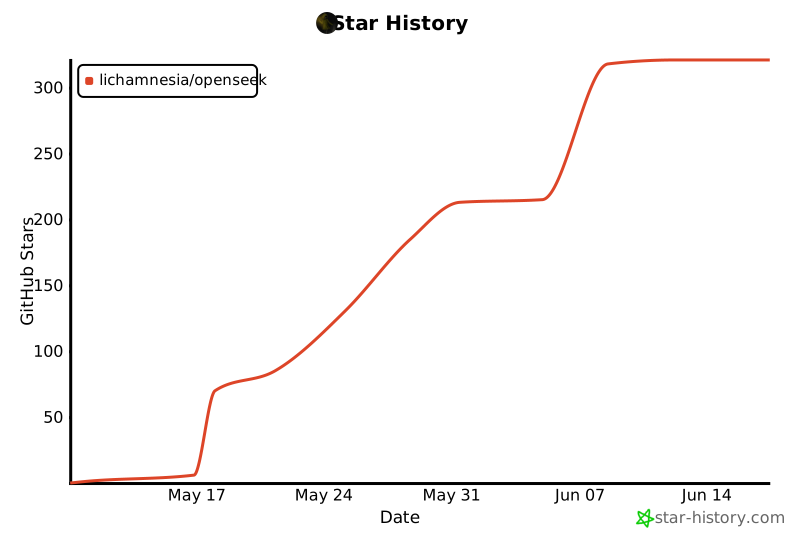
## Star History
## 许可
MIT —— 见 [`LICENSE`](./LICENSE)。