https://github.com/MengTo/Angle-Sketch-Plugin
A free Sketch plugin for creating perspective mockups.
https://github.com/MengTo/Angle-Sketch-Plugin
Last synced: 21 days ago
JSON representation
A free Sketch plugin for creating perspective mockups.
- Host: GitHub
- URL: https://github.com/MengTo/Angle-Sketch-Plugin
- Owner: MengTo
- Created: 2018-02-09T13:52:41.000Z (over 8 years ago)
- Default Branch: master
- Last Pushed: 2023-02-02T21:57:24.000Z (over 3 years ago)
- Last Synced: 2025-04-10T01:09:43.297Z (about 1 year ago)
- Language: JavaScript
- Homepage: https://designcode.io/angle
- Size: 1.26 MB
- Stars: 215
- Watchers: 13
- Forks: 19
- Open Issues: 35
-
Metadata Files:
- Readme: README.md
Awesome Lists containing this project
- awesome-github-projects - Angle-Sketch-Plugin - A free Sketch plugin for creating perspective mockups. ⭐212 `JavaScript` (📦 Legacy & Inactive Projects)
README

Angle is a free and lightweight Sketch plugin for applying perspective transforms for your mockups. You can get the **[starting template](https://angle.sh)** to help you design beautiful mockups from scratch. Check out the **[full tutorial](https://www.youtube.com/watch?v=5uffgI-J29I)**.
# Getting Started
The only thing that Angle needs to work is an Artboard containing your Screen. That's it!

## Installation
Make sure you have the latest version of Sketch (72+) running on macOS Catalina (10.15.0) or newer.
- [Download the zip file](https://github.com/MengTo/Angle-Sketch-Plugin/archive/master.zip).
- Double-click on Angle.sketchplugin
#### Important note:
- This plugin may not work for Sketch 93+. You can use [Mockup](https://github.com/ruslanlatypov/Mockup-Plugin-for-Sketch) (make sure to Detach from Symbol and once applied, rotate 3 times). This will work with Angle mockups.
- use version [1.1.7](https://github.com/MengTo/Angle-Sketch-Plugin/releases/download/v1.1.7/Angle.sketchplugin.zip) for Sketch 86+
- use version [1.1.6](https://github.com/MengTo/Angle-Sketch-Plugin/releases/download/v1.1.6/Angle.sketchplugin.zip) for Sketch 72 to Sketch 85.1
- use version [1.1.5](https://github.com/MengTo/Angle-Sketch-Plugin/releases/download/v1.1.5/Angle.sketchplugin.zip) for Sketch 66 to Sketch 71.2
- use version [1.1.4](https://github.com/MengTo/Angle-Sketch-Plugin/releases/download/v1.1.4/Angle.sketchplugin.zip) for Sketch 65 and earlier.
Apply perspective transforms on screen mockups. Auto-detect screens by resolution and works on shapes and symbols.
## Usage
Select a shape layer and do **Apply Mockup** `Command + \`.
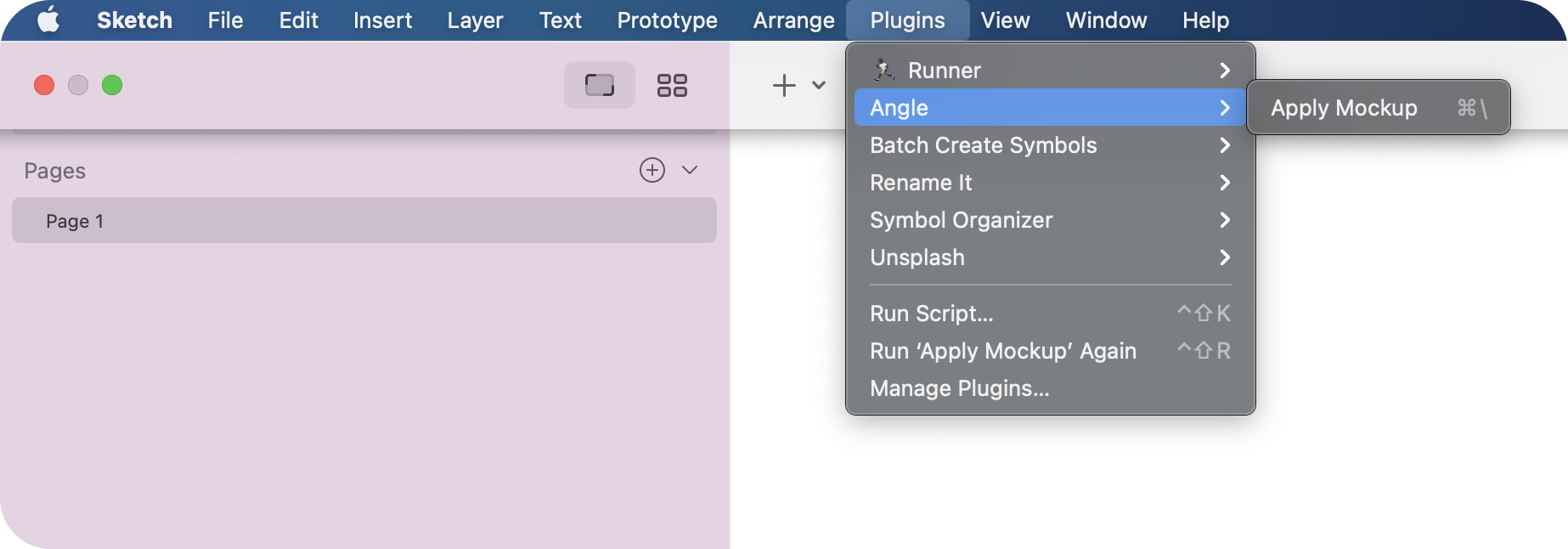
- **Apply Mockup** `Command + \`: this will apply an Artboard to your selected shape.
## Auto-Detect
When applying a mockup, Angle automatically detects all the Artboards, except the current Artboard. No expensive operations while you're designing, as this only happens when you run one of Angle's commands.

## Single Artboard
If you have a single Artboard with your screen, Angle will skip the modal and apply right away. Boom!
## Working with Symbols
If you have a Symbol that contains your Mockup, make sure to have an **Image Fill**. That's how Angle knows that your Symbol contains a mockup.

## Multiple Shapes and Nested Symbols
If you have multiple shapes or a Nested Symbols, you can apply the mockups to multiple destinations.
## Pixel Density
By default, it's set to **Auto**, which will detect the size of selected shape and apply a **2x** pixel density. You can set to **1x**, **2x**, **3x** or **4x**.
## Image Quality
By default, it's set the **Best**. While you'll get the highest quality possible, this will increase your filesize dramatically. By setting to **Better**, **Good** or **Average**, you will make the file smaller.
## Credit
This plugin was made by the team at [Design+Code](https://designcode.io), including [Tiago Mergulhao](https://github.com/tmergulhao), [Meng To](https://twitter.com/mengto) and [Kwan Yip Yap](http://twitter.com/pizza0502).