https://github.com/Moolt/Unity-Null-Reference-Detection
A lightweight plug-in that will find any unassigned component properties at design-time to avoid runtime null-reference exceptions.
https://github.com/Moolt/Unity-Null-Reference-Detection
asset bug component debug exception find free null reference script unassigned unity
Last synced: about 1 year ago
JSON representation
A lightweight plug-in that will find any unassigned component properties at design-time to avoid runtime null-reference exceptions.
- Host: GitHub
- URL: https://github.com/Moolt/Unity-Null-Reference-Detection
- Owner: Moolt
- License: mit
- Created: 2018-11-16T15:47:08.000Z (over 7 years ago)
- Default Branch: master
- Last Pushed: 2023-12-04T21:59:58.000Z (over 2 years ago)
- Last Synced: 2024-11-10T16:46:04.332Z (over 1 year ago)
- Topics: asset, bug, component, debug, exception, find, free, null, reference, script, unassigned, unity
- Language: C#
- Homepage:
- Size: 478 KB
- Stars: 15
- Watchers: 5
- Forks: 3
- Open Issues: 0
-
Metadata Files:
- Readme: Readme.md
- License: LICENSE
Awesome Lists containing this project
README
# Finding null references in Unity
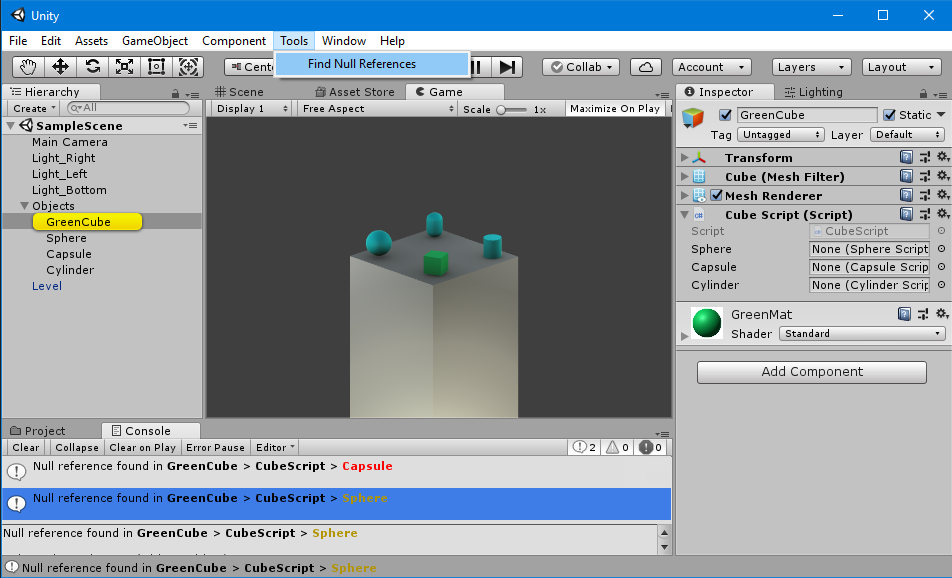
This handy Unity plug-in helps you to find `null references` in your scene objects to avoid runtime exceptions. It's lightweight and both easy to install and to use.
## Setup
If you want to get a quick overview you should check out the [demo project](https://github.com/Moolt/Unity-Null-Reference-Detection/archive/master.zip).
You can also download the [package](https://github.com/Moolt/Unity-Null-Reference-Detection/raw/master/null-reference-detection.unitypackage) containing only the essential scripts.
After downloading and importing the package, you will find a new entry under `Tools > Find Null References`.
## How to use
In the screenshot above there's a cube with a script containing three references. Here's the example code:
```csharp
using NullReferenceDetection;
using UnityEngine;
public class CubeScript : MonoBehaviour {
[SerializeField]
//Serialized, private fields are visible in the inspector
private SphereScript sphere;
[ValueRequired]
//Will be shown as red text if null
public CapsuleScript capsule;
[ValueOptional]
//Won't be shown even if null
public CylinderScript cylinder;
}
```
All fields that appear in the `Unity Inspector` will also be checked for `null` by the plug-in. That includes `public` fields and `serialized private` fields.
In addition you can use two custom attributes to further specify how your fields should be handled:
* `[ValueRequired]` will print a red error message if null
* `[ValueOptional]`won't show in the console even if null
__Using these custom attributes is purely optional__.
If you now execute the plug-in via `Tools > Find Null References` the console will show two error messages, like in the screenshot above. The `capsule` reference is marked as `required`, therefore it's show as red. `sphere` is shown with the default severity and `cylinder` is not shown at all as the `[ValueOptional]` attribute allows the field to be a `null` reference.
## Project Settings
You can open the preferences window by navigating to `Edit -> Project Settings -> Null Reference Detection` where you can define which occurences of null references should be printed to the console. You can also change their text color.
If you want to automatically check for null references, you can do so by activating checks on entering play mode or on compilation. You can also prevent Unity from entering play mode if any null references were found.
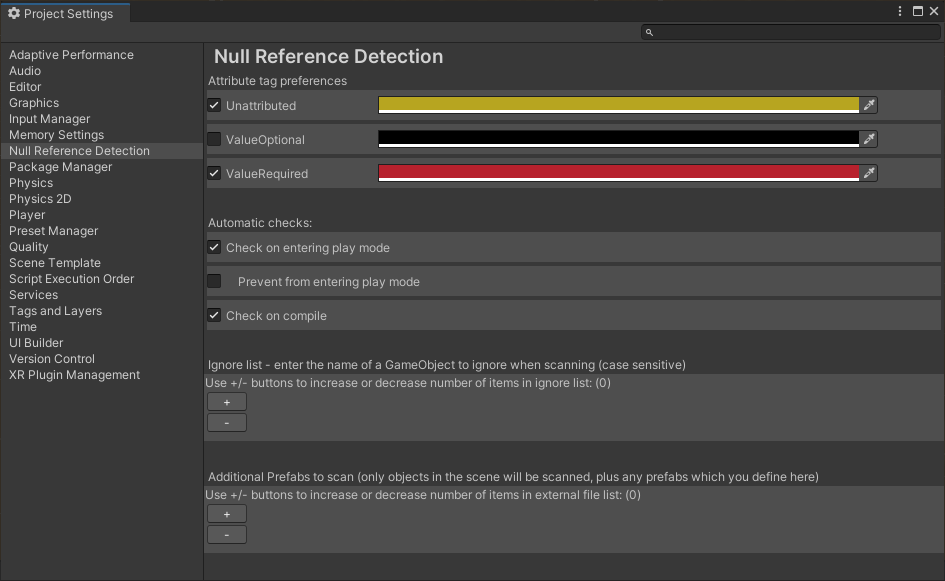
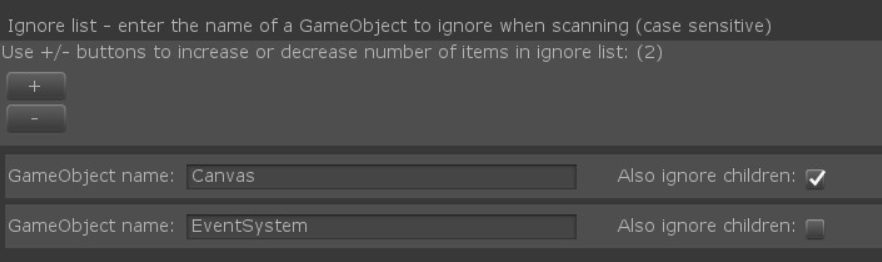
Additionally in the preferences window you can define a list of GameObjects for which null references will be ignored, this is like the [ValueOptional] tag but affects the entire GameObject (and it's children, if the checkbox is ticked).
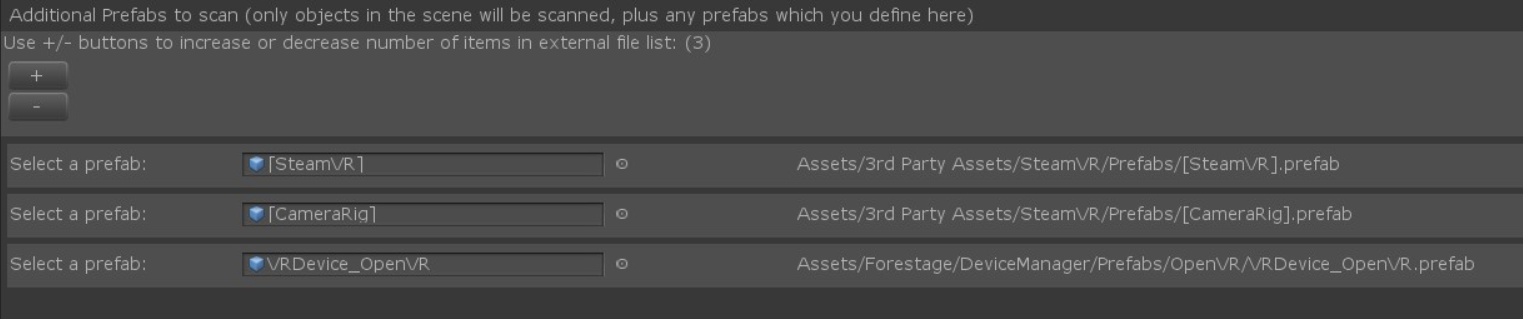
Finaly, by default the plug-in only scans GameObjects which are in the scene. If you have additional prefabs which are only instanciated at run-time, but you would like them to also be checked by the plug-in you can add the path to the prefab here.
## Extension
By inheriting from the abstract `BaseAttribute` class you can implement your own attributes. They will also show up in the preferences window where you assign a color of your choice to your custom attribute.
## Good to know
Clicking on an error message will highlight the target object in the `Hierarchy`, or if the target object is in a prefab it will highlight the folder in the `Project` panel.
The save files for the preferences are plain text files, aiding in ease of use so that you can easily see what was added or removed when staging files or working on a merge request etc.
## The plug-in does not...
* check list items for null references.
* check for properties of default unity components (such as transform, box collider etc.)
* consider objects in other scenes but the currently opened scene.
* consider inactive objects.
* automatically update the entry of a prefab if the filename or path changes