https://github.com/NIyueeE/ds-free-api
DeepSeek网页端API代理,支持OpenAI与Anthropic兼容接口 | OpenAI & Anthropic compatible API proxy for DeepSeek web
https://github.com/NIyueeE/ds-free-api
api api-proxy claude-api deepseek-api freeapi openai-api proxy-server rust
Last synced: about 2 months ago
JSON representation
DeepSeek网页端API代理,支持OpenAI与Anthropic兼容接口 | OpenAI & Anthropic compatible API proxy for DeepSeek web
- Host: GitHub
- URL: https://github.com/NIyueeE/ds-free-api
- Owner: NIyueeE
- License: gpl-3.0
- Created: 2026-03-21T15:17:34.000Z (4 months ago)
- Default Branch: main
- Last Pushed: 2026-05-26T16:27:26.000Z (about 2 months ago)
- Last Synced: 2026-05-26T18:19:12.877Z (about 2 months ago)
- Topics: api, api-proxy, claude-api, deepseek-api, freeapi, openai-api, proxy-server, rust
- Language: Rust
- Homepage:
- Size: 2.03 MB
- Stars: 356
- Watchers: 6
- Forks: 101
- Open Issues: 15
-
Metadata Files:
- Readme: README.en.md
- Changelog: CHANGELOG.md
- License: LICENSE
- Codeowners: .github/CODEOWNERS
- Agents: AGENTS.md
Awesome Lists containing this project
README

DS-Free-API




[中文](README.md)
A Rust API proxy that translates DeepSeek's free web chat into standard OpenAI and Anthropic-compatible API protocols (supports chat completions and messages, including streaming and tool calling).
## Highlights
- **Zero-cost API proxy**: Uses DeepSeek's free web interface — no official API key needed, get OpenAI/Anthropic-compatible endpoints for free
- **Dual protocol support**: Both OpenAI Chat Completions and Anthropic Messages API, drop-in compatible with mainstream clients
- **Tool call ready**: Full OpenAI function calling implementation with a 3-tier self-healing pipeline (text repair → JSON repair → model fallback), covering 10+ malformed formats
- **File upload ready**: Inline data URL files in OpenAI `file`/`image_url` content parts and Anthropic `image`/`document` content blocks are automatically uploaded to DeepSeek sessions; HTTP URLs trigger search mode so the model can access link content directly
- **Oversized prompt fallback**: When the prompt exceeds model limits, automatically falls back to chunked completion with file upload
- **Web admin panel**: Built-in dashboard for account pool status, API key management, request logs, i18n internationalization, theme switcher, and hot-reloadable config — ready out of the box
- **Built with Rust**: Single binary + single TOML config, cross-platform native performance (web panel compiled in at build time)
- **Multi-account pool**: Idle-aware round-robin selection (DashMap lock-free reads), horizontal scaling for concurrency
## Quick Start
### Binary Usage
1. Download and extract the archive for your platform from [releases](https://github.com/NIyueeE/ds-free-api/releases)
2. Copy `config.example.toml` to `config.toml` and fill in accounts (optional — you can also configure via the admin panel after startup)
3. Run `./ds-free-api`
4. Visit `http://127.0.0.1:22217/admin` to set an admin password, then manage API keys and accounts from the panel
```bash
./ds-free-api
./ds-free-api -c /path/to/config.toml
RUST_LOG=debug ./ds-free-api
```
> **Concurrency**: The free API has session-level rate limits. This project has built-in rate-limit detection + exponential backoff retry for stability.
> Recommended parallelism = accounts / 2. Supports starting without `config.toml` and adding accounts via the admin panel.
### Docker Usage
```bash
docker compose -f docker/docker-compose.yaml up -d
```
Refer to the [sample compose file](./docker/docker-compose.yaml) for reference.
The admin panel is at `http://localhost:22217/admin`. Set your admin password on first visit.
The `config/` and `data/` directories are bind-mounted into the container — config changes persist to the host automatically.
### Free Test Accounts
Please register your own. You can refer to the method in [issue #62](https://github.com/NIyueeE/ds-free-api/issues/62).
## API Endpoints
| Method | Path | Description |
|--------|------|-------------|
| GET | `/` | Redirect to admin panel |
| GET | `/health` | Health check |
| POST | `/v1/chat/completions` | Chat completions (streaming + tool calls) |
| GET | `/v1/models` | List models |
| GET | `/v1/models/{id}` | Model details |
| POST | `/anthropic/v1/messages` | Anthropic Messages (streaming + tool calls) |
| GET | `/anthropic/v1/models` | List models (Anthropic format) |
| GET | `/anthropic/v1/models/{id}` | Model details (Anthropic format) |
The admin panel is at `/admin` — on first visit you'll be guided to set an admin password.
## Model Mapping
The `model_types` config in `config.toml` (default `["default", "expert", "vision"]`) maps to model IDs:
| OpenAI Model ID | DeepSeek Mode |
| ------------------ | -------------- |
| `deepseek-default` | Fast mode |
| `deepseek-expert` | Expert mode |
| `deepseek-vision` | Vision mode |
Optional aliases via `model_aliases`, aligned by index with `model_types`. Empty strings are skipped:
```toml
# model_aliases = ["", "deepseek-v4-pro"] → deepseek-v4-pro maps to expert (index 1)
model_aliases = []
```
The Anthropic compatibility layer uses the same model IDs via `/anthropic/v1/messages`.
### Capability Toggles
- **Deep thinking**: Enabled by default. To explicitly disable, include `"reasoning_effort": "none"` in the request body.
- **Web search**: Enabled by default (DeepSeek injects a stronger system prompt in search mode, improving tool call adherence). To explicitly disable, include `"web_search_options": {"search_context_size": "none"}` in the request body.
- **File upload**: Inline files (data URL) are auto-uploaded to DeepSeek sessions; HTTP URLs trigger search mode:
**OpenAI endpoint:**
```json
{"type": "file", "file": {"file_data": "data:text/plain;base64,...", "filename": "doc.txt"}}
{"type": "image_url", "image_url": {"url": "data:image/png;base64,..."}}
{"type": "image_url", "image_url": {"url": "https://example.com/img.jpg"}}
```
**Anthropic endpoint:**
```json
{"type": "image", "source": {"type": "base64", "media_type": "image/png", "data": "..."}}
{"type": "document", "source": {"type": "base64", "media_type": "text/plain", "data": "..."}}
{"type": "image", "source": {"type": "url", "url": "https://example.com/img.jpg"}}
```
### Tool Call Tag Hallucination
Built-in fuzzy matching handles variations (full-width `|`<=>`|`, `▁`<=>`_`) for most formats. If the model outputs a different fallback tag, add it via the admin panel or in `config.toml` under `[ds_core]`:
```toml
tool_call.extra_starts = ["<|tool_call_begin|>", "", ""]
tool_call.extra_ends = ["<|tool_call_end|>", "", ""]
```
## Web Admin Panel
Visit `http://127.0.0.1:22217/admin` after starting the server:
- **Dashboard**: Request statistics, account pool status at a glance
- **Accounts**: View/add/remove accounts, manually re-login accounts in Error state
- **API Keys**: Create/delete API keys, masked display
- **Models**: Available models with details
- **Config**: Current runtime config (sensitive fields masked)
- **Logs**: Recent request logs and runtime logs
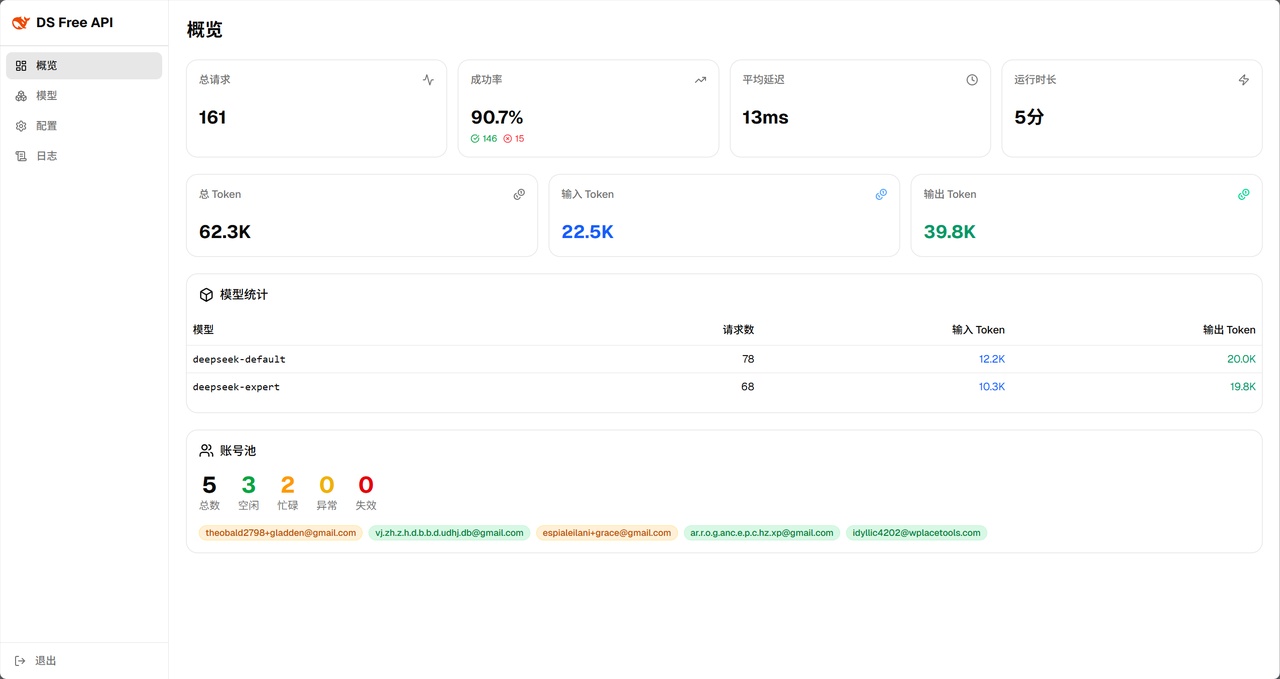
Dashboard overview
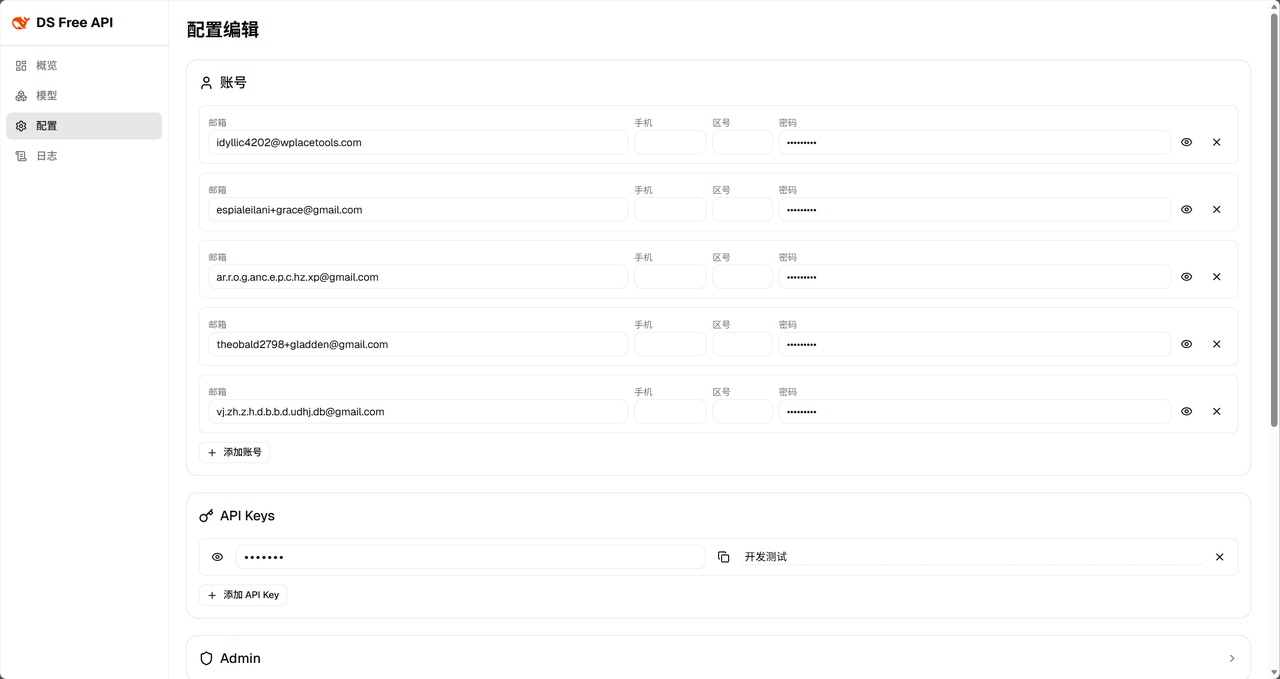
Config editor page
On first visit, you'll be guided to set an admin password (stored as bcrypt hash), then issued a JWT (24h validity). Password reset revokes old tokens.
## Environment Variables
| Variable | Default | Description |
|----------|---------|-------------|
| `RUST_LOG` | `info` | Log level (`trace` / `debug` / `info` / `warn` / `error`) |
| `DS_DATA_DIR` | `.` (current dir) | Data directory for `logs/runtime.log` and `stats.json` |
| `DS_CONFIG_PATH` | `./config.toml` | Config file path (lower priority than `-c` flag) |
## Security
- **Admin panel**: JWT authentication + bcrypt password hash + login rate limiting (5 failures → 5-minute lockout)
- **API access**: API keys created via the admin panel (HashSet O(1) lookup)
- **CORS**: Configurable allowed origins, defaults to `http://localhost:22217`
- **Sensitive data**: Account IDs masked in response headers, request bodies excluded from logs, persisted files at 0600 permissions
## Development
### Design Philosophy
**A single `config.toml` reflects all runtime state.** Admin panel changes are instantly persisted to `config.toml` and hot-reloaded into the running service.
**No unnecessary runtime system dependencies.** The project prioritizes pure Rust or statically-linked dependencies (e.g., `rustls` → `wreq` with BoringSSL), ensuring a single binary with no external `.so`/`.dll` requirements — download and run.
### Architecture Diagram
```mermaid
flowchart TB
%% ===== Theme =====
classDef client fill:#eff6ff,stroke:#3b82f6,stroke-width:3px,color:#1d4ed8,rx:14,ry:14
classDef gateway fill:#fffbeb,stroke:#f59e0b,stroke-width:3px,color:#92400e,rx:12,ry:12
classDef openai_adapter fill:#f8fafc,stroke:#0a9e7b,stroke-width:2px,color:#334155,rx:10,ry:10
classDef anthropic_compat fill:#f8fafc,stroke:#d07354,stroke-width:2px,color:#334155,rx:10,ry:10
classDef ds_core fill:#f8fafc,stroke:#3964fe,stroke-width:2px,color:#1e40af,rx:10,ry:10
classDef external fill:#fef2f2,stroke:#ef4444,stroke-width:3px,color:#991b1b,rx:6,ry:6
%% ===== Nodes =====
Client(["Client"]):::client
subgraph GW ["HTTP Gateway Layer"]
Handler(["Router / Auth / Serialization"]):::gateway
end
subgraph PL ["Protocol Layer"]
direction TB
subgraph AC ["Anthropic Compat"]
A2O["Request
Anthropic → OpenAI"]:::anthropic_compat
O2A["Response
OpenAI → Anthropic"]:::anthropic_compat
end
subgraph OA ["OpenAI Adapter"]
ReqPipe["Request Pipeline
Validation / Tool Extraction / Prompt Building"]:::openai_adapter
RespPipe["Response Pipeline
SSE Parsing / Format Conversion / Tool Repair"]:::openai_adapter
end
end
subgraph CL ["Core Layer (ds_core)"]
Pool["Account Pool Rotation"]:::ds_core
PoW["PoW Solver"]:::ds_core
Session["Session Orchestration
Create/Destroy / History Upload"]:::ds_core
end
DeepSeek[("DeepSeek API")]:::external
%% ===== Connections =====
Client -->|"HTTP Request"| Handler
Handler -->|"OpenAI Request"| ReqPipe
Handler -->|"Anthropic Request"| A2O
A2O -->|"OpenAI Request"| ReqPipe
ReqPipe --> Pool
Pool --> PoW
PoW --> Session
Session -->|"completion endpoint"| DeepSeek
Session -.->|"DeepSeek SSE Stream"| RespPipe
RespPipe -.->|"OpenAI Response"| Handler
RespPipe -.->|"OpenAI Response"| O2A
O2A -.->|"Anthropic Response"| Handler
%% ===== Subgraph Styles =====
style GW fill:#fffbeb,stroke:#f59e0b,stroke-width:2px,stroke-dasharray: 5 5
style PL fill:#fafafa,stroke:#94a3b8,stroke-width:2px
style AC fill:#fdf0ec,stroke:#d07354,stroke-width:2px
style OA fill:#e6f7f3,stroke:#0a9e7b,stroke-width:2px
style CL fill:#eef2ff,stroke:#3964fe,stroke-width:2px,stroke-dasharray: 5 5
```
### Data Pipeline
#### OpenAI (chat_completions) Pipeline:
```mermaid
flowchart TB
%% ===== Theme =====
classDef ds_core fill:#eef2ff,stroke:#3964fe,stroke-width:2.5px,color:#1e40af,rx:10,ry:10
classDef openai_adapter fill:#e6f7f3,stroke:#0a9e7b,stroke-width:2.5px,color:#065f46,rx:10,ry:10
classDef step fill:#fffbeb,stroke:#f59e0b,stroke-width:1.5px,color:#334155,rx:6,ry:6
subgraph RQ ["Request Pipeline"]
direction TB
Q1["ChatCompletionsRequest"]:::openai_adapter
Q2["Validation + Defaults"]:::step
Q3["Extract tools/files + inject prompts"]:::step
Q4["Build DeepSeek native tag prompt"]:::step
Q5["Model mapping + capability toggles"]:::step
Q6["Retry with exp. backoff
1s→2s→4s→8s→16s"]:::step
Q7["ChatRequest"]:::ds_core
end
subgraph RS1 ["Non-streaming Response"]
direction TB
OR1["ds_core SSE stream"]:::ds_core
OR2["SSE frame parse
ContentDelta / Usage"]:::step
OR3["State machine merge
contiguous text / accumulate usage"]:::step
OR4["Chunk aggregation
concat content / reasoning / tool_calls"]:::step
OR5["ChatCompletionsResponse"]:::openai_adapter
end
subgraph RS2 ["Streaming Response"]
direction TB
OS1["ds_core SSE stream"]:::ds_core
OS2["SSE frame parse + state machine"]:::step
OS3["Chunk conversion
DsFrame → ChatCompletionsResponseChunk"]:::step
OS4["Tool call XML parse"]:::step
OS5["Malformed tool call repair"]:::step
OS6["Stop sequence detect + obfuscation"]:::step
OS7["ChatCompletionsResponseChunk"]:::openai_adapter
end
Q1 --> Q2 --> Q3 --> Q4 --> Q5 --> Q6 --> Q7
OR1 --> OR2 --> OR3 --> OR4 --> OR5
OS1 --> OS2 --> OS3 --> OS4 --> OS5 --> OS6 --> OS7
style RQ fill:#f8fafc,stroke:#0a9e7b,stroke-width:2px
style RS1 fill:#f8fafc,stroke:#0a9e7b,stroke-width:2px
style RS2 fill:#f8fafc,stroke:#0a9e7b,stroke-width:2px
```
#### Anthropic (messages) Pipeline:
```mermaid
flowchart TB
%% ===== Theme =====
classDef oai fill:#e6f7f3,stroke:#0a9e7b,stroke-width:2.5px,color:#065f46,rx:10,ry:10
classDef anth fill:#fdf0ec,stroke:#d07354,stroke-width:2.5px,color:#7c3a2a,rx:10,ry:10
classDef step fill:#fffbeb,stroke:#f59e0b,stroke-width:1.5px,color:#334155,rx:6,ry:6
subgraph RQ ["Request Pipeline"]
direction TB
Q1["MessagesRequest"]:::anth
Q2["Message expansion
System prepend / text merge / image+document mapping"]:::step
Q3["Tool mapping
ToolUnion → OpenAI Tool"]:::step
Q4["Capability toggle mapping
thinking → reasoning_effort"]:::step
Q5["ChatCompletionsRequest"]:::oai
end
subgraph RS3 ["Non-streaming Response"]
direction TB
AR1["ChatCompletionsResponse"]:::oai
AR2["Content decomposition
reasoning → Thinking
content → Text
tool_calls → ToolUse"]:::step
AR3["ID mapping
chatcmpl → msg
call → toolu"]:::step
AR4["MessagesResponse"]:::anth
end
subgraph RS4 ["Streaming Response"]
direction TB
AS1["ChatCompletionsResponseChunk stream"]:::oai
AS2["Chunk state machine
block type switch / index progression"]:::step
AS3["Event mapping
content → text_delta
reasoning → thinking_delta
tool_calls → input_json_delta"]:::step
AS4["MessagesResponseChunk"]:::anth
end
Q1 --> Q2 --> Q3 --> Q4 --> Q5
AR1 --> AR2 --> AR3 --> AR4
AS1 --> AS2 --> AS3 --> AS4
style RQ fill:#f8fafc,stroke:#d07354,stroke-width:2px
style RS3 fill:#f8fafc,stroke:#d07354,stroke-width:2px
style RS4 fill:#f8fafc,stroke:#d07354,stroke-width:2px
```
For detailed development guide (building, testing, Docker deployment, e2e testing, etc.), see [docs/development.md](./docs/development.md).
## License
[GNU General Public License v3.0](LICENSE)
[DeepSeek's official API](https://platform.deepseek.com/top_up) is very affordable — please support the official service.
This project was born from the desire to try the latest models in DeepSeek's web interface during grayscale testing.
**Commercial use is strictly prohibited** to avoid putting pressure on official servers. Use at your own risk.