https://github.com/OPPO-PersonalAI/Agent_Foundation_Models
Chain-of-Agents: End-to-End Agent Foundation Models via Multi-Agent Distillation and Agentic RL.
https://github.com/OPPO-PersonalAI/Agent_Foundation_Models
Last synced: 10 months ago
JSON representation
Chain-of-Agents: End-to-End Agent Foundation Models via Multi-Agent Distillation and Agentic RL.
- Host: GitHub
- URL: https://github.com/OPPO-PersonalAI/Agent_Foundation_Models
- Owner: OPPO-PersonalAI
- License: apache-2.0
- Created: 2025-08-05T15:38:50.000Z (10 months ago)
- Default Branch: main
- Last Pushed: 2025-08-20T06:08:42.000Z (10 months ago)
- Last Synced: 2025-08-20T08:22:16.603Z (10 months ago)
- Language: Python
- Homepage:
- Size: 25.3 MB
- Stars: 39
- Watchers: 0
- Forks: 3
- Open Issues: 0
-
Metadata Files:
- Readme: README.md
- License: LICENSE
Awesome Lists containing this project
- awesome - OPPO-PersonalAI/Agent\_Foundation\_Models - Chain-of-Agents: End-to-End Agent Foundation Models via Multi-Agent Distillation and Agentic RL. (Python)
README
Chain-of-Agents: End-to-End Agent Foundation Models via Multi-Agent Distillation and Agentic RL, OPPO PersonalAI Lab.


This is the official repository for our paper "Chain-of-Agents: End-to-End Agent Foundation Models via Multi-Agent Distillation and Agentic RL". Our work introduces a novel paradigm for LLM reasoning that enables end-to-end complex problem-solving within a single model, simulating multi-agent collaboration through dynamic activation of tool agents and role-playing agents.

# Overview
Recent advances in large language models (LLMs) and multi-agent systems have demonstrated remarkable capabilities in complex problem-solving. However, existing multi-agent systems often rely on manual prompt engineering and sophisticated frameworks, leading to inefficiencies.
We propose:
- **Chain-of-Agents (CoA)**: A paradigm enabling end-to-end complex problem-solving within one model
- **Agent Foundation Model (AFM)**: Model trained through our multi-agent distillation framework and agentic reinforcement learning
# SOTA Performance

We present the **Chain-of-Agents Distillation framework**, a novel approach that significantly advances the capabilities of LLMs. By applying CoA distillation pipeline to Qwen-2.5 series models, we developed the Agent Foundation Model (AFM), which achieves state-of-the-art performance across multiple benchmarks. For instance, our 32B AFM model reaches an average success rate of **55.3%** (**Pass@1**) on the GAIA benchmark. It also scores **11.1%** on BrowseComp, **63.0%** on WebWalker, and **18.0%** on HLE. The effectiveness of CoA distillation is further demonstrated by our 7B model, which achieves a remarkable **15.6%** on HLE.


Test-time scaling also significantly enhances AFM's performance across all benchmarks: **AFM-Bo3** achieves **57.3%** on GAIA, **64.7%** on WebWalker, **11.3%** on BrowseComp and **23.0%** on HLE, while **AFM-Pass@3** reaches **69.9%** on GAIA, **78.7%** on WebWalker, **19.2%** on BrowseComp, and **33.2%** on HLE.
We fully open-source our data, model, and training and inference code to ensure the reproducibility of our results. For more details, please refer to our [Technical Report](https://arxiv.org/pdf/2508.13167).
# Quick Feature Summary
| Feature Category | Supported Capabilities|
| - | - |
| **Core Paradigm** | ✅ Chain-of-Agents (CoA) for end-to-end problem-solving
✅ Single-model simulation of multi-agent collaboration
✅ Dynamic activation of tool agents and role-playing agents |
| **Training Framework** | ✅ Multi-Agent Distillation pipeline
✅ Agentic Reinforcement Learning support
✅ Mask fine-tuning for selective learning |
| **Agent Capabilities** | ✅ Web interaction (Web Agent)
✅ Multi-hop question answering (MHQA Agent)
✅ Code execution (Code Agent) |
| **Tool Integration** | ✅ Web search and crawling servers
✅ Secure code sandbox (via nsjail)
✅ Configurable multi-tool collaboration |
| **Evaluation** | ✅ Multi-scenario benchmark testing
✅ Custom reward model integration
|
# Table of Contents
- [Overview](#overview)
- [SOTA Performance](#sota-performance)
- [Quick Feature Summary](#quick-feature-summary)
- [Table of Contents](#table-of-contents)
- [Running Examples](#running-examples)
- [Training](#training)
- [Supervised Fine-tuning](#supervised-fine-tuning)
- [1. Env Setup](#1-env-setup)
- [2. Prepare SFT Dataset](#2-prepare-sft-dataset)
- [3. Start training with default parameters](#3-start-training-with-default-parameters)
- [Reinforement Learning](#reinforement-learning)
- [1. Env Setup](#1-env-setup-1)
- [2. Tool usage](#2-tool-usage)
- [2.1 Search Servers](#21-search-servers)
- [2.2 Code Server(s)](#22-code-servers)
- [4. Configuration](#4-configuration)
- [5. Dataset Processing](#5-dataset-processing)
- [6. Training](#6-training)
- [Evaluation](#evaluation)
- [Multi Hop QA (MHQA) Evaluation](#multi-hop-qa-mhqa-evaluation)
- [Web Agent Evaluation](#web-agent-evaluation)
- [Code Agent Evaluation](#code-agent-evaluation)
- [Acknowledgement](#acknowledgement)
- [Citation](#citation)
- [Star](#star)
# Running Examples
## Training
### Supervised Fine-tuning
#### 1. Env Setup
```bash
conda create -n llama_factory python=3.10
conda activate llama_factory
pip install deepspeed
pip install swanlab
cd LLaMA-Factory
pip install -e '.[torch,metrics]'
```
#### 2. Prepare SFT Dataset
Download SFT Dataset for Web/MHQA/Code Agent:
```py
python ./AFM/data/web_agent/download.py
python ./AFM/data/mhqa_agent/download.py
python ./AFM/data/code_agent/download.py
```
Add the downloaded dataset filepath to `LLaMA-Factory/data/dataset_info.json`, for example:
```json
"code_agent_sft": {
"file_name": "path/to/downloaded/AFM-WebAgent-SFT-Dataset/WebAgentSFTDataset.json"
}
```
#### 3. Start training with default parameters
The training scripts are list in `./train`.
Example of sft for code agent:
```bash
bash ./AFM/train/code_agent/sft/sft_qwen2.5_7b.sh
```
Note `DATA_DATA` in the training bash script should be the key in `LLaMA-Factory/data/dataset_info.json`, like `web_agent_sft`, `mhqa_agent_sft`, `code_agent_sft`.
Logs output to output_dir/training.log. We use [SwanLab](https://swanlab.cn/) for visualization (requires setup):
```bash
--swanlab_api_key xxx # Your SWANLAB_API_KEY
--swanlab_project xxx # Your SWANLAB_PROJECT
```
Key Configurable Parameters
```
ignore_observation=true # Whether to mask content within special tokens
ignore_observation_token=observation # Specify special token
```
**Note: Check if special tokens are properly masked and data length is appropriate after starting.**
### Reinforement Learning
#### 1. Env Setup
```bash
# Create virtual environment.
conda create -n afm python=3.10.14 -y
conda activate afm
# Phase 1
pip install symeval@git+https://github.com/tongyx361/symeval.git@54c1a844ea4a6db486c5af8b5b4d2f383224a83b
pip install latex2sympy2==1.9.1
pip install --force-reinstall antlr4-python3-runtime==4.9.3
# Phase 2
cd verl
pip install -r requirements.txt
# Phase 3
pip install --force-reinstall protobuf==5.29.5
pip install --force-reinstall --no-deps grpcio-status==1.71.0 selenium==4.33.0
# Phase 4
cd ..
git clone https://github.com/NVIDIA/apex.git
cd apex
python -m pip install -v --disable-pip-version-check --no-cache-dir --no-build-isolation --global-option="--cpp_ext" --global-option="--cuda_ext" ./
cd ..
# Phase 5
cd verl
pip install -r requirements_sglang.txt
cd ..
```
#### 2. Tool usage
##### 2.1 Search Servers
We have developed two server-side components to support web interactions:
- A web search server
- A page crawling server
For detailed deployment instructions, please refer to `AFM/tool_servers/tool_server_readme.md`.
##### 2.2 Code Server(s)
Our Python executor leverages the powerful local isolation sandbox capabilities provided by [nsjail](https://github.com/google/nsjail). We greatly appreciate the nsjail project for enabling secure code execution.
To use this feature during training, you need to:
1. Clone and build nsjail
```bash
git clone https://github.com/google/nsjail.git
cd nsjail
make
```
2. Add the absolute path to the nsjail_path in code tool configuration file `verl/verl/tools/config/code_tool_config/code_executor.yaml`:
```yaml
nsjail_path: /abs_path/to/your/nsjail/nsjail
```
#### 4. Configuration
1. Edit the `environment.sh` file and fill in your API keys and other required credentials
2. Apply the environment settings:
```bash
source environment.sh
```
#### 5. Dataset Processing
The `./AFM/data/README.md` contains scripts and instructions for processing search agent model related data.
For code agent model, the validation datasets are already provided in the `./AFM/data/code_agent/code_math_benchmarks` folder, with corresponding processing instructions available in `./AFM/data/code_agent/code_math_benchmarks/README.md`.
The final web_agent and mhqa_agent dataset format is shown below and stored in .parquet:
```python
{
"data_source": data_source,
"prompt": [
{"role": "user", "content": sys_prompt + question}
],
"reward_model": {
"ground_truth": {"target": answer}
},
"extra_info": {
"need_tools_kwargs": True,
"question": question,
"answer": answer,
"tools_kwargs": tools_kwargs
}
}
```
#### 6. Training
To start a training run:
1. All Agentic-RL script examples are listed:
- Web Agent: `./AFM/train/web_agent/rl/train_dapo_web_agent.sh`
- Code Agent: `./AFM/train/code_agent/rl/train_dapo_code_agent.sh`
- MHQA Agent: `./AFM/train/mhqa_agent/rl/train_ppo_mhqa_agent.sh`
2. Edit the corresponding script to specify your downloaded dataset and model
3. Make sure you have already fill in the `environment.sh` and source
4. All tool configs are listed and have been specified in training scripts:
- web_search and crawl_page: `verl/verl/tools/config/search_tool_config/training_servers_config.yaml`
- code_executor: `verl/verl/tools/config/code_tool_config/code_executor.yaml`
- wiki_search: `verl/verl/tools/config/search_tool_config/wiki_rag_config.yaml`
- all_tools: `verl/verl/tools/config/afm_tool_config/afm_tool_config.yaml`
5. Execute the training script like:
```bash
bash ./AFM/train/web_agent/rl/train_dapo_web_agent.sh
```
## Evaluation
### Multi Hop QA (MHQA) Evaluation
1. To evaluate MHQA datasets, you should first download the AFM-MHQA-Agent-7B-rl model and test datasets
2. Transform the test dataset to parquet format.
```bash
cd ./AFM/data/mhqa_agent
bash ./prepare.sh
```
3. Then fill the corresponding dataset and model in scripts below and run
```bash
bash evaluation/inference_mhqa.sh
```
### Web Agent Evaluation
1. To evaluate web agent, you should first download the AFM-WebAgent-32B-RL checkpoint (or your own) and test dataset.
2. Set environment variable `source environment.sh`.
3. Set `model_path` in the `run_qwen.sh` script, and serve the model with the following command `./AFM/evaluation/web_agent/run_qwen.sh`. After several minutes, the script will output like `URL Endpoint: http://10.77.225.92:10000/v1`.
4. Choose from available test sets in `./AFM/data/web_agent/test_benchmarks`: gaia, hle, webwalker, browsercomp.
5. Finally, set `URL` in `inference_web_agent.py` according to step3, and execute the python script to start webagent inference and evaluation.
```bash
python ./AFM/evaluation/web_agent/inference_web_agent.py \
--infile ./AFM/data/web_agent/test_benchmarks/gaia_dev_103.json \
--outfile ./AFM/evaluation/web_agent/results/webagent_out.jsonl
```
### Code Agent Evaluation
1. All math and code related evaluation datasets are stored in the `./AFM/data/code_agent/code_math_benchmarks` folder.
2. Please fill in the downloaded code agent model AFM-CodeAgent-32B-rl and validation datasets in `./AFM/evaluation/code_agent/eval_code_agent.sh`
3. Make sure you have build nsjail code sandbox and fill in the corresponding config. Then run
```bash
bash ./AFM/evaluation/code_agent/eval_code_agent.sh
```
In addition, if you want to evaluate livecodebench datasets, please use the scripts `./AFM/data/code_agent/livecodebench_testcases/download_and_process.py` to generate corresponding testcases. We would like to thank the [Skywork-OR1](https://github.com/SkyworkAI/Skywork-OR1) for their open-source evaluation code. Our evaluation implementation for math and code training sets was inspired by and adapted from their work.
# Acknowledgement
We would like to express our sincere gratitude to the original authors and contributors of LLaMA-Factory and verl, an excellent open-source project that provided a solid foundation for our work. Our implementation has been adapted from the [LLaMA-Factory](https://github.com/hiyouga/LLaMA-Factory) and [verl](https://github.com/volcengine/verl).
Specifically, based on the LLaMA-Factory framework, we have modified the implementation of fine-tuning pipeline to support mask fine-tuning; while in the VeRL framework, we have enhanced it with functionalities: tool calling for reinforcement learning training, reward design, and related supporting features.
## Citation
If you find `AFM` useful in your research or applications, we would appreciate it if you could cite our work:
```bibtex
@misc{li2025chainofagentsendtoendagentfoundation,
title={Chain-of-Agents: End-to-End Agent Foundation Models via Multi-Agent Distillation and Agentic RL},
author={Weizhen Li and Jianbo Lin and Zhuosong Jiang and Jingyi Cao and Xinpeng Liu and Jiayu Zhang and Zhenqiang Huang and Qianben Chen and Weichen Sun and Qiexiang Wang and Hongxuan Lu and Tianrui Qin and Chenghao Zhu and Yi Yao and Shuying Fan and Xiaowan Li and Tiannan Wang and Pai Liu and King Zhu and He Zhu and Dingfeng Shi and Piaohong Wang and Yeyi Guan and Xiangru Tang and Minghao Liu and Yuchen Eleanor Jiang and Jian Yang and Jiaheng Liu and Ge Zhang and Wangchunshu Zhou},
year={2025},
eprint={2508.13167},
archivePrefix={arXiv},
primaryClass={cs.AI},
url={https://arxiv.org/abs/2508.13167},
}
```
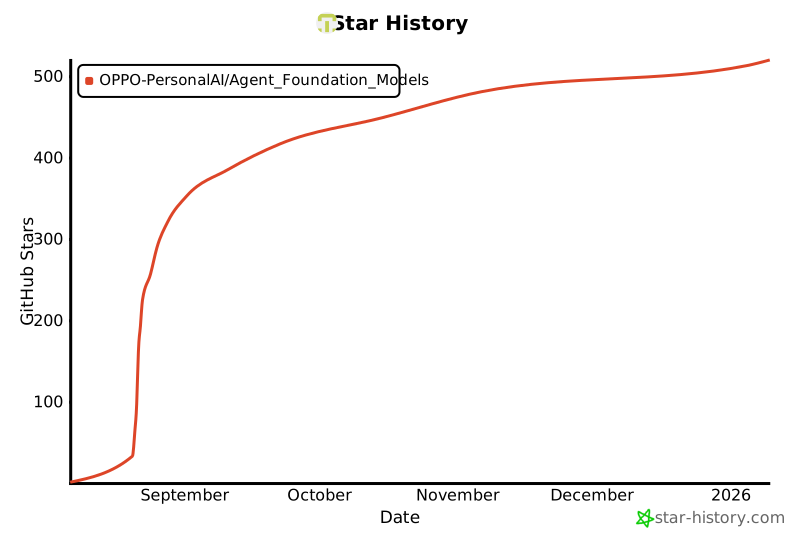
# Star
[](https://github.com/OPPO-PersonalAI/Agent_Foundation_Models)