https://github.com/Paca-AI/paca
AI-native, free, open-source alternative to Jira, Trello, ClickUp & Monday. Built for Scrum teams where humans and AI agents collaborate as equals — on the same board, the same sprints, the same goals. Self-hosted. Fully customizable via config and plugins.
https://github.com/Paca-AI/paca
ai-agent bdd clickup-alternative jira-alternative mcp open-source openhands project-management scrum scrumban self-hosted trello-alternative wasm-plugins
Last synced: 3 months ago
JSON representation
AI-native, free, open-source alternative to Jira, Trello, ClickUp & Monday. Built for Scrum teams where humans and AI agents collaborate as equals — on the same board, the same sprints, the same goals. Self-hosted. Fully customizable via config and plugins.
- Host: GitHub
- URL: https://github.com/Paca-AI/paca
- Owner: Paca-AI
- License: apache-2.0
- Created: 2026-03-20T03:35:40.000Z (6 months ago)
- Default Branch: master
- Last Pushed: 2026-06-24T08:01:38.000Z (3 months ago)
- Last Synced: 2026-06-24T08:26:29.728Z (3 months ago)
- Topics: ai-agent, bdd, clickup-alternative, jira-alternative, mcp, open-source, openhands, project-management, scrum, scrumban, self-hosted, trello-alternative, wasm-plugins
- Language: Go
- Homepage: https://paca-ai.org
- Size: 48.3 MB
- Stars: 1,290
- Watchers: 2
- Forks: 77
- Open Issues: 2
-
Metadata Files:
- Readme: README.md
- Contributing: CONTRIBUTING.md
- License: LICENSE
- Code of conduct: CODE_OF_CONDUCT.md
- Security: SECURITY.md
- Roadmap: ROADMAP.md
Awesome Lists containing this project
- awesome-github-repos - Paca-AI/paca - AI-native, free, open-source alternative to Jira, Trello, ClickUp & Monday. Built for Scrum teams where humans and AI agents collaborate as equals — on the same board, the same sprints, the same goals (Go)
README

Paca
AI-native. Free. Lightweight. Open-source.
The fully customizable alternative to Jira, Trello, ClickUp, and Monday.



Getting Started
·
MCP Server
·
Claude Code Skill
·
Architecture
·
Contributing
·
Roadmap
---
## What is Paca?
Paca is a **self-hosted project management platform** where AI agents and humans collaborate as equal teammates inside a Scrum team — not as chatbots bolted on the side.
Jira gives you a backlog. ClickUp gives you automations. Monday gives you dashboards. **Paca gives your AI agents a seat at the table.** They join sprint planning, pick up tasks from the board, write BDD specs, and adapt alongside humans in real time.
Everything about Paca — its workflow, its data model, its UI — is **configurable and extendable via plugins**.
---
## Why Paca?
| | Jira / Trello / ClickUp / Monday | **Paca** |
|:--|:--|:--|
| **AI integration** | Chatbot add-ons, peripheral automation | AI agents as first-class Scrum teammates |
| **Collaboration model** | Human-only by default | Human + AI, side by side on the same board |
| **Hosting** | Vendor cloud (your data, their servers) | Self-hosted, you own everything |
| **Cost** | $8–$20+ per seat/month | **Free forever** |
| **Customization** | Limited; locked behind enterprise tiers | **Fully open: configuration + plugins** |
| **Weight** | Bloated feature sprawl | Lightweight core; extend only what you need |
| **Source** | Closed / proprietary | **100% open-source (Apache 2.0)** |
---
## Core Idea: Humans and AI Agents, One Scrum Team
The central insight behind Paca is that **AI agents should participate in the Scrum process**, not just generate output in isolation.
In Paca, AI agents:
- Are **assigned to sprints** and appear on the Scrumban board alongside human teammates
- **Pick up tasks** from the backlog and update their status in real time
- **Collaborate on BDD specs** — helping Product Owners and BAs write Gherkin scenarios
- **Contribute to System Design Documents** — keeping the architecture visible to the whole team
- **Probe, sense, and respond** to emerging complexity, just like a human would
This is not automation. It is **genuine collaboration** — rooted in the Cynefin / Stacey framework's recognition that complex domains require teams, not pipelines.

---
## Fully Customizable — Configuration and Plugins
Paca ships as a small, focused core. Everything else is optional.
**Configuration-driven:** workflows, statuses, field definitions, board layouts, sprint rules, and agent behavior are all driven by project-level configuration files. No code needed to adapt Paca to your team's process.
**Plugin system:** extend or replace any part of Paca via plugins. Plugins are compiled to **WebAssembly (WASM)** for the backend (write in Go, Rust, AssemblyScript — anything with a WASM target) and standard module bundles for the frontend. Plugins run in a sandboxed environment with a capability-based permission model; they declare exactly what host functions they need, and nothing more.
```
plugins/
├── backend/ # WASM modules — add custom routes, logic, data models
└── frontend/ # UI modules — add custom pages, board views, widgets
```
Browse and install community plugins directly from the **Plugin Marketplace** inside the Paca UI — no command line required. Go to **Settings → Plugins → Marketplace**, find a plugin, and click **Install**.

For local development or custom plugins, you can also install from the filesystem:
```bash
./scripts/install-local-plugin.sh ./my-plugin --api-key
```
---
## The P-A-C-A Cycle
Paca structures team collaboration around four phases that mirror both Scrum and the scientific method:
```
Plan → Act → Check → Adapt
↑ |
└─────────────────────────────┘
```
| Phase | What happens |
|:--|:--|
| **Plan** | POs, BAs, and AI agents collaboratively refine the backlog. BDD scenarios and SDD designs are written together. |
| **Act** | Sprint is live. Humans and AI agents pull tasks from the board, execute, and post updates. |
| **Check** | QA agents run automated verification. Humans review AI output. The board reflects reality. |
| **Adapt** | Data from the sprint informs the next cycle. The team — human and AI — retrospects together. |
---
## What's New in v0.4.0
- **In-app AI chat** — chat with AI agents at the project level to plan work, create or update epics, stories, tasks, and documentation — all in plain English without leaving Paca

- **Activity diff & revert** — every field change in the activity pane now shows a before/after diff; one click reverts a change to its previous value

---
## Key Features
- **Unified Scrumban Board** — humans and AI agents share a single real-time board; no separate "AI workspace"
- **In-app AI chat** — chat with AI agents at the project level to plan work, create or update epics, stories, tasks, and documentation in plain English
- **Activity diff & revert** — see a visual diff for every field change in the activity pane and revert any change with one click
- **BDD Collaboration** — Gherkin scenario editor co-authored by POs, BAs, and AI agents
- **System Design Documents (SDD)** — living architecture docs that keep AI agents contextually grounded
- **MCP Server** — connect Claude, custom agents, or any MCP-compatible tool directly into Paca's data layer
- **Claude Code skill** — `/paca` slash command for Claude Code; manage tasks, docs, and sprints in plain English without leaving your editor
- **Real-time updates** — Socket.IO delivery; everyone sees changes the moment they happen
- **OpenHands-powered agents** — AI agents run on the [OpenHands](https://github.com/All-Hands-AI/OpenHands) SDK; each agent executes inside its own isolated sandbox container so your host environment is never touched
- **WASM plugin sandbox** — extend Paca safely; plugins cannot escape their declared permissions
- **Self-hosted** — runs on a single Docker Compose command; your data never leaves your infrastructure
- **Lightweight by default** — minimal core, no feature bloat; add only what your team actually needs
---
## Getting Started
### Option 1 — Interactive install script (recommended for production)
Runs on any Linux server with Docker. No repository clone required.
```bash
curl -fsSL https://github.com/Paca-AI/paca/releases/latest/download/install.sh | bash
```
The script walks you through configuration interactively and starts the full stack. Open `http://your-server-ip` when it finishes.

---
### Option 2 — Docker Compose (manual)
**1. Create a directory and download the compose file**
```bash
mkdir paca && cd paca
curl -fsSL https://github.com/Paca-AI/paca/releases/latest/download/docker-compose.yml -o docker-compose.yml
mkdir -p caddy
curl -fsSL https://github.com/Paca-AI/paca/releases/latest/download/Caddyfile -o caddy/Caddyfile
```
**2. Download the environment template**
```bash
curl -fsSL https://github.com/Paca-AI/paca/releases/latest/download/.env.production.example -o .env
```
**3. Generate secure passwords and secrets**
```bash
POSTGRES_PASSWORD=$(openssl rand -hex 32)
ADMIN_PASSWORD=$(openssl rand -hex 16)
JWT_SECRET=$(openssl rand -hex 32)
ENCRYPTION_KEY=$(openssl rand -hex 32)
```
Optional: Generate API keys if you'll use the AI agent or external integrations:
```bash
AGENT_API_KEY=$(openssl rand -hex 32)
INTERNAL_API_KEY=$(openssl rand -hex 32)
```
Optional: Generate MinIO credentials or use your own:
```bash
STORAGE_ACCESS_KEY_ID=$(openssl rand -hex 16)
STORAGE_SECRET_ACCESS_KEY=$(openssl rand -hex 32)
```
**4. Update .env with your values**
Edit the `.env` file and replace the placeholder values with the ones you generated above. Below are the required fields:
```bash
PUBLIC_URL=http://localhost
POSTGRES_PASSWORD=
ADMIN_USERNAME=admin
ADMIN_PASSWORD=
JWT_SECRET=
ENCRYPTION_KEY=
STORAGE_ACCESS_KEY_ID=
STORAGE_SECRET_ACCESS_KEY=
```
**5. Start the stack**
```bash
docker compose --env-file .env up -d
```
> **⚠️ Important:** Save your generated passwords and secrets securely. You'll need `ADMIN_USERNAME` and `ADMIN_PASSWORD` to log in.
**Login:** Open `http://localhost` and use the admin credentials you set above.
> **Customizing the stack:** scale down services you don't need.
>
> ```bash
> # External PostgreSQL (supply DATABASE_URL in .env)
> docker compose --env-file .env up -d --scale postgres=0
>
> # AWS S3 instead of MinIO (set STORAGE_PROVIDER=s3 in .env)
> docker compose --env-file .env up -d --scale minio=0
>
> # Without the AI agent (reduces resource usage)
> docker compose --env-file .env up -d --scale ai-agent=0
> ```
---
### Upgrading to a new version
From the directory where your `docker-compose.yml` and `.env` live, run the upgrade
script published with each release — it refreshes `docker-compose.yml` and the
Caddyfile (with backups) and restarts the stack:
```bash
curl -fsSL https://github.com/Paca-AI/paca/releases/latest/download/upgrade.sh -o upgrade.sh
bash upgrade.sh
```
Database migrations run automatically on API startup. See [deploy/README.md](deploy/README.md#upgrading-to-a-new-version) for pinning a specific version or passing through `--scale` flags.
---
### Option 3 — Local development
```bash
# Clone the repository
git clone https://github.com/Paca-AI/paca.git && cd paca
# Start infrastructure dependencies (PostgreSQL + Valkey)
docker compose -f deploy/docker-compose.dev.yml up -d postgres valkey
# Or start the full dev stack in containers
docker compose -f deploy/docker-compose.dev.yml up -d
```
See [docs/guides/local-development.md](docs/guides/local-development.md) for running services on the host for active development.
---
## MCP Server — Connect Any AI Agent to Paca
Paca ships an [MCP (Model Context Protocol)](https://modelcontextprotocol.io) server that gives any compatible AI agent direct, structured access to your workspace — projects, tasks, sprints, documents, members, and more. No scraping, no custom APIs to wire up.
The server is published as **`@paca-ai/paca-mcp`** on npm. You run it with `npx`; your MCP client handles the rest.
### Claude Desktop
1. Open (or create) the Claude Desktop config file:
- **macOS**: `~/Library/Application Support/Claude/claude_desktop_config.json`
- **Windows**: `%APPDATA%\Claude\claude_desktop_config.json`
2. Add the `paca` entry:
```json
{
"mcpServers": {
"paca": {
"command": "npx",
"args": ["-y", "@paca-ai/paca-mcp"],
"env": {
"PACA_API_KEY": "your-api-key-here",
"PACA_API_URL": "http://localhost:8080"
}
}
}
}
```
3. Restart Claude Desktop. Claude now has access to all Paca tools and can answer requests like:
- *"List all active sprints in project X"*
- *"Create a task for implementing OAuth and assign it to sprint 3"*
- *"Add a comment to task #42 with my progress update"*
### Other MCP-Compatible Clients
Any client that speaks MCP works. Typical configuration:
```json
{
"name": "paca",
"command": "npx",
"args": ["-y", "@paca-ai/paca-mcp"],
"env": {
"PACA_API_KEY": "your-api-key-here",
"PACA_API_URL": "http://your-paca-instance:8080"
}
}
```
### Environment Variables
| Variable | Required | Default | Description |
|:--|:--|:--|:--|
| `PACA_API_KEY` | Yes | — | API key from your Paca instance (Settings → API Keys) |
| `PACA_API_URL` | No | `http://localhost:8080` | URL of your Paca API |
### Available Tools
The server exposes tools across these categories:
| Category | Tools |
|:--|:--|
| Projects | `list_projects`, `get_project`, `create_project`, `update_project`, `delete_project` |
| Tasks | `list_tasks`, `get_task`, `create_task`, `update_task`, `delete_task`, + more |
| Sprints | `list_sprints`, `create_sprint`, `update_sprint`, `complete_sprint`, + more |
| Documents | `list_documents`, `get_document`, `create_document`, `update_document`, `delete_document` |
| Members & Roles | `list_project_members`, `add_project_member`, `list_project_roles`, + more |
| Task Types & Statuses | `list_task_types`, `create_task_type`, `list_task_statuses`, + more |
| Views & Custom Fields | `list_views`, `create_view`, `list_custom_fields`, `create_custom_field`, + more |
| Attachments | `list_task_attachments`, `get_attachment_download_url`, `delete_task_attachment` |
| Activity & Comments | `list_task_activities`, `add_task_comment`, `update_task_comment`, `delete_task_comment` |
| Plugin tools | Installed plugins can register additional tools at runtime |
For a complete reference and advanced configuration (agent-mode, plugin tools, programmatic usage), see [docs/guides/mcp-server-setup.md](docs/guides/mcp-server-setup.md).
---
## Claude Code — `/paca` skills
If you use [Claude Code](https://claude.ai/code), install the Paca skill set and manage your entire Paca workspace through natural-language slash commands — without leaving your editor and without creating local files. Every command reads your Paca documentation first to understand the project before acting.
Skills are defined in the [`skills/`](skills/) directory using the [Agent Skills](https://agentskills.io/specification) format — one subdirectory per skill, each with a `SKILL.md` containing YAML frontmatter and instructions. The install script strips the frontmatter and writes the body to `~/.claude/commands/` for use as Claude Code slash commands.
### Install
Run this once in your terminal to install all skills globally:
```bash
curl -fsSL https://raw.githubusercontent.com/Paca-AI/paca/master/scripts/install-claude-skill.sh | bash
```
Then connect the Paca MCP server to Claude Code:
```bash
claude mcp add paca \
--env PACA_API_KEY= \
--env PACA_API_URL= \
-- npx -y @paca-ai/paca-mcp
```
Run `/paca-setup` inside a Claude Code session for a guided interactive walkthrough instead.
### Available commands
| Command | What it does |
|:--|:--|
| `/paca ` | General task, doc, and sprint operations in plain English |
| `/paca-epic ` | Turn requirements into an epic with child stories and a spec doc |
| `/paca-clarify ` | Identify ambiguities, ask questions, and update the spec in Paca |
| `/paca-breakdown ` | Decompose a task into independent, estimable sub-tasks |
| `/paca-sprint` | Plan a sprint from the backlog against capacity and goals |
| `/paca-estimate ` | Estimate story points and write them back to tasks |
| `/paca-prioritize` | Score and set priorities across the backlog |
| `/paca-do ` | Execute a task, update its status, and keep docs current |
| `/paca-test ` | Derive test cases, run them, and record results as a comment |
| `/paca-doc ` | Write or update documentation in Paca Docs |
| `/paca-setup` | Interactive MCP connection wizard |
For full setup options and command reference, see [docs/guides/claude-code-skill.md](docs/guides/claude-code-skill.md).
---
## Architecture
```
apps/web React + TanStack Start + shadcn/ui — user interface
apps/mcp @paca-ai/paca-mcp — MCP server for AI agent integration
services/api Go + Gin — core business logic and REST API
services/realtime Node.js + Socket.IO — real-time event fan-out
services/ai-agent Python + FastAPI + OpenHands SDK — AI agent orchestration
apps/e2e Playwright — end-to-end test suite
skills/ Agent Skills — /paca slash commands for Claude Code
PostgreSQL Persistent store
Valkey Cache + async event streams between services
```
See [docs/architecture/overview.md](docs/architecture/overview.md) for detail.
---
## The "Paca" Story
The name is a small pun on the Japanese word **"Baka" (ばか)** — "silly."
In the early days, we jokingly called our AI assistants "silly" when they hallucinated. And building a serious project management platform as a free, open-source alternative to multi-billion-dollar tools might also seem a bit silly.
But Paca is built from conviction: human-AI collaboration in a real Scrum team should be accessible to every team, everywhere — not locked behind a vendor's pricing model. We think that's worth being a little foolish about. 🦙✨
---
## Documentation
| Document | Description |
|:--|:--|
| [docs/architecture/overview.md](docs/architecture/overview.md) | High-level system architecture |
| [docs/guides/getting-started.md](docs/guides/getting-started.md) | Getting started (install, Docker, local dev) |
| [docs/guides/local-development.md](docs/guides/local-development.md) | Contributor dev environment setup |
| [docs/guides/mcp-server-setup.md](docs/guides/mcp-server-setup.md) | Connect AI agents via MCP |
| [docs/guides/claude-code-skill.md](docs/guides/claude-code-skill.md) | `/paca` skill for Claude Code — manage Paca from your editor |
| [docs/plugins/](docs/plugins/) | Plugin system: backend (WASM) and frontend |
| [deploy/README.md](deploy/README.md) | Full deployment reference |
| [CONTRIBUTING.md](CONTRIBUTING.md) | How to contribute |
| [SECURITY.md](SECURITY.md) | Security policy |
---
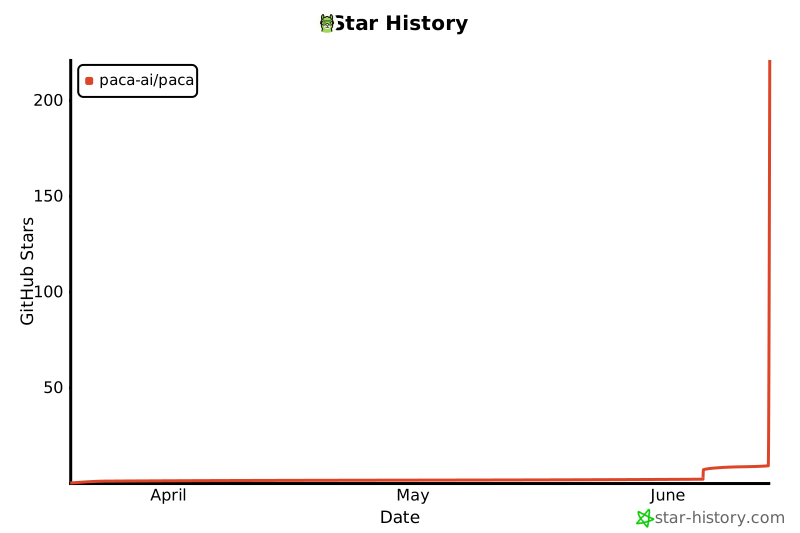
## Star History
[](https://www.star-history.com/?repos=paca-ai%2Fpaca&type=date&legend=top-left)
---
## License
Distributed under the **Apache License 2.0**. See [LICENSE](LICENSE) for details.